Install MemryX MX3 dependencies, connect Edge Impulse to Linux targets, and deploy MX3-accelerated models.
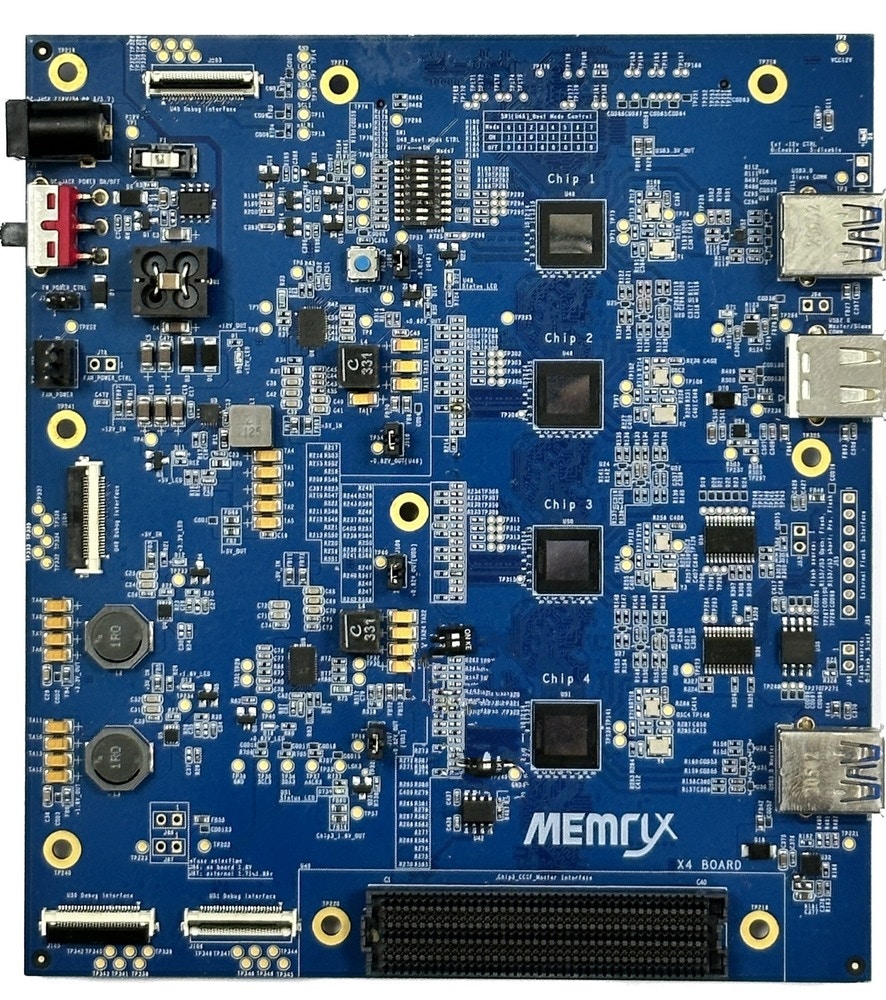
The MemryX MX3 is the latest state-of-the-art AI inference co-processor for running trained Computer Vision (CV) neural network models built using any of the major AI frameworks (TensorFlow, LiteRT (previously Tensorflow Lite), ONNX, PyTorch, Keras) and offering the widest operator support. Running alongside any Host Processor, the MX-3 offloads CV inferencing tasks providing power savings, latency reduction, and high accuracy. The MX-3 can be cascaded together optimizing performance based on the model being run. The MX3 Evaluation Board (EVB) consists of PCBA with 4 MX3’s installed. Multiple EVBs can be cascaded using a single interface cable.MemryX Developer Hub provides simple 1-click compilation. This portal is intuitive and easy-to-use and includes many tools, such as a Simulator, Python and C++ APIs, and example code. Contact MemryX to request an EVB and access to the online Developer Hub.
To use MemryX devices with Edge Impulse deployments you must install the following dependencies on your Linux target that has a MemryX device installed.
Python 3.8+: This is a prerequisite for the MemryX SDK.
For Debian based Linux devices you may need to install using the following command. For other Linux distributions please use the necessary package manager for installation.
Important: Edge Impulse requires Node.js version 20.x or later. Using older versions may lead to installation issues or runtime errors. Please ensure you have the correct version installed before proceeding with the setup.
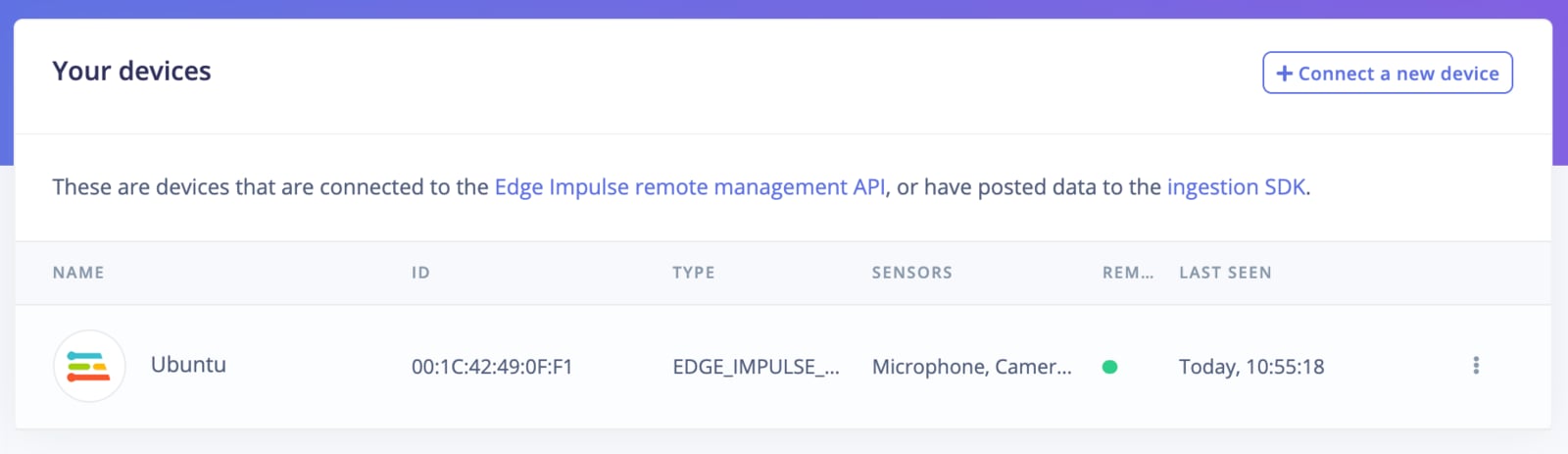
After working through a getting started tutorial, and with all software set up, connect your camera or microphone to your operating system and run:
edge-impulse-linux
This will start a wizard which will ask you to log in, and choose an Edge Impulse project. If you want to switch projects run the command with --clean.
Need sudo?Some commands require the use of sudo in order to have proper access to a connected camera. If your edge-impulse-linux or edge-impulse-linux-runner command fails to enumerate your camera please try the command again with sudo
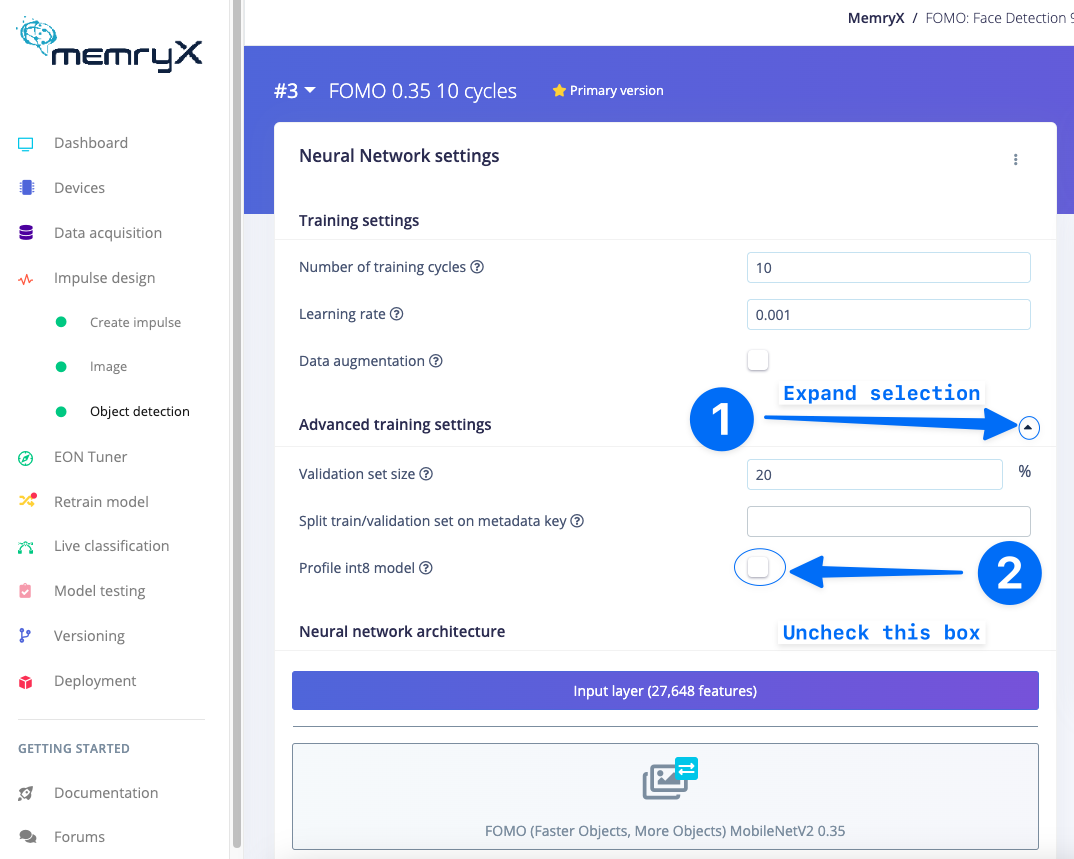
No need to int8 modelMemryX devices only need a float32 model to be passed into the compiler. Therefore, when developing models with Edge Impulse it is better not to profile int8 (quantize) models. You may prevent generation, profiling, and deployment of int8 models by deselecting Profile int8 model under the Advanced training settings of your Impulse Design model training section.
Frames per second (FPS), Latency, and Synchronous Calls
The implementation of MemryX MX3 devices into the Edge Impulse SDK uses synchronous calls to the evaluation board. Therefore, frame per second information is relative to that API. For faster performance there is an asynchronous API from MemryX that may be used in place for high performance applications. Please contact Edge Impulse Support for assistance in getting the best performance out of your MemryX MX3 devices!
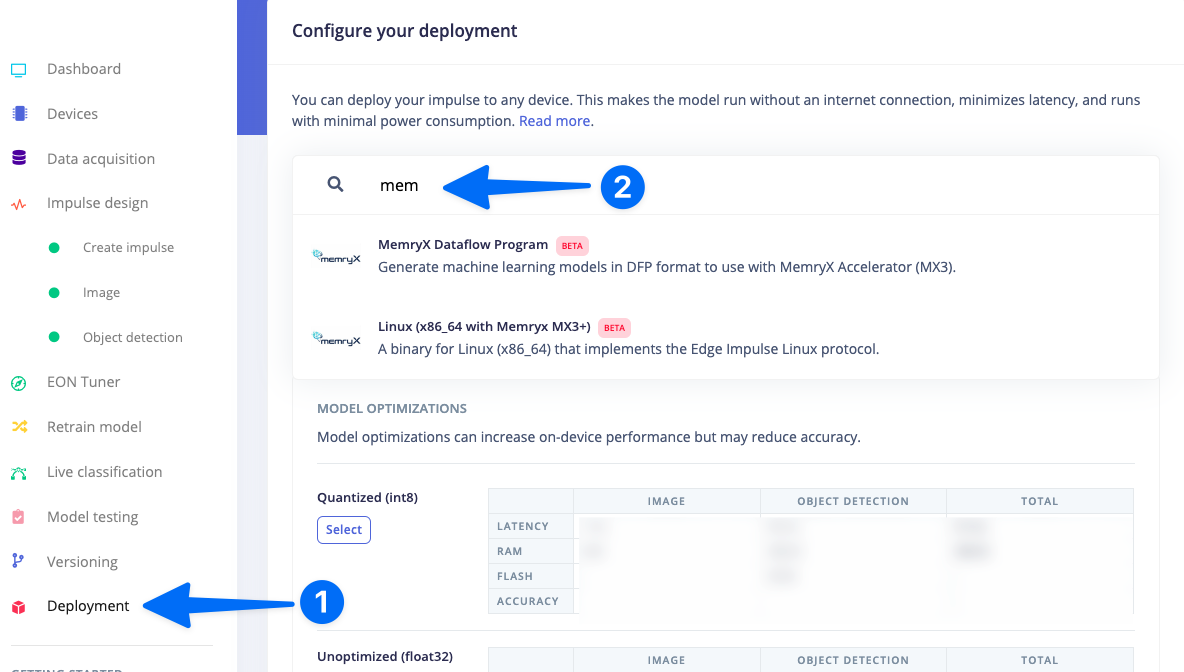
In order to achieve full hardware acceleration models must be converted from their original format to run on the MX3. This can be done by selecting the MX3 from the Deployment Screen. This will generate a .zip file with models that can be used in your application for the MX3. The block uses the MemryX compiler so that the model will run accelerated on the device.
The MemryX Dataflow Program Deployment Block generates a .zip file that contains the converted Edge Impulse model usable by MX3 devices (.dfp file). One can use the MemryX SDK to develop applications using this file.
The output from this Block is an Edge Impulse .eim file that, once saved onto the computer with the MX3 connected, can be run with the following command.
Running this command will ensure that the model runs accelerated on the MemryX MX3 device.
Need sudo?Some commands require the use of sudo in order to have proper access to a connected camera. If your edge-impulse-linux or edge-impulse-linux-runner command fails to enumerate your camera please try the command again with sudo
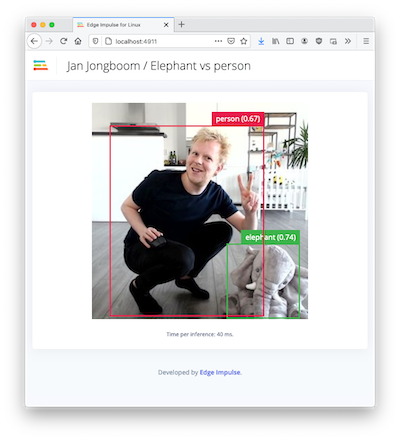
If you have an image model then you can get a peek of what your device sees by being on the same network as your device, and finding the ‘Want to see a feed of the camera and live classification in your browser’ message in the console. Open the URL in a browser and both the camera feed and the classification are shown:
UnhandledPromiseRejectionWarning: No response within 5 seconds
Please restart your MX3 evaluation board by using the reset button. Then use the edge-impulse-linux-runner command again. If you are still having issues please contact Edge Impulse support.
Failed to run impulse Capture process failed with code 1
You may need to use sudo edge-impulse-linux-runner to be able to access the camera on your system.
Ensure that you do not have any open processes still using the camera. For example, if you have the Edge Impulse web browser image acquisition page open or a virtual meeting software, please close or disable the camera usage in those applications.
This error could mean that your camera is in use by another process. Check if you have any application open that is using the camera. This error could exist when your previous attempt to run edge-impulse-linux-runner failed with exception. In that case, check if you have a gst-launch-1.0 process running. For example:
ps aux | grep gst-launch-1.0
   5615 pts/0    00:01:52 gst-launch-1.0
In this case, the first number (here 5615) is a process ID. Kill the process:
kill -9 5615
And try to run the model with edge-impulse-linux-runner once again.
This should give you additional info in the first terminal about the possible root of your issue. Contact Edge Impulse Support with the results.
Was this page helpful?
{"docsConfig":{"theme":"aspen","$schema":"https://mintlify.com/docs.json","name":"Edge Impulse Documentation","description":"Where you can find all the Edge Impulse documentation, and more!","colors":{"primary":"#5f76db","light":"#5f76db","dark":"#182896"},"logo":{"light":"https://mintcdn.com/edgeimpulse/-Yjt9HB8VCOXQC8H/.assets/logos/ei-logo-light.svg?fit=max\u0026auto=format\u0026n=-Yjt9HB8VCOXQC8H\u0026q=85\u0026s=a26ac03680700105c38fa0507df4fee2","dark":"https://mintcdn.com/edgeimpulse/K7zNEaqi2bZnNjVz/.assets/logos/ei-logo-dark.svg?fit=max\u0026auto=format\u0026n=K7zNEaqi2bZnNjVz\u0026q=85\u0026s=6c5887f8e79896f1ca3c3a63d5477761"},"favicon":"https://mintcdn.com/edgeimpulse/HzwDHenmvHu0xumg/.assets/favicon.svg?fit=max\u0026auto=format\u0026n=HzwDHenmvHu0xumg\u0026q=85\u0026s=5d3672f264e068f096f0ccfeff030489","appearance":{"default":"light"},"navbar":{"links":[{"href":"https://edgeimpulse.com/","label":"Website"},{"href":"https://studio.edgeimpulse.com","label":"Login"}],"primary":{"type":"button","label":"Sign up","href":"https://edgeimpulse.com/signup"}},"footer":{"socials":{"linkedin":"https://linkedin.com/company/edgeimpulse","youtube":"https://www.youtube.com/@EdgeImpulse","x":"https://x.com/edgeimpulse"},"links":[{"header":"Policies","items":[{"label":"Responsible AI","href":"https://www.qualcomm.com/site/responsible-ai-license"},{"label":"Privacy","href":"https://www.edgeimpulse.com/legal/privacy-policy"},{"label":"Cookies","href":"https://www.qualcomm.com/site/privacy/cookies"}]},{"header":"Legal","items":[{"label":"Terms of Use","href":"https://www.qualcomm.com/site/terms-of-use"},{"label":"Accessibility","href":"https://www.qualcomm.com/accessibility"}]}]},"seo":{"metatags":{"canonical":"https://docs.edgeimpulse.com"}},"icons":{"library":"fontawesome"},"styling":{"eyebrows":"breadcrumbs","codeblocks":"system","latex":true},"contextual":{"options":["copy","view","assistant"],"display":"header"},"navigation":{"global":{"anchors":[{"anchor":"Forum","icon":"discourse","href":"https://forum.edgeimpulse.com"},{"anchor":"Discord","icon":"discord","href":"https://discord.gg/edgeimpulse"},{"anchor":"GitHub","icon":"github","href":"https://github.com/edgeimpulse"}]},"pages":[]}},"deployment":{"deploymentMetadataValue":{"subdomain":"edgeimpulse","hasAudioNarration":false,"actualSubdomain":"edgeimpulse","customDomains":["docs.edgeimpulse.com"],"gitSource":{"type":"github","owner":"edgeimpulse","repo":"documentation","deployBranch":"main","contentDirectory":"","isPrivate":true,"mountPath":"","label":""},"feedback":{"thumbs":true},"entitlements":{"AI_CHAT":{"status":"ENABLED"},"REMOVE_BRANDING":{"status":"ENABLED"},"CONTEXTUAL_FEEDBACK":{"status":"ENABLED"},"CODE_SNIPPET_FEEDBACK":{"status":"ENABLED"},"WEB_MCP":{"status":"ENABLED"},"NARRATION":{"status":"ENABLED"}},"buildId":"6aee6f2e3adda608f4a6a268","clientVersion":"0.0.4087","searchFilterCounts":[{"language":"default","tag":"Tools","count":1309},{"language":"default","tag":"LIBRARIES","count":1283},{"language":"default","tag":"Studio Python API bindings","count":1249},{"language":"default","tag":"edgeimpulse-api","count":1248},{"language":"default","tag":"models","count":1215},{"language":"default","tag":"APIs","count":564},{"language":"default","tag":"STUDIO API ENDPOINTS","count":556},{"language":"default","tag":"Projects","count":272},{"language":"default","tag":"EXPERT NETWORK","count":211},{"language":"default","tag":"Hardware","count":123}]},"assistantConfig":{"enableStarterQuestions":true,"enableContextualStarterQuestions":true},"basePath":"","hasChatPermissions":false,"hasWebMcpPermissions":true,"toggles":[{"name":"kill-isr","enabled":true,"variant":{"name":"disabled","enabled":false,"feature_enabled":true},"impressionData":false},{"name":"agent-mintlify-slack","enabled":true,"variant":{"name":"disabled","enabled":false,"feature_enabled":true},"impressionData":false},{"name":"agent-integrations-settings","enabled":true,"variant":{"name":"disabled","enabled":false,"feature_enabled":true},"impressionData":false},{"name":"rbac-expansion","enabled":true,"variant":{"name":"disabled","enabled":false,"feature_enabled":true},"impressionData":false},{"name":"automations-pr-grouping","enabled":true,"variant":{"name":"disabled","enabled":false,"feature_enabled":true},"impressionData":false},{"name":"custom-prefix","enabled":true,"variant":{"name":"disabled","enabled":false,"feature_enabled":true},"impressionData":false},{"name":"analytics-v7","enabled":true,"variant":{"name":"disabled","enabled":false,"feature_enabled":true},"impressionData":false},{"name":"user-flows-analytics","enabled":true,"variant":{"name":"disabled","enabled":false,"feature_enabled":true},"impressionData":false},{"name":"no-publish-flow","enabled":true,"variant":{"name":"disabled","enabled":false,"feature_enabled":true},"impressionData":false},{"name":"workos-onboarding","enabled":true,"variant":{"name":"disabled","enabled":false,"feature_enabled":true},"impressionData":false},{"name":"llms-txt-v2","enabled":true,"variant":{"name":"disabled","enabled":false,"feature_enabled":true},"impressionData":false},{"name":"snapshot-serving-live","enabled":true,"variant":{"name":"disabled","enabled":false,"feature_enabled":true},"impressionData":false},{"name":"stripTemperatureMiddleware","enabled":true,"variant":{"name":"disabled","enabled":false,"feature_enabled":true},"impressionData":false},{"name":"support-platform-pylon-zendesk","enabled":true,"variant":{"name":"disabled","enabled":false,"feature_enabled":true},"impressionData":false},{"name":"snapshot-serving","enabled":true,"variant":{"name":"disabled","enabled":false,"feature_enabled":true},"impressionData":false},{"name":"instant-rollback","enabled":true,"variant":{"name":"disabled","enabled":false,"feature_enabled":true},"impressionData":false},{"name":"granular-notifications-server","enabled":true,"variant":{"name":"disabled","enabled":false,"feature_enabled":true},"impressionData":false},{"name":"granular-notifications","enabled":true,"variant":{"name":"disabled","enabled":false,"feature_enabled":true},"impressionData":false},{"name":"automations-fable","enabled":true,"variant":{"name":"disabled","enabled":false,"feature_enabled":true},"impressionData":false},{"name":"fixed-ai-action-pricing","enabled":true,"variant":{"name":"disabled","enabled":false,"feature_enabled":true},"impressionData":false},{"name":"automation-resolve-merge-conflict","enabled":true,"variant":{"name":"disabled","enabled":false,"feature_enabled":true},"impressionData":false},{"name":"scoped-publishing","enabled":true,"variant":{"name":"disabled","enabled":false,"feature_enabled":true},"impressionData":false},{"name":"mintql","enabled":true,"variant":{"name":"disabled","enabled":false,"feature_enabled":true},"impressionData":false},{"name":"page-level-analytics","enabled":true,"variant":{"name":"disabled","enabled":false,"feature_enabled":true},"impressionData":false},{"name":"editor-version-history-v2","enabled":true,"variant":{"name":"disabled","enabled":false,"feature_enabled":true},"impressionData":false},{"name":"billing-page-v2","enabled":true,"variant":{"name":"disabled","enabled":false,"feature_enabled":true},"impressionData":false},{"name":"full-page-search","enabled":true,"variant":{"name":"disabled","enabled":false,"feature_enabled":true},"impressionData":false},{"name":"workspace-projects","enabled":true,"variant":{"name":"disabled","enabled":false,"feature_enabled":true},"impressionData":false},{"name":"assistant-v5","enabled":true,"variant":{"name":"disabled","enabled":false,"feature_enabled":true},"impressionData":false},{"name":"fork-pr-previews","enabled":true,"variant":{"name":"disabled","enabled":false,"feature_enabled":true},"impressionData":false},{"name":"revalidation-jwt","enabled":true,"variant":{"name":"disabled","enabled":false,"feature_enabled":true},"impressionData":false},{"name":"workos-sso-scim","enabled":true,"variant":{"name":"disabled","enabled":false,"feature_enabled":true},"impressionData":false},{"name":"hobby-abuse-scan","enabled":true,"variant":{"name":"disabled","enabled":false,"feature_enabled":true},"impressionData":false},{"name":"dashboard-inbox","enabled":true,"variant":{"name":"disabled","enabled":false,"feature_enabled":true},"impressionData":false},{"name":"workos-signup","enabled":true,"variant":{"name":"disabled","enabled":false,"feature_enabled":true},"impressionData":false},{"name":"turbopuffer-dual-write","enabled":true,"variant":{"name":"disabled","enabled":false,"feature_enabled":true},"impressionData":false},{"name":"workos-enabled","enabled":true,"variant":{"name":"disabled","enabled":false,"feature_enabled":true},"impressionData":false},{"name":"approve-review-flow","enabled":true,"variant":{"name":"disabled","enabled":false,"feature_enabled":true},"impressionData":false},{"name":"editor-metadata","enabled":true,"variant":{"name":"disabled","enabled":false,"feature_enabled":true},"impressionData":false},{"name":"sso-setup-deadline-banner","enabled":true,"variant":{"name":"disabled","enabled":false,"feature_enabled":true},"impressionData":false},{"name":"turbopuffer-serve","enabled":true,"variant":{"name":"disabled","enabled":false,"feature_enabled":true},"impressionData":false},{"name":"live-agents","enabled":true,"variant":{"name":"disabled","enabled":false,"feature_enabled":true},"impressionData":false},{"name":"comment-mode","enabled":true,"variant":{"name":"disabled","enabled":false,"feature_enabled":true},"impressionData":false}],"googleFontsInlined":false},"customCss":[{"filePath":".styles/styles.css","content":".cookie-settings-button{color:rgb(var(--gray-800))!important;background-color:rgb(var(--gray-950) / .03)!important;border-radius:var(--rounded-xl, .75rem);font-size:.875rem!important;line-height:1.25rem!important;width:fit-content!important;align-self:flex-end!important;margin-left:auto!important}.cookie-settings-button:hover{background-color:rgb(var(--gray-950) / .1)!important}"}],"page":{"pagePath":"hardware/boards/memryx-mx3","slug":"/hardware/boards/memryx-mx3","pageMetadata":{"title":"MemryX MX3","description":"Install MemryX MX3 dependencies, connect Edge Impulse to Linux targets, and deploy MX3-accelerated models.","href":"/hardware/boards/memryx-mx3"},"description":{"compiledSource":"\"use strict\";\nconst {jsx: _jsx} = arguments[0];\nconst {useMDXComponents: _provideComponents} = arguments[0];\nfunction _createMdxContent(props) {\n const _components = {\n p: \"p\",\n ..._provideComponents(),\n ...props.components\n };\n return _jsx(_components.p, {\n children: \"Install MemryX MX3 dependencies, connect Edge Impulse to Linux targets, and deploy MX3-accelerated models.\"\n });\n}\nfunction MDXContent(props = {}) {\n const {wrapper: MDXLayout} = {\n ..._provideComponents(),\n ...props.components\n };\n return MDXLayout ? _jsx(MDXLayout, {\n ...props,\n children: _jsx(_createMdxContent, {\n ...props\n })\n }) : _createMdxContent(props);\n}\nreturn {\n default: MDXContent\n};\n","frontmatter":{},"scope":{}},"pageType":"default","mdx":{"mdxSource":{"compiledSource":"\"use strict\";const{Fragment:_Fragment,jsx:_jsx,jsxs:_jsxs}=arguments[0];const{useMDXComponents:_provideComponents}=arguments[0];function _createMdxContent(props){const _components={a:`a`,code:`code`,li:`li`,ol:`ol`,p:`p`,pre:`pre`,span:`span`,strong:`strong`,ul:`ul`,..._provideComponents(),...props.components},{CodeBlock,Frame,Heading,Info,OptimizedImage,Warning}=_components;if(!CodeBlock)_missingMdxReference(`CodeBlock`,true);if(!Frame)_missingMdxReference(`Frame`,true);if(!Heading)_missingMdxReference(`Heading`,true);if(!Info)_missingMdxReference(`Info`,true);if(!OptimizedImage)_missingMdxReference(`OptimizedImage`,true);if(!Warning)_missingMdxReference(`Warning`,true);return _jsxs(_Fragment,{children:[_jsx(_components.p,{children:`The MemryX MX3 is the latest state-of-the-art AI inference co-processor for running trained Computer Vision (CV) neural network models built using any of the major AI frameworks (TensorFlow, LiteRT (previously Tensorflow Lite), ONNX, PyTorch, Keras) and offering the widest operator support. Running alongside any Host Processor, the MX-3 offloads CV inferencing tasks providing power savings, latency reduction, and high accuracy. The MX-3 can be cascaded together optimizing performance based on the model being run. The MX3 Evaluation Board (EVB) consists of PCBA with 4 MX3’s installed. Multiple EVBs can be cascaded using a single interface cable.`}),`\n`,_jsxs(_components.p,{children:[`MemryX Developer Hub provides simple 1-click compilation. This portal is intuitive and easy-to-use and includes many tools, such as a Simulator, Python and C++ APIs, and example code. Contact `,_jsx(_components.a,{href:`https://memryx.com/contact/`,children:`MemryX`}),` to request an EVB and access to the online Developer Hub.`]}),`\n`,_jsx(Frame,{caption:`MX3 EVB`,children:_jsx(OptimizedImage,{src:`https://mintcdn.com/edgeimpulse/O-6Yv5nSVCNsemg-/.assets/images/memryx/mx3-evb.jpg?fit=max\u0026auto=format\u0026n=O-6Yv5nSVCNsemg-\u0026q=85\u0026s=cd7bb176ad9e41f3d01ca86cef0c6342`,alt:`MemryX MX3 evaluation board with four accelerator modules`,\"data-og-width\":`886`,width:`886`,\"data-og-height\":`1000`,height:`1000`,\"data-path\":`.assets/images/memryx/mx3-evb.jpg`,\"data-optimize\":`true`,\"data-opv\":`3`,srcset:`https://mintcdn.com/edgeimpulse/O-6Yv5nSVCNsemg-/.assets/images/memryx/mx3-evb.jpg?w=280\u0026fit=max\u0026auto=format\u0026n=O-6Yv5nSVCNsemg-\u0026q=85\u0026s=b13c51e0fc6551fdb984145c5723c1bf 280w, https://mintcdn.com/edgeimpulse/O-6Yv5nSVCNsemg-/.assets/images/memryx/mx3-evb.jpg?w=560\u0026fit=max\u0026auto=format\u0026n=O-6Yv5nSVCNsemg-\u0026q=85\u0026s=93a85142a837eb3774d851b4d59ab5f4 560w, https://mintcdn.com/edgeimpulse/O-6Yv5nSVCNsemg-/.assets/images/memryx/mx3-evb.jpg?w=840\u0026fit=max\u0026auto=format\u0026n=O-6Yv5nSVCNsemg-\u0026q=85\u0026s=8ea6a1f48f6c50804f0af7e283afcd1c 840w, https://mintcdn.com/edgeimpulse/O-6Yv5nSVCNsemg-/.assets/images/memryx/mx3-evb.jpg?w=1100\u0026fit=max\u0026auto=format\u0026n=O-6Yv5nSVCNsemg-\u0026q=85\u0026s=b63ddbc5400196b3b579e4c8e0709ab2 1100w, https://mintcdn.com/edgeimpulse/O-6Yv5nSVCNsemg-/.assets/images/memryx/mx3-evb.jpg?w=1650\u0026fit=max\u0026auto=format\u0026n=O-6Yv5nSVCNsemg-\u0026q=85\u0026s=d99e8ed0db6ef61ce2cf576017be1d18 1650w, https://mintcdn.com/edgeimpulse/O-6Yv5nSVCNsemg-/.assets/images/memryx/mx3-evb.jpg?w=2500\u0026fit=max\u0026auto=format\u0026n=O-6Yv5nSVCNsemg-\u0026q=85\u0026s=2e34fb273b35718b1c84756e8157843c 2500w`})}),`\n`,_jsx(Heading,{level:`3`,id:`installing-dependencies`,children:`Installing dependencies`}),`\n`,_jsx(_components.p,{children:`To use MemryX devices with Edge Impulse deployments you must install the following dependencies on your Linux target that has a MemryX device installed.`}),`\n`,_jsxs(_components.ul,{children:[`\n`,_jsxs(_components.li,{children:[_jsx(_components.a,{href:`https://www.python.org/downloads/`,children:`Python 3.8+`}),`: This is a prerequisite for the MemryX SDK.`]}),`\n`]}),`\n`,_jsx(_components.p,{children:`For Debian based Linux devices you may need to install using the following command. For other Linux distributions please use the necessary package manager for installation.`}),`\n`,_jsx(CodeBlock,{numberOfLines:`5`,language:`text`,children:_jsx(_components.pre,{className:`shiki shiki-themes github-light-default dark-plus`,style:{backgroundColor:`#ffffff`,\"--shiki-dark-bg\":`#0B0C0E`,color:`#1f2328`,\"--shiki-dark\":`#D4D4D4`},language:`text`,children:_jsxs(_components.code,{language:`text`,numberOfLines:`5`,children:[_jsx(_components.span,{className:`line`,children:_jsx(_components.span,{children:`sudo add-apt-repository universe`})}),`\n`,_jsx(_components.span,{className:`line`,children:_jsx(_components.span,{children:`sudo add-apt-repository ppa:deadsnakes/ppa`})}),`\n`,_jsx(_components.span,{className:`line`,children:_jsx(_components.span,{children:`sudo apt update`})}),`\n`,_jsx(_components.span,{className:`line`,children:_jsx(_components.span,{children:`sudo apt install python3.8 python3.8-dev python3.8-distutils python3.8-venv`})}),`\n`,_jsx(_components.span,{className:`line`,children:_jsx(_components.span,{})})]})})}),`\n`,_jsxs(_components.ul,{children:[`\n`,_jsxs(_components.li,{children:[`MemryX tools and drivers: Please contact `,_jsx(_components.a,{href:`https://memryx.com/contact/`,children:`MemryX`}),` for access to their tools and drivers`]}),`\n`,_jsxs(_components.li,{children:[_jsx(_components.a,{href:`/tools/libraries/sdks/inference/linux`,children:`Edge Impulse Linux`}),`: This will enable you to connect your development system directly to Edge Impulse Studio`]}),`\n`]}),`\n`,_jsx(_components.p,{children:_jsx(_components.strong,{children:`Ubuntu/Debian x86:`})}),`\n`,_jsx(CodeBlock,{numberOfLines:`5`,language:`text`,children:_jsx(_components.pre,{className:`shiki shiki-themes github-light-default dark-plus`,style:{backgroundColor:`#ffffff`,\"--shiki-dark-bg\":`#0B0C0E`,color:`#1f2328`,\"--shiki-dark\":`#D4D4D4`},language:`text`,children:_jsxs(_components.code,{language:`text`,numberOfLines:`5`,children:[_jsx(_components.span,{className:`line`,children:_jsx(_components.span,{children:`sudo apt install -y curl`})}),`\n`,_jsx(_components.span,{className:`line`,children:_jsx(_components.span,{children:`curl -sL https://deb.nodesource.com/setup_20.x | sudo bash -`})}),`\n`,_jsx(_components.span,{className:`line`,children:_jsx(_components.span,{children:`sudo apt install -y gcc g++ make build-essential nodejs sox gstreamer1.0-tools gstreamer1.0-plugins-good gstreamer1.0-plugins-base gstreamer1.0-plugins-base-apps`})}),`\n`,_jsx(_components.span,{className:`line`,children:_jsx(_components.span,{children:`npm install edge-impulse-linux -g --unsafe-perm`})}),`\n`,_jsx(_components.span,{className:`line`,children:_jsx(_components.span,{})})]})})}),`\n`,_jsx(Warning,{children:_jsxs(_components.p,{children:[_jsx(_components.strong,{children:`Important:`}),` Edge Impulse requires Node.js version 20.x or later. Using older versions may lead to installation issues or runtime errors. Please ensure you have the correct version installed before proceeding with the setup.`]})}),`\n`,_jsx(Heading,{level:`3`,id:`connecting-to-edge-impulse`,children:`Connecting to Edge Impulse`}),`\n`,_jsx(_components.p,{children:`After working through a getting started tutorial, and with all software set up, connect your camera or microphone to your operating system and run:`}),`\n`,_jsx(CodeBlock,{numberOfLines:`2`,language:`text`,children:_jsx(_components.pre,{className:`shiki shiki-themes github-light-default dark-plus`,style:{backgroundColor:`#ffffff`,\"--shiki-dark-bg\":`#0B0C0E`,color:`#1f2328`,\"--shiki-dark\":`#D4D4D4`},language:`text`,children:_jsxs(_components.code,{language:`text`,numberOfLines:`2`,children:[_jsx(_components.span,{className:`line`,children:_jsx(_components.span,{children:`edge-impulse-linux`})}),`\n`,_jsx(_components.span,{className:`line`,children:_jsx(_components.span,{})})]})})}),`\n`,_jsxs(_components.p,{children:[`This will start a wizard which will ask you to log in, and choose an Edge Impulse project. If you want to switch projects run the command with `,_jsx(_components.code,{children:`--clean`}),`.`]}),`\n`,_jsxs(Info,{children:[_jsx(_components.p,{children:_jsx(_components.strong,{children:`Need sudo?`})}),_jsxs(_components.p,{children:[`Some commands require the use of `,_jsx(_components.code,{children:`sudo`}),` in order to have proper access to a connected camera. If your `,_jsx(_components.code,{children:`edge-impulse-linux`}),` or `,_jsx(_components.code,{children:`edge-impulse-linux-runner`}),` command fails to enumerate your camera please try the command again with `,_jsx(_components.code,{children:`sudo`})]})]}),`\n`,_jsx(Heading,{level:`4`,id:`verifying-that-your-device-is-connected`,children:`Verifying that your device is connected`}),`\n`,_jsxs(_components.p,{children:[`Your machine is now connected to Edge Impulse. To verify this, go to `,_jsx(_components.a,{href:`https://studio.edgeimpulse.com/studio/profile/projects`,children:`your Edge Impulse project`}),`, and click `,_jsx(_components.strong,{children:`Devices`}),`. The device will be listed here.`]}),`\n`,_jsx(Frame,{caption:`Device connected to Edge Impulse`,children:_jsx(OptimizedImage,{src:`https://mintcdn.com/edgeimpulse/UpfKnXz6Rfn5wm4E/.assets/images/edge-impulse-devices-page-showing-a-connected-linux.png?fit=max\u0026auto=format\u0026n=UpfKnXz6Rfn5wm4E\u0026q=85\u0026s=94dccac47b7027c2bcf8a30e5353e097`,alt:`Edge Impulse Devices page showing a Linux machine connected`,\"data-og-width\":`1600`,width:`1600`,\"data-og-height\":`463`,height:`463`,\"data-path\":`.assets/images/edge-impulse-devices-page-showing-a-connected-linux.png`,\"data-optimize\":`true`,\"data-opv\":`3`,srcset:`https://mintcdn.com/edgeimpulse/UpfKnXz6Rfn5wm4E/.assets/images/edge-impulse-devices-page-showing-a-connected-linux.png?w=280\u0026fit=max\u0026auto=format\u0026n=UpfKnXz6Rfn5wm4E\u0026q=85\u0026s=b03037fd23dbe9fde43c4fb4342ac6bf 280w, https://mintcdn.com/edgeimpulse/UpfKnXz6Rfn5wm4E/.assets/images/edge-impulse-devices-page-showing-a-connected-linux.png?w=560\u0026fit=max\u0026auto=format\u0026n=UpfKnXz6Rfn5wm4E\u0026q=85\u0026s=459faf6a3e7eb10787fde01f7edda50e 560w, https://mintcdn.com/edgeimpulse/UpfKnXz6Rfn5wm4E/.assets/images/edge-impulse-devices-page-showing-a-connected-linux.png?w=840\u0026fit=max\u0026auto=format\u0026n=UpfKnXz6Rfn5wm4E\u0026q=85\u0026s=43d64dcc726d12612ed35eb7517f8604 840w, https://mintcdn.com/edgeimpulse/UpfKnXz6Rfn5wm4E/.assets/images/edge-impulse-devices-page-showing-a-connected-linux.png?w=1100\u0026fit=max\u0026auto=format\u0026n=UpfKnXz6Rfn5wm4E\u0026q=85\u0026s=860306eaf254bcb8e0899d6774eba943 1100w, https://mintcdn.com/edgeimpulse/UpfKnXz6Rfn5wm4E/.assets/images/edge-impulse-devices-page-showing-a-connected-linux.png?w=1650\u0026fit=max\u0026auto=format\u0026n=UpfKnXz6Rfn5wm4E\u0026q=85\u0026s=33b8391f454fada054d0bbc05aad0616 1650w, https://mintcdn.com/edgeimpulse/UpfKnXz6Rfn5wm4E/.assets/images/edge-impulse-devices-page-showing-a-connected-linux.png?w=2500\u0026fit=max\u0026auto=format\u0026n=UpfKnXz6Rfn5wm4E\u0026q=85\u0026s=9e7e512a6042376da1c24f62ecb5feaf 2500w`})}),`\n`,_jsx(Heading,{level:`3`,id:`next-steps-building-a-machine-learning-model`,children:`Next steps: building a machine learning model`}),`\n`,_jsx(_components.p,{children:`With everything set up you can now build your first machine learning model with these tutorials:`}),`\n`,_jsxs(_components.ul,{children:[`\n`,_jsx(_components.li,{children:_jsx(_components.a,{href:`/tutorials/end-to-end/image-classification`,children:`Image classification`})}),`\n`,_jsxs(_components.li,{children:[_jsx(_components.a,{href:`/tutorials/end-to-end/object-detection-bounding-boxes`,children:`object detection`}),`.`]}),`\n`,_jsx(_components.li,{children:_jsx(_components.a,{href:`/tutorials/topics/post-processing/count-objects-fomo`,children:`Counting objects using FOMO`})}),`\n`]}),`\n`,_jsxs(Info,{children:[_jsx(_components.p,{children:_jsx(_components.strong,{children:`No need to int8 model`})}),_jsxs(_components.p,{children:[`MemryX devices only need a float32 model to be passed into the compiler. Therefore, when developing models with Edge Impulse it is better not to profile int8 (quantize) models. You may prevent generation, profiling, and deployment of int8 models by deselecting `,_jsx(_components.strong,{children:`Profile int8 model`}),` under the `,_jsx(_components.strong,{children:`Advanced training settings`}),` of your Impulse Design model training section.`]}),_jsx(Frame,{caption:`Deselect Profile int8 model`,children:_jsx(OptimizedImage,{src:`https://mintcdn.com/edgeimpulse/O-6Yv5nSVCNsemg-/.assets/images/memryx/memx-int8-profile.png?fit=max\u0026auto=format\u0026n=O-6Yv5nSVCNsemg-\u0026q=85\u0026s=92d93cd011c550b7661a13ed57b97131`,alt:`Advanced training settings with Profile int8 model deselected`,\"data-og-width\":`1074`,width:`1074`,\"data-og-height\":`859`,height:`859`,\"data-path\":`.assets/images/memryx/memx-int8-profile.png`,\"data-optimize\":`true`,\"data-opv\":`3`,srcset:`https://mintcdn.com/edgeimpulse/O-6Yv5nSVCNsemg-/.assets/images/memryx/memx-int8-profile.png?w=280\u0026fit=max\u0026auto=format\u0026n=O-6Yv5nSVCNsemg-\u0026q=85\u0026s=dd508a61af8de4946507cc8c82e24fe1 280w, https://mintcdn.com/edgeimpulse/O-6Yv5nSVCNsemg-/.assets/images/memryx/memx-int8-profile.png?w=560\u0026fit=max\u0026auto=format\u0026n=O-6Yv5nSVCNsemg-\u0026q=85\u0026s=c8799dda39655babda7bb1e5ed3b0892 560w, https://mintcdn.com/edgeimpulse/O-6Yv5nSVCNsemg-/.assets/images/memryx/memx-int8-profile.png?w=840\u0026fit=max\u0026auto=format\u0026n=O-6Yv5nSVCNsemg-\u0026q=85\u0026s=4e29566d4c1415ab2872ecff0498a6c9 840w, https://mintcdn.com/edgeimpulse/O-6Yv5nSVCNsemg-/.assets/images/memryx/memx-int8-profile.png?w=1100\u0026fit=max\u0026auto=format\u0026n=O-6Yv5nSVCNsemg-\u0026q=85\u0026s=f6627aad1eafec3891eeaaa7615db639 1100w, https://mintcdn.com/edgeimpulse/O-6Yv5nSVCNsemg-/.assets/images/memryx/memx-int8-profile.png?w=1650\u0026fit=max\u0026auto=format\u0026n=O-6Yv5nSVCNsemg-\u0026q=85\u0026s=b29ed6abf21600b8dcbbed7c6429a288 1650w, https://mintcdn.com/edgeimpulse/O-6Yv5nSVCNsemg-/.assets/images/memryx/memx-int8-profile.png?w=2500\u0026fit=max\u0026auto=format\u0026n=O-6Yv5nSVCNsemg-\u0026q=85\u0026s=d28ebc4e22ce56aaabeda1ff277efd34 2500w`})})]}),`\n`,_jsx(Heading,{level:`4`,id:`frames-per-second-fps--latency-and-synchronous-calls`,children:`Frames per second (FPS), Latency, and Synchronous Calls`}),`\n`,_jsx(_components.p,{children:`The implementation of MemryX MX3 devices into the Edge Impulse SDK uses synchronous calls to the evaluation board. Therefore, frame per second information is relative to that API. For faster performance there is an asynchronous API from MemryX that may be used in place for high performance applications. Please contact Edge Impulse Support for assistance in getting the best performance out of your MemryX MX3 devices!`}),`\n`,_jsx(Heading,{level:`3`,id:`deploying-back-to-device`,children:`Deploying back to device`}),`\n`,_jsx(_components.p,{children:`In order to achieve full hardware acceleration models must be converted from their original format to run on the MX3. This can be done by selecting the MX3 from the Deployment Screen. This will generate a .zip file with models that can be used in your application for the MX3. The block uses the MemryX compiler so that the model will run accelerated on the device.`}),`\n`,_jsx(Frame,{caption:`MemryX Dataflow Program`,children:_jsx(OptimizedImage,{src:`https://mintcdn.com/edgeimpulse/O-6Yv5nSVCNsemg-/.assets/images/memryx/memryx-deployment-all.png?fit=max\u0026auto=format\u0026n=O-6Yv5nSVCNsemg-\u0026q=85\u0026s=157b3a6133eaaeac75680b3ebed23a83`,alt:`Deployment page showing the MemryX Dataflow Program option`,\"data-og-width\":`1184`,width:`1184`,\"data-og-height\":`672`,height:`672`,\"data-path\":`.assets/images/memryx/memryx-deployment-all.png`,\"data-optimize\":`true`,\"data-opv\":`3`,srcset:`https://mintcdn.com/edgeimpulse/O-6Yv5nSVCNsemg-/.assets/images/memryx/memryx-deployment-all.png?w=280\u0026fit=max\u0026auto=format\u0026n=O-6Yv5nSVCNsemg-\u0026q=85\u0026s=ee76de378c7c45abf272374f2123d74d 280w, https://mintcdn.com/edgeimpulse/O-6Yv5nSVCNsemg-/.assets/images/memryx/memryx-deployment-all.png?w=560\u0026fit=max\u0026auto=format\u0026n=O-6Yv5nSVCNsemg-\u0026q=85\u0026s=2f1b62d94250575fc1645a372bc689da 560w, https://mintcdn.com/edgeimpulse/O-6Yv5nSVCNsemg-/.assets/images/memryx/memryx-deployment-all.png?w=840\u0026fit=max\u0026auto=format\u0026n=O-6Yv5nSVCNsemg-\u0026q=85\u0026s=d15c866ee92cb7080ec71bd277d4f27c 840w, https://mintcdn.com/edgeimpulse/O-6Yv5nSVCNsemg-/.assets/images/memryx/memryx-deployment-all.png?w=1100\u0026fit=max\u0026auto=format\u0026n=O-6Yv5nSVCNsemg-\u0026q=85\u0026s=51ad0af12a550d548fa432e5cac636a6 1100w, https://mintcdn.com/edgeimpulse/O-6Yv5nSVCNsemg-/.assets/images/memryx/memryx-deployment-all.png?w=1650\u0026fit=max\u0026auto=format\u0026n=O-6Yv5nSVCNsemg-\u0026q=85\u0026s=526e634ba308a515ace2e5d7dca2860e 1650w, https://mintcdn.com/edgeimpulse/O-6Yv5nSVCNsemg-/.assets/images/memryx/memryx-deployment-all.png?w=2500\u0026fit=max\u0026auto=format\u0026n=O-6Yv5nSVCNsemg-\u0026q=85\u0026s=81f980e7925d79546f9c626b02d1d561 2500w`})}),`\n`,_jsx(Heading,{level:`4`,id:`memryx-dataflow-program-deployment-block`,children:`MemryX Dataflow Program Deployment Block`}),`\n`,_jsx(_components.p,{children:`The MemryX Dataflow Program Deployment Block generates a .zip file that contains the converted Edge Impulse model usable by MX3 devices (.dfp file). One can use the MemryX SDK to develop applications using this file.`}),`\n`,_jsx(Heading,{level:`4`,id:`linux-x86_64-with-memryx-mx3`,children:`Linux (x86_64 with MemryX MX3)`}),`\n`,_jsx(_components.p,{children:`The output from this Block is an Edge Impulse .eim file that, once saved onto the computer with the MX3 connected, can be run with the following command.`}),`\n`,_jsx(CodeBlock,{numberOfLines:`2`,language:`text`,children:_jsx(_components.pre,{className:`shiki shiki-themes github-light-default dark-plus`,style:{backgroundColor:`#ffffff`,\"--shiki-dark-bg\":`#0B0C0E`,color:`#1f2328`,\"--shiki-dark\":`#D4D4D4`},language:`text`,children:_jsxs(_components.code,{language:`text`,numberOfLines:`2`,children:[_jsx(_components.span,{className:`line`,children:_jsx(_components.span,{children:`edge-impulse-linux-runner --model-file \u003cpath-to-model.eim>`})}),`\n`,_jsx(_components.span,{className:`line`,children:_jsx(_components.span,{})})]})})}),`\n`,_jsx(_components.p,{children:`Running this command will ensure that the model runs accelerated on the MemryX MX3 device.`}),`\n`,_jsxs(Info,{children:[_jsx(_components.p,{children:_jsx(_components.strong,{children:`Need sudo?`})}),_jsxs(_components.p,{children:[`Some commands require the use of `,_jsx(_components.code,{children:`sudo`}),` in order to have proper access to a connected camera. If your `,_jsx(_components.code,{children:`edge-impulse-linux`}),` or `,_jsx(_components.code,{children:`edge-impulse-linux-runner`}),` command fails to enumerate your camera please try the command again with `,_jsx(_components.code,{children:`sudo`})]})]}),`\n`,_jsx(Heading,{level:`4`,id:`image-model`,children:`Image model?`}),`\n`,_jsx(_components.p,{children:`If you have an image model then you can get a peek of what your device sees by being on the same network as your device, and finding the ‘Want to see a feed of the camera and live classification in your browser’ message in the console. Open the URL in a browser and both the camera feed and the classification are shown:`}),`\n`,_jsx(Frame,{caption:`Live feed with classification results`,children:_jsx(OptimizedImage,{src:`https://mintcdn.com/edgeimpulse/pssAI2UB-dmQQKtc/.assets/images/demo1.png?fit=max\u0026auto=format\u0026n=pssAI2UB-dmQQKtc\u0026q=85\u0026s=f5d180c10366b2d54c7aec5f6c2187cc`,alt:`Browser view showing a camera feed beside live classification results`,\"data-og-width\":`400`,width:`400`,\"data-og-height\":`440`,height:`440`,\"data-path\":`.assets/images/demo1.png`,\"data-optimize\":`true`,\"data-opv\":`3`,srcset:`https://mintcdn.com/edgeimpulse/pssAI2UB-dmQQKtc/.assets/images/demo1.png?w=280\u0026fit=max\u0026auto=format\u0026n=pssAI2UB-dmQQKtc\u0026q=85\u0026s=8b9404ca8f99476341d6fbce8b07d670 280w, https://mintcdn.com/edgeimpulse/pssAI2UB-dmQQKtc/.assets/images/demo1.png?w=560\u0026fit=max\u0026auto=format\u0026n=pssAI2UB-dmQQKtc\u0026q=85\u0026s=a307a7b4ce63d456bb5b69c975b9676c 560w, https://mintcdn.com/edgeimpulse/pssAI2UB-dmQQKtc/.assets/images/demo1.png?w=840\u0026fit=max\u0026auto=format\u0026n=pssAI2UB-dmQQKtc\u0026q=85\u0026s=8fb319ead282c8ac5ff091c5d7177088 840w, https://mintcdn.com/edgeimpulse/pssAI2UB-dmQQKtc/.assets/images/demo1.png?w=1100\u0026fit=max\u0026auto=format\u0026n=pssAI2UB-dmQQKtc\u0026q=85\u0026s=bb90b67091735f34e3f3554b722bfe30 1100w, https://mintcdn.com/edgeimpulse/pssAI2UB-dmQQKtc/.assets/images/demo1.png?w=1650\u0026fit=max\u0026auto=format\u0026n=pssAI2UB-dmQQKtc\u0026q=85\u0026s=234c9ecd23fb31a6b214428fbf121db7 1650w, https://mintcdn.com/edgeimpulse/pssAI2UB-dmQQKtc/.assets/images/demo1.png?w=2500\u0026fit=max\u0026auto=format\u0026n=pssAI2UB-dmQQKtc\u0026q=85\u0026s=8f7da8dfdbf6e5ad6514d8797082817a 2500w`})}),`\n`,_jsx(Heading,{level:`3`,id:`troubleshooting`,children:`Troubleshooting`}),`\n`,_jsx(Heading,{level:`4`,id:`unhandledpromiserejectionwarning-no-response-within-5-seconds`,children:`UnhandledPromiseRejectionWarning: No response within 5 seconds`}),`\n`,_jsxs(_components.p,{children:[`Please restart your MX3 evaluation board by using the reset button. Then use the `,_jsx(_components.code,{children:`edge-impulse-linux-runner`}),` command again. If you are still having issues please contact Edge Impulse support.`]}),`\n`,_jsx(Heading,{level:`4`,id:`failed-to-run-impulse-capture-process-failed-with-code-1`,children:`Failed to run impulse Capture process failed with code 1`}),`\n`,_jsxs(_components.ol,{children:[`\n`,_jsxs(_components.li,{children:[`You may need to use `,_jsx(_components.code,{children:`sudo edge-impulse-linux-runner`}),` to be able to access the camera on your system.`]}),`\n`,_jsx(_components.li,{children:`Ensure that you do not have any open processes still using the camera. For example, if you have the Edge Impulse web browser image acquisition page open or a virtual meeting software, please close or disable the camera usage in those applications.`}),`\n`,_jsxs(_components.li,{children:[`This error could mean that your camera is in use by another process. Check if you have any application open that is using the camera. This error could exist when your previous attempt to run `,_jsx(_components.code,{children:`edge-impulse-linux-runner`}),` failed with exception. In that case, check if you have a `,_jsx(_components.code,{children:`gst-launch-1.0`}),` process running. For example:`]}),`\n`]}),`\n`,_jsx(CodeBlock,{numberOfLines:`3`,language:`text`,children:_jsx(_components.pre,{className:`shiki shiki-themes github-light-default dark-plus`,style:{backgroundColor:`#ffffff`,\"--shiki-dark-bg\":`#0B0C0E`,color:`#1f2328`,\"--shiki-dark\":`#D4D4D4`},language:`text`,children:_jsxs(_components.code,{language:`text`,numberOfLines:`3`,children:[_jsx(_components.span,{className:`line`,children:_jsx(_components.span,{children:`ps aux | grep gst-launch-1.0`})}),`\n`,_jsx(_components.span,{className:`line`,children:_jsx(_components.span,{children:` 5615 pts/0 00:01:52 gst-launch-1.0`})}),`\n`,_jsx(_components.span,{className:`line`,children:_jsx(_components.span,{})})]})})}),`\n`,_jsxs(_components.p,{children:[`In this case, the first number (here `,_jsx(_components.code,{children:`5615`}),`) is a process ID. Kill the process:`]}),`\n`,_jsx(CodeBlock,{numberOfLines:`2`,language:`text`,children:_jsx(_components.pre,{className:`shiki shiki-themes github-light-default dark-plus`,style:{backgroundColor:`#ffffff`,\"--shiki-dark-bg\":`#0B0C0E`,color:`#1f2328`,\"--shiki-dark\":`#D4D4D4`},language:`text`,children:_jsxs(_components.code,{language:`text`,numberOfLines:`2`,children:[_jsx(_components.span,{className:`line`,children:_jsx(_components.span,{children:`kill -9 5615`})}),`\n`,_jsx(_components.span,{className:`line`,children:_jsx(_components.span,{})})]})})}),`\n`,_jsxs(_components.p,{children:[`And try to run the model with `,_jsx(_components.code,{children:`edge-impulse-linux-runner`}),` once again.`]}),`\n`,_jsx(Heading,{level:`4`,id:`error-classifying-failed-error-code-was-23-other-issues`,children:`Error: Classifying failed, error code was -23 (other issues)`}),`\n`,_jsx(_components.p,{children:`If the previous step didn’t help, try to get additional debug data. With your EIM model downloaded, open one terminal window and do:`}),`\n`,_jsx(CodeBlock,{numberOfLines:`2`,language:`text`,children:_jsx(_components.pre,{className:`shiki shiki-themes github-light-default dark-plus`,style:{backgroundColor:`#ffffff`,\"--shiki-dark-bg\":`#0B0C0E`,color:`#1f2328`,\"--shiki-dark\":`#D4D4D4`},language:`text`,children:_jsxs(_components.code,{language:`text`,numberOfLines:`2`,children:[_jsx(_components.span,{className:`line`,children:_jsx(_components.span,{children:`./model.eim /tmp/ei.socket`})}),`\n`,_jsx(_components.span,{className:`line`,children:_jsx(_components.span,{})})]})})}),`\n`,_jsx(_components.p,{children:`Then in another terminal:`}),`\n`,_jsx(CodeBlock,{numberOfLines:`2`,language:`text`,children:_jsx(_components.pre,{className:`shiki shiki-themes github-light-default dark-plus`,style:{backgroundColor:`#ffffff`,\"--shiki-dark-bg\":`#0B0C0E`,color:`#1f2328`,\"--shiki-dark\":`#D4D4D4`},language:`text`,children:_jsxs(_components.code,{language:`text`,numberOfLines:`2`,children:[_jsx(_components.span,{className:`line`,children:_jsx(_components.span,{children:`edge-impulse-linux-runner --model-file /tmp/ei.socket`})}),`\n`,_jsx(_components.span,{className:`line`,children:_jsx(_components.span,{})})]})})}),`\n`,_jsx(_components.p,{children:`This should give you additional info in the first terminal about the possible root of your issue. Contact Edge Impulse Support with the results.`})]})}function MDXContent(props={}){const{wrapper:MDXLayout}={..._provideComponents(),...props.components};return MDXLayout?_jsx(MDXLayout,{...props,children:_jsx(_createMdxContent,{...props})}):_createMdxContent(props)}return{default:MDXContent};function _missingMdxReference(id,component){throw new Error(`Expected `+(component?`component`:`object`)+\" `\"+id+\"` to be defined: you likely forgot to import, pass, or provide it.\")}","frontmatter":{},"scope":{"codeStyling":"system","config":{},"pageMetadata":{"title":"MemryX MX3","description":"Install MemryX MX3 dependencies, connect Edge Impulse to Linux targets, and deploy MX3-accelerated models.","href":"/hardware/boards/memryx-mx3"}}},"mdxSourceWithNoJs":null},"mdxExtracts":{"tableOfContents":[{"title":"Installing dependencies","slug":"installing-dependencies","depth":3,"children":[]},{"title":"Connecting to Edge Impulse","slug":"connecting-to-edge-impulse","depth":3,"children":[]},{"title":"Verifying that your device is connected","slug":"verifying-that-your-device-is-connected","depth":4,"children":[]},{"title":"Next steps: building a machine learning model","slug":"next-steps-building-a-machine-learning-model","depth":3,"children":[]},{"title":"Frames per second (FPS), Latency, and Synchronous Calls","slug":"frames-per-second-fps--latency-and-synchronous-calls","depth":4,"children":[]},{"title":"Deploying back to device","slug":"deploying-back-to-device","depth":3,"children":[]},{"title":"MemryX Dataflow Program Deployment Block","slug":"memryx-dataflow-program-deployment-block","depth":4,"children":[]},{"title":"Linux (x86_64 with MemryX MX3)","slug":"linux-x86_64-with-memryx-mx3","depth":4,"children":[]},{"title":"Image model?","slug":"image-model","depth":4,"children":[]},{"title":"Troubleshooting","slug":"troubleshooting","depth":3,"children":[]},{"title":"UnhandledPromiseRejectionWarning: No response within 5 seconds","slug":"unhandledpromiserejectionwarning-no-response-within-5-seconds","depth":4,"children":[]},{"title":"Failed to run impulse Capture process failed with code 1","slug":"failed-to-run-impulse-capture-process-failed-with-code-1","depth":4,"children":[]},{"title":"Error: Classifying failed, error code was -23 (other issues)","slug":"error-classifying-failed-error-code-was-23-other-issues","depth":4,"children":[]}],"codeExamples":{}},"jsLinks":["/_mintlify/custom/edgeimpulse/3a20e79a9abf6af7/.scripts/adobe-analytics.js"],"subdomain":"edgeimpulse","siteName":"Edge Impulse Documentation","title":"MemryX MX3 - Edge Impulse Documentation","contextualStarterQuestions":[{"_id":"6ac78d27407b2b5b5aa3873e","deploymentId":"6888ecea7bd5ed3e5d2f677d","questionText":"How do I access the Developer Hub?","status":"active","generatedBy":"contextual","path":"hardware/boards/memryx-mx3","createdAt":"2026-10-08T12:31:35.482Z","updatedAt":"2026-10-08T12:31:35.482Z","__v":0},{"_id":"6ac78d27407b2b5b5aa3873d","deploymentId":"6888ecea7bd5ed3e5d2f677d","questionText":"What frameworks does MX3 support?","status":"active","generatedBy":"contextual","path":"hardware/boards/memryx-mx3","createdAt":"2026-10-08T12:31:35.482Z","updatedAt":"2026-10-08T12:31:35.482Z","__v":0},{"_id":"6ac78d27407b2b5b5aa3873c","deploymentId":"6888ecea7bd5ed3e5d2f677d","questionText":"How do I deploy models on MX3?","status":"active","generatedBy":"contextual","path":"hardware/boards/memryx-mx3","createdAt":"2026-10-08T12:31:35.482Z","updatedAt":"2026-10-08T12:31:35.482Z","__v":0}],"navMaps":{"firstHrefInVersion":{},"firstHrefInLanguage":{}},"lastModified":"2026-09-13T14:39:24.725Z","originalFileLocation":"hardware/boards/memryx-mx3.mdx"},"headHtml":"\u003cscript data-mint-head>(function(){var d=document.documentElement,p=null;if(!p){try{p=localStorage.getItem(\"isDarkMode\")}catch(e){}if(p==='true')p='dark';else if(p==='false')p='light';if(p!=='light'\u0026\u0026p!=='dark'\u0026\u0026p!=='system')p=\"light\"}var r=p==='system'?(matchMedia(\"(prefers-color-scheme: dark)\").matches?'dark':'light'):p;d.classList.remove(r==='dark'?'light':'dark');d.classList.add(r);d.setAttribute(\"data-theme-preference\",p)})();\u003c/script>\u003cmeta data-mint-head name=\"description\" content=\"Install MemryX MX3 dependencies, connect Edge Impulse to Linux targets, and deploy MX3-accelerated models.\">\u003cmeta data-mint-head name=\"application-name\" content=\"Edge Impulse Documentation\">\u003cmeta data-mint-head name=\"generator\" content=\"Mintlify\">\u003clink data-mint-head rel=\"icon\" type=\"image/png\" sizes=\"192x192\" href=\"/mintlify-assets/_mintlify/favicons/edgeimpulse/ZmtueQz3qIhQbHQ2/_generated/favicon/android-chrome-192x192.png\" media=\"(prefers-color-scheme: light)\">\u003clink data-mint-head rel=\"apple-touch-icon\" type=\"image/png\" sizes=\"180x180\" href=\"/mintlify-assets/_mintlify/favicons/edgeimpulse/ZmtueQz3qIhQbHQ2/_generated/favicon/apple-touch-icon.png\">\u003clink data-mint-head rel=\"icon\" type=\"image/png\" sizes=\"16x16\" href=\"/mintlify-assets/_mintlify/favicons/edgeimpulse/ZmtueQz3qIhQbHQ2/_generated/favicon/favicon-16x16.png\" media=\"(prefers-color-scheme: light)\">\u003clink data-mint-head rel=\"icon\" type=\"image/png\" sizes=\"32x32\" href=\"/mintlify-assets/_mintlify/favicons/edgeimpulse/ZmtueQz3qIhQbHQ2/_generated/favicon/favicon-32x32.png\" media=\"(prefers-color-scheme: light)\">\u003clink data-mint-head rel=\"shortcut icon\" type=\"image/x-icon\" href=\"/mintlify-assets/_mintlify/favicons/edgeimpulse/ZmtueQz3qIhQbHQ2/_generated/favicon/favicon.ico\" media=\"(prefers-color-scheme: light)\">\u003clink data-mint-head rel=\"icon\" type=\"image/png\" sizes=\"192x192\" href=\"/mintlify-assets/_mintlify/favicons/edgeimpulse/ZmtueQz3qIhQbHQ2/_generated/favicon-dark/android-chrome-192x192.png\" media=\"(prefers-color-scheme: dark)\">\u003clink data-mint-head rel=\"icon\" type=\"image/png\" sizes=\"16x16\" href=\"/mintlify-assets/_mintlify/favicons/edgeimpulse/ZmtueQz3qIhQbHQ2/_generated/favicon-dark/favicon-16x16.png\" media=\"(prefers-color-scheme: dark)\">\u003clink data-mint-head rel=\"icon\" type=\"image/png\" sizes=\"32x32\" href=\"/mintlify-assets/_mintlify/favicons/edgeimpulse/ZmtueQz3qIhQbHQ2/_generated/favicon-dark/favicon-32x32.png\" media=\"(prefers-color-scheme: dark)\">\u003clink data-mint-head rel=\"shortcut icon\" type=\"image/x-icon\" href=\"/mintlify-assets/_mintlify/favicons/edgeimpulse/ZmtueQz3qIhQbHQ2/_generated/favicon-dark/favicon.ico\" media=\"(prefers-color-scheme: dark)\">\u003cmeta data-mint-head property=\"og:title\" content=\"MemryX MX3 - Edge Impulse Documentation\">\u003cmeta data-mint-head property=\"og:description\" content=\"Install MemryX MX3 dependencies, connect Edge Impulse to Linux targets, and deploy MX3-accelerated models.\">\u003cmeta data-mint-head property=\"og:site_name\" content=\"Edge Impulse Documentation\">\u003cmeta data-mint-head property=\"og:url\" content=\"https://docs.edgeimpulse.com/hardware/boards/memryx-mx3\">\u003cmeta data-mint-head property=\"og:type\" content=\"website\">\u003cmeta data-mint-head property=\"og:image\" content=\"https://edgeimpulse.mintlify.site/_mintlify/api/og/v2?division=CPU+%2B+AI+accelerator\u0026amp;title=MemryX+MX3\u0026amp;description=Install+MemryX+MX3+dependencies%2C+connect+Edge+Impulse+to+Linux+targets%2C+and+deploy+MX3-accelerated+models.\u0026amp;theme=c0871bc4d614d2e3b7bd2b2d\u0026amp;signature=324d2270ce62502ca9571a3513cf155bc39acead5e6634c20f976e80d47076d3\">\u003cmeta data-mint-head property=\"og:image:width\" content=\"1200\">\u003cmeta data-mint-head property=\"og:image:height\" content=\"630\">\u003cmeta data-mint-head name=\"twitter:card\" content=\"summary_large_image\">\u003cmeta data-mint-head name=\"twitter:title\" content=\"MemryX MX3 - Edge Impulse Documentation\">\u003cmeta data-mint-head name=\"twitter:description\" content=\"Install MemryX MX3 dependencies, connect Edge Impulse to Linux targets, and deploy MX3-accelerated models.\">\u003cmeta data-mint-head name=\"twitter:image\" content=\"https://edgeimpulse.mintlify.site/_mintlify/api/og/v2?division=CPU+%2B+AI+accelerator\u0026amp;title=MemryX+MX3\u0026amp;description=Install+MemryX+MX3+dependencies%2C+connect+Edge+Impulse+to+Linux+targets%2C+and+deploy+MX3-accelerated+models.\u0026amp;theme=c0871bc4d614d2e3b7bd2b2d\u0026amp;signature=324d2270ce62502ca9571a3513cf155bc39acead5e6634c20f976e80d47076d3\">\u003cmeta data-mint-head name=\"twitter:image:width\" content=\"1200\">\u003cmeta data-mint-head name=\"twitter:image:height\" content=\"630\">\u003cmeta data-mint-head name=\"msapplication-config\" content=\"/mintlify-assets/_mintlify/favicons/edgeimpulse/ZmtueQz3qIhQbHQ2/_generated/favicon/browserconfig.xml\">\u003cmeta data-mint-head name=\"apple-mobile-web-app-title\" content=\"Edge Impulse Documentation\">\u003cmeta data-mint-head name=\"msapplication-TileColor\" content=\"#5f76db\">\u003clink data-mint-head rel=\"canonical\" href=\"https://docs.edgeimpulse.com/hardware/boards/memryx-mx3\">\u003clink data-mint-head rel=\"alternate\" type=\"application/xml\" href=\"/sitemap.xml\">\u003clink data-mint-head rel=\"alternate\" type=\"text/markdown\" href=\"/hardware/boards/memryx-mx3.md\">\u003cscript data-mint-head type=\"application/ld+json\">{\"@context\":\"https://schema.org\",\"@graph\":[{\"@type\":\"Organization\",\"@id\":\"https://docs.edgeimpulse.com/#organization\",\"name\":\"Edge Impulse Documentation\",\"url\":\"https://docs.edgeimpulse.com\",\"logo\":{\"@type\":\"ImageObject\",\"url\":\"https://mintcdn.com/edgeimpulse/-Yjt9HB8VCOXQC8H/.assets/logos/ei-logo-light.svg?fit=max\u0026auto=format\u0026n=-Yjt9HB8VCOXQC8H\u0026q=85\u0026s=a26ac03680700105c38fa0507df4fee2\"}},{\"@type\":\"WebSite\",\"@id\":\"https://docs.edgeimpulse.com#website\",\"name\":\"Edge Impulse Documentation\",\"url\":\"https://docs.edgeimpulse.com\",\"publisher\":{\"@id\":\"https://docs.edgeimpulse.com/#organization\"}},{\"@type\":\"WebPage\",\"@id\":\"https://docs.edgeimpulse.com/hardware/boards/memryx-mx3#webpage\",\"url\":\"https://docs.edgeimpulse.com/hardware/boards/memryx-mx3\",\"name\":\"MemryX MX3\",\"description\":\"Install MemryX MX3 dependencies, connect Edge Impulse to Linux targets, and deploy MX3-accelerated models.\",\"dateModified\":\"2026-09-13T14:39:24.725Z\",\"isPartOf\":{\"@id\":\"https://docs.edgeimpulse.com#website\"},\"breadcrumb\":{\"@id\":\"https://docs.edgeimpulse.com/hardware/boards/memryx-mx3#breadcrumb\"}},{\"@type\":\"BreadcrumbList\",\"@id\":\"https://docs.edgeimpulse.com/hardware/boards/memryx-mx3#breadcrumb\",\"itemListElement\":[{\"@type\":\"ListItem\",\"position\":1,\"name\":\"BOARDS\",\"item\":\"https://docs.edgeimpulse.com/hardware/boards/ambiq-apollo4\"},{\"@type\":\"ListItem\",\"position\":2,\"name\":\"CPU + AI accelerator\",\"item\":\"https://docs.edgeimpulse.com/hardware/boards/advantech-aom2721-osm\"},{\"@type\":\"ListItem\",\"position\":3,\"name\":\"MemryX MX3\",\"item\":\"https://docs.edgeimpulse.com/hardware/boards/memryx-mx3\"}]},{\"@type\":[\"Article\",\"TechArticle\"],\"@id\":\"https://docs.edgeimpulse.com/hardware/boards/memryx-mx3#article\",\"headline\":\"MemryX MX3\",\"name\":\"MemryX MX3\",\"description\":\"Install MemryX MX3 dependencies, connect Edge Impulse to Linux targets, and deploy MX3-accelerated models.\",\"url\":\"https://docs.edgeimpulse.com/hardware/boards/memryx-mx3\",\"mainEntityOfPage\":{\"@id\":\"https://docs.edgeimpulse.com/hardware/boards/memryx-mx3#webpage\"},\"dateModified\":\"2026-09-13T14:39:24.725Z\",\"publisher\":{\"@id\":\"https://docs.edgeimpulse.com/#organization\"},\"isPartOf\":{\"@id\":\"https://docs.edgeimpulse.com#website\"}}]}\u003c/script>","siteName":"Edge Impulse Documentation","nav":{"global":{"anchors":[{"anchor":"Forum","icon":"discourse","href":"https://forum.edgeimpulse.com"},{"anchor":"Discord","icon":"discord","href":"https://discord.gg/edgeimpulse"},{"anchor":"GitHub","icon":"github","href":"https://github.com/edgeimpulse"}]},"tabs":[{"tab":"Knowledge","pages":[{"title":"Knowledge","href":""}]},{"tab":"Studio","pages":[{"title":"Studio","href":"/studio"}]},{"tab":"Hardware","groups":[{"group":"OVERVIEW","icon":"map","pages":[{"title":"Hardware","href":"/hardware"}]},{"group":"GETTING YOUR DEVICE EDGE IMPULSE READY","icon":"cogs","pages":[{"group":"Inference Testing Guide for Linux Targets","pages":[{"title":"Linux Process Overview","href":"/hardware/porting/linux-inference/linux-inference-process"},{"title":"Inferencing with Edge Impulse Linux CLI","href":"/hardware/porting/linux-inference/linux-inference-cli"},{"title":"Inferencing with Edge Impulse Linux C++ SDK","href":"/hardware/porting/linux-inference/linux-inference-cpp"},{"title":"Inferencing with Edge Impulse Linux Python SDK","href":"/hardware/porting/linux-inference/linux-inference-python"}]}]},{"group":"DEVICES","icon":"tablet-screen-button","pages":[{"title":"Advantech ICAM-540","href":"/hardware/devices/advantech-icam-540"},{"title":"BrickML","href":"/hardware/devices/brickml"},{"title":"CODICO Triple Vision Industrial AI Camera","href":"/hardware/devices/jmo-triple-vision-camera"},{"title":"OnLogic FR101","href":"/hardware/devices/onlogic-fr101"},{"title":"OnLogic Helix 521","href":"/hardware/devices/onlogic-hx521"},{"title":"OnLogic ML100G","href":"/hardware/devices/onlogic-ml100g"},{"title":"Seeed reComputer Jetson","href":"/hardware/devices/seeed-recomputer-jetson"},{"title":"Seeed SenseCAP A1101","href":"/hardware/devices/seeed-sensecap-a1101"},{"title":"macOS devices","href":"/hardware/devices/macos"},{"title":"Linux x86_64 devices","href":"/hardware/devices/linux-x86_64"},{"title":"Mobile phone","href":"/hardware/devices/mobile-phone"}]},{"group":"BOARDS","icon":"mobile-retro","pages":[{"group":"MCU","pages":[{"title":"Ambiq Apollo4 evaluation boards","sidebarTitle":"Ambiq Apollo4 eval boards","href":"/hardware/boards/ambiq-apollo4"},{"title":"Arducam Pico4ML TinyML Dev Kit","href":"/hardware/boards/arducam-pico4ml-tinyml-dev-kit"},{"title":"Arduino Nano 33 BLE Sense","href":"/hardware/boards/arduino-nano-33-ble-sense"},{"title":"Arduino Nicla Sense ME","href":"/hardware/boards/arduino-nicla-sense-me"},{"title":"Arduino Nicla Vision","href":"/hardware/boards/arduino-nicla-vision"},{"title":"Arduino Portenta H7","href":"/hardware/boards/arduino-portenta-h7"},{"title":"Blues Wireless Swan","href":"/hardware/boards/blues-wireless-swan"},{"title":"Espressif ESP-EYE","href":"/hardware/boards/espressif-esp32"},{"title":"Himax WE-I Plus","href":"/hardware/boards/himax-we-i-plus"},{"title":"Infineon CY8CKIT-062-BLE Pioneer Kit","href":"/hardware/boards/infineon-cy8ckit-062-ble"},{"title":"Infineon CY8CKIT-062S2 Pioneer Kit","href":"/hardware/boards/infineon-cy8ckit-062s2"},{"title":"Nordic Semi nRF52840 DK","href":"/hardware/boards/nordic-semi-nrf52840-dk"},{"title":"Nordic Semi nRF5340 DK","href":"/hardware/boards/nordic-semi-nrf5340-dk"},{"title":"Nordic Semi nRF54L15 DK","href":"/hardware/boards/nordic-semi-nrf54L15-dk"},{"title":"Nordic Semi nRF9160 DK","href":"/hardware/boards/nordic-semi-nrf9160-dk"},{"title":"Nordic Semi nRF9161 DK","href":"/hardware/boards/nordic-semi-nrf9161-dk"},{"title":"Nordic Semi nRF9151 DK","href":"/hardware/boards/nordic-semi-nrf9151-dk"},{"title":"Nordic Semi nRF7002 DK","href":"/hardware/boards/nordic-semi-nrf7002-dk"},{"title":"Nordic Semi Thingy:53","href":"/hardware/boards/nordic-semi-thingy53"},{"title":"Nordic Semi Thingy:91","href":"/hardware/boards/nordic-semi-thingy91"},{"title":"Open MV Cam H7 Plus","href":"/hardware/boards/openmv-cam-h7-plus"},{"title":"Particle Boron","href":"/hardware/boards/particle-boron"},{"title":"Particle Photon 2","href":"/hardware/boards/particle-photon-2"},{"title":"Qualcomm QCC744M Evaluation Kit","sidebarTitle":"Qualcomm QCC744M EVK","href":"/hardware/boards/qualcomm-qcc744m_evk"},{"title":"RAKwireless WisBlock","href":"/hardware/boards/rakwireless-wisblock"},{"title":"Raspberry Pi Pico","href":"/hardware/boards/raspberry-pi-pico"},{"title":"Renesas CK-RA6M5 Cloud Kit","href":"/hardware/boards/renesas-ck-ra6m5"},{"title":"Renesas EK-RA8D1","href":"/hardware/boards/renesas-ek-ra8d1"},{"title":"Seeed Wio Terminal","href":"/hardware/boards/seeed-wio-terminal"},{"title":"Seeed XIAO nRF52840 Sense","href":"/hardware/boards/seeed-xiao-nrf52840-sense"},{"title":"Seeed XIAO ESP32 S3 Sense","href":"/hardware/boards/seeed-xiao-esp32s3-sense"},{"title":"SiLabs Thunderboard Sense 2","href":"/hardware/boards/silabs-thunderboard-sense-2"},{"title":"Sony Spresense","href":"/hardware/boards/sony-spresense"},{"title":"ST B-L475E-IOT01A","href":"/hardware/boards/st-b-l475e-iot01a"},{"title":"TI CC1352P Launchpad","href":"/hardware/boards/ti-launchxl"}]},{"group":"MCU + AI accelerator","pages":[{"title":"Alif Ensemble series kits","href":"/hardware/boards/alif-ensemble"},{"title":"Ambiq Apollo5 evaluation boards","sidebarTitle":"Ambiq Apollo5 eval boards","href":"/hardware/boards/ambiq-apollo5"},{"title":"Arduino Nicla Voice","href":"/hardware/boards/arduino-nicla-voice"},{"title":"Avnet RASynBoard","href":"/hardware/boards/avnet-rasynboard"},{"title":"Nordic Semi nRF54LM20 DK","href":"/hardware/boards/nordic-semi-nrf54LM20-dk"},{"title":"Himax WiseEye2 Module and ISM Devboard","href":"/hardware/boards/himax-ism-wise-eye-2"},{"title":"Seeed Grove - Vision AI Module","href":"/hardware/boards/seeed-grove-vision-ai"},{"title":"Seeed Grove Vision AI Module V2 (WiseEye2)","href":"/hardware/boards/seeed-grove-vision-ai-module-v2-wise-eye-2"},{"title":"SiLabs xG24 Dev Kit","href":"/hardware/boards/silabs-xg24-devkit"},{"title":"STMicroelectronics STM32N6570-DK","href":"/hardware/boards/stm32n6570-dk"},{"title":"Synaptics Katana EVK","href":"/hardware/boards/synaptics-katana"},{"title":"Syntiant Tiny ML Board","href":"/hardware/boards/syntiant-tinyml-board"}]},{"group":"CPU","pages":[{"title":"Arduino UNO Q","href":"/hardware/boards/arduino-uno-q"},{"title":"Microchip SAMA7G54","href":"/hardware/boards/microchip-sama7"},{"title":"Raspberry Pi 4","href":"/hardware/boards/raspberry-pi-4"},{"title":"Raspberry Pi 5","href":"/hardware/boards/raspberry-pi-5"},{"title":"Renesas RZ/G2L","href":"/hardware/boards/renesas-rz-g2l"},{"title":"Texas Instruments SK-AM62","href":"/hardware/boards/ti-sk-am62"}]},{"group":"CPU + AI accelerator","pages":[{"title":"Advantech AOM-2721 OSM","href":"/hardware/boards/advantech-aom2721-osm"},{"title":"Arduino VENTUNO Q","href":"/hardware/boards/arduino-ventuno-q"},{"title":"AVNET RZBoard V2L","href":"/hardware/boards/avenet-rz-v2l"},{"title":"BrainChip AKD1000","href":"/hardware/boards/brainchip-akd1000"},{"title":"Digi ConnectCore 93 Development Kit","href":"/hardware/boards/digi-ccimx93-dvk"},{"title":"IMDT RZ/V2H","href":"/hardware/boards/imdt-rz-v2h"},{"title":"Innodisk EXEC-Q911","description":"Set up Ubuntu on the Innodisk EXEC-Q911, install Qualcomm dependencies, and deploy accelerated Edge Impulse models.","href":"/hardware/boards/innodisk-exec-q911"},{"title":"MemryX MX3","href":"/hardware/boards/memryx-mx3"},{"title":"MistyWest MistySOM RZ/V2L","description":"Review MistySOM RZ/V2L hardware capabilities and support links for using the board with Edge Impulse.","href":"/hardware/boards/mistywest-rz-v2l"},{"title":"NXP i.MX 8M Plus EVK","href":"/hardware/boards/nxp-imx8-evk"},{"title":"Qualcomm Dragonwing IQ-8275 Evaluation Kit","sidebarTitle":"Qualcomm Dragonwing IQ-8275 EVK","href":"/hardware/boards/qualcomm-iq8275-evk"},{"title":"Qualcomm Dragonwing IQ-9075 Evaluation Kit","sidebarTitle":"Qualcomm Dragonwing IQ-9075 EVK","href":"/hardware/boards/qualcomm-iq9075-evk"},{"title":"Qualcomm Dragonwing RB3 Gen 2 Dev Kit","href":"/hardware/boards/qualcomm-rb3-gen-2-dev-kit"},{"title":"Quectel PI-SG565D","href":"/hardware/boards/quectel-pi-sg565d"},{"title":"Renesas RZ/V2H","href":"/hardware/boards/renesas-rz-v2h"},{"title":"Renesas RZ/V2L","href":"/hardware/boards/renesas-rz-v2l"},{"title":"Texas Instruments SK-AM62A-LP","href":"/hardware/boards/ti-sk-am62a-lp"},{"title":"Texas Instruments SK-AM68A","href":"/hardware/boards/ti-sk-am68a"},{"title":"Texas Instruments SK-TDA4VM","href":"/hardware/boards/ti-sk-tda4vm"},{"title":"Thundercomm Rubik Pi 3","href":"/hardware/boards/thundercomm-rubikpi3"},{"title":"Tria Vision AI-KIT 6490","href":"/hardware/boards/tria-vision-ai-kit-6490"}]},{"group":"GPU","pages":[{"title":"NVIDIA Jetson","href":"/hardware/boards/nvidia-jetson"}]}]},{"group":"DEPLOYMENTS","icon":"cube","pages":[{"title":"Deployments","sidebarTitle":"Overview","href":"/hardware/deployments"},{"group":"C++ library","pages":[{"title":"C++ library","sidebarTitle":"Overview","href":"/hardware/deployments/run-cpp-overview"},{"title":"Run C++ library on custom boards","sidebarTitle":"C++ library on custom boards","href":"/hardware/deployments/run-cpp"},{"title":"Run C++ library on desktop","sidebarTitle":"C++ library on desktop","href":"/hardware/deployments/run-cpp-desktop"},{"title":"Run C++ library on Android","sidebarTitle":"C++ library on Android","href":"/hardware/deployments/run-cpp-android"},{"title":"Run C++ library on Alif Ensemble Series devices","sidebarTitle":"C++ library on Alif Ensemble Series","href":"/hardware/deployments/run-cpp-alif-ensemble"},{"title":"Run C++ library on Espressif ESP-EYE (ESP32)","sidebarTitle":"C++ library on Espressif ESP-EYE (ESP32)","href":"/hardware/deployments/run-cpp-espressif-esp32"},{"title":"Run C++ library on Himax WE-I Plus","sidebarTitle":"C++ library on Himax WE-I Plus","href":"/hardware/deployments/run-cpp-himax-we-i-plus"},{"title":"Run C++ library on Raspberry Pi Pico (RP2040)","sidebarTitle":"C++ library on Raspberry Pi Pico (RP2040)","href":"/hardware/deployments/run-cpp-rpi-rp2040"},{"title":"Run C++ library on SiLabs Thunderboard Sense 2","sidebarTitle":"C++ library on SiLabs Thunderboard Sense 2","href":"/hardware/deployments/run-cpp-silabs-thunderboard-sense-2"},{"title":"Run C++ library on Sony Spresense","sidebarTitle":"C++ library on Sony Spresense","href":"/hardware/deployments/run-cpp-sony-spresense"},{"title":"Run C++ library on Syntiant TinyML Board","sidebarTitle":"C++ library on Syntiant TinyML Board","href":"/hardware/deployments/run-cpp-syntiant-tinyml-board"},{"title":"Run C++ library on TI LaunchPad using GCC and the SimpleLink SDK","sidebarTitle":"C++ library on TI LaunchPad","href":"/hardware/deployments/run-cpp-ti-launchxl"},{"title":"Run C++ library on Zephyr-based Nordic Semiconductor development boards","sidebarTitle":"C++ library on Zephyr-based Nordic boards","href":"/hardware/deployments/run-cpp-zephyr-nordic"}]},{"group":"Arduino","pages":[{"title":"Run Arduino App Lab","sidebarTitle":"Arduino App Lab","href":"/hardware/deployments/run-arduino-app-lab"},{"title":"Run Arduino library (IDE 2.0)","sidebarTitle":"Arduino library (IDE 2.0)","href":"/hardware/deployments/run-arduino-2-0"},{"title":"Run Arduino library (IDE 1.18) ","sidebarTitle":"Arduino library (IDE 1.18)","tag":"deprecated","href":"/hardware/deployments/run-arduino-1-18"}]},{"group":"DRP-AI library","pages":[{"title":"Run DRP-AI library on Renesas RZ/V2L","sidebarTitle":"DRP-AI library on Renesas RZ/V2L","href":"/hardware/deployments/run-drpai-rzv2l"},{"title":"Run DRP-AI TVM i8 library on Renesas RZ/V2H","sidebarTitle":"DRP-AI TVM i8 library on Renesas RZ/V2H","href":"/hardware/deployments/run-drpai-rzv2h"}]},{"group":"Zephyr","pages":[{"title":"Edge Impulse Zephyr Module Deployment","sidebarTitle":"Edge Impulse Zephyr Module Deployment","href":"/hardware/deployments/run-zephyr-module"}]},{"group":"WebAssembly library","pages":[{"title":"Run WebAssembly library (browser)","sidebarTitle":"WebAssembly library (browser)","href":"/hardware/deployments/run-webassembly-browser"},{"title":"Run WebAssembly library (Node.js)","sidebarTitle":"WebAssembly library (Node.js)","href":"/hardware/deployments/run-webassembly-node"}]},{"title":"Run Arm Keil MDK CMSIS-Pack","sidebarTitle":"Arm Keil MDK CMSIS-Pack","href":"/hardware/deployments/run-arm-keil-cmsis"},{"title":"Run Cube.MX CMSIS-Pack","sidebarTitle":"Cube.MX CMSIS-Pack","href":"/hardware/deployments/run-cubemx"},{"title":"Run Docker container","sidebarTitle":"Docker container","href":"/hardware/deployments/run-docker"},{"title":"Run Edge Impulse firmwares","sidebarTitle":"Edge Impulse firmwares","href":"/hardware/deployments/run-ei-fw"},{"title":"Run IAR library","sidebarTitle":"IAR library","href":"/hardware/deployments/run-iar"},{"title":"Run Linux EIM","sidebarTitle":"Linux EIM","href":"/hardware/deployments/run-linux-eim"},{"title":"Run Open-CMSIS-Pack","sidebarTitle":"Open-CMSIS-Pack","href":"/hardware/deployments/run-open-cmsis-pack"},{"title":"Run OpenMV library","sidebarTitle":"OpenMV library","href":"/hardware/deployments/run-openmv"},{"title":"Run Particle library","sidebarTitle":"Particle library","href":"/hardware/deployments/run-particle"},{"title":"Run Qualcomm IM SDK GStreamer pipeline","sidebarTitle":"Qualcomm IM SDK GStreamer pipeline","href":"/hardware/deployments/run-qualcomm-im-sdk-gstreamer"}]}]},{"tab":"Tools","pages":[{"title":"Tools","href":"/tools"}]},{"tab":"APIs","pages":[{"title":"APIs","href":"/apis"}]},{"tab":"Tutorials","pages":[{"title":"Tutorials","href":"/tutorials"}]},{"tab":"Projects","pages":[{"title":"Projects","href":"/projects"}]},{"tab":"Datasets","pages":[{"title":"Datasets","href":"/datasets"}]}]},"basePath":"","title":"MemryX MX3 - Edge Impulse Documentation","buildId":"dpl_FWZhTb2vab28gFGFH4ojka6qEznQ","deploymentId":"dpl_FWZhTb2vab28gFGFH4ojka6qEznQ","dynamics":["07c022d89b","a74be98ba7"],"chunks":["Frame-CXMGc493.js","DynamicMarkdown-D-2HDKEp.js","zoom-image-lightbox-CE4cYsJE.js","lightbox-handle-r17bVUz3.js"]}