Recognize specific sounds like running water on the TI LaunchXL using an audio classification model from Edge Impulse.
In this tutorial, you’ll use machine learning to build a system that can recognize when a particular sound is happening, a task known as audio classification. The system you create will be able to recognize the sound of water running from a faucet, even in the presence of other background noise.You’ll learn how to collect audio data from microphones, use signal processing to extract the most important information, and train a deep neural network that can tell you whether the sound of running water can be heard in a given clip of audio. Finally, you’ll deploy the system to an embedded device and evaluate how well it works.At the end of this tutorial, you’ll have a firm understanding of how to classify audio using Edge Impulse.
Skip straight to the project
Skip the setup: clone a ready-to-use Edge Impulse project with the dataset, impulse, and trained model.
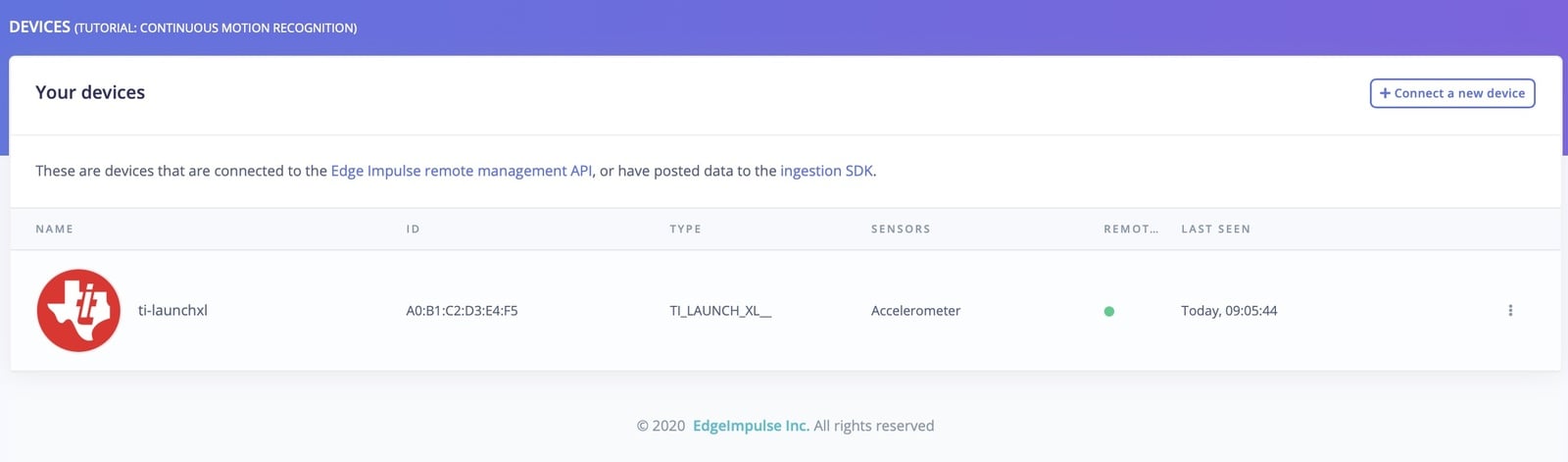
If your device is connected under Devices in the studio you can proceed:
Devices tab with the device connected to the remote management interface.
Device compatibilityEdge Impulse can ingest data from any device - including embedded devices that you already have in production. See the documentation for the Ingestion API for more information.
To build this project, you’ll need to collect some audio data that will be used to train the machine learning model. Since the goal is to detect the sound of a running faucet, you’ll need to collect some examples of that. You’ll also need some examples of typical background noise that doesn’t contain the sound of a faucet, so the model can learn to discriminate between the two. These two types of examples represent the two classes we’ll be training our model to detect: background noise, or running faucet.You can use your device to collect some data. In the studio, go to the Data acquisition tab. This is the place where all your raw data is stored, and - if your device is connected to the remote management API - where you can start sampling new data.Let’s start by recording an example of background noise that doesn’t contain the sound of a running faucet. Under Record new data, select your device, set the label to noise, the sample length to 1000, and the sensor to Built-in microphone. This indicates that you want to record 1 second of audio, and label the recorded data as noise. You can later edit these labels if needed.
Record new data screen.
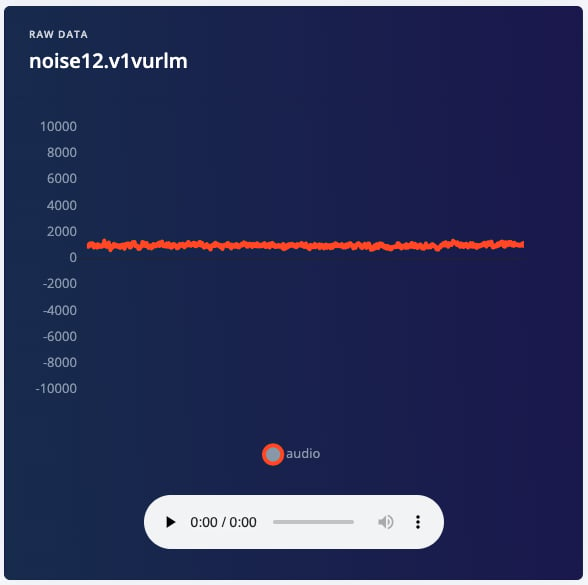
After you click Start sampling, the device will capture a second of audio and transmit it to Edge Impulse. The LED will light while recording is in progress, then light again during transmission.When the data has been uploaded, you will see a new line appear under ‘Collected data’. You will also see the waveform of the audio in the ‘RAW DATA’ box. You can use the controls underneath to listen to the audio that was captured.
Since you now know how to capture audio with Edge Impulse, it’s time to start building a dataset. For a simple audio classification model like this one, we should aim to capture around 10 minutes of data. We have two classes, and it’s ideal if our data is balanced equally between each of them. This means we should aim to capture the following data:
5 minutes of background noise, with the label “noise”
5 minutes of running faucet noise, with the label “faucet”
In the real world, there are usually additional sounds present alongside the sounds we care about. For example, a running faucet is often accompanied by the sound of dishes being washed, teeth being brushed, or a conversation in the kitchen. Background noise might also include the sounds of television, kids playing, or cars driving past outside.It’s important that your training data contains these types of real world sounds. If your model is not exposed to them during training, it will not learn to take them into account, and it will not perform well during real-world usage.For this tutorial, you should try to capture the following:
Background noise
2 minutes of background noise without much additional activity
1 minute of background noise with a TV or music playing
1 minute of background noise featuring occasional talking or conversation
1 minutes of background noise with the sounds of housework
Running faucet noise
1 minute of a faucet running
1 minute of a different faucet running
1 minute of a faucet running with a TV or music playing
1 minute of a faucet running with occasional talking or conversation
1 minute of a faucet running with the sounds of housework
It’s okay if you can’t get all of these, as long as you still obtain 5 minutes of data for each class. However, your model will perform better in the real world if it was trained on a representative dataset.
Dataset diversityThere’s no guarantee your model will perform well in the presence of sounds that were not included in its training set, so it’s important to make your dataset as diverse and representative of real-world conditions as possible.
The amount of audio that can be captured in one go varies depending on a device’s memory. The ST B-L475E-IOT01A developer board has enough memory to capture 60 seconds of audio at a time, and the Arduino Nano 33 BLE Sense has enough memory for 16 seconds. To capture 60 seconds of audio, set the sample length to 60000. Because the board transmits data quite slowly, it will take around 7 minutes before a 60 second sample appears in Edge Impulse.Once you’ve captured around 10 minutes of data, it’s time to start designing an Impulse.
Alternatively, you can load an example test set that has about ten minutes of data in these classes (but how much fun is that?). See the Running faucet dataset for more information.
With the training set in place you can design an impulse. An impulse takes the raw data, slices it up in smaller windows, uses signal processing blocks to extract features, and then uses a learning block to classify new data. Signal processing blocks always return the same values for the same input and are used to make raw data easier to process, while learning blocks learn from past experiences.For this tutorial we’ll use the “MFE” signal processing block. MFE stands for Mel Frequency Energy. This sounds scary, but it’s basically just a way of turning raw audio, which contains a large amount of redundant information, into simplified form.
Spectrogram blockEdge Impulse supports three different blocks for audio classification: MFCC, MFE and spectrogram blocks. If your accuracy is not great using the MFE block you can switch to the spectrogram block, which is not tuned to frequencies for the human ear.
We’ll then pass this simplified audio data into a Neural Network block, which will learn to distinguish between the two classes of audio (faucet and noise).In the studio, go to the Create impulse tab. You’ll see a Time Series Data block, like this one.
The Time Series Data block with updated parameters.
As mentioned above, Edge Impulse slices up the raw samples into windows that are fed into the machine learning model during training. The Window size field controls how long, in milliseconds, each window of data should be. A half second audio sample will be enough to determine whether a faucet is running or not, so you should make sure Window size is set to 500 ms. You can either drag the slider or type a new value directly.Each raw sample is sliced into multiple windows, and the Window increase field controls the offset of each subsequent window from the first. For example, a Window increase value of 500 ms would result in each window starting 1 second after the start of the previous one.By setting a Window increase that is smaller than the Window size, we can create windows that overlap. This is actually a great idea. Although they may contain similar data, each overlapping window is still a unique example of audio that represents the sample’s label. By using overlapping windows, we can make the most of our training data. For example, with a Window size of 500 ms and a Window increase of 100 ms, we can extract 20 unique windows from only 2 seconds of data.Make sure the Window increase field is set to 300 ms. The Time series data block should match the screenshot above.Next, click Add a processing block and choose the ‘MFE’ block. Once you’re done with that, click Add a learning block and select ‘Classification (Keras)’. Finally, click Save impulse. Your impulse should now look like this:
The impulse, with one processing block and one learning block.
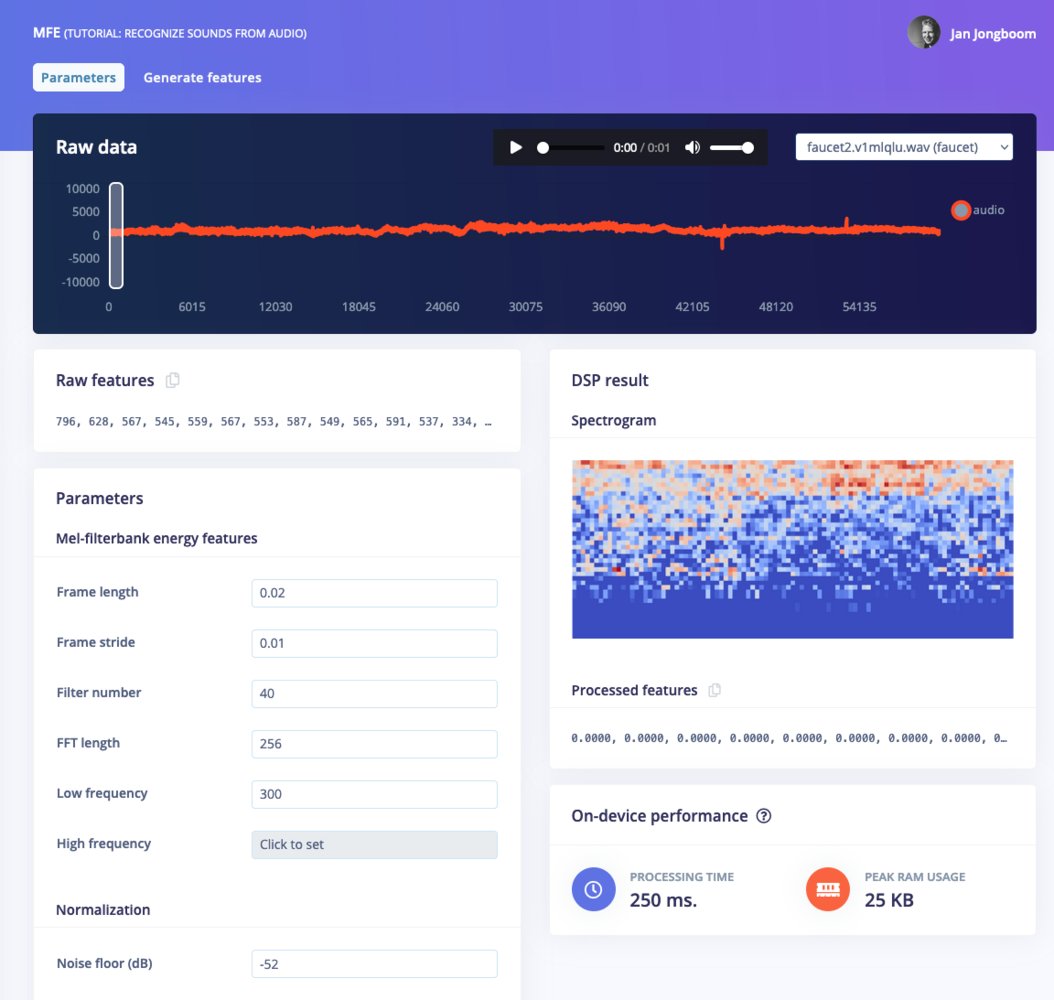
Now that we’ve assembled the building blocks of our Impulse, we can configure each individual part. Click on the MFE tab in the left hand navigation menu. You’ll see a page that looks like this:
The MFE page.
This page allows you to configure the MFE block, and lets you preview how the data will be transformed. The right of the page shows a visualization of the MFE’s output for a piece of audio, which is known as a spectrogram.The MFE block transforms a window of audio into a table of data where each row represents a range of frequencies and each column represents a span of time. The value contained within each cell reflects the amplitude of its associated range of frequencies during that span of time. The spectrogram shows each cell as a colored block, the intensity which varies depends on the amplitude.The patterns visible in a spectrogram contain information about what type of sound it represents. For example, the spectrogram in this image shows a pattern typical of background noise:
Spectrogram of background noise.
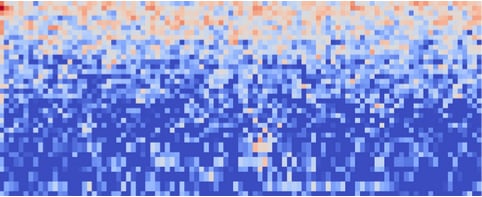
You can tell that it is slightly different from the following spectrogram, which shows a pattern typical of a running faucet:
Spectrogram of a running faucet.
These differences are not necessarily easy for a person to describe, but fortunately they are enough for a neural network to learn to identify.It’s interesting to explore your data and look at the types of spectrograms it results in. You can use the dropdown box near the top right of the page to choose between different audio samples to visualize, and drag the white window on the audio waveform to select different windows of data:
Audio waveform and sample dropdown box.
There are a lot of different ways to configure the MFE block, as shown in the Parameters box. Here, we are going to lower the Filter number to 32 in order to lower the overhead of running the MFE block. You can play around with other parameters such as the noise floor to see how they impact the spectrogram.For the first run through this tutorial, set your MFE parameters to match the image below:
MFE Parameters
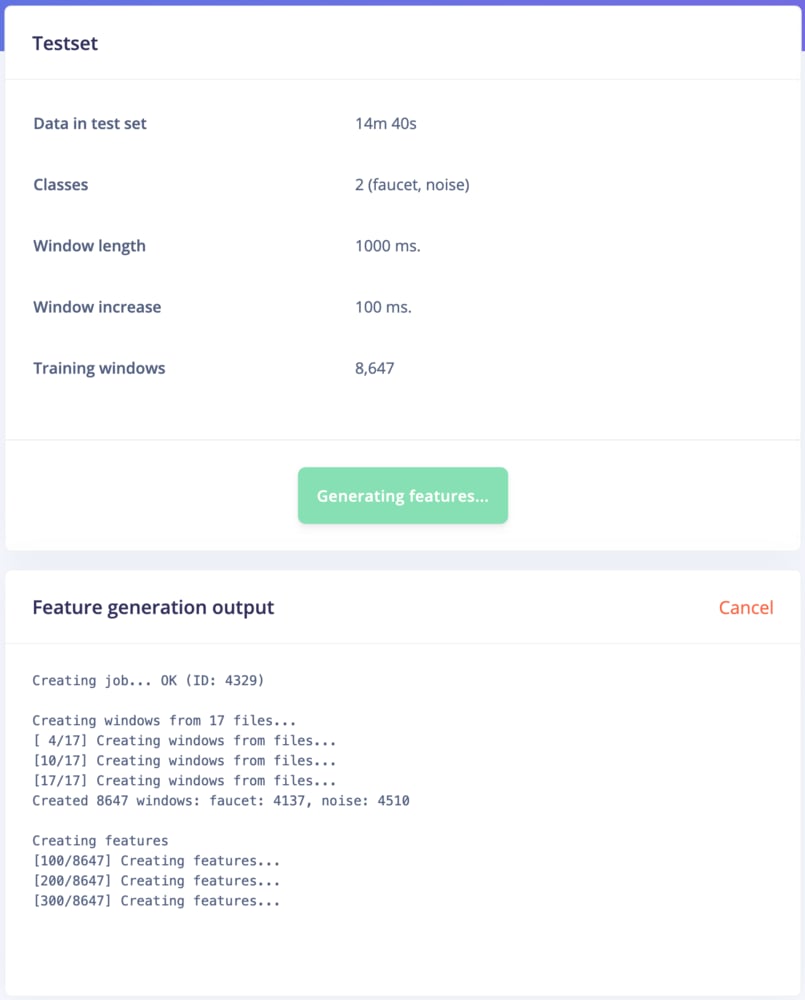
After testing out training with the parameters above, check out the EON Tuner tutorial to learn how to use Edge Impulse to automatically choose the best DSP parameters for your dataset.The spectrograms generated by the MFE block will be passed into a neural network architecture that is particularly good at learning to recognize patterns in this type of tabular data. Before training our neural network, we’ll need to generate MFE blocks for all of our windows of audio. To do this, click the Generate features button at the top of the page, then click the green Generate features button. If you have a full 10 minutes of data, the process will take a while to complete:
Running the feature generation process.
Once this process is complete the feature explorer shows a visualization of your dataset. Here dimensionality reduction is used to map your features onto a 3D space, and you can use the feature explorer to see if the different classes separate well, or find mislabeled data (if it shows in a different cluster). You can find more information in visualizing complex datasets.Next, we’ll configure the neural network and begin training.
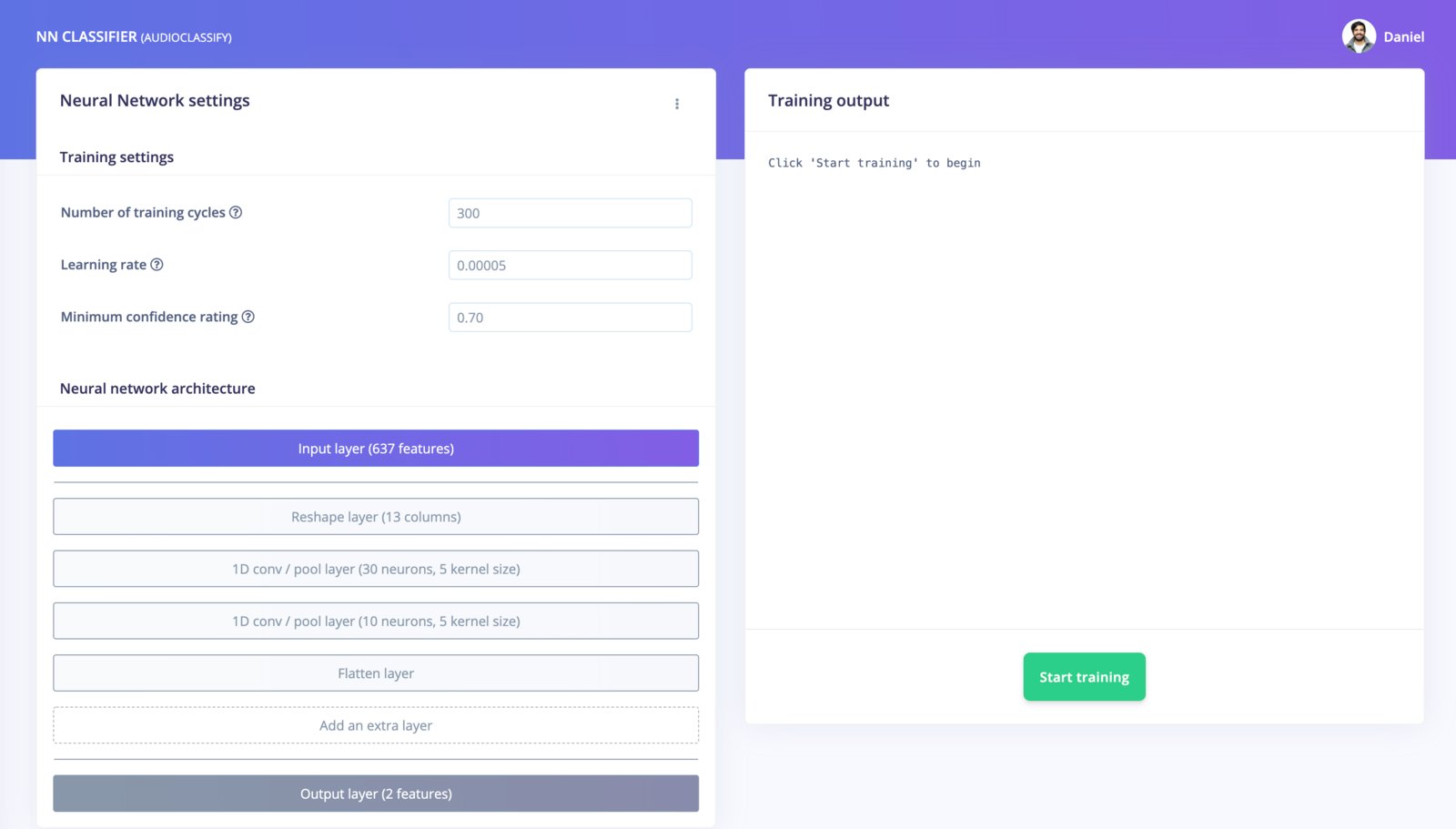
With all data processed it’s time to start training a neural network. Neural networks are algorithms, modeled loosely after the human brain, that can learn to recognize patterns that appear in their training data. The network that we’re training here will take the MFE as an input, and try to map this to one of two classes: noise, or faucet.Click on NN Classifier in the left hand menu. You’ll see the following page:
The NN Classifier page.
A neural network is composed of layers of virtual “neurons”, which you can see represented on the left hand side of the NN Classifier page. An input, in our case an MFE spectrogram, is fed into the first layer of neurons, which filters and transforms it based on each neuron’s unique internal state. The first layer’s output is then fed into the second layer, and so on, gradually transforming the original input into something radically different. In this case, the spectrogram input is transformed over four intermediate layers into just two numbers: the probability that the input represents noise, and the probability that the input represents a running faucet.During training, the internal state of the neurons is gradually tweaked and refined so that the network transforms its input in just the right ways to produce the correct output. This is done by feeding in a sample of training data, checking how far the network’s output is from the correct answer, and adjusting the neurons’ internal state to make it more likely that a correct answer is produced next time. When done thousands of times, this results in a trained network.A particular arrangement of layers is referred to as an architecture, and different architectures are useful for different tasks. The default neural network architecture provided by Edge Impulse will work well for our current project, but you can also define your own architectures. You can even import custom neural network code from tools used by data scientists, such as TensorFlow and Keras.The default settings should work, and to begin training, click Start training. You’ll see a lot of text flying past in the Training output panel, which you can ignore for now. Training will take a few minutes. When it’s complete, you’ll see the Model panel appear at the right side of the page:
The Model panel.
Congratulations, you’ve trained a neural network with Edge Impulse! But what do all these numbers mean?At the start of training, 20% of the training data is set aside for validation. This means that instead of being used to train the model, it is used to evaluate how the model is performing. The Last training performance panel displays the results of this validation, providing some vital information about your model and how well it is working. Bear in mind that your exact numbers may differ from the ones in this tutorial.On the left hand side of the panel, Accuracy refers to the percentage of windows of audio that were correctly classified. The higher number the better, although an accuracy approaching 100% is unlikely, and is often a sign that your model has overfit the training data. You will find out whether this is true in the next stage, during model testing. For many applications, an accuracy above 80% can be considered very good.The Confusion matrix is a table showing the balance of correctly versus incorrectly classified windows. To understand it, compare the values in each row. For example, in the above screenshot, all of the faucet audio windows were classified as faucet, but a few noise windows were misclassified. This appears to be a great result though.The On-device performance region shows statistics about how the model is likely to run on-device. Inferencing time is an estimate of how long the model will take to analyze one second of data on a typical microcontroller (here: an Arm Cortex-M4F running at 80MHz). Peak memory usage gives an idea of how much RAM will be required to run the model on-device.
The performance numbers in the previous step show that our model is working well on its training data, but it’s extremely important that we test the model on new, unseen data before deploying it in the real world. This will help us ensure the model has not learned to overfit the training data, which is a common occurrence.Edge Impulse provides some helpful tools for testing our model, including a way to capture live data from your device and immediately attempt to classify it. To try it out, click on Live classification in the left hand menu. Your device should show up in the ‘Classify new data’ panel. Capture 5 seconds of background noise by clicking Start sampling:
The Classify new data panel.
The sample will be captured, uploaded, and classified. Once this has happened, you’ll see a breakdown of the results:
The results of classifying a new sample.
Once the sample is uploaded, it is split into windows–in this case, a total of 41. These windows are then classified. As you can see, our model classified all 41 windows of the captured audio as noise. This is a great result! Our model has correctly identified that the audio was background noise, even though this is new data that was not part of its training set.Of course, it’s possible some of the windows may be classified incorrectly. Since our model was 99% accurate based on its validation data, you can expect that at least 1% of windows will be classified wrongly, and likely much more than this, since our validation data doesn’t represent every possible type of background or faucet noise. If your model didn’t perform perfectly, don’t worry. We’ll get to troubleshooting later.
Misclassifications and uncertain resultsIt’s inevitable that even a well-trained machine learning model will sometimes misclassify its inputs. When you integrate a model into your application, you should take into account that it will not always give you the correct answer.For example, if you are classifying audio, you might want to classify several windows of data and average the results. This will give you better overall accuracy than assuming that every individual result is correct.
Using the Live classification tab, you can easily try out your model and get an idea of how it performs. But to be really sure that it is working well, we need to do some more rigorous testing. That’s where the Model testing tab comes in. If you open it up, you’ll see the sample we just captured listed in the Test data panel:
The Test data panel.
In addition to its training data, every Edge Impulse project also has a test dataset. Samples captured in Live classification are automatically saved to the test dataset, and the Model testing tab lists all of the test data.To use the sample we’ve just captured for testing, we should correctly set its expected outcome. Click the ⋮ icon and select Edit expected outcome, then enter noise. Now, select the sample using the checkbox to the left of the table and click Classify selected:
Test data classification results.
You’ll see that the model’s accuracy has been rated based on the test data. Right now, this doesn’t give us much more information that just classifying the same sample in the Live classification tab. But if you build up a big, comprehensive set of test samples, you can use the Model testing tab to measure how your model is performing on real data.Ideally, you’ll want to collect a test set that contains a minimum of 25% the amount of data of your training set. So, if you’ve collected 10 minutes of training data, you should collect at least 2.5 minutes of test data. You should make sure this test data represents a wide range of possible conditions, so that it evaluates how the model performs with many different types of inputs. For example, collecting test audio for several different faucets is a good idea.You can use the Data acquisition tab to manage your test data. Open the tab, and then click Test data at the top. Then, use the Record new data panel to capture a few minutes of test data, including audio for both background noise and faucet. Make sure the samples are labelled correctly. Once you’re done, head back to the Model testing tab, select all the samples, and click Classify selected:
Test results for a large number of samples.
The screenshot shows classification results from a large number of test samples (there are more on the page than would fit in the screenshot). The panel shows that our model is performing at 85% accuracy, which is 5% less than how it performed on validation data. It’s normal for a model to perform less well on entirely fresh data, so this is a successful result. Our model is working well!For each test sample, the panel shows a breakdown of its individual performance. For example, one of the samples was classified with only 62% accuracy. Samples that contain a lot of misclassifications are valuable, since they have examples of types of audio that our model does not fit. It’s often worth adding these to your training data, which you can do by clicking the ⋮ icon and selecting Move to training set. If you do this, you should add some new test data to make up for the loss!Testing your model helps confirm that it works in real life, and it’s something you should do after every change. However, if you often make tweaks to your model to try to improve its performance on the test dataset, your model may gradually start to overfit to the test dataset, and it will lose its value as a metric. To avoid this, continually add fresh data to your test dataset.
Data hygieneIt’s extremely important that data is never duplicated between your training and test datasets. Your model will naturally perform well on the data that it was trained on, so if there are duplicate samples then your test results will indicate better performance than your model will achieve in the real world.
If the network performed well, great! But what if it performed poorly? There could be a variety of reasons, but the most common ones are:
The data does not look like other data the network has seen before. This is common when someone uses the device in a way that you didn’t add to the test set. You can add the current file to the test set by adding the correct label in the ‘Expected outcome’ field, clicking ⋮, then selecting Move to training set.
The model has not been trained enough. Increase number of epochs to 200 and see if performance increases (the classified file is stored, and you can load it through ‘Classify existing validation sample’).
The model is overfitting and thus performs poorly on new data. Try reducing the number of epochs, reducing the learning rate, or adding more data.
The neural network architecture is not a great fit for your data. Play with the number of layers and neurons and see if performance improves.
As you see, there is still a lot of trial and error when building neural networks. One place to start improving the performance of your model is the EON Tuner tutorial. The tuner will automatically test different DSP and NN parameters to improve performance with your dataset.
With the impulse designed, trained and verified you can deploy this model back to your device. This makes the model run without an internet connection, minimizes latency, and runs with minimum power consumption. Edge Impulse can package up the complete impulse - including the MFE algorithm, neural network weights, and classification code - in a single C++ library that you can include in your embedded software.
Mobile phoneYour mobile phone can build and download the compiled impulse directly from the mobile client. See ‘Deploying back to device’ on the Using your mobile phone page.
To export your model, click on Deployment in the menu. Then under ‘Build firmware’ select your development board, and click Build. This will export the impulse, and build a binary that will run on your development board in a single step. After building is completed you’ll get prompted to download a binary. Save this on your computer.
When you click the Build button, you’ll see a pop-up with text and video instructions on how to deploy the binary to your particular device. Follow these instructions. Once you are done, we are ready to test your impulse out.
We can connect to the board’s newly flashed firmware over serial. Open a terminal and run:
$ edge-impulse-run-impulse --continuous
Serial daemonIf the device is not connected over WiFi, but instead connected via the Edge Impulse serial daemon, you’ll need stop the daemon. Only one application can connect to the development board at a time.
This will capture audio from the microphone, run the MFE code, and then classify the spectrogram:
Great work! You’ve captured data, trained a model, and deployed it to an embedded device. It’s time to celebrate by pouring yourself a nice glass of water, and checking whether the sound is correctly classified by you model.
Congratulations! You’ve used Edge Impulse to train a neural network model capable of recognizing a particular sound. There are endless applications for this type of model, from monitoring industrial machinery to recognizing voice commands. Now that you’ve trained your model you can integrate your impulse in the firmware of your own embedded device, see the Deployments tutorials. There are examples for Mbed OS, Arduino, STM32CubeIDE, Zephyr, and any other target that supports a C++ compiler.Or if you’re interested in more, see our tutorials on Continuous motion recognition or Image classification. If you have a great idea for a different project, that’s fine too. Edge Impulse lets you capture data from any sensor, build custom processing blocks to extract features, and you have full flexibility in your Machine Learning pipeline with the learning blocks.We can’t wait to see what you’ll build! 🚀
Was this page helpful?
{"docsConfig":{"theme":"aspen","$schema":"https://mintlify.com/docs.json","name":"Edge Impulse Documentation","description":"Where you can find all the Edge Impulse documentation, and more!","colors":{"primary":"#5f76db","light":"#5f76db","dark":"#182896"},"logo":{"light":"https://mintcdn.com/edgeimpulse/-Yjt9HB8VCOXQC8H/.assets/logos/ei-logo-light.svg?fit=max\u0026auto=format\u0026n=-Yjt9HB8VCOXQC8H\u0026q=85\u0026s=a26ac03680700105c38fa0507df4fee2","dark":"https://mintcdn.com/edgeimpulse/K7zNEaqi2bZnNjVz/.assets/logos/ei-logo-dark.svg?fit=max\u0026auto=format\u0026n=K7zNEaqi2bZnNjVz\u0026q=85\u0026s=6c5887f8e79896f1ca3c3a63d5477761"},"favicon":"https://mintcdn.com/edgeimpulse/HzwDHenmvHu0xumg/.assets/favicon.svg?fit=max\u0026auto=format\u0026n=HzwDHenmvHu0xumg\u0026q=85\u0026s=5d3672f264e068f096f0ccfeff030489","appearance":{"default":"light"},"navbar":{"links":[{"href":"https://edgeimpulse.com/","label":"Website"},{"href":"https://studio.edgeimpulse.com","label":"Login"}],"primary":{"type":"button","label":"Sign up","href":"https://edgeimpulse.com/signup"}},"footer":{"socials":{"linkedin":"https://linkedin.com/company/edgeimpulse","youtube":"https://www.youtube.com/@EdgeImpulse","x":"https://x.com/edgeimpulse"},"links":[{"header":"Policies","items":[{"label":"Responsible AI","href":"https://www.qualcomm.com/site/responsible-ai-license"},{"label":"Privacy","href":"https://www.edgeimpulse.com/legal/privacy-policy"},{"label":"Cookies","href":"https://www.qualcomm.com/site/privacy/cookies"}]},{"header":"Legal","items":[{"label":"Terms of Use","href":"https://www.qualcomm.com/site/terms-of-use"},{"label":"Accessibility","href":"https://www.qualcomm.com/accessibility"}]}]},"seo":{"metatags":{"canonical":"https://docs.edgeimpulse.com"}},"icons":{"library":"fontawesome"},"styling":{"eyebrows":"breadcrumbs","codeblocks":"system","latex":true},"contextual":{"options":["copy","view","assistant"],"display":"header"},"navigation":{"global":{"anchors":[{"anchor":"Forum","icon":"discourse","href":"https://forum.edgeimpulse.com"},{"anchor":"Discord","icon":"discord","href":"https://discord.gg/edgeimpulse"},{"anchor":"GitHub","icon":"github","href":"https://github.com/edgeimpulse"}]},"pages":[]}},"deployment":{"deploymentMetadataValue":{"subdomain":"edgeimpulse","hasAudioNarration":false,"actualSubdomain":"edgeimpulse","customDomains":["docs.edgeimpulse.com"],"gitSource":{"type":"github","owner":"edgeimpulse","repo":"documentation","deployBranch":"main","contentDirectory":"","isPrivate":true,"mountPath":"","label":""},"chroma":{"liveDeploymentHistoryId":"6ae2931d32d9b4ba8a7f5edf","collectionId":"0a3eb521-9a93-4591-9452-c58dcc143c16","schemaVersion":"v3","latestBuiltDeploymentHistoryId":"6ae2931d32d9b4ba8a7f5edf"},"feedback":{"thumbs":true},"entitlements":{"AI_CHAT":{"status":"ENABLED"},"REMOVE_BRANDING":{"status":"ENABLED"},"CONTEXTUAL_FEEDBACK":{"status":"ENABLED"},"CODE_SNIPPET_FEEDBACK":{"status":"ENABLED"},"WEB_MCP":{"status":"ENABLED"},"NARRATION":{"status":"ENABLED"}},"buildId":"6ae2931d32d9b4ba8a7f5edf","clientVersion":"0.0.4044","searchFilterCounts":[{"language":"default","tag":"Tools","count":1305},{"language":"default","tag":"LIBRARIES","count":1279},{"language":"default","tag":"Studio Python API bindings","count":1245},{"language":"default","tag":"edgeimpulse-api","count":1244},{"language":"default","tag":"models","count":1211},{"language":"default","tag":"APIs","count":563},{"language":"default","tag":"STUDIO API ENDPOINTS","count":555},{"language":"default","tag":"Projects","count":272},{"language":"default","tag":"EXPERT NETWORK","count":211},{"language":"default","tag":"Hardware","count":123}]},"assistantConfig":{"enableStarterQuestions":true,"enableContextualStarterQuestions":true},"basePath":"","hasChatPermissions":false,"hasWebMcpPermissions":true,"toggles":[{"name":"kill-isr","enabled":true,"variant":{"name":"disabled","enabled":false,"feature_enabled":true},"impressionData":false},{"name":"agent-mintlify-slack","enabled":true,"variant":{"name":"disabled","enabled":false,"feature_enabled":true},"impressionData":false},{"name":"agent-integrations-settings","enabled":true,"variant":{"name":"disabled","enabled":false,"feature_enabled":true},"impressionData":false},{"name":"automations-pr-grouping","enabled":true,"variant":{"name":"disabled","enabled":false,"feature_enabled":true},"impressionData":false},{"name":"custom-prefix","enabled":true,"variant":{"name":"disabled","enabled":false,"feature_enabled":true},"impressionData":false},{"name":"analytics-v7","enabled":true,"variant":{"name":"disabled","enabled":false,"feature_enabled":true},"impressionData":false},{"name":"user-flows-analytics","enabled":true,"variant":{"name":"disabled","enabled":false,"feature_enabled":true},"impressionData":false},{"name":"no-publish-flow","enabled":true,"variant":{"name":"disabled","enabled":false,"feature_enabled":true},"impressionData":false},{"name":"workos-onboarding","enabled":true,"variant":{"name":"disabled","enabled":false,"feature_enabled":true},"impressionData":false},{"name":"llms-txt-v2","enabled":true,"variant":{"name":"disabled","enabled":false,"feature_enabled":true},"impressionData":false},{"name":"snapshot-serving-live","enabled":true,"variant":{"name":"disabled","enabled":false,"feature_enabled":true},"impressionData":false},{"name":"stripTemperatureMiddleware","enabled":true,"variant":{"name":"disabled","enabled":false,"feature_enabled":true},"impressionData":false},{"name":"support-platform-pylon-zendesk","enabled":true,"variant":{"name":"disabled","enabled":false,"feature_enabled":true},"impressionData":false},{"name":"snapshot-serving","enabled":true,"variant":{"name":"disabled","enabled":false,"feature_enabled":true},"impressionData":false},{"name":"instant-rollback","enabled":true,"variant":{"name":"disabled","enabled":false,"feature_enabled":true},"impressionData":false},{"name":"granular-notifications-server","enabled":true,"variant":{"name":"disabled","enabled":false,"feature_enabled":true},"impressionData":false},{"name":"granular-notifications","enabled":true,"variant":{"name":"disabled","enabled":false,"feature_enabled":true},"impressionData":false},{"name":"automations-fable","enabled":true,"variant":{"name":"disabled","enabled":false,"feature_enabled":true},"impressionData":false},{"name":"fixed-ai-action-pricing","enabled":true,"variant":{"name":"disabled","enabled":false,"feature_enabled":true},"impressionData":false},{"name":"automation-resolve-merge-conflict","enabled":true,"variant":{"name":"disabled","enabled":false,"feature_enabled":true},"impressionData":false},{"name":"scoped-publishing","enabled":true,"variant":{"name":"disabled","enabled":false,"feature_enabled":true},"impressionData":false},{"name":"mintql","enabled":true,"variant":{"name":"disabled","enabled":false,"feature_enabled":true},"impressionData":false},{"name":"page-level-analytics","enabled":true,"variant":{"name":"disabled","enabled":false,"feature_enabled":true},"impressionData":false},{"name":"editor-version-history-v2","enabled":true,"variant":{"name":"disabled","enabled":false,"feature_enabled":true},"impressionData":false},{"name":"billing-page-v2","enabled":true,"variant":{"name":"disabled","enabled":false,"feature_enabled":true},"impressionData":false},{"name":"full-page-search","enabled":true,"variant":{"name":"disabled","enabled":false,"feature_enabled":true},"impressionData":false},{"name":"workspace-projects","enabled":true,"variant":{"name":"disabled","enabled":false,"feature_enabled":true},"impressionData":false},{"name":"assistant-v5","enabled":true,"variant":{"name":"disabled","enabled":false,"feature_enabled":true},"impressionData":false},{"name":"byok-sep-25","enabled":true,"variant":{"name":"disabled","enabled":false,"feature_enabled":true},"impressionData":false},{"name":"fork-pr-previews","enabled":true,"variant":{"name":"disabled","enabled":false,"feature_enabled":true},"impressionData":false},{"name":"revalidation-jwt","enabled":true,"variant":{"name":"disabled","enabled":false,"feature_enabled":true},"impressionData":false},{"name":"vite-origin","enabled":true,"variant":{"name":"disabled","enabled":false,"feature_enabled":true},"impressionData":false},{"name":"billing-updated-9-15","enabled":true,"variant":{"name":"disabled","enabled":false,"feature_enabled":true},"impressionData":false},{"name":"workos-sso-scim","enabled":true,"variant":{"name":"disabled","enabled":false,"feature_enabled":true},"impressionData":false},{"name":"hobby-abuse-scan","enabled":true,"variant":{"name":"disabled","enabled":false,"feature_enabled":true},"impressionData":false},{"name":"dashboard-inbox","enabled":true,"variant":{"name":"disabled","enabled":false,"feature_enabled":true},"impressionData":false},{"name":"workos-signup","enabled":true,"variant":{"name":"disabled","enabled":false,"feature_enabled":true},"impressionData":false},{"name":"turbopuffer-dual-write","enabled":true,"variant":{"name":"disabled","enabled":false,"feature_enabled":true},"impressionData":false},{"name":"workos-enabled","enabled":true,"variant":{"name":"disabled","enabled":false,"feature_enabled":true},"impressionData":false},{"name":"approve-review-flow","enabled":true,"variant":{"name":"disabled","enabled":false,"feature_enabled":true},"impressionData":false},{"name":"sso-setup-deadline-banner","enabled":true,"variant":{"name":"disabled","enabled":false,"feature_enabled":true},"impressionData":false}],"googleFontsInlined":false},"customCss":[{"filePath":".styles/styles.css","content":".cookie-settings-button{color:rgb(var(--gray-800))!important;background-color:rgb(var(--gray-950)/.03)!important;border-radius:var(--rounded-xl, .75rem);font-size:.875rem!important;line-height:1.25rem!important;width:fit-content!important;align-self:flex-end!important;margin-left:auto!important}.cookie-settings-button:hover{background-color:rgb(var(--gray-950)/.1)!important}"}],"page":{"pagePath":"tutorials/hardware/ti-launchxl-sound-recognition","slug":"/tutorials/hardware/ti-launchxl-sound-recognition","pageMetadata":{"title":"TI LaunchXL - sound recognition","description":"Recognize specific sounds like running water on the TI LaunchXL using an audio classification model from Edge Impulse.","href":"/tutorials/hardware/ti-launchxl-sound-recognition"},"description":{"compiledSource":"\"use strict\";\nconst {jsx: _jsx} = arguments[0];\nconst {useMDXComponents: _provideComponents} = arguments[0];\nfunction _createMdxContent(props) {\n const _components = {\n p: \"p\",\n ..._provideComponents(),\n ...props.components\n };\n return _jsx(_components.p, {\n children: \"Recognize specific sounds like running water on the TI LaunchXL using an audio classification model from Edge Impulse.\"\n });\n}\nfunction MDXContent(props = {}) {\n const {wrapper: MDXLayout} = {\n ..._provideComponents(),\n ...props.components\n };\n return MDXLayout ? _jsx(MDXLayout, {\n ...props,\n children: _jsx(_createMdxContent, {\n ...props\n })\n }) : _createMdxContent(props);\n}\nreturn {\n default: MDXContent\n};\n","frontmatter":{},"scope":{}},"pageType":"default","mdx":{"mdxSource":{"compiledSource":"\"use strict\";const{Fragment:_Fragment,jsx:_jsx,jsxs:_jsxs}=arguments[0];const{useMDXComponents:_provideComponents}=arguments[0];const CardOpenStudioTutorial=({href})=>{const{Card}=_provideComponents()||{};if(!Card)_missingMdxReference(`Card`,true);return _jsx(Card,{title:`Skip straight to the project`,icon:`forward`,href,children:`Skip the setup: clone a ready-to-use Edge Impulse project with the dataset, impulse, and trained model.`})};function _createMdxContent(props){const _components={a:`a`,code:`code`,em:`em`,li:`li`,ol:`ol`,p:`p`,pre:`pre`,span:`span`,strong:`strong`,ul:`ul`,..._provideComponents(),...props.components},{CodeBlock,Danger,Frame,Heading,Info,OptimizedImage,Warning,_MdxComponentBoundary}=_components;if(!CodeBlock)_missingMdxReference(`CodeBlock`,true);if(!Danger)_missingMdxReference(`Danger`,true);if(!Frame)_missingMdxReference(`Frame`,true);if(!Heading)_missingMdxReference(`Heading`,true);if(!Info)_missingMdxReference(`Info`,true);if(!OptimizedImage)_missingMdxReference(`OptimizedImage`,true);if(!Warning)_missingMdxReference(`Warning`,true);if(!_MdxComponentBoundary)_missingMdxReference(`_MdxComponentBoundary`,true);return _jsxs(_Fragment,{children:[_jsxs(_components.p,{children:[`In this tutorial, you’ll use machine learning to build a system that can recognize when a particular sound is happening, a task known as `,_jsx(_components.em,{children:`audio classification`}),`. The system you create will be able to recognize the sound of water running from a faucet, even in the presence of other background noise.`]}),`\n`,_jsx(_components.p,{children:`You’ll learn how to collect audio data from microphones, use signal processing to extract the most important information, and train a deep neural network that can tell you whether the sound of running water can be heard in a given clip of audio. Finally, you’ll deploy the system to an embedded device and evaluate how well it works.`}),`\n`,_jsx(_components.p,{children:`At the end of this tutorial, you’ll have a firm understanding of how to classify audio using Edge Impulse.`}),`\n`,_jsx(_MdxComponentBoundary,{name:`CardOpenStudioTutorial`,children:_jsx(CardOpenStudioTutorial,{href:`https://studio.edgeimpulse.com/public/14301/latest`})}),`\n`,_jsx(Heading,{level:`2`,id:`1-prerequisites`,children:`1. Prerequisites`}),`\n`,_jsx(_components.p,{children:`For this tutorial you’ll need a supported device. Follow the steps to connect your development board to Edge Impulse.`}),`\n`,_jsxs(_components.ul,{children:[`\n`,_jsx(_components.li,{children:_jsx(_components.a,{href:`/hardware/boards/ti-launchxl`,children:`TI CC1352P LaunchPad`})}),`\n`,_jsxs(_components.li,{children:[_jsx(_components.a,{href:`/hardware/devices/mobile-phone`,children:`Any mobile phone`}),` - if you don’t have a development kit`]}),`\n`]}),`\n`,_jsxs(_components.p,{children:[`If your device is connected under `,_jsx(_components.strong,{children:`Devices`}),` in the studio you can proceed:`]}),`\n`,_jsx(Frame,{caption:`Devices tab with the device connected to the remote management interface.`,children:_jsx(OptimizedImage,{src:`https://mintcdn.com/edgeimpulse/UpfKnXz6Rfn5wm4E/.assets/images/edge-impulse-devices-page-listing-the-connected-ti.jpg?fit=max\u0026auto=format\u0026n=UpfKnXz6Rfn5wm4E\u0026q=85\u0026s=5add93e18f4aa34f68c2998eea9e0370`,alt:`Devices page listing a connected TI LaunchPad under remote management`,\"data-og-width\":`1600`,width:`1600`,\"data-og-height\":`471`,height:`471`,\"data-path\":`.assets/images/edge-impulse-devices-page-listing-the-connected-ti.jpg`,\"data-optimize\":`true`,\"data-opv\":`3`,srcset:`https://mintcdn.com/edgeimpulse/UpfKnXz6Rfn5wm4E/.assets/images/edge-impulse-devices-page-listing-the-connected-ti.jpg?w=280\u0026fit=max\u0026auto=format\u0026n=UpfKnXz6Rfn5wm4E\u0026q=85\u0026s=140e3d4a58b6ca8015b898a6db86255d 280w, https://mintcdn.com/edgeimpulse/UpfKnXz6Rfn5wm4E/.assets/images/edge-impulse-devices-page-listing-the-connected-ti.jpg?w=560\u0026fit=max\u0026auto=format\u0026n=UpfKnXz6Rfn5wm4E\u0026q=85\u0026s=c1ea7a237e172b60c1b176b69d9e510a 560w, https://mintcdn.com/edgeimpulse/UpfKnXz6Rfn5wm4E/.assets/images/edge-impulse-devices-page-listing-the-connected-ti.jpg?w=840\u0026fit=max\u0026auto=format\u0026n=UpfKnXz6Rfn5wm4E\u0026q=85\u0026s=536c9478e246693ba5d474cce3d2bd91 840w, https://mintcdn.com/edgeimpulse/UpfKnXz6Rfn5wm4E/.assets/images/edge-impulse-devices-page-listing-the-connected-ti.jpg?w=1100\u0026fit=max\u0026auto=format\u0026n=UpfKnXz6Rfn5wm4E\u0026q=85\u0026s=6159e0dedf9d8bc3cfdef099ff8cc799 1100w, https://mintcdn.com/edgeimpulse/UpfKnXz6Rfn5wm4E/.assets/images/edge-impulse-devices-page-listing-the-connected-ti.jpg?w=1650\u0026fit=max\u0026auto=format\u0026n=UpfKnXz6Rfn5wm4E\u0026q=85\u0026s=237edeb19e735d9de2da36a4947f8407 1650w, https://mintcdn.com/edgeimpulse/UpfKnXz6Rfn5wm4E/.assets/images/edge-impulse-devices-page-listing-the-connected-ti.jpg?w=2500\u0026fit=max\u0026auto=format\u0026n=UpfKnXz6Rfn5wm4E\u0026q=85\u0026s=6c51348f1b0636deb570be1962ed750f 2500w`})}),`\n`,_jsxs(Info,{children:[_jsx(_components.p,{children:_jsx(_components.strong,{children:`Device compatibility`})}),_jsxs(_components.p,{children:[`Edge Impulse can ingest data from any device - including embedded devices that you already have in production. See the documentation for the `,_jsx(_components.a,{href:`/apis/ingestion`,children:`Ingestion API`}),` for more information.`]})]}),`\n`,_jsx(Heading,{level:`2`,id:`2-collecting-your-first-data`,children:`2. Collecting your first data`}),`\n`,_jsxs(_components.p,{children:[`To build this project, you’ll need to collect some audio data that will be used to train the machine learning model. Since the goal is to detect the sound of a running faucet, you’ll need to collect some examples of that. You’ll also need some examples of typical background noise that `,_jsx(_components.em,{children:`doesn’t`}),` contain the sound of a faucet, so the model can learn to discriminate between the two. These two types of examples represent the two `,_jsx(_components.em,{children:`classes`}),` we’ll be training our model to detect: background noise, or running faucet.`]}),`\n`,_jsxs(_components.p,{children:[`You can use your device to collect some data. In the studio, go to the `,_jsx(_components.strong,{children:`Data acquisition`}),` tab. This is the place where all your raw data is stored, and - if your device is connected to the remote management API - where you can start sampling new data.`]}),`\n`,_jsxs(_components.p,{children:[`Let’s start by recording an example of background noise that doesn’t contain the sound of a running faucet. Under `,_jsx(_components.strong,{children:`Record new data`}),`, select your device, set the label to `,_jsx(_components.code,{children:`noise`}),`, the sample length to `,_jsx(_components.code,{children:`1000`}),`, and the sensor to `,_jsx(_components.code,{children:`Built-in microphone`}),`. This indicates that you want to record 1 second of audio, and label the recorded data as `,_jsx(_components.code,{children:`noise`}),`. You can later edit these labels if needed.`]}),`\n`,_jsx(Frame,{caption:`Record new data screen.`,children:_jsx(OptimizedImage,{src:`https://mintcdn.com/edgeimpulse/-WgXP515XHSZ7nhZ/.assets/images/record-new-data-form-configured-to-capture-faucet.png?fit=max\u0026auto=format\u0026n=-WgXP515XHSZ7nhZ\u0026q=85\u0026s=cee6c46c8b667404331b34ab9aa3cb99`,alt:`Data acquisition page configured to record one second of microphone noise`,\"data-og-width\":`588`,width:`588`,\"data-og-height\":`482`,height:`482`,\"data-path\":`.assets/images/record-new-data-form-configured-to-capture-faucet.png`,\"data-optimize\":`true`,\"data-opv\":`3`,srcset:`https://mintcdn.com/edgeimpulse/-WgXP515XHSZ7nhZ/.assets/images/record-new-data-form-configured-to-capture-faucet.png?w=280\u0026fit=max\u0026auto=format\u0026n=-WgXP515XHSZ7nhZ\u0026q=85\u0026s=337f71f499790addd0160206881b00be 280w, https://mintcdn.com/edgeimpulse/-WgXP515XHSZ7nhZ/.assets/images/record-new-data-form-configured-to-capture-faucet.png?w=560\u0026fit=max\u0026auto=format\u0026n=-WgXP515XHSZ7nhZ\u0026q=85\u0026s=b48a348a8966615fbc34849887c2e5b8 560w, https://mintcdn.com/edgeimpulse/-WgXP515XHSZ7nhZ/.assets/images/record-new-data-form-configured-to-capture-faucet.png?w=840\u0026fit=max\u0026auto=format\u0026n=-WgXP515XHSZ7nhZ\u0026q=85\u0026s=b5eb7317d750a8bef5e3f8a468e34b9a 840w, https://mintcdn.com/edgeimpulse/-WgXP515XHSZ7nhZ/.assets/images/record-new-data-form-configured-to-capture-faucet.png?w=1100\u0026fit=max\u0026auto=format\u0026n=-WgXP515XHSZ7nhZ\u0026q=85\u0026s=5971caaf03a1a17ac9eece062abbced0 1100w, https://mintcdn.com/edgeimpulse/-WgXP515XHSZ7nhZ/.assets/images/record-new-data-form-configured-to-capture-faucet.png?w=1650\u0026fit=max\u0026auto=format\u0026n=-WgXP515XHSZ7nhZ\u0026q=85\u0026s=1dc997f03d0e2b4c5e057addcba97f05 1650w, https://mintcdn.com/edgeimpulse/-WgXP515XHSZ7nhZ/.assets/images/record-new-data-form-configured-to-capture-faucet.png?w=2500\u0026fit=max\u0026auto=format\u0026n=-WgXP515XHSZ7nhZ\u0026q=85\u0026s=24d8eb4ac4fa22b4f00dede725c47f7d 2500w`})}),`\n`,_jsxs(_components.p,{children:[`After you click `,_jsx(_components.strong,{children:`Start sampling`}),`, the device will capture a second of audio and transmit it to Edge Impulse. The LED will light while recording is in progress, then light again during transmission.`]}),`\n`,_jsx(_components.p,{children:`When the data has been uploaded, you will see a new line appear under ‘Collected data’. You will also see the waveform of the audio in the ‘RAW DATA’ box. You can use the controls underneath to listen to the audio that was captured.`}),`\n`,_jsx(Frame,{caption:`Audio waveform`,children:_jsx(OptimizedImage,{src:`https://mintcdn.com/edgeimpulse/9u5olrlM4B74-V8U/.assets/images/audio-waveform-for-a-recorded-faucet-sample.png?fit=max\u0026auto=format\u0026n=9u5olrlM4B74-V8U\u0026q=85\u0026s=67a7b043bd0743c178539cc771ce3ed0`,alt:`Collected audio sample with the raw waveform and playback controls`,\"data-og-width\":`588`,width:`588`,\"data-og-height\":`585`,height:`585`,\"data-path\":`.assets/images/audio-waveform-for-a-recorded-faucet-sample.png`,\"data-optimize\":`true`,\"data-opv\":`3`,srcset:`https://mintcdn.com/edgeimpulse/9u5olrlM4B74-V8U/.assets/images/audio-waveform-for-a-recorded-faucet-sample.png?w=280\u0026fit=max\u0026auto=format\u0026n=9u5olrlM4B74-V8U\u0026q=85\u0026s=ec98d646542a16958af9b95ffa015ac3 280w, https://mintcdn.com/edgeimpulse/9u5olrlM4B74-V8U/.assets/images/audio-waveform-for-a-recorded-faucet-sample.png?w=560\u0026fit=max\u0026auto=format\u0026n=9u5olrlM4B74-V8U\u0026q=85\u0026s=f74cb0806b2f8c49344e859fd7d03ac9 560w, https://mintcdn.com/edgeimpulse/9u5olrlM4B74-V8U/.assets/images/audio-waveform-for-a-recorded-faucet-sample.png?w=840\u0026fit=max\u0026auto=format\u0026n=9u5olrlM4B74-V8U\u0026q=85\u0026s=f65016788657fcf5ba6adcfb25c10330 840w, https://mintcdn.com/edgeimpulse/9u5olrlM4B74-V8U/.assets/images/audio-waveform-for-a-recorded-faucet-sample.png?w=1100\u0026fit=max\u0026auto=format\u0026n=9u5olrlM4B74-V8U\u0026q=85\u0026s=09cbb51cd22d96d0619ea08a16b5a182 1100w, https://mintcdn.com/edgeimpulse/9u5olrlM4B74-V8U/.assets/images/audio-waveform-for-a-recorded-faucet-sample.png?w=1650\u0026fit=max\u0026auto=format\u0026n=9u5olrlM4B74-V8U\u0026q=85\u0026s=cc60b0406fd3ecbcd3831ff37d551b44 1650w, https://mintcdn.com/edgeimpulse/9u5olrlM4B74-V8U/.assets/images/audio-waveform-for-a-recorded-faucet-sample.png?w=2500\u0026fit=max\u0026auto=format\u0026n=9u5olrlM4B74-V8U\u0026q=85\u0026s=aeee693eef46ee261a39ecf8a3083ec4 2500w`})}),`\n`,_jsx(Heading,{level:`2`,id:`3-build-a-dataset`,children:`3. Build a dataset`}),`\n`,_jsx(_components.p,{children:`Since you now know how to capture audio with Edge Impulse, it’s time to start building a dataset. For a simple audio classification model like this one, we should aim to capture around 10 minutes of data. We have two classes, and it’s ideal if our data is balanced equally between each of them. This means we should aim to capture the following data:`}),`\n`,_jsxs(_components.ul,{children:[`\n`,_jsx(_components.li,{children:`5 minutes of background noise, with the label “noise”`}),`\n`,_jsx(_components.li,{children:`5 minutes of running faucet noise, with the label “faucet”`}),`\n`]}),`\n`,_jsx(Heading,{level:`4`,id:`real-world-data`,children:`Real world data`}),`\n`,_jsx(_components.p,{children:`In the real world, there are usually additional sounds present alongside the sounds we care about. For example, a running faucet is often accompanied by the sound of dishes being washed, teeth being brushed, or a conversation in the kitchen. Background noise might also include the sounds of television, kids playing, or cars driving past outside.`}),`\n`,_jsx(_components.p,{children:`It’s important that your training data contains these types of real world sounds. If your model is not exposed to them during training, it will not learn to take them into account, and it will not perform well during real-world usage.`}),`\n`,_jsx(_components.p,{children:`For this tutorial, you should try to capture the following:`}),`\n`,_jsxs(_components.ul,{children:[`\n`,_jsxs(_components.li,{children:[`Background noise`,`\n`,_jsxs(_components.ul,{children:[`\n`,_jsx(_components.li,{children:`2 minutes of background noise without much additional activity`}),`\n`,_jsx(_components.li,{children:`1 minute of background noise with a TV or music playing`}),`\n`,_jsx(_components.li,{children:`1 minute of background noise featuring occasional talking or conversation`}),`\n`,_jsx(_components.li,{children:`1 minutes of background noise with the sounds of housework`}),`\n`]}),`\n`]}),`\n`,_jsxs(_components.li,{children:[`Running faucet noise`,`\n`,_jsxs(_components.ul,{children:[`\n`,_jsx(_components.li,{children:`1 minute of a faucet running`}),`\n`,_jsx(_components.li,{children:`1 minute of a different faucet running`}),`\n`,_jsx(_components.li,{children:`1 minute of a faucet running with a TV or music playing`}),`\n`,_jsx(_components.li,{children:`1 minute of a faucet running with occasional talking or conversation`}),`\n`,_jsx(_components.li,{children:`1 minute of a faucet running with the sounds of housework`}),`\n`]}),`\n`]}),`\n`]}),`\n`,_jsx(_components.p,{children:`It’s okay if you can’t get all of these, as long as you still obtain 5 minutes of data for each class. However, your model will perform better in the real world if it was trained on a representative dataset.`}),`\n`,_jsxs(Info,{children:[_jsx(_components.p,{children:_jsx(_components.strong,{children:`Dataset diversity`})}),_jsx(_components.p,{children:`There’s no guarantee your model will perform well in the presence of sounds that were not included in its training set, so it’s important to make your dataset as diverse and representative of real-world conditions as possible.`})]}),`\n`,_jsx(Heading,{level:`4`,id:`data-capture-and-transmission`,children:`Data capture and transmission`}),`\n`,_jsxs(_components.p,{children:[`The amount of audio that can be captured in one go varies depending on a device’s memory. The ST B-L475E-IOT01A developer board has enough memory to capture 60 seconds of audio at a time, and the Arduino Nano 33 BLE Sense has enough memory for 16 seconds. To capture 60 seconds of audio, set the sample length to `,_jsx(_components.code,{children:`60000`}),`. Because the board transmits data quite slowly, it will take around 7 minutes before a 60 second sample appears in Edge Impulse.`]}),`\n`,_jsx(_components.p,{children:`Once you’ve captured around 10 minutes of data, it’s time to start designing an Impulse.`}),`\n`,_jsx(Heading,{level:`4`,id:`prebuilt-dataset`,children:`Prebuilt dataset`}),`\n`,_jsxs(_components.p,{children:[`Alternatively, you can load an example test set that has about ten minutes of data in these classes (but how much fun is that?). See the `,_jsx(_components.a,{href:`/datasets/audio/faucet-vs-noise`,children:`Running faucet dataset`}),` for more information.`]}),`\n`,_jsx(Heading,{level:`2`,id:`4-design-an-impulse`,children:`4. Design an Impulse`}),`\n`,_jsx(_components.p,{children:`With the training set in place you can design an impulse. An impulse takes the raw data, slices it up in smaller windows, uses signal processing blocks to extract features, and then uses a learning block to classify new data. Signal processing blocks always return the same values for the same input and are used to make raw data easier to process, while learning blocks learn from past experiences.`}),`\n`,_jsx(_components.p,{children:`For this tutorial we’ll use the “MFE” signal processing block. MFE stands for Mel Frequency Energy. This sounds scary, but it’s basically just a way of turning raw audio, which contains a large amount of redundant information, into simplified form.`}),`\n`,_jsxs(Warning,{children:[_jsx(_components.p,{children:_jsx(_components.strong,{children:`Spectrogram block`})}),_jsx(_components.p,{children:`Edge Impulse supports three different blocks for audio classification: MFCC, MFE and spectrogram blocks. If your accuracy is not great using the MFE block you can switch to the spectrogram block, which is not tuned to frequencies for the human ear.`})]}),`\n`,_jsx(_components.p,{children:`We’ll then pass this simplified audio data into a Neural Network block, which will learn to distinguish between the two classes of audio (faucet and noise).`}),`\n`,_jsxs(_components.p,{children:[`In the studio, go to the `,_jsx(_components.strong,{children:`Create impulse`}),` tab. You’ll see a `,_jsx(_components.em,{children:`Time Series Data`}),` block, like this one.`]}),`\n`,_jsx(Frame,{caption:`The Time Series Data block with updated parameters.`,children:_jsx(OptimizedImage,{src:`https://mintcdn.com/edgeimpulse/3StgJ7NkW4vSOuoq/.assets/images/create-impulse-page-with-a-500-ms-window-size-and.png?fit=max\u0026auto=format\u0026n=3StgJ7NkW4vSOuoq\u0026q=85\u0026s=f8bb6d36d1542536ab4d3f9e1304ca3b`,alt:`Create impulse page with a 500 ms window size and 300 ms window increase`,\"data-og-width\":`644`,width:`644`,\"data-og-height\":`1000`,height:`1000`,\"data-path\":`.assets/images/create-impulse-page-with-a-500-ms-window-size-and.png`,\"data-optimize\":`true`,\"data-opv\":`3`,srcset:`https://mintcdn.com/edgeimpulse/3StgJ7NkW4vSOuoq/.assets/images/create-impulse-page-with-a-500-ms-window-size-and.png?w=280\u0026fit=max\u0026auto=format\u0026n=3StgJ7NkW4vSOuoq\u0026q=85\u0026s=1f110e7f4acf22a8ad7ba91fd2f005df 280w, https://mintcdn.com/edgeimpulse/3StgJ7NkW4vSOuoq/.assets/images/create-impulse-page-with-a-500-ms-window-size-and.png?w=560\u0026fit=max\u0026auto=format\u0026n=3StgJ7NkW4vSOuoq\u0026q=85\u0026s=4b46cd4e3e2b6591827e85d9d8dc0134 560w, https://mintcdn.com/edgeimpulse/3StgJ7NkW4vSOuoq/.assets/images/create-impulse-page-with-a-500-ms-window-size-and.png?w=840\u0026fit=max\u0026auto=format\u0026n=3StgJ7NkW4vSOuoq\u0026q=85\u0026s=031781109bf603c23e91455fef32342a 840w, https://mintcdn.com/edgeimpulse/3StgJ7NkW4vSOuoq/.assets/images/create-impulse-page-with-a-500-ms-window-size-and.png?w=1100\u0026fit=max\u0026auto=format\u0026n=3StgJ7NkW4vSOuoq\u0026q=85\u0026s=4d93aa98e790bd3751299f217d1b3f2e 1100w, https://mintcdn.com/edgeimpulse/3StgJ7NkW4vSOuoq/.assets/images/create-impulse-page-with-a-500-ms-window-size-and.png?w=1650\u0026fit=max\u0026auto=format\u0026n=3StgJ7NkW4vSOuoq\u0026q=85\u0026s=a6fdf2b5bfc47e87fe1c59bdd02ee3f9 1650w, https://mintcdn.com/edgeimpulse/3StgJ7NkW4vSOuoq/.assets/images/create-impulse-page-with-a-500-ms-window-size-and.png?w=2500\u0026fit=max\u0026auto=format\u0026n=3StgJ7NkW4vSOuoq\u0026q=85\u0026s=5d9d67fc7b9b6f9586ef3a64043e4008 2500w`})}),`\n`,_jsxs(_components.p,{children:[`As mentioned above, Edge Impulse slices up the raw samples into `,_jsx(_components.em,{children:`windows`}),` that are fed into the machine learning model during training. The `,_jsx(_components.em,{children:`Window size`}),` field controls how long, in milliseconds, each window of data should be. A half second audio sample will be enough to determine whether a faucet is running or not, so you should make sure `,_jsx(_components.em,{children:`Window size`}),` is set to 500 ms. You can either drag the slider or type a new value directly.`]}),`\n`,_jsxs(_components.p,{children:[`Each raw sample is sliced into multiple windows, and the `,_jsx(_components.em,{children:`Window increase`}),` field controls the offset of each subsequent window from the first. For example, a `,_jsx(_components.em,{children:`Window increase`}),` value of 500 ms would result in each window starting 1 second after the start of the previous one.`]}),`\n`,_jsxs(_components.p,{children:[`By setting a `,_jsx(_components.em,{children:`Window increase`}),` that is smaller than the `,_jsx(_components.em,{children:`Window size`}),`, we can create windows that overlap. This is actually a great idea. Although they may contain similar data, each overlapping window is still a unique example of audio that represents the sample’s label. By using overlapping windows, we can make the most of our training data. For example, with a `,_jsx(_components.em,{children:`Window size`}),` of 500 ms and a `,_jsx(_components.em,{children:`Window increase`}),` of 100 ms, we can extract 20 unique windows from only 2 seconds of data.`]}),`\n`,_jsxs(_components.p,{children:[`Make sure the `,_jsx(_components.em,{children:`Window increase`}),` field is set to 300 ms. The `,_jsx(_components.em,{children:`Time series data`}),` block should match the screenshot above.`]}),`\n`,_jsxs(_components.p,{children:[`Next, click `,_jsx(_components.strong,{children:`Add a processing block`}),` and choose the ‘MFE’ block. Once you’re done with that, click `,_jsx(_components.strong,{children:`Add a learning block`}),` and select ‘Classification (Keras)’. Finally, click `,_jsx(_components.strong,{children:`Save impulse`}),`. Your impulse should now look like this:`]}),`\n`,_jsx(Frame,{caption:`The impulse, with one processing block and one learning block.`,children:_jsx(OptimizedImage,{src:`https://mintcdn.com/edgeimpulse/Ne4gmLvFnDuriMuJ/.assets/images/impulse-design-with-time-series-input-mfe-processing.png?fit=max\u0026auto=format\u0026n=Ne4gmLvFnDuriMuJ\u0026q=85\u0026s=1fe27f73a819e9f51ca5c97e92999320`,alt:`Impulse design with time-series input, MFE processing, and Keras classification blocks`,\"data-og-width\":`1600`,width:`1600`,\"data-og-height\":`689`,height:`689`,\"data-path\":`.assets/images/impulse-design-with-time-series-input-mfe-processing.png`,\"data-optimize\":`true`,\"data-opv\":`3`,srcset:`https://mintcdn.com/edgeimpulse/Ne4gmLvFnDuriMuJ/.assets/images/impulse-design-with-time-series-input-mfe-processing.png?w=280\u0026fit=max\u0026auto=format\u0026n=Ne4gmLvFnDuriMuJ\u0026q=85\u0026s=bc3804688b184eeac7484275d77249e4 280w, https://mintcdn.com/edgeimpulse/Ne4gmLvFnDuriMuJ/.assets/images/impulse-design-with-time-series-input-mfe-processing.png?w=560\u0026fit=max\u0026auto=format\u0026n=Ne4gmLvFnDuriMuJ\u0026q=85\u0026s=73648e121072c7f9da67f2a8b48ad3d8 560w, https://mintcdn.com/edgeimpulse/Ne4gmLvFnDuriMuJ/.assets/images/impulse-design-with-time-series-input-mfe-processing.png?w=840\u0026fit=max\u0026auto=format\u0026n=Ne4gmLvFnDuriMuJ\u0026q=85\u0026s=b2c91721504b9092edcdbaf86889737f 840w, https://mintcdn.com/edgeimpulse/Ne4gmLvFnDuriMuJ/.assets/images/impulse-design-with-time-series-input-mfe-processing.png?w=1100\u0026fit=max\u0026auto=format\u0026n=Ne4gmLvFnDuriMuJ\u0026q=85\u0026s=9da7ebeefec6a20d7a076103b02e95a1 1100w, https://mintcdn.com/edgeimpulse/Ne4gmLvFnDuriMuJ/.assets/images/impulse-design-with-time-series-input-mfe-processing.png?w=1650\u0026fit=max\u0026auto=format\u0026n=Ne4gmLvFnDuriMuJ\u0026q=85\u0026s=d555c5b2e33e94f2ed3cfa0bc26cf0b4 1650w, https://mintcdn.com/edgeimpulse/Ne4gmLvFnDuriMuJ/.assets/images/impulse-design-with-time-series-input-mfe-processing.png?w=2500\u0026fit=max\u0026auto=format\u0026n=Ne4gmLvFnDuriMuJ\u0026q=85\u0026s=20b1a8b598800488b385b8da19ed398e 2500w`})}),`\n`,_jsx(Heading,{level:`2`,id:`5-configure-the-mfe-block`,children:`5. Configure the MFE block`}),`\n`,_jsxs(_components.p,{children:[`Now that we’ve assembled the building blocks of our Impulse, we can configure each individual part. Click on the `,_jsx(_components.strong,{children:`MFE`}),` tab in the left hand navigation menu. You’ll see a page that looks like this:`]}),`\n`,_jsx(Frame,{caption:`The MFE page.`,children:_jsx(OptimizedImage,{src:`https://mintcdn.com/edgeimpulse/4LqDn7bJ8E1uQf2G/.assets/images/mfe-block-page-with-an-audio-sample-and-processing.png?fit=max\u0026auto=format\u0026n=4LqDn7bJ8E1uQf2G\u0026q=85\u0026s=ba19f85cabc1153348b5f4b4f1dcefd1`,alt:`MFE processing page with parameters and a spectrogram preview`,\"data-og-width\":`1054`,width:`1054`,\"data-og-height\":`1000`,height:`1000`,\"data-path\":`.assets/images/mfe-block-page-with-an-audio-sample-and-processing.png`,\"data-optimize\":`true`,\"data-opv\":`3`,srcset:`https://mintcdn.com/edgeimpulse/4LqDn7bJ8E1uQf2G/.assets/images/mfe-block-page-with-an-audio-sample-and-processing.png?w=280\u0026fit=max\u0026auto=format\u0026n=4LqDn7bJ8E1uQf2G\u0026q=85\u0026s=d620c52f29d9b980fcd995cbfb5fab0d 280w, https://mintcdn.com/edgeimpulse/4LqDn7bJ8E1uQf2G/.assets/images/mfe-block-page-with-an-audio-sample-and-processing.png?w=560\u0026fit=max\u0026auto=format\u0026n=4LqDn7bJ8E1uQf2G\u0026q=85\u0026s=ccd5c18a9f89de91617b7fa37e91628b 560w, https://mintcdn.com/edgeimpulse/4LqDn7bJ8E1uQf2G/.assets/images/mfe-block-page-with-an-audio-sample-and-processing.png?w=840\u0026fit=max\u0026auto=format\u0026n=4LqDn7bJ8E1uQf2G\u0026q=85\u0026s=604eeaad5d66f4b762f5da08d9421064 840w, https://mintcdn.com/edgeimpulse/4LqDn7bJ8E1uQf2G/.assets/images/mfe-block-page-with-an-audio-sample-and-processing.png?w=1100\u0026fit=max\u0026auto=format\u0026n=4LqDn7bJ8E1uQf2G\u0026q=85\u0026s=3430b76ded2fb65e20a8f860b33446a3 1100w, https://mintcdn.com/edgeimpulse/4LqDn7bJ8E1uQf2G/.assets/images/mfe-block-page-with-an-audio-sample-and-processing.png?w=1650\u0026fit=max\u0026auto=format\u0026n=4LqDn7bJ8E1uQf2G\u0026q=85\u0026s=2050ac9f018ebec07db7fedbe923a682 1650w, https://mintcdn.com/edgeimpulse/4LqDn7bJ8E1uQf2G/.assets/images/mfe-block-page-with-an-audio-sample-and-processing.png?w=2500\u0026fit=max\u0026auto=format\u0026n=4LqDn7bJ8E1uQf2G\u0026q=85\u0026s=e98d87ff2bfdbaf212fdaf0ce5a94778 2500w`})}),`\n`,_jsxs(_components.p,{children:[`This page allows you to configure the MFE block, and lets you preview how the data will be transformed. The right of the page shows a visualization of the MFE’s output for a piece of audio, which is known as a `,_jsx(_components.a,{href:`/studio/projects/processing-blocks/blocks/spectrogram`,children:`spectrogram`}),`.`]}),`\n`,_jsx(_components.p,{children:`The MFE block transforms a window of audio into a table of data where each row represents a range of frequencies and each column represents a span of time. The value contained within each cell reflects the amplitude of its associated range of frequencies during that span of time. The spectrogram shows each cell as a colored block, the intensity which varies depends on the amplitude.`}),`\n`,_jsx(_components.p,{children:`The patterns visible in a spectrogram contain information about what type of sound it represents. For example, the spectrogram in this image shows a pattern typical of background noise:`}),`\n`,_jsx(Frame,{caption:`Spectrogram of background noise.`,children:_jsx(OptimizedImage,{src:`https://mintcdn.com/edgeimpulse/4LqDn7bJ8E1uQf2G/.assets/images/mfe-spectrogram-for-background-noise.png?fit=max\u0026auto=format\u0026n=4LqDn7bJ8E1uQf2G\u0026q=85\u0026s=5ca07d2384bbda75810c6c6978c9dd8a`,alt:`MFE spectrogram showing the frequency pattern for a background noise sample`,\"data-og-width\":`482`,width:`482`,\"data-og-height\":`197`,height:`197`,\"data-path\":`.assets/images/mfe-spectrogram-for-background-noise.png`,\"data-optimize\":`true`,\"data-opv\":`3`,srcset:`https://mintcdn.com/edgeimpulse/4LqDn7bJ8E1uQf2G/.assets/images/mfe-spectrogram-for-background-noise.png?w=280\u0026fit=max\u0026auto=format\u0026n=4LqDn7bJ8E1uQf2G\u0026q=85\u0026s=346e05707071e1dbb4441cc205a00873 280w, https://mintcdn.com/edgeimpulse/4LqDn7bJ8E1uQf2G/.assets/images/mfe-spectrogram-for-background-noise.png?w=560\u0026fit=max\u0026auto=format\u0026n=4LqDn7bJ8E1uQf2G\u0026q=85\u0026s=2259608e45885331caaac00123a04361 560w, https://mintcdn.com/edgeimpulse/4LqDn7bJ8E1uQf2G/.assets/images/mfe-spectrogram-for-background-noise.png?w=840\u0026fit=max\u0026auto=format\u0026n=4LqDn7bJ8E1uQf2G\u0026q=85\u0026s=ed7df48057c593a46110aa01543d6f91 840w, https://mintcdn.com/edgeimpulse/4LqDn7bJ8E1uQf2G/.assets/images/mfe-spectrogram-for-background-noise.png?w=1100\u0026fit=max\u0026auto=format\u0026n=4LqDn7bJ8E1uQf2G\u0026q=85\u0026s=c744a93bcc00b672c636a0393d6a850c 1100w, https://mintcdn.com/edgeimpulse/4LqDn7bJ8E1uQf2G/.assets/images/mfe-spectrogram-for-background-noise.png?w=1650\u0026fit=max\u0026auto=format\u0026n=4LqDn7bJ8E1uQf2G\u0026q=85\u0026s=e1379bb64d6dd4e67fa71dab9725d8fc 1650w, https://mintcdn.com/edgeimpulse/4LqDn7bJ8E1uQf2G/.assets/images/mfe-spectrogram-for-background-noise.png?w=2500\u0026fit=max\u0026auto=format\u0026n=4LqDn7bJ8E1uQf2G\u0026q=85\u0026s=1d70b4630af1bbb0db61c365c9cd48f5 2500w`})}),`\n`,_jsx(_components.p,{children:`You can tell that it is slightly different from the following spectrogram, which shows a pattern typical of a running faucet:`}),`\n`,_jsx(Frame,{caption:`Spectrogram of a running faucet.`,children:_jsx(OptimizedImage,{src:`https://mintcdn.com/edgeimpulse/4LqDn7bJ8E1uQf2G/.assets/images/mfe-spectrogram-for-a-running-faucet-sample.png?fit=max\u0026auto=format\u0026n=4LqDn7bJ8E1uQf2G\u0026q=85\u0026s=3df69e3c8ba65c33c91ec03045d95557`,alt:`MFE spectrogram showing stronger frequency bands for a running faucet sample`,\"data-og-width\":`483`,width:`483`,\"data-og-height\":`196`,height:`196`,\"data-path\":`.assets/images/mfe-spectrogram-for-a-running-faucet-sample.png`,\"data-optimize\":`true`,\"data-opv\":`3`,srcset:`https://mintcdn.com/edgeimpulse/4LqDn7bJ8E1uQf2G/.assets/images/mfe-spectrogram-for-a-running-faucet-sample.png?w=280\u0026fit=max\u0026auto=format\u0026n=4LqDn7bJ8E1uQf2G\u0026q=85\u0026s=0e2497a64dae16b8cb6742ba8f5021de 280w, https://mintcdn.com/edgeimpulse/4LqDn7bJ8E1uQf2G/.assets/images/mfe-spectrogram-for-a-running-faucet-sample.png?w=560\u0026fit=max\u0026auto=format\u0026n=4LqDn7bJ8E1uQf2G\u0026q=85\u0026s=c665448f071db0dedcd4263d88d7dee7 560w, https://mintcdn.com/edgeimpulse/4LqDn7bJ8E1uQf2G/.assets/images/mfe-spectrogram-for-a-running-faucet-sample.png?w=840\u0026fit=max\u0026auto=format\u0026n=4LqDn7bJ8E1uQf2G\u0026q=85\u0026s=6e716627d8694dd2a22fcfaa92e12f13 840w, https://mintcdn.com/edgeimpulse/4LqDn7bJ8E1uQf2G/.assets/images/mfe-spectrogram-for-a-running-faucet-sample.png?w=1100\u0026fit=max\u0026auto=format\u0026n=4LqDn7bJ8E1uQf2G\u0026q=85\u0026s=5adfaa7da7eb922eb16e7ccc407a4b7b 1100w, https://mintcdn.com/edgeimpulse/4LqDn7bJ8E1uQf2G/.assets/images/mfe-spectrogram-for-a-running-faucet-sample.png?w=1650\u0026fit=max\u0026auto=format\u0026n=4LqDn7bJ8E1uQf2G\u0026q=85\u0026s=6e89ebe83a8e9b5e4923a77b5f9ff3c5 1650w, https://mintcdn.com/edgeimpulse/4LqDn7bJ8E1uQf2G/.assets/images/mfe-spectrogram-for-a-running-faucet-sample.png?w=2500\u0026fit=max\u0026auto=format\u0026n=4LqDn7bJ8E1uQf2G\u0026q=85\u0026s=c3c9065fb97f0b1e800f5fba37955ecc 2500w`})}),`\n`,_jsx(_components.p,{children:`These differences are not necessarily easy for a person to describe, but fortunately they are enough for a neural network to learn to identify.`}),`\n`,_jsx(_components.p,{children:`It’s interesting to explore your data and look at the types of spectrograms it results in. You can use the dropdown box near the top right of the page to choose between different audio samples to visualize, and drag the white window on the audio waveform to select different windows of data:`}),`\n`,_jsx(Frame,{caption:`Audio waveform and sample dropdown box.`,children:_jsx(OptimizedImage,{src:`https://mintcdn.com/edgeimpulse/9u5olrlM4B74-V8U/.assets/images/audio-waveform-view-with-a-sample-selector-dropdown.png?fit=max\u0026auto=format\u0026n=9u5olrlM4B74-V8U\u0026q=85\u0026s=a2db67f897f4ac9c082973d475c1d681`,alt:`MFE page with an audio waveform selector and sample dropdown`,\"data-og-width\":`1600`,width:`1600`,\"data-og-height\":`255`,height:`255`,\"data-path\":`.assets/images/audio-waveform-view-with-a-sample-selector-dropdown.png`,\"data-optimize\":`true`,\"data-opv\":`3`,srcset:`https://mintcdn.com/edgeimpulse/9u5olrlM4B74-V8U/.assets/images/audio-waveform-view-with-a-sample-selector-dropdown.png?w=280\u0026fit=max\u0026auto=format\u0026n=9u5olrlM4B74-V8U\u0026q=85\u0026s=19b29fcffa74cc7afeba8af29a5a78dd 280w, https://mintcdn.com/edgeimpulse/9u5olrlM4B74-V8U/.assets/images/audio-waveform-view-with-a-sample-selector-dropdown.png?w=560\u0026fit=max\u0026auto=format\u0026n=9u5olrlM4B74-V8U\u0026q=85\u0026s=eb28e3a0df0a6a1db3dc60e81b57acb9 560w, https://mintcdn.com/edgeimpulse/9u5olrlM4B74-V8U/.assets/images/audio-waveform-view-with-a-sample-selector-dropdown.png?w=840\u0026fit=max\u0026auto=format\u0026n=9u5olrlM4B74-V8U\u0026q=85\u0026s=4592e1d0cb9f9471aa73df85c61df709 840w, https://mintcdn.com/edgeimpulse/9u5olrlM4B74-V8U/.assets/images/audio-waveform-view-with-a-sample-selector-dropdown.png?w=1100\u0026fit=max\u0026auto=format\u0026n=9u5olrlM4B74-V8U\u0026q=85\u0026s=3babd1b3c79c8f74f526b8735fef1a1b 1100w, https://mintcdn.com/edgeimpulse/9u5olrlM4B74-V8U/.assets/images/audio-waveform-view-with-a-sample-selector-dropdown.png?w=1650\u0026fit=max\u0026auto=format\u0026n=9u5olrlM4B74-V8U\u0026q=85\u0026s=26ebde1872f1b8e3f0dddadb34bfc46d 1650w, https://mintcdn.com/edgeimpulse/9u5olrlM4B74-V8U/.assets/images/audio-waveform-view-with-a-sample-selector-dropdown.png?w=2500\u0026fit=max\u0026auto=format\u0026n=9u5olrlM4B74-V8U\u0026q=85\u0026s=e262c8da657ba8470feec099add0d6c9 2500w`})}),`\n`,_jsxs(_components.p,{children:[`There are a lot of different ways to configure the MFE block, as shown in the Parameters box. Here, we are going to lower the `,_jsx(_components.strong,{children:`Filter number`}),` to `,_jsx(_components.code,{children:`32`}),` in order to lower the overhead of running the MFE block. You can play around with other parameters such as the `,_jsx(_components.strong,{children:`noise floor`}),` to see how they impact the spectrogram.`]}),`\n`,_jsx(_components.p,{children:`For the first run through this tutorial, set your MFE parameters to match the image below:`}),`\n`,_jsx(Frame,{caption:`MFE Parameters`,children:_jsx(OptimizedImage,{src:`https://mintcdn.com/edgeimpulse/4LqDn7bJ8E1uQf2G/.assets/images/mfe-parameters-panel-with-the-filter-number-set-to.png?fit=max\u0026auto=format\u0026n=4LqDn7bJ8E1uQf2G\u0026q=85\u0026s=83301c161de0109fcd55b5e7e5338430`,alt:`MFE parameters panel with the filter number set to 32`,\"data-og-width\":`1371`,width:`1371`,\"data-og-height\":`1000`,height:`1000`,\"data-path\":`.assets/images/mfe-parameters-panel-with-the-filter-number-set-to.png`,\"data-optimize\":`true`,\"data-opv\":`3`,srcset:`https://mintcdn.com/edgeimpulse/4LqDn7bJ8E1uQf2G/.assets/images/mfe-parameters-panel-with-the-filter-number-set-to.png?w=280\u0026fit=max\u0026auto=format\u0026n=4LqDn7bJ8E1uQf2G\u0026q=85\u0026s=0f62915cd8beadfd7e2bb806e8b87676 280w, https://mintcdn.com/edgeimpulse/4LqDn7bJ8E1uQf2G/.assets/images/mfe-parameters-panel-with-the-filter-number-set-to.png?w=560\u0026fit=max\u0026auto=format\u0026n=4LqDn7bJ8E1uQf2G\u0026q=85\u0026s=c761cad26d255f1415af8398c5d47526 560w, https://mintcdn.com/edgeimpulse/4LqDn7bJ8E1uQf2G/.assets/images/mfe-parameters-panel-with-the-filter-number-set-to.png?w=840\u0026fit=max\u0026auto=format\u0026n=4LqDn7bJ8E1uQf2G\u0026q=85\u0026s=b2e2dfa79da64268cd8193d90cbe003b 840w, https://mintcdn.com/edgeimpulse/4LqDn7bJ8E1uQf2G/.assets/images/mfe-parameters-panel-with-the-filter-number-set-to.png?w=1100\u0026fit=max\u0026auto=format\u0026n=4LqDn7bJ8E1uQf2G\u0026q=85\u0026s=0143fd816eb93d1ed700c4e476a5c4a6 1100w, https://mintcdn.com/edgeimpulse/4LqDn7bJ8E1uQf2G/.assets/images/mfe-parameters-panel-with-the-filter-number-set-to.png?w=1650\u0026fit=max\u0026auto=format\u0026n=4LqDn7bJ8E1uQf2G\u0026q=85\u0026s=ca38ec9b1cbc00404a4314d3ab965714 1650w, https://mintcdn.com/edgeimpulse/4LqDn7bJ8E1uQf2G/.assets/images/mfe-parameters-panel-with-the-filter-number-set-to.png?w=2500\u0026fit=max\u0026auto=format\u0026n=4LqDn7bJ8E1uQf2G\u0026q=85\u0026s=ab1a0bfa145c82adef7fcf5a38fe8fdf 2500w`})}),`\n`,_jsxs(_components.p,{children:[`After testing out training with the parameters above, check out the `,_jsx(_components.a,{href:`/studio/projects/eon-tuner`,children:`EON Tuner`}),` tutorial to learn how to use Edge Impulse to automatically choose the best DSP parameters for your dataset.`]}),`\n`,_jsxs(_components.p,{children:[`The spectrograms generated by the MFE block will be passed into a neural network architecture that is particularly good at learning to recognize patterns in this type of tabular data. Before training our neural network, we’ll need to generate MFE blocks for all of our windows of audio. To do this, click the `,_jsx(_components.em,{children:`Generate features`}),` button at the top of the page, then click the green `,_jsx(_components.em,{children:`Generate features`}),` button. If you have a full 10 minutes of data, the process will take a while to complete:`]}),`\n`,_jsx(Frame,{caption:`Running the feature generation process.`,children:_jsx(OptimizedImage,{src:`https://mintcdn.com/edgeimpulse/B6ca-Frs_y2bXtoI/.assets/images/generate-features-page-running-the-mfe-feature.png?fit=max\u0026auto=format\u0026n=B6ca-Frs_y2bXtoI\u0026q=85\u0026s=fcb544f78694f8e045bbdeaf41fed6c2`,alt:`Feature generation dialog running MFE processing across the dataset`,\"data-og-width\":`805`,width:`805`,\"data-og-height\":`1000`,height:`1000`,\"data-path\":`.assets/images/generate-features-page-running-the-mfe-feature.png`,\"data-optimize\":`true`,\"data-opv\":`3`,srcset:`https://mintcdn.com/edgeimpulse/B6ca-Frs_y2bXtoI/.assets/images/generate-features-page-running-the-mfe-feature.png?w=280\u0026fit=max\u0026auto=format\u0026n=B6ca-Frs_y2bXtoI\u0026q=85\u0026s=9ce463e25b8097f438b708ed3cd5b3b0 280w, https://mintcdn.com/edgeimpulse/B6ca-Frs_y2bXtoI/.assets/images/generate-features-page-running-the-mfe-feature.png?w=560\u0026fit=max\u0026auto=format\u0026n=B6ca-Frs_y2bXtoI\u0026q=85\u0026s=42fac4b6bbe4a79bb955c80776bae7f9 560w, https://mintcdn.com/edgeimpulse/B6ca-Frs_y2bXtoI/.assets/images/generate-features-page-running-the-mfe-feature.png?w=840\u0026fit=max\u0026auto=format\u0026n=B6ca-Frs_y2bXtoI\u0026q=85\u0026s=f3ede5132742b293ef7326d10da1cb36 840w, https://mintcdn.com/edgeimpulse/B6ca-Frs_y2bXtoI/.assets/images/generate-features-page-running-the-mfe-feature.png?w=1100\u0026fit=max\u0026auto=format\u0026n=B6ca-Frs_y2bXtoI\u0026q=85\u0026s=e47a4f2ba0a2f5c8f20a2d5132546172 1100w, https://mintcdn.com/edgeimpulse/B6ca-Frs_y2bXtoI/.assets/images/generate-features-page-running-the-mfe-feature.png?w=1650\u0026fit=max\u0026auto=format\u0026n=B6ca-Frs_y2bXtoI\u0026q=85\u0026s=aa2a8c7d8d978088fed5cf54f2d16e0c 1650w, https://mintcdn.com/edgeimpulse/B6ca-Frs_y2bXtoI/.assets/images/generate-features-page-running-the-mfe-feature.png?w=2500\u0026fit=max\u0026auto=format\u0026n=B6ca-Frs_y2bXtoI\u0026q=85\u0026s=ae24784c42488f7c399fcfd8d5f600bc 2500w`})}),`\n`,_jsxs(_components.p,{children:[`Once this process is complete the feature explorer shows a visualization of your dataset. Here dimensionality reduction is used to map your features onto a 3D space, and you can use the feature explorer to see if the different classes separate well, or find mislabeled data (if it shows in a different cluster). You can find more information in `,_jsx(_components.a,{href:`https://edgeimpulse.com/blog/visualizing-complex-datasets-in-edge-impulse/`,children:`visualizing complex datasets`}),`.`]}),`\n`,_jsx(_components.p,{children:`Next, we’ll configure the neural network and begin training.`}),`\n`,_jsx(Heading,{level:`2`,id:`6-configure-the-neural-network`,children:`6. Configure the neural network`}),`\n`,_jsx(_components.p,{children:`With all data processed it’s time to start training a neural network. Neural networks are algorithms, modeled loosely after the human brain, that can learn to recognize patterns that appear in their training data. The network that we’re training here will take the MFE as an input, and try to map this to one of two classes: noise, or faucet.`}),`\n`,_jsxs(_components.p,{children:[`Click on `,_jsx(_components.strong,{children:`NN Classifier`}),` in the left hand menu. You’ll see the following page:`]}),`\n`,_jsx(Frame,{caption:`The NN Classifier page.`,children:_jsx(OptimizedImage,{src:`https://mintcdn.com/edgeimpulse/2OS7WYnQj9_83wCn/.assets/images/neural-network-classifier-page-for-the-sound.png?fit=max\u0026auto=format\u0026n=2OS7WYnQj9_83wCn\u0026q=85\u0026s=39e3b239645b5f456f8206773147e934`,alt:`NN Classifier page with the model architecture and training settings`,\"data-og-width\":`1600`,width:`1600`,\"data-og-height\":`911`,height:`911`,\"data-path\":`.assets/images/neural-network-classifier-page-for-the-sound.png`,\"data-optimize\":`true`,\"data-opv\":`3`,srcset:`https://mintcdn.com/edgeimpulse/2OS7WYnQj9_83wCn/.assets/images/neural-network-classifier-page-for-the-sound.png?w=280\u0026fit=max\u0026auto=format\u0026n=2OS7WYnQj9_83wCn\u0026q=85\u0026s=1f653358910c988355d8e5fbbb397a02 280w, https://mintcdn.com/edgeimpulse/2OS7WYnQj9_83wCn/.assets/images/neural-network-classifier-page-for-the-sound.png?w=560\u0026fit=max\u0026auto=format\u0026n=2OS7WYnQj9_83wCn\u0026q=85\u0026s=2b4bc2d8aa8a813ec92d803944a448d6 560w, https://mintcdn.com/edgeimpulse/2OS7WYnQj9_83wCn/.assets/images/neural-network-classifier-page-for-the-sound.png?w=840\u0026fit=max\u0026auto=format\u0026n=2OS7WYnQj9_83wCn\u0026q=85\u0026s=4aa8d83734ac49de5400236526f993e4 840w, https://mintcdn.com/edgeimpulse/2OS7WYnQj9_83wCn/.assets/images/neural-network-classifier-page-for-the-sound.png?w=1100\u0026fit=max\u0026auto=format\u0026n=2OS7WYnQj9_83wCn\u0026q=85\u0026s=acf2732eb98eb517f307169de9e48fa0 1100w, https://mintcdn.com/edgeimpulse/2OS7WYnQj9_83wCn/.assets/images/neural-network-classifier-page-for-the-sound.png?w=1650\u0026fit=max\u0026auto=format\u0026n=2OS7WYnQj9_83wCn\u0026q=85\u0026s=8664f839b586986717601f3d1432b6be 1650w, https://mintcdn.com/edgeimpulse/2OS7WYnQj9_83wCn/.assets/images/neural-network-classifier-page-for-the-sound.png?w=2500\u0026fit=max\u0026auto=format\u0026n=2OS7WYnQj9_83wCn\u0026q=85\u0026s=6b001680eae49781a3b2ede1d862beb4 2500w`})}),`\n`,_jsx(_components.p,{children:`A neural network is composed of layers of virtual “neurons”, which you can see represented on the left hand side of the NN Classifier page. An input, in our case an MFE spectrogram, is fed into the first layer of neurons, which filters and transforms it based on each neuron’s unique internal state. The first layer’s output is then fed into the second layer, and so on, gradually transforming the original input into something radically different. In this case, the spectrogram input is transformed over four intermediate layers into just two numbers: the probability that the input represents noise, and the probability that the input represents a running faucet.`}),`\n`,_jsxs(_components.p,{children:[`During training, the internal state of the neurons is gradually tweaked and refined so that the network transforms its input in `,_jsx(_components.em,{children:`just`}),` the right ways to produce the correct output. This is done by feeding in a sample of training data, checking how far the network’s output is from the correct answer, and adjusting the neurons’ internal state to make it more likely that a correct answer is produced next time. When done thousands of times, this results in a trained network.`]}),`\n`,_jsxs(_components.p,{children:[`A particular arrangement of layers is referred to as an `,_jsx(_components.em,{children:`architecture`}),`, and different architectures are useful for different tasks. The default neural network architecture provided by Edge Impulse will work well for our current project, but you can also define your own architectures. You can even import custom neural network code from tools used by data scientists, such as TensorFlow and Keras.`]}),`\n`,_jsxs(_components.p,{children:[`The default settings should work, and to begin training, click `,_jsx(_components.strong,{children:`Start training`}),`. You’ll see a lot of text flying past in the `,_jsx(_components.em,{children:`Training output`}),` panel, which you can ignore for now. Training will take a few minutes. When it’s complete, you’ll see the `,_jsx(_components.em,{children:`Model`}),` panel appear at the right side of the page:`]}),`\n`,_jsx(Frame,{caption:`The Model panel.`,children:_jsx(OptimizedImage,{src:`https://mintcdn.com/edgeimpulse/X7013OZmlLuzfpnk/.assets/images/model-architecture-panel-for-the-sound-recognition.png?fit=max\u0026auto=format\u0026n=X7013OZmlLuzfpnk\u0026q=85\u0026s=1f2042bf9e367f4c0dbafedc8d21b853`,alt:`Training performance panel with accuracy, confusion matrix, and on-device estimates`,\"data-og-width\":`550`,width:`550`,\"data-og-height\":`888`,height:`888`,\"data-path\":`.assets/images/model-architecture-panel-for-the-sound-recognition.png`,\"data-optimize\":`true`,\"data-opv\":`3`,srcset:`https://mintcdn.com/edgeimpulse/X7013OZmlLuzfpnk/.assets/images/model-architecture-panel-for-the-sound-recognition.png?w=280\u0026fit=max\u0026auto=format\u0026n=X7013OZmlLuzfpnk\u0026q=85\u0026s=97fca7bb9a078a9373a9882a09bb2b3d 280w, https://mintcdn.com/edgeimpulse/X7013OZmlLuzfpnk/.assets/images/model-architecture-panel-for-the-sound-recognition.png?w=560\u0026fit=max\u0026auto=format\u0026n=X7013OZmlLuzfpnk\u0026q=85\u0026s=52727c9841fa7bd6600d64809608d038 560w, https://mintcdn.com/edgeimpulse/X7013OZmlLuzfpnk/.assets/images/model-architecture-panel-for-the-sound-recognition.png?w=840\u0026fit=max\u0026auto=format\u0026n=X7013OZmlLuzfpnk\u0026q=85\u0026s=fcb984804c79b334cdcf330f5b1828fd 840w, https://mintcdn.com/edgeimpulse/X7013OZmlLuzfpnk/.assets/images/model-architecture-panel-for-the-sound-recognition.png?w=1100\u0026fit=max\u0026auto=format\u0026n=X7013OZmlLuzfpnk\u0026q=85\u0026s=5367f800459914406eef65162cc78143 1100w, https://mintcdn.com/edgeimpulse/X7013OZmlLuzfpnk/.assets/images/model-architecture-panel-for-the-sound-recognition.png?w=1650\u0026fit=max\u0026auto=format\u0026n=X7013OZmlLuzfpnk\u0026q=85\u0026s=514660f27ec090fb3aadce8dfda21fba 1650w, https://mintcdn.com/edgeimpulse/X7013OZmlLuzfpnk/.assets/images/model-architecture-panel-for-the-sound-recognition.png?w=2500\u0026fit=max\u0026auto=format\u0026n=X7013OZmlLuzfpnk\u0026q=85\u0026s=c1b53dda850f00f3956d571d81c0039b 2500w`})}),`\n`,_jsx(_components.p,{children:`Congratulations, you’ve trained a neural network with Edge Impulse! But what do all these numbers mean?`}),`\n`,_jsxs(_components.p,{children:[`At the start of training, 20% of the training data is set aside for `,_jsx(_components.em,{children:`validation`}),`. This means that instead of being used to train the model, it is used to evaluate how the model is performing. The `,_jsx(_components.em,{children:`Last training performance`}),` panel displays the results of this validation, providing some vital information about your model and how well it is working. Bear in mind that your exact numbers may differ from the ones in this tutorial.`]}),`\n`,_jsxs(_components.p,{children:[`On the left hand side of the panel, `,_jsx(_components.em,{children:`Accuracy`}),` refers to the percentage of windows of audio that were correctly classified. The higher number the better, although an accuracy approaching 100% is unlikely, and is often a sign that your model has `,_jsx(_components.em,{children:`overfit`}),` the training data. You will find out whether this is true in the next stage, during model testing. For many applications, an accuracy above 80% can be considered very good.`]}),`\n`,_jsxs(_components.p,{children:[`The `,_jsx(_components.em,{children:`Confusion matrix`}),` is a table showing the balance of correctly versus incorrectly classified windows. To understand it, compare the values in each row. For example, in the above screenshot, all of the `,_jsx(_components.em,{children:`faucet`}),` audio windows were classified as `,_jsx(_components.em,{children:`faucet`}),`, but a few `,_jsx(_components.em,{children:`noise`}),` windows were misclassified. This appears to be a great result though.`]}),`\n`,_jsxs(_components.p,{children:[`The `,_jsx(_components.em,{children:`On-device performance`}),` region shows statistics about how the model is likely to run on-device. `,_jsx(_components.em,{children:`Inferencing time`}),` is an estimate of how long the model will take to analyze one second of data on a typical microcontroller (here: an Arm Cortex-M4F running at 80MHz). `,_jsx(_components.em,{children:`Peak memory usage`}),` gives an idea of how much RAM will be required to run the model on-device.`]}),`\n`,_jsx(Heading,{level:`2`,id:`7-classifying-new-data`,children:`7. Classifying new data`}),`\n`,_jsx(_components.p,{children:`The performance numbers in the previous step show that our model is working well on its training data, but it’s extremely important that we test the model on new, unseen data before deploying it in the real world. This will help us ensure the model has not learned to overfit the training data, which is a common occurrence.`}),`\n`,_jsxs(_components.p,{children:[`Edge Impulse provides some helpful tools for testing our model, including a way to capture live data from your device and immediately attempt to classify it. To try it out, click on `,_jsx(_components.strong,{children:`Live classification`}),` in the left hand menu. Your device should show up in the ‘Classify new data’ panel. Capture 5 seconds of background noise by clicking `,_jsx(_components.strong,{children:`Start sampling`}),`:`]}),`\n`,_jsx(Frame,{caption:`The Classify new data panel.`,children:_jsx(OptimizedImage,{src:`https://mintcdn.com/edgeimpulse/RrXnlyvCMnW_AePw/.assets/images/classify-new-data-panel-for-selecting-an-audio.png?fit=max\u0026auto=format\u0026n=RrXnlyvCMnW_AePw\u0026q=85\u0026s=a19810214aa7fbaca753acb5e2874451`,alt:`Live classification page set up to sample five seconds from the device`,\"data-og-width\":`1438`,width:`1438`,\"data-og-height\":`832`,height:`832`,\"data-path\":`.assets/images/classify-new-data-panel-for-selecting-an-audio.png`,\"data-optimize\":`true`,\"data-opv\":`3`,srcset:`https://mintcdn.com/edgeimpulse/RrXnlyvCMnW_AePw/.assets/images/classify-new-data-panel-for-selecting-an-audio.png?w=280\u0026fit=max\u0026auto=format\u0026n=RrXnlyvCMnW_AePw\u0026q=85\u0026s=db7ffd478483793990d275054ffc7ee8 280w, https://mintcdn.com/edgeimpulse/RrXnlyvCMnW_AePw/.assets/images/classify-new-data-panel-for-selecting-an-audio.png?w=560\u0026fit=max\u0026auto=format\u0026n=RrXnlyvCMnW_AePw\u0026q=85\u0026s=01a7b142eedd230ad682dc81d7e261e8 560w, https://mintcdn.com/edgeimpulse/RrXnlyvCMnW_AePw/.assets/images/classify-new-data-panel-for-selecting-an-audio.png?w=840\u0026fit=max\u0026auto=format\u0026n=RrXnlyvCMnW_AePw\u0026q=85\u0026s=4bfea47f71e15384255e6041369261e6 840w, https://mintcdn.com/edgeimpulse/RrXnlyvCMnW_AePw/.assets/images/classify-new-data-panel-for-selecting-an-audio.png?w=1100\u0026fit=max\u0026auto=format\u0026n=RrXnlyvCMnW_AePw\u0026q=85\u0026s=c3f46b8066df22e76257d8f3abaf579e 1100w, https://mintcdn.com/edgeimpulse/RrXnlyvCMnW_AePw/.assets/images/classify-new-data-panel-for-selecting-an-audio.png?w=1650\u0026fit=max\u0026auto=format\u0026n=RrXnlyvCMnW_AePw\u0026q=85\u0026s=8660bdcf5b085ca4a453a80ccc1d9199 1650w, https://mintcdn.com/edgeimpulse/RrXnlyvCMnW_AePw/.assets/images/classify-new-data-panel-for-selecting-an-audio.png?w=2500\u0026fit=max\u0026auto=format\u0026n=RrXnlyvCMnW_AePw\u0026q=85\u0026s=7c4ab6bced99ed880419455b27a26c6b 2500w`})}),`\n`,_jsx(_components.p,{children:`The sample will be captured, uploaded, and classified. Once this has happened, you’ll see a breakdown of the results:`}),`\n`,_jsx(Frame,{caption:`The results of classifying a new sample.`,children:_jsx(OptimizedImage,{src:`https://mintcdn.com/edgeimpulse/RrXnlyvCMnW_AePw/.assets/images/classification-results-for-a-new-faucet-audio-sample.png?fit=max\u0026auto=format\u0026n=RrXnlyvCMnW_AePw\u0026q=85\u0026s=aa854125ede26a4873ab37cd50e339ae`,alt:`Live classification results showing windows classified as noise`,\"data-og-width\":`1548`,width:`1548`,\"data-og-height\":`1000`,height:`1000`,\"data-path\":`.assets/images/classification-results-for-a-new-faucet-audio-sample.png`,\"data-optimize\":`true`,\"data-opv\":`3`,srcset:`https://mintcdn.com/edgeimpulse/RrXnlyvCMnW_AePw/.assets/images/classification-results-for-a-new-faucet-audio-sample.png?w=280\u0026fit=max\u0026auto=format\u0026n=RrXnlyvCMnW_AePw\u0026q=85\u0026s=e9caf2fefd79e1c28732db6bad23c69d 280w, https://mintcdn.com/edgeimpulse/RrXnlyvCMnW_AePw/.assets/images/classification-results-for-a-new-faucet-audio-sample.png?w=560\u0026fit=max\u0026auto=format\u0026n=RrXnlyvCMnW_AePw\u0026q=85\u0026s=a51ca72550be63034d7893c4ca030239 560w, https://mintcdn.com/edgeimpulse/RrXnlyvCMnW_AePw/.assets/images/classification-results-for-a-new-faucet-audio-sample.png?w=840\u0026fit=max\u0026auto=format\u0026n=RrXnlyvCMnW_AePw\u0026q=85\u0026s=c728d0c88effea03d17a7019333e0985 840w, https://mintcdn.com/edgeimpulse/RrXnlyvCMnW_AePw/.assets/images/classification-results-for-a-new-faucet-audio-sample.png?w=1100\u0026fit=max\u0026auto=format\u0026n=RrXnlyvCMnW_AePw\u0026q=85\u0026s=7dec515d2c2ed9c7b8dcd5483a27ef1e 1100w, https://mintcdn.com/edgeimpulse/RrXnlyvCMnW_AePw/.assets/images/classification-results-for-a-new-faucet-audio-sample.png?w=1650\u0026fit=max\u0026auto=format\u0026n=RrXnlyvCMnW_AePw\u0026q=85\u0026s=64500b9bcb34239880a04324da91a160 1650w, https://mintcdn.com/edgeimpulse/RrXnlyvCMnW_AePw/.assets/images/classification-results-for-a-new-faucet-audio-sample.png?w=2500\u0026fit=max\u0026auto=format\u0026n=RrXnlyvCMnW_AePw\u0026q=85\u0026s=a60f771e2b528fc200a68e7a289836de 2500w`})}),`\n`,_jsxs(_components.p,{children:[`Once the sample is uploaded, it is split into windows–in this case, a total of 41. These windows are then classified. As you can see, our model classified all 41 windows of the captured audio as `,_jsx(_components.em,{children:`noise`}),`. This is a great result! Our model has correctly identified that the audio was background noise, even though this is new data that was not part of its training set.`]}),`\n`,_jsx(_components.p,{children:`Of course, it’s possible some of the windows may be classified incorrectly. Since our model was 99% accurate based on its validation data, you can expect that at least 1% of windows will be classified wrongly, and likely much more than this, since our validation data doesn’t represent every possible type of background or faucet noise. If your model didn’t perform perfectly, don’t worry. We’ll get to troubleshooting later.`}),`\n`,_jsxs(Warning,{children:[_jsx(_components.p,{children:_jsx(_components.strong,{children:`Misclassifications and uncertain results`})}),_jsx(_components.p,{children:`It’s inevitable that even a well-trained machine learning model will sometimes misclassify its inputs. When you integrate a model into your application, you should take into account that it will not always give you the correct answer.`}),_jsx(_components.p,{children:`For example, if you are classifying audio, you might want to classify several windows of data and average the results. This will give you better overall accuracy than assuming that every individual result is correct.`})]}),`\n`,_jsx(Heading,{level:`2`,id:`8-model-testing`,children:`8. Model testing`}),`\n`,_jsxs(_components.p,{children:[`Using the `,_jsx(_components.em,{children:`Live classification`}),` tab, you can easily try out your model and get an idea of how it performs. But to be really sure that it is working well, we need to do some more rigorous testing. That’s where the `,_jsx(_components.em,{children:`Model testing`}),` tab comes in. If you open it up, you’ll see the sample we just captured listed in the `,_jsx(_components.em,{children:`Test data`}),` panel:`]}),`\n`,_jsx(Frame,{caption:`The Test data panel.`,children:_jsx(OptimizedImage,{src:`https://mintcdn.com/edgeimpulse/jROO7bXowE_Ie1tJ/.assets/images/test-data-panel-listing-audio-samples-for-model.png?fit=max\u0026auto=format\u0026n=jROO7bXowE_Ie1tJ\u0026q=85\u0026s=a64748288935d8811daabd8f918d6d43`,alt:`Model testing page listing the newly captured test sample`,\"data-og-width\":`1600`,width:`1600`,\"data-og-height\":`485`,height:`485`,\"data-path\":`.assets/images/test-data-panel-listing-audio-samples-for-model.png`,\"data-optimize\":`true`,\"data-opv\":`3`,srcset:`https://mintcdn.com/edgeimpulse/jROO7bXowE_Ie1tJ/.assets/images/test-data-panel-listing-audio-samples-for-model.png?w=280\u0026fit=max\u0026auto=format\u0026n=jROO7bXowE_Ie1tJ\u0026q=85\u0026s=23a44b758dd5202aab5f116f41912070 280w, https://mintcdn.com/edgeimpulse/jROO7bXowE_Ie1tJ/.assets/images/test-data-panel-listing-audio-samples-for-model.png?w=560\u0026fit=max\u0026auto=format\u0026n=jROO7bXowE_Ie1tJ\u0026q=85\u0026s=aaa05a2ef4d868adb3a6866d6dab220b 560w, https://mintcdn.com/edgeimpulse/jROO7bXowE_Ie1tJ/.assets/images/test-data-panel-listing-audio-samples-for-model.png?w=840\u0026fit=max\u0026auto=format\u0026n=jROO7bXowE_Ie1tJ\u0026q=85\u0026s=4e2254d8498bd9e956ab3e42f74c0e62 840w, https://mintcdn.com/edgeimpulse/jROO7bXowE_Ie1tJ/.assets/images/test-data-panel-listing-audio-samples-for-model.png?w=1100\u0026fit=max\u0026auto=format\u0026n=jROO7bXowE_Ie1tJ\u0026q=85\u0026s=408153480a4551cd481a123d85d1a4d6 1100w, https://mintcdn.com/edgeimpulse/jROO7bXowE_Ie1tJ/.assets/images/test-data-panel-listing-audio-samples-for-model.png?w=1650\u0026fit=max\u0026auto=format\u0026n=jROO7bXowE_Ie1tJ\u0026q=85\u0026s=7a075a04eabd8ab24816f45af4215dc0 1650w, https://mintcdn.com/edgeimpulse/jROO7bXowE_Ie1tJ/.assets/images/test-data-panel-listing-audio-samples-for-model.png?w=2500\u0026fit=max\u0026auto=format\u0026n=jROO7bXowE_Ie1tJ\u0026q=85\u0026s=587900489c5b74912e161ba31a670f66 2500w`})}),`\n`,_jsxs(_components.p,{children:[`In addition to its training data, every Edge Impulse project also has a test dataset. Samples captured in `,_jsx(_components.em,{children:`Live classification`}),` are automatically saved to the test dataset, and the `,_jsx(_components.em,{children:`Model testing`}),` tab lists all of the test data.`]}),`\n`,_jsxs(_components.p,{children:[`To use the sample we’ve just captured for testing, we should correctly set its expected outcome. Click the `,_jsx(_components.code,{children:`⋮`}),` icon and select `,_jsx(_components.strong,{children:`Edit expected outcome`}),`, then enter `,_jsx(_components.code,{children:`noise`}),`. Now, select the sample using the checkbox to the left of the table and click `,_jsx(_components.strong,{children:`Classify selected`}),`:`]}),`\n`,_jsx(Frame,{caption:`Test data classification results.`,children:_jsx(OptimizedImage,{src:`https://mintcdn.com/edgeimpulse/X7013OZmlLuzfpnk/.assets/images/model-testing-results-for-the-sound-recognition-test.png?fit=max\u0026auto=format\u0026n=X7013OZmlLuzfpnk\u0026q=85\u0026s=9a398707f604699241a551b3e0f9a83b`,alt:`Model testing results with expected outcome and accuracy details`,\"data-og-width\":`1600`,width:`1600`,\"data-og-height\":`313`,height:`313`,\"data-path\":`.assets/images/model-testing-results-for-the-sound-recognition-test.png`,\"data-optimize\":`true`,\"data-opv\":`3`,srcset:`https://mintcdn.com/edgeimpulse/X7013OZmlLuzfpnk/.assets/images/model-testing-results-for-the-sound-recognition-test.png?w=280\u0026fit=max\u0026auto=format\u0026n=X7013OZmlLuzfpnk\u0026q=85\u0026s=26a7d304a668d9e625b725b170c0d74c 280w, https://mintcdn.com/edgeimpulse/X7013OZmlLuzfpnk/.assets/images/model-testing-results-for-the-sound-recognition-test.png?w=560\u0026fit=max\u0026auto=format\u0026n=X7013OZmlLuzfpnk\u0026q=85\u0026s=93e2bdde3091334fa42e911e5b8135e9 560w, https://mintcdn.com/edgeimpulse/X7013OZmlLuzfpnk/.assets/images/model-testing-results-for-the-sound-recognition-test.png?w=840\u0026fit=max\u0026auto=format\u0026n=X7013OZmlLuzfpnk\u0026q=85\u0026s=15003a59de4f03e243dd8fcc9ac925d7 840w, https://mintcdn.com/edgeimpulse/X7013OZmlLuzfpnk/.assets/images/model-testing-results-for-the-sound-recognition-test.png?w=1100\u0026fit=max\u0026auto=format\u0026n=X7013OZmlLuzfpnk\u0026q=85\u0026s=defb4de7e0ac72e4d6025ad0d695ac2a 1100w, https://mintcdn.com/edgeimpulse/X7013OZmlLuzfpnk/.assets/images/model-testing-results-for-the-sound-recognition-test.png?w=1650\u0026fit=max\u0026auto=format\u0026n=X7013OZmlLuzfpnk\u0026q=85\u0026s=f3160c47e56ad65274bdd799bda69ce3 1650w, https://mintcdn.com/edgeimpulse/X7013OZmlLuzfpnk/.assets/images/model-testing-results-for-the-sound-recognition-test.png?w=2500\u0026fit=max\u0026auto=format\u0026n=X7013OZmlLuzfpnk\u0026q=85\u0026s=536dbb70a8084f9f783662d875b24359 2500w`})}),`\n`,_jsxs(_components.p,{children:[`You’ll see that the model’s accuracy has been rated based on the test data. Right now, this doesn’t give us much more information that just classifying the same sample in the `,_jsx(_components.em,{children:`Live classification`}),` tab. But if you build up a big, comprehensive set of test samples, you can use the `,_jsx(_components.em,{children:`Model testing`}),` tab to measure how your model is performing on real data.`]}),`\n`,_jsx(_components.p,{children:`Ideally, you’ll want to collect a test set that contains a minimum of 25% the amount of data of your training set. So, if you’ve collected 10 minutes of training data, you should collect at least 2.5 minutes of test data. You should make sure this test data represents a wide range of possible conditions, so that it evaluates how the model performs with many different types of inputs. For example, collecting test audio for several different faucets is a good idea.`}),`\n`,_jsxs(_components.p,{children:[`You can use the `,_jsx(_components.em,{children:`Data acquisition`}),` tab to manage your test data. Open the tab, and then click `,_jsx(_components.strong,{children:`Test data`}),` at the top. Then, use the `,_jsx(_components.em,{children:`Record new data`}),` panel to capture a few minutes of test data, including audio for both background noise and faucet. Make sure the samples are labelled correctly. Once you’re done, head back to the `,_jsx(_components.em,{children:`Model testing`}),` tab, select all the samples, and click `,_jsx(_components.strong,{children:`Classify selected`}),`:`]}),`\n`,_jsx(Frame,{caption:`Test results for a large number of samples.`,children:_jsx(OptimizedImage,{src:`https://mintcdn.com/edgeimpulse/X7013OZmlLuzfpnk/.assets/images/model-testing-page-summarizing-results-across-many.png?fit=max\u0026auto=format\u0026n=X7013OZmlLuzfpnk\u0026q=85\u0026s=0cdef56102110ebb74d370105372936c`,alt:`Model testing page summarizing accuracy across many test samples`,\"data-og-width\":`1600`,width:`1600`,\"data-og-height\":`783`,height:`783`,\"data-path\":`.assets/images/model-testing-page-summarizing-results-across-many.png`,\"data-optimize\":`true`,\"data-opv\":`3`,srcset:`https://mintcdn.com/edgeimpulse/X7013OZmlLuzfpnk/.assets/images/model-testing-page-summarizing-results-across-many.png?w=280\u0026fit=max\u0026auto=format\u0026n=X7013OZmlLuzfpnk\u0026q=85\u0026s=6bee5d5ccd2bcb0fe7c82b27b7f1c917 280w, https://mintcdn.com/edgeimpulse/X7013OZmlLuzfpnk/.assets/images/model-testing-page-summarizing-results-across-many.png?w=560\u0026fit=max\u0026auto=format\u0026n=X7013OZmlLuzfpnk\u0026q=85\u0026s=9639e462f2573dc67c53d7104e8922cc 560w, https://mintcdn.com/edgeimpulse/X7013OZmlLuzfpnk/.assets/images/model-testing-page-summarizing-results-across-many.png?w=840\u0026fit=max\u0026auto=format\u0026n=X7013OZmlLuzfpnk\u0026q=85\u0026s=0e7ec58010962282c6995540ae853baf 840w, https://mintcdn.com/edgeimpulse/X7013OZmlLuzfpnk/.assets/images/model-testing-page-summarizing-results-across-many.png?w=1100\u0026fit=max\u0026auto=format\u0026n=X7013OZmlLuzfpnk\u0026q=85\u0026s=f8ceec0b711c3ba034439ec02d3a4752 1100w, https://mintcdn.com/edgeimpulse/X7013OZmlLuzfpnk/.assets/images/model-testing-page-summarizing-results-across-many.png?w=1650\u0026fit=max\u0026auto=format\u0026n=X7013OZmlLuzfpnk\u0026q=85\u0026s=362b7a9f9c7e356e2421b46ce9f879ad 1650w, https://mintcdn.com/edgeimpulse/X7013OZmlLuzfpnk/.assets/images/model-testing-page-summarizing-results-across-many.png?w=2500\u0026fit=max\u0026auto=format\u0026n=X7013OZmlLuzfpnk\u0026q=85\u0026s=9cb3e1409e5e97d9bb4a0e7774e17991 2500w`})}),`\n`,_jsx(_components.p,{children:`The screenshot shows classification results from a large number of test samples (there are more on the page than would fit in the screenshot). The panel shows that our model is performing at 85% accuracy, which is 5% less than how it performed on validation data. It’s normal for a model to perform less well on entirely fresh data, so this is a successful result. Our model is working well!`}),`\n`,_jsxs(_components.p,{children:[`For each test sample, the panel shows a breakdown of its individual performance. For example, one of the samples was classified with only 62% accuracy. Samples that contain a lot of misclassifications are valuable, since they have examples of types of audio that our model does not fit. It’s often worth adding these to your training data, which you can do by clicking the `,_jsx(_components.code,{children:`⋮`}),` icon and selecting `,_jsx(_components.strong,{children:`Move to training set`}),`. If you do this, you should add some new test data to make up for the loss!`]}),`\n`,_jsx(_components.p,{children:`Testing your model helps confirm that it works in real life, and it’s something you should do after every change. However, if you often make tweaks to your model to try to improve its performance on the test dataset, your model may gradually start to overfit to the test dataset, and it will lose its value as a metric. To avoid this, continually add fresh data to your test dataset.`}),`\n`,_jsxs(Danger,{children:[_jsx(_components.p,{children:_jsx(_components.strong,{children:`Data hygiene`})}),_jsx(_components.p,{children:`It’s extremely important that data is never duplicated between your training and test datasets. Your model will naturally perform well on the data that it was trained on, so if there are duplicate samples then your test results will indicate better performance than your model will achieve in the real world.`})]}),`\n`,_jsx(Heading,{level:`2`,id:`9-model-troubleshooting`,children:`9. Model troubleshooting`}),`\n`,_jsx(_components.p,{children:`If the network performed well, great! But what if it performed poorly? There could be a variety of reasons, but the most common ones are:`}),`\n`,_jsxs(_components.ol,{children:[`\n`,_jsxs(_components.li,{children:[`The data does not look like other data the network has seen before. This is common when someone uses the device in a way that you didn’t add to the test set. You can add the current file to the test set by adding the correct label in the ‘Expected outcome’ field, clicking `,_jsx(_components.code,{children:`⋮`}),`, then selecting `,_jsx(_components.strong,{children:`Move to training set`}),`.`]}),`\n`,_jsxs(_components.li,{children:[`The model has not been trained enough. Increase number of epochs to `,_jsx(_components.code,{children:`200`}),` and see if performance increases (the classified file is stored, and you can load it through ‘Classify existing validation sample’).`]}),`\n`,_jsx(_components.li,{children:`The model is overfitting and thus performs poorly on new data. Try reducing the number of epochs, reducing the learning rate, or adding more data.`}),`\n`,_jsx(_components.li,{children:`The neural network architecture is not a great fit for your data. Play with the number of layers and neurons and see if performance improves.`}),`\n`]}),`\n`,_jsxs(_components.p,{children:[`As you see, there is still a lot of trial and error when building neural networks. One place to start improving the performance of your model is the `,_jsx(_components.a,{href:`/studio/projects/eon-tuner`,children:`EON Tuner`}),` tutorial. The tuner will automatically test different DSP and NN parameters to improve performance with your dataset.`]}),`\n`,_jsx(Heading,{level:`2`,id:`10-deploying-to-your-device`,children:`10. Deploying to your device`}),`\n`,_jsx(_components.p,{children:`With the impulse designed, trained and verified you can deploy this model back to your device. This makes the model run without an internet connection, minimizes latency, and runs with minimum power consumption. Edge Impulse can package up the complete impulse - including the MFE algorithm, neural network weights, and classification code - in a single C++ library that you can include in your embedded software.`}),`\n`,_jsxs(Info,{children:[_jsx(_components.p,{children:_jsx(_components.strong,{children:`Mobile phone`})}),_jsxs(_components.p,{children:[`Your mobile phone can build and download the compiled impulse directly from the mobile client. See ‘Deploying back to device’ on the `,_jsx(_components.a,{href:`/hardware/devices/mobile-phone`,children:`Using your mobile phone`}),` page.`]})]}),`\n`,_jsxs(_components.p,{children:[`To export your model, click on `,_jsx(_components.strong,{children:`Deployment`}),` in the menu. Then under ‘Build firmware’ select your development board, and click `,_jsx(_components.strong,{children:`Build`}),`. This will export the impulse, and build a binary that will run on your development board in a single step. After building is completed you’ll get prompted to download a binary. Save this on your computer.`]}),`\n`,_jsx(Heading,{level:`3`,id:`flashing-the-device`,children:`Flashing the device`}),`\n`,_jsxs(_components.p,{children:[`When you click the `,_jsx(_components.strong,{children:`Build`}),` button, you’ll see a pop-up with text and video instructions on how to deploy the binary to your particular device. Follow these instructions. Once you are done, we are ready to test your impulse out.`]}),`\n`,_jsx(Heading,{level:`3`,id:`running-the-model-on-the-device`,children:`Running the model on the device`}),`\n`,_jsx(_components.p,{children:`We can connect to the board’s newly flashed firmware over serial. Open a terminal and run:`}),`\n`,_jsx(CodeBlock,{numberOfLines:`2`,language:`text`,children:_jsx(_components.pre,{className:`shiki shiki-themes github-light-default dark-plus`,style:{backgroundColor:`#ffffff`,\"--shiki-dark-bg\":`#0B0C0E`,color:`#1f2328`,\"--shiki-dark\":`#D4D4D4`},language:`text`,children:_jsxs(_components.code,{language:`text`,numberOfLines:`2`,children:[_jsx(_components.span,{className:`line`,children:_jsx(_components.span,{children:`$ edge-impulse-run-impulse --continuous`})}),`\n`,_jsx(_components.span,{className:`line`,children:_jsx(_components.span,{})})]})})}),`\n`,_jsxs(Warning,{children:[_jsx(_components.p,{children:_jsx(_components.strong,{children:`Serial daemon`})}),_jsx(_components.p,{children:`If the device is not connected over WiFi, but instead connected via the Edge Impulse serial daemon, you’ll need stop the daemon. Only one application can connect to the development board at a time.`})]}),`\n`,_jsx(_components.p,{children:`This will capture audio from the microphone, run the MFE code, and then classify the spectrogram:`}),`\n`,_jsx(CodeBlock,{numberOfLines:`4`,language:`text`,children:_jsx(_components.pre,{className:`shiki shiki-themes github-light-default dark-plus`,style:{backgroundColor:`#ffffff`,\"--shiki-dark-bg\":`#0B0C0E`,color:`#1f2328`,\"--shiki-dark\":`#D4D4D4`},language:`text`,children:_jsxs(_components.code,{language:`text`,numberOfLines:`4`,children:[_jsx(_components.span,{className:`line`,children:_jsx(_components.span,{children:`Predictions (DSP: 86 ms., Classification: 4 ms., Anomaly: 0 ms.):`})}),`\n`,_jsx(_components.span,{className:`line`,children:_jsx(_components.span,{children:` faucet: 0.03757`})}),`\n`,_jsx(_components.span,{className:`line`,children:_jsx(_components.span,{children:` noise: 0.96243`})}),`\n`,_jsx(_components.span,{className:`line`,children:_jsx(_components.span,{})})]})})}),`\n`,_jsx(_components.p,{children:`Great work! You’ve captured data, trained a model, and deployed it to an embedded device. It’s time to celebrate by pouring yourself a nice glass of water, and checking whether the sound is correctly classified by you model.`}),`\n`,_jsx(Frame,{caption:`Machine learning is thirsty work.`,children:_jsx(OptimizedImage,{src:`https://mintcdn.com/edgeimpulse/RrXnlyvCMnW_AePw/.assets/images/cat-reaching-toward-running-water-from-a-faucet.gif?s=7b67a5bc0e4fdab29364317044b9ec9b`,alt:`Cat drinking from a running faucet`,\"data-og-width\":`500`,width:`500`,\"data-og-height\":`250`,height:`250`,\"data-path\":`.assets/images/cat-reaching-toward-running-water-from-a-faucet.gif`,\"data-optimize\":`true`,\"data-opv\":`3`})}),`\n`,_jsx(Heading,{level:`2`,id:`11-conclusion`,children:`11. Conclusion`}),`\n`,_jsxs(_components.p,{children:[`Congratulations! You’ve used Edge Impulse to train a neural network model capable of recognizing a particular sound. There are endless applications for this type of model, from monitoring industrial machinery to recognizing voice commands. Now that you’ve trained your model you can integrate your impulse in the firmware of your own embedded device, see the `,_jsx(_components.a,{href:`/hardware/deployments`,children:`Deployments`}),` tutorials. There are examples for Mbed OS, Arduino, STM32CubeIDE, Zephyr, and any other target that supports a C++ compiler.`]}),`\n`,_jsxs(_components.p,{children:[`Or if you’re interested in more, see our tutorials on `,_jsx(_components.a,{href:`/tutorials/end-to-end/motion-recognition`,children:`Continuous motion recognition`}),` or `,_jsx(_components.a,{href:`/tutorials/topics/data/collect-image-data-openmv-h7-plus`,children:`Image classification`}),`. If you have a great idea for a different project, that’s fine too. Edge Impulse lets you capture data from any sensor, build `,_jsx(_components.a,{href:`/studio/organizations/custom-blocks/custom-processing-blocks`,children:`custom processing blocks`}),` to extract features, and you have full flexibility in your Machine Learning pipeline with the learning blocks.`]}),`\n`,_jsx(_components.p,{children:`We can’t wait to see what you’ll build! 🚀`})]})}function MDXContent(props={}){const{wrapper:MDXLayout}={..._provideComponents(),...props.components};return MDXLayout?_jsx(MDXLayout,{...props,children:_jsx(_createMdxContent,{...props})}):_createMdxContent(props)}return{CardOpenStudioTutorial,default:MDXContent};function _missingMdxReference(id,component){throw new Error(`Expected `+(component?`component`:`object`)+\" `\"+id+\"` to be defined: you likely forgot to import, pass, or provide it.\")}","frontmatter":{},"scope":{"codeStyling":"system","config":{},"pageMetadata":{"title":"TI LaunchXL - sound recognition","description":"Recognize specific sounds like running water on the TI LaunchXL using an audio classification model from Edge Impulse.","href":"/tutorials/hardware/ti-launchxl-sound-recognition"}}},"mdxSourceWithNoJs":null},"mdxExtracts":{"tableOfContents":[{"title":"1. Prerequisites","slug":"1-prerequisites","depth":2,"children":[]},{"title":"2. Collecting your first data","slug":"2-collecting-your-first-data","depth":2,"children":[]},{"title":"3. Build a dataset","slug":"3-build-a-dataset","depth":2,"children":[{"title":"Real world data","slug":"real-world-data","depth":4,"children":[]},{"title":"Data capture and transmission","slug":"data-capture-and-transmission","depth":4,"children":[]},{"title":"Prebuilt dataset","slug":"prebuilt-dataset","depth":4,"children":[]}]},{"title":"4. Design an Impulse","slug":"4-design-an-impulse","depth":2,"children":[]},{"title":"5. Configure the MFE block","slug":"5-configure-the-mfe-block","depth":2,"children":[]},{"title":"6. Configure the neural network","slug":"6-configure-the-neural-network","depth":2,"children":[]},{"title":"7. Classifying new data","slug":"7-classifying-new-data","depth":2,"children":[]},{"title":"8. Model testing","slug":"8-model-testing","depth":2,"children":[]},{"title":"9. Model troubleshooting","slug":"9-model-troubleshooting","depth":2,"children":[]},{"title":"10. Deploying to your device","slug":"10-deploying-to-your-device","depth":2,"children":[{"title":"Flashing the device","slug":"flashing-the-device","depth":3,"children":[]},{"title":"Running the model on the device","slug":"running-the-model-on-the-device","depth":3,"children":[]}]},{"title":"11. Conclusion","slug":"11-conclusion","depth":2,"children":[]}],"codeExamples":{}},"jsLinks":["/_mintlify/custom/edgeimpulse/3a20e79a9abf6af7/.scripts/adobe-analytics.js"],"subdomain":"edgeimpulse","siteName":"Edge Impulse Documentation","title":"TI LaunchXL - sound recognition - Edge Impulse Documentation","contextualStarterQuestions":[{"_id":"6ac78de3407b2b5b5aa3bd77","deploymentId":"6888ecea7bd5ed3e5d2f677d","questionText":"How do I deploy to the device?","status":"active","generatedBy":"contextual","path":"tutorials/hardware/ti-launchxl-sound-recognition","createdAt":"2026-10-08T12:34:43.633Z","updatedAt":"2026-10-08T12:34:43.633Z","__v":0},{"_id":"6ac78de3407b2b5b5aa3bd76","deploymentId":"6888ecea7bd5ed3e5d2f677d","questionText":"What hardware do I need to start?","status":"active","generatedBy":"contextual","path":"tutorials/hardware/ti-launchxl-sound-recognition","createdAt":"2026-10-08T12:34:43.633Z","updatedAt":"2026-10-08T12:34:43.633Z","__v":0},{"_id":"6ac78de3407b2b5b5aa3bd75","deploymentId":"6888ecea7bd5ed3e5d2f677d","questionText":"How do I recognize water sounds?","status":"active","generatedBy":"contextual","path":"tutorials/hardware/ti-launchxl-sound-recognition","createdAt":"2026-10-08T12:34:43.633Z","updatedAt":"2026-10-08T12:34:43.633Z","__v":0}],"navMaps":{"firstHrefInVersion":{},"firstHrefInLanguage":{}},"lastModified":"2026-09-13T14:39:19.971Z","originalFileLocation":"tutorials/hardware/ti-launchxl-sound-recognition.mdx"},"headHtml":"\u003cscript data-mint-head>(function(){var d=document.documentElement,p=null;if(!p){try{p=localStorage.getItem(\"isDarkMode\")}catch(e){}if(p==='true')p='dark';else if(p==='false')p='light';if(p!=='light'\u0026\u0026p!=='dark'\u0026\u0026p!=='system')p=\"light\"}var r=p==='system'?(matchMedia(\"(prefers-color-scheme: dark)\").matches?'dark':'light'):p;d.classList.remove(r==='dark'?'light':'dark');d.classList.add(r);d.setAttribute(\"data-theme-preference\",p)})();\u003c/script>\u003cmeta data-mint-head name=\"description\" content=\"Recognize specific sounds like running water on the TI LaunchXL using an audio classification model from Edge Impulse.\">\u003cmeta data-mint-head name=\"application-name\" content=\"Edge Impulse Documentation\">\u003cmeta data-mint-head name=\"generator\" content=\"Mintlify\">\u003clink data-mint-head rel=\"icon\" type=\"image/png\" sizes=\"192x192\" href=\"/mintlify-assets/_mintlify/favicons/edgeimpulse/ZmtueQz3qIhQbHQ2/_generated/favicon/android-chrome-192x192.png\" media=\"(prefers-color-scheme: light)\">\u003clink data-mint-head rel=\"apple-touch-icon\" type=\"image/png\" sizes=\"180x180\" href=\"/mintlify-assets/_mintlify/favicons/edgeimpulse/ZmtueQz3qIhQbHQ2/_generated/favicon/apple-touch-icon.png\">\u003clink data-mint-head rel=\"icon\" type=\"image/png\" sizes=\"16x16\" href=\"/mintlify-assets/_mintlify/favicons/edgeimpulse/ZmtueQz3qIhQbHQ2/_generated/favicon/favicon-16x16.png\" media=\"(prefers-color-scheme: light)\">\u003clink data-mint-head rel=\"icon\" type=\"image/png\" sizes=\"32x32\" href=\"/mintlify-assets/_mintlify/favicons/edgeimpulse/ZmtueQz3qIhQbHQ2/_generated/favicon/favicon-32x32.png\" media=\"(prefers-color-scheme: light)\">\u003clink data-mint-head rel=\"shortcut icon\" type=\"image/x-icon\" href=\"/mintlify-assets/_mintlify/favicons/edgeimpulse/ZmtueQz3qIhQbHQ2/_generated/favicon/favicon.ico\" media=\"(prefers-color-scheme: light)\">\u003clink data-mint-head rel=\"icon\" type=\"image/png\" sizes=\"192x192\" href=\"/mintlify-assets/_mintlify/favicons/edgeimpulse/ZmtueQz3qIhQbHQ2/_generated/favicon-dark/android-chrome-192x192.png\" media=\"(prefers-color-scheme: dark)\">\u003clink data-mint-head rel=\"icon\" type=\"image/png\" sizes=\"16x16\" href=\"/mintlify-assets/_mintlify/favicons/edgeimpulse/ZmtueQz3qIhQbHQ2/_generated/favicon-dark/favicon-16x16.png\" media=\"(prefers-color-scheme: dark)\">\u003clink data-mint-head rel=\"icon\" type=\"image/png\" sizes=\"32x32\" href=\"/mintlify-assets/_mintlify/favicons/edgeimpulse/ZmtueQz3qIhQbHQ2/_generated/favicon-dark/favicon-32x32.png\" media=\"(prefers-color-scheme: dark)\">\u003clink data-mint-head rel=\"shortcut icon\" type=\"image/x-icon\" href=\"/mintlify-assets/_mintlify/favicons/edgeimpulse/ZmtueQz3qIhQbHQ2/_generated/favicon-dark/favicon.ico\" media=\"(prefers-color-scheme: dark)\">\u003cmeta data-mint-head property=\"og:title\" content=\"TI LaunchXL - sound recognition - Edge Impulse Documentation\">\u003cmeta data-mint-head property=\"og:description\" content=\"Recognize specific sounds like running water on the TI LaunchXL using an audio classification model from Edge Impulse.\">\u003cmeta data-mint-head property=\"og:site_name\" content=\"Edge Impulse Documentation\">\u003cmeta data-mint-head property=\"og:url\" content=\"https://docs.edgeimpulse.com/tutorials/hardware/ti-launchxl-sound-recognition\">\u003cmeta data-mint-head property=\"og:type\" content=\"website\">\u003cmeta data-mint-head property=\"og:image\" content=\"https://edgeimpulse.mintlify.app/_mintlify/api/og/v2?division=Hardware+specific\u0026amp;title=TI+LaunchXL+-+sound+recognition\u0026amp;description=Recognize+specific+sounds+like+running+water+on+the+TI+LaunchXL+using+an+audio+classification+model+from+Edge+Impulse.\u0026amp;theme=c0871bc4d614d2e3b7bd2b2d\u0026amp;signature=3f5cc4898c2b3897c74a22c1c646ff15139f307f1992fc64b63507974843f83d\">\u003cmeta data-mint-head property=\"og:image:width\" content=\"1200\">\u003cmeta data-mint-head property=\"og:image:height\" content=\"630\">\u003cmeta data-mint-head name=\"twitter:card\" content=\"summary_large_image\">\u003cmeta data-mint-head name=\"twitter:title\" content=\"TI LaunchXL - sound recognition - Edge Impulse Documentation\">\u003cmeta data-mint-head name=\"twitter:description\" content=\"Recognize specific sounds like running water on the TI LaunchXL using an audio classification model from Edge Impulse.\">\u003cmeta data-mint-head name=\"twitter:image\" content=\"https://edgeimpulse.mintlify.app/_mintlify/api/og/v2?division=Hardware+specific\u0026amp;title=TI+LaunchXL+-+sound+recognition\u0026amp;description=Recognize+specific+sounds+like+running+water+on+the+TI+LaunchXL+using+an+audio+classification+model+from+Edge+Impulse.\u0026amp;theme=c0871bc4d614d2e3b7bd2b2d\u0026amp;signature=3f5cc4898c2b3897c74a22c1c646ff15139f307f1992fc64b63507974843f83d\">\u003cmeta data-mint-head name=\"twitter:image:width\" content=\"1200\">\u003cmeta data-mint-head name=\"twitter:image:height\" content=\"630\">\u003cmeta data-mint-head name=\"msapplication-config\" content=\"/mintlify-assets/_mintlify/favicons/edgeimpulse/ZmtueQz3qIhQbHQ2/_generated/favicon/browserconfig.xml\">\u003cmeta data-mint-head name=\"apple-mobile-web-app-title\" content=\"Edge Impulse Documentation\">\u003cmeta data-mint-head name=\"msapplication-TileColor\" content=\"#5f76db\">\u003clink data-mint-head rel=\"canonical\" href=\"https://docs.edgeimpulse.com/tutorials/hardware/ti-launchxl-sound-recognition\">\u003clink data-mint-head rel=\"alternate\" type=\"application/xml\" href=\"/sitemap.xml\">\u003clink data-mint-head rel=\"alternate\" type=\"text/markdown\" href=\"/tutorials/hardware/ti-launchxl-sound-recognition.md\">\u003cscript data-mint-head type=\"application/ld+json\">{\"@context\":\"https://schema.org\",\"@graph\":[{\"@type\":\"Organization\",\"@id\":\"https://docs.edgeimpulse.com/#organization\",\"name\":\"Edge Impulse Documentation\",\"url\":\"https://docs.edgeimpulse.com\",\"logo\":{\"@type\":\"ImageObject\",\"url\":\"https://mintcdn.com/edgeimpulse/-Yjt9HB8VCOXQC8H/.assets/logos/ei-logo-light.svg?fit=max\u0026auto=format\u0026n=-Yjt9HB8VCOXQC8H\u0026q=85\u0026s=a26ac03680700105c38fa0507df4fee2\"}},{\"@type\":\"WebSite\",\"@id\":\"https://docs.edgeimpulse.com#website\",\"name\":\"Edge Impulse Documentation\",\"url\":\"https://docs.edgeimpulse.com\",\"publisher\":{\"@id\":\"https://docs.edgeimpulse.com/#organization\"}},{\"@type\":\"WebPage\",\"@id\":\"https://docs.edgeimpulse.com/tutorials/hardware/ti-launchxl-sound-recognition#webpage\",\"url\":\"https://docs.edgeimpulse.com/tutorials/hardware/ti-launchxl-sound-recognition\",\"name\":\"TI LaunchXL - sound recognition\",\"description\":\"Recognize specific sounds like running water on the TI LaunchXL using an audio classification model from Edge Impulse.\",\"dateModified\":\"2026-09-13T14:39:19.971Z\",\"isPartOf\":{\"@id\":\"https://docs.edgeimpulse.com#website\"},\"breadcrumb\":{\"@id\":\"https://docs.edgeimpulse.com/tutorials/hardware/ti-launchxl-sound-recognition#breadcrumb\"}},{\"@type\":\"BreadcrumbList\",\"@id\":\"https://docs.edgeimpulse.com/tutorials/hardware/ti-launchxl-sound-recognition#breadcrumb\",\"itemListElement\":[{\"@type\":\"ListItem\",\"position\":1,\"name\":\"END-TO-END\",\"item\":\"https://docs.edgeimpulse.com/tutorials/end-to-end/overview\"},{\"@type\":\"ListItem\",\"position\":2,\"name\":\"Hardware specific\",\"item\":\"https://docs.edgeimpulse.com/tutorials/hardware/avnet-rasyn-motion-recognition\"},{\"@type\":\"ListItem\",\"position\":3,\"name\":\"TI LaunchXL - sound recognition\",\"item\":\"https://docs.edgeimpulse.com/tutorials/hardware/ti-launchxl-sound-recognition\"}]},{\"@type\":[\"Article\",\"TechArticle\"],\"@id\":\"https://docs.edgeimpulse.com/tutorials/hardware/ti-launchxl-sound-recognition#article\",\"headline\":\"TI LaunchXL - sound recognition\",\"name\":\"TI LaunchXL - sound recognition\",\"description\":\"Recognize specific sounds like running water on the TI LaunchXL using an audio classification model from Edge Impulse.\",\"url\":\"https://docs.edgeimpulse.com/tutorials/hardware/ti-launchxl-sound-recognition\",\"mainEntityOfPage\":{\"@id\":\"https://docs.edgeimpulse.com/tutorials/hardware/ti-launchxl-sound-recognition#webpage\"},\"dateModified\":\"2026-09-13T14:39:19.971Z\",\"publisher\":{\"@id\":\"https://docs.edgeimpulse.com/#organization\"},\"isPartOf\":{\"@id\":\"https://docs.edgeimpulse.com#website\"}}]}\u003c/script>","siteName":"Edge Impulse Documentation","nav":{"global":{"anchors":[{"anchor":"Forum","icon":"discourse","href":"https://forum.edgeimpulse.com"},{"anchor":"Discord","icon":"discord","href":"https://discord.gg/edgeimpulse"},{"anchor":"GitHub","icon":"github","href":"https://github.com/edgeimpulse"}]},"tabs":[{"tab":"Knowledge","pages":[{"title":"Knowledge","href":""}]},{"tab":"Studio","pages":[{"title":"Studio","href":"/studio"}]},{"tab":"Hardware","pages":[{"title":"Hardware","href":"/hardware"}]},{"tab":"Tools","pages":[{"title":"Tools","href":"/tools"}]},{"tab":"APIs","pages":[{"title":"APIs","href":"/apis"}]},{"tab":"Tutorials","groups":[{"group":"OVERVIEW","icon":"map","pages":[{"title":"Tutorials","href":"/tutorials"}]},{"group":"END-TO-END","icon":"arrows-left-right","pages":[{"title":"End-to-end tutorials","href":"/tutorials/end-to-end/overview"},{"group":"Image","pages":[{"title":"Image classification","href":"/tutorials/end-to-end/image-classification"},{"title":"Object detection with bounding boxes","href":"/tutorials/end-to-end/object-detection-bounding-boxes"},{"title":"Object detection with centroids","href":"/tutorials/end-to-end/object-detection-centroids"},{"title":"Visual anomaly detection","sidebarTitle":"Visual anomaly detection","href":"/tutorials/end-to-end/visual-anomaly-detection"},{"title":"Visual regression","sidebarTitle":"Visual regression","href":"/tutorials/end-to-end/visual-regression"}]},{"group":"Audio","pages":[{"title":"Keyword spotting","href":"/tutorials/end-to-end/keyword-spotting"},{"title":"Sound recognition","href":"/tutorials/end-to-end/sound-recognition"}]},{"group":"Time-series","pages":[{"title":"Motion recognition with anomaly detection","href":"/tutorials/end-to-end/motion-recognition"},{"title":"Environmental sensor fusion","href":"/tutorials/end-to-end/environmental-sensor-fusion"},{"title":"HR/HRV estimation","href":"/tutorials/end-to-end/hr-hrv-estimation"},{"title":"Temperature anomaly detection on Opta PLC","href":"/tutorials/end-to-end/temp-anomaly-detection-opta-plc"},{"title":"OBD Automotive data","href":"/tutorials/end-to-end/obd-automotive-data"}]},{"group":"Hardware specific","pages":[{"title":"Avnet RASynBoard - motion recognition","href":"/tutorials/hardware/avnet-rasyn-motion-recognition"},{"title":"Particle Photon 2 - audio event detection","href":"/tutorials/hardware/particle-photon2-audio-even-detection"},{"title":"Particle Photon 2 and Boron - motion recognition","href":"/tutorials/hardware/particle-photon2-motion-recognition"},{"title":"Renesas RA8D1 - NVIDIA TAO models","href":"/tutorials/hardware/renesas-ra8d1-nvidia-tao"},{"title":"Renesas RZ/V2L - object detection (x2)","href":"/tutorials/hardware/renesas-rzv2l-object-detection-x2"},{"title":"Sony Spresense - image classification","href":"/tutorials/hardware/sony-spresense-image-classification"},{"title":"SiLabs xG24 Dev Kit - object detection","href":"/tutorials/hardware/silabs-xg24-devkit-object-detection"},{"title":"Syntiant NDPs - keyword spotting","href":"/tutorials/hardware/syntiant-ndp-keyword-spotting"},{"title":"Syntiant NDPs - motion recognition","href":"/tutorials/hardware/syntiant-ndp-motion-recognition"},{"title":"TI LaunchXL - keyword spotting","description":"Detect voice keywords on the TI LaunchXL using a deep neural network classifier trained in Edge Impulse.","href":"/tutorials/hardware/ti-launchxl-keyword-spotting"},{"title":"TI LaunchXL - sound recognition","href":"/tutorials/hardware/ti-launchxl-sound-recognition"}]},{"group":"AI agents","pages":[{"title":"Motion recognition using an agent","description":"Use an AI coding agent to take an Edge Impulse project from raw data collection through model training and deployment to a device.","href":"/tutorials/end-to-end/motion-recognition-using-agent"}]}]},{"group":"TOPICS","icon":"list","pages":[{"group":"AI agents","pages":[{"title":"Install Agent Skills","href":"/tutorials/topics/ai-agents/create-edge-impulse-skill"},{"title":"Create a companion skill","href":"/tutorials/topics/ai-agents/create-a-companion-skill"},{"title":"Prompt library","href":"/tutorials/topics/ai-agents/prompt-library"}]},{"group":"Data","pages":[{"group":"Ingestion","pages":[{"title":"Collect image data using a mobile phone","href":"/tutorials/topics/data/collect-image-data-phone"},{"title":"Collect image data using Studio","href":"/tutorials/topics/data/collect-image-data-studio"},{"title":"Collect image data using OpenMV Cam H7 Plus","href":"/tutorials/topics/data/collect-image-data-openmv-h7-plus"}]},{"group":"Generation","pages":[{"title":"Generate image data using Dall-E","href":"/tutorials/topics/data/generate-image-data-dall-e"},{"title":"Generate image data using RealVisXL","href":"/tutorials/topics/data/generate-image-data-realvisxl"},{"title":"Generate keyword data using Google TTS","href":"/tutorials/topics/data/generate-keyword-data-google-tts"},{"title":"Generate time-series data using MATLAB","href":"/tutorials/topics/data/generate-time-series-data-matlab"},{"title":"Generate time-series data using PyBullet","href":"/tutorials/topics/data/generate-time-series-data-pybullet"}]},{"group":"Annotation","pages":[{"title":"Label audio data using your existing model","href":"/tutorials/topics/data/label-audio-data-existing-model"},{"title":"Label image data using GPT-4o","href":"/tutorials/topics/data/label-image-data-gpt-4o"}]}]},{"group":"Feature extraction","pages":[{"title":"Build a custom processing block","href":"/tutorials/topics/feature-extraction/build-custom-processing-blocks"},{"title":"Use embeddings for sensor fusion","href":"/tutorials/topics/feature-extraction/use-embeddings-sensor-fusion"}]},{"group":"Machine learning","pages":[{"title":"Classify multiple 2D input features","href":"/tutorials/topics/machine-learning/classify-multiple-2d-features"},{"title":"Deploy pretrained models with freeform outputs","href":"/tutorials/topics/machine-learning/deploy-freeform-model"},{"title":"Use the regression learning block","href":"/tutorials/topics/machine-learning/use-regression-learning-block"},{"title":"Visualize neural networks decisions with Grad-CAM","href":"/tutorials/topics/machine-learning/visualize-neural-netowrks-gradcam"}]},{"group":"Inference","pages":[{"title":"Run multiple impulses (C++)","href":"/tutorials/topics/inference/run-multiple-impulses-cpp"},{"title":"Run on Qualcomm Device Cloud","href":"/tutorials/topics/inference/run-qualcomm-device-cloud"},{"title":"Sample audio continuously","href":"/tutorials/topics/inference/sample-audio-continuously"}]},{"group":"Post-processing","pages":[{"title":"Count objects using FOMO","href":"/tutorials/topics/post-processing/count-objects-fomo"}]},{"group":"Model cascades","pages":[{"title":"Two-stage OCR on Linux devices","sidebarTitle":"Two-stage OCR","href":"/tutorials/topics/model-cascades/ocr"}]},{"group":"Lifecycle management","pages":[{"title":"Acquire and process data using Golioth on AI","href":"/tutorials/topics/lifecycle-management/acquire-process-golioth"},{"title":"Deploy using GitHub Actions","href":"/tutorials/topics/lifecycle-management/deploy-github-actions"},{"group":"Perform OTA model updates","pages":[{"title":"Allxon","href":"/tutorials/topics/lifecycle-management/ota-allxon"},{"title":"Arduino IDE (for ESP32)","href":"/tutorials/topics/lifecycle-management/ota-arduino"},{"title":"Arduino IoT Cloud","href":"/tutorials/topics/lifecycle-management/ota-arduino-iot-cloud"},{"title":"Balena","href":"/tutorials/topics/lifecycle-management/ota-balena"},{"title":"Blues Wireless","href":"/tutorials/topics/lifecycle-management/ota-blues-wireless"},{"title":"C++","href":"/tutorials/topics/lifecycle-management/ota-cpp"},{"title":"Espressif IDF","href":"/tutorials/topics/lifecycle-management/ota-espressif-idf"},{"title":"Nordic Thingy53","href":"/tutorials/topics/lifecycle-management/ota-thingy53"},{"title":"NVIDIA Jetson","href":"/tutorials/topics/lifecycle-management/ota-jetson-nano"},{"title":"Particle Workbench","href":"/tutorials/topics/lifecycle-management/ota-particle-workbench"},{"title":"Particle Webhook","href":"/tutorials/topics/lifecycle-management/ota-particle-webhook"},{"title":"Zephyr on Golioth","href":"/tutorials/topics/lifecycle-management/ota-zephyr-golioth"}]}]},{"group":"Android","pages":[{"title":"Android series overview","href":"/tutorials/topics/android/android-series"},{"title":"Static buffer inference on Android","href":"/tutorials/topics/android/static-buffer-inference"},{"title":"Keyword spotting on Android","href":"/tutorials/topics/android/keyword-spotting"},{"title":"Camera inference on Android","href":"/tutorials/topics/android/camera-inference"},{"title":"Motion inference on Wear OS","href":"/tutorials/topics/android/wearos-motion-inference"},{"title":"QNN hardware acceleration on Android","href":"/tutorials/topics/android/qnn-acceleration"},{"title":"Build a speech-to-image app with QNN on Android","href":"/tutorials/topics/android/qnn-speech-to-image"},{"title":"Android data collector","href":"/tutorials/topics/android/android-data-collector"},{"title":"AR/XR factory floor (Unity + Meta Quest 3)","href":"/tutorials/topics/android/ar-xr-factory-floor"}]},{"group":"Zephyr","pages":[{"title":"Zephyr series overview","href":"/tutorials/topics/zephyr/zephyr-module-series"},{"title":"Porting Zephyr Projects Between Boards","href":"/tutorials/topics/zephyr/porting-between-boards"},{"title":"IMU inference on Zephyr","href":"/tutorials/topics/zephyr/zephyr-module-imu"},{"title":"Microphone Keyword Spotting on Zephyr","href":"/tutorials/topics/zephyr/zephyr-module-microphone-kws"},{"title":"BLE GATT sensor bridge for Edge Impulse","href":"/tutorials/topics/zephyr/zephyr-ble-gatt-client"}]},{"group":"Robotics","pages":[{"title":"Robotics","href":"/tutorials/topics/robotics"},{"title":"Run Edge Impulse object detection with ROS 2","href":"/tutorials/topics/robotics/edgeimpulse-ros2-integration"},{"title":"Run Edge Impulse vision on a JetBot with Rubik Pi","href":"/tutorials/topics/robotics/wheeled-robot-ros2-integration"},{"title":"Run Edge Impulse pick and place with UNO Q Braccio","href":"/tutorials/topics/robotics/robotic-arm-ros2-integration"},{"title":"Build a mobile inspection system with Edge Impulse and ROS 2","href":"/tutorials/topics/robotics/wheeled-inspection-system"}]}]},{"group":"TOOLS","icon":"screwdriver-wrench","pages":[{"group":"APIs","pages":[{"group":"Ingestion","pages":[{"title":"Ingest structured label data","href":"/tutorials/tools/apis/ingestion/ingest-structured-label-data"}]},{"group":"Studio","pages":[{"title":"Collect data from a device","href":"/tutorials/tools/apis/studio/collect-data-device"},{"title":"Customize the EON Tuner","href":"/tutorials/tools/apis/studio/customize-the-eon-tuner"},{"title":"Deploy a model","href":"/tutorials/tools/apis/studio/deploy-model"}]}]},{"group":"Studio Python API bindings","pages":[{"title":"Use the Python API bindings","href":"/tutorials/tools/api-bindings/studio/python/use-python-api-bindings"}]},{"group":"Studio Python SDK","pages":[{"title":"Use the Edge Impulse Python SDK to upload and download data","href":"/tutorials/tools/sdks/studio/python/upload-download-data"},{"title":"Use the Edge Impulse Python SDK to run the EON Tuner","href":"/tutorials/tools/sdks/studio/python/run-eon-tuner"},{"title":"Use the Edge Impulse Python SDK with Hugging Face","href":"/tutorials/tools/sdks/studio/python/use-hugging-face"},{"title":"Use the Edge Impulse Python SDK with SageMaker Studio","href":"/tutorials/tools/sdks/studio/python/use-sagemaker-studio"},{"title":"Use the Edge Impulse Python SDK with TensorFlow and Keras","href":"/tutorials/tools/sdks/studio/python/use-tf-keras"},{"title":"Use the Edge Impulse Python SDK with Weights \u0026 Biases","href":"/tutorials/tools/sdks/studio/python/use-wandb"}]}]},{"group":"Inference libraries","pages":[]},{"group":"INTEGRATIONS","icon":"handshake","pages":[{"title":"AWS IoT Greengrass","href":"/tutorials/integrations/aws-greengrass"},{"title":"Deploy PyTorch models with ExecuTorch","sidebarTitle":"ExecuTorch","href":"/tutorials/integrations/executorch"},{"title":"NVIDIA Omniverse","href":"/tutorials/integrations/nvidia-omniverse"},{"title":"syntheticAIdata Vision Datasets","href":"/tutorials/integrations/syntheticaIdata-vision-datasets"},{"title":"Weights \u0026 Biases","href":"/tutorials/integrations/weights-and-biases"},{"title":"ROS 2 (edgeimpulse_ros)","sidebarTitle":"ROS 2","href":"/tutorials/integrations/ros2"}]}]},{"tab":"Projects","pages":[{"title":"Projects","href":"/projects"}]},{"tab":"Datasets","pages":[{"title":"Datasets","href":"/datasets"}]}]},"basePath":"","title":"TI LaunchXL - sound recognition - Edge Impulse Documentation","buildId":"dpl_DeHjVRGfFnhYQwHnfC2pjeXXv8h9","deploymentId":"dpl_DeHjVRGfFnhYQwHnfC2pjeXXv8h9","dynamics":["07c022d89b","a74be98ba7"],"chunks":["Frame-DXXFP6nH.js","DynamicMarkdown-B54_zNBF.js","zoom-image-lightbox-BG6oD64b.js","lightbox-handle-r17bVUz3.js"]}