Track dataset growth and model performance over time on shared dashboards, with scheduled email updates.
Only available on the Enterprise planThis feature is only available on the Enterprise plan. Review our plans and pricing or sign up for our free expert-led trial today.
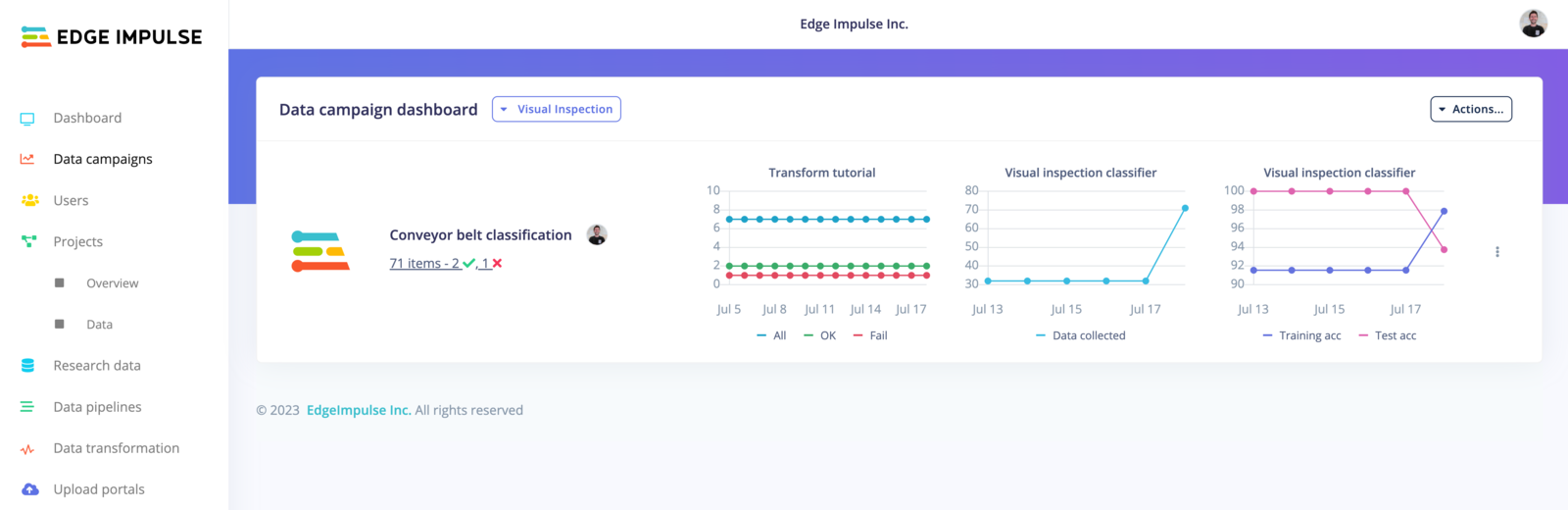
The “data campaigns” feature allows you to quickly track your experiments and your models’ development progresses. It is an overview of your pipelines where you can easily extract useful information from your datasets and correlate those metrics with your model performances.It has been primarily designed to follow clinical research data processes. In August 2023, we released this feature for every enterprise user as we see value in being able to track metrics between your datasets and your projects.
A dataset or project page shows the current state. A campaign samples that state repeatedly and plots it over time, so you can see data arriving, checklists passing, and accuracy changing.Campaigns are grouped into dashboards:
Object
What it is
Dashboard
A container for campaigns, and the thing people subscribe to. It holds the email recipients, how often they are emailed, and how many days of history the graphs show.
Campaign
One tracked effort inside a dashboard. It references the organization datasets and projects it tracks, optionally the pipelines that feed it, and the queries that define its metrics.
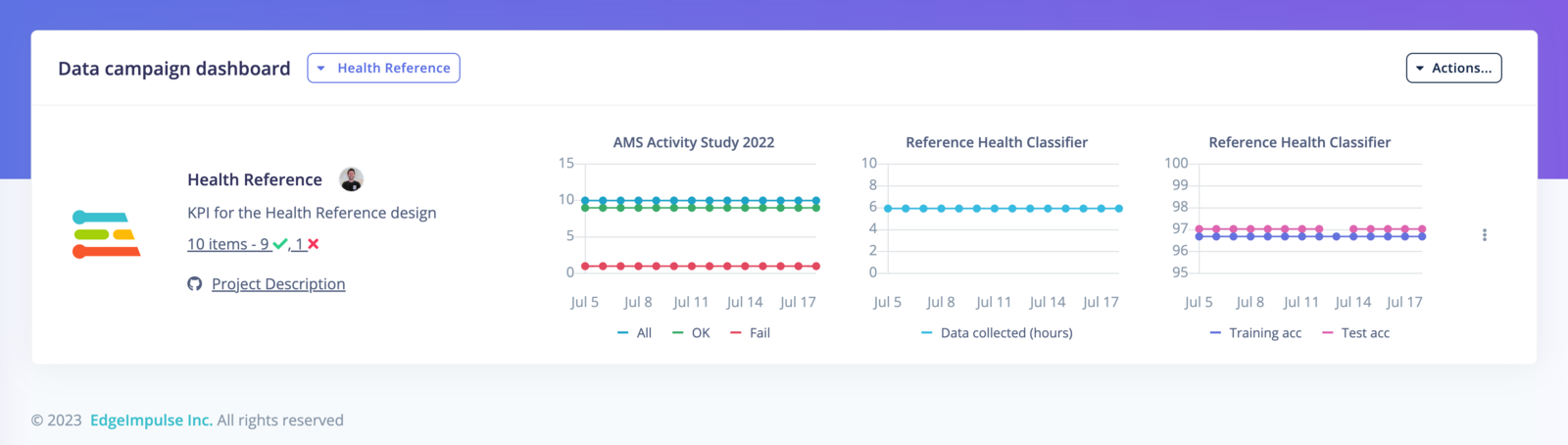
Graphs are recalculated periodically, so they can lag behind the live data. Metrics come from counts over the selected datasets, model performance from the selected projects, and any queries you define. Each query is an SQL WHERE filter over dataset metadata.A campaign also carries a description, coordinators, and links, so a collaborator can find the protocol document or repository without asking.
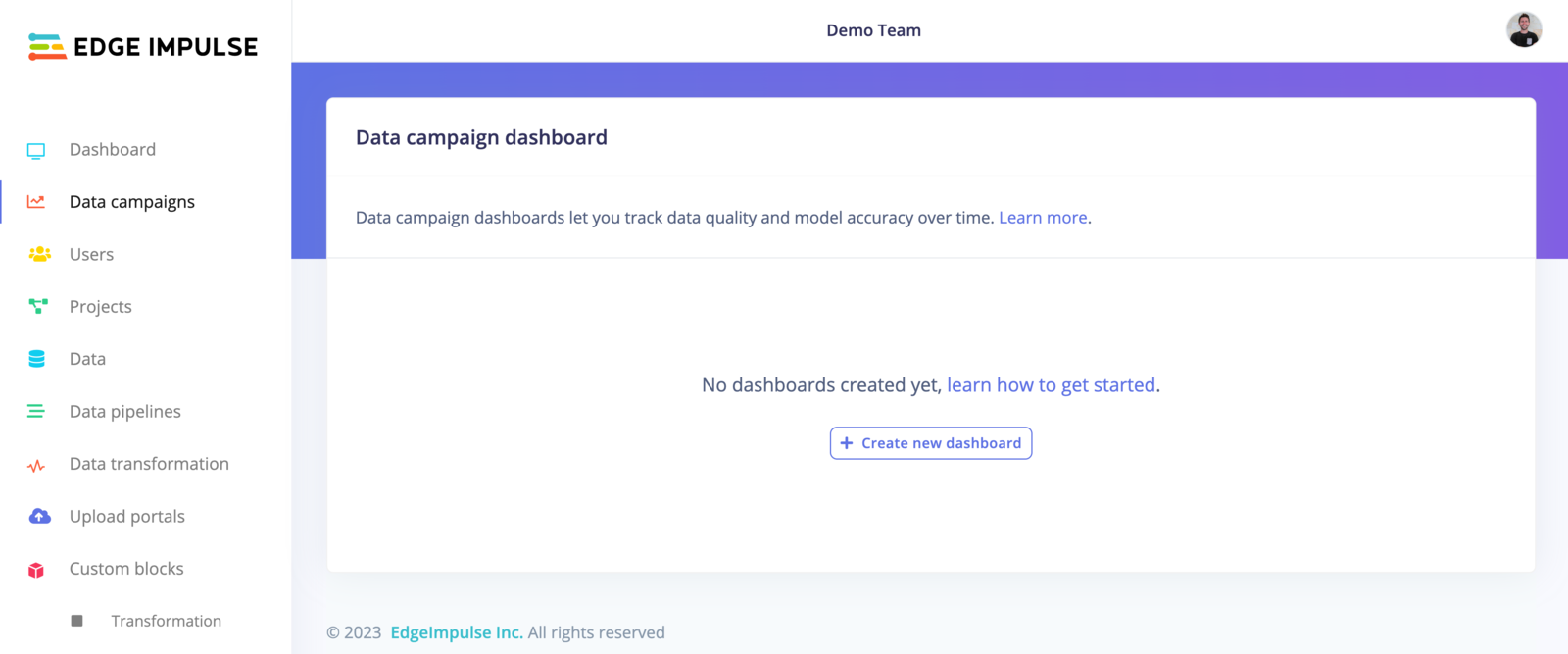
To get started, navigate to the Data campaigns tab in your organization:
Data campaigns
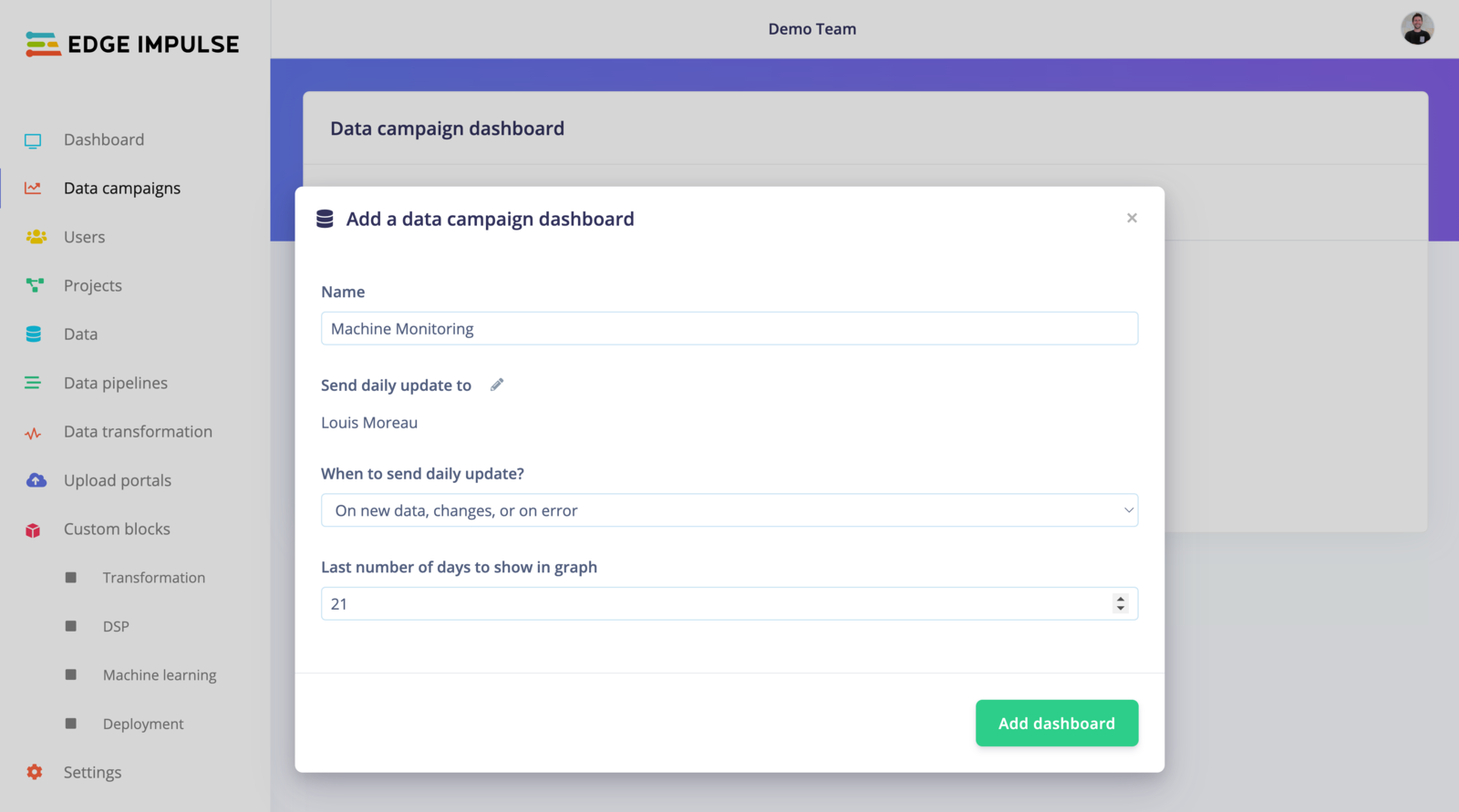
Click on + Create new dashboard.Give your dashboard a name, and select one or more collaborators to receive the daily updates by email. If you don’t want to be spammed, you can select when you want to receive these updates, either Always, On new data, changes or on error, or Never. Finally, set the last number of days shown in the graphs:
Add data campaign dashboard
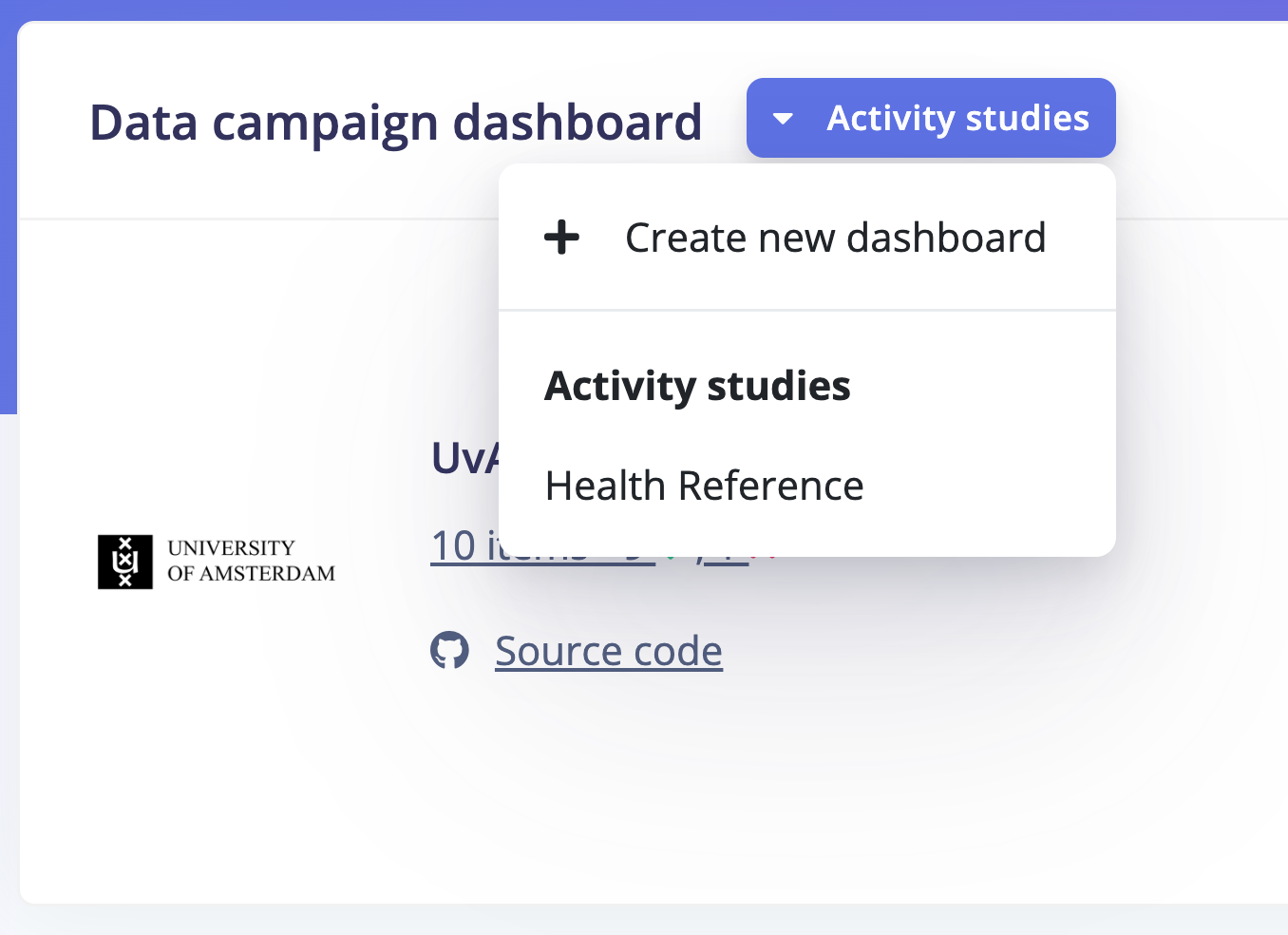
The number of days only changes what the graphs show. It doesn’t delete any data. Use a short range to see recent changes, or a long range to review the whole campaign.You can create as many dashboards as needed, simply click on + Create a new dashboard from the dropdown available under your current dashboard:
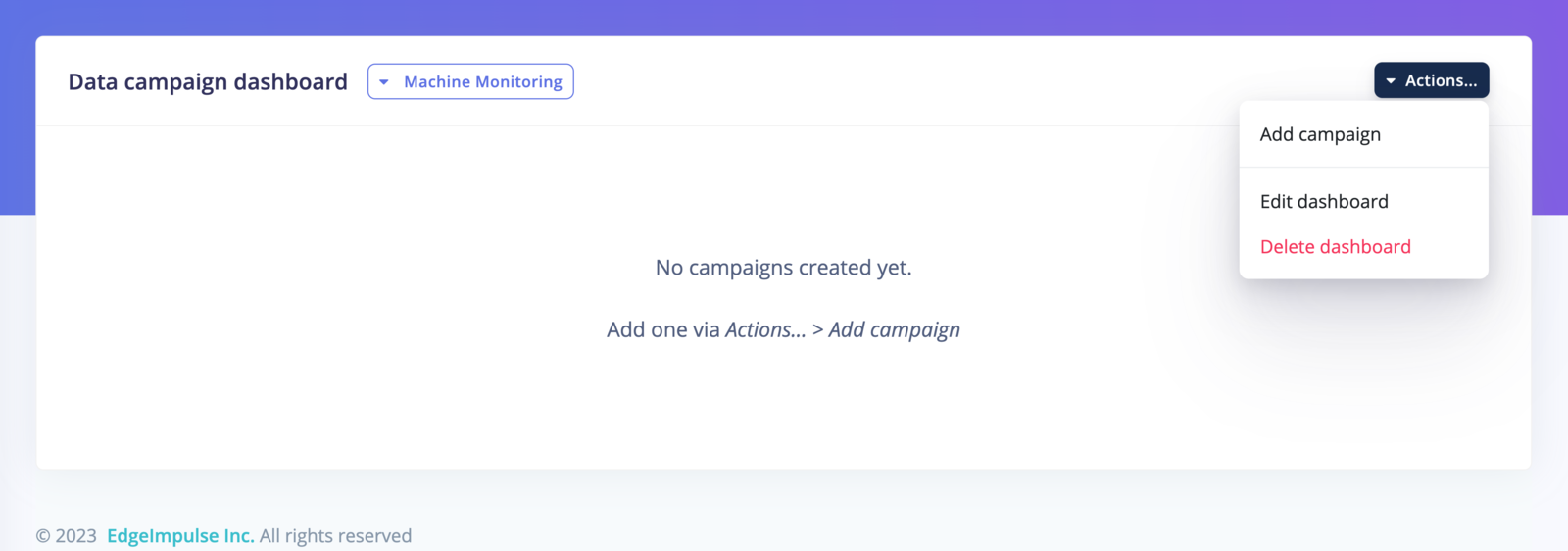
If you want to delete a dashboard, Click on Actions… -> Delete dashboard
Once your dashboard is created, you can add your custom campaigns. It’s where you will specify which metrics are important to you and your use case. Click on Actions… -> Add campaign
Add data campaign
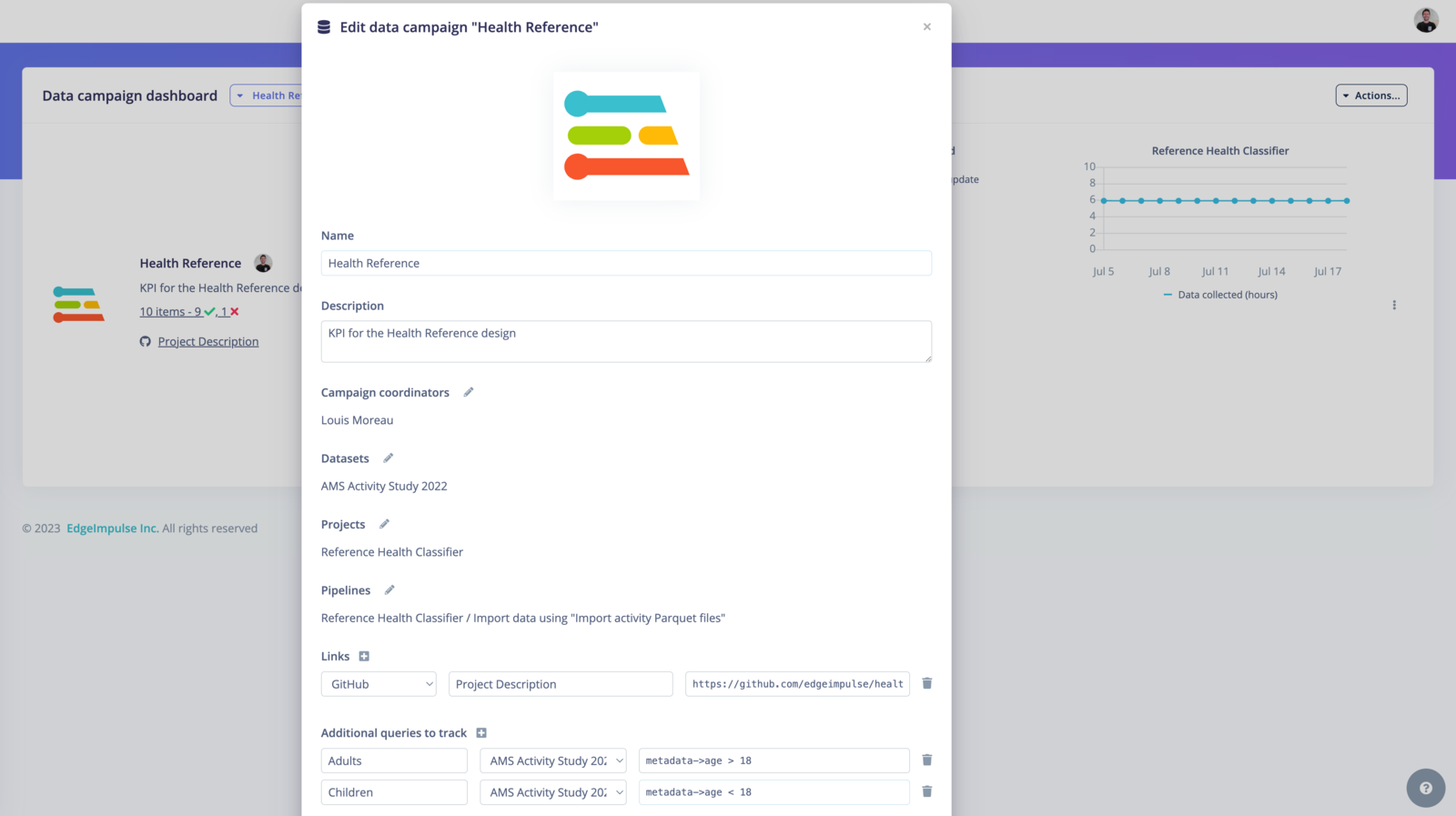
Fill the form to create your campaign:Name: Name of your data campaign.Description: Description of your data campaign.Campaign coordinators: Add the collaborators that are engaged with this campaignDatasets: Select the datasets you want to visualize in your campaign. You can add several datasets.Projects: Select the projects you want to visualize in your campaign.
You can add several projects.Pipelines: Select the pipeline that is associated with your campaign.
Note that this is for reference only, it is not displayed in your campaignLinks: Select between the link type you need. Options are Github, Spreadsheet, Text Document, Code repository, List or Folder.
Add a name and the link. This place is useful for other collaborators to have all the needed information about your project, gathered in one place under your campaign.Addition queries to track:
These queries are data filters that need to be written in the SQL WHERE format. See Querying data for more information.
For example metadata->age >= 18` will return the data samples from adult patients.
Each query plots how many data items match it over time. Write one query per group you want to follow, such as a single site, device revision, or age band, so you can see when one group stops growing.
You can then save your data campaign and it will be added to your dashboard:
{"docsConfig":{"theme":"aspen","$schema":"https://mintlify.com/docs.json","name":"Edge Impulse Documentation","description":"Where you can find all the Edge Impulse documentation, and more!","colors":{"primary":"#5f76db","light":"#5f76db","dark":"#182896"},"logo":{"light":"https://mintcdn.com/edgeimpulse/-Yjt9HB8VCOXQC8H/.assets/logos/ei-logo-light.svg?fit=max\u0026auto=format\u0026n=-Yjt9HB8VCOXQC8H\u0026q=85\u0026s=a26ac03680700105c38fa0507df4fee2","dark":"https://mintcdn.com/edgeimpulse/K7zNEaqi2bZnNjVz/.assets/logos/ei-logo-dark.svg?fit=max\u0026auto=format\u0026n=K7zNEaqi2bZnNjVz\u0026q=85\u0026s=6c5887f8e79896f1ca3c3a63d5477761"},"favicon":"https://mintcdn.com/edgeimpulse/HzwDHenmvHu0xumg/.assets/favicon.svg?fit=max\u0026auto=format\u0026n=HzwDHenmvHu0xumg\u0026q=85\u0026s=5d3672f264e068f096f0ccfeff030489","appearance":{"default":"light"},"navbar":{"links":[{"href":"https://edgeimpulse.com/","label":"Website"},{"href":"https://studio.edgeimpulse.com","label":"Login"}],"primary":{"type":"button","label":"Sign up","href":"https://edgeimpulse.com/signup"}},"footer":{"socials":{"linkedin":"https://linkedin.com/company/edgeimpulse","youtube":"https://www.youtube.com/@EdgeImpulse","x":"https://x.com/edgeimpulse"},"links":[{"header":"Policies","items":[{"label":"Responsible AI","href":"https://www.qualcomm.com/site/responsible-ai-license"},{"label":"Privacy","href":"https://www.edgeimpulse.com/legal/privacy-policy"},{"label":"Cookies","href":"https://www.qualcomm.com/site/privacy/cookies"}]},{"header":"Legal","items":[{"label":"Terms of Use","href":"https://www.qualcomm.com/site/terms-of-use"},{"label":"Accessibility","href":"https://www.qualcomm.com/accessibility"}]}]},"seo":{"metatags":{"canonical":"https://docs.edgeimpulse.com"}},"icons":{"library":"fontawesome"},"styling":{"eyebrows":"breadcrumbs","codeblocks":"system","latex":true},"contextual":{"options":["copy","view","assistant"],"display":"header"},"navigation":{"global":{"anchors":[{"anchor":"Forum","icon":"discourse","href":"https://forum.edgeimpulse.com"},{"anchor":"Discord","icon":"discord","href":"https://discord.gg/edgeimpulse"},{"anchor":"GitHub","icon":"github","href":"https://github.com/edgeimpulse"}]},"pages":[]}},"deployment":{"deploymentMetadataValue":{"subdomain":"edgeimpulse","hasAudioNarration":false,"actualSubdomain":"edgeimpulse","customDomains":["docs.edgeimpulse.com"],"gitSource":{"type":"github","owner":"edgeimpulse","repo":"documentation","deployBranch":"main","contentDirectory":"","isPrivate":true,"mountPath":"","label":""},"chroma":{"liveDeploymentHistoryId":"6aea7b41760e6072a808fb99","collectionId":"d57efdda-d220-4bdf-b2c5-5cb5dbcef73c","schemaVersion":"v3","latestBuiltDeploymentHistoryId":"6aea7b41760e6072a808fb99"},"feedback":{"thumbs":true},"entitlements":{"AI_CHAT":{"status":"ENABLED"},"REMOVE_BRANDING":{"status":"ENABLED"},"CONTEXTUAL_FEEDBACK":{"status":"ENABLED"},"CODE_SNIPPET_FEEDBACK":{"status":"ENABLED"},"WEB_MCP":{"status":"ENABLED"},"NARRATION":{"status":"ENABLED"}},"buildId":"6aea7b41760e6072a808fb99","clientVersion":"0.0.4054","searchFilterCounts":[{"language":"default","tag":"Tools","count":1305},{"language":"default","tag":"LIBRARIES","count":1279},{"language":"default","tag":"Studio Python API bindings","count":1245},{"language":"default","tag":"edgeimpulse-api","count":1244},{"language":"default","tag":"models","count":1211},{"language":"default","tag":"APIs","count":564},{"language":"default","tag":"STUDIO API ENDPOINTS","count":556},{"language":"default","tag":"Projects","count":272},{"language":"default","tag":"EXPERT NETWORK","count":211},{"language":"default","tag":"Hardware","count":123}]},"assistantConfig":{"enableStarterQuestions":true,"enableContextualStarterQuestions":true},"basePath":"","hasChatPermissions":false,"hasWebMcpPermissions":true,"toggles":[{"name":"kill-isr","enabled":true,"variant":{"name":"disabled","enabled":false,"feature_enabled":true},"impressionData":false},{"name":"agent-mintlify-slack","enabled":true,"variant":{"name":"disabled","enabled":false,"feature_enabled":true},"impressionData":false},{"name":"agent-integrations-settings","enabled":true,"variant":{"name":"disabled","enabled":false,"feature_enabled":true},"impressionData":false},{"name":"rbac-expansion","enabled":true,"variant":{"name":"disabled","enabled":false,"feature_enabled":true},"impressionData":false},{"name":"automations-pr-grouping","enabled":true,"variant":{"name":"disabled","enabled":false,"feature_enabled":true},"impressionData":false},{"name":"custom-prefix","enabled":true,"variant":{"name":"disabled","enabled":false,"feature_enabled":true},"impressionData":false},{"name":"analytics-v7","enabled":true,"variant":{"name":"disabled","enabled":false,"feature_enabled":true},"impressionData":false},{"name":"user-flows-analytics","enabled":true,"variant":{"name":"disabled","enabled":false,"feature_enabled":true},"impressionData":false},{"name":"no-publish-flow","enabled":true,"variant":{"name":"disabled","enabled":false,"feature_enabled":true},"impressionData":false},{"name":"workos-onboarding","enabled":true,"variant":{"name":"disabled","enabled":false,"feature_enabled":true},"impressionData":false},{"name":"llms-txt-v2","enabled":true,"variant":{"name":"disabled","enabled":false,"feature_enabled":true},"impressionData":false},{"name":"snapshot-serving-live","enabled":true,"variant":{"name":"disabled","enabled":false,"feature_enabled":true},"impressionData":false},{"name":"stripTemperatureMiddleware","enabled":true,"variant":{"name":"disabled","enabled":false,"feature_enabled":true},"impressionData":false},{"name":"support-platform-pylon-zendesk","enabled":true,"variant":{"name":"disabled","enabled":false,"feature_enabled":true},"impressionData":false},{"name":"snapshot-serving","enabled":true,"variant":{"name":"disabled","enabled":false,"feature_enabled":true},"impressionData":false},{"name":"instant-rollback","enabled":true,"variant":{"name":"disabled","enabled":false,"feature_enabled":true},"impressionData":false},{"name":"granular-notifications-server","enabled":true,"variant":{"name":"disabled","enabled":false,"feature_enabled":true},"impressionData":false},{"name":"granular-notifications","enabled":true,"variant":{"name":"disabled","enabled":false,"feature_enabled":true},"impressionData":false},{"name":"automations-fable","enabled":true,"variant":{"name":"disabled","enabled":false,"feature_enabled":true},"impressionData":false},{"name":"fixed-ai-action-pricing","enabled":true,"variant":{"name":"disabled","enabled":false,"feature_enabled":true},"impressionData":false},{"name":"automation-resolve-merge-conflict","enabled":true,"variant":{"name":"disabled","enabled":false,"feature_enabled":true},"impressionData":false},{"name":"scoped-publishing","enabled":true,"variant":{"name":"disabled","enabled":false,"feature_enabled":true},"impressionData":false},{"name":"mintql","enabled":true,"variant":{"name":"disabled","enabled":false,"feature_enabled":true},"impressionData":false},{"name":"page-level-analytics","enabled":true,"variant":{"name":"disabled","enabled":false,"feature_enabled":true},"impressionData":false},{"name":"editor-version-history-v2","enabled":true,"variant":{"name":"disabled","enabled":false,"feature_enabled":true},"impressionData":false},{"name":"billing-page-v2","enabled":true,"variant":{"name":"disabled","enabled":false,"feature_enabled":true},"impressionData":false},{"name":"full-page-search","enabled":true,"variant":{"name":"disabled","enabled":false,"feature_enabled":true},"impressionData":false},{"name":"workspace-projects","enabled":true,"variant":{"name":"disabled","enabled":false,"feature_enabled":true},"impressionData":false},{"name":"assistant-v5","enabled":true,"variant":{"name":"disabled","enabled":false,"feature_enabled":true},"impressionData":false},{"name":"byok-sep-25","enabled":true,"variant":{"name":"disabled","enabled":false,"feature_enabled":true},"impressionData":false},{"name":"fork-pr-previews","enabled":true,"variant":{"name":"disabled","enabled":false,"feature_enabled":true},"impressionData":false},{"name":"revalidation-jwt","enabled":true,"variant":{"name":"disabled","enabled":false,"feature_enabled":true},"impressionData":false},{"name":"vite-origin","enabled":true,"variant":{"name":"disabled","enabled":false,"feature_enabled":true},"impressionData":false},{"name":"billing-updated-9-15","enabled":true,"variant":{"name":"disabled","enabled":false,"feature_enabled":true},"impressionData":false},{"name":"workos-sso-scim","enabled":true,"variant":{"name":"disabled","enabled":false,"feature_enabled":true},"impressionData":false},{"name":"hobby-abuse-scan","enabled":true,"variant":{"name":"disabled","enabled":false,"feature_enabled":true},"impressionData":false},{"name":"dashboard-inbox","enabled":true,"variant":{"name":"disabled","enabled":false,"feature_enabled":true},"impressionData":false},{"name":"workos-signup","enabled":true,"variant":{"name":"disabled","enabled":false,"feature_enabled":true},"impressionData":false},{"name":"turbopuffer-dual-write","enabled":true,"variant":{"name":"disabled","enabled":false,"feature_enabled":true},"impressionData":false},{"name":"workos-enabled","enabled":true,"variant":{"name":"disabled","enabled":false,"feature_enabled":true},"impressionData":false},{"name":"approve-review-flow","enabled":true,"variant":{"name":"disabled","enabled":false,"feature_enabled":true},"impressionData":false},{"name":"sso-setup-deadline-banner","enabled":true,"variant":{"name":"disabled","enabled":false,"feature_enabled":true},"impressionData":false}],"googleFontsInlined":false},"customCss":[{"filePath":".styles/styles.css","content":".cookie-settings-button{color:rgb(var(--gray-800))!important;background-color:rgb(var(--gray-950)/.03)!important;border-radius:var(--rounded-xl, .75rem);font-size:.875rem!important;line-height:1.25rem!important;width:fit-content!important;align-self:flex-end!important;margin-left:auto!important}.cookie-settings-button:hover{background-color:rgb(var(--gray-950)/.1)!important}"}],"page":{"pagePath":"studio/organizations/data-campaigns","slug":"/studio/organizations/data-campaigns","pageMetadata":{"title":"Data campaigns","description":"Track dataset growth and model performance over time on shared dashboards, with scheduled email updates.","href":"/studio/organizations/data-campaigns"},"description":{"compiledSource":"\"use strict\";\nconst {jsx: _jsx} = arguments[0];\nconst {useMDXComponents: _provideComponents} = arguments[0];\nfunction _createMdxContent(props) {\n const _components = {\n p: \"p\",\n ..._provideComponents(),\n ...props.components\n };\n return _jsx(_components.p, {\n children: \"Track dataset growth and model performance over time on shared dashboards, with scheduled email updates.\"\n });\n}\nfunction MDXContent(props = {}) {\n const {wrapper: MDXLayout} = {\n ..._provideComponents(),\n ...props.components\n };\n return MDXLayout ? _jsx(MDXLayout, {\n ...props,\n children: _jsx(_createMdxContent, {\n ...props\n })\n }) : _createMdxContent(props);\n}\nreturn {\n default: MDXContent\n};\n","frontmatter":{},"scope":{}},"pageType":"default","mdx":{"mdxSource":{"compiledSource":"\"use strict\";const{Fragment:_Fragment,jsx:_jsx,jsxs:_jsxs}=arguments[0];const{useMDXComponents:_provideComponents}=arguments[0];function _createMdxContent(props){const _components={a:`a`,code:`code`,em:`em`,li:`li`,p:`p`,strong:`strong`,tbody:`tbody`,td:`td`,th:`th`,thead:`thead`,tr:`tr`,ul:`ul`,..._provideComponents(),...props.components},{Frame,Heading,Info,OptimizedImage,Table,Tip}=_components;if(!Frame)_missingMdxReference(`Frame`,true);if(!Heading)_missingMdxReference(`Heading`,true);if(!Info)_missingMdxReference(`Info`,true);if(!OptimizedImage)_missingMdxReference(`OptimizedImage`,true);if(!Table)_missingMdxReference(`Table`,true);if(!Tip)_missingMdxReference(`Tip`,true);return _jsxs(_Fragment,{children:[_jsxs(Info,{children:[_jsx(_components.p,{children:_jsx(_components.strong,{children:`Only available on the Enterprise plan`})}),_jsxs(_components.p,{children:[`This feature is only available on the Enterprise plan. Review our `,_jsx(_components.a,{href:`https://edgeimpulse.com/pricing`,children:`plans and pricing`}),` or sign up for our free `,_jsx(_components.a,{href:`https://edgeimpulse.com/expert-led-trial`,children:`expert-led trial`}),` today.`]})]}),`\n`,_jsx(_components.p,{children:`The “data campaigns” feature allows you to quickly track your experiments and your models’ development progresses. It is an overview of your pipelines where you can easily extract useful information from your datasets and correlate those metrics with your model performances.`}),`\n`,_jsx(_components.p,{children:`It has been primarily designed to follow clinical research data processes. In August 2023, we released this feature for every enterprise user as we see value in being able to track metrics between your datasets and your projects.`}),`\n`,_jsx(Frame,{caption:`Data campaigns overview`,children:_jsx(OptimizedImage,{src:`https://mintcdn.com/edgeimpulse/UMiv9oezYdq-CZ8W/.assets/images/studio-data-campaigns.png?fit=max\u0026auto=format\u0026n=UMiv9oezYdq-CZ8W\u0026q=85\u0026s=ba0c0477f71741a8b2e2fe89b2ba8adc`,alt:`Data campaigns overview page listing campaign dashboards and collection activity`,\"data-og-width\":`1600`,width:`1600`,\"data-og-height\":`520`,height:`520`,\"data-path\":`.assets/images/studio-data-campaigns.png`,\"data-optimize\":`true`,\"data-opv\":`3`,srcset:`https://mintcdn.com/edgeimpulse/UMiv9oezYdq-CZ8W/.assets/images/studio-data-campaigns.png?w=280\u0026fit=max\u0026auto=format\u0026n=UMiv9oezYdq-CZ8W\u0026q=85\u0026s=a5e6cbd265eb94b53952e3d9ba5f94ed 280w, https://mintcdn.com/edgeimpulse/UMiv9oezYdq-CZ8W/.assets/images/studio-data-campaigns.png?w=560\u0026fit=max\u0026auto=format\u0026n=UMiv9oezYdq-CZ8W\u0026q=85\u0026s=267301f6dd15ca36a8074088c95a0fdf 560w, https://mintcdn.com/edgeimpulse/UMiv9oezYdq-CZ8W/.assets/images/studio-data-campaigns.png?w=840\u0026fit=max\u0026auto=format\u0026n=UMiv9oezYdq-CZ8W\u0026q=85\u0026s=687fe34f2243b1b0268d6952236c5243 840w, https://mintcdn.com/edgeimpulse/UMiv9oezYdq-CZ8W/.assets/images/studio-data-campaigns.png?w=1100\u0026fit=max\u0026auto=format\u0026n=UMiv9oezYdq-CZ8W\u0026q=85\u0026s=994136162b998db51538330e84d4a164 1100w, https://mintcdn.com/edgeimpulse/UMiv9oezYdq-CZ8W/.assets/images/studio-data-campaigns.png?w=1650\u0026fit=max\u0026auto=format\u0026n=UMiv9oezYdq-CZ8W\u0026q=85\u0026s=6daa64d0ebae97ba8803abc78d0fd492 1650w, https://mintcdn.com/edgeimpulse/UMiv9oezYdq-CZ8W/.assets/images/studio-data-campaigns.png?w=2500\u0026fit=max\u0026auto=format\u0026n=UMiv9oezYdq-CZ8W\u0026q=85\u0026s=024d20747e9d8840ed2069572678f9b3 2500w`})}),`\n`,_jsx(Heading,{level:`2`,id:`how-data-campaigns-work`,children:`How data campaigns work`}),`\n`,_jsx(_components.p,{children:`A dataset or project page shows the current state. A campaign samples that state repeatedly and plots it over time, so you can see data arriving, checklists passing, and accuracy changing.`}),`\n`,_jsx(_components.p,{children:`Campaigns are grouped into dashboards:`}),`\n`,_jsxs(Table,{children:[_jsx(_components.thead,{children:_jsxs(_components.tr,{children:[_jsx(_components.th,{children:`Object`}),_jsx(_components.th,{children:`What it is`})]})}),_jsxs(_components.tbody,{children:[_jsxs(_components.tr,{children:[_jsx(_components.td,{children:_jsx(_components.strong,{children:`Dashboard`})}),_jsx(_components.td,{children:`A container for campaigns, and the thing people subscribe to. It holds the email recipients, how often they are emailed, and how many days of history the graphs show.`})]}),_jsxs(_components.tr,{children:[_jsx(_components.td,{children:_jsx(_components.strong,{children:`Campaign`})}),_jsx(_components.td,{children:`One tracked effort inside a dashboard. It references the organization datasets and projects it tracks, optionally the pipelines that feed it, and the queries that define its metrics.`})]})]})]}),`\n`,_jsxs(_components.p,{children:[`Graphs are recalculated periodically, so they can lag behind the live data. Metrics come from counts over the selected datasets, model performance from the selected projects, and any queries you define. Each query is an SQL `,_jsx(_components.code,{children:`WHERE`}),` filter over dataset metadata.`]}),`\n`,_jsx(_components.p,{children:`A campaign also carries a description, coordinators, and links, so a collaborator can find the protocol document or repository without asking.`}),`\n`,_jsx(Heading,{level:`2`,id:`setting-up-your-dashboard`,children:`Setting up your dashboard`}),`\n`,_jsxs(_components.p,{children:[`To get started, navigate to the `,_jsx(_components.strong,{children:`Data campaigns`}),` tab in your organization:`]}),`\n`,_jsx(Frame,{caption:`Data campaigns`,children:_jsx(OptimizedImage,{src:`https://mintcdn.com/edgeimpulse/UMiv9oezYdq-CZ8W/.assets/images/studio-data-campaigns-empty.png?fit=max\u0026auto=format\u0026n=UMiv9oezYdq-CZ8W\u0026q=85\u0026s=381ec0efb5e4ce3d366985e1961f3881`,alt:`Empty data campaigns page before adding a dashboard`,\"data-og-width\":`1600`,width:`1600`,\"data-og-height\":`667`,height:`667`,\"data-path\":`.assets/images/studio-data-campaigns-empty.png`,\"data-optimize\":`true`,\"data-opv\":`3`,srcset:`https://mintcdn.com/edgeimpulse/UMiv9oezYdq-CZ8W/.assets/images/studio-data-campaigns-empty.png?w=280\u0026fit=max\u0026auto=format\u0026n=UMiv9oezYdq-CZ8W\u0026q=85\u0026s=f8785671d83417f552c40e1d63354b32 280w, https://mintcdn.com/edgeimpulse/UMiv9oezYdq-CZ8W/.assets/images/studio-data-campaigns-empty.png?w=560\u0026fit=max\u0026auto=format\u0026n=UMiv9oezYdq-CZ8W\u0026q=85\u0026s=e154cd4d400fd3387bb9824d5876ddef 560w, https://mintcdn.com/edgeimpulse/UMiv9oezYdq-CZ8W/.assets/images/studio-data-campaigns-empty.png?w=840\u0026fit=max\u0026auto=format\u0026n=UMiv9oezYdq-CZ8W\u0026q=85\u0026s=7e48f2e47755fd80681c04694b3b8670 840w, https://mintcdn.com/edgeimpulse/UMiv9oezYdq-CZ8W/.assets/images/studio-data-campaigns-empty.png?w=1100\u0026fit=max\u0026auto=format\u0026n=UMiv9oezYdq-CZ8W\u0026q=85\u0026s=dfbd99fbe4d03b5cde2cf21bdf132454 1100w, https://mintcdn.com/edgeimpulse/UMiv9oezYdq-CZ8W/.assets/images/studio-data-campaigns-empty.png?w=1650\u0026fit=max\u0026auto=format\u0026n=UMiv9oezYdq-CZ8W\u0026q=85\u0026s=c8136a9c5ba72c8d6d99fe1884400390 1650w, https://mintcdn.com/edgeimpulse/UMiv9oezYdq-CZ8W/.assets/images/studio-data-campaigns-empty.png?w=2500\u0026fit=max\u0026auto=format\u0026n=UMiv9oezYdq-CZ8W\u0026q=85\u0026s=853b48021b721f5f32cd7579bf417608 2500w`})}),`\n`,_jsxs(_components.p,{children:[`Click on `,_jsx(_components.strong,{children:`+ Create new dashboard`}),`.`]}),`\n`,_jsxs(_components.p,{children:[`Give your dashboard a name, and select one or more collaborators to receive the daily updates by email. If you don’t want to be spammed, you can select when you want to receive these updates, either `,_jsx(_components.em,{children:`Always`}),`, `,_jsx(_components.em,{children:`On new data, changes or on error`}),`, or `,_jsx(_components.em,{children:`Never`}),`. Finally, set the last number of days shown in the graphs:`]}),`\n`,_jsx(Frame,{caption:`Add data campaign dashboard`,children:_jsx(OptimizedImage,{src:`https://mintcdn.com/edgeimpulse/UMiv9oezYdq-CZ8W/.assets/images/studio-data-campaigns-add-dashboard.png?fit=max\u0026auto=format\u0026n=UMiv9oezYdq-CZ8W\u0026q=85\u0026s=20f2a5512171a1ad0f4cfa090a0e3267`,alt:`Add data campaign dashboard dialog with name and storage options`,\"data-og-width\":`1600`,width:`1600`,\"data-og-height\":`891`,height:`891`,\"data-path\":`.assets/images/studio-data-campaigns-add-dashboard.png`,\"data-optimize\":`true`,\"data-opv\":`3`,srcset:`https://mintcdn.com/edgeimpulse/UMiv9oezYdq-CZ8W/.assets/images/studio-data-campaigns-add-dashboard.png?w=280\u0026fit=max\u0026auto=format\u0026n=UMiv9oezYdq-CZ8W\u0026q=85\u0026s=b135d13ed0506c46bfc602189bb78680 280w, https://mintcdn.com/edgeimpulse/UMiv9oezYdq-CZ8W/.assets/images/studio-data-campaigns-add-dashboard.png?w=560\u0026fit=max\u0026auto=format\u0026n=UMiv9oezYdq-CZ8W\u0026q=85\u0026s=cfc1fa0ada87115d480f2d7162c82810 560w, https://mintcdn.com/edgeimpulse/UMiv9oezYdq-CZ8W/.assets/images/studio-data-campaigns-add-dashboard.png?w=840\u0026fit=max\u0026auto=format\u0026n=UMiv9oezYdq-CZ8W\u0026q=85\u0026s=35da36c99c0823b0574b62d49fd5d8f3 840w, https://mintcdn.com/edgeimpulse/UMiv9oezYdq-CZ8W/.assets/images/studio-data-campaigns-add-dashboard.png?w=1100\u0026fit=max\u0026auto=format\u0026n=UMiv9oezYdq-CZ8W\u0026q=85\u0026s=75768a7cda86c3020e66d6d59a68dd64 1100w, https://mintcdn.com/edgeimpulse/UMiv9oezYdq-CZ8W/.assets/images/studio-data-campaigns-add-dashboard.png?w=1650\u0026fit=max\u0026auto=format\u0026n=UMiv9oezYdq-CZ8W\u0026q=85\u0026s=0d243ada2e53d116b928516e3478ec48 1650w, https://mintcdn.com/edgeimpulse/UMiv9oezYdq-CZ8W/.assets/images/studio-data-campaigns-add-dashboard.png?w=2500\u0026fit=max\u0026auto=format\u0026n=UMiv9oezYdq-CZ8W\u0026q=85\u0026s=669da88a0a3128e1550f3875cae1822e 2500w`})}),`\n`,_jsx(_components.p,{children:`The number of days only changes what the graphs show. It doesn’t delete any data. Use a short range to see recent changes, or a long range to review the whole campaign.`}),`\n`,_jsxs(_components.p,{children:[`You can create as many dashboards as needed, simply click on `,_jsx(_components.strong,{children:`+ Create a new dashboard`}),` from the dropdown available under your current dashboard:`]}),`\n`,_jsx(Frame,{children:_jsx(OptimizedImage,{src:`https://mintcdn.com/edgeimpulse/VpF_Einsy6qHCvhZ/.assets/images/data-campaign-create-second-dashboard.png?fit=max\u0026auto=format\u0026n=VpF_Einsy6qHCvhZ\u0026q=85\u0026s=422131a8a9e6c4dfa9185c126a8a8d6b`,alt:`Newly created data campaign dashboard shown in the organization interface`,\"data-og-width\":`1356`,width:`1356`,\"data-og-height\":`984`,height:`984`,\"data-path\":`.assets/images/data-campaign-create-second-dashboard.png`,\"data-optimize\":`true`,\"data-opv\":`3`,srcset:`https://mintcdn.com/edgeimpulse/VpF_Einsy6qHCvhZ/.assets/images/data-campaign-create-second-dashboard.png?w=280\u0026fit=max\u0026auto=format\u0026n=VpF_Einsy6qHCvhZ\u0026q=85\u0026s=fc96652254ee1d2f23d0778bfb42eaf9 280w, https://mintcdn.com/edgeimpulse/VpF_Einsy6qHCvhZ/.assets/images/data-campaign-create-second-dashboard.png?w=560\u0026fit=max\u0026auto=format\u0026n=VpF_Einsy6qHCvhZ\u0026q=85\u0026s=782f48533ee6a24a79ceba82e9657675 560w, https://mintcdn.com/edgeimpulse/VpF_Einsy6qHCvhZ/.assets/images/data-campaign-create-second-dashboard.png?w=840\u0026fit=max\u0026auto=format\u0026n=VpF_Einsy6qHCvhZ\u0026q=85\u0026s=e88822e4a2cf00a33d22da93117776c7 840w, https://mintcdn.com/edgeimpulse/VpF_Einsy6qHCvhZ/.assets/images/data-campaign-create-second-dashboard.png?w=1100\u0026fit=max\u0026auto=format\u0026n=VpF_Einsy6qHCvhZ\u0026q=85\u0026s=3273fe1df9f5ef835d369ceff485f43e 1100w, https://mintcdn.com/edgeimpulse/VpF_Einsy6qHCvhZ/.assets/images/data-campaign-create-second-dashboard.png?w=1650\u0026fit=max\u0026auto=format\u0026n=VpF_Einsy6qHCvhZ\u0026q=85\u0026s=98eb7e98ae5ae4cd21397f4593b1db90 1650w, https://mintcdn.com/edgeimpulse/VpF_Einsy6qHCvhZ/.assets/images/data-campaign-create-second-dashboard.png?w=2500\u0026fit=max\u0026auto=format\u0026n=VpF_Einsy6qHCvhZ\u0026q=85\u0026s=ce2a691a3731d6879a6860f28b73c890 2500w`})}),`\n`,_jsxs(_components.p,{children:[`If you want to delete a dashboard, Click on `,_jsx(_components.strong,{children:`Actions…`}),` -> `,_jsx(_components.strong,{children:`Delete dashboard`})]}),`\n`,_jsx(Heading,{level:`2`,id:`setting-up-your-campaign`,children:`Setting up your campaign`}),`\n`,_jsxs(_components.p,{children:[`Once your dashboard is created, you can add your custom campaigns. It’s where you will specify which metrics are important to you and your use case. Click on `,_jsx(_components.strong,{children:`Actions…`}),` -> `,_jsx(_components.strong,{children:`Add campaign`})]}),`\n`,_jsx(Frame,{caption:`Add data campaign`,children:_jsx(OptimizedImage,{src:`https://mintcdn.com/edgeimpulse/UMiv9oezYdq-CZ8W/.assets/images/studio-data-campaigns-add-campaign.png?fit=max\u0026auto=format\u0026n=UMiv9oezYdq-CZ8W\u0026q=85\u0026s=b507b70d8e671db35335e9e634c16bce`,alt:`Add data campaign dialog with campaign setup fields`,\"data-og-width\":`1600`,width:`1600`,\"data-og-height\":`562`,height:`562`,\"data-path\":`.assets/images/studio-data-campaigns-add-campaign.png`,\"data-optimize\":`true`,\"data-opv\":`3`,srcset:`https://mintcdn.com/edgeimpulse/UMiv9oezYdq-CZ8W/.assets/images/studio-data-campaigns-add-campaign.png?w=280\u0026fit=max\u0026auto=format\u0026n=UMiv9oezYdq-CZ8W\u0026q=85\u0026s=3808282ae45d83b8423f0c890baea29c 280w, https://mintcdn.com/edgeimpulse/UMiv9oezYdq-CZ8W/.assets/images/studio-data-campaigns-add-campaign.png?w=560\u0026fit=max\u0026auto=format\u0026n=UMiv9oezYdq-CZ8W\u0026q=85\u0026s=1f3b76adfdd6683335b460d613c09077 560w, https://mintcdn.com/edgeimpulse/UMiv9oezYdq-CZ8W/.assets/images/studio-data-campaigns-add-campaign.png?w=840\u0026fit=max\u0026auto=format\u0026n=UMiv9oezYdq-CZ8W\u0026q=85\u0026s=1ed5199e8a27ec0ac95c7918c66f3978 840w, https://mintcdn.com/edgeimpulse/UMiv9oezYdq-CZ8W/.assets/images/studio-data-campaigns-add-campaign.png?w=1100\u0026fit=max\u0026auto=format\u0026n=UMiv9oezYdq-CZ8W\u0026q=85\u0026s=5926c93d6aa417618ad29a5f25dc62da 1100w, https://mintcdn.com/edgeimpulse/UMiv9oezYdq-CZ8W/.assets/images/studio-data-campaigns-add-campaign.png?w=1650\u0026fit=max\u0026auto=format\u0026n=UMiv9oezYdq-CZ8W\u0026q=85\u0026s=1245ccbb4c3b274a43f617560d35ab25 1650w, https://mintcdn.com/edgeimpulse/UMiv9oezYdq-CZ8W/.assets/images/studio-data-campaigns-add-campaign.png?w=2500\u0026fit=max\u0026auto=format\u0026n=UMiv9oezYdq-CZ8W\u0026q=85\u0026s=8bed90622a5d6fc95279890395ec735c 2500w`})}),`\n`,_jsx(_components.p,{children:`Fill the form to create your campaign:`}),`\n`,_jsxs(_components.p,{children:[_jsx(_components.strong,{children:`Name`}),`: Name of your data campaign.`]}),`\n`,_jsxs(_components.p,{children:[_jsx(_components.strong,{children:`Description`}),`: Description of your data campaign.`]}),`\n`,_jsxs(_components.p,{children:[_jsx(_components.strong,{children:`Campaign coordinators`}),`: Add the collaborators that are engaged with this campaign`]}),`\n`,_jsxs(_components.p,{children:[_jsx(_components.strong,{children:`Datasets`}),`: Select the datasets you want to visualize in your campaign. You can add several datasets.`]}),`\n`,_jsxs(_components.p,{children:[_jsx(_components.strong,{children:`Projects`}),`: Select the projects you want to visualize in your campaign.\nYou can add several projects.`]}),`\n`,_jsxs(_components.p,{children:[_jsx(_components.strong,{children:`Pipelines`}),`: Select the pipeline that is associated with your campaign.\n`,_jsx(_components.em,{children:`Note that this is for reference only, it is not displayed in your campaign`})]}),`\n`,_jsxs(_components.p,{children:[_jsx(_components.strong,{children:`Links`}),`: Select between the link type you need. Options are Github, Spreadsheet, Text Document, Code repository, List or Folder.\nAdd a name and the link. This place is useful for other collaborators to have all the needed information about your project, gathered in one place under your campaign.`]}),`\n`,_jsxs(_components.p,{children:[_jsx(_components.strong,{children:`Addition queries to track`}),`:\nThese queries are data filters that need to be written in the SQL WHERE format. See `,_jsx(_components.a,{href:`/knowledge/guides/reference-designs/health-reference-design/querying-clinical-data`,children:`Querying data`}),` for more information.\nFor example `,_jsx(_components.code,{children:`metadata->`}),\"age >= 18` will return the data samples from adult patients.\"]}),`\n`,_jsx(Tip,{children:_jsx(_components.p,{children:`Each query plots how many data items match it over time. Write one query per group you want to follow, such as a single site, device revision, or age band, so you can see when one group stops growing.`})}),`\n`,_jsx(_components.p,{children:`You can then save your data campaign and it will be added to your dashboard:`}),`\n`,_jsx(Frame,{caption:`Create or edit data campaign`,children:_jsx(OptimizedImage,{src:`https://mintcdn.com/edgeimpulse/UMiv9oezYdq-CZ8W/.assets/images/studio-data-campaigns-edit-campaign.png?fit=max\u0026auto=format\u0026n=UMiv9oezYdq-CZ8W\u0026q=85\u0026s=5b2dd7360f084d0af925da89008d0de2`,alt:`Campaign editor with portal, folder, metadata, and labeling configuration fields`,\"data-og-width\":`1600`,width:`1600`,\"data-og-height\":`897`,height:`897`,\"data-path\":`.assets/images/studio-data-campaigns-edit-campaign.png`,\"data-optimize\":`true`,\"data-opv\":`3`,srcset:`https://mintcdn.com/edgeimpulse/UMiv9oezYdq-CZ8W/.assets/images/studio-data-campaigns-edit-campaign.png?w=280\u0026fit=max\u0026auto=format\u0026n=UMiv9oezYdq-CZ8W\u0026q=85\u0026s=89b8a2c03e19a4f6a76cc8f7e3697a60 280w, https://mintcdn.com/edgeimpulse/UMiv9oezYdq-CZ8W/.assets/images/studio-data-campaigns-edit-campaign.png?w=560\u0026fit=max\u0026auto=format\u0026n=UMiv9oezYdq-CZ8W\u0026q=85\u0026s=1ba88fa7c4805f49cb3c5ffa968d7111 560w, https://mintcdn.com/edgeimpulse/UMiv9oezYdq-CZ8W/.assets/images/studio-data-campaigns-edit-campaign.png?w=840\u0026fit=max\u0026auto=format\u0026n=UMiv9oezYdq-CZ8W\u0026q=85\u0026s=4517d118494905e0584e0940329f75b6 840w, https://mintcdn.com/edgeimpulse/UMiv9oezYdq-CZ8W/.assets/images/studio-data-campaigns-edit-campaign.png?w=1100\u0026fit=max\u0026auto=format\u0026n=UMiv9oezYdq-CZ8W\u0026q=85\u0026s=739dfbc0eb1b66a32825261dca2db772 1100w, https://mintcdn.com/edgeimpulse/UMiv9oezYdq-CZ8W/.assets/images/studio-data-campaigns-edit-campaign.png?w=1650\u0026fit=max\u0026auto=format\u0026n=UMiv9oezYdq-CZ8W\u0026q=85\u0026s=251039765d5f1d62b7b95930ab6757f2 1650w, https://mintcdn.com/edgeimpulse/UMiv9oezYdq-CZ8W/.assets/images/studio-data-campaigns-edit-campaign.png?w=2500\u0026fit=max\u0026auto=format\u0026n=UMiv9oezYdq-CZ8W\u0026q=85\u0026s=d3535d39490e08b59d48d76ca992e53c 2500w`})}),`\n`,_jsxs(_components.p,{children:[`This dashboard shows the metrics’ progress from the `,_jsx(_components.a,{href:`/knowledge/guides/reference-designs/health-reference-design`,children:`Health reference design data`})]}),`\n`,_jsx(Frame,{caption:`Create or edit data campaign`,children:_jsx(OptimizedImage,{src:`https://mintcdn.com/edgeimpulse/UMiv9oezYdq-CZ8W/.assets/images/studio-data-campaigns-overview.png?fit=max\u0026auto=format\u0026n=UMiv9oezYdq-CZ8W\u0026q=85\u0026s=a215527c5f06297b8b2e078b57da984d`,alt:`Data campaign overview with configured upload portal and collection status`,\"data-og-width\":`1600`,width:`1600`,\"data-og-height\":`454`,height:`454`,\"data-path\":`.assets/images/studio-data-campaigns-overview.png`,\"data-optimize\":`true`,\"data-opv\":`3`,srcset:`https://mintcdn.com/edgeimpulse/UMiv9oezYdq-CZ8W/.assets/images/studio-data-campaigns-overview.png?w=280\u0026fit=max\u0026auto=format\u0026n=UMiv9oezYdq-CZ8W\u0026q=85\u0026s=df5e8b8a966b0e8980e5a3ea0cdf4536 280w, https://mintcdn.com/edgeimpulse/UMiv9oezYdq-CZ8W/.assets/images/studio-data-campaigns-overview.png?w=560\u0026fit=max\u0026auto=format\u0026n=UMiv9oezYdq-CZ8W\u0026q=85\u0026s=8ba36e123ba0a3062066e4e75bbfee21 560w, https://mintcdn.com/edgeimpulse/UMiv9oezYdq-CZ8W/.assets/images/studio-data-campaigns-overview.png?w=840\u0026fit=max\u0026auto=format\u0026n=UMiv9oezYdq-CZ8W\u0026q=85\u0026s=bfbc7fe9f544f3f6d09bdb22aacbe8b2 840w, https://mintcdn.com/edgeimpulse/UMiv9oezYdq-CZ8W/.assets/images/studio-data-campaigns-overview.png?w=1100\u0026fit=max\u0026auto=format\u0026n=UMiv9oezYdq-CZ8W\u0026q=85\u0026s=2d4628bb46f18bef51fcf777f8f92f37 1100w, https://mintcdn.com/edgeimpulse/UMiv9oezYdq-CZ8W/.assets/images/studio-data-campaigns-overview.png?w=1650\u0026fit=max\u0026auto=format\u0026n=UMiv9oezYdq-CZ8W\u0026q=85\u0026s=2dcc03ffd23e46361407ca0f19aec5cc 1650w, https://mintcdn.com/edgeimpulse/UMiv9oezYdq-CZ8W/.assets/images/studio-data-campaigns-overview.png?w=2500\u0026fit=max\u0026auto=format\u0026n=UMiv9oezYdq-CZ8W\u0026q=85\u0026s=1aa2495bb63a6d0ed8f941fea0863d78 2500w`})}),`\n`,_jsxs(_components.p,{children:[`If you want to edit or delete your campaign, click on the ”`,_jsx(_components.strong,{children:`⋮`}),`” button on the right side of your campaign:`]}),`\n`,_jsx(Frame,{caption:`Edit campaign`,children:_jsx(OptimizedImage,{src:`https://mintcdn.com/edgeimpulse/VpF_Einsy6qHCvhZ/.assets/images/data-campaigns-edit-campaign.png?fit=max\u0026auto=format\u0026n=VpF_Einsy6qHCvhZ\u0026q=85\u0026s=0321ba71a1b6bc5acd10bfcb6061eec9`,alt:`Edit campaign menu for updating an existing data campaign`,\"data-og-width\":`1600`,width:`1600`,\"data-og-height\":`505`,height:`505`,\"data-path\":`.assets/images/data-campaigns-edit-campaign.png`,\"data-optimize\":`true`,\"data-opv\":`3`,srcset:`https://mintcdn.com/edgeimpulse/VpF_Einsy6qHCvhZ/.assets/images/data-campaigns-edit-campaign.png?w=280\u0026fit=max\u0026auto=format\u0026n=VpF_Einsy6qHCvhZ\u0026q=85\u0026s=519d1c4d3cb4fd8a981119cbb1e69e99 280w, https://mintcdn.com/edgeimpulse/VpF_Einsy6qHCvhZ/.assets/images/data-campaigns-edit-campaign.png?w=560\u0026fit=max\u0026auto=format\u0026n=VpF_Einsy6qHCvhZ\u0026q=85\u0026s=26fcbc21217f61d0585062237b5082f9 560w, https://mintcdn.com/edgeimpulse/VpF_Einsy6qHCvhZ/.assets/images/data-campaigns-edit-campaign.png?w=840\u0026fit=max\u0026auto=format\u0026n=VpF_Einsy6qHCvhZ\u0026q=85\u0026s=d95a671955eed5ddbb9042fa2ccf1b20 840w, https://mintcdn.com/edgeimpulse/VpF_Einsy6qHCvhZ/.assets/images/data-campaigns-edit-campaign.png?w=1100\u0026fit=max\u0026auto=format\u0026n=VpF_Einsy6qHCvhZ\u0026q=85\u0026s=6d389fe781482b16d56daad43c54426a 1100w, https://mintcdn.com/edgeimpulse/VpF_Einsy6qHCvhZ/.assets/images/data-campaigns-edit-campaign.png?w=1650\u0026fit=max\u0026auto=format\u0026n=VpF_Einsy6qHCvhZ\u0026q=85\u0026s=120aca6b7764fe3116b3f1f1b21cec3b 1650w, https://mintcdn.com/edgeimpulse/VpF_Einsy6qHCvhZ/.assets/images/data-campaigns-edit-campaign.png?w=2500\u0026fit=max\u0026auto=format\u0026n=VpF_Einsy6qHCvhZ\u0026q=85\u0026s=f804ec2626a025a4cb586e4442197e0e 2500w`})}),`\n`,_jsx(Heading,{level:`2`,id:`working-with-campaigns-programmatically`,children:`Working with campaigns programmatically`}),`\n`,_jsx(_components.p,{children:`Dashboards and campaigns can also be created and read through the API.`}),`\n`,_jsxs(Table,{children:[_jsx(_components.thead,{children:_jsxs(_components.tr,{children:[_jsx(_components.th,{children:`Task`}),_jsx(_components.th,{children:`Endpoint`})]})}),_jsxs(_components.tbody,{children:[_jsxs(_components.tr,{children:[_jsx(_components.td,{children:`List the dashboards in an organization`}),_jsx(_components.td,{children:_jsx(_components.a,{href:`/apis/studio/organizationdatacampaigns/get-data-campaign-dashboards`,children:`Get data campaign dashboards`})})]}),_jsxs(_components.tr,{children:[_jsx(_components.td,{children:`List the campaigns on a dashboard`}),_jsx(_components.td,{children:_jsx(_components.a,{href:`/apis/studio/organizationdatacampaigns/get-data-campaigns`,children:`Get data campaigns`})})]}),_jsxs(_components.tr,{children:[_jsx(_components.td,{children:`Create a campaign, including its datasets, projects, queries, and links`}),_jsx(_components.td,{children:_jsx(_components.a,{href:`/apis/studio/organizationdatacampaigns/add-a-data-campaign`,children:`Add a data campaign`})})]}),_jsxs(_components.tr,{children:[_jsx(_components.td,{children:`Read a campaign together with its computed graphs`}),_jsx(_components.td,{children:_jsx(_components.a,{href:`/apis/studio/organizationdatacampaigns/get-data-campaign`,children:`Get data campaign`})})]})]})]}),`\n`,_jsx(Heading,{level:`2`,id:`additional-resources`,children:`Additional resources`}),`\n`,_jsxs(_components.ul,{children:[`\n`,_jsx(_components.li,{children:_jsx(_components.a,{href:`/studio/organizations/data-pipelines`,children:`Data pipelines`})}),`\n`,_jsx(_components.li,{children:_jsx(_components.a,{href:`/studio/organizations/data`,children:`Organization data`})}),`\n`,_jsx(_components.li,{children:_jsx(_components.a,{href:`/knowledge/guides/reference-designs/health-reference-design`,children:`Health reference design`})}),`\n`,_jsx(_components.li,{children:_jsx(_components.a,{href:`/knowledge/guides/reference-designs/health-reference-design/querying-clinical-data`,children:`Querying clinical data`})}),`\n`]})]})}function MDXContent(props={}){const{wrapper:MDXLayout}={..._provideComponents(),...props.components};return MDXLayout?_jsx(MDXLayout,{...props,children:_jsx(_createMdxContent,{...props})}):_createMdxContent(props)}return{default:MDXContent};function _missingMdxReference(id,component){throw new Error(`Expected `+(component?`component`:`object`)+\" `\"+id+\"` to be defined: you likely forgot to import, pass, or provide it.\")}","frontmatter":{},"scope":{"codeStyling":"system","config":{},"pageMetadata":{"title":"Data campaigns","description":"Track dataset growth and model performance over time on shared dashboards, with scheduled email updates.","href":"/studio/organizations/data-campaigns"}}},"mdxSourceWithNoJs":null},"mdxExtracts":{"tableOfContents":[{"title":"How data campaigns work","slug":"how-data-campaigns-work","depth":2,"children":[]},{"title":"Setting up your dashboard","slug":"setting-up-your-dashboard","depth":2,"children":[]},{"title":"Setting up your campaign","slug":"setting-up-your-campaign","depth":2,"children":[]},{"title":"Working with campaigns programmatically","slug":"working-with-campaigns-programmatically","depth":2,"children":[]},{"title":"Additional resources","slug":"additional-resources","depth":2,"children":[]}],"codeExamples":{}},"jsLinks":["/_mintlify/custom/edgeimpulse/3a20e79a9abf6af7/.scripts/adobe-analytics.js"],"subdomain":"edgeimpulse","siteName":"Edge Impulse Documentation","title":"Data campaigns - Edge Impulse Documentation","contextualStarterQuestions":[{"_id":"6ac78d4c407b2b5b5aa392b2","deploymentId":"6888ecea7bd5ed3e5d2f677d","questionText":"What plan do I need?","status":"active","generatedBy":"contextual","path":"studio/organizations/data-campaigns","createdAt":"2026-10-08T12:32:12.858Z","updatedAt":"2026-10-08T12:32:12.858Z","__v":0},{"_id":"6ac78d4c407b2b5b5aa392b1","deploymentId":"6888ecea7bd5ed3e5d2f677d","questionText":"How do I track model performance?","status":"active","generatedBy":"contextual","path":"studio/organizations/data-campaigns","createdAt":"2026-10-08T12:32:12.858Z","updatedAt":"2026-10-08T12:32:12.858Z","__v":0},{"_id":"6ac78d4c407b2b5b5aa392b0","deploymentId":"6888ecea7bd5ed3e5d2f677d","questionText":"What are data campaigns?","status":"active","generatedBy":"contextual","path":"studio/organizations/data-campaigns","createdAt":"2026-10-08T12:32:12.858Z","updatedAt":"2026-10-08T12:32:12.858Z","__v":0}],"navMaps":{"firstHrefInVersion":{},"firstHrefInLanguage":{}},"lastModified":"2026-10-06T11:34:12.642Z","originalFileLocation":"studio/organizations/data-campaigns.mdx"},"headHtml":"\u003cscript data-mint-head>(function(){var d=document.documentElement,p=null;if(!p){try{p=localStorage.getItem(\"isDarkMode\")}catch(e){}if(p==='true')p='dark';else if(p==='false')p='light';if(p!=='light'\u0026\u0026p!=='dark'\u0026\u0026p!=='system')p=\"light\"}var r=p==='system'?(matchMedia(\"(prefers-color-scheme: dark)\").matches?'dark':'light'):p;d.classList.remove(r==='dark'?'light':'dark');d.classList.add(r);d.setAttribute(\"data-theme-preference\",p)})();\u003c/script>\u003cmeta data-mint-head name=\"description\" content=\"Track dataset growth and model performance over time on shared dashboards, with scheduled email updates.\">\u003cmeta data-mint-head name=\"application-name\" content=\"Edge Impulse Documentation\">\u003cmeta data-mint-head name=\"generator\" content=\"Mintlify\">\u003clink data-mint-head rel=\"icon\" type=\"image/png\" sizes=\"192x192\" href=\"/mintlify-assets/_mintlify/favicons/edgeimpulse/ZmtueQz3qIhQbHQ2/_generated/favicon/android-chrome-192x192.png\" media=\"(prefers-color-scheme: light)\">\u003clink data-mint-head rel=\"apple-touch-icon\" type=\"image/png\" sizes=\"180x180\" href=\"/mintlify-assets/_mintlify/favicons/edgeimpulse/ZmtueQz3qIhQbHQ2/_generated/favicon/apple-touch-icon.png\">\u003clink data-mint-head rel=\"icon\" type=\"image/png\" sizes=\"16x16\" href=\"/mintlify-assets/_mintlify/favicons/edgeimpulse/ZmtueQz3qIhQbHQ2/_generated/favicon/favicon-16x16.png\" media=\"(prefers-color-scheme: light)\">\u003clink data-mint-head rel=\"icon\" type=\"image/png\" sizes=\"32x32\" href=\"/mintlify-assets/_mintlify/favicons/edgeimpulse/ZmtueQz3qIhQbHQ2/_generated/favicon/favicon-32x32.png\" media=\"(prefers-color-scheme: light)\">\u003clink data-mint-head rel=\"shortcut icon\" type=\"image/x-icon\" href=\"/mintlify-assets/_mintlify/favicons/edgeimpulse/ZmtueQz3qIhQbHQ2/_generated/favicon/favicon.ico\" media=\"(prefers-color-scheme: light)\">\u003clink data-mint-head rel=\"icon\" type=\"image/png\" sizes=\"192x192\" href=\"/mintlify-assets/_mintlify/favicons/edgeimpulse/ZmtueQz3qIhQbHQ2/_generated/favicon-dark/android-chrome-192x192.png\" media=\"(prefers-color-scheme: dark)\">\u003clink data-mint-head rel=\"icon\" type=\"image/png\" sizes=\"16x16\" href=\"/mintlify-assets/_mintlify/favicons/edgeimpulse/ZmtueQz3qIhQbHQ2/_generated/favicon-dark/favicon-16x16.png\" media=\"(prefers-color-scheme: dark)\">\u003clink data-mint-head rel=\"icon\" type=\"image/png\" sizes=\"32x32\" href=\"/mintlify-assets/_mintlify/favicons/edgeimpulse/ZmtueQz3qIhQbHQ2/_generated/favicon-dark/favicon-32x32.png\" media=\"(prefers-color-scheme: dark)\">\u003clink data-mint-head rel=\"shortcut icon\" type=\"image/x-icon\" href=\"/mintlify-assets/_mintlify/favicons/edgeimpulse/ZmtueQz3qIhQbHQ2/_generated/favicon-dark/favicon.ico\" media=\"(prefers-color-scheme: dark)\">\u003cmeta data-mint-head property=\"og:title\" content=\"Data campaigns - Edge Impulse Documentation\">\u003cmeta data-mint-head property=\"og:description\" content=\"Track dataset growth and model performance over time on shared dashboards, with scheduled email updates.\">\u003cmeta data-mint-head property=\"og:site_name\" content=\"Edge Impulse Documentation\">\u003cmeta data-mint-head property=\"og:url\" content=\"https://docs.edgeimpulse.com/studio/organizations/data-campaigns\">\u003cmeta data-mint-head property=\"og:type\" content=\"website\">\u003cmeta data-mint-head property=\"og:image\" content=\"https://edgeimpulse.mintlify.app/_mintlify/api/og/v2?division=ORGANIZATIONS\u0026amp;title=Data+campaigns\u0026amp;description=Track+dataset+growth+and+model+performance+over+time+on+shared+dashboards%2C+with+scheduled+email+updates.\u0026amp;theme=c0871bc4d614d2e3b7bd2b2d\u0026amp;signature=41f8ff2f7e3418f3caf6bf793f2522081450ce2f9be3c59a856288ed77c474d5\">\u003cmeta data-mint-head property=\"og:image:width\" content=\"1200\">\u003cmeta data-mint-head property=\"og:image:height\" content=\"630\">\u003cmeta data-mint-head name=\"twitter:card\" content=\"summary_large_image\">\u003cmeta data-mint-head name=\"twitter:title\" content=\"Data campaigns - Edge Impulse Documentation\">\u003cmeta data-mint-head name=\"twitter:description\" content=\"Track dataset growth and model performance over time on shared dashboards, with scheduled email updates.\">\u003cmeta data-mint-head name=\"twitter:image\" content=\"https://edgeimpulse.mintlify.app/_mintlify/api/og/v2?division=ORGANIZATIONS\u0026amp;title=Data+campaigns\u0026amp;description=Track+dataset+growth+and+model+performance+over+time+on+shared+dashboards%2C+with+scheduled+email+updates.\u0026amp;theme=c0871bc4d614d2e3b7bd2b2d\u0026amp;signature=41f8ff2f7e3418f3caf6bf793f2522081450ce2f9be3c59a856288ed77c474d5\">\u003cmeta data-mint-head name=\"twitter:image:width\" content=\"1200\">\u003cmeta data-mint-head name=\"twitter:image:height\" content=\"630\">\u003cmeta data-mint-head name=\"msapplication-config\" content=\"/mintlify-assets/_mintlify/favicons/edgeimpulse/ZmtueQz3qIhQbHQ2/_generated/favicon/browserconfig.xml\">\u003cmeta data-mint-head name=\"apple-mobile-web-app-title\" content=\"Edge Impulse Documentation\">\u003cmeta data-mint-head name=\"msapplication-TileColor\" content=\"#5f76db\">\u003clink data-mint-head rel=\"canonical\" href=\"https://docs.edgeimpulse.com/studio/organizations/data-campaigns\">\u003clink data-mint-head rel=\"alternate\" type=\"application/xml\" href=\"/sitemap.xml\">\u003clink data-mint-head rel=\"alternate\" type=\"text/markdown\" href=\"/studio/organizations/data-campaigns.md\">\u003cscript data-mint-head type=\"application/ld+json\">{\"@context\":\"https://schema.org\",\"@graph\":[{\"@type\":\"Organization\",\"@id\":\"https://docs.edgeimpulse.com/#organization\",\"name\":\"Edge Impulse Documentation\",\"url\":\"https://docs.edgeimpulse.com\",\"logo\":{\"@type\":\"ImageObject\",\"url\":\"https://mintcdn.com/edgeimpulse/-Yjt9HB8VCOXQC8H/.assets/logos/ei-logo-light.svg?fit=max\u0026auto=format\u0026n=-Yjt9HB8VCOXQC8H\u0026q=85\u0026s=a26ac03680700105c38fa0507df4fee2\"}},{\"@type\":\"WebSite\",\"@id\":\"https://docs.edgeimpulse.com#website\",\"name\":\"Edge Impulse Documentation\",\"url\":\"https://docs.edgeimpulse.com\",\"publisher\":{\"@id\":\"https://docs.edgeimpulse.com/#organization\"}},{\"@type\":\"WebPage\",\"@id\":\"https://docs.edgeimpulse.com/studio/organizations/data-campaigns#webpage\",\"url\":\"https://docs.edgeimpulse.com/studio/organizations/data-campaigns\",\"name\":\"Data campaigns\",\"description\":\"Track dataset growth and model performance over time on shared dashboards, with scheduled email updates.\",\"dateModified\":\"2026-10-06T11:34:12.642Z\",\"isPartOf\":{\"@id\":\"https://docs.edgeimpulse.com#website\"},\"breadcrumb\":{\"@id\":\"https://docs.edgeimpulse.com/studio/organizations/data-campaigns#breadcrumb\"}},{\"@type\":\"BreadcrumbList\",\"@id\":\"https://docs.edgeimpulse.com/studio/organizations/data-campaigns#breadcrumb\",\"itemListElement\":[{\"@type\":\"ListItem\",\"position\":1,\"name\":\"ORGANIZATIONS\",\"item\":\"https://docs.edgeimpulse.com/studio/organizations/dashboard\"},{\"@type\":\"ListItem\",\"position\":2,\"name\":\"Data campaigns\",\"item\":\"https://docs.edgeimpulse.com/studio/organizations/data-campaigns\"}]},{\"@type\":[\"Article\",\"TechArticle\"],\"@id\":\"https://docs.edgeimpulse.com/studio/organizations/data-campaigns#article\",\"headline\":\"Data campaigns\",\"name\":\"Data campaigns\",\"description\":\"Track dataset growth and model performance over time on shared dashboards, with scheduled email updates.\",\"url\":\"https://docs.edgeimpulse.com/studio/organizations/data-campaigns\",\"mainEntityOfPage\":{\"@id\":\"https://docs.edgeimpulse.com/studio/organizations/data-campaigns#webpage\"},\"dateModified\":\"2026-10-06T11:34:12.642Z\",\"publisher\":{\"@id\":\"https://docs.edgeimpulse.com/#organization\"},\"isPartOf\":{\"@id\":\"https://docs.edgeimpulse.com#website\"}}]}\u003c/script>","siteName":"Edge Impulse Documentation","nav":{"global":{"anchors":[{"anchor":"Forum","icon":"discourse","href":"https://forum.edgeimpulse.com"},{"anchor":"Discord","icon":"discord","href":"https://discord.gg/edgeimpulse"},{"anchor":"GitHub","icon":"github","href":"https://github.com/edgeimpulse"}]},"tabs":[{"tab":"Knowledge","pages":[{"title":"Knowledge","href":""}]},{"tab":"Studio","groups":[{"group":"OVERVIEW","icon":"map","pages":[{"title":"Studio","href":"/studio"},{"title":"Account settings","sidebarTitle":"Account settings","href":"/studio/account-settings"}]},{"group":"PROJECTS","icon":"folder-tree","pages":[{"group":"Dashboard","pages":[{"title":"Dashboard","sidebarTitle":"Overview","href":"/studio/projects/dashboard"},{"title":"API keys","href":"/studio/projects/dashboard/api-keys"},{"title":"Target device","href":"/studio/projects/dashboard/target-device"},{"title":"Bring your own model (BYOM)","href":"/studio/projects/dashboard/byom"}]},{"title":"Devices","href":"/studio/projects/devices"},{"group":"Data acquisition","pages":[{"title":"Data acquisition","sidebarTitle":"Overview","href":"/studio/projects/data-acquisition"},{"group":"Dataset","pages":[{"title":"Dataset","sidebarTitle":"Overview","href":"/studio/projects/data-acquisition/dataset"},{"title":"Uploader","href":"/studio/projects/data-acquisition/dataset/uploader"},{"title":"Define dataset split","sidebarTitle":"Splits","href":"/studio/projects/data-acquisition/dataset/splits"},{"title":"Metadata","href":"/studio/projects/data-acquisition/dataset/metadata"},{"title":"Multi-label data","href":"/studio/projects/data-acquisition/dataset/multi-label"},{"title":"Tabular data","href":"/studio/projects/data-acquisition/dataset/tabular-data"},{"title":"Advanced dataset settings","sidebarTitle":"Advanced settings","href":"/studio/projects/data-acquisition/dataset/advanced-settings"}]},{"title":"Data explorer","href":"/studio/projects/data-acquisition/data-explorer"},{"title":"Data sources","href":"/studio/projects/data-acquisition/data-sources"},{"title":"Synthetic data","href":"/studio/projects/data-acquisition/synthetic-data"},{"title":"Labeling queue","href":"/studio/projects/data-acquisition/labeling-queue"},{"title":"AI labeling","href":"/studio/projects/data-acquisition/ai-labeling"},{"title":"CSV Wizard","href":"/studio/projects/data-acquisition/csv-wizard"}]},{"title":"Experiments","href":"/studio/projects/experiments"},{"group":"EON Tuner","pages":[{"title":"EON Tuner","sidebarTitle":"Overview","href":"/studio/projects/eon-tuner"},{"title":"Search space","href":"/studio/projects/eon-tuner/search-space"}]},{"title":"Impulse design","href":"/studio/projects/impulse-design"},{"group":"Processing blocks","pages":[{"title":"Processing blocks","sidebarTitle":"Overview","href":"/studio/projects/processing-blocks"},{"title":"Feature explorer","href":"/studio/projects/processing-blocks/feature-explorer"},{"group":"Blocks","pages":[{"title":"Audio MFCC","href":"/studio/projects/processing-blocks/blocks/audio-mfcc"},{"title":"Audio MFE","href":"/studio/projects/processing-blocks/blocks/audio-mfe"},{"title":"Audio Syntiant","href":"/studio/projects/processing-blocks/blocks/audio-syntiant"},{"title":"EEG","href":"/studio/projects/processing-blocks/blocks/eeg"},{"title":"Flatten","href":"/studio/projects/processing-blocks/blocks/flatten"},{"title":"HR/HRV","href":"/studio/projects/processing-blocks/blocks/hr-hrv"},{"title":"Image","href":"/studio/projects/processing-blocks/blocks/image"},{"title":"IMU Syntiant","href":"/studio/projects/processing-blocks/blocks/imu-syntiant"},{"title":"Raw data","href":"/studio/projects/processing-blocks/blocks/raw-data"},{"title":"Spectral analysis","href":"/studio/projects/processing-blocks/blocks/spectral-analysis"},{"title":"Spectrogram","href":"/studio/projects/processing-blocks/blocks/spectrogram"},{"title":"Custom processing blocks","href":"/studio/organizations/custom-blocks/custom-processing-blocks"}]}]},{"group":"Learning blocks","pages":[{"title":"Learning blocks","sidebarTitle":"Overview","href":"/studio/projects/learning-blocks"},{"title":"Expert mode","href":"/studio/projects/learning-blocks/expert-mode"},{"title":"Training graphs","href":"/studio/projects/learning-blocks/training-graphs"},{"group":"Blocks","pages":[{"title":"Anomaly detection","href":"/studio/projects/learning-blocks/blocks/anomaly-detection-custom"},{"title":"Anomaly detection (GMM)","href":"/studio/projects/learning-blocks/blocks/anomaly-detection-gmm"},{"title":"Anomaly detection (K-means)","href":"/studio/projects/learning-blocks/blocks/anomaly-detection-k-means"},{"title":"Classification","href":"/studio/projects/learning-blocks/blocks/classification"},{"title":"Classical ML","href":"/studio/projects/learning-blocks/blocks/classical-ml"},{"group":"Object detection","pages":[{"title":"Object detection","sidebarTitle":"Overview","href":"/studio/projects/learning-blocks/blocks/object-detection"},{"title":"YOLO-Pro","href":"/studio/projects/learning-blocks/blocks/object-detection/yolo-pro"},{"title":"FOMO","href":"/studio/projects/learning-blocks/blocks/object-detection/fomo"},{"title":"MobileNetV2 SSD FPN","href":"/studio/projects/learning-blocks/blocks/object-detection/mobilenetv2-ssd-fpn"}]},{"title":"Regression","href":"/studio/projects/learning-blocks/blocks/regression"},{"title":"Transfer learning (images)","href":"/studio/projects/learning-blocks/blocks/transfer-learning-images"},{"title":"Transfer learning (keyword spotting)","href":"/studio/projects/learning-blocks/blocks/transfer-learning-keyword"},{"title":"Visual anomaly detection (FOMO-AD)","href":"/studio/projects/learning-blocks/blocks/visual-anomaly-detection-fomo-ad"},{"title":"Custom learning blocks","href":"/studio/organizations/custom-blocks/custom-learning-blocks"},{"title":"NVIDIA TAO","tag":"deprecated","href":"/studio/projects/learning-blocks/blocks/nvidia-tao"}]}]},{"title":"Retrain model","href":"/studio/projects/retrain-model"},{"title":"Live classification","href":"/studio/projects/live-classification"},{"title":"Model testing","href":"/studio/projects/model-testing"},{"title":"Performance calibration","href":"/studio/projects/performance-calibration"},{"group":"Post-processing","pages":[{"title":"Object tracking","href":"/studio/projects/post-processing/object-tracking"}]},{"group":"Deployment","pages":[{"title":"Deployment","sidebarTitle":"Overview","href":"/studio/projects/deployment"},{"title":"EON Compiler","href":"/studio/projects/deployment/eon-compiler"},{"title":"EON Operator Matrix (TensorFlow 2.19)","sidebarTitle":" Operator matrix (2.19)","mode":"wide","href":"/studio/projects/deployment/eon-compiler-operator-matrix-2-19"},{"title":"Custom deployment blocks","href":"/studio/organizations/custom-blocks/custom-deployment-blocks"},{"title":"Multi-project deployment","href":"/studio/organizations/multi-project-deployment"}]},{"title":"Versioning","href":"/studio/projects/versioning"}]},{"group":"ORGANIZATIONS","icon":"building","pages":[{"title":"Dashboard","description":"Monitor organization usage, data, projects, campaigns, blocks, and members from the organization dashboard.","href":"/studio/organizations/dashboard"},{"title":"Data campaigns","href":"/studio/organizations/data-campaigns"},{"title":"Users","description":"Understand organization roles and compare the permissions available to Admins, Members, and Guests.","href":"/studio/organizations/users"},{"title":"Projects","href":"/studio/organizations/projects"},{"title":"Multi-project deployment","href":"/studio/organizations/multi-project-deployment"},{"group":"Data","pages":[{"title":"Data","sidebarTitle":"Overview","href":"/studio/organizations/data"},{"title":"Cloud data storage","href":"/studio/organizations/data/cloud-data-storage"}]},{"title":"Data pipelines","href":"/studio/organizations/data-pipelines"},{"title":"Data transformation","href":"/studio/organizations/data-transformation"},{"group":"Transformation blocks","pages":[{"title":"Transformation blocks","sidebarTitle":"Overview","href":"/studio/organizations/transformation-blocks"},{"group":"Blocks","pages":[{"title":"Time-series data augmentation","href":"/studio/organizations/transformation-blocks/blocks/time-series-data-augmentation"}]}]},{"title":"Upload portals","href":"/studio/organizations/upload-portals"},{"group":"Custom blocks","pages":[{"title":"Custom blocks","sidebarTitle":"Overview","href":"/studio/organizations/custom-blocks"},{"title":"Custom AI labeling blocks","href":"/studio/organizations/custom-blocks/custom-ai-labeling-blocks"},{"title":"Custom deployment blocks","href":"/studio/organizations/custom-blocks/custom-deployment-blocks"},{"title":"Custom learning blocks","href":"/studio/organizations/custom-blocks/custom-learning-blocks"},{"title":"Custom processing blocks","href":"/studio/organizations/custom-blocks/custom-processing-blocks"},{"title":"Custom synthetic data blocks","href":"/studio/organizations/custom-blocks/custom-synthetic-data-blocks"},{"title":"Custom transformation blocks","href":"/studio/organizations/custom-blocks/custom-transformation-blocks"}]},{"title":"Secrets","href":"/studio/organizations/secrets"}]}]},{"tab":"Hardware","pages":[{"title":"Hardware","href":"/hardware"}]},{"tab":"Tools","pages":[{"title":"Tools","href":"/tools"}]},{"tab":"APIs","pages":[{"title":"APIs","href":"/apis"}]},{"tab":"Tutorials","pages":[{"title":"Tutorials","href":"/tutorials"}]},{"tab":"Projects","pages":[{"title":"Projects","href":"/projects"}]},{"tab":"Datasets","pages":[{"title":"Datasets","href":"/datasets"}]}]},"basePath":"","title":"Data campaigns - Edge Impulse Documentation","buildId":"dpl_345ReqzYaAjzS9QpeJemsKdb7KDj","deploymentId":"dpl_345ReqzYaAjzS9QpeJemsKdb7KDj","dynamics":["07c022d89b","a74be98ba7"],"chunks":["Frame-PS-3COT9.js","DynamicMarkdown-BcnBltEQ.js","zoom-image-lightbox-B4-wUcHm.js","lightbox-handle-r17bVUz3.js"]}