Create and manage organization custom blocks for labeling, processing, learning, transformation, deployment, and synthetic data workflows.
Much functionality in Edge Impulse is based on the concept of blocks. There are existing blocks built into the platform to achieve dedicated tasks. If these pre-built blocks do not fit your needs, you can edit existing blocks or develop from scratch to create custom blocks that extend the capabilities of Edge Impulse. These include:
The sections below provide an overview of custom blocks. The details for each specific type of block can be found on its own documentation page linked above.
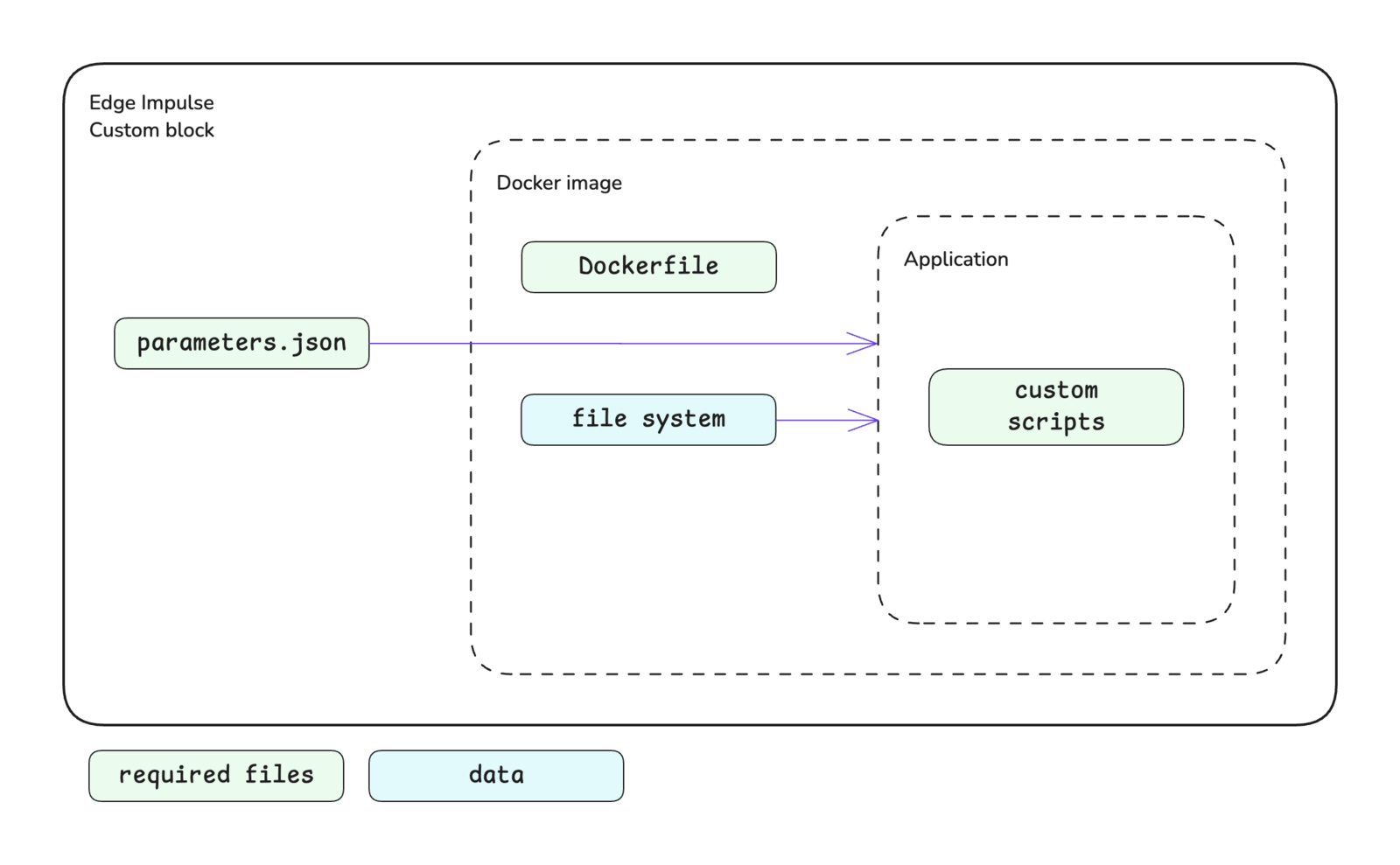
A block in Edge Impulse encapsulates a Docker image and provides information to the container when it is run. Different parameters, environment variables, and data will be passed in and different volumes will be mounted depending on the type of block.The basic structure of a block is shown below. At a minimum, a custom block consists of a directory containing your scripts, a Dockerfile, and a parameters.json file. Block specific structures are shown in their respective documentation.
The Docker container executes the scripts that you have written for your custom block. At Edge Impulse, block scripts are mostly written in Python, Javascript/Typescript, or Bash. However, these scripts can be written in any language that you are comfortable with.The initial script that you would like to be executed is defined in the Dockerfile as the ENTRYPOINT for the image.
Do not set theWORKDIRargument to/home or /dataThe /home and /data directory paths are used by Edge Impulse. Therefore, if you set the working directory for your container to this path, your files will be overwritten and rendered inaccessible. You will notice in most examples from Edge Impulse, the argument for the WORKDIR instruction is set to /app.
Use theENTRYPOINTinstructionIt is important to set the ENTRYPOINT instruction at the end of your Dockerfile to specify the default executable for the container. This instruction is used to turn a container into a standalone executable and blocks in Edge Impulse have been designed with this in mind.Do not use the RUN or CMD instructions to set the default executable. The RUN instruction is not meant for this purpose (it’s meant for building layers of an image) and the CMD instruction is not what Edge Impulse expects.
The Dockerfile is the instruction set for building the Docker image that will be run as a container in your custom block. The documentation for each type of custom block contains links to GitHub repositories for block examples, which each contain a Dockerfile. Referencing these is a great starting point when developing your own Dockerfile.In general, the argument you define as the ENTRYPOINT in your Dockerfile will be your custom script. For processing blocks, however, this will be an HTTP server. In this case, you will also need to expose the port for your server using the EXPOSE instruction.If you want to leverage GPU compute for your custom learning blocks, you will need to make sure to install the CUDA packages. You can refer to the example-custom-ml-keras repository to see an example Dockerfile that installs these packages.When running in Edge Impulse, processing and learning block containers do not have network access. Make sure you don’t download dependencies while running these containers, only when building the images.
A parameters.json file is to be included at the root of your custom block directory. This file describes the block itself and identifies the parameter items that will be exposed for configuration in Studio and, in turn, passed to the script you defined in your Dockerfile as the ENTRYPOINT. See parameters.json for more details.In most cases, the parameter items defined in your parameters.json file are passed to your script as command line arguments. For example, a parameter named custom-param-one with an associated value will be passed to your script as --custom-param-one <value>.Processing blocks are handled differently. In the case of processing blocks, parameter items are passed as properties in the body of an HTTP request. In this case, a parameter named custom-param-one with an associated value will be passed to the function generating features in your script as an argument named custom_param_one. Notice the dashes have been converted to underscores.One additional note in regards to how parameter items are passed is that items of the type secret will be passed as environment variables instead of command line arguments.Parameter types are enforced and validation is performed automatically when values are being entered in Studio.
The first steps to developing a custom block are to write your scripts and Dockerfile. Once those are completed, you can initialize the block, test it locally, and push it to Edge Impulse using the edge-impulse-blocks tool in the Edge Impulse CLI.
From within your custom block directory, run the edge-impulse-blocks init command and follow the prompts to initialize your block. This will do two things:
Create an .ei-block-config file that associates the block with your organization
Create a parameters.json file (if one does not already exist in your custom block directory)
After the parameters.json file is created, you will want to take a look at it and make modifications as necessary. The CLI creates a basic file for you and you may want to include additional metadata and parameter items.
There are several levels of testing locally that you can do while developing your custom block:
Calling your script directly, passing it any required environment variables and arguments
Building the Docker image and running the container directly, passing it any required environment variables and arguments
Using the blocks runner tool in the Edge Impulse CLI to test the complete block
To use the blocks runner tool in the Edge Impulse CLI, run the edge-impulse-blocks runner command from within your custom block directory and follow the prompts to test your block locally. See Block runner.Refer to the documentation for your type of custom block for additional details about testing locally.
Custom learning blocks can be pushed to a developer profileUnlike all other types of custom blocks, a custom learning block can be pushed to a developer profile (non-Enterprise plan account).
After initializing and testing your custom block, you can push it to Edge Impulse to make it available for use by everyone in your organization.From within your custom block directory, run the edge-impulse-blocks push command and follow the prompts to push your block to Edge Impulse.Once pushed successfully, your block will appear in your organization or, if it is a custom learning block and you are not on the Enterprise plan, in your developer profile. See Editing a custom block in Studio for images showing each block type after being pushed to Edge Impulse.
If at some point you need to change configuration settings for your block that aren’t being shown when you run the edge-impulse-blocks commands, say to download data from a different project with the runner, you can execute any of the respective commands with the --clean flag.
If you have previously created a Docker image for a custom block and are hosting it on Docker Hub, you can create a custom block that uses this image.To do so, go to your organization and select the item in the left sidebar menu for the type of custom block you would like to create. On that custom block page, select the + Add new <block-type> block button (or select an existing block to edit). In the modal that pops up, configure your block as desired and in the Docker container field enter the details for your image in the username/image:tag format.
After successfully pushing your custom block to Edge Impulse you can edit it from within Studio.
AI labeling
Deployment
Learning
Processing
Synthetic data
Transformation
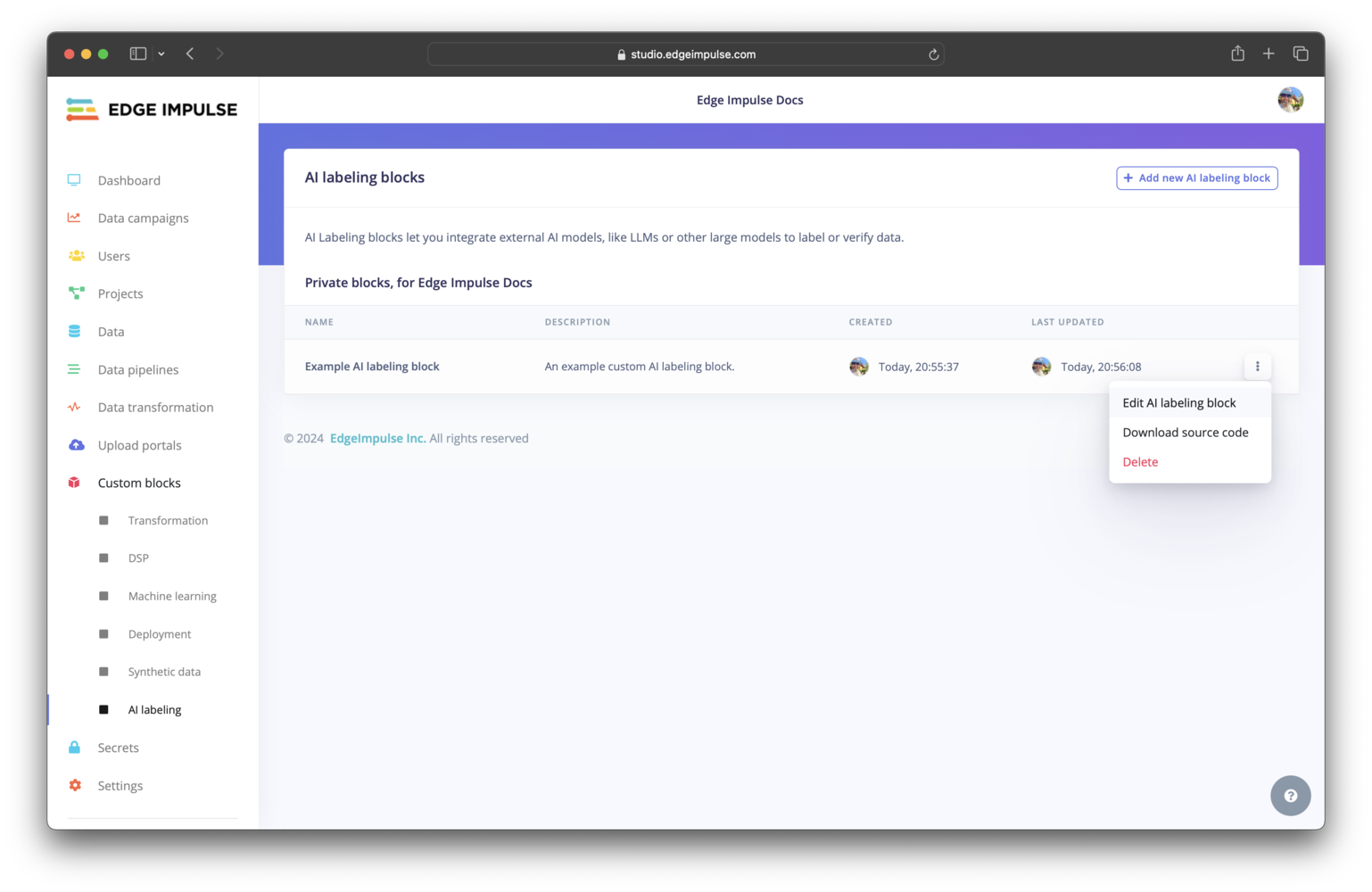
Click on AI labeling under Custom blocks. You should find your custom AI labeling block listed here. To view the configuration settings for your block and edit them, you can click on the three dots and select Edit AI labeling block.
Custom AI labeling block pushed to an organization
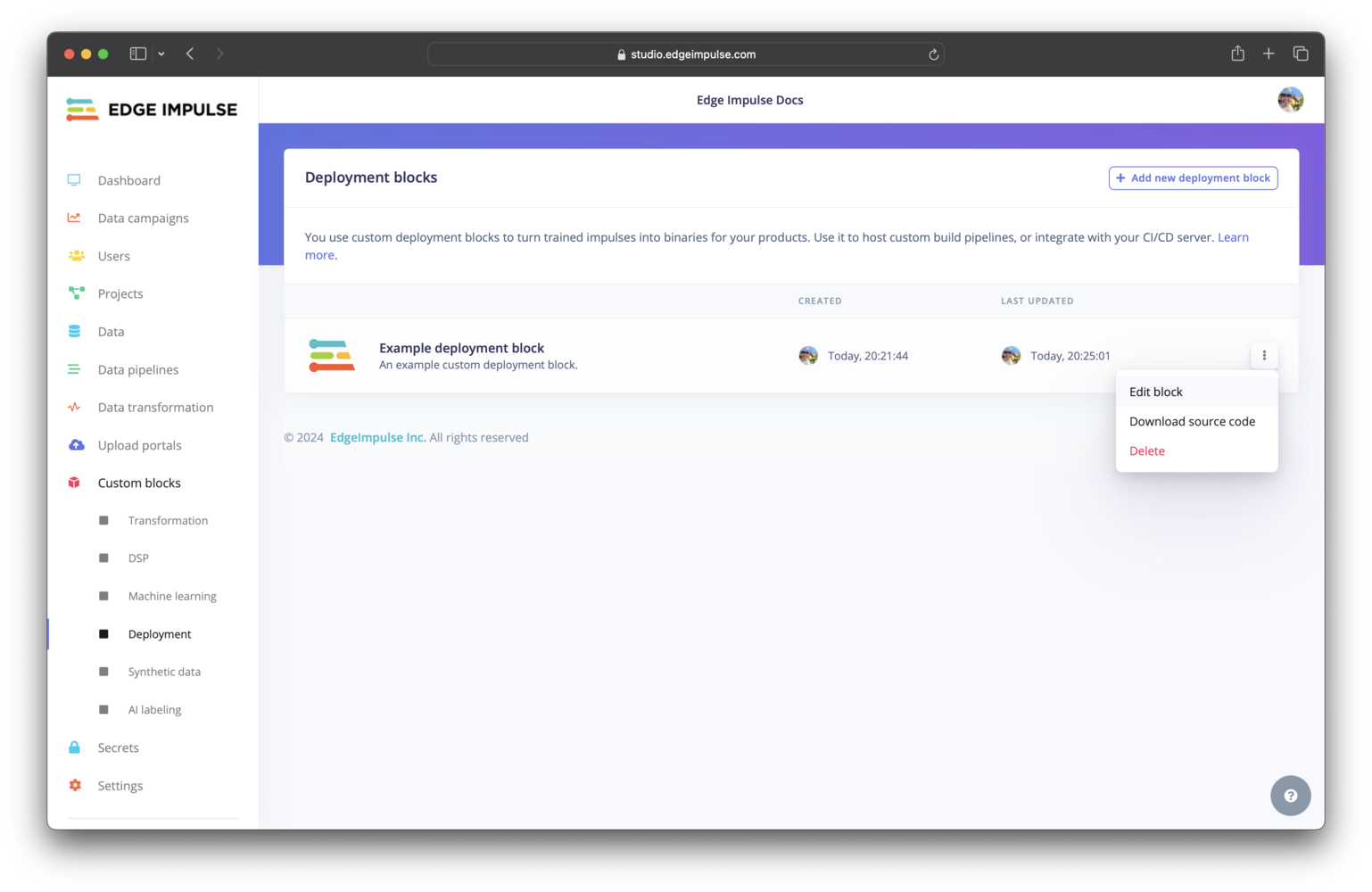
Click on Deployment under Custom blocks. You should find your custom deployment block listed here. To view the configuration settings for your block and edit them, you can click on the three dots and select Edit block.
Custom deployment block pushed to an organization
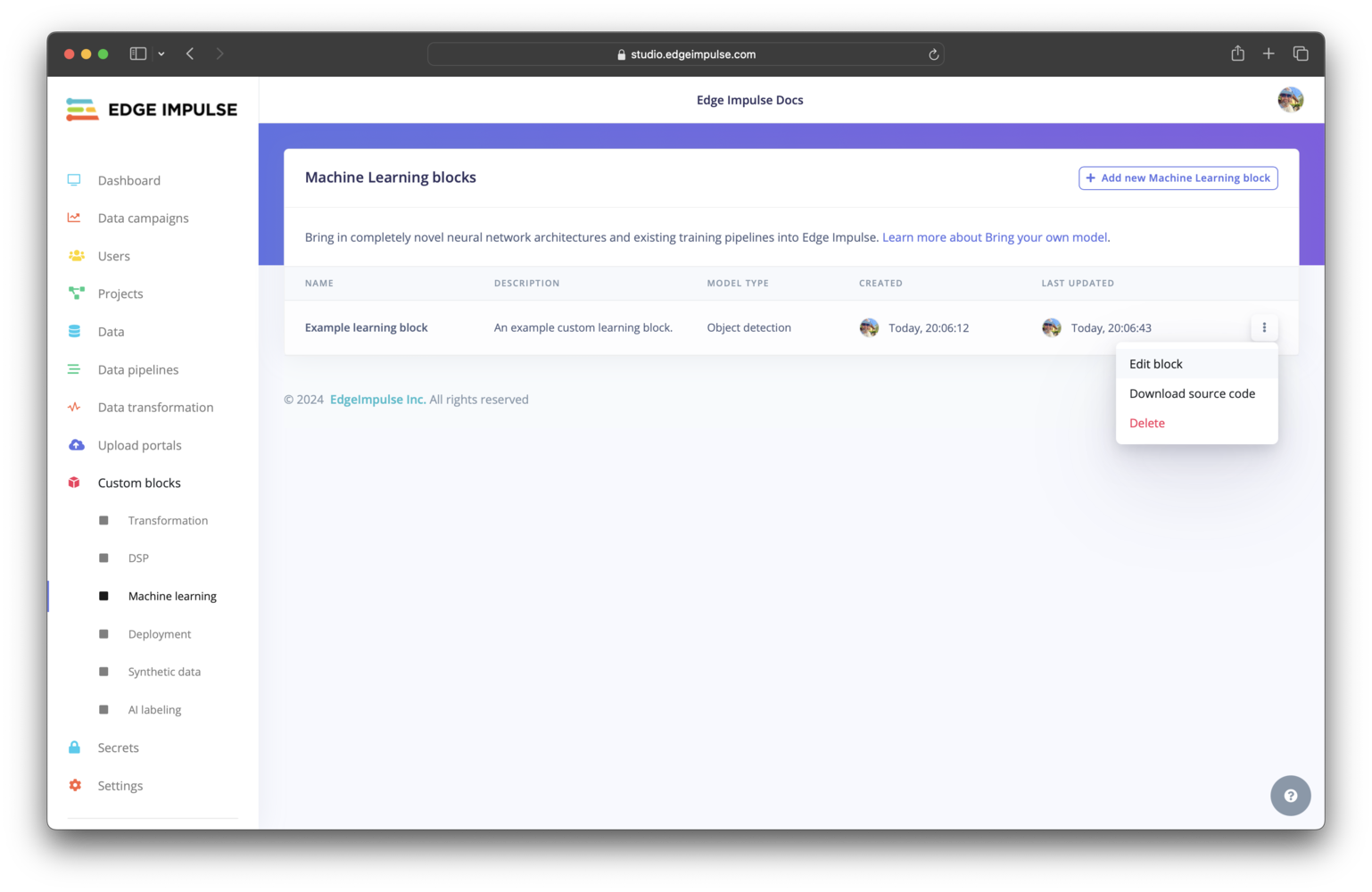
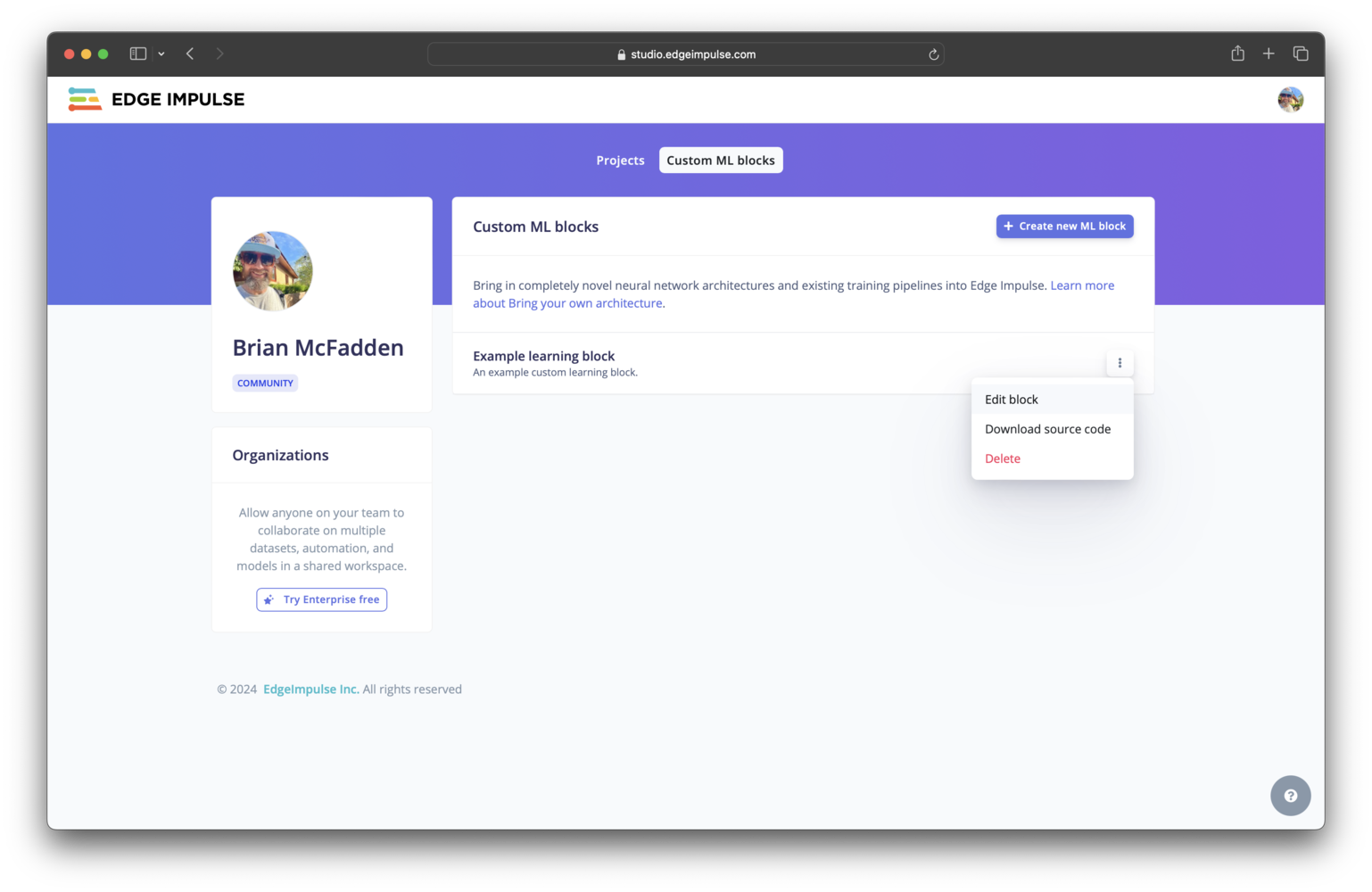
Organization (Enterprise plan)Click on Machine learning under Custom blocks. You should find your custom learning block listed here. To view the configuration settings for your block and edit them, you can click on the three dots and select Edit block.
Custom learning block pushed to an organization
Developer profile (all other plans)Click on your photo in the top right corner of your developer profile, select Custom ML blocks. To view the configuration settings for your block and edit them, you can click on the three dots and select Edit block.
Custom learning block pushed to a developer profile
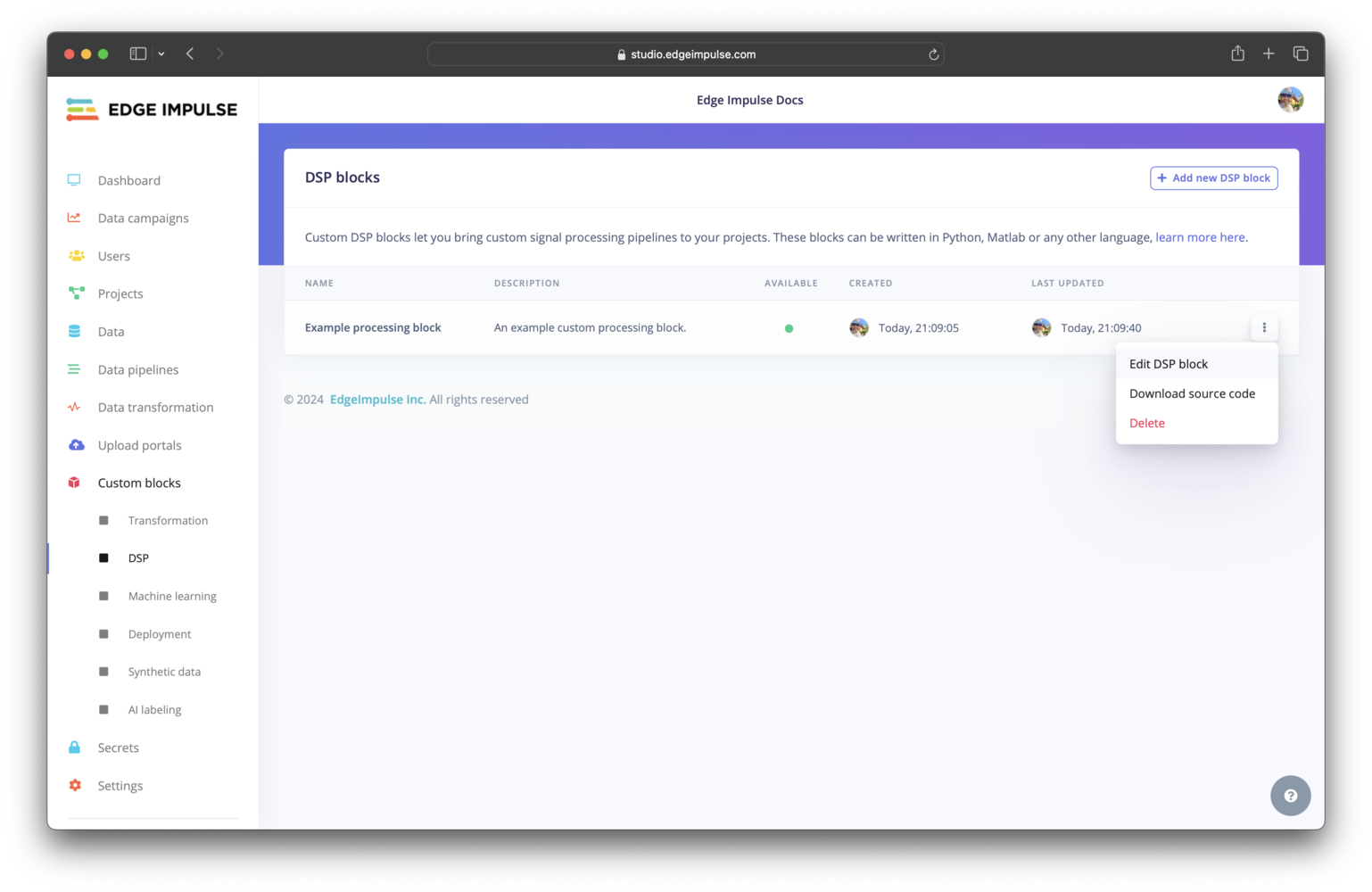
Click on DSP under Custom blocks. You should find your custom processing block listed here. To view the configuration settings for your block and edit them, you can click on the three dots and select Edit DSP block.
Custom processing block pushed to an organization
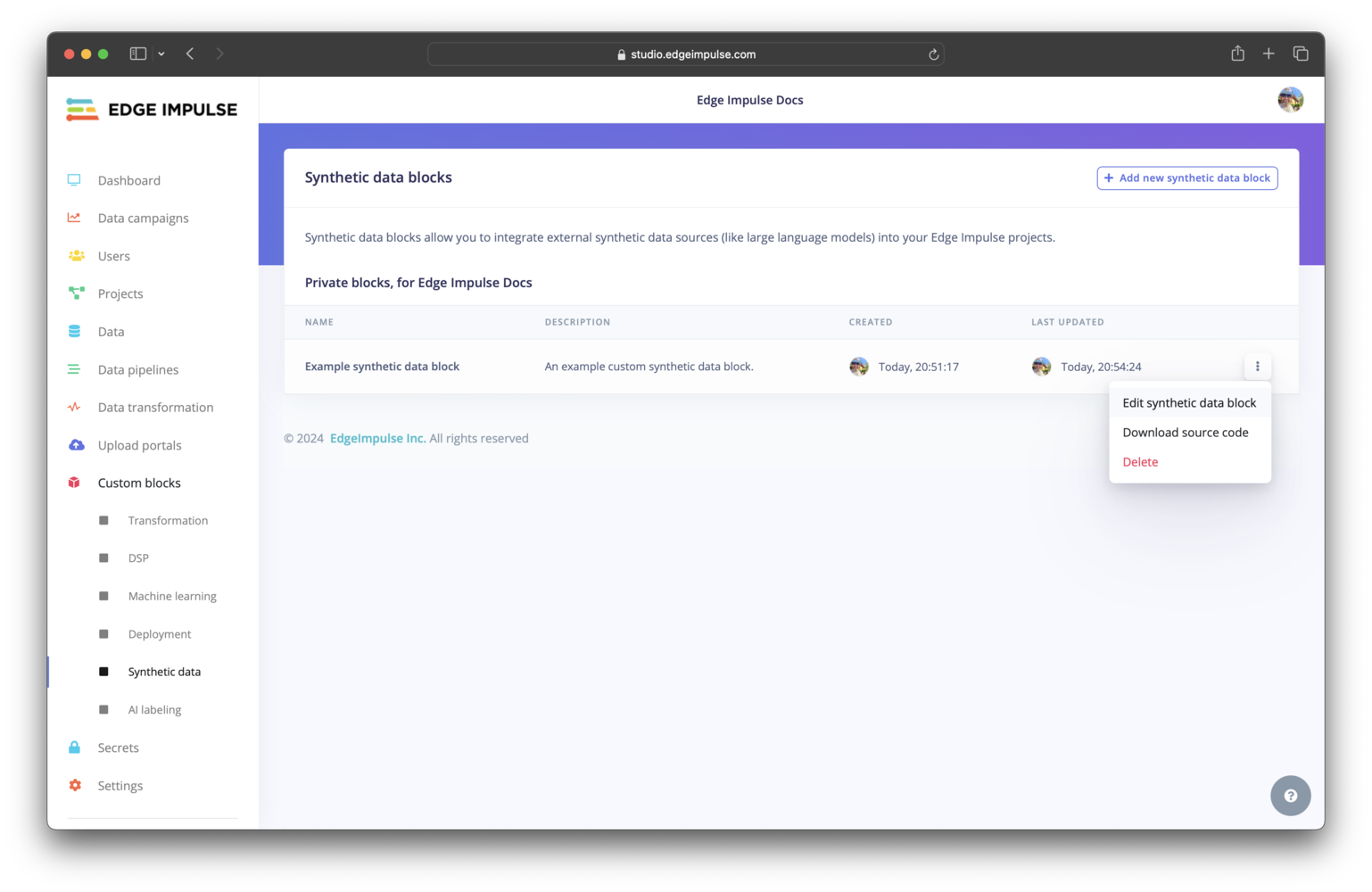
Click on Synthetic data under Custom blocks. You should find your custom synthetic data block listed here. To view the configuration settings for your block and edit them, you can click on the three dots and select Edit synthetic data block.
Custom synthetic data block pushed to an organization
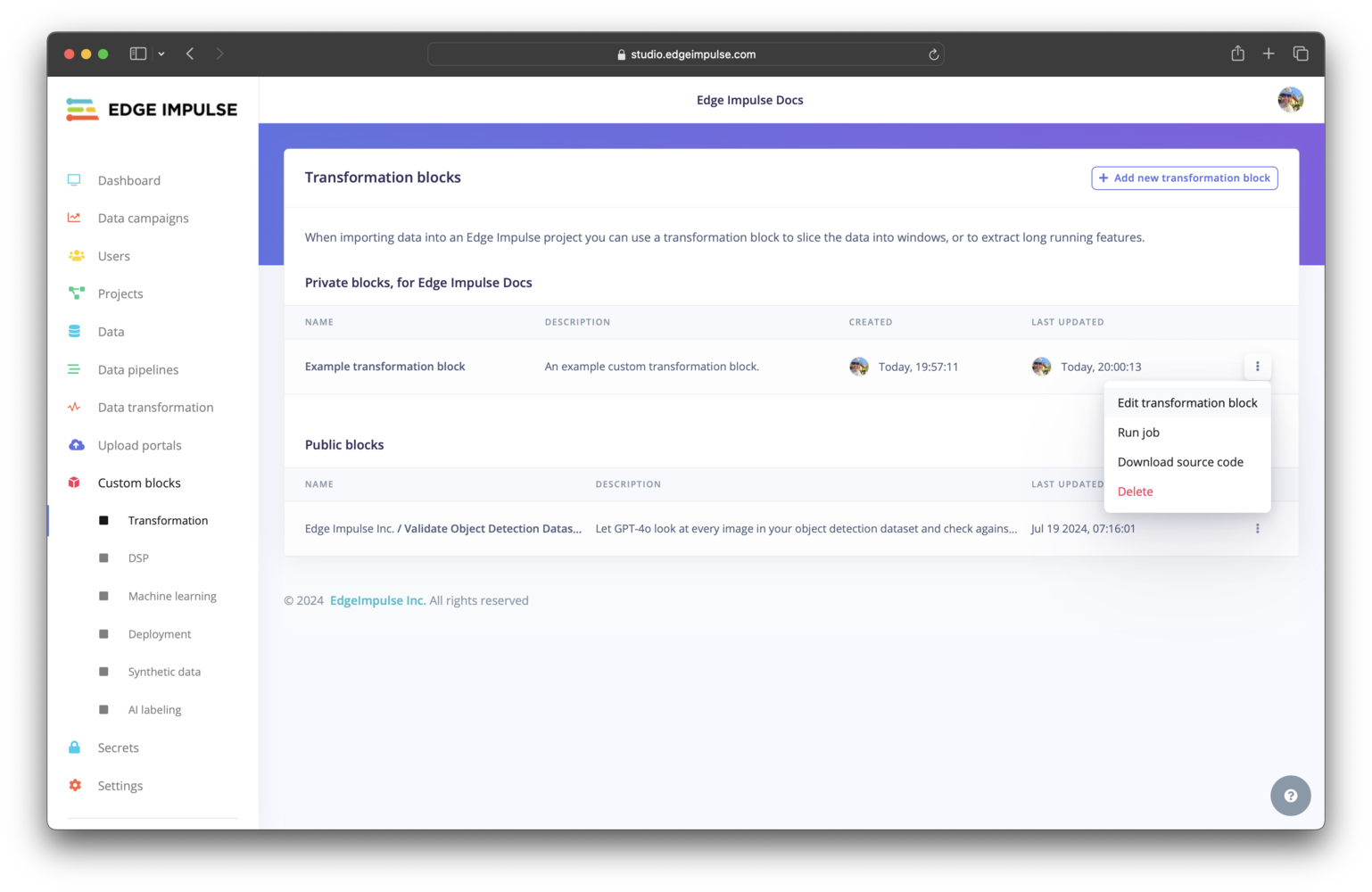
Click on Transformation under Custom blocks. You should find your custom transformation block listed here. To view the configuration settings for your block and edit them, you can click on the three dots and select Edit transformation block.
Custom transformation block pushed to an organization
Most blocks have the option to set the compute requests and limits (number of CPUs and memory) and some have the option to set the maximum running time duration. These items cannot, however, be configured from the parameters.json file; they must be configured when editing the block after it has been pushed to Edge Impulse.
Everything the CLI and Studio do to a block is also available over the API. Each block type exposes the same shape of endpoints: list, get, add, update, delete, and export.Synthetic data and AI labeling blocks are transformation blocks running in standalone mode, so they use the transformation block endpoints. Flags on the block control whether it shows in Data sources, Create transformation job, Synthetic data, or AI labeling.
The update endpoints also set the compute requests and limits described above, without going through the Studio.The API also has endpoints for secrets and processing block connections:
Secrets. Blocks that call an external service read their credentials from organization secrets, which you can list, add, and delete over the API.
Processing block connectivity. A DSP block runs as a long-lived service that the Studio connects to, so if it becomes unreachable you can retry the connection rather than re-pushing the block.
{"docsConfig":{"theme":"aspen","$schema":"https://mintlify.com/docs.json","name":"Edge Impulse Documentation","description":"Where you can find all the Edge Impulse documentation, and more!","colors":{"primary":"#5f76db","light":"#5f76db","dark":"#182896"},"logo":{"light":"https://mintcdn.com/edgeimpulse/-Yjt9HB8VCOXQC8H/.assets/logos/ei-logo-light.svg?fit=max\u0026auto=format\u0026n=-Yjt9HB8VCOXQC8H\u0026q=85\u0026s=a26ac03680700105c38fa0507df4fee2","dark":"https://mintcdn.com/edgeimpulse/K7zNEaqi2bZnNjVz/.assets/logos/ei-logo-dark.svg?fit=max\u0026auto=format\u0026n=K7zNEaqi2bZnNjVz\u0026q=85\u0026s=6c5887f8e79896f1ca3c3a63d5477761"},"favicon":"https://mintcdn.com/edgeimpulse/HzwDHenmvHu0xumg/.assets/favicon.svg?fit=max\u0026auto=format\u0026n=HzwDHenmvHu0xumg\u0026q=85\u0026s=5d3672f264e068f096f0ccfeff030489","appearance":{"default":"light"},"navbar":{"links":[{"href":"https://edgeimpulse.com/","label":"Website"},{"href":"https://studio.edgeimpulse.com","label":"Login"}],"primary":{"type":"button","label":"Sign up","href":"https://edgeimpulse.com/signup"}},"footer":{"socials":{"linkedin":"https://linkedin.com/company/edgeimpulse","youtube":"https://www.youtube.com/@EdgeImpulse","x":"https://x.com/edgeimpulse"},"links":[{"header":"Policies","items":[{"label":"Responsible AI","href":"https://www.qualcomm.com/site/responsible-ai-license"},{"label":"Privacy","href":"https://www.edgeimpulse.com/legal/privacy-policy"},{"label":"Cookies","href":"https://www.qualcomm.com/site/privacy/cookies"}]},{"header":"Legal","items":[{"label":"Terms of Use","href":"https://www.qualcomm.com/site/terms-of-use"},{"label":"Accessibility","href":"https://www.qualcomm.com/accessibility"}]}]},"seo":{"metatags":{"canonical":"https://docs.edgeimpulse.com"}},"icons":{"library":"fontawesome"},"styling":{"eyebrows":"breadcrumbs","codeblocks":"system","latex":true},"contextual":{"options":["copy","view","assistant"],"display":"header"},"navigation":{"global":{"anchors":[{"anchor":"Forum","icon":"discourse","href":"https://forum.edgeimpulse.com"},{"anchor":"Discord","icon":"discord","href":"https://discord.gg/edgeimpulse"},{"anchor":"GitHub","icon":"github","href":"https://github.com/edgeimpulse"}]},"pages":[]}},"deployment":{"deploymentMetadataValue":{"subdomain":"edgeimpulse","hasAudioNarration":false,"actualSubdomain":"edgeimpulse","customDomains":["docs.edgeimpulse.com"],"gitSource":{"type":"github","owner":"edgeimpulse","repo":"documentation","deployBranch":"main","contentDirectory":"","isPrivate":true,"mountPath":"","label":""},"chroma":{"liveDeploymentHistoryId":"6ae1b2f60ab3938238c8bd9b","collectionId":"b214cabc-f712-4bf1-9cb7-b417e1d86f12","schemaVersion":"v3","latestBuiltDeploymentHistoryId":"6ae1b2f60ab3938238c8bd9b"},"feedback":{"thumbs":true},"entitlements":{"AI_CHAT":{"status":"ENABLED"},"REMOVE_BRANDING":{"status":"ENABLED"},"CONTEXTUAL_FEEDBACK":{"status":"ENABLED"},"CODE_SNIPPET_FEEDBACK":{"status":"ENABLED"},"WEB_MCP":{"status":"ENABLED"},"NARRATION":{"status":"ENABLED"}},"buildId":"6ae1b2f60ab3938238c8bd9b","clientVersion":"0.0.4006","searchFilterCounts":[{"language":"default","tag":"Tools","count":1303},{"language":"default","tag":"LIBRARIES","count":1277},{"language":"default","tag":"Studio Python API bindings","count":1243},{"language":"default","tag":"edgeimpulse-api","count":1242},{"language":"default","tag":"models","count":1209},{"language":"default","tag":"APIs","count":563},{"language":"default","tag":"STUDIO API ENDPOINTS","count":555},{"language":"default","tag":"Projects","count":272},{"language":"default","tag":"EXPERT NETWORK","count":211},{"language":"default","tag":"Hardware","count":123}]},"assistantConfig":{"enableStarterQuestions":true,"enableContextualStarterQuestions":true},"basePath":"","hasChatPermissions":false,"hasWebMcpPermissions":true,"toggles":[],"googleFontsInlined":false},"customCss":[{"filePath":".styles/styles.css","content":".cookie-settings-button{color:rgb(var(--gray-800))!important;background-color:rgb(var(--gray-950)/.03)!important;border-radius:var(--rounded-xl, .75rem);font-size:.875rem!important;line-height:1.25rem!important;width:fit-content!important;align-self:flex-end!important;margin-left:auto!important}.cookie-settings-button:hover{background-color:rgb(var(--gray-950)/.1)!important}"}],"page":{"pagePath":"studio/organizations/custom-blocks","slug":"/studio/organizations/custom-blocks","pageMetadata":{"title":"Custom blocks","sidebarTitle":"Overview","description":"Create and manage organization custom blocks for labeling, processing, learning, transformation, deployment, and synthetic data workflows.","href":"/studio/organizations/custom-blocks"},"description":{"compiledSource":"\"use strict\";\nconst {jsx: _jsx} = arguments[0];\nconst {useMDXComponents: _provideComponents} = arguments[0];\nfunction _createMdxContent(props) {\n const _components = {\n p: \"p\",\n ..._provideComponents(),\n ...props.components\n };\n return _jsx(_components.p, {\n children: \"Create and manage organization custom blocks for labeling, processing, learning, transformation, deployment, and synthetic data workflows.\"\n });\n}\nfunction MDXContent(props = {}) {\n const {wrapper: MDXLayout} = {\n ..._provideComponents(),\n ...props.components\n };\n return MDXLayout ? _jsx(MDXLayout, {\n ...props,\n children: _jsx(_createMdxContent, {\n ...props\n })\n }) : _createMdxContent(props);\n}\nreturn {\n default: MDXContent\n};\n","frontmatter":{},"scope":{}},"pageType":"default","mdx":{"mdxSource":{"compiledSource":"\"use strict\";const{Fragment:_Fragment,jsx:_jsx,jsxs:_jsxs}=arguments[0];const{useMDXComponents:_provideComponents}=arguments[0];function _createMdxContent(props){const _components={a:`a`,code:`code`,li:`li`,ol:`ol`,p:`p`,strong:`strong`,tbody:`tbody`,td:`td`,th:`th`,thead:`thead`,tr:`tr`,ul:`ul`,..._provideComponents(),...props.components},{Frame,Heading,Info,OptimizedImage,Tab,Table,Tabs,Warning}=_components;if(!Frame)_missingMdxReference(`Frame`,true);if(!Heading)_missingMdxReference(`Heading`,true);if(!Info)_missingMdxReference(`Info`,true);if(!OptimizedImage)_missingMdxReference(`OptimizedImage`,true);if(!Tab)_missingMdxReference(`Tab`,true);if(!Table)_missingMdxReference(`Table`,true);if(!Tabs)_missingMdxReference(`Tabs`,true);if(!Warning)_missingMdxReference(`Warning`,true);return _jsxs(_Fragment,{children:[_jsx(_components.p,{children:`Much functionality in Edge Impulse is based on the concept of blocks. There are existing blocks built into the platform to achieve dedicated tasks. If these pre-built blocks do not fit your needs, you can edit existing blocks or develop from scratch to create custom blocks that extend the capabilities of Edge Impulse. These include:`}),`\n`,_jsxs(_components.ul,{children:[`\n`,_jsx(_components.li,{children:_jsx(_components.a,{href:`/studio/organizations/custom-blocks/custom-ai-labeling-blocks`,children:`Custom AI labeling blocks`})}),`\n`,_jsx(_components.li,{children:_jsx(_components.a,{href:`/studio/organizations/custom-blocks/custom-deployment-blocks`,children:`Custom deployment blocks`})}),`\n`,_jsx(_components.li,{children:_jsx(_components.a,{href:`/studio/organizations/custom-blocks/custom-learning-blocks`,children:`Custom learning blocks`})}),`\n`,_jsx(_components.li,{children:_jsx(_components.a,{href:`/studio/organizations/custom-blocks/custom-processing-blocks`,children:`Custom processing blocks`})}),`\n`,_jsx(_components.li,{children:_jsx(_components.a,{href:`/studio/organizations/custom-blocks/custom-synthetic-data-blocks`,children:`Custom synthetic data blocks`})}),`\n`,_jsx(_components.li,{children:_jsx(_components.a,{href:`/studio/organizations/custom-blocks/custom-transformation-blocks`,children:`Custom transformation blocks`})}),`\n`]}),`\n`,_jsx(_components.p,{children:`The sections below provide an overview of custom blocks. The details for each specific type of block can be found on its own documentation page linked above.`}),`\n`,_jsx(Heading,{level:`2`,id:`block-structure`,children:`Block structure`}),`\n`,_jsx(_components.p,{children:`A block in Edge Impulse encapsulates a Docker image and provides information to the container when it is run. Different parameters, environment variables, and data will be passed in and different volumes will be mounted depending on the type of block.`}),`\n`,_jsxs(_components.p,{children:[`The basic structure of a block is shown below. At a minimum, a custom block consists of a directory containing your scripts, a Dockerfile, and a `,_jsx(_components.code,{children:`parameters.json`}),` file. Block specific structures are shown in their respective documentation.`]}),`\n`,_jsx(Frame,{caption:`Custom block structure`,children:_jsx(OptimizedImage,{src:`https://mintcdn.com/edgeimpulse/fGaR6Z5uJaXr3nXE/.assets/images/custom-blocks-structure.png?fit=max\u0026auto=format\u0026n=fGaR6Z5uJaXr3nXE\u0026q=85\u0026s=42d40acff054ade88d7e8e552b4b197e`,alt:`Diagram of custom block files, scripts, parameters, and Docker configuration`,\"data-og-width\":`1600`,width:`1600`,\"data-og-height\":`989`,height:`989`,\"data-path\":`.assets/images/custom-blocks-structure.png`,\"data-optimize\":`true`,\"data-opv\":`3`,srcset:`https://mintcdn.com/edgeimpulse/fGaR6Z5uJaXr3nXE/.assets/images/custom-blocks-structure.png?w=280\u0026fit=max\u0026auto=format\u0026n=fGaR6Z5uJaXr3nXE\u0026q=85\u0026s=7d6d073f376c011b33af38e1f572e2a4 280w, https://mintcdn.com/edgeimpulse/fGaR6Z5uJaXr3nXE/.assets/images/custom-blocks-structure.png?w=560\u0026fit=max\u0026auto=format\u0026n=fGaR6Z5uJaXr3nXE\u0026q=85\u0026s=8537443fc80e23250dde4720ce399d30 560w, https://mintcdn.com/edgeimpulse/fGaR6Z5uJaXr3nXE/.assets/images/custom-blocks-structure.png?w=840\u0026fit=max\u0026auto=format\u0026n=fGaR6Z5uJaXr3nXE\u0026q=85\u0026s=f2c833cbebae35cc3c3463d69a3746fd 840w, https://mintcdn.com/edgeimpulse/fGaR6Z5uJaXr3nXE/.assets/images/custom-blocks-structure.png?w=1100\u0026fit=max\u0026auto=format\u0026n=fGaR6Z5uJaXr3nXE\u0026q=85\u0026s=b98756a8b5120fb8043bc08163772587 1100w, https://mintcdn.com/edgeimpulse/fGaR6Z5uJaXr3nXE/.assets/images/custom-blocks-structure.png?w=1650\u0026fit=max\u0026auto=format\u0026n=fGaR6Z5uJaXr3nXE\u0026q=85\u0026s=82a8f0abd1df967fb009fb89bd1b815d 1650w, https://mintcdn.com/edgeimpulse/fGaR6Z5uJaXr3nXE/.assets/images/custom-blocks-structure.png?w=2500\u0026fit=max\u0026auto=format\u0026n=fGaR6Z5uJaXr3nXE\u0026q=85\u0026s=4aba9afb371c3595a8a77ad509df810d 2500w`})}),`\n`,_jsx(Heading,{level:`3`,id:`scripts`,children:`Scripts`}),`\n`,_jsx(_components.p,{children:`The Docker container executes the scripts that you have written for your custom block. At Edge Impulse, block scripts are mostly written in Python, Javascript/Typescript, or Bash. However, these scripts can be written in any language that you are comfortable with.`}),`\n`,_jsxs(_components.p,{children:[`The initial script that you would like to be executed is defined in the Dockerfile as the `,_jsx(_components.code,{children:`ENTRYPOINT`}),` for the image.`]}),`\n`,_jsx(Heading,{level:`3`,id:`dockerfile`,children:`Dockerfile`}),`\n`,_jsxs(Warning,{children:[_jsxs(_components.p,{children:[_jsx(_components.strong,{children:`Do not set the`}),` `,_jsx(_components.code,{children:`WORKDIR`}),` `,_jsx(_components.strong,{children:`argument to`}),` `,_jsx(_components.code,{children:`/home`}),` or `,_jsx(_components.code,{children:`/data`})]}),_jsxs(_components.p,{children:[`The `,_jsx(_components.code,{children:`/home`}),` and `,_jsx(_components.code,{children:`/data`}),` directory paths are used by Edge Impulse. Therefore, if you set the working directory for your container to this path, your files will be overwritten and rendered inaccessible. You will notice in most examples from Edge Impulse, the argument for the `,_jsx(_components.code,{children:`WORKDIR`}),` instruction is set to `,_jsx(_components.code,{children:`/app`}),`.`]})]}),`\n`,_jsxs(Warning,{children:[_jsxs(_components.p,{children:[_jsx(_components.strong,{children:`Use the`}),` `,_jsx(_components.code,{children:`ENTRYPOINT`}),` `,_jsx(_components.strong,{children:`instruction`})]}),_jsxs(_components.p,{children:[`It is important to set the `,_jsx(_components.code,{children:`ENTRYPOINT`}),` instruction at the end of your Dockerfile to specify the default executable for the container. This instruction is used to turn a container into a standalone executable and blocks in Edge Impulse have been designed with this in mind.`]}),_jsxs(_components.p,{children:[`Do not use the `,_jsx(_components.code,{children:`RUN`}),` or `,_jsx(_components.code,{children:`CMD`}),` instructions to set the default executable. The `,_jsx(_components.code,{children:`RUN`}),` instruction is not meant for this purpose (it’s meant for building layers of an image) and the `,_jsx(_components.code,{children:`CMD`}),` instruction is not what Edge Impulse expects.`]})]}),`\n`,_jsx(_components.p,{children:`The Dockerfile is the instruction set for building the Docker image that will be run as a container in your custom block. The documentation for each type of custom block contains links to GitHub repositories for block examples, which each contain a Dockerfile. Referencing these is a great starting point when developing your own Dockerfile.`}),`\n`,_jsxs(_components.p,{children:[`In general, the argument you define as the `,_jsx(_components.code,{children:`ENTRYPOINT`}),` in your Dockerfile will be your custom script. For processing blocks, however, this will be an HTTP server. In this case, you will also need to expose the port for your server using the `,_jsx(_components.code,{children:`EXPOSE`}),` instruction.`]}),`\n`,_jsxs(_components.p,{children:[`If you want to leverage GPU compute for your custom learning blocks, you will need to make sure to install the CUDA packages. You can refer to the `,_jsx(_components.a,{href:`https://github.com/edgeimpulse/example-custom-ml-block-keras`,children:`example-custom-ml-keras`}),` repository to see an example Dockerfile that installs these packages.`]}),`\n`,_jsx(_components.p,{children:`When running in Edge Impulse, processing and learning block containers do not have network access. Make sure you don’t download dependencies while running these containers, only when building the images.`}),`\n`,_jsx(Heading,{level:`3`,id:`parameters`,children:`Parameters`}),`\n`,_jsxs(_components.p,{children:[`A `,_jsx(_components.code,{children:`parameters.json`}),` file is to be included at the root of your custom block directory. This file describes the block itself and identifies the parameter items that will be exposed for configuration in Studio and, in turn, passed to the script you defined in your Dockerfile as the `,_jsx(_components.code,{children:`ENTRYPOINT`}),`. See `,_jsx(_components.a,{href:`/tools/specifications/files/parameters-json`,children:`parameters.json`}),` for more details.`]}),`\n`,_jsxs(_components.p,{children:[`In most cases, the parameter items defined in your `,_jsx(_components.code,{children:`parameters.json`}),` file are passed to your script as command line arguments. For example, a parameter named `,_jsx(_components.code,{children:`custom-param-one`}),` with an associated value will be passed to your script as `,_jsx(_components.code,{children:`--custom-param-one \u003cvalue>`}),`.`]}),`\n`,_jsxs(_components.p,{children:[`Processing blocks are handled differently. In the case of processing blocks, parameter items are passed as properties in the body of an HTTP request. In this case, a parameter named `,_jsx(_components.code,{children:`custom-param-one`}),` with an associated value will be passed to the function generating features in your script as an argument named `,_jsx(_components.code,{children:`custom_param_one`}),`. Notice the dashes have been converted to underscores.`]}),`\n`,_jsxs(_components.p,{children:[`One additional note in regards to how parameter items are passed is that items of the type `,_jsx(_components.code,{children:`secret`}),` will be passed as environment variables instead of command line arguments.`]}),`\n`,_jsx(_components.p,{children:`Parameter types are enforced and validation is performed automatically when values are being entered in Studio.`}),`\n`,_jsx(Heading,{level:`2`,id:`developing-a-custom-block`,children:`Developing a custom block`}),`\n`,_jsxs(_components.p,{children:[`The first steps to developing a custom block are to write your scripts and Dockerfile. Once those are completed, you can initialize the block, test it locally, and push it to Edge Impulse using the `,_jsx(_components.a,{href:`/tools/clis/edge-impulse-cli/blocks`,children:`edge-impulse-blocks`}),` tool in the Edge Impulse CLI.`]}),`\n`,_jsx(Heading,{level:`3`,id:`initializing-the-block`,children:`Initializing the block`}),`\n`,_jsxs(_components.p,{children:[`From within your custom block directory, run the `,_jsx(_components.code,{children:`edge-impulse-blocks init`}),` command and follow the prompts to initialize your block. This will do two things:`]}),`\n`,_jsxs(_components.ol,{children:[`\n`,_jsxs(_components.li,{children:[`Create an `,_jsx(_components.code,{children:`.ei-block-config`}),` file that associates the block with your organization`]}),`\n`,_jsxs(_components.li,{children:[`Create a `,_jsx(_components.code,{children:`parameters.json`}),` file (if one does not already exist in your custom block directory)`]}),`\n`]}),`\n`,_jsxs(_components.p,{children:[`After the `,_jsx(_components.code,{children:`parameters.json`}),` file is created, you will want to take a look at it and make modifications as necessary. The CLI creates a basic file for you and you may want to include additional metadata and parameter items.`]}),`\n`,_jsx(Heading,{level:`3`,id:`testing-the-block-locally`,children:`Testing the block locally`}),`\n`,_jsx(_components.p,{children:`There are several levels of testing locally that you can do while developing your custom block:`}),`\n`,_jsxs(_components.ol,{children:[`\n`,_jsx(_components.li,{children:`Calling your script directly, passing it any required environment variables and arguments`}),`\n`,_jsx(_components.li,{children:`Building the Docker image and running the container directly, passing it any required environment variables and arguments`}),`\n`,_jsx(_components.li,{children:`Using the blocks runner tool in the Edge Impulse CLI to test the complete block`}),`\n`]}),`\n`,_jsxs(_components.p,{children:[`To use the blocks runner tool in the Edge Impulse CLI, run the `,_jsx(_components.code,{children:`edge-impulse-blocks runner`}),` command from within your custom block directory and follow the prompts to test your block locally. See `,_jsx(_components.a,{href:`/tools/clis/edge-impulse-cli/blocks#block-runner`,children:`Block runner`}),`.`]}),`\n`,_jsx(_components.p,{children:`Refer to the documentation for your type of custom block for additional details about testing locally.`}),`\n`,_jsx(Heading,{level:`3`,id:`pushing-the-block-to-edge-impulse`,children:`Pushing the block to Edge Impulse`}),`\n`,_jsxs(Info,{children:[_jsx(_components.p,{children:_jsx(_components.strong,{children:`Custom learning blocks can be pushed to a developer profile`})}),_jsx(_components.p,{children:`Unlike all other types of custom blocks, a custom learning block can be pushed to a developer profile (non-Enterprise plan account).`})]}),`\n`,_jsx(_components.p,{children:`After initializing and testing your custom block, you can push it to Edge Impulse to make it available for use by everyone in your organization.`}),`\n`,_jsxs(_components.p,{children:[`From within your custom block directory, run the `,_jsx(_components.code,{children:`edge-impulse-blocks push`}),` command and follow the prompts to push your block to Edge Impulse.`]}),`\n`,_jsxs(_components.p,{children:[`Once pushed successfully, your block will appear in your organization or, if it is a custom learning block and you are not on the Enterprise plan, in your developer profile. See `,_jsx(_components.a,{href:`/studio/organizations/custom-blocks#editing-a-custom-block-in-studio`,children:`Editing a custom block in Studio`}),` for images showing each block type after being pushed to Edge Impulse.`]}),`\n`,_jsx(Heading,{level:`3`,id:`resetting-the-block-configuration`,children:`Resetting the block configuration`}),`\n`,_jsxs(_components.p,{children:[`If at some point you need to change configuration settings for your block that aren’t being shown when you run the `,_jsx(_components.code,{children:`edge-impulse-blocks`}),` commands, say to download data from a different project with the `,_jsx(_components.code,{children:`runner`}),`, you can execute any of the respective commands with the `,_jsx(_components.code,{children:`--clean`}),` flag.`]}),`\n`,_jsx(Heading,{level:`3`,id:`importing-existing-docker-images`,children:`Importing existing Docker images`}),`\n`,_jsx(_components.p,{children:`If you have previously created a Docker image for a custom block and are hosting it on Docker Hub, you can create a custom block that uses this image.`}),`\n`,_jsxs(_components.p,{children:[`To do so, go to your organization and select the item in the left sidebar menu for the type of custom block you would like to create. On that custom block page, select the `,_jsx(_components.code,{children:`+ Add new \u003cblock-type> block`}),` button (or select an existing block to edit). In the modal that pops up, configure your block as desired and in the `,_jsx(_components.strong,{children:`Docker container`}),` field enter the details for your image in the `,_jsx(_components.code,{children:`username/image:tag`}),` format.`]}),`\n`,_jsx(Heading,{level:`2`,id:`editing-a-custom-block-in-studio`,children:`Editing a custom block in Studio`}),`\n`,_jsx(_components.p,{children:`After successfully pushing your custom block to Edge Impulse you can edit it from within Studio.`}),`\n`,_jsxs(Tabs,{children:[_jsxs(Tab,{title:`AI labeling`,id:`ai-labeling`,children:[_jsxs(_components.p,{children:[`Click on `,_jsx(_components.strong,{children:`AI labeling`}),` under `,_jsx(_components.strong,{children:`Custom blocks`}),`. You should find your custom AI labeling block listed here. To view the configuration settings for your block and edit them, you can click on the three dots and select `,_jsx(_components.strong,{children:`Edit AI labeling block`}),`.`]}),_jsx(Frame,{caption:`Custom AI labeling block pushed to an organization`,children:_jsx(OptimizedImage,{src:`https://mintcdn.com/edgeimpulse/YmjKhgkCrlx3Nxh9/.assets/images/custom-blocks-edit-ai-labeling.png?fit=max\u0026auto=format\u0026n=YmjKhgkCrlx3Nxh9\u0026q=85\u0026s=2085e7d110d816726d4ecc11d0ccb74a`,alt:`Custom AI labeling block settings page for a block pushed to an organization`,\"data-og-width\":`1538`,width:`1538`,\"data-og-height\":`1000`,height:`1000`,\"data-path\":`.assets/images/custom-blocks-edit-ai-labeling.png`,\"data-optimize\":`true`,\"data-opv\":`3`,srcset:`https://mintcdn.com/edgeimpulse/YmjKhgkCrlx3Nxh9/.assets/images/custom-blocks-edit-ai-labeling.png?w=280\u0026fit=max\u0026auto=format\u0026n=YmjKhgkCrlx3Nxh9\u0026q=85\u0026s=0d55f849c2559cc5a127409a69b8165f 280w, https://mintcdn.com/edgeimpulse/YmjKhgkCrlx3Nxh9/.assets/images/custom-blocks-edit-ai-labeling.png?w=560\u0026fit=max\u0026auto=format\u0026n=YmjKhgkCrlx3Nxh9\u0026q=85\u0026s=55044739b3dc9e876aa518e9e828a52b 560w, https://mintcdn.com/edgeimpulse/YmjKhgkCrlx3Nxh9/.assets/images/custom-blocks-edit-ai-labeling.png?w=840\u0026fit=max\u0026auto=format\u0026n=YmjKhgkCrlx3Nxh9\u0026q=85\u0026s=1cd2ef67b7521b4a708e7da6220e937a 840w, https://mintcdn.com/edgeimpulse/YmjKhgkCrlx3Nxh9/.assets/images/custom-blocks-edit-ai-labeling.png?w=1100\u0026fit=max\u0026auto=format\u0026n=YmjKhgkCrlx3Nxh9\u0026q=85\u0026s=31eb4764c56fbef555171baa04d83443 1100w, https://mintcdn.com/edgeimpulse/YmjKhgkCrlx3Nxh9/.assets/images/custom-blocks-edit-ai-labeling.png?w=1650\u0026fit=max\u0026auto=format\u0026n=YmjKhgkCrlx3Nxh9\u0026q=85\u0026s=2dd49a22b8f2e80d354618184d9e300a 1650w, https://mintcdn.com/edgeimpulse/YmjKhgkCrlx3Nxh9/.assets/images/custom-blocks-edit-ai-labeling.png?w=2500\u0026fit=max\u0026auto=format\u0026n=YmjKhgkCrlx3Nxh9\u0026q=85\u0026s=b91cc5661c14dec21161e008e385f965 2500w`})})]}),_jsxs(Tab,{title:`Deployment`,id:`deployment`,children:[_jsxs(_components.p,{children:[`Click on `,_jsx(_components.strong,{children:`Deployment`}),` under `,_jsx(_components.strong,{children:`Custom blocks`}),`. You should find your custom deployment block listed here. To view the configuration settings for your block and edit them, you can click on the three dots and select `,_jsx(_components.strong,{children:`Edit block`}),`.`]}),_jsx(Frame,{caption:`Custom deployment block pushed to an organization`,children:_jsx(OptimizedImage,{src:`https://mintcdn.com/edgeimpulse/YmjKhgkCrlx3Nxh9/.assets/images/custom-blocks-edit-deployment.png?fit=max\u0026auto=format\u0026n=YmjKhgkCrlx3Nxh9\u0026q=85\u0026s=dd867b5420014593e5df54bcae7975af`,alt:`Custom deployment block settings page for a block pushed to an organization`,\"data-og-width\":`1538`,width:`1538`,\"data-og-height\":`1000`,height:`1000`,\"data-path\":`.assets/images/custom-blocks-edit-deployment.png`,\"data-optimize\":`true`,\"data-opv\":`3`,srcset:`https://mintcdn.com/edgeimpulse/YmjKhgkCrlx3Nxh9/.assets/images/custom-blocks-edit-deployment.png?w=280\u0026fit=max\u0026auto=format\u0026n=YmjKhgkCrlx3Nxh9\u0026q=85\u0026s=b60b0e49b104217fb532aa69819333b3 280w, https://mintcdn.com/edgeimpulse/YmjKhgkCrlx3Nxh9/.assets/images/custom-blocks-edit-deployment.png?w=560\u0026fit=max\u0026auto=format\u0026n=YmjKhgkCrlx3Nxh9\u0026q=85\u0026s=718da2649bfd15bae584a34c29f3a8da 560w, https://mintcdn.com/edgeimpulse/YmjKhgkCrlx3Nxh9/.assets/images/custom-blocks-edit-deployment.png?w=840\u0026fit=max\u0026auto=format\u0026n=YmjKhgkCrlx3Nxh9\u0026q=85\u0026s=8010366ac6bc7bbc1c1e5e7b29ee6ef2 840w, https://mintcdn.com/edgeimpulse/YmjKhgkCrlx3Nxh9/.assets/images/custom-blocks-edit-deployment.png?w=1100\u0026fit=max\u0026auto=format\u0026n=YmjKhgkCrlx3Nxh9\u0026q=85\u0026s=7c57848e3845fe069ed714dd5b397ee1 1100w, https://mintcdn.com/edgeimpulse/YmjKhgkCrlx3Nxh9/.assets/images/custom-blocks-edit-deployment.png?w=1650\u0026fit=max\u0026auto=format\u0026n=YmjKhgkCrlx3Nxh9\u0026q=85\u0026s=ddef684d67ad2b3afb40f538ad7a0b91 1650w, https://mintcdn.com/edgeimpulse/YmjKhgkCrlx3Nxh9/.assets/images/custom-blocks-edit-deployment.png?w=2500\u0026fit=max\u0026auto=format\u0026n=YmjKhgkCrlx3Nxh9\u0026q=85\u0026s=334107404f1d1b117c1622970c8c21a0 2500w`})})]}),_jsxs(Tab,{title:`Learning`,id:`learning`,children:[_jsx(_components.p,{children:_jsx(_components.strong,{children:`Organization (Enterprise plan)`})}),_jsxs(_components.p,{children:[`Click on `,_jsx(_components.strong,{children:`Machine learning`}),` under `,_jsx(_components.strong,{children:`Custom blocks`}),`. You should find your custom learning block listed here. To view the configuration settings for your block and edit them, you can click on the three dots and select `,_jsx(_components.strong,{children:`Edit block`}),`.`]}),_jsx(Frame,{caption:`Custom learning block pushed to an organization`,children:_jsx(OptimizedImage,{src:`https://mintcdn.com/edgeimpulse/YmjKhgkCrlx3Nxh9/.assets/images/custom-blocks-edit-learning-org.png?fit=max\u0026auto=format\u0026n=YmjKhgkCrlx3Nxh9\u0026q=85\u0026s=d1e313124ebe3a86276aafa25cd07e19`,alt:`Custom learning block settings page for a block pushed to an organization`,\"data-og-width\":`1538`,width:`1538`,\"data-og-height\":`1000`,height:`1000`,\"data-path\":`.assets/images/custom-blocks-edit-learning-org.png`,\"data-optimize\":`true`,\"data-opv\":`3`,srcset:`https://mintcdn.com/edgeimpulse/YmjKhgkCrlx3Nxh9/.assets/images/custom-blocks-edit-learning-org.png?w=280\u0026fit=max\u0026auto=format\u0026n=YmjKhgkCrlx3Nxh9\u0026q=85\u0026s=b5a45392dbbbf2b7c01ef31a01c00766 280w, https://mintcdn.com/edgeimpulse/YmjKhgkCrlx3Nxh9/.assets/images/custom-blocks-edit-learning-org.png?w=560\u0026fit=max\u0026auto=format\u0026n=YmjKhgkCrlx3Nxh9\u0026q=85\u0026s=4d9928239e93d0d7c95c542ce686870d 560w, https://mintcdn.com/edgeimpulse/YmjKhgkCrlx3Nxh9/.assets/images/custom-blocks-edit-learning-org.png?w=840\u0026fit=max\u0026auto=format\u0026n=YmjKhgkCrlx3Nxh9\u0026q=85\u0026s=c76fa3b752536db57370c95a211e1bd3 840w, https://mintcdn.com/edgeimpulse/YmjKhgkCrlx3Nxh9/.assets/images/custom-blocks-edit-learning-org.png?w=1100\u0026fit=max\u0026auto=format\u0026n=YmjKhgkCrlx3Nxh9\u0026q=85\u0026s=9c9911245accb7dd1d7e992cbe8ace91 1100w, https://mintcdn.com/edgeimpulse/YmjKhgkCrlx3Nxh9/.assets/images/custom-blocks-edit-learning-org.png?w=1650\u0026fit=max\u0026auto=format\u0026n=YmjKhgkCrlx3Nxh9\u0026q=85\u0026s=62248eab2a389020f4611a97200612f1 1650w, https://mintcdn.com/edgeimpulse/YmjKhgkCrlx3Nxh9/.assets/images/custom-blocks-edit-learning-org.png?w=2500\u0026fit=max\u0026auto=format\u0026n=YmjKhgkCrlx3Nxh9\u0026q=85\u0026s=10bf04cc2cbc6e818edde1f948969ffe 2500w`})}),_jsx(_components.p,{children:_jsx(_components.strong,{children:`Developer profile (all other plans)`})}),_jsxs(_components.p,{children:[`Click on your photo in the top right corner of your developer profile, select `,_jsx(_components.strong,{children:`Custom ML blocks`}),`. To view the configuration settings for your block and edit them, you can click on the three dots and select `,_jsx(_components.strong,{children:`Edit block`}),`.`]}),_jsx(Frame,{caption:`Custom learning block pushed to a developer profile`,children:_jsx(OptimizedImage,{src:`https://mintcdn.com/edgeimpulse/YmjKhgkCrlx3Nxh9/.assets/images/custom-blocks-edit-learning-dev.png?fit=max\u0026auto=format\u0026n=YmjKhgkCrlx3Nxh9\u0026q=85\u0026s=56bcedd7ce0581318e503807f26d305b`,alt:`Custom learning block settings page for a block pushed to a developer profile`,\"data-og-width\":`1538`,width:`1538`,\"data-og-height\":`1000`,height:`1000`,\"data-path\":`.assets/images/custom-blocks-edit-learning-dev.png`,\"data-optimize\":`true`,\"data-opv\":`3`,srcset:`https://mintcdn.com/edgeimpulse/YmjKhgkCrlx3Nxh9/.assets/images/custom-blocks-edit-learning-dev.png?w=280\u0026fit=max\u0026auto=format\u0026n=YmjKhgkCrlx3Nxh9\u0026q=85\u0026s=0ced294a226e68a1d638621d193967e0 280w, https://mintcdn.com/edgeimpulse/YmjKhgkCrlx3Nxh9/.assets/images/custom-blocks-edit-learning-dev.png?w=560\u0026fit=max\u0026auto=format\u0026n=YmjKhgkCrlx3Nxh9\u0026q=85\u0026s=db158596b0e89277ba2bef31c8e664b3 560w, https://mintcdn.com/edgeimpulse/YmjKhgkCrlx3Nxh9/.assets/images/custom-blocks-edit-learning-dev.png?w=840\u0026fit=max\u0026auto=format\u0026n=YmjKhgkCrlx3Nxh9\u0026q=85\u0026s=96b79d892cbc4f2e10cde6bffbbdbc24 840w, https://mintcdn.com/edgeimpulse/YmjKhgkCrlx3Nxh9/.assets/images/custom-blocks-edit-learning-dev.png?w=1100\u0026fit=max\u0026auto=format\u0026n=YmjKhgkCrlx3Nxh9\u0026q=85\u0026s=1aa86975ff8ec361e52b8188d3d0d21c 1100w, https://mintcdn.com/edgeimpulse/YmjKhgkCrlx3Nxh9/.assets/images/custom-blocks-edit-learning-dev.png?w=1650\u0026fit=max\u0026auto=format\u0026n=YmjKhgkCrlx3Nxh9\u0026q=85\u0026s=6960f633dd43a5226c489ec2c14ec494 1650w, https://mintcdn.com/edgeimpulse/YmjKhgkCrlx3Nxh9/.assets/images/custom-blocks-edit-learning-dev.png?w=2500\u0026fit=max\u0026auto=format\u0026n=YmjKhgkCrlx3Nxh9\u0026q=85\u0026s=526f54773fcc142aa7d19728f9dba081 2500w`})})]}),_jsxs(Tab,{title:`Processing`,id:`processing`,children:[_jsxs(_components.p,{children:[`Click on `,_jsx(_components.strong,{children:`DSP`}),` under `,_jsx(_components.strong,{children:`Custom blocks`}),`. You should find your custom processing block listed here. To view the configuration settings for your block and edit them, you can click on the three dots and select `,_jsx(_components.strong,{children:`Edit DSP block`}),`.`]}),_jsx(Frame,{caption:`Custom processing block pushed to an organization`,children:_jsx(OptimizedImage,{src:`https://mintcdn.com/edgeimpulse/fGaR6Z5uJaXr3nXE/.assets/images/custom-blocks-edit-processing.png?fit=max\u0026auto=format\u0026n=fGaR6Z5uJaXr3nXE\u0026q=85\u0026s=feb89ad068a1ee317863752c8213d090`,alt:`Custom processing block settings page for a block pushed to an organization`,\"data-og-width\":`1538`,width:`1538`,\"data-og-height\":`1000`,height:`1000`,\"data-path\":`.assets/images/custom-blocks-edit-processing.png`,\"data-optimize\":`true`,\"data-opv\":`3`,srcset:`https://mintcdn.com/edgeimpulse/fGaR6Z5uJaXr3nXE/.assets/images/custom-blocks-edit-processing.png?w=280\u0026fit=max\u0026auto=format\u0026n=fGaR6Z5uJaXr3nXE\u0026q=85\u0026s=93561a6924987743432eecaf7d4dcbee 280w, https://mintcdn.com/edgeimpulse/fGaR6Z5uJaXr3nXE/.assets/images/custom-blocks-edit-processing.png?w=560\u0026fit=max\u0026auto=format\u0026n=fGaR6Z5uJaXr3nXE\u0026q=85\u0026s=151fb6b77d75cecaef0990f68f5500a8 560w, https://mintcdn.com/edgeimpulse/fGaR6Z5uJaXr3nXE/.assets/images/custom-blocks-edit-processing.png?w=840\u0026fit=max\u0026auto=format\u0026n=fGaR6Z5uJaXr3nXE\u0026q=85\u0026s=f538a6c4cf4d6d924190c0201452c3e4 840w, https://mintcdn.com/edgeimpulse/fGaR6Z5uJaXr3nXE/.assets/images/custom-blocks-edit-processing.png?w=1100\u0026fit=max\u0026auto=format\u0026n=fGaR6Z5uJaXr3nXE\u0026q=85\u0026s=616156f3281d608c7311b3dc5969de69 1100w, https://mintcdn.com/edgeimpulse/fGaR6Z5uJaXr3nXE/.assets/images/custom-blocks-edit-processing.png?w=1650\u0026fit=max\u0026auto=format\u0026n=fGaR6Z5uJaXr3nXE\u0026q=85\u0026s=7207590b7ed26c7b7823f75f86209b31 1650w, https://mintcdn.com/edgeimpulse/fGaR6Z5uJaXr3nXE/.assets/images/custom-blocks-edit-processing.png?w=2500\u0026fit=max\u0026auto=format\u0026n=fGaR6Z5uJaXr3nXE\u0026q=85\u0026s=dfe98b7ce22ba33c34453f0fe83f5c39 2500w`})})]}),_jsxs(Tab,{title:`Synthetic data`,id:`synthetic-data`,children:[_jsxs(_components.p,{children:[`Click on `,_jsx(_components.strong,{children:`Synthetic data`}),` under `,_jsx(_components.strong,{children:`Custom blocks`}),`. You should find your custom synthetic data block listed here. To view the configuration settings for your block and edit them, you can click on the three dots and select `,_jsx(_components.strong,{children:`Edit synthetic data block`}),`.`]}),_jsx(Frame,{caption:`Custom synthetic data block pushed to an organization`,children:_jsx(OptimizedImage,{src:`https://mintcdn.com/edgeimpulse/fGaR6Z5uJaXr3nXE/.assets/images/custom-blocks-edit-synthetic-data.png?fit=max\u0026auto=format\u0026n=fGaR6Z5uJaXr3nXE\u0026q=85\u0026s=e4e07940a1baefd83927aa5c0c75ce64`,alt:`Custom synthetic data block settings page for a block pushed to an organization`,\"data-og-width\":`1538`,width:`1538`,\"data-og-height\":`1000`,height:`1000`,\"data-path\":`.assets/images/custom-blocks-edit-synthetic-data.png`,\"data-optimize\":`true`,\"data-opv\":`3`,srcset:`https://mintcdn.com/edgeimpulse/fGaR6Z5uJaXr3nXE/.assets/images/custom-blocks-edit-synthetic-data.png?w=280\u0026fit=max\u0026auto=format\u0026n=fGaR6Z5uJaXr3nXE\u0026q=85\u0026s=7129d54e45f72e3ca8a27368eed459cf 280w, https://mintcdn.com/edgeimpulse/fGaR6Z5uJaXr3nXE/.assets/images/custom-blocks-edit-synthetic-data.png?w=560\u0026fit=max\u0026auto=format\u0026n=fGaR6Z5uJaXr3nXE\u0026q=85\u0026s=62c67eb82a0a08ce9a88c7e7bb932c68 560w, https://mintcdn.com/edgeimpulse/fGaR6Z5uJaXr3nXE/.assets/images/custom-blocks-edit-synthetic-data.png?w=840\u0026fit=max\u0026auto=format\u0026n=fGaR6Z5uJaXr3nXE\u0026q=85\u0026s=305bbd077ddbab1e9e929173012d507c 840w, https://mintcdn.com/edgeimpulse/fGaR6Z5uJaXr3nXE/.assets/images/custom-blocks-edit-synthetic-data.png?w=1100\u0026fit=max\u0026auto=format\u0026n=fGaR6Z5uJaXr3nXE\u0026q=85\u0026s=7d4d0d101f50c08ccb9b28383674d080 1100w, https://mintcdn.com/edgeimpulse/fGaR6Z5uJaXr3nXE/.assets/images/custom-blocks-edit-synthetic-data.png?w=1650\u0026fit=max\u0026auto=format\u0026n=fGaR6Z5uJaXr3nXE\u0026q=85\u0026s=9c9ab3842797a45aa2e520ba8169ec1f 1650w, https://mintcdn.com/edgeimpulse/fGaR6Z5uJaXr3nXE/.assets/images/custom-blocks-edit-synthetic-data.png?w=2500\u0026fit=max\u0026auto=format\u0026n=fGaR6Z5uJaXr3nXE\u0026q=85\u0026s=fca44d006e5e7ed1834ce1359c574f9c 2500w`})})]}),_jsxs(Tab,{title:`Transformation`,id:`transformation`,children:[_jsxs(_components.p,{children:[`Click on `,_jsx(_components.strong,{children:`Transformation`}),` under `,_jsx(_components.strong,{children:`Custom blocks`}),`. You should find your custom transformation block listed here. To view the configuration settings for your block and edit them, you can click on the three dots and select `,_jsx(_components.strong,{children:`Edit transformation block`}),`.`]}),_jsx(Frame,{caption:`Custom transformation block pushed to an organization`,children:_jsx(OptimizedImage,{src:`https://mintcdn.com/edgeimpulse/fGaR6Z5uJaXr3nXE/.assets/images/custom-blocks-edit-transformation.png?fit=max\u0026auto=format\u0026n=fGaR6Z5uJaXr3nXE\u0026q=85\u0026s=f9aa425c055882e12e19c12dea4344ad`,alt:`Custom transformation block settings page for a block pushed to an organization`,\"data-og-width\":`1538`,width:`1538`,\"data-og-height\":`1000`,height:`1000`,\"data-path\":`.assets/images/custom-blocks-edit-transformation.png`,\"data-optimize\":`true`,\"data-opv\":`3`,srcset:`https://mintcdn.com/edgeimpulse/fGaR6Z5uJaXr3nXE/.assets/images/custom-blocks-edit-transformation.png?w=280\u0026fit=max\u0026auto=format\u0026n=fGaR6Z5uJaXr3nXE\u0026q=85\u0026s=89e8a40a6eb65d2dbf4642d5bd34d0df 280w, https://mintcdn.com/edgeimpulse/fGaR6Z5uJaXr3nXE/.assets/images/custom-blocks-edit-transformation.png?w=560\u0026fit=max\u0026auto=format\u0026n=fGaR6Z5uJaXr3nXE\u0026q=85\u0026s=afa69b56aa49bc5b323a78198da9de9c 560w, https://mintcdn.com/edgeimpulse/fGaR6Z5uJaXr3nXE/.assets/images/custom-blocks-edit-transformation.png?w=840\u0026fit=max\u0026auto=format\u0026n=fGaR6Z5uJaXr3nXE\u0026q=85\u0026s=dd16f511b3f4a85c1c5a545ab1097032 840w, https://mintcdn.com/edgeimpulse/fGaR6Z5uJaXr3nXE/.assets/images/custom-blocks-edit-transformation.png?w=1100\u0026fit=max\u0026auto=format\u0026n=fGaR6Z5uJaXr3nXE\u0026q=85\u0026s=cfc312cc288d7667ac33a5ad2f9cd814 1100w, https://mintcdn.com/edgeimpulse/fGaR6Z5uJaXr3nXE/.assets/images/custom-blocks-edit-transformation.png?w=1650\u0026fit=max\u0026auto=format\u0026n=fGaR6Z5uJaXr3nXE\u0026q=85\u0026s=fddb5ebdffc0949e35c2b9e126f2da6b 1650w, https://mintcdn.com/edgeimpulse/fGaR6Z5uJaXr3nXE/.assets/images/custom-blocks-edit-transformation.png?w=2500\u0026fit=max\u0026auto=format\u0026n=fGaR6Z5uJaXr3nXE\u0026q=85\u0026s=59f3cff905a8e7beda690d695506dbbb 2500w`})})]})]}),`\n`,_jsx(Heading,{level:`3`,id:`setting-compute-requests-and-limits`,children:`Setting compute requests and limits`}),`\n`,_jsxs(_components.p,{children:[`Most blocks have the option to set the compute requests and limits (number of CPUs and memory) and some have the option to set the maximum running time duration. These items cannot, however, be configured from the `,_jsx(_components.code,{children:`parameters.json`}),` file; they must be configured when editing the block after it has been pushed to Edge Impulse.`]}),`\n`,_jsx(Heading,{level:`2`,id:`managing-blocks-through-the-api`,children:`Managing blocks through the API`}),`\n`,_jsx(_components.p,{children:`Everything the CLI and Studio do to a block is also available over the API. Each block type exposes the same shape of endpoints: list, get, add, update, delete, and export.`}),`\n`,_jsxs(_components.p,{children:[`Synthetic data and AI labeling blocks are transformation blocks running in `,_jsxs(_components.a,{href:`/studio/organizations/custom-blocks/custom-transformation-blocks#standalone`,children:[_jsx(_components.code,{children:`standalone`}),` mode`]}),`, so they use the transformation block endpoints. Flags on the block control whether it shows in `,_jsx(_components.strong,{children:`Data sources`}),`, `,_jsx(_components.strong,{children:`Create transformation job`}),`, `,_jsx(_components.strong,{children:`Synthetic data`}),`, or `,_jsx(_components.strong,{children:`AI labeling`}),`.`]}),`\n`,_jsxs(Table,{children:[_jsx(_components.thead,{children:_jsxs(_components.tr,{children:[_jsx(_components.th,{children:`Block type`}),_jsx(_components.th,{children:`Endpoints`})]})}),_jsxs(_components.tbody,{children:[_jsxs(_components.tr,{children:[_jsx(_components.td,{children:`Transformation, synthetic data, and AI labeling`}),_jsxs(_components.td,{children:[_jsx(_components.a,{href:`/apis/studio/organizationblocks/get-transformation-blocks`,children:`List`}),`, `,_jsx(_components.a,{href:`/apis/studio/organizationblocks/add-transformation-block`,children:`add`}),`, `,_jsx(_components.a,{href:`/apis/studio/organizationblocks/update-transformation-block`,children:`update`}),`, `,_jsx(_components.a,{href:`/apis/studio/organizationblocks/delete-transformation-block`,children:`delete`})]})]}),_jsxs(_components.tr,{children:[_jsx(_components.td,{children:`Deployment`}),_jsxs(_components.td,{children:[_jsx(_components.a,{href:`/apis/studio/organizationblocks/get-deploy-blocks`,children:`List`}),`, `,_jsx(_components.a,{href:`/apis/studio/organizationblocks/add-deploy-block`,children:`add`}),`, `,_jsx(_components.a,{href:`/apis/studio/organizationblocks/update-deploy-block`,children:`update`}),`, `,_jsx(_components.a,{href:`/apis/studio/organizationblocks/delete-deploy-block`,children:`delete`})]})]}),_jsxs(_components.tr,{children:[_jsx(_components.td,{children:`Processing (DSP)`}),_jsxs(_components.td,{children:[_jsx(_components.a,{href:`/apis/studio/organizationblocks/get-dsp-blocks`,children:`List`}),`, `,_jsx(_components.a,{href:`/apis/studio/organizationblocks/add-dsp-block`,children:`add`}),`, `,_jsx(_components.a,{href:`/apis/studio/organizationblocks/update-dsp-block`,children:`update`}),`, `,_jsx(_components.a,{href:`/apis/studio/organizationblocks/delete-dsp-block`,children:`delete`})]})]}),_jsxs(_components.tr,{children:[_jsx(_components.td,{children:`Learning`}),_jsxs(_components.td,{children:[_jsx(_components.a,{href:`/apis/studio/organizationblocks/get-transfer-learning-blocks`,children:`List`}),`, `,_jsx(_components.a,{href:`/apis/studio/organizationblocks/add-transfer-learning-block`,children:`add`}),`, `,_jsx(_components.a,{href:`/apis/studio/organizationblocks/update-transfer-learning-block`,children:`update`}),`, `,_jsx(_components.a,{href:`/apis/studio/organizationblocks/delete-transfer-learning-block`,children:`delete`})]})]})]})]}),`\n`,_jsx(_components.p,{children:`The update endpoints also set the compute requests and limits described above, without going through the Studio.`}),`\n`,_jsx(_components.p,{children:`The API also has endpoints for secrets and processing block connections:`}),`\n`,_jsxs(_components.ul,{children:[`\n`,_jsxs(_components.li,{children:[_jsx(_components.strong,{children:`Secrets.`}),` Blocks that call an external service read their credentials from organization secrets, which you can `,_jsx(_components.a,{href:`/apis/studio/organizationblocks/get-secrets`,children:`list`}),`, `,_jsx(_components.a,{href:`/apis/studio/organizationblocks/add-secret`,children:`add`}),`, and `,_jsx(_components.a,{href:`/apis/studio/organizationblocks/delete-secret`,children:`delete`}),` over the API.`]}),`\n`,_jsxs(_components.li,{children:[_jsx(_components.strong,{children:`Processing block connectivity.`}),` A DSP block runs as a long-lived service that the Studio connects to, so if it becomes unreachable you can `,_jsx(_components.a,{href:`/apis/studio/organizationblocks/retry-connection-to-dsp-block`,children:`retry the connection`}),` rather than re-pushing the block.`]}),`\n`]}),`\n`,_jsx(Heading,{level:`2`,id:`additional-resources`,children:`Additional resources`}),`\n`,_jsxs(_components.ul,{children:[`\n`,_jsx(_components.li,{children:_jsx(_components.a,{href:`/tools/clis/edge-impulse-cli/blocks`,children:`edge-impulse-blocks`})}),`\n`,_jsx(_components.li,{children:_jsx(_components.a,{href:`/tools/specifications/files/parameters-json`,children:`parameters.json`})}),`\n`,_jsx(_components.li,{children:_jsx(_components.a,{href:`/studio/organizations/secrets`,children:`Organization secrets`})}),`\n`]})]})}function MDXContent(props={}){const{wrapper:MDXLayout}={..._provideComponents(),...props.components};return MDXLayout?_jsx(MDXLayout,{...props,children:_jsx(_createMdxContent,{...props})}):_createMdxContent(props)}return{default:MDXContent};function _missingMdxReference(id,component){throw new Error(`Expected `+(component?`component`:`object`)+\" `\"+id+\"` to be defined: you likely forgot to import, pass, or provide it.\")}","frontmatter":{},"scope":{"codeStyling":"system","config":{},"pageMetadata":{"title":"Custom blocks","sidebarTitle":"Overview","description":"Create and manage organization custom blocks for labeling, processing, learning, transformation, deployment, and synthetic data workflows.","href":"/studio/organizations/custom-blocks"}}},"mdxSourceWithNoJs":null},"mdxExtracts":{"tableOfContents":[{"title":"Block structure","slug":"block-structure","depth":2,"children":[{"title":"Scripts","slug":"scripts","depth":3,"children":[]},{"title":"Dockerfile","slug":"dockerfile","depth":3,"children":[]},{"title":"Parameters","slug":"parameters","depth":3,"children":[]}]},{"title":"Developing a custom block","slug":"developing-a-custom-block","depth":2,"children":[{"title":"Initializing the block","slug":"initializing-the-block","depth":3,"children":[]},{"title":"Testing the block locally","slug":"testing-the-block-locally","depth":3,"children":[]},{"title":"Pushing the block to Edge Impulse","slug":"pushing-the-block-to-edge-impulse","depth":3,"children":[]},{"title":"Resetting the block configuration","slug":"resetting-the-block-configuration","depth":3,"children":[]},{"title":"Importing existing Docker images","slug":"importing-existing-docker-images","depth":3,"children":[]}]},{"title":"Editing a custom block in Studio","slug":"editing-a-custom-block-in-studio","depth":2,"children":[{"title":"Setting compute requests and limits","slug":"setting-compute-requests-and-limits","depth":3,"children":[]}]},{"title":"Managing blocks through the API","slug":"managing-blocks-through-the-api","depth":2,"children":[]},{"title":"Additional resources","slug":"additional-resources","depth":2,"children":[]}],"codeExamples":{}},"jsLinks":["/_mintlify/custom/edgeimpulse/3a20e79a9abf6af7/.scripts/adobe-analytics.js"],"subdomain":"edgeimpulse","siteName":"Edge Impulse Documentation","title":"Custom blocks - Edge Impulse Documentation","contextualStarterQuestions":[{"_id":"6ac78d4b407b2b5b5aa3926f","deploymentId":"6888ecea7bd5ed3e5d2f677d","questionText":"How do I create a custom block?","status":"active","generatedBy":"contextual","path":"studio/organizations/custom-blocks","createdAt":"2026-10-08T12:32:11.977Z","updatedAt":"2026-10-08T12:32:11.977Z","__v":0},{"_id":"6ac78d4b407b2b5b5aa39270","deploymentId":"6888ecea7bd5ed3e5d2f677d","questionText":"What block types are available?","status":"active","generatedBy":"contextual","path":"studio/organizations/custom-blocks","createdAt":"2026-10-08T12:32:11.977Z","updatedAt":"2026-10-08T12:32:11.977Z","__v":0},{"_id":"6ac78d4b407b2b5b5aa3926e","deploymentId":"6888ecea7bd5ed3e5d2f677d","questionText":"What files do I need for a block?","status":"active","generatedBy":"contextual","path":"studio/organizations/custom-blocks","createdAt":"2026-10-08T12:32:11.977Z","updatedAt":"2026-10-08T12:32:11.977Z","__v":0}],"navMaps":{"firstHrefInVersion":{},"firstHrefInLanguage":{}},"lastModified":"2026-10-06T11:34:12.636Z","originalFileLocation":"studio/organizations/custom-blocks.mdx"},"headHtml":"\u003cscript data-mint-head>(function(){var d=document.documentElement,p=null;if(!p){try{p=localStorage.getItem(\"isDarkMode\")}catch(e){}if(p==='true')p='dark';else if(p==='false')p='light';if(p!=='light'\u0026\u0026p!=='dark'\u0026\u0026p!=='system')p=\"light\"}var r=p==='system'?(matchMedia(\"(prefers-color-scheme: dark)\").matches?'dark':'light'):p;d.classList.remove(r==='dark'?'light':'dark');d.classList.add(r);d.setAttribute(\"data-theme-preference\",p)})();\u003c/script>\u003cmeta data-mint-head name=\"description\" content=\"Create and manage organization custom blocks for labeling, processing, learning, transformation, deployment, and synthetic data workflows.\">\u003cmeta data-mint-head name=\"application-name\" content=\"Edge Impulse Documentation\">\u003cmeta data-mint-head name=\"generator\" content=\"Mintlify\">\u003clink data-mint-head rel=\"icon\" type=\"image/png\" sizes=\"192x192\" href=\"/mintlify-assets/_mintlify/favicons/edgeimpulse/ZmtueQz3qIhQbHQ2/_generated/favicon/android-chrome-192x192.png\" media=\"(prefers-color-scheme: light)\">\u003clink data-mint-head rel=\"apple-touch-icon\" type=\"image/png\" sizes=\"180x180\" href=\"/mintlify-assets/_mintlify/favicons/edgeimpulse/ZmtueQz3qIhQbHQ2/_generated/favicon/apple-touch-icon.png\">\u003clink data-mint-head rel=\"icon\" type=\"image/png\" sizes=\"16x16\" href=\"/mintlify-assets/_mintlify/favicons/edgeimpulse/ZmtueQz3qIhQbHQ2/_generated/favicon/favicon-16x16.png\" media=\"(prefers-color-scheme: light)\">\u003clink data-mint-head rel=\"icon\" type=\"image/png\" sizes=\"32x32\" href=\"/mintlify-assets/_mintlify/favicons/edgeimpulse/ZmtueQz3qIhQbHQ2/_generated/favicon/favicon-32x32.png\" media=\"(prefers-color-scheme: light)\">\u003clink data-mint-head rel=\"shortcut icon\" type=\"image/x-icon\" href=\"/mintlify-assets/_mintlify/favicons/edgeimpulse/ZmtueQz3qIhQbHQ2/_generated/favicon/favicon.ico\" media=\"(prefers-color-scheme: light)\">\u003clink data-mint-head rel=\"icon\" type=\"image/png\" sizes=\"192x192\" href=\"/mintlify-assets/_mintlify/favicons/edgeimpulse/ZmtueQz3qIhQbHQ2/_generated/favicon-dark/android-chrome-192x192.png\" media=\"(prefers-color-scheme: dark)\">\u003clink data-mint-head rel=\"icon\" type=\"image/png\" sizes=\"16x16\" href=\"/mintlify-assets/_mintlify/favicons/edgeimpulse/ZmtueQz3qIhQbHQ2/_generated/favicon-dark/favicon-16x16.png\" media=\"(prefers-color-scheme: dark)\">\u003clink data-mint-head rel=\"icon\" type=\"image/png\" sizes=\"32x32\" href=\"/mintlify-assets/_mintlify/favicons/edgeimpulse/ZmtueQz3qIhQbHQ2/_generated/favicon-dark/favicon-32x32.png\" media=\"(prefers-color-scheme: dark)\">\u003clink data-mint-head rel=\"shortcut icon\" type=\"image/x-icon\" href=\"/mintlify-assets/_mintlify/favicons/edgeimpulse/ZmtueQz3qIhQbHQ2/_generated/favicon-dark/favicon.ico\" media=\"(prefers-color-scheme: dark)\">\u003cmeta data-mint-head property=\"og:title\" content=\"Custom blocks - Edge Impulse Documentation\">\u003cmeta data-mint-head property=\"og:description\" content=\"Create and manage organization custom blocks for labeling, processing, learning, transformation, deployment, and synthetic data workflows.\">\u003cmeta data-mint-head property=\"og:site_name\" content=\"Edge Impulse Documentation\">\u003cmeta data-mint-head property=\"og:url\" content=\"https://docs.edgeimpulse.com/studio/organizations/custom-blocks\">\u003cmeta data-mint-head property=\"og:type\" content=\"website\">\u003cmeta data-mint-head property=\"og:image\" content=\"https://edgeimpulse.mintlify.app/_mintlify/api/og/v2?division=Custom+blocks\u0026amp;title=Custom+blocks\u0026amp;description=Create+and+manage+organization+custom+blocks+for+labeling%2C+processing%2C+learning%2C+transformation%2C+deployment%2C+and+synthetic+data+workflows.\u0026amp;theme=c0871bc4d614d2e3b7bd2b2d\u0026amp;signature=0c0fbb5a4d6cafa28cbc75e5a771911e2825bb5c9720bbda5e1aa35c3a72eaf1\">\u003cmeta data-mint-head property=\"og:image:width\" content=\"1200\">\u003cmeta data-mint-head property=\"og:image:height\" content=\"630\">\u003cmeta data-mint-head name=\"twitter:card\" content=\"summary_large_image\">\u003cmeta data-mint-head name=\"twitter:title\" content=\"Custom blocks - Edge Impulse Documentation\">\u003cmeta data-mint-head name=\"twitter:description\" content=\"Create and manage organization custom blocks for labeling, processing, learning, transformation, deployment, and synthetic data workflows.\">\u003cmeta data-mint-head name=\"twitter:image\" content=\"https://edgeimpulse.mintlify.app/_mintlify/api/og/v2?division=Custom+blocks\u0026amp;title=Custom+blocks\u0026amp;description=Create+and+manage+organization+custom+blocks+for+labeling%2C+processing%2C+learning%2C+transformation%2C+deployment%2C+and+synthetic+data+workflows.\u0026amp;theme=c0871bc4d614d2e3b7bd2b2d\u0026amp;signature=0c0fbb5a4d6cafa28cbc75e5a771911e2825bb5c9720bbda5e1aa35c3a72eaf1\">\u003cmeta data-mint-head name=\"twitter:image:width\" content=\"1200\">\u003cmeta data-mint-head name=\"twitter:image:height\" content=\"630\">\u003cmeta data-mint-head name=\"msapplication-config\" content=\"/mintlify-assets/_mintlify/favicons/edgeimpulse/ZmtueQz3qIhQbHQ2/_generated/favicon/browserconfig.xml\">\u003cmeta data-mint-head name=\"apple-mobile-web-app-title\" content=\"Edge Impulse Documentation\">\u003cmeta data-mint-head name=\"msapplication-TileColor\" content=\"#5f76db\">\u003clink data-mint-head rel=\"canonical\" href=\"https://docs.edgeimpulse.com/studio/organizations/custom-blocks\">\u003clink data-mint-head rel=\"alternate\" type=\"application/xml\" href=\"/sitemap.xml\">\u003clink data-mint-head rel=\"alternate\" type=\"text/markdown\" href=\"/studio/organizations/custom-blocks.md\">\u003cscript data-mint-head type=\"application/ld+json\">{\"@context\":\"https://schema.org\",\"@graph\":[{\"@type\":\"Organization\",\"@id\":\"https://docs.edgeimpulse.com/#organization\",\"name\":\"Edge Impulse Documentation\",\"url\":\"https://docs.edgeimpulse.com\",\"logo\":{\"@type\":\"ImageObject\",\"url\":\"https://mintcdn.com/edgeimpulse/-Yjt9HB8VCOXQC8H/.assets/logos/ei-logo-light.svg?fit=max\u0026auto=format\u0026n=-Yjt9HB8VCOXQC8H\u0026q=85\u0026s=a26ac03680700105c38fa0507df4fee2\"}},{\"@type\":\"WebSite\",\"@id\":\"https://docs.edgeimpulse.com#website\",\"name\":\"Edge Impulse Documentation\",\"url\":\"https://docs.edgeimpulse.com\",\"publisher\":{\"@id\":\"https://docs.edgeimpulse.com/#organization\"}},{\"@type\":\"WebPage\",\"@id\":\"https://docs.edgeimpulse.com/studio/organizations/custom-blocks#webpage\",\"url\":\"https://docs.edgeimpulse.com/studio/organizations/custom-blocks\",\"name\":\"Custom blocks\",\"description\":\"Create and manage organization custom blocks for labeling, processing, learning, transformation, deployment, and synthetic data workflows.\",\"dateModified\":\"2026-10-06T11:34:12.636Z\",\"isPartOf\":{\"@id\":\"https://docs.edgeimpulse.com#website\"},\"breadcrumb\":{\"@id\":\"https://docs.edgeimpulse.com/studio/organizations/custom-blocks#breadcrumb\"}},{\"@type\":\"BreadcrumbList\",\"@id\":\"https://docs.edgeimpulse.com/studio/organizations/custom-blocks#breadcrumb\",\"itemListElement\":[{\"@type\":\"ListItem\",\"position\":1,\"name\":\"ORGANIZATIONS\",\"item\":\"https://docs.edgeimpulse.com/studio/organizations/dashboard\"},{\"@type\":\"ListItem\",\"position\":2,\"name\":\"Custom blocks\",\"item\":\"https://docs.edgeimpulse.com/studio/organizations/custom-blocks\"}]},{\"@type\":[\"Article\",\"TechArticle\"],\"@id\":\"https://docs.edgeimpulse.com/studio/organizations/custom-blocks#article\",\"headline\":\"Custom blocks\",\"name\":\"Custom blocks\",\"description\":\"Create and manage organization custom blocks for labeling, processing, learning, transformation, deployment, and synthetic data workflows.\",\"url\":\"https://docs.edgeimpulse.com/studio/organizations/custom-blocks\",\"mainEntityOfPage\":{\"@id\":\"https://docs.edgeimpulse.com/studio/organizations/custom-blocks#webpage\"},\"dateModified\":\"2026-10-06T11:34:12.636Z\",\"publisher\":{\"@id\":\"https://docs.edgeimpulse.com/#organization\"},\"isPartOf\":{\"@id\":\"https://docs.edgeimpulse.com#website\"}}]}\u003c/script>","siteName":"Edge Impulse Documentation","nav":{"global":{"anchors":[{"anchor":"Forum","icon":"discourse","href":"https://forum.edgeimpulse.com"},{"anchor":"Discord","icon":"discord","href":"https://discord.gg/edgeimpulse"},{"anchor":"GitHub","icon":"github","href":"https://github.com/edgeimpulse"}]},"tabs":[{"tab":"Knowledge","pages":[{"title":"Knowledge","href":""}]},{"tab":"Studio","groups":[{"group":"OVERVIEW","icon":"map","pages":[{"title":"Studio","href":"/studio"},{"title":"Account settings","sidebarTitle":"Account settings","href":"/studio/account-settings"}]},{"group":"PROJECTS","icon":"folder-tree","pages":[{"group":"Dashboard","pages":[{"title":"Dashboard","sidebarTitle":"Overview","href":"/studio/projects/dashboard"},{"title":"API keys","href":"/studio/projects/dashboard/api-keys"},{"title":"Target device","href":"/studio/projects/dashboard/target-device"},{"title":"Bring your own model (BYOM)","href":"/studio/projects/dashboard/byom"}]},{"title":"Devices","href":"/studio/projects/devices"},{"group":"Data acquisition","pages":[{"title":"Data acquisition","sidebarTitle":"Overview","href":"/studio/projects/data-acquisition"},{"group":"Dataset","pages":[{"title":"Dataset","sidebarTitle":"Overview","href":"/studio/projects/data-acquisition/dataset"},{"title":"Uploader","href":"/studio/projects/data-acquisition/dataset/uploader"},{"title":"Define dataset split","sidebarTitle":"Splits","href":"/studio/projects/data-acquisition/dataset/splits"},{"title":"Metadata","href":"/studio/projects/data-acquisition/dataset/metadata"},{"title":"Multi-label data","href":"/studio/projects/data-acquisition/dataset/multi-label"},{"title":"Tabular data","href":"/studio/projects/data-acquisition/dataset/tabular-data"},{"title":"Advanced dataset settings","sidebarTitle":"Advanced settings","href":"/studio/projects/data-acquisition/dataset/advanced-settings"}]},{"title":"Data explorer","href":"/studio/projects/data-acquisition/data-explorer"},{"title":"Data sources","href":"/studio/projects/data-acquisition/data-sources"},{"title":"Synthetic data","href":"/studio/projects/data-acquisition/synthetic-data"},{"title":"Labeling queue","href":"/studio/projects/data-acquisition/labeling-queue"},{"title":"AI labeling","href":"/studio/projects/data-acquisition/ai-labeling"},{"title":"CSV Wizard","href":"/studio/projects/data-acquisition/csv-wizard"}]},{"title":"Experiments","href":"/studio/projects/experiments"},{"group":"EON Tuner","pages":[{"title":"EON Tuner","sidebarTitle":"Overview","href":"/studio/projects/eon-tuner"},{"title":"Search space","href":"/studio/projects/eon-tuner/search-space"}]},{"title":"Impulse design","href":"/studio/projects/impulse-design"},{"group":"Processing blocks","pages":[{"title":"Processing blocks","sidebarTitle":"Overview","href":"/studio/projects/processing-blocks"},{"title":"Feature explorer","href":"/studio/projects/processing-blocks/feature-explorer"},{"group":"Blocks","pages":[{"title":"Audio MFCC","href":"/studio/projects/processing-blocks/blocks/audio-mfcc"},{"title":"Audio MFE","href":"/studio/projects/processing-blocks/blocks/audio-mfe"},{"title":"Audio Syntiant","href":"/studio/projects/processing-blocks/blocks/audio-syntiant"},{"title":"EEG","href":"/studio/projects/processing-blocks/blocks/eeg"},{"title":"Flatten","href":"/studio/projects/processing-blocks/blocks/flatten"},{"title":"HR/HRV","href":"/studio/projects/processing-blocks/blocks/hr-hrv"},{"title":"Image","href":"/studio/projects/processing-blocks/blocks/image"},{"title":"IMU Syntiant","href":"/studio/projects/processing-blocks/blocks/imu-syntiant"},{"title":"Raw data","href":"/studio/projects/processing-blocks/blocks/raw-data"},{"title":"Spectral analysis","href":"/studio/projects/processing-blocks/blocks/spectral-analysis"},{"title":"Spectrogram","href":"/studio/projects/processing-blocks/blocks/spectrogram"},{"title":"Custom processing blocks","href":"/studio/organizations/custom-blocks/custom-processing-blocks"}]}]},{"group":"Learning blocks","pages":[{"title":"Learning blocks","sidebarTitle":"Overview","href":"/studio/projects/learning-blocks"},{"title":"Expert mode","href":"/studio/projects/learning-blocks/expert-mode"},{"title":"Training graphs","href":"/studio/projects/learning-blocks/training-graphs"},{"group":"Blocks","pages":[{"title":"Anomaly detection","href":"/studio/projects/learning-blocks/blocks/anomaly-detection-custom"},{"title":"Anomaly detection (GMM)","href":"/studio/projects/learning-blocks/blocks/anomaly-detection-gmm"},{"title":"Anomaly detection (K-means)","href":"/studio/projects/learning-blocks/blocks/anomaly-detection-k-means"},{"title":"Classification","href":"/studio/projects/learning-blocks/blocks/classification"},{"title":"Classical ML","href":"/studio/projects/learning-blocks/blocks/classical-ml"},{"group":"Object detection","pages":[{"title":"Object detection","sidebarTitle":"Overview","href":"/studio/projects/learning-blocks/blocks/object-detection"},{"title":"YOLO-Pro","href":"/studio/projects/learning-blocks/blocks/object-detection/yolo-pro"},{"title":"FOMO","href":"/studio/projects/learning-blocks/blocks/object-detection/fomo"},{"title":"MobileNetV2 SSD FPN","href":"/studio/projects/learning-blocks/blocks/object-detection/mobilenetv2-ssd-fpn"}]},{"title":"Regression","href":"/studio/projects/learning-blocks/blocks/regression"},{"title":"Transfer learning (images)","href":"/studio/projects/learning-blocks/blocks/transfer-learning-images"},{"title":"Transfer learning (keyword spotting)","href":"/studio/projects/learning-blocks/blocks/transfer-learning-keyword"},{"title":"Visual anomaly detection (FOMO-AD)","href":"/studio/projects/learning-blocks/blocks/visual-anomaly-detection-fomo-ad"},{"title":"Custom learning blocks","href":"/studio/organizations/custom-blocks/custom-learning-blocks"},{"title":"NVIDIA TAO","tag":"deprecated","href":"/studio/projects/learning-blocks/blocks/nvidia-tao"}]}]},{"title":"Retrain model","href":"/studio/projects/retrain-model"},{"title":"Live classification","href":"/studio/projects/live-classification"},{"title":"Model testing","href":"/studio/projects/model-testing"},{"title":"Performance calibration","href":"/studio/projects/performance-calibration"},{"group":"Post-processing","pages":[{"title":"Object tracking","href":"/studio/projects/post-processing/object-tracking"}]},{"group":"Deployment","pages":[{"title":"Deployment","sidebarTitle":"Overview","href":"/studio/projects/deployment"},{"title":"EON Compiler","href":"/studio/projects/deployment/eon-compiler"},{"title":"EON Operator Matrix (TensorFlow 2.19)","sidebarTitle":" Operator matrix (2.19)","mode":"wide","href":"/studio/projects/deployment/eon-compiler-operator-matrix-2-19"},{"title":"Custom deployment blocks","href":"/studio/organizations/custom-blocks/custom-deployment-blocks"},{"title":"Multi-project deployment","href":"/studio/organizations/multi-project-deployment"}]},{"title":"Versioning","href":"/studio/projects/versioning"}]},{"group":"ORGANIZATIONS","icon":"building","pages":[{"title":"Dashboard","href":"/studio/organizations/dashboard"},{"title":"Data campaigns","href":"/studio/organizations/data-campaigns"},{"title":"Users","href":"/studio/organizations/users"},{"title":"Projects","href":"/studio/organizations/projects"},{"title":"Multi-project deployment","href":"/studio/organizations/multi-project-deployment"},{"group":"Data","pages":[{"title":"Data","sidebarTitle":"Overview","href":"/studio/organizations/data"},{"title":"Cloud data storage","href":"/studio/organizations/data/cloud-data-storage"}]},{"title":"Data pipelines","href":"/studio/organizations/data-pipelines"},{"title":"Data transformation","href":"/studio/organizations/data-transformation"},{"group":"Transformation blocks","pages":[{"title":"Transformation blocks","sidebarTitle":"Overview","href":"/studio/organizations/transformation-blocks"},{"group":"Blocks","pages":[{"title":"Time-series data augmentation","href":"/studio/organizations/transformation-blocks/blocks/time-series-data-augmentation"}]}]},{"title":"Upload portals","description":"Configure upload portals that let external contributors send files into organization storage buckets.","href":"/studio/organizations/upload-portals"},{"group":"Custom blocks","pages":[{"title":"Custom blocks","sidebarTitle":"Overview","href":"/studio/organizations/custom-blocks"},{"title":"Custom AI labeling blocks","description":"Build custom AI labeling blocks that generate labels or bounding boxes from data stored in Edge Impulse.","href":"/studio/organizations/custom-blocks/custom-ai-labeling-blocks"},{"title":"Custom deployment blocks","href":"/studio/organizations/custom-blocks/custom-deployment-blocks"},{"title":"Custom learning blocks","href":"/studio/organizations/custom-blocks/custom-learning-blocks"},{"title":"Custom processing blocks","href":"/studio/organizations/custom-blocks/custom-processing-blocks"},{"title":"Custom synthetic data blocks","href":"/studio/organizations/custom-blocks/custom-synthetic-data-blocks"},{"title":"Custom transformation blocks","href":"/studio/organizations/custom-blocks/custom-transformation-blocks"}]},{"title":"Secrets","href":"/studio/organizations/secrets"}]}]},{"tab":"Hardware","pages":[{"title":"Hardware","href":"/hardware"}]},{"tab":"Tools","pages":[{"title":"Tools","href":"/tools"}]},{"tab":"APIs","pages":[{"title":"APIs","href":"/apis"}]},{"tab":"Tutorials","pages":[{"title":"Tutorials","href":"/tutorials"}]},{"tab":"Projects","pages":[{"title":"Projects","href":"/projects"}]},{"tab":"Datasets","pages":[{"title":"Datasets","href":"/datasets"}]}]},"title":"Custom blocks - Edge Impulse Documentation","buildId":"dpl_2xiSHD9XEvLsPGPcfoMtkLTB3dy9","deploymentId":"dpl_2xiSHD9XEvLsPGPcfoMtkLTB3dy9","dynamics":["07c022d89b","a74be98ba7"],"chunks":["Frame-DYplxqhs.js","DynamicMarkdown-Cc6AuSHS.js","zoom-image-lightbox-BNnMwe0F.js","lightbox-handle-r17bVUz3.js"]}