> ## Documentation Index
> Fetch the complete documentation index at: https://docs.edgeimpulse.com/llms.txt
> Use this file to discover all available pages before exploring further.
# Build a Mobile Inspection System with Edge Impulse and ROS 2
> Design a wheeled rover inspection workflow with ROS 2, Edge Impulse detection, anomaly scoring, gimbal control, logging, and safety layers.
# Build a Mobile Inspection System with Edge Impulse and ROS 2
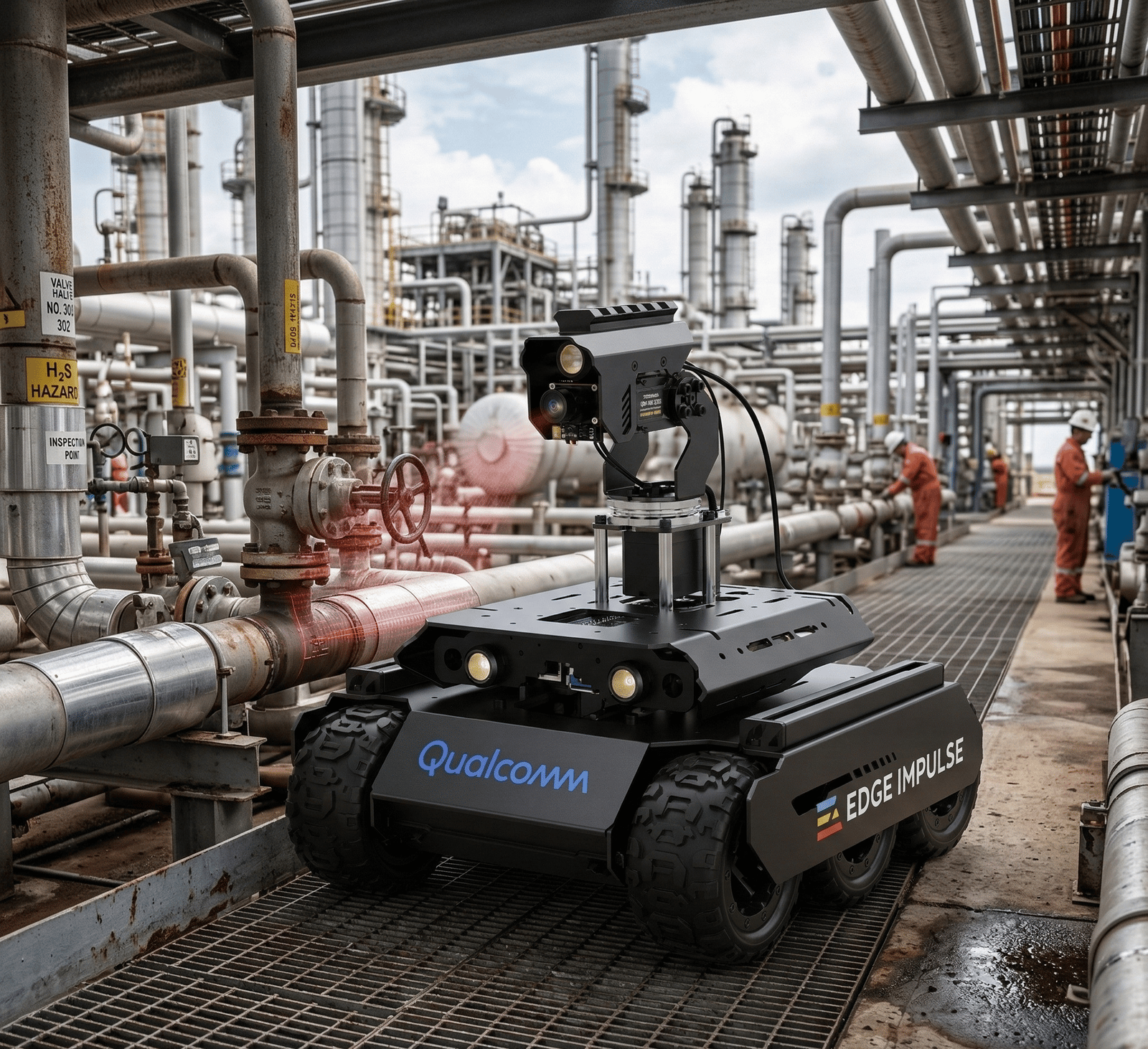
Build an industrial inspection robot that combines mobility, local perception, and structured inspection logging. The architecture is based on a Waveshare UGV-style rover with a pan/tilt camera system and an Edge Impulse perception pipeline running on edge compute such as a Qualcomm QCS6490-class device.
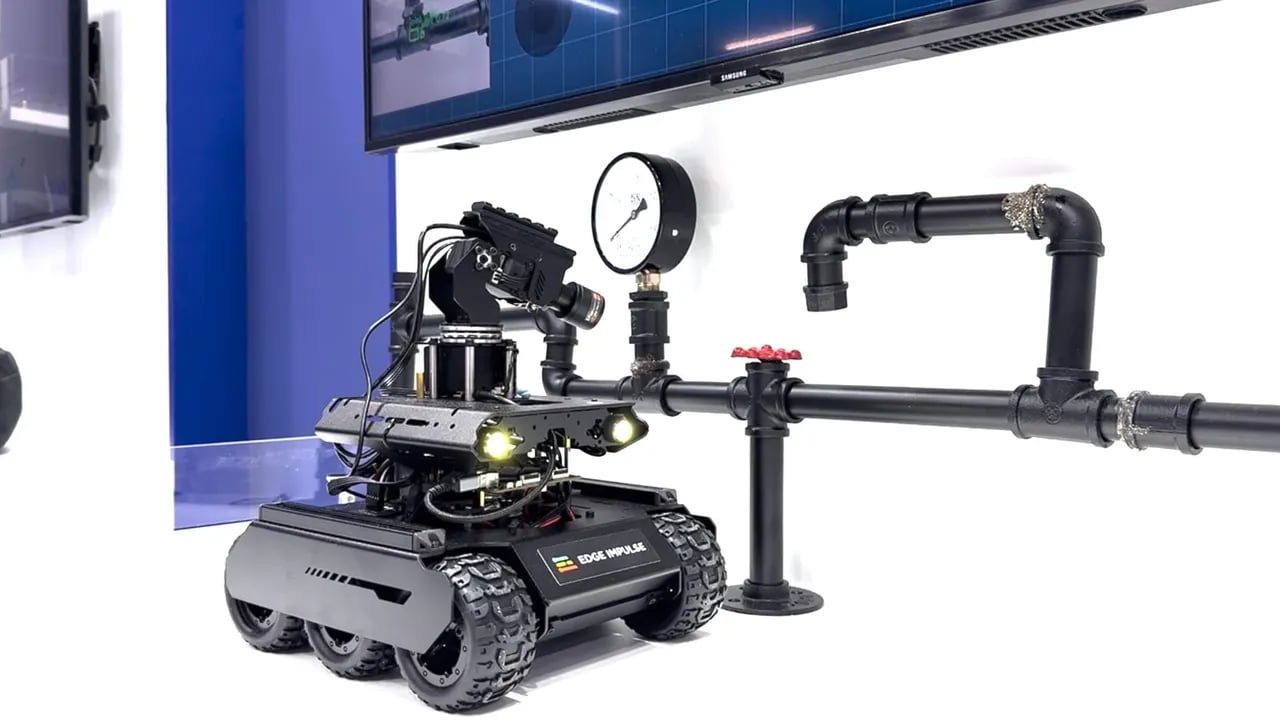 This tutorial is based on Moe Sani's Embedded World 2026 inspection-robot demo. Read the full build story: [A Look Inside my Edge AI Inspection Robot (ROS 2-Native)](https://www.edgeimpulse.com/blog/edge-ai-inspection-robot-ros-2-native/).
## Problem statement
Inspection in industrial settings such as pipelines, refineries, utilities, and infrastructure has several constraints:
* **Hazardous or awkward access**: Manual inspection can put people in unsafe or difficult-to-reach environments.
* **Inconsistent data capture**: Operators may collect images from different angles, distances, and lighting conditions.
* **Limited connectivity**: Field sites may have restricted, intermittent, or intentionally isolated networks.
* **Audit requirements**: Every decision should be traceable, repeatable, and reviewable after the run.
This tutorial is based on Moe Sani's Embedded World 2026 inspection-robot demo. Read the full build story: [A Look Inside my Edge AI Inspection Robot (ROS 2-Native)](https://www.edgeimpulse.com/blog/edge-ai-inspection-robot-ros-2-native/).
## Problem statement
Inspection in industrial settings such as pipelines, refineries, utilities, and infrastructure has several constraints:
* **Hazardous or awkward access**: Manual inspection can put people in unsafe or difficult-to-reach environments.
* **Inconsistent data capture**: Operators may collect images from different angles, distances, and lighting conditions.
* **Limited connectivity**: Field sites may have restricted, intermittent, or intentionally isolated networks.
* **Audit requirements**: Every decision should be traceable, repeatable, and reviewable after the run.
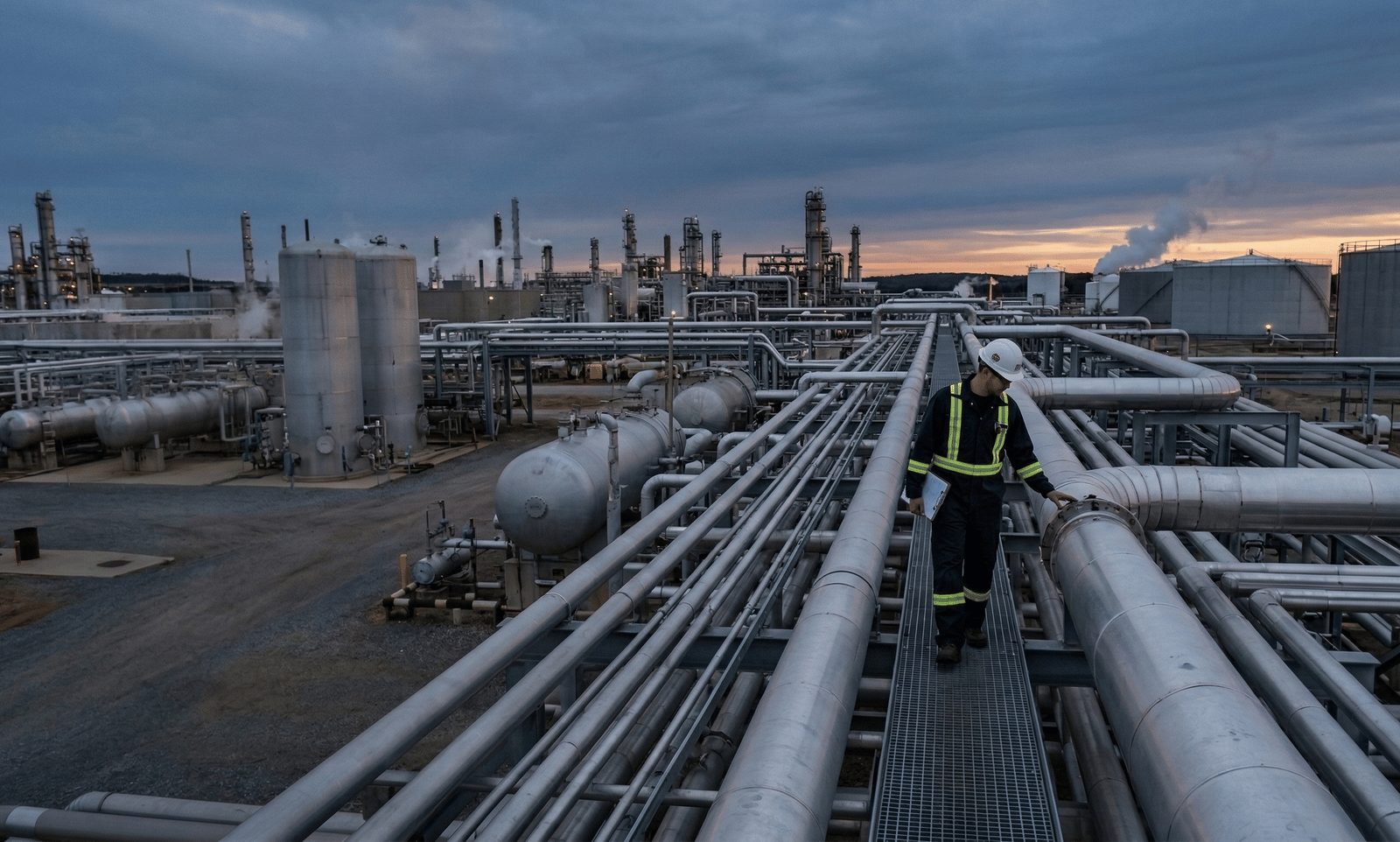 Effective systems make decisions locally, stream compact results, and keep data on-site. Edge AI helps by placing inference next to the sensors, reducing latency, and supporting stronger data governance because raw imagery can remain on-device unless an operator explicitly needs it.
## System architecture
### Hardware minimum
* **Mobile base**: A rover with reliable velocity control, such as a Waveshare UGV-class platform.
* **Gimbal**: A 2-DOF pan/tilt mechanism for aiming the close-up camera.
* **Cameras**: A wide-view camera for search and a close-up camera for inspection.
* **Compute**: Linux edge hardware capable of running ROS 2 and Edge Impulse Linux inference.
* **Safety controls**: Emergency stop, command watchdog, conservative speed limits, and a manual override path.
### Perception pipeline
A two-stage perception design separates search from inspection:
| Stage | Camera | Task | Model | Output |
| ------- | --------- | -------------------------------- | ------------------------------ | ------------------------------------ |
| Search | Wide view | Find candidate inspection points | Object detector | Bounding boxes and confidence scores |
| Inspect | Close-up | Evaluate quality or damage | Anomaly detector or classifier | Anomaly score or class result |
This approach keeps the robot efficient. The detector can run continuously or during short search windows, while higher-resolution anomaly scoring only runs after the gimbal has moved to a candidate point.
### ROS 2 architecture
The system is designed to feel native in ROS 2: perception publishes standard messages, mission logic orchestrates long-running behaviours as Actions, safety gating sits between mission logic and the motor driver, and visualization is a separate consumer.
Effective systems make decisions locally, stream compact results, and keep data on-site. Edge AI helps by placing inference next to the sensors, reducing latency, and supporting stronger data governance because raw imagery can remain on-device unless an operator explicitly needs it.
## System architecture
### Hardware minimum
* **Mobile base**: A rover with reliable velocity control, such as a Waveshare UGV-class platform.
* **Gimbal**: A 2-DOF pan/tilt mechanism for aiming the close-up camera.
* **Cameras**: A wide-view camera for search and a close-up camera for inspection.
* **Compute**: Linux edge hardware capable of running ROS 2 and Edge Impulse Linux inference.
* **Safety controls**: Emergency stop, command watchdog, conservative speed limits, and a manual override path.
### Perception pipeline
A two-stage perception design separates search from inspection:
| Stage | Camera | Task | Model | Output |
| ------- | --------- | -------------------------------- | ------------------------------ | ------------------------------------ |
| Search | Wide view | Find candidate inspection points | Object detector | Bounding boxes and confidence scores |
| Inspect | Close-up | Evaluate quality or damage | Anomaly detector or classifier | Anomaly score or class result |
This approach keeps the robot efficient. The detector can run continuously or during short search windows, while higher-resolution anomaly scoring only runs after the gimbal has moved to a candidate point.
### ROS 2 architecture
The system is designed to feel native in ROS 2: perception publishes standard messages, mission logic orchestrates long-running behaviours as Actions, safety gating sits between mission logic and the motor driver, and visualization is a separate consumer.
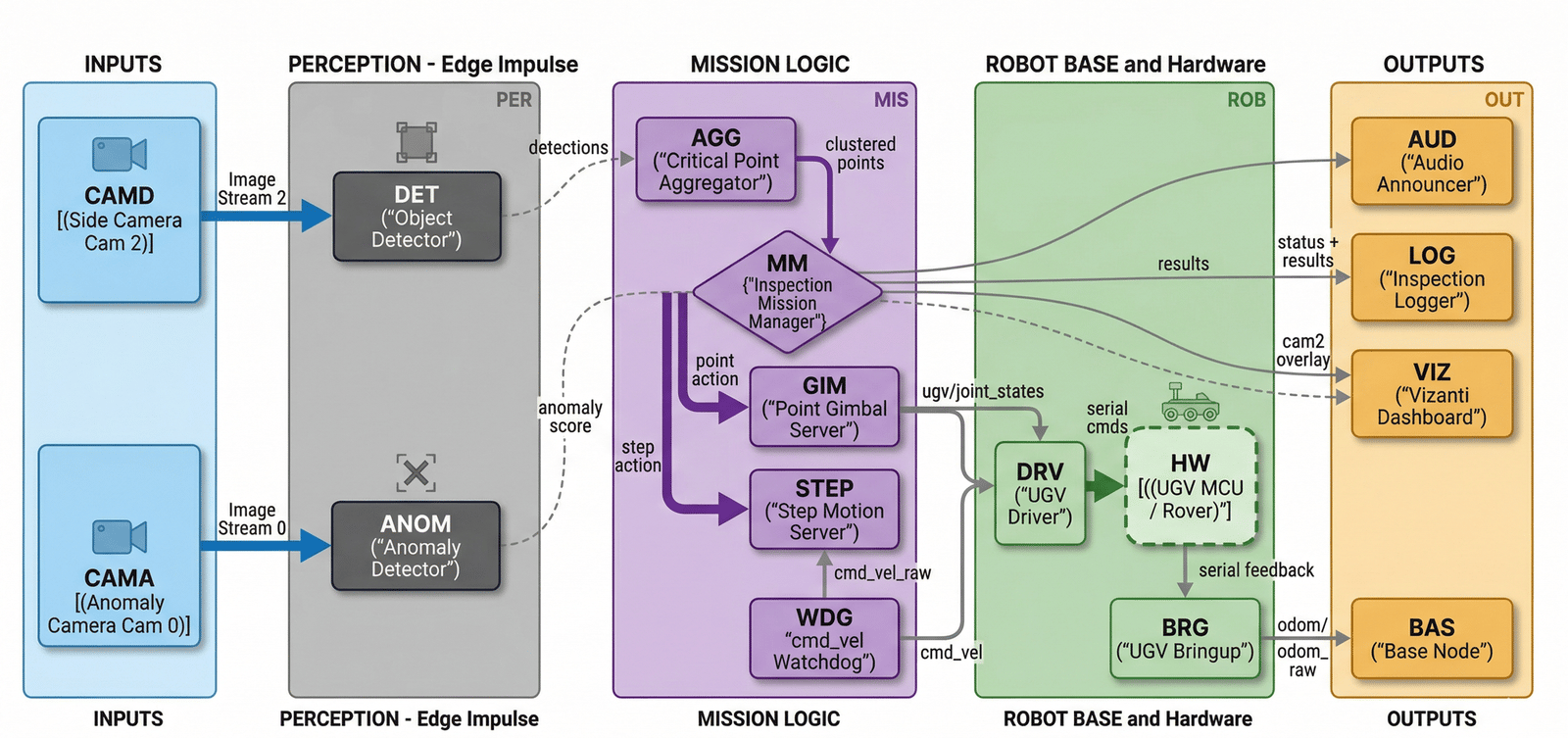 | Node | Role |
| ----------------------------------- | ---------------------------------------------------------------------------------- |
| **DET — Object Detector** | Runs the wide-view detection model and publishes `vision_msgs/Detection2DArray`. |
| **ANOM — Anomaly Detector** | Runs the close-up inspection model and publishes an anomaly score or class result. |
| **AGG — Critical Point Aggregator** | Clusters detections into stable candidate points for inspection. |
| **MM — Inspection Mission Manager** | Orchestrates the move-inspect-move loop as ROS 2 Actions. |
| **GIM — Point Gimbal Server** | Controls pan and tilt to aim the close-up camera at a candidate point. |
| **STEP — Step Motion Server** | Advances the rover one controlled step along the inspection path. |
| **WDG — cmd\_vel Watchdog** | Independently gates motor commands and stops the robot if control messages stall. |
| **DRV — UGV Driver** | Translates `/cmd_vel` into serial or hardware-specific motor commands. |
| **VIZ — Vizanti Dashboard** | Provides a web-based operator view of overlays and mission state. |
| **LOG — Inspection Logger** | Writes structured per-point inspection records. |
Key ROS interfaces:
| Interface | Message type | Purpose |
| ---------------------------------- | ----------------------------------- | ------------------------------------------------------ |
| `/cmd_vel` | `geometry_msgs/Twist` | Motion control for the rover base. |
| `/joint_states` | `sensor_msgs/JointState` | Gimbal pan/tilt state. |
| `/edgeimpulse_detector/detections` | `vision_msgs/Detection2DArray` | Wide-view candidate detections from `edgeimpulse_ros`. |
| Inspection result topic | `std_msgs/String` or custom message | Structured anomaly result for each inspected point. |
## Mission loop
The inspection behaviour is a repeatable **move-inspect-move** routine. The rover advances in short, controlled steps along an inspection path, runs the detector for a short time window, and aggregates detections into a stable set of candidate critical points. For each candidate, the gimbal turns to the target, the camera settles, and the close-up model produces an inspection score.
1. **STEP** advances the rover one position along the inspection path.
2. **DET** runs the object detector on the wide-view camera.
3. **AGG** aggregates detections into stable critical point candidates.
4. For each candidate:
* **GIM** aims the gimbal at the target location.
* **ANOM** captures a close-up and produces an anomaly score or class result.
* **LOG** records the detection, position, score, timestamp, and model version.
5. The mission manager decides whether to continue, retry, alert, or stop.
Each stop produces a traceable record: what the robot saw, why it decided to inspect, and what the anomaly score was. That traceability is often more valuable than an over-automated policy that is difficult to debug.
## Integrating Edge Impulse models
Use [`edgeimpulse_ros`](https://github.com/edgeimpulse/edgeimpulse-ros) when your detector is exported as a Linux `.eim` model and subscribes to a `sensor_msgs/Image` topic published by your wide-view camera driver.
### Installation
Install ROS 2 message dependencies and OpenCV:
```bash theme={"system"}
sudo apt update
sudo apt install -y ros-$ROS_DISTRO-vision-msgs ros-$ROS_DISTRO-diagnostic-msgs \
ros-$ROS_DISTRO-v4l2-camera python3-opencv python3-numpy portaudio19-dev
```
Create or reuse a ROS 2 workspace:
```bash theme={"system"}
mkdir -p ~/inspection_ws/src
cd ~/inspection_ws/src
git clone https://github.com/edgeimpulse/edgeimpulse-ros.git edgeimpulse_ros
pip install --user --break-system-packages edge_impulse_linux pyaudio
cd ~/inspection_ws
source /opt/ros/$ROS_DISTRO/setup.bash
rosdep install --from-paths src --ignore-src -r -y
colcon build --symlink-install
source install/setup.bash
```
Do not place the Edge Impulse Linux SDK source repository inside a ROS workspace `src/` directory. Colcon may treat it as a ROS package. Install the SDK with `pip`, or add `COLCON_IGNORE` if a non-ROS directory must live under the workspace.
### Running the detector
Use the launch file for normal operation:
```bash theme={"system"}
ros2 launch edgeimpulse_ros edgeimpulse_detector.launch.py \
model_path:=/home/$USER/models/inspection-detector.eim \
image_topic:=/wide_camera/image_raw \
image_qos:=sensor_data
```
Use `ros2 run` when you need to override individual parameters from the command line:
```bash theme={"system"}
ros2 run edgeimpulse_ros edgeimpulse_detector --ros-args \
-p model_path:=/home/$USER/models/inspection-detector.eim \
-p image_topic:=/wide_camera/image_raw \
-p image_qos:=sensor_data \
-p confidence_threshold:=0.5 \
-p frame_id_override:=wide_camera
```
### Output topics
| Topic | Type | Content |
| ---------------------------------- | --------------------------------- | --------------------------------------------------------------------- |
| `/edgeimpulse_detector/detections` | `vision_msgs/Detection2DArray` | Bounding boxes and class scores for accepted detections. |
| `/edgeimpulse_detector/anomaly` | `std_msgs/Float32` | Peak anomaly score for models with an anomaly output. |
| `/diagnostics` | `diagnostic_msgs/DiagnosticArray` | FPS, latency, dropped frames, and Edge Impulse DSP/inference timings. |
### Configuration
Common parameters:
| Parameter | Use |
| ---------------------- | ---------------------------------------------------------------------------------------------------------------- |
| `confidence_threshold` | Filter low-confidence detections before downstream mission logic sees them. `<0` uses the model's own threshold. |
| `image_topic` | Subscribe to the wide-view camera driver's `sensor_msgs/Image` topic. |
| `image_qos` | Match the camera driver's QoS (`sensor_data`, `reliable`, or `default`). |
| `publish_debug_image` | Publish an annotated overlay for operator review and dashboards. |
| `publish_diagnostics` | Publish the `DiagnosticArray` that dashboards and watchdogs can consume. |
## Building your inspection system
### 1. Define mission requirements
Before collecting data, define the inspection target and operational limits:
* What is a critical point for the asset?
* What does abnormal look like operationally?
* What inspection distance, angle, lighting, and speed are acceptable?
* What should happen when confidence is low or a component cannot be inspected?
### 2. Design data collection
Capture two views with consistent conditions.
**Search view: wide camera**
* Capture multiple angles along the inspection path.
* Include expected lighting, motion blur, and partial occlusions.
* Label the target components or regions of interest.
**Inspection view: close-up camera**
* Capture high detail for anomaly detection.
* Keep framing consistent after the gimbal aims at a target.
* Include normal examples first, then expand with known defects or borderline cases.
### 3. Train two models in Edge Impulse
**Detection model**
* Input: wide-view images.
* Output: bounding boxes for critical points.
* Optimize for: speed and recall.
**Inspection model**
* Input: close-up images.
* Output: anomaly score or binary/multiclass result.
* Optimize for: precision, repeatability, and explainable operator review.
### 4. Integrate with ROS 2
Keep inference as a standard ROS 2 component:
* Publish standard message types where possible.
* Keep visualization as a consumer of topics, not as the owner of mission state.
* Keep safety separate from ML and mission logic.
* Version the model path and threshold values alongside the mission configuration.
### 5. Orchestrate the mission with Actions
Implement long-running behaviours as ROS 2 Actions:
* **Detect/Aggregate**: Run detector and collect candidates.
* **Point Gimbal**: Move pan/tilt to a target.
* **Capture/Inspect**: Take a close-up and run inspection.
* **Move**: Advance the rover to the next position.
Actions provide timeout handling, cancellation, and recovery mechanisms, which are essential for field robotics.
### 6. Add an independent safety layer
Safety should not depend on the model being correct.
* Use a `/cmd_vel` watchdog with a short timeout.
* Keep emergency stop outside the mission manager.
* Gate motor driver commands independently of detection output.
* Use conservative speed limits during inspection.
* Add collision avoidance or protected operating zones where required.
### 7. Validate progressively
1. Test both models on representative offline images.
2. Run static camera tests with the robot powered but stationary.
3. Run controlled low-speed tests in a safe environment.
4. Review logs for repeatability, false positives, false negatives, and motion timing.
5. Expand field tests gradually.
## Visualization and control
Use [Vizanti](https://github.com/AdaCompNUS/vizanti) or a similar ROS 2 web UI for a portable operator interface. It runs in the browser and connects directly to the ROS 2 graph, which makes it useful for demos, field validation, and debugging.
| Node | Role |
| ----------------------------------- | ---------------------------------------------------------------------------------- |
| **DET — Object Detector** | Runs the wide-view detection model and publishes `vision_msgs/Detection2DArray`. |
| **ANOM — Anomaly Detector** | Runs the close-up inspection model and publishes an anomaly score or class result. |
| **AGG — Critical Point Aggregator** | Clusters detections into stable candidate points for inspection. |
| **MM — Inspection Mission Manager** | Orchestrates the move-inspect-move loop as ROS 2 Actions. |
| **GIM — Point Gimbal Server** | Controls pan and tilt to aim the close-up camera at a candidate point. |
| **STEP — Step Motion Server** | Advances the rover one controlled step along the inspection path. |
| **WDG — cmd\_vel Watchdog** | Independently gates motor commands and stops the robot if control messages stall. |
| **DRV — UGV Driver** | Translates `/cmd_vel` into serial or hardware-specific motor commands. |
| **VIZ — Vizanti Dashboard** | Provides a web-based operator view of overlays and mission state. |
| **LOG — Inspection Logger** | Writes structured per-point inspection records. |
Key ROS interfaces:
| Interface | Message type | Purpose |
| ---------------------------------- | ----------------------------------- | ------------------------------------------------------ |
| `/cmd_vel` | `geometry_msgs/Twist` | Motion control for the rover base. |
| `/joint_states` | `sensor_msgs/JointState` | Gimbal pan/tilt state. |
| `/edgeimpulse_detector/detections` | `vision_msgs/Detection2DArray` | Wide-view candidate detections from `edgeimpulse_ros`. |
| Inspection result topic | `std_msgs/String` or custom message | Structured anomaly result for each inspected point. |
## Mission loop
The inspection behaviour is a repeatable **move-inspect-move** routine. The rover advances in short, controlled steps along an inspection path, runs the detector for a short time window, and aggregates detections into a stable set of candidate critical points. For each candidate, the gimbal turns to the target, the camera settles, and the close-up model produces an inspection score.
1. **STEP** advances the rover one position along the inspection path.
2. **DET** runs the object detector on the wide-view camera.
3. **AGG** aggregates detections into stable critical point candidates.
4. For each candidate:
* **GIM** aims the gimbal at the target location.
* **ANOM** captures a close-up and produces an anomaly score or class result.
* **LOG** records the detection, position, score, timestamp, and model version.
5. The mission manager decides whether to continue, retry, alert, or stop.
Each stop produces a traceable record: what the robot saw, why it decided to inspect, and what the anomaly score was. That traceability is often more valuable than an over-automated policy that is difficult to debug.
## Integrating Edge Impulse models
Use [`edgeimpulse_ros`](https://github.com/edgeimpulse/edgeimpulse-ros) when your detector is exported as a Linux `.eim` model and subscribes to a `sensor_msgs/Image` topic published by your wide-view camera driver.
### Installation
Install ROS 2 message dependencies and OpenCV:
```bash theme={"system"}
sudo apt update
sudo apt install -y ros-$ROS_DISTRO-vision-msgs ros-$ROS_DISTRO-diagnostic-msgs \
ros-$ROS_DISTRO-v4l2-camera python3-opencv python3-numpy portaudio19-dev
```
Create or reuse a ROS 2 workspace:
```bash theme={"system"}
mkdir -p ~/inspection_ws/src
cd ~/inspection_ws/src
git clone https://github.com/edgeimpulse/edgeimpulse-ros.git edgeimpulse_ros
pip install --user --break-system-packages edge_impulse_linux pyaudio
cd ~/inspection_ws
source /opt/ros/$ROS_DISTRO/setup.bash
rosdep install --from-paths src --ignore-src -r -y
colcon build --symlink-install
source install/setup.bash
```
Do not place the Edge Impulse Linux SDK source repository inside a ROS workspace `src/` directory. Colcon may treat it as a ROS package. Install the SDK with `pip`, or add `COLCON_IGNORE` if a non-ROS directory must live under the workspace.
### Running the detector
Use the launch file for normal operation:
```bash theme={"system"}
ros2 launch edgeimpulse_ros edgeimpulse_detector.launch.py \
model_path:=/home/$USER/models/inspection-detector.eim \
image_topic:=/wide_camera/image_raw \
image_qos:=sensor_data
```
Use `ros2 run` when you need to override individual parameters from the command line:
```bash theme={"system"}
ros2 run edgeimpulse_ros edgeimpulse_detector --ros-args \
-p model_path:=/home/$USER/models/inspection-detector.eim \
-p image_topic:=/wide_camera/image_raw \
-p image_qos:=sensor_data \
-p confidence_threshold:=0.5 \
-p frame_id_override:=wide_camera
```
### Output topics
| Topic | Type | Content |
| ---------------------------------- | --------------------------------- | --------------------------------------------------------------------- |
| `/edgeimpulse_detector/detections` | `vision_msgs/Detection2DArray` | Bounding boxes and class scores for accepted detections. |
| `/edgeimpulse_detector/anomaly` | `std_msgs/Float32` | Peak anomaly score for models with an anomaly output. |
| `/diagnostics` | `diagnostic_msgs/DiagnosticArray` | FPS, latency, dropped frames, and Edge Impulse DSP/inference timings. |
### Configuration
Common parameters:
| Parameter | Use |
| ---------------------- | ---------------------------------------------------------------------------------------------------------------- |
| `confidence_threshold` | Filter low-confidence detections before downstream mission logic sees them. `<0` uses the model's own threshold. |
| `image_topic` | Subscribe to the wide-view camera driver's `sensor_msgs/Image` topic. |
| `image_qos` | Match the camera driver's QoS (`sensor_data`, `reliable`, or `default`). |
| `publish_debug_image` | Publish an annotated overlay for operator review and dashboards. |
| `publish_diagnostics` | Publish the `DiagnosticArray` that dashboards and watchdogs can consume. |
## Building your inspection system
### 1. Define mission requirements
Before collecting data, define the inspection target and operational limits:
* What is a critical point for the asset?
* What does abnormal look like operationally?
* What inspection distance, angle, lighting, and speed are acceptable?
* What should happen when confidence is low or a component cannot be inspected?
### 2. Design data collection
Capture two views with consistent conditions.
**Search view: wide camera**
* Capture multiple angles along the inspection path.
* Include expected lighting, motion blur, and partial occlusions.
* Label the target components or regions of interest.
**Inspection view: close-up camera**
* Capture high detail for anomaly detection.
* Keep framing consistent after the gimbal aims at a target.
* Include normal examples first, then expand with known defects or borderline cases.
### 3. Train two models in Edge Impulse
**Detection model**
* Input: wide-view images.
* Output: bounding boxes for critical points.
* Optimize for: speed and recall.
**Inspection model**
* Input: close-up images.
* Output: anomaly score or binary/multiclass result.
* Optimize for: precision, repeatability, and explainable operator review.
### 4. Integrate with ROS 2
Keep inference as a standard ROS 2 component:
* Publish standard message types where possible.
* Keep visualization as a consumer of topics, not as the owner of mission state.
* Keep safety separate from ML and mission logic.
* Version the model path and threshold values alongside the mission configuration.
### 5. Orchestrate the mission with Actions
Implement long-running behaviours as ROS 2 Actions:
* **Detect/Aggregate**: Run detector and collect candidates.
* **Point Gimbal**: Move pan/tilt to a target.
* **Capture/Inspect**: Take a close-up and run inspection.
* **Move**: Advance the rover to the next position.
Actions provide timeout handling, cancellation, and recovery mechanisms, which are essential for field robotics.
### 6. Add an independent safety layer
Safety should not depend on the model being correct.
* Use a `/cmd_vel` watchdog with a short timeout.
* Keep emergency stop outside the mission manager.
* Gate motor driver commands independently of detection output.
* Use conservative speed limits during inspection.
* Add collision avoidance or protected operating zones where required.
### 7. Validate progressively
1. Test both models on representative offline images.
2. Run static camera tests with the robot powered but stationary.
3. Run controlled low-speed tests in a safe environment.
4. Review logs for repeatability, false positives, false negatives, and motion timing.
5. Expand field tests gradually.
## Visualization and control
Use [Vizanti](https://github.com/AdaCompNUS/vizanti) or a similar ROS 2 web UI for a portable operator interface. It runs in the browser and connects directly to the ROS 2 graph, which makes it useful for demos, field validation, and debugging.
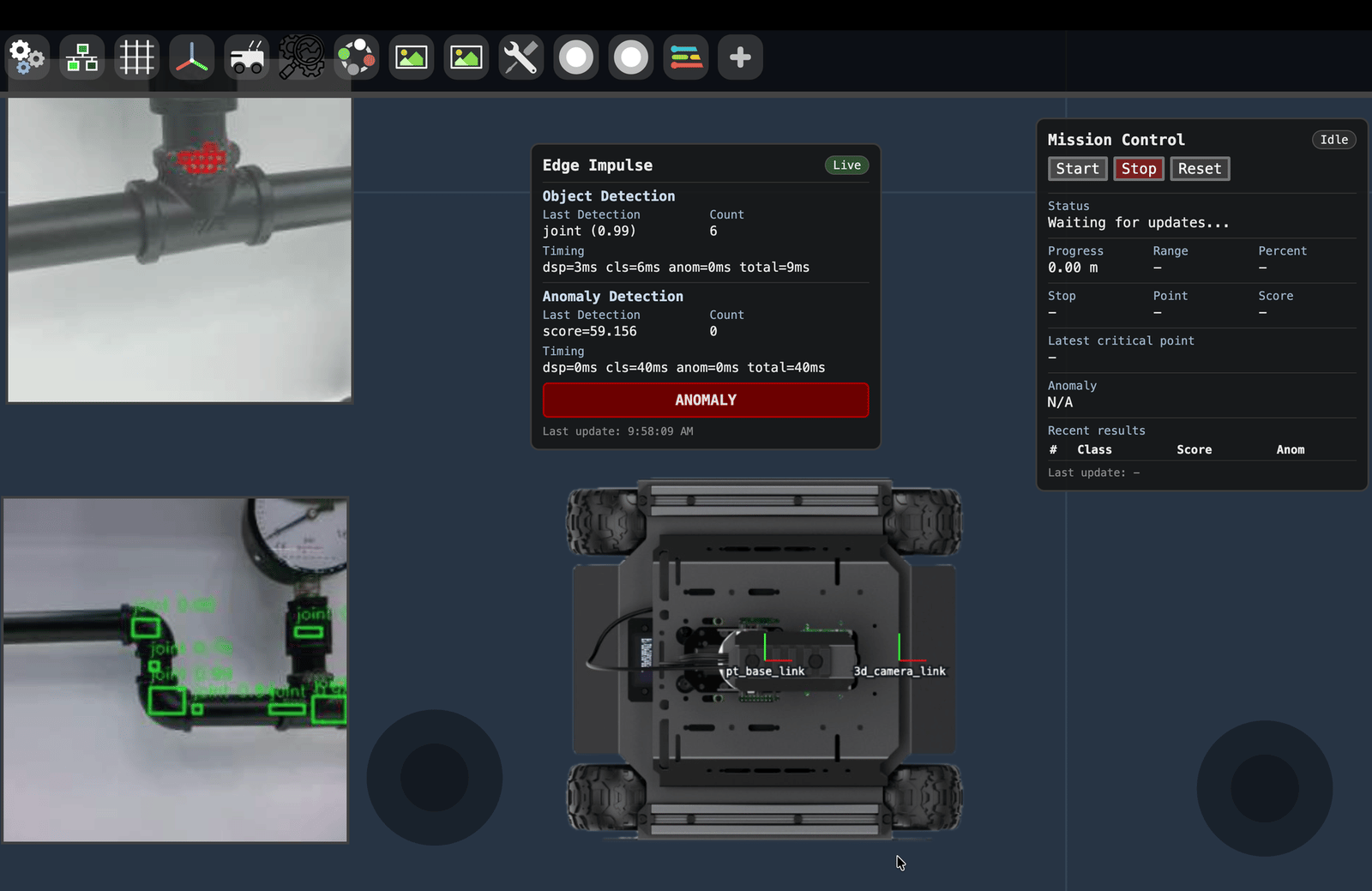 Key outputs:
* **Live overlays**: Detection bounding boxes on the wide-view feed and anomaly scores on the close-up feed.
* **Mission timeline**: What the rover is doing and when, including STEP, GIM, and ANOM actions.
* **Inspection log**: Per-point records with location, detection confidence, anomaly score, model version, and timestamp.
## Deployment
Key outputs:
* **Live overlays**: Detection bounding boxes on the wide-view feed and anomaly scores on the close-up feed.
* **Mission timeline**: What the rover is doing and when, including STEP, GIM, and ANOM actions.
* **Inspection log**: Per-point records with location, detection confidence, anomaly score, model version, and timestamp.
## Deployment
 ### On-device inference
* Keep all inference local.
* Stream compact results only.
* Transmit imagery only when an operator or audit process needs it.
* Maintain on-site data storage for sensitive environments.
### Safety
* Treat ML as advisory, not authoritative.
* Keep emergency stop and collision avoidance in independent layers.
* Test failure modes such as model failure, communications loss, stalled gimbal movement, and blocked motion.
### Feedback loop
Log model scores, operator overrides, manual results, camera pose, and model version. Use those logs to improve datasets, thresholds, and mission policy over time.
## Getting started checklist
1. Create an Edge Impulse project for the search detector.
2. Collect a small dataset from the wide-view camera.
3. Train and export the detection model as a Linux `.eim` deployment.
4. Create a second Edge Impulse project for close-up anomaly scoring or classification.
5. Collect normal and abnormal close-up examples.
6. Integrate the detector with `edgeimpulse_ros` and verify `/edgeimpulse_detector/detections`.
7. Add gimbal aiming, inspection scoring, and structured logging.
8. Test in a controlled environment before field deployment.
## Additional resources
* [A Look Inside my Edge AI Inspection Robot (ROS 2-Native)](https://www.edgeimpulse.com/blog/edge-ai-inspection-robot-ros-2-native/) — Moe Sani's Embedded World build story and architecture walkthrough.
* [edgeimpulse-ros GitHub](https://github.com/edgeimpulse/edgeimpulse-ros)
* [Edge Impulse Linux SDK](https://github.com/edgeimpulse/linux-sdk-python)
* [ROS 2 Documentation](https://docs.ros.org/)
* [Vizanti web-based ROS 2 UI](https://github.com/AdaCompNUS/vizanti)
### On-device inference
* Keep all inference local.
* Stream compact results only.
* Transmit imagery only when an operator or audit process needs it.
* Maintain on-site data storage for sensitive environments.
### Safety
* Treat ML as advisory, not authoritative.
* Keep emergency stop and collision avoidance in independent layers.
* Test failure modes such as model failure, communications loss, stalled gimbal movement, and blocked motion.
### Feedback loop
Log model scores, operator overrides, manual results, camera pose, and model version. Use those logs to improve datasets, thresholds, and mission policy over time.
## Getting started checklist
1. Create an Edge Impulse project for the search detector.
2. Collect a small dataset from the wide-view camera.
3. Train and export the detection model as a Linux `.eim` deployment.
4. Create a second Edge Impulse project for close-up anomaly scoring or classification.
5. Collect normal and abnormal close-up examples.
6. Integrate the detector with `edgeimpulse_ros` and verify `/edgeimpulse_detector/detections`.
7. Add gimbal aiming, inspection scoring, and structured logging.
8. Test in a controlled environment before field deployment.
## Additional resources
* [A Look Inside my Edge AI Inspection Robot (ROS 2-Native)](https://www.edgeimpulse.com/blog/edge-ai-inspection-robot-ros-2-native/) — Moe Sani's Embedded World build story and architecture walkthrough.
* [edgeimpulse-ros GitHub](https://github.com/edgeimpulse/edgeimpulse-ros)
* [Edge Impulse Linux SDK](https://github.com/edgeimpulse/linux-sdk-python)
* [ROS 2 Documentation](https://docs.ros.org/)
* [Vizanti web-based ROS 2 UI](https://github.com/AdaCompNUS/vizanti)