> ## Documentation Index
> Fetch the complete documentation index at: https://docs.edgeimpulse.com/llms.txt
> Use this file to discover all available pages before exploring further.
# Robotics with Edge Impulse and ROS 2
> Build robotics workflows that combine ROS 2, Edge Impulse vision models, simulation, and physical robot deployment.
# Robotics with Edge Impulse and ROS 2
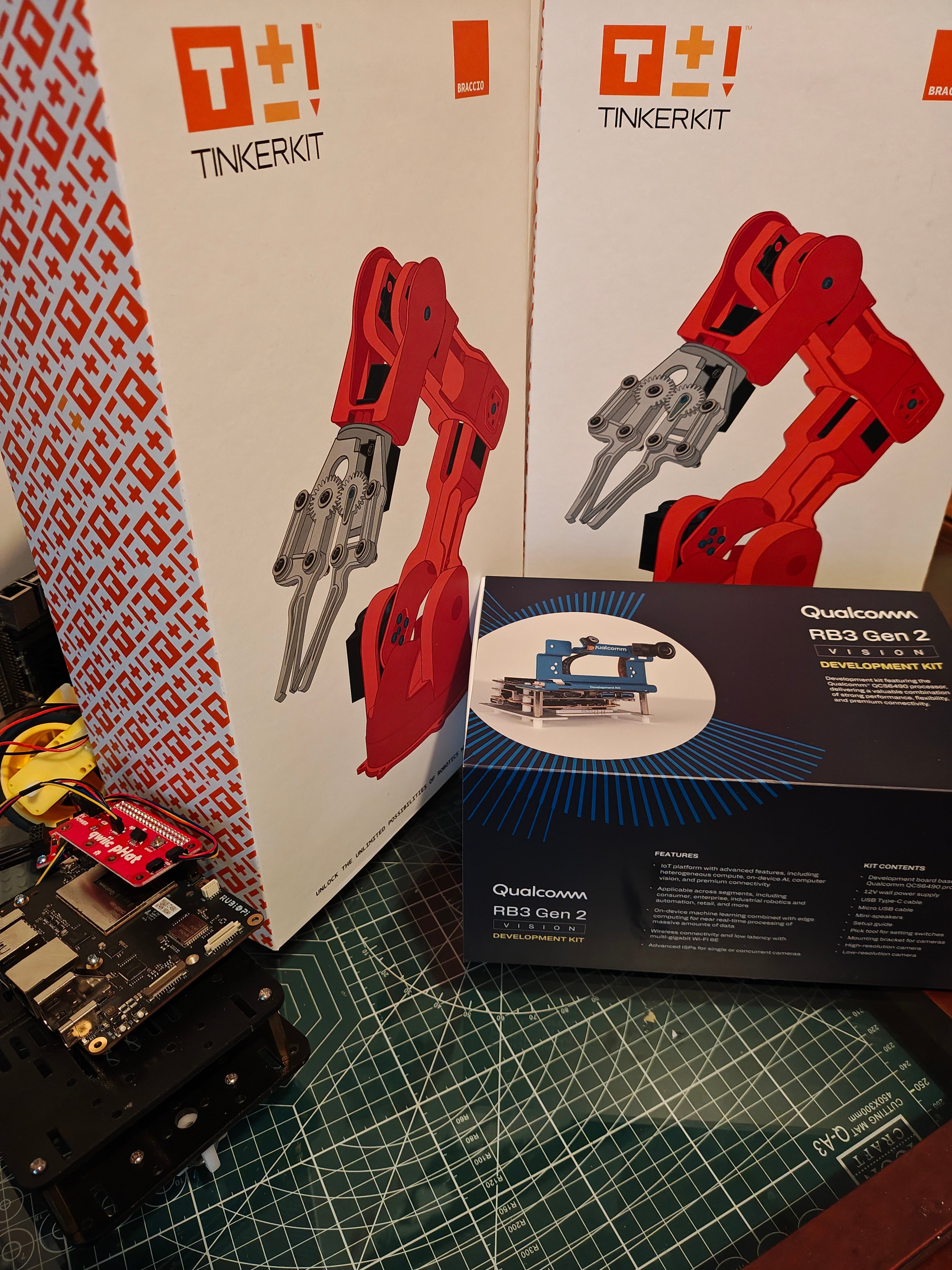 This series shows how to build practical robotics systems with ROS 2 and Edge Impulse. The tutorials start with environment setup and model deployment, then progress into full robot workflows for mobile robots, camera-based inspection, and robotic-arm pick-and-place tasks.
Across the series, the common pattern is to train a model in Edge Impulse, run inference locally on the robot or host computer, and pass the result into ROS 2 so robot-specific nodes can decide what to do next. Depending on the workflow, that local runtime can be either a Linux `.eim` deployment or a Python/Linux runner command.
```mermaid theme={"system"}
flowchart LR
DATA["Robot or camera data"] --> EI["Edge Impulse model"]
EI --> ROS["ROS 2 topics"]
ROS --> LOGIC["Robot behavior nodes"]
LOGIC --> ACTION["Motion, inspection, sorting, or alerts"]
```
## What the series covers
* Setting up Linux and ROS 2 for robotics development.
* Exporting Edge Impulse models for local Linux inference.
* Publishing object-detection results as ROS 2 messages.
* Connecting perception output to robot-specific behavior nodes.
* Testing robot motion and perception separately before integrating them.
* Moving from simulation and bench tests to physical robot workflows.
## Foundations and setup
Run a Linux `.eim` object-detection model on a ROS 2 image topic and publish detection messages.
## Robot tutorials
Combine JetBot-class motor control on Qualcomm Rubik Pi with Edge Impulse object detection.
Design a ROS 2-native inspection rover with detection, anomaly scoring, gimbal control, logging, and safety layers.
Use Edge Impulse object detection, ROS 2, and an Arduino UNO Q to sort colored blocks with a Braccio arm.
**Simulation, topic classes, and what's next**
These tutorials also work with **simulated robotic arms** — you can develop and test the full perception-to-motion pipeline in Gazebo before touching hardware, then point the same nodes at a physical arm by swapping the camera and joint-command topics.
Across the series you work with a consistent set of ROS 2 message classes: perception input as `sensor_msgs/Image`, detection and classification output as `vision_msgs` (`Detection2DArray`, `Classification`), model health as `diagnostic_msgs/DiagnosticArray`, and actuation as `std_msgs`, `sensor_msgs/JointState`, and `trajectory_msgs`. Learning this mapping once carries across every robot in the series.
We plan to cover **imitation learning** for robotic arms in an upcoming tutorial, extending this detection-driven workflow toward learned, demonstration-based manipulation.
## Recommended path
Start with the shared Edge Impulse ROS 2 detector tutorial. It explains the `.eim` deployment, image-topic subscription, output topics, and runtime parameters used by the JetBot workflow and by generic inspection systems.
The UNO Q Braccio workflow uses a repo-native Edge Impulse runner pipeline instead of the shared `edgeimpulse_ros` `.eim` wrapper. Read the shared detector page for background, but follow the Braccio tutorial for the exact arm launch commands and topics.
| Goal | Start here |
| -------------------------------------------------- | ------------------------------------------------------------------------------------------- |
| Publish Edge Impulse detections into ROS 2 | [Run Edge Impulse Object Detection with ROS 2](./edgeimpulse-ros2-integration) |
| Add perception to a JetBot-class mobile robot | [Run Edge Impulse Vision on a JetBot with Rubik Pi](./wheeled-robot-ros2-integration) |
| Design a rover-style inspection architecture | [Build a Mobile Inspection System with Edge Impulse and ROS 2](./wheeled-inspection-system) |
| Trigger robotic-arm sorting from object detections | [Run Edge Impulse Pick and Place with UNO Q Braccio](./robotic-arm-ros2-integration) |
## Prerequisites
Before starting the tutorials, have the following ready:
* A supported Linux development environment.
* Basic familiarity with ROS 2 nodes, topics, launch files, and workspaces.
* An Edge Impulse account and an object-detection or anomaly-detection project.
* Access to the target robot or a simulation environment for the tutorial you follow.
* Required sensors and actuators, such as a USB camera, motor controller, gimbal, or gripper.
## Safety notes
Robotics examples can move physical hardware. Test perception, networking, and motion separately before connecting them into a live workflow. Keep physical access to emergency power, use conservative speeds, and avoid unattended operation until the behavior has been validated in the final environment.
## Resources
* [ROS 2 Documentation](https://docs.ros.org/)
* [Edge Impulse Linux SDK](https://github.com/edgeimpulse/linux-sdk-python)
* [edgeimpulse-ros ROS 2 package](https://github.com/edgeimpulse/edgeimpulse-ros)
* [Nav2 Navigation Framework](https://nav2.org/)
* [MoveIt 2 Motion Planning](https://moveit.picknik.ai/)
This series shows how to build practical robotics systems with ROS 2 and Edge Impulse. The tutorials start with environment setup and model deployment, then progress into full robot workflows for mobile robots, camera-based inspection, and robotic-arm pick-and-place tasks.
Across the series, the common pattern is to train a model in Edge Impulse, run inference locally on the robot or host computer, and pass the result into ROS 2 so robot-specific nodes can decide what to do next. Depending on the workflow, that local runtime can be either a Linux `.eim` deployment or a Python/Linux runner command.
```mermaid theme={"system"}
flowchart LR
DATA["Robot or camera data"] --> EI["Edge Impulse model"]
EI --> ROS["ROS 2 topics"]
ROS --> LOGIC["Robot behavior nodes"]
LOGIC --> ACTION["Motion, inspection, sorting, or alerts"]
```
## What the series covers
* Setting up Linux and ROS 2 for robotics development.
* Exporting Edge Impulse models for local Linux inference.
* Publishing object-detection results as ROS 2 messages.
* Connecting perception output to robot-specific behavior nodes.
* Testing robot motion and perception separately before integrating them.
* Moving from simulation and bench tests to physical robot workflows.
## Foundations and setup
Run a Linux `.eim` object-detection model on a ROS 2 image topic and publish detection messages.
## Robot tutorials
Combine JetBot-class motor control on Qualcomm Rubik Pi with Edge Impulse object detection.
Design a ROS 2-native inspection rover with detection, anomaly scoring, gimbal control, logging, and safety layers.
Use Edge Impulse object detection, ROS 2, and an Arduino UNO Q to sort colored blocks with a Braccio arm.
**Simulation, topic classes, and what's next**
These tutorials also work with **simulated robotic arms** — you can develop and test the full perception-to-motion pipeline in Gazebo before touching hardware, then point the same nodes at a physical arm by swapping the camera and joint-command topics.
Across the series you work with a consistent set of ROS 2 message classes: perception input as `sensor_msgs/Image`, detection and classification output as `vision_msgs` (`Detection2DArray`, `Classification`), model health as `diagnostic_msgs/DiagnosticArray`, and actuation as `std_msgs`, `sensor_msgs/JointState`, and `trajectory_msgs`. Learning this mapping once carries across every robot in the series.
We plan to cover **imitation learning** for robotic arms in an upcoming tutorial, extending this detection-driven workflow toward learned, demonstration-based manipulation.
## Recommended path
Start with the shared Edge Impulse ROS 2 detector tutorial. It explains the `.eim` deployment, image-topic subscription, output topics, and runtime parameters used by the JetBot workflow and by generic inspection systems.
The UNO Q Braccio workflow uses a repo-native Edge Impulse runner pipeline instead of the shared `edgeimpulse_ros` `.eim` wrapper. Read the shared detector page for background, but follow the Braccio tutorial for the exact arm launch commands and topics.
| Goal | Start here |
| -------------------------------------------------- | ------------------------------------------------------------------------------------------- |
| Publish Edge Impulse detections into ROS 2 | [Run Edge Impulse Object Detection with ROS 2](./edgeimpulse-ros2-integration) |
| Add perception to a JetBot-class mobile robot | [Run Edge Impulse Vision on a JetBot with Rubik Pi](./wheeled-robot-ros2-integration) |
| Design a rover-style inspection architecture | [Build a Mobile Inspection System with Edge Impulse and ROS 2](./wheeled-inspection-system) |
| Trigger robotic-arm sorting from object detections | [Run Edge Impulse Pick and Place with UNO Q Braccio](./robotic-arm-ros2-integration) |
## Prerequisites
Before starting the tutorials, have the following ready:
* A supported Linux development environment.
* Basic familiarity with ROS 2 nodes, topics, launch files, and workspaces.
* An Edge Impulse account and an object-detection or anomaly-detection project.
* Access to the target robot or a simulation environment for the tutorial you follow.
* Required sensors and actuators, such as a USB camera, motor controller, gimbal, or gripper.
## Safety notes
Robotics examples can move physical hardware. Test perception, networking, and motion separately before connecting them into a live workflow. Keep physical access to emergency power, use conservative speeds, and avoid unattended operation until the behavior has been validated in the final environment.
## Resources
* [ROS 2 Documentation](https://docs.ros.org/)
* [Edge Impulse Linux SDK](https://github.com/edgeimpulse/linux-sdk-python)
* [edgeimpulse-ros ROS 2 package](https://github.com/edgeimpulse/edgeimpulse-ros)
* [Nav2 Navigation Framework](https://nav2.org/)
* [MoveIt 2 Motion Planning](https://moveit.picknik.ai/)