> ## Documentation Index
> Fetch the complete documentation index at: https://docs.edgeimpulse.com/llms.txt
> Use this file to discover all available pages before exploring further.
# Run multiple impulses (C++)
> Run two independent Edge Impulse impulses simultaneously on a microcontroller using the C++ SDK.
Once you successfully trained or imported a model, you can use Edge Impulse to download a C++ library that bundles both your signal processing and your machine learning model. Until recently, we could only run one **impulse** on MCUs.
**Developer preview**
This feature is a developer preview. Changes and improvements can still be made without prior notice and there are no guarantees that this feature will be fully released in future.
This tutorial is for advanced users. We will provide limited support on the forum until this feature is fully integrated into the platform. If you have subscribed to an Enterprise plan, you can contact our customer success or solution engineering team.
In this tutorial, we will see how to run multiple impulses using the downloaded C++ libraries of two different projects.
We have put together a [custom deployment block](https://github.com/edgeimpulse/multi-impulse-deployment-block) that will automate all the processes and provide a C++ library that can be compiled and run as a standalone.
In this page, we will explain the high level concepts of how to merge two impulses. Feel free to look at the code to gain a deeper understanding.
**Multi-impulse vs multi-model vs sensor fusion**
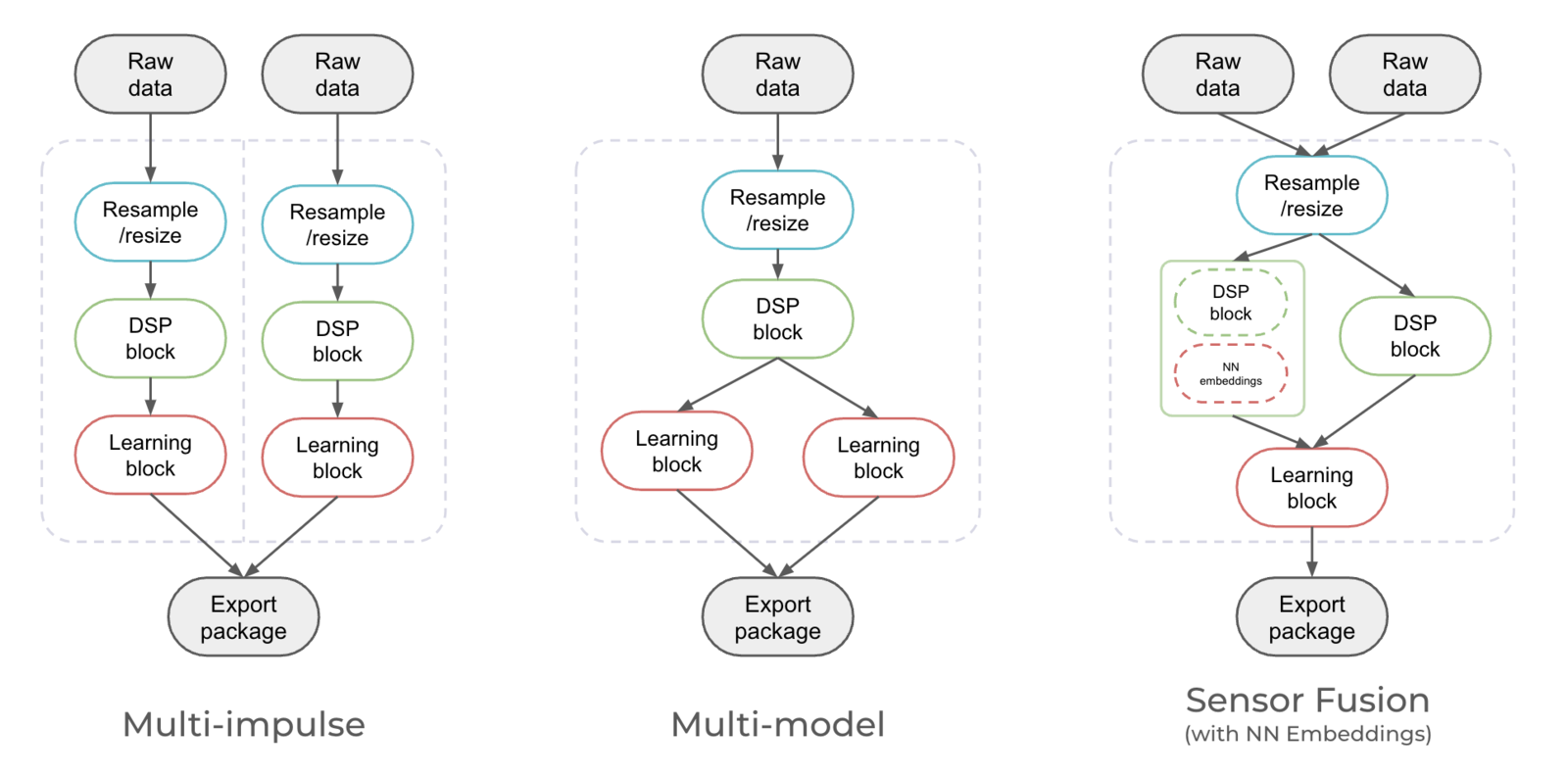
Running **multi-impulse** refers to running two separate projects (different data, different DSP blocks and different models) on the same target. It will require modifying some files in the EI-generated SDKs.
Running **multi-model** refers to running two different models (same data, same DSP block but different tflite models) on the same target. See how to run a motion classifier model and an anomaly detection model on the same device in [this tutorial](/tutorials/end-to-end/motion-recognition).
**Sensor fusion** refers to the process of combining data from different types of sensors to give more information to the neural network. See how to use sensor fusion in [this tutorial](/tutorials/end-to-end/environmental-sensor-fusion).
 Also see this video (starting min 13):
### Examples
Make sure you have at least two impulses fully trained.
You can use one of the following examples:
This example can be used for an intrusion detection system. We will use a first model to detect glass-breaking sounds, if we detected this sound, we will then classify an image to see if there is a person or not in the image. In this tutorial, we will use the following public projects:
* [Glass breaking - audio classification](https://studio.edgeimpulse.com/public/233502/latest)
* [Person detection - image classification](https://studio.edgeimpulse.com/public/233515/latest)
## Merge multiple impulses into a single C++ Library
The source code and the generator script can be found [here](https://github.com/edgeimpulse/multi-impulse-deployment-block).
By default, the quantized version is used when downloading the C++ libraries. To use float32, add the option `--float32` as an argument.
Similarly by default the EON compiled model is used, if you want to use full tflite then add the option `--full-tflite` and be sure to include a recent version of tensorflow lite compiled for your device architecture in the root of your project in a folder named `tensorflow-lite`
If you need a mix of quantized and float32, you can look at the `dzip.download_model` function call in generate.py and change the code accordingly.
By default, the block will download cached version of builds. You can force new builds using the `--force-build` option.
### Locally
Retrieve API Keys of your projects and run the generate.py command as follows:
```bash theme={"system"}
python generate.py --out-directory output --api-keys ei_0b0e...,ei_acde... --quantization-map <0/1>,<0/1>
```
### Docker
Build the container:
```bash theme={"system"}
docker build -t multi-impulse .
```
Then run:
```bash theme={"system"}
docker run --rm -it -v $PWD:/home multi-impulse --api-keys ei_0b0e...,ei_acde...
```
### Custom deployment block
Initialize the custom block - select *Deployment block* and *Library* when prompted:
```bash theme={"system"}
edge-impulse-blocks init
```
Push the block:
```bash theme={"system"}
edge-impulse-blocks push
```
Then go your Organization and Edit the deployment block with:
* CLI arguments: `--api-keys ei_0b0e...,ei_acde...`
* Privaliged mode: **Enabled**
See [Edge Impulse Studio -> Organizations -> Custom blocks -> Deployment blocks](/studio/organizations/custom-blocks/custom-deployment-blocks) documentation for more details about custom deployment blocks.
### Understanding the process
If you have a look at the `generate.py` script, it streamline the process of generating a C++ library from multiple impulses through several steps:
1. **Library Download and Extraction:**
* If the script detects that the necessary projects are not already present locally, it initiates the download of C++ libraries required for edge deployment. These libraries are fetched using API keys provided by the user.
* Libraries are downloaded and extracted into a temporary directory. If the user specifies a custom temporary directory, it's used; otherwise, a temporary directory is created.
2. **Customization of Files:**
For each project's library, the script performs several modifications:
* At the file name level:
* It adds a project-specific suffix to certain patterns in compiled **files** within the `tflite-model` directory. This customization ensures that each project's files are unique.
* Renamed files are then copied to a target directory, mainly the first project's directory.
* At the function name level:
* It edits `model_variables.h` **functions** by adding the project-specific suffix to various patterns. This step ensures that model parameters are correctly associated with each project.
3. **Merging the projects**
* `model_variables.h` is merged into the first project's directory to consolidate model information.
* The script saves the intersection of lines between `trained_model_ops_define.h` files for different projects, ensuring consistency.
4. **Copying Templates:**
* The script copies template files from a `templates` directory to the target directory. The template available includes files with code structures and placeholders for customization. It's adapted from the [example-standalone-inferencing](https://github.com/edgeimpulse/example-standalone-inferencing) example available on Github.
5. **Generating Custom Code:**
* The script retrieves impulse IDs from `model_variables.h` for each project. Impulses are a key part of edge machine learning models.
* Custom code is generated for each project, including functions to get signal data, define raw features, and run the classifier.
* This custom code is inserted into the `main.cpp` file of each project at specific locations.
6. **Archiving for Deployment:**
* Finally, the script archives the target directory, creating a zip file ready for deployment. This zip file contains all the customized files and code necessary for deploying machine learning models on edge devices.
**When changing between projects and running `generate.py` locally:**
You may need to include the `--force-build` option to ensure correctness of the combined library.
### Compiling and running the multi-impulse library
Now to test the library generated:
* Download and unzip your Edge Impulse C++ multi-impulse library into a directory
* Copy a test sample's *raw features* into the `features[]` array in *source/main.cpp*
* Enter `make -j` in this directory to compile the project. If you encounter any OOM memory error try `make -j4` (replace 4 with the number of cores available)
* Enter `./build/app` to run the application
* Compare the output predictions to the predictions of the test sample in the Edge Impulse Studio
#### Want to add your own business logic?
You can change the template you want to use in step 4 to use another compilation method, implement your custom sampling strategy and how to handle the inference results in step 5 (apply post-processing, send results somewhere else, trigger actions, etc.).
## Limitations
**General limitations:**
* The custom ML accelerator deployments are unlikely to work (TDA4VM, DRPAI, MemoryX, Brainchip).
* The custom tflite kernels (ESP NN, Silabs MVP, Arc MLI) should work - but may require some additional work. I.e: for ESP32 you may need to statically allocate arena for the image model.
* In general, running multiple impulses on an MCU can be challenging due to limited processing power, memory, and other hardware constraints. Make sure to thoroughly evaluate the capabilities and limitations of your specific MCU and consider the resource requirements of the impulses before attempting to run them concurrently.
**Use case specific limitations:**
The `model_metadata.h` **comes from the first API Key of your project**. This means some `#define` statement might be missing or conflicting.
* **Object detection**: If you want to run at least one Object Detection project. Make sure to use this project API KEY first! This will set the `#define EI_CLASSIFIER_OBJECT_DETECTION 1` and eventually the `#define EI_HAS_FOMO 1`. Note that you can overwrite them manually but it requires an extra step.
* **Anomaly detection**: If your anomaly detection model API Key is not in the first position, the `model-parameter/anomaly_metadata.h` file will not be included.
* **Visual anomaly detection AND time-series anomaly detection (K-Means or GMM)**: It is not possible to combine two different anomaly detection models. The `#define EI_CLASSIFIER_HAS_ANOMALY` statement expect ONLY one of the following argument:
```
#define EI_ANOMALY_TYPE_UNKNOWN 0
#define EI_ANOMALY_TYPE_KMEANS 1
#define EI_ANOMALY_TYPE_GMM 2
#define EI_ANOMALY_TYPE_VISUAL_GMM 3
```
## Troubleshooting
#### Segmentation fault
If you see the following segmentation fault, make sure to [subtract and merge the trained\_model\_ops\_define.h or tflite\_resolver.h](/tutorials/topics/inference/run-multiple-impulses-cpp#manual-procedure)
```
./build/app
run_classifier with audio impulse returned: 0
Timing: DSP 0 ms, inference 0 ms, anomaly 0 ms
Predictions:
Background: 0.00000
Glass_Breaking: 0.99609
zsh: segmentation fault ./build/app
```
#### FileExistsError: \[Errno 17] File exists
If you see an error like the following, you probably used twice the same API Key:
```
Project ID is 517331
Export ZIP saved in: temp/517331/cubes-visual-ad-v12.zip (6218297 Bytes)
Project ID is 517331
Traceback (most recent call last):
File "generate.py", line 49, in
os.makedirs(download_path)
File "/Users/luisomoreau/.pyenv/versions/3.8.10/lib/python3.8/os.py", line 223, in makedirs
mkdir(name, mode)
FileExistsError: [Errno 17] File exists: 'temp/517331'
```
Make sure you use distinct projects.
## Manual procedure
When we first wrote this tutorial, we explained how to merge two impulses manually; This process is now deprecated due to recent changes in our C++ SDK, some files and functions may have been renamed.
**Some files and function names have changed**
The general concepts remain valid but due to recent changes in our C++ inferencing SDK, some files and function names may have changed.
#### Download the impulses from your projects
Head to your projects' **deployment** pages and download the C++ libraries:
Also see this video (starting min 13):
### Examples
Make sure you have at least two impulses fully trained.
You can use one of the following examples:
This example can be used for an intrusion detection system. We will use a first model to detect glass-breaking sounds, if we detected this sound, we will then classify an image to see if there is a person or not in the image. In this tutorial, we will use the following public projects:
* [Glass breaking - audio classification](https://studio.edgeimpulse.com/public/233502/latest)
* [Person detection - image classification](https://studio.edgeimpulse.com/public/233515/latest)
## Merge multiple impulses into a single C++ Library
The source code and the generator script can be found [here](https://github.com/edgeimpulse/multi-impulse-deployment-block).
By default, the quantized version is used when downloading the C++ libraries. To use float32, add the option `--float32` as an argument.
Similarly by default the EON compiled model is used, if you want to use full tflite then add the option `--full-tflite` and be sure to include a recent version of tensorflow lite compiled for your device architecture in the root of your project in a folder named `tensorflow-lite`
If you need a mix of quantized and float32, you can look at the `dzip.download_model` function call in generate.py and change the code accordingly.
By default, the block will download cached version of builds. You can force new builds using the `--force-build` option.
### Locally
Retrieve API Keys of your projects and run the generate.py command as follows:
```bash theme={"system"}
python generate.py --out-directory output --api-keys ei_0b0e...,ei_acde... --quantization-map <0/1>,<0/1>
```
### Docker
Build the container:
```bash theme={"system"}
docker build -t multi-impulse .
```
Then run:
```bash theme={"system"}
docker run --rm -it -v $PWD:/home multi-impulse --api-keys ei_0b0e...,ei_acde...
```
### Custom deployment block
Initialize the custom block - select *Deployment block* and *Library* when prompted:
```bash theme={"system"}
edge-impulse-blocks init
```
Push the block:
```bash theme={"system"}
edge-impulse-blocks push
```
Then go your Organization and Edit the deployment block with:
* CLI arguments: `--api-keys ei_0b0e...,ei_acde...`
* Privaliged mode: **Enabled**
See [Edge Impulse Studio -> Organizations -> Custom blocks -> Deployment blocks](/studio/organizations/custom-blocks/custom-deployment-blocks) documentation for more details about custom deployment blocks.
### Understanding the process
If you have a look at the `generate.py` script, it streamline the process of generating a C++ library from multiple impulses through several steps:
1. **Library Download and Extraction:**
* If the script detects that the necessary projects are not already present locally, it initiates the download of C++ libraries required for edge deployment. These libraries are fetched using API keys provided by the user.
* Libraries are downloaded and extracted into a temporary directory. If the user specifies a custom temporary directory, it's used; otherwise, a temporary directory is created.
2. **Customization of Files:**
For each project's library, the script performs several modifications:
* At the file name level:
* It adds a project-specific suffix to certain patterns in compiled **files** within the `tflite-model` directory. This customization ensures that each project's files are unique.
* Renamed files are then copied to a target directory, mainly the first project's directory.
* At the function name level:
* It edits `model_variables.h` **functions** by adding the project-specific suffix to various patterns. This step ensures that model parameters are correctly associated with each project.
3. **Merging the projects**
* `model_variables.h` is merged into the first project's directory to consolidate model information.
* The script saves the intersection of lines between `trained_model_ops_define.h` files for different projects, ensuring consistency.
4. **Copying Templates:**
* The script copies template files from a `templates` directory to the target directory. The template available includes files with code structures and placeholders for customization. It's adapted from the [example-standalone-inferencing](https://github.com/edgeimpulse/example-standalone-inferencing) example available on Github.
5. **Generating Custom Code:**
* The script retrieves impulse IDs from `model_variables.h` for each project. Impulses are a key part of edge machine learning models.
* Custom code is generated for each project, including functions to get signal data, define raw features, and run the classifier.
* This custom code is inserted into the `main.cpp` file of each project at specific locations.
6. **Archiving for Deployment:**
* Finally, the script archives the target directory, creating a zip file ready for deployment. This zip file contains all the customized files and code necessary for deploying machine learning models on edge devices.
**When changing between projects and running `generate.py` locally:**
You may need to include the `--force-build` option to ensure correctness of the combined library.
### Compiling and running the multi-impulse library
Now to test the library generated:
* Download and unzip your Edge Impulse C++ multi-impulse library into a directory
* Copy a test sample's *raw features* into the `features[]` array in *source/main.cpp*
* Enter `make -j` in this directory to compile the project. If you encounter any OOM memory error try `make -j4` (replace 4 with the number of cores available)
* Enter `./build/app` to run the application
* Compare the output predictions to the predictions of the test sample in the Edge Impulse Studio
#### Want to add your own business logic?
You can change the template you want to use in step 4 to use another compilation method, implement your custom sampling strategy and how to handle the inference results in step 5 (apply post-processing, send results somewhere else, trigger actions, etc.).
## Limitations
**General limitations:**
* The custom ML accelerator deployments are unlikely to work (TDA4VM, DRPAI, MemoryX, Brainchip).
* The custom tflite kernels (ESP NN, Silabs MVP, Arc MLI) should work - but may require some additional work. I.e: for ESP32 you may need to statically allocate arena for the image model.
* In general, running multiple impulses on an MCU can be challenging due to limited processing power, memory, and other hardware constraints. Make sure to thoroughly evaluate the capabilities and limitations of your specific MCU and consider the resource requirements of the impulses before attempting to run them concurrently.
**Use case specific limitations:**
The `model_metadata.h` **comes from the first API Key of your project**. This means some `#define` statement might be missing or conflicting.
* **Object detection**: If you want to run at least one Object Detection project. Make sure to use this project API KEY first! This will set the `#define EI_CLASSIFIER_OBJECT_DETECTION 1` and eventually the `#define EI_HAS_FOMO 1`. Note that you can overwrite them manually but it requires an extra step.
* **Anomaly detection**: If your anomaly detection model API Key is not in the first position, the `model-parameter/anomaly_metadata.h` file will not be included.
* **Visual anomaly detection AND time-series anomaly detection (K-Means or GMM)**: It is not possible to combine two different anomaly detection models. The `#define EI_CLASSIFIER_HAS_ANOMALY` statement expect ONLY one of the following argument:
```
#define EI_ANOMALY_TYPE_UNKNOWN 0
#define EI_ANOMALY_TYPE_KMEANS 1
#define EI_ANOMALY_TYPE_GMM 2
#define EI_ANOMALY_TYPE_VISUAL_GMM 3
```
## Troubleshooting
#### Segmentation fault
If you see the following segmentation fault, make sure to [subtract and merge the trained\_model\_ops\_define.h or tflite\_resolver.h](/tutorials/topics/inference/run-multiple-impulses-cpp#manual-procedure)
```
./build/app
run_classifier with audio impulse returned: 0
Timing: DSP 0 ms, inference 0 ms, anomaly 0 ms
Predictions:
Background: 0.00000
Glass_Breaking: 0.99609
zsh: segmentation fault ./build/app
```
#### FileExistsError: \[Errno 17] File exists
If you see an error like the following, you probably used twice the same API Key:
```
Project ID is 517331
Export ZIP saved in: temp/517331/cubes-visual-ad-v12.zip (6218297 Bytes)
Project ID is 517331
Traceback (most recent call last):
File "generate.py", line 49, in
os.makedirs(download_path)
File "/Users/luisomoreau/.pyenv/versions/3.8.10/lib/python3.8/os.py", line 223, in makedirs
mkdir(name, mode)
FileExistsError: [Errno 17] File exists: 'temp/517331'
```
Make sure you use distinct projects.
## Manual procedure
When we first wrote this tutorial, we explained how to merge two impulses manually; This process is now deprecated due to recent changes in our C++ SDK, some files and functions may have been renamed.
**Some files and function names have changed**
The general concepts remain valid but due to recent changes in our C++ inferencing SDK, some files and function names may have changed.
#### Download the impulses from your projects
Head to your projects' **deployment** pages and download the C++ libraries:
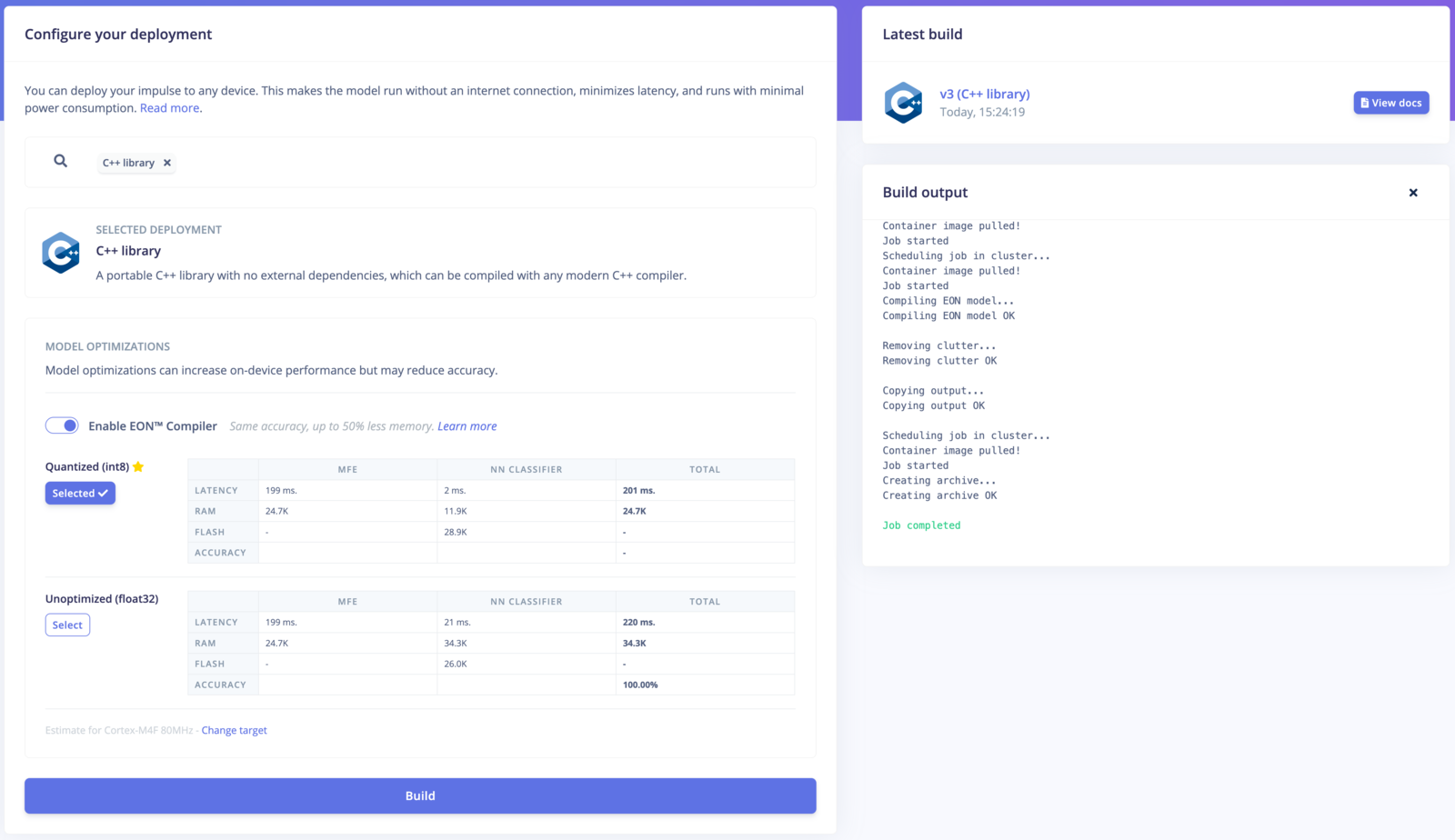 Make sure to select the same model versions (EON-Compiled enabled/disabled and int8/float32) for your projects.
Extract the two archive in a directory (`multi-impulse` for example).
#### Rename the tflite model files
Rename the tflite model files:
Go to the `tflite-model` directory in your extracted archives and rename the following files by post-fixing them with the name of the project:
* for EON compiled projects: `tflite_learn_[block-id]_compiled.cpp`/`tflite_learn_[block-id]_compiled.h`.
* for non-EON-compiled projects: `tflite_learn_[block-id].cpp`/`tflite_learn_[block-id].h`.
Original structure:
```
> multi-impulse % tree -L 3
.
├── audio
│ ├── CMakeLists.txt
│ ├── README.txt
│ ├── edge-impulse-sdk
│ │ ├── CMSIS
│ │ ├── LICENSE
│ │ ├── LICENSE-apache-2.0.txt
│ │ ├── README.md
│ │ ├── classifier
│ │ ├── cmake
│ │ ├── dsp
│ │ ├── porting
│ │ ├── sources.txt
│ │ ├── tensorflow
│ │ └── third_party
│ ├── model-parameters
│ │ ├── model_metadata.h
│ │ └── model_variables.h
│ └── tflite-model
│ ├── tflite_learn_5_compiled.cpp
│ ├── tflite_learn_5_compiled.h
│ └── trained_model_ops_define.h
└── image
├── CMakeLists.txt
├── README.txt
├── edge-impulse-sdk
│ ├── CMSIS
│ ├── LICENSE
│ ├── LICENSE-apache-2.0.txt
│ ├── README.md
│ ├── classifier
│ ├── cmake
│ ├── dsp
│ ├── porting
│ ├── sources.txt
│ ├── tensorflow
│ └── third_party
├── model-parameters
│ ├── model_metadata.h
│ └── model_variables.h
└── tflite-model
├── tflite_learn_5_compiled.cpp
├── tflite_learn_5_compiled.h
└── trained_model_ops_define.h
22 directories, 22 files
```
New structure after renaming the files:
```
>multi-impulse % tree -L 3
.
├── audio
│ ├── CMakeLists.txt
│ ├── README.txt
│ ├── edge-impulse-sdk
│ │ ├── CMSIS
│ │ ├── LICENSE
│ │ ├── LICENSE-apache-2.0.txt
│ │ ├── README.md
│ │ ├── classifier
│ │ ├── cmake
│ │ ├── dsp
│ │ ├── porting
│ │ ├── sources.txt
│ │ ├── tensorflow
│ │ └── third_party
│ ├── model-parameters
│ │ ├── model_metadata.h
│ │ └── model_variables.h
│ └── tflite-model
│ ├── trained_model_compiled_audio.cpp
│ ├── trained_model_compiled_audio.h
│ └── trained_model_ops_define.h
└── image
├── CMakeLists.txt
├── README.txt
├── edge-impulse-sdk
│ ├── CMSIS
│ ├── LICENSE
│ ├── LICENSE-apache-2.0.txt
│ ├── README.md
│ ├── classifier
│ ├── cmake
│ ├── dsp
│ ├── porting
│ ├── sources.txt
│ ├── tensorflow
│ └── third_party
├── model-parameters
│ ├── model_metadata.h
│ └── model_variables.h
└── tflite-model
├── trained_model_compiled_image.cpp
├── trained_model_compiled_image.h
└── trained_model_ops_define.h
22 directories, 22 files
```
#### Rename the variables in the tflite-model directory
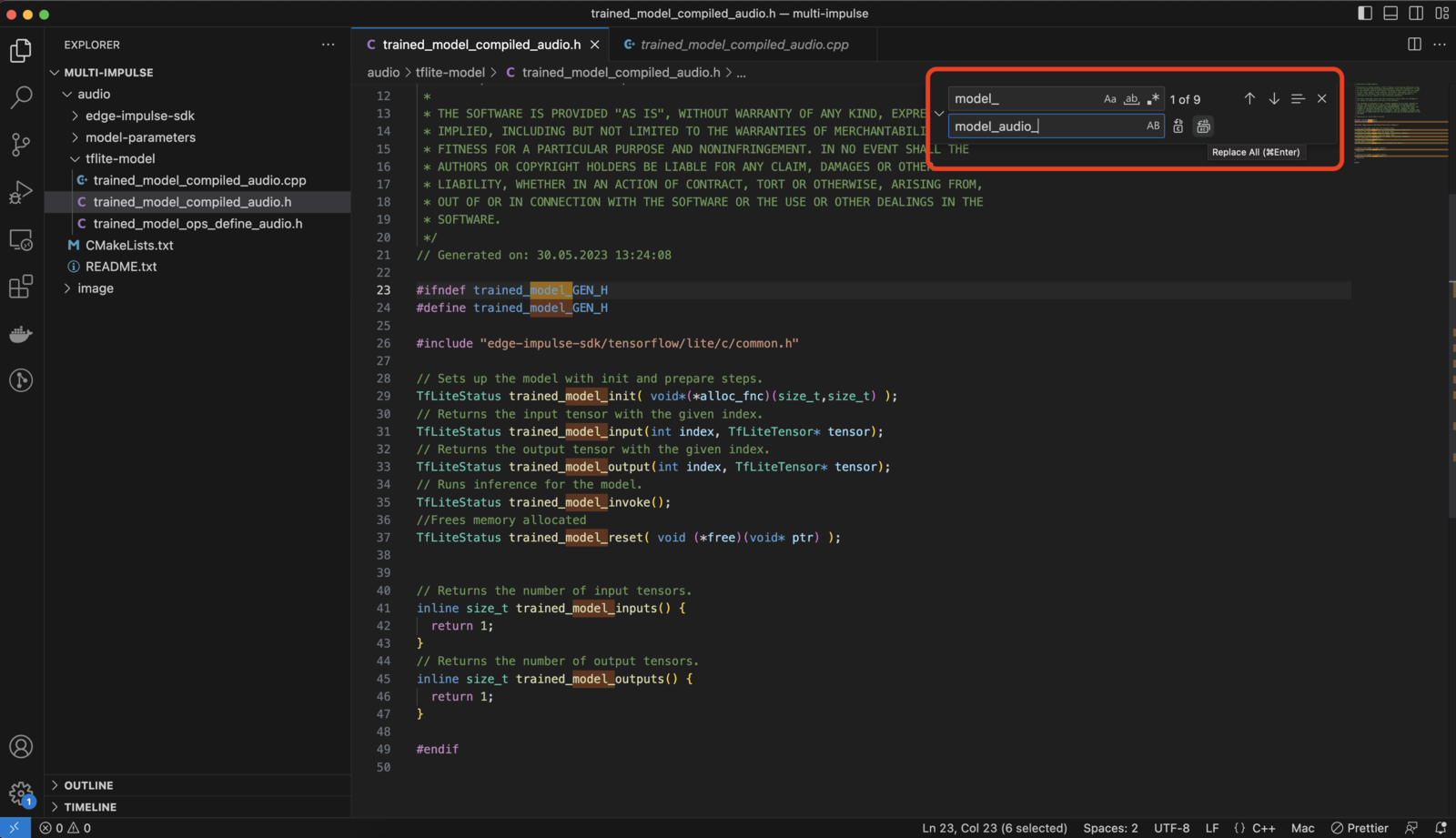
Rename the variables (EON model functions, such as trained\_model\_input etc. or tflite model array names) by post-fixing them with the name of the project.
e.g: Change the `trained_model_compiled_audio.h` from:
```
#ifndef tflite_learn_5_GEN_H
#define tflite_learn_5_GEN_H
#include "edge-impulse-sdk/tensorflow/lite/c/common.h"
// Sets up the model with init and prepare steps.
TfLiteStatus tflite_learn_5_init( void*(*alloc_fnc)(size_t,size_t) );
// Returns the input tensor with the given index.
TfLiteStatus tflite_learn_5_input(int index, TfLiteTensor* tensor);
// Returns the output tensor with the given index.
TfLiteStatus tflite_learn_5_output(int index, TfLiteTensor* tensor);
// Runs inference for the model.
TfLiteStatus tflite_learn_5_invoke();
//Frees memory allocated
TfLiteStatus tflite_learn_5_reset( void (*free)(void* ptr) );
// Returns the number of input tensors.
inline size_t tflite_learn_5_inputs() {
return 1;
}
// Returns the number of output tensors.
inline size_t tflite_learn_5_outputs() {
return 1;
}
#endif
```
to:
```
#include "edge-impulse-sdk/tensorflow/lite/c/common.h"
// Sets up the model with init and prepare steps.
TfLiteStatus tflite_learn_audio_init( void*(*alloc_fnc)(size_t,size_t) );
// Returns the input tensor with the given index.
TfLiteStatus tflite_learn_audio_input(int index, TfLiteTensor* tensor);
// Returns the output tensor with the given index.
TfLiteStatus tflite_learn_audio_output(int index, TfLiteTensor* tensor);
// Runs inference for the model.
TfLiteStatus tflite_learn_audio_invoke();
//Frees memory allocated
TfLiteStatus tflite_learn_audio_reset( void (*free)(void* ptr) );
// Returns the number of input tensors.
inline size_t tflite_learn_audio_inputs() {
return 1;
}
// Returns the number of output tensors.
inline size_t tflite_learn_audio_outputs() {
return 1;
}
#endif
```
*Tip: Use an IDE to use the "Find and replace feature.*
Here is a list of the files that need to be modified (the names may change if not compiled with the EON compiler) in folders for both projects:
* `tflite-model/tflite_learn_[block-id]_compiled.h`
* `tflite-model/tflite_learn_[block-id]_compiled.cpp`
Make sure to select the same model versions (EON-Compiled enabled/disabled and int8/float32) for your projects.
Extract the two archive in a directory (`multi-impulse` for example).
#### Rename the tflite model files
Rename the tflite model files:
Go to the `tflite-model` directory in your extracted archives and rename the following files by post-fixing them with the name of the project:
* for EON compiled projects: `tflite_learn_[block-id]_compiled.cpp`/`tflite_learn_[block-id]_compiled.h`.
* for non-EON-compiled projects: `tflite_learn_[block-id].cpp`/`tflite_learn_[block-id].h`.
Original structure:
```
> multi-impulse % tree -L 3
.
├── audio
│ ├── CMakeLists.txt
│ ├── README.txt
│ ├── edge-impulse-sdk
│ │ ├── CMSIS
│ │ ├── LICENSE
│ │ ├── LICENSE-apache-2.0.txt
│ │ ├── README.md
│ │ ├── classifier
│ │ ├── cmake
│ │ ├── dsp
│ │ ├── porting
│ │ ├── sources.txt
│ │ ├── tensorflow
│ │ └── third_party
│ ├── model-parameters
│ │ ├── model_metadata.h
│ │ └── model_variables.h
│ └── tflite-model
│ ├── tflite_learn_5_compiled.cpp
│ ├── tflite_learn_5_compiled.h
│ └── trained_model_ops_define.h
└── image
├── CMakeLists.txt
├── README.txt
├── edge-impulse-sdk
│ ├── CMSIS
│ ├── LICENSE
│ ├── LICENSE-apache-2.0.txt
│ ├── README.md
│ ├── classifier
│ ├── cmake
│ ├── dsp
│ ├── porting
│ ├── sources.txt
│ ├── tensorflow
│ └── third_party
├── model-parameters
│ ├── model_metadata.h
│ └── model_variables.h
└── tflite-model
├── tflite_learn_5_compiled.cpp
├── tflite_learn_5_compiled.h
└── trained_model_ops_define.h
22 directories, 22 files
```
New structure after renaming the files:
```
>multi-impulse % tree -L 3
.
├── audio
│ ├── CMakeLists.txt
│ ├── README.txt
│ ├── edge-impulse-sdk
│ │ ├── CMSIS
│ │ ├── LICENSE
│ │ ├── LICENSE-apache-2.0.txt
│ │ ├── README.md
│ │ ├── classifier
│ │ ├── cmake
│ │ ├── dsp
│ │ ├── porting
│ │ ├── sources.txt
│ │ ├── tensorflow
│ │ └── third_party
│ ├── model-parameters
│ │ ├── model_metadata.h
│ │ └── model_variables.h
│ └── tflite-model
│ ├── trained_model_compiled_audio.cpp
│ ├── trained_model_compiled_audio.h
│ └── trained_model_ops_define.h
└── image
├── CMakeLists.txt
├── README.txt
├── edge-impulse-sdk
│ ├── CMSIS
│ ├── LICENSE
│ ├── LICENSE-apache-2.0.txt
│ ├── README.md
│ ├── classifier
│ ├── cmake
│ ├── dsp
│ ├── porting
│ ├── sources.txt
│ ├── tensorflow
│ └── third_party
├── model-parameters
│ ├── model_metadata.h
│ └── model_variables.h
└── tflite-model
├── trained_model_compiled_image.cpp
├── trained_model_compiled_image.h
└── trained_model_ops_define.h
22 directories, 22 files
```
#### Rename the variables in the tflite-model directory
Rename the variables (EON model functions, such as trained\_model\_input etc. or tflite model array names) by post-fixing them with the name of the project.
e.g: Change the `trained_model_compiled_audio.h` from:
```
#ifndef tflite_learn_5_GEN_H
#define tflite_learn_5_GEN_H
#include "edge-impulse-sdk/tensorflow/lite/c/common.h"
// Sets up the model with init and prepare steps.
TfLiteStatus tflite_learn_5_init( void*(*alloc_fnc)(size_t,size_t) );
// Returns the input tensor with the given index.
TfLiteStatus tflite_learn_5_input(int index, TfLiteTensor* tensor);
// Returns the output tensor with the given index.
TfLiteStatus tflite_learn_5_output(int index, TfLiteTensor* tensor);
// Runs inference for the model.
TfLiteStatus tflite_learn_5_invoke();
//Frees memory allocated
TfLiteStatus tflite_learn_5_reset( void (*free)(void* ptr) );
// Returns the number of input tensors.
inline size_t tflite_learn_5_inputs() {
return 1;
}
// Returns the number of output tensors.
inline size_t tflite_learn_5_outputs() {
return 1;
}
#endif
```
to:
```
#include "edge-impulse-sdk/tensorflow/lite/c/common.h"
// Sets up the model with init and prepare steps.
TfLiteStatus tflite_learn_audio_init( void*(*alloc_fnc)(size_t,size_t) );
// Returns the input tensor with the given index.
TfLiteStatus tflite_learn_audio_input(int index, TfLiteTensor* tensor);
// Returns the output tensor with the given index.
TfLiteStatus tflite_learn_audio_output(int index, TfLiteTensor* tensor);
// Runs inference for the model.
TfLiteStatus tflite_learn_audio_invoke();
//Frees memory allocated
TfLiteStatus tflite_learn_audio_reset( void (*free)(void* ptr) );
// Returns the number of input tensors.
inline size_t tflite_learn_audio_inputs() {
return 1;
}
// Returns the number of output tensors.
inline size_t tflite_learn_audio_outputs() {
return 1;
}
#endif
```
*Tip: Use an IDE to use the "Find and replace feature.*
Here is a list of the files that need to be modified (the names may change if not compiled with the EON compiler) in folders for both projects:
* `tflite-model/tflite_learn_[block-id]_compiled.h`
* `tflite-model/tflite_learn_[block-id]_compiled.cpp`
 #### Rename the variables and structs in `model-parameters/model_variables.h`
*Be careful here when using the "find and replace" from your IDE, NOT all variables looking like `_model_` need to be replaced*.
Example for the audio project:
```
#ifndef _EI_CLASSIFIER_MODEL_VARIABLES_H_
#define _EI_CLASSIFIER_MODEL_VARIABLES_H_
#include
#include "model_metadata.h"
#include "tflite-model/trained_model_compiled_audio.h"
#include "edge-impulse-sdk/classifier/ei_model_types.h"
#include "edge-impulse-sdk/classifier/inferencing_engines/engines.h"
const char* ei_classifier_inferencing_categories_audio[] = { "Background", "Glass_Breaking" };
uint8_t ei_dsp_config_3_axes_audio[] = { 0 };
const uint32_t ei_dsp_config_3_axes_size_audio = 1;
ei_dsp_config_mfe_t ei_dsp_config_3_audio = {
3, // uint32_t blockId
3, // int implementationVersion
1, // int length of axes
0.02f, // float frame_length
0.01f, // float frame_stride
40, // int num_filters
256, // int fft_length
300, // int low_frequency
0, // int high_frequency
101, // int win_size
-52 // int noise_floor_db
};
const size_t ei_dsp_blocks_size_audio = 1;
ei_model_dsp_t ei_dsp_blocks_audio[ei_dsp_blocks_size_audio] = {
{ // DSP block 3
3960,
&extract_mfe_features,
(void*)&ei_dsp_config_3_audio,
ei_dsp_config_3_axes_audio,
ei_dsp_config_3_axes_size_audio
}
};
const ei_config_tflite_eon_graph_t ei_config_tflite_graph_audio_0 = {
.implementation_version = 1,
.model_init = &trained_model_audio_init,
.model_invoke = &trained_model_audio_invoke,
.model_reset = &trained_model_audio_reset,
.model_input = &trained_model_audio_input,
.model_output = &trained_model_audio_output,
};
const ei_learning_block_config_tflite_graph_t ei_learning_block_config_audio_0 = {
.implementation_version = 1,
.block_id = 0,
.object_detection = 0,
.object_detection_last_layer = EI_CLASSIFIER_LAST_LAYER_UNKNOWN,
.output_data_tensor = 0,
.output_labels_tensor = 1,
.output_score_tensor = 2,
.graph_config = (void*)&ei_config_tflite_graph_audio_0
};
const size_t ei_learning_blocks_size_audio = 1;
const ei_learning_block_t ei_learning_blocks_audio[ei_learning_blocks_size_audio] = {
{
&run_nn_inference,
(void*)&ei_learning_block_config_audio_0,
},
};
const ei_model_performance_calibration_t ei_calibration_audio = {
1, /* integer version number */
false, /* has configured performance calibration */
(int32_t)(EI_CLASSIFIER_RAW_SAMPLE_COUNT / ((EI_CLASSIFIER_FREQUENCY > 0) ? EI_CLASSIFIER_FREQUENCY : 1)) * 1000, /* Model window */
0.8f, /* Default threshold */
(int32_t)(EI_CLASSIFIER_RAW_SAMPLE_COUNT / ((EI_CLASSIFIER_FREQUENCY > 0) ? EI_CLASSIFIER_FREQUENCY : 1)) * 500, /* Half of model window */
0 /* Don't use flags */
};
const ei_impulse_t impulse_233502_3 = {
.project_id = 233502,
.project_owner = "Edge Impulse Inc.",
.project_name = "Glass breaking - audio classification",
.deploy_version = 3,
.nn_input_frame_size = 3960,
.raw_sample_count = 16000,
.raw_samples_per_frame = 1,
.dsp_input_frame_size = 16000 * 1,
.input_width = 0,
.input_height = 0,
.input_frames = 0,
.interval_ms = 0.0625,
.frequency = 16000,
.dsp_blocks_size = ei_dsp_blocks_size_audio,
.dsp_blocks = ei_dsp_blocks_audio,
.object_detection = 0,
.object_detection_count = 0,
.object_detection_threshold = 0,
.object_detection_last_layer = EI_CLASSIFIER_LAST_LAYER_UNKNOWN,
.fomo_output_size = 0,
.tflite_output_features_count = 2,
.learning_blocks_size = ei_learning_blocks_size_audio,
.learning_blocks = ei_learning_blocks_audio,
.inferencing_engine = EI_CLASSIFIER_TFLITE,
.quantized = 1,
.compiled = 1,
.sensor = EI_CLASSIFIER_SENSOR_MICROPHONE,
.fusion_string = "audio",
.slice_size = (16000/4),
.slices_per_model_window = 4,
.has_anomaly = 0,
.label_count = 2,
.calibration = ei_calibration_audio,
.categories = ei_classifier_inferencing_categories_audio
};
const ei_impulse_t ei_default_impulse = impulse_233502_3;
#endif // _EI_CLASSIFIER_MODEL_METADATA_H_
```
Example for the image project:
```
#ifndef _EI_CLASSIFIER_MODEL_VARIABLES_H_
#define _EI_CLASSIFIER_MODEL_VARIABLES_H_
#include
#include "model_metadata.h"
#include "tflite-model/trained_model_compiled_image.h"
#include "edge-impulse-sdk/classifier/ei_model_types.h"
#include "edge-impulse-sdk/classifier/inferencing_engines/engines.h"
const char* ei_classifier_inferencing_categories_image[] = { "person", "unknown" };
uint8_t ei_dsp_config_3_axes_image[] = { 0 };
const uint32_t ei_dsp_config_3_axes_size_image = 1;
ei_dsp_config_image_t ei_dsp_config_3_image = {
3, // uint32_t blockId
1, // int implementationVersion
1, // int length of axes
"RGB" // select channels
};
const size_t ei_dsp_blocks_size_image = 1;
ei_model_dsp_t ei_dsp_blocks_image[ei_dsp_blocks_size_image] = {
{ // DSP block 3
27648,
&extract_image_features,
(void*)&ei_dsp_config_3_image,
ei_dsp_config_3_axes_image,
ei_dsp_config_3_axes_size_image
}
};
const ei_config_tflite_eon_graph_t ei_config_tflite_graph_image_0 = {
.implementation_version = 1,
.model_init = &trained_model_image_init,
.model_invoke = &trained_model_image_invoke,
.model_reset = &trained_model_image_reset,
.model_input = &trained_model_image_input,
.model_output = &trained_model_image_output,
};
const ei_learning_block_config_tflite_graph_t ei_learning_block_config_image_0 = {
.implementation_version = 1,
.block_id = 0,
.object_detection = 0,
.object_detection_last_layer = EI_CLASSIFIER_LAST_LAYER_UNKNOWN,
.output_data_tensor = 0,
.output_labels_tensor = 1,
.output_score_tensor = 2,
.graph_config = (void*)&ei_config_tflite_graph_image_0
};
const size_t ei_learning_blocks_size_image = 1;
const ei_learning_block_t ei_learning_blocks_image[ei_learning_blocks_size_image] = {
{
&run_nn_inference,
(void*)&ei_learning_block_config_image_0,
},
};
const ei_model_performance_calibration_t ei_calibration_image = {
1, /* integer version number */
false, /* has configured performance calibration */
(int32_t)(EI_CLASSIFIER_RAW_SAMPLE_COUNT / ((EI_CLASSIFIER_FREQUENCY > 0) ? EI_CLASSIFIER_FREQUENCY : 1)) * 1000, /* Model window */
0.8f, /* Default threshold */
(int32_t)(EI_CLASSIFIER_RAW_SAMPLE_COUNT / ((EI_CLASSIFIER_FREQUENCY > 0) ? EI_CLASSIFIER_FREQUENCY : 1)) * 500, /* Half of model window */
0 /* Don't use flags */
};
const ei_impulse_t impulse_233515_5 = {
.project_id = 233515,
.project_owner = "Edge Impulse Inc.",
.project_name = "Person vs unknown - image classification",
.deploy_version = 5,
.nn_input_frame_size = 27648,
.raw_sample_count = 9216,
.raw_samples_per_frame = 1,
.dsp_input_frame_size = 9216 * 1,
.input_width = 96,
.input_height = 96,
.input_frames = 1,
.interval_ms = 1,
.frequency = 0,
.dsp_blocks_size = ei_dsp_blocks_size_image,
.dsp_blocks = ei_dsp_blocks_image,
.object_detection = 0,
.object_detection_count = 0,
.object_detection_threshold = 0,
.object_detection_last_layer = EI_CLASSIFIER_LAST_LAYER_UNKNOWN,
.fomo_output_size = 0,
.tflite_output_features_count = 2,
.learning_blocks_size = ei_learning_blocks_size_image,
.learning_blocks = ei_learning_blocks_image,
.inferencing_engine = EI_CLASSIFIER_TFLITE,
.quantized = 1,
.compiled = 1,
.sensor = EI_CLASSIFIER_SENSOR_CAMERA,
.fusion_string = "image",
.slice_size = (9216/4),
.slices_per_model_window = 4,
.has_anomaly = 0,
.label_count = 2,
.calibration = ei_calibration_image,
.categories = ei_classifier_inferencing_categories_image
};
const ei_impulse_t ei_default_impulse = impulse_233515_5;
#endif // _EI_CLASSIFIER_MODEL_METADATA_H_
```
#### Merge the files
Create a new directory (`merged-impulse` for example). Copy the content of one project into this new directory (`audio` for example). Copy the content of the `tflite-model` directory from the other project (`image`) inside the newly created `merged-impulse/tflite-model`.
The structure of this new directory should look like the following:
```
> merged-impulse % tree -L 2
.
├── CMakeLists.txt
├── README.txt
├── edge-impulse-sdk
│ ├── CMSIS
│ ├── LICENSE
│ ├── LICENSE-apache-2.0.txt
│ ├── README.md
│ ├── classifier
│ ├── cmake
│ ├── dsp
│ ├── porting
│ ├── sources.txt
│ ├── tensorflow
│ └── third_party
├── model-parameters
│ ├── model_metadata.h
│ └── model_variables.h
└── tflite-model
├── trained_model_compiled_audio.cpp
├── trained_model_compiled_audio.h
├── trained_model_compiled_image.cpp
├── trained_model_compiled_image.h
├── trained_model_ops_define_audio.h
└── trained_model_ops_define_image.h
10 directories, 14 files
```
#### Merge the variables and structs in model\_variables.h
Copy the necessary variables and structs from previously updated `image/model_metadata.h` file content to the `merged-impulse/model_metadata.h`.
To do so, include both of these lines in the `#include` section:
```
#include "tflite-model/trained_model_compiled_audio.h"
#include "tflite-model/trained_model_compiled_image.h"
```
The section that should be copied is from `const char* ei_classifier_inferencing_categories...` to the line before `const ei_impulse_t ei_default_impulse = impulse__`.
Make sure to leave only one `const ei_impulse_t ei_default_impulse = impulse_233502_3;` this will define which of your impulse is the default one.
#### Subtract and merge the trained\_model\_ops\_define.h or tflite\_resolver.h
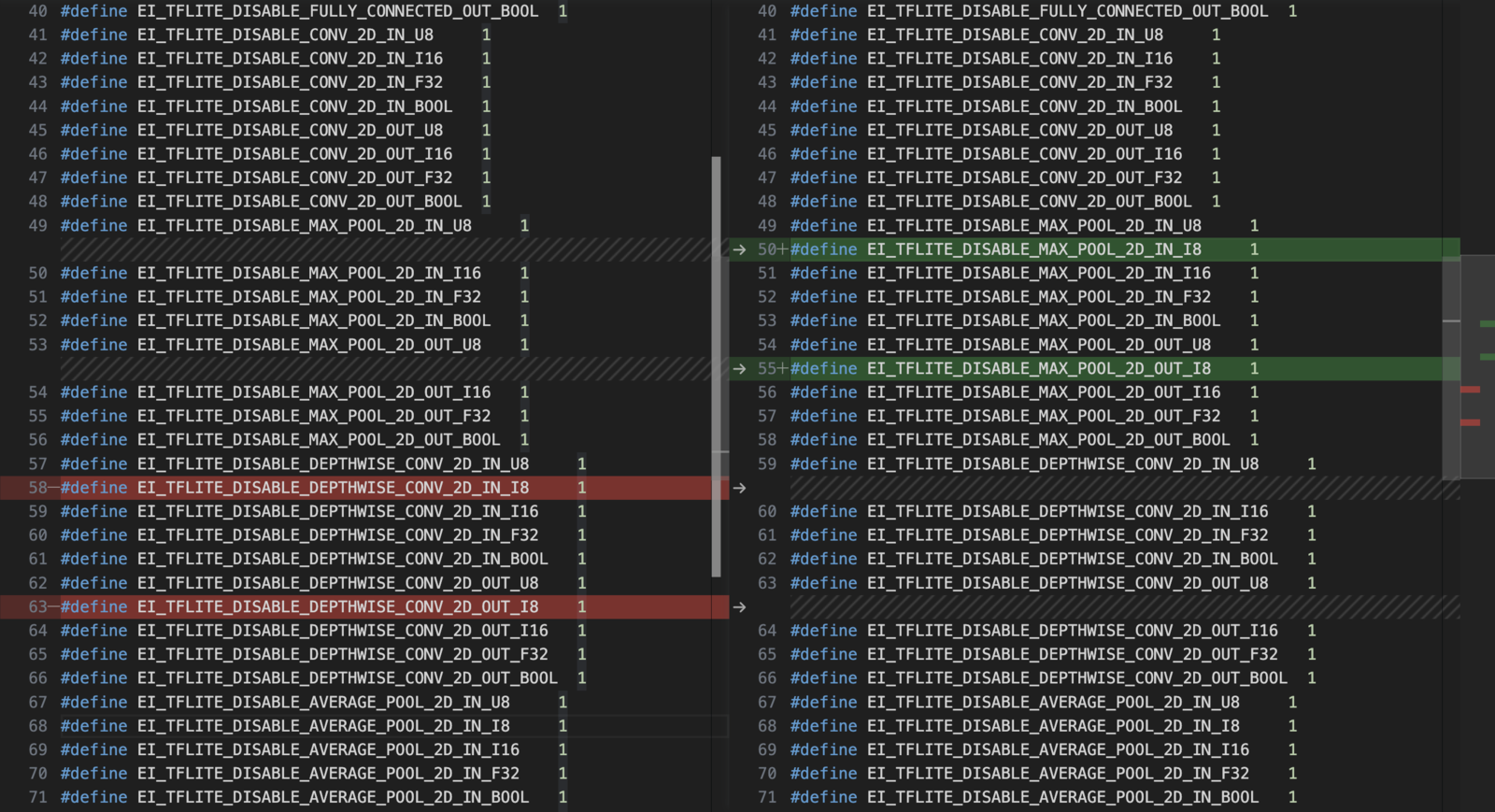
Make sure the macros `EI_TFLITE_DISABLE_...` are a COMBINATION of the ones present in two deployments.
For EON-compiled projects:
E.g. if `#define EI_TFLITE_DISABLE_SOFTMAX_IN_U8 1` is present in one deployment and absent in the other, it should be ABSENT in the combined `trained_model_ops_define.h`.
For non-EON-Compiled projects:
E.g. if `resolver.AddFullyConnected();` is present in one deployment and absent in the other, it should be PRESENT in the combined `tflite-resolver.h`. Remember to change the length of the resolver array if necessary.
In this example, here are the lines to deleted:
#### Rename the variables and structs in `model-parameters/model_variables.h`
*Be careful here when using the "find and replace" from your IDE, NOT all variables looking like `_model_` need to be replaced*.
Example for the audio project:
```
#ifndef _EI_CLASSIFIER_MODEL_VARIABLES_H_
#define _EI_CLASSIFIER_MODEL_VARIABLES_H_
#include
#include "model_metadata.h"
#include "tflite-model/trained_model_compiled_audio.h"
#include "edge-impulse-sdk/classifier/ei_model_types.h"
#include "edge-impulse-sdk/classifier/inferencing_engines/engines.h"
const char* ei_classifier_inferencing_categories_audio[] = { "Background", "Glass_Breaking" };
uint8_t ei_dsp_config_3_axes_audio[] = { 0 };
const uint32_t ei_dsp_config_3_axes_size_audio = 1;
ei_dsp_config_mfe_t ei_dsp_config_3_audio = {
3, // uint32_t blockId
3, // int implementationVersion
1, // int length of axes
0.02f, // float frame_length
0.01f, // float frame_stride
40, // int num_filters
256, // int fft_length
300, // int low_frequency
0, // int high_frequency
101, // int win_size
-52 // int noise_floor_db
};
const size_t ei_dsp_blocks_size_audio = 1;
ei_model_dsp_t ei_dsp_blocks_audio[ei_dsp_blocks_size_audio] = {
{ // DSP block 3
3960,
&extract_mfe_features,
(void*)&ei_dsp_config_3_audio,
ei_dsp_config_3_axes_audio,
ei_dsp_config_3_axes_size_audio
}
};
const ei_config_tflite_eon_graph_t ei_config_tflite_graph_audio_0 = {
.implementation_version = 1,
.model_init = &trained_model_audio_init,
.model_invoke = &trained_model_audio_invoke,
.model_reset = &trained_model_audio_reset,
.model_input = &trained_model_audio_input,
.model_output = &trained_model_audio_output,
};
const ei_learning_block_config_tflite_graph_t ei_learning_block_config_audio_0 = {
.implementation_version = 1,
.block_id = 0,
.object_detection = 0,
.object_detection_last_layer = EI_CLASSIFIER_LAST_LAYER_UNKNOWN,
.output_data_tensor = 0,
.output_labels_tensor = 1,
.output_score_tensor = 2,
.graph_config = (void*)&ei_config_tflite_graph_audio_0
};
const size_t ei_learning_blocks_size_audio = 1;
const ei_learning_block_t ei_learning_blocks_audio[ei_learning_blocks_size_audio] = {
{
&run_nn_inference,
(void*)&ei_learning_block_config_audio_0,
},
};
const ei_model_performance_calibration_t ei_calibration_audio = {
1, /* integer version number */
false, /* has configured performance calibration */
(int32_t)(EI_CLASSIFIER_RAW_SAMPLE_COUNT / ((EI_CLASSIFIER_FREQUENCY > 0) ? EI_CLASSIFIER_FREQUENCY : 1)) * 1000, /* Model window */
0.8f, /* Default threshold */
(int32_t)(EI_CLASSIFIER_RAW_SAMPLE_COUNT / ((EI_CLASSIFIER_FREQUENCY > 0) ? EI_CLASSIFIER_FREQUENCY : 1)) * 500, /* Half of model window */
0 /* Don't use flags */
};
const ei_impulse_t impulse_233502_3 = {
.project_id = 233502,
.project_owner = "Edge Impulse Inc.",
.project_name = "Glass breaking - audio classification",
.deploy_version = 3,
.nn_input_frame_size = 3960,
.raw_sample_count = 16000,
.raw_samples_per_frame = 1,
.dsp_input_frame_size = 16000 * 1,
.input_width = 0,
.input_height = 0,
.input_frames = 0,
.interval_ms = 0.0625,
.frequency = 16000,
.dsp_blocks_size = ei_dsp_blocks_size_audio,
.dsp_blocks = ei_dsp_blocks_audio,
.object_detection = 0,
.object_detection_count = 0,
.object_detection_threshold = 0,
.object_detection_last_layer = EI_CLASSIFIER_LAST_LAYER_UNKNOWN,
.fomo_output_size = 0,
.tflite_output_features_count = 2,
.learning_blocks_size = ei_learning_blocks_size_audio,
.learning_blocks = ei_learning_blocks_audio,
.inferencing_engine = EI_CLASSIFIER_TFLITE,
.quantized = 1,
.compiled = 1,
.sensor = EI_CLASSIFIER_SENSOR_MICROPHONE,
.fusion_string = "audio",
.slice_size = (16000/4),
.slices_per_model_window = 4,
.has_anomaly = 0,
.label_count = 2,
.calibration = ei_calibration_audio,
.categories = ei_classifier_inferencing_categories_audio
};
const ei_impulse_t ei_default_impulse = impulse_233502_3;
#endif // _EI_CLASSIFIER_MODEL_METADATA_H_
```
Example for the image project:
```
#ifndef _EI_CLASSIFIER_MODEL_VARIABLES_H_
#define _EI_CLASSIFIER_MODEL_VARIABLES_H_
#include
#include "model_metadata.h"
#include "tflite-model/trained_model_compiled_image.h"
#include "edge-impulse-sdk/classifier/ei_model_types.h"
#include "edge-impulse-sdk/classifier/inferencing_engines/engines.h"
const char* ei_classifier_inferencing_categories_image[] = { "person", "unknown" };
uint8_t ei_dsp_config_3_axes_image[] = { 0 };
const uint32_t ei_dsp_config_3_axes_size_image = 1;
ei_dsp_config_image_t ei_dsp_config_3_image = {
3, // uint32_t blockId
1, // int implementationVersion
1, // int length of axes
"RGB" // select channels
};
const size_t ei_dsp_blocks_size_image = 1;
ei_model_dsp_t ei_dsp_blocks_image[ei_dsp_blocks_size_image] = {
{ // DSP block 3
27648,
&extract_image_features,
(void*)&ei_dsp_config_3_image,
ei_dsp_config_3_axes_image,
ei_dsp_config_3_axes_size_image
}
};
const ei_config_tflite_eon_graph_t ei_config_tflite_graph_image_0 = {
.implementation_version = 1,
.model_init = &trained_model_image_init,
.model_invoke = &trained_model_image_invoke,
.model_reset = &trained_model_image_reset,
.model_input = &trained_model_image_input,
.model_output = &trained_model_image_output,
};
const ei_learning_block_config_tflite_graph_t ei_learning_block_config_image_0 = {
.implementation_version = 1,
.block_id = 0,
.object_detection = 0,
.object_detection_last_layer = EI_CLASSIFIER_LAST_LAYER_UNKNOWN,
.output_data_tensor = 0,
.output_labels_tensor = 1,
.output_score_tensor = 2,
.graph_config = (void*)&ei_config_tflite_graph_image_0
};
const size_t ei_learning_blocks_size_image = 1;
const ei_learning_block_t ei_learning_blocks_image[ei_learning_blocks_size_image] = {
{
&run_nn_inference,
(void*)&ei_learning_block_config_image_0,
},
};
const ei_model_performance_calibration_t ei_calibration_image = {
1, /* integer version number */
false, /* has configured performance calibration */
(int32_t)(EI_CLASSIFIER_RAW_SAMPLE_COUNT / ((EI_CLASSIFIER_FREQUENCY > 0) ? EI_CLASSIFIER_FREQUENCY : 1)) * 1000, /* Model window */
0.8f, /* Default threshold */
(int32_t)(EI_CLASSIFIER_RAW_SAMPLE_COUNT / ((EI_CLASSIFIER_FREQUENCY > 0) ? EI_CLASSIFIER_FREQUENCY : 1)) * 500, /* Half of model window */
0 /* Don't use flags */
};
const ei_impulse_t impulse_233515_5 = {
.project_id = 233515,
.project_owner = "Edge Impulse Inc.",
.project_name = "Person vs unknown - image classification",
.deploy_version = 5,
.nn_input_frame_size = 27648,
.raw_sample_count = 9216,
.raw_samples_per_frame = 1,
.dsp_input_frame_size = 9216 * 1,
.input_width = 96,
.input_height = 96,
.input_frames = 1,
.interval_ms = 1,
.frequency = 0,
.dsp_blocks_size = ei_dsp_blocks_size_image,
.dsp_blocks = ei_dsp_blocks_image,
.object_detection = 0,
.object_detection_count = 0,
.object_detection_threshold = 0,
.object_detection_last_layer = EI_CLASSIFIER_LAST_LAYER_UNKNOWN,
.fomo_output_size = 0,
.tflite_output_features_count = 2,
.learning_blocks_size = ei_learning_blocks_size_image,
.learning_blocks = ei_learning_blocks_image,
.inferencing_engine = EI_CLASSIFIER_TFLITE,
.quantized = 1,
.compiled = 1,
.sensor = EI_CLASSIFIER_SENSOR_CAMERA,
.fusion_string = "image",
.slice_size = (9216/4),
.slices_per_model_window = 4,
.has_anomaly = 0,
.label_count = 2,
.calibration = ei_calibration_image,
.categories = ei_classifier_inferencing_categories_image
};
const ei_impulse_t ei_default_impulse = impulse_233515_5;
#endif // _EI_CLASSIFIER_MODEL_METADATA_H_
```
#### Merge the files
Create a new directory (`merged-impulse` for example). Copy the content of one project into this new directory (`audio` for example). Copy the content of the `tflite-model` directory from the other project (`image`) inside the newly created `merged-impulse/tflite-model`.
The structure of this new directory should look like the following:
```
> merged-impulse % tree -L 2
.
├── CMakeLists.txt
├── README.txt
├── edge-impulse-sdk
│ ├── CMSIS
│ ├── LICENSE
│ ├── LICENSE-apache-2.0.txt
│ ├── README.md
│ ├── classifier
│ ├── cmake
│ ├── dsp
│ ├── porting
│ ├── sources.txt
│ ├── tensorflow
│ └── third_party
├── model-parameters
│ ├── model_metadata.h
│ └── model_variables.h
└── tflite-model
├── trained_model_compiled_audio.cpp
├── trained_model_compiled_audio.h
├── trained_model_compiled_image.cpp
├── trained_model_compiled_image.h
├── trained_model_ops_define_audio.h
└── trained_model_ops_define_image.h
10 directories, 14 files
```
#### Merge the variables and structs in model\_variables.h
Copy the necessary variables and structs from previously updated `image/model_metadata.h` file content to the `merged-impulse/model_metadata.h`.
To do so, include both of these lines in the `#include` section:
```
#include "tflite-model/trained_model_compiled_audio.h"
#include "tflite-model/trained_model_compiled_image.h"
```
The section that should be copied is from `const char* ei_classifier_inferencing_categories...` to the line before `const ei_impulse_t ei_default_impulse = impulse__`.
Make sure to leave only one `const ei_impulse_t ei_default_impulse = impulse_233502_3;` this will define which of your impulse is the default one.
#### Subtract and merge the trained\_model\_ops\_define.h or tflite\_resolver.h
Make sure the macros `EI_TFLITE_DISABLE_...` are a COMBINATION of the ones present in two deployments.
For EON-compiled projects:
E.g. if `#define EI_TFLITE_DISABLE_SOFTMAX_IN_U8 1` is present in one deployment and absent in the other, it should be ABSENT in the combined `trained_model_ops_define.h`.
For non-EON-Compiled projects:
E.g. if `resolver.AddFullyConnected();` is present in one deployment and absent in the other, it should be PRESENT in the combined `tflite-resolver.h`. Remember to change the length of the resolver array if necessary.
In this example, here are the lines to deleted: