> ## Documentation Index
> Fetch the complete documentation index at: https://docs.edgeimpulse.com/llms.txt
> Use this file to discover all available pages before exploring further.
# Generate image data using RealVisXL
> Generate photorealistic synthetic image datasets for Edge Impulse using the RealVisXL model hosted on Hugging Face.
Generate realistic images with the [RealVisXL\_V4.0](https://huggingface.co/SG161222/RealVisXL_V4.0) model hosted on HuggingFace.
RealVisXL 4.0 is a highly advanced image generation AI model designed for photorealistic outputs. It's built on the Stable Diffusion XL (SDXL) architecture and fine-tuned to create images with exceptional detail and realism.
## Getting Started
### Steps
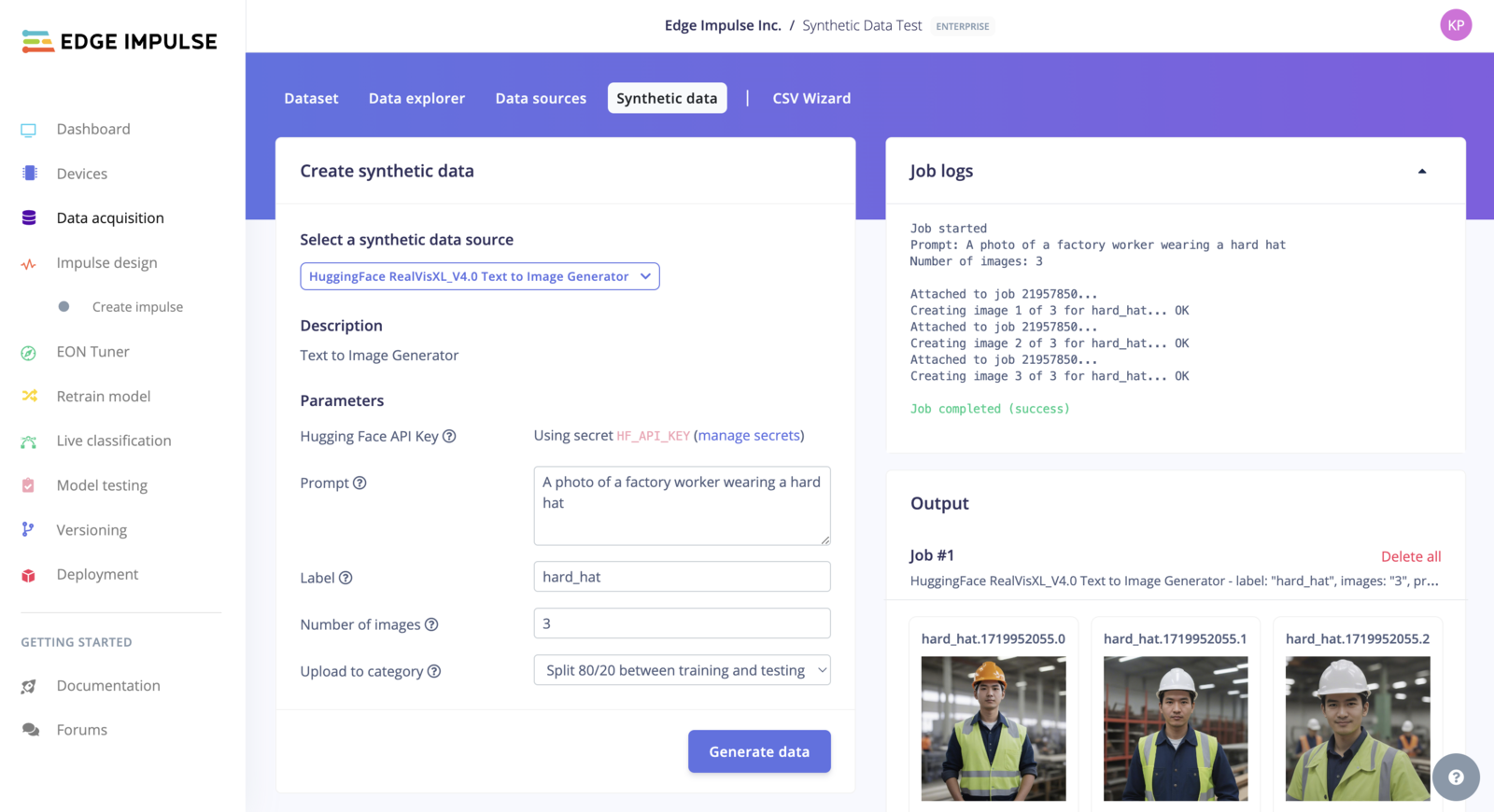
1. In your Edge Impulse project, choose **Data acquisition > Synthetic data**.
2. Select the 'Huggingface RealVisXL\_4.0 Synthetic Image Generator' block, fill in your prompt and label, and hit *Generate data*.
> You need a HuggingFace API Key/Access Token. See below to [create one and set the permissions](/tutorials/topics/data/generate-image-data-realvisxl#generate-an-access-token-in-hugging-face).
3. Your synthetic data will show on the right side, for quick evaluation of your prompt.
 ## Generate an Access Token in Hugging Face
See [https://huggingface.co/docs/hub/en/security-tokens](https://huggingface.co/docs/hub/en/security-tokens) for more information.
To create an Access Token in the Hugging Face web interface, click on your avatar (top-right corner) and select **Settings**. Navigate to the **Access Token** view (left menu) and click on **New token**. Add a *Name* and for the *Type* use the "Fine-grained (custom)" option.
Copy the newly generated Access Token
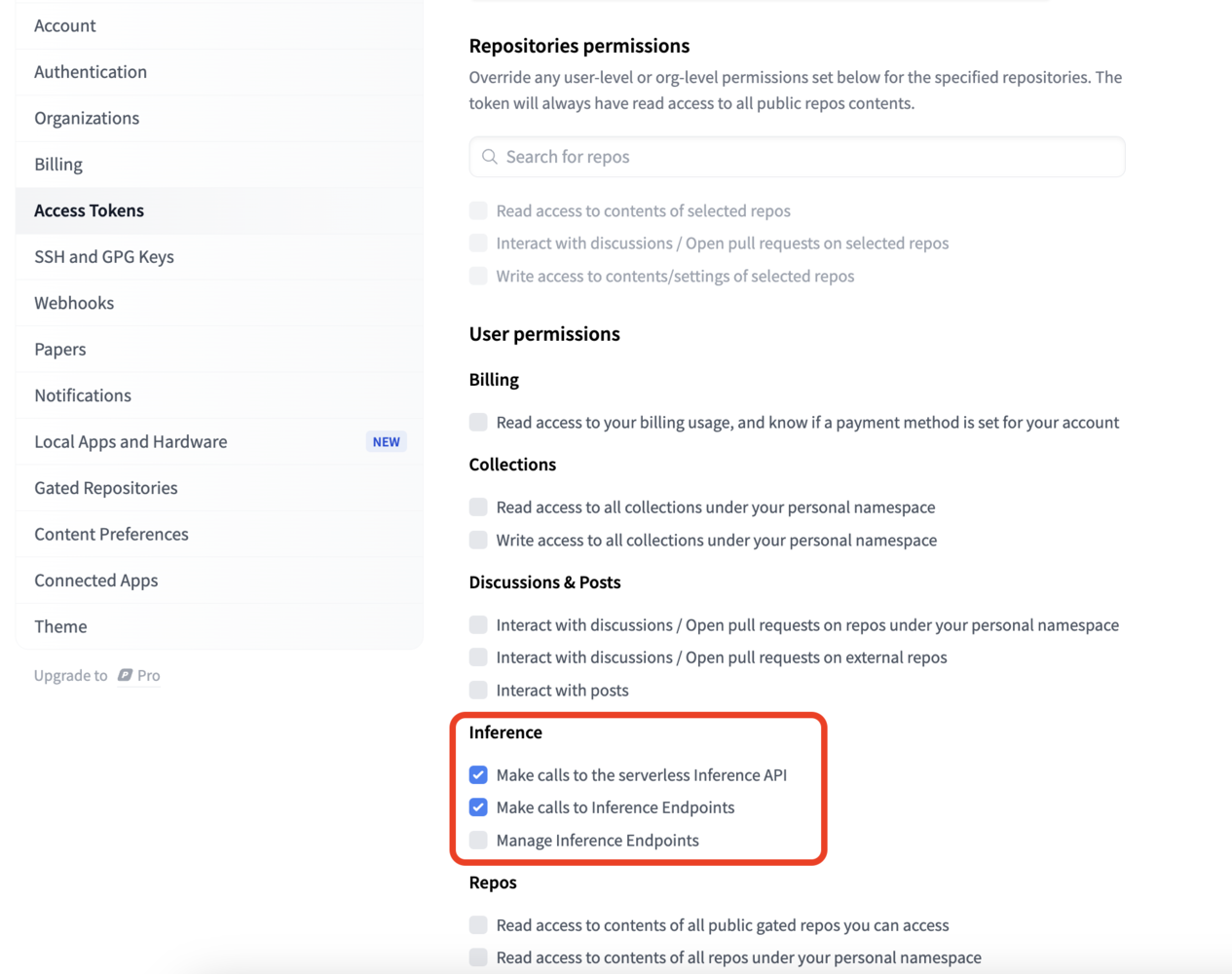
Finally, add the following permissions:
* Make calls to the serverless Inference API
* Make calls to Inference Endpoints
## Generate an Access Token in Hugging Face
See [https://huggingface.co/docs/hub/en/security-tokens](https://huggingface.co/docs/hub/en/security-tokens) for more information.
To create an Access Token in the Hugging Face web interface, click on your avatar (top-right corner) and select **Settings**. Navigate to the **Access Token** view (left menu) and click on **New token**. Add a *Name* and for the *Type* use the "Fine-grained (custom)" option.
Copy the newly generated Access Token
Finally, add the following permissions:
* Make calls to the serverless Inference API
* Make calls to Inference Endpoints
 ## Limitations and warnings
* The model is still in the training phase. This is not the final version and may contain artifacts and perform poorly in some cases.
* The model can produce NSFW (Not Safe For Work) images!
## Troubleshooting
**CUDA out of memory**:
```
Exception: Failed to generate image (status_code=500):
{"error":"unknown error",
"warnings":["CUDA out of memory. Tried to allocate 128.00 MiB (GPU 0; 14.75 GiB total capacity; 7.09 GiB already allocated; 5.06 MiB free; 7.34 GiB reserved in total by PyTorch) If reserved memory is >> allocated memory try setting max_split_size_mb to avoid fragmentation. See documentation for Memory Management and PYTORCH_CUDA_ALLOC_CONF","There was an inference error: CUDA out of memory. Tried to allocate 128.00 MiB (GPU 0; 14.75 GiB total capacity; 7.09 GiB already allocated; 5.06 MiB free; 7.34 GiB reserved in total by PyTorch) If reserved memory is >> allocated memory try setting max_split_size_mb to avoid fragmentation. See documentation for Memory Management and PYTORCH_CUDA_ALLOC_CONF"]}
```
This error usually happens when using a Free Hugging Face account. You can wait a few minutes and try generating your synthetic data again.
You can also get [Pro Hugging Face Account](https://huggingface.co/pricing) to increase your rate limits.
## Limitations and warnings
* The model is still in the training phase. This is not the final version and may contain artifacts and perform poorly in some cases.
* The model can produce NSFW (Not Safe For Work) images!
## Troubleshooting
**CUDA out of memory**:
```
Exception: Failed to generate image (status_code=500):
{"error":"unknown error",
"warnings":["CUDA out of memory. Tried to allocate 128.00 MiB (GPU 0; 14.75 GiB total capacity; 7.09 GiB already allocated; 5.06 MiB free; 7.34 GiB reserved in total by PyTorch) If reserved memory is >> allocated memory try setting max_split_size_mb to avoid fragmentation. See documentation for Memory Management and PYTORCH_CUDA_ALLOC_CONF","There was an inference error: CUDA out of memory. Tried to allocate 128.00 MiB (GPU 0; 14.75 GiB total capacity; 7.09 GiB already allocated; 5.06 MiB free; 7.34 GiB reserved in total by PyTorch) If reserved memory is >> allocated memory try setting max_split_size_mb to avoid fragmentation. See documentation for Memory Management and PYTORCH_CUDA_ALLOC_CONF"]}
```
This error usually happens when using a Free Hugging Face account. You can wait a few minutes and try generating your synthetic data again.
You can also get [Pro Hugging Face Account](https://huggingface.co/pricing) to increase your rate limits.