> ## Documentation Index
> Fetch the complete documentation index at: https://docs.edgeimpulse.com/llms.txt
> Use this file to discover all available pages before exploring further.
# Build a speech-to-image app with QNN on Android
> Generate images from spoken prompts on Android with Whisper and Stable Diffusion running on the Qualcomm Hexagon NPU.
This tutorial builds an Android app that turns a spoken prompt into an image. Whisper transcribes the speech and Stable Diffusion generates the image, both on the Hexagon NPU through Qualcomm AI Engine Direct (QNN). The reference code is in [qnn-genai-speech\_to\_image](https://github.com/edgeimpulse/example-android-inferencing/tree/main/qnn-genai-speech_to_image).
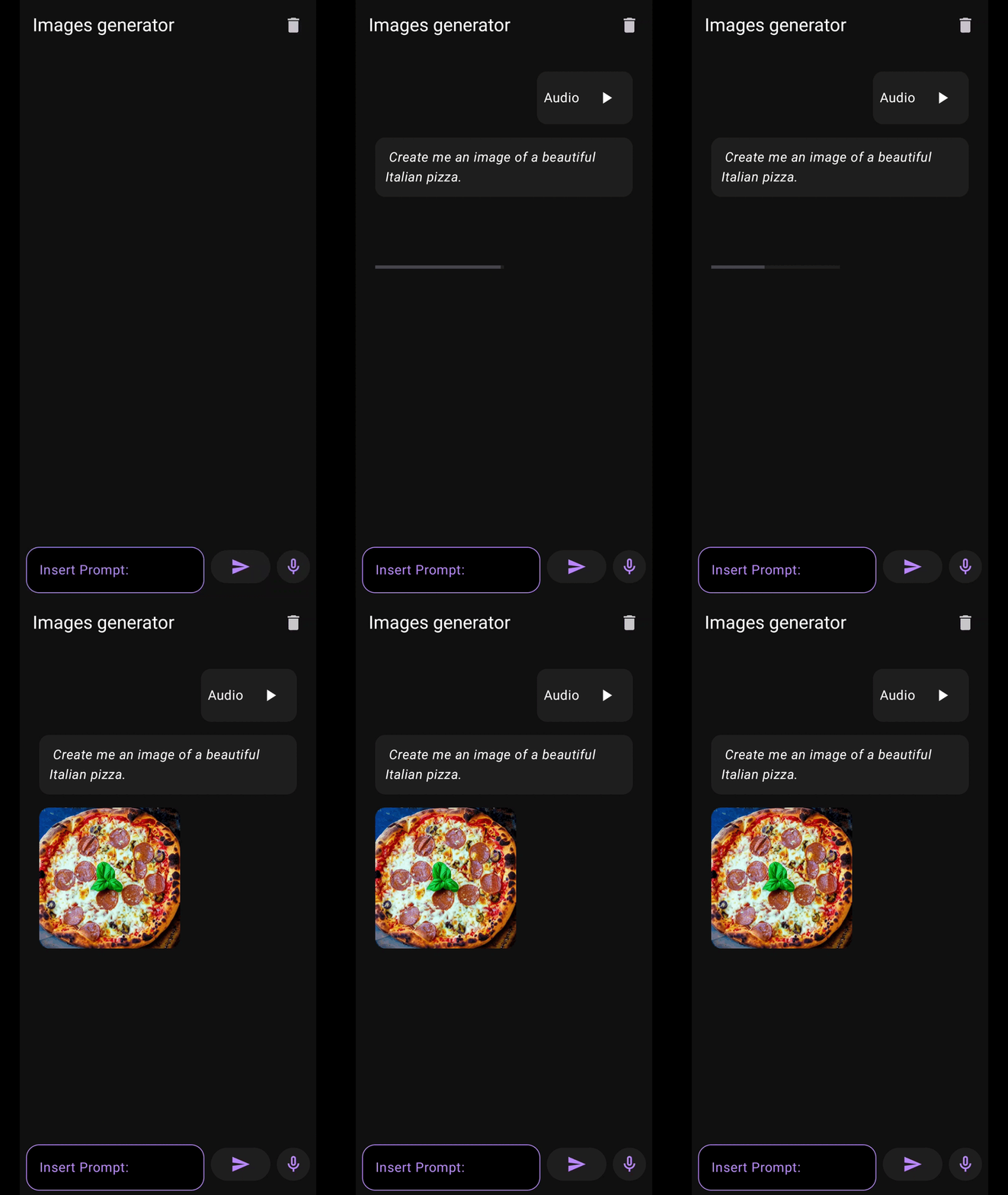
App demo showing speech input generating AI images
## What you'll build
An Android app that:
* Records speech with the Android audio APIs
* Transcribes it with a Whisper model on the NPU
* Generates an image from the transcript with Stable Diffusion on the NPU
* Shows the prompts and images in a chat interface
## Architecture overview

Application architecture with QNN acceleration
| Layer | Responsibility |
| - | - |
| Kotlin UI | User interaction, audio recording, and display |
| C++ backend | Model inference on the Snapdragon HTP through the QNN APIs |
| JNI bridge | Calls between Kotlin and C++ |
| Rust libraries | Converting text to model tokens and back |
## Prerequisites
* Android Studio 2024.3.1 or later
* Android NDK 27.2.12479018
* The latest stable Rust toolchain
* [Qualcomm AI Engine Direct SDK](https://www.qualcomm.com/developer/software/qualcomm-ai-engine-direct-sdk) 2.40.0
* Python 3.10, for the asset generation script
* A Snapdragon device with a Hexagon NPU and at least 500 MB of free storage for the models
## Supported devices
The app is tested on Snapdragon 8 Elite. It needs a Hexagon NPU Gen 2 or later:
| Category | Devices |
| - | - |
| Mobile | Snapdragon 8 Gen 1, 2, and 3; Snapdragon 7+ Gen 2 and 3; Snapdragon 6 Gen 1 |
| Embedded | QRB6490 (Rubik Pi 3), QRB5165 (RB5) |
## 1. Clone the repository
```bash theme={"system"}
git clone https://github.com/edgeimpulse/example-android-inferencing.git
cd example-android-inferencing/qnn-genai-speech_to_image
```
## 2. Set up the Qualcomm AI Engine Direct SDK
Download and extract the SDK, then point `QNN_SDK_ROOT` at it:
```bash theme={"system"}
export QNN_SDK_ROOT=/path/to/your/qnn/sdk
```
## 3. Install Rust and the Android target
```bash theme={"system"}
# Install Rust
curl --proto '=https' --tlsv1.2 -sSf https://sh.rustup.rs | sh
source ~/.cargo/env
# Add Android target
rustup target add aarch64-linux-android
# Install cargo-ndk
cargo install cargo-ndk
```
## 4. Compile Rust tokenization libraries
Build the Rust `tokenizer` and `detokenizer` libraries for Android:
```bash theme={"system"}
# Build tokenizer
cd tokenizer
cargo ndk -t arm64-v8a build --release
# Build detokenizer
cd ../detokenizer
cargo ndk -t arm64-v8a build --release
```
## 5. Set up Android project dependencies
### Copy QNN libraries
Create the JNI libraries folder:
```bash theme={"system"}
mkdir -p speech_to_image/app/src/main/jniLibs/arm64-v8a
```
Copy in the libraries. Replace `VXX` and `vXX` with your Hexagon version, for example `V79` for Snapdragon 8 Elite:
```bash theme={"system"}
# From Android NDK
cp $ANDROID_NDK/toolchains/llvm/prebuilt/linux-x86_64/sysroot/usr/lib/aarch64-linux-android/libc++_shared.so speech_to_image/app/src/main/jniLibs/arm64-v8a/
# From Rust builds
cp tokenizer/target/aarch64-linux-android/release/libtokenizer.so speech_to_image/app/src/main/jniLibs/arm64-v8a/
cp detokenizer/target/aarch64-linux-android/release/libdetokenizer.so speech_to_image/app/src/main/jniLibs/arm64-v8a/
# From QNN SDK (adjust VXX)
cp $QNN_SDK_ROOT/lib/hexagon-vXX/unsigned/libQnnHtpVXX.so speech_to_image/app/src/main/jniLibs/arm64-v8a/
cp $QNN_SDK_ROOT/lib/hexagon-vXX/unsigned/libQnnHtpVXXSkel.so speech_to_image/app/src/main/jniLibs/arm64-v8a/
cp $QNN_SDK_ROOT/lib/aarch64-android/libQnnHtp.so speech_to_image/app/src/main/jniLibs/arm64-v8a/
cp $QNN_SDK_ROOT/lib/aarch64-android/libQnnHtpPrepare.so speech_to_image/app/src/main/jniLibs/arm64-v8a/
cp $QNN_SDK_ROOT/lib/aarch64-android/libQnnHtpVXXStub.so speech_to_image/app/src/main/jniLibs/arm64-v8a/
cp $QNN_SDK_ROOT/lib/aarch64-android/libQnnSystem.so speech_to_image/app/src/main/jniLibs/arm64-v8a/
```
### Copy QNN headers and utilities
Run the dependency resolution script:
```bash theme={"system"}
source scripts/resolveDependencies.sh
```
The script copies the QNN headers and C++ utilities into the project.
### Download the remaining source files
```bash theme={"system"}
# Log mel spectrogram utilities
curl -L https://raw.githubusercontent.com/psmdv/log_mel_spectrogram/main/src/log_mel_spectrogram.cpp -o speech_to_image/app/src/main/cpp/speech_to_image/src/LogMel/src/log_mel_spectrogram.cpp
curl -L https://raw.githubusercontent.com/psmdv/log_mel_spectrogram/main/src/wavreader.cpp -o speech_to_image/app/src/main/cpp/speech_to_image/src/LogMel/src/wavreader.cpp
curl -L https://raw.githubusercontent.com/psmdv/log_mel_spectrogram/main/inc/log_mel_spectrogram.hpp -o speech_to_image/app/src/main/cpp/speech_to_image/src/LogMel/include/log_mel_spectrogram.hpp
curl -L https://raw.githubusercontent.com/psmdv/log_mel_spectrogram/main/inc/wavreader.h -o speech_to_image/app/src/main/cpp/speech_to_image/src/LogMel/include/wavreader.h
# Image writing utility
curl -L https://raw.githubusercontent.com/nothings/stb/master/stb_image_write.h -o speech_to_image/app/src/main/cpp/speech_to_image/src/Utils/stb_image_write.h
```
## 6. Download AI model assets
Create the assets folder:
```bash theme={"system"}
mkdir -p speech_to_image/app/src/main/assets
```
### Tokenizers
```bash theme={"system"}
# CLIP tokenizer
curl -L https://huggingface.co/openai/clip-vit-base-patch32/resolve/main/tokenizer.json -o speech_to_image/app/src/main/assets/tokenizer.json
# Whisper tokenizer (rename to detokenizer.json)
curl -L https://huggingface.co/openai/whisper-small/resolve/main/tokenizer.json -o speech_to_image/app/src/main/assets/detokenizer.json
```
### Stable Diffusion models
Download `text_encoder.bin`, `unet.bin`, and `vae_decoder.bin` from Qualcomm Package Manager (you need a Qualcomm account), and put them in `speech_to_image/app/src/main/assets/`.
### Whisper models
```bash theme={"system"}
# Tiny Whisper models for Snapdragon 8 Elite
curl -L https://huggingface.co/qualcomm/Whisper-Tiny/resolve/main/precompiled/qualcomm-snapdragon-8-elite-for-galaxy/whisper_encoder_tiny.bin -o speech_to_image/app/src/main/assets/whisper_encoder_tiny.bin
curl -L https://huggingface.co/qualcomm/Whisper-Tiny/resolve/main/precompiled/qualcomm-snapdragon-8-elite-for-galaxy/whisper_decoder_tiny.bin -o speech_to_image/app/src/main/assets/whisper_decoder_tiny.bin
```
### Audio processing assets
```bash theme={"system"}
# Mel spectrogram filterbank
curl -L https://raw.githubusercontent.com/psmdv/log_mel_spectrogram/main/assets/mel80.bin -o speech_to_image/app/src/main/assets/mel80.bin
```
### Generate embedding tokens
Run the Python script to generate the token files:
```bash theme={"system"}
python python_scripts/generate_t_emb_and_empty_tokens.py
```
This creates `t_emb_0.raw` through `t_emb_19.raw` and `tokens.raw` in the assets directory.
## 7. Configure device for QNN
Push the HTP skeleton library to the device:
```bash theme={"system"}
adb root
adb shell setenforce 0
adb disable-verity
adb shell mount -o rw,remount /vendor
adb push $QNN_SDK_ROOT/lib/hexagon-vXX/unsigned/libQnnHtpVXXSkel.so /vendor/lib/rfsa/adsp/
```
> [!WARNING]
>
> These commands need root access and modify the device's `/vendor` partition, which might void its warranty.
## 8. Build and run
1. Check that `AndroidManifest.xml` declares the microphone permission:
```xml theme={"system"}
```
2. In Android Studio, select **File** -> **Open** and open the `speech_to_image` folder.
3. Build and run the app on your Snapdragon device, and grant the microphone permission when prompted.
4. Tap the microphone button and speak a prompt.
The app transcribes your speech, generates an image, and shows both in the chat.
## Troubleshooting
> **Build fails with missing libraries or headers**
>
> * Check that all QNN and Rust libraries are in `jniLibs/arm64-v8a/`.
> * Check that `resolveDependencies.sh` finished without errors.
> * Check that your NDK and CMake versions match the prerequisites.
> **QNN initialization or model loading fails**
>
> * Check that the device has a Hexagon NPU and that you pushed the skeleton library in step 7.
> * Check that every asset file from step 6 is in the assets folder.
> **Generation is slower than expected**
>
> The device might be throttling because it's hot. Let it cool down and try again.
> **No speech detected or poor transcription**
>
> * Check the microphone permission and the device's audio settings.
> * Whisper Tiny is the smallest Whisper model. A larger Whisper model transcribes more accurately.
## Next steps
* [QNN hardware acceleration on Android](https://docs.edgeimpulse.com/tutorials/topics/android/qnn-acceleration.md)
* [Android series overview](https://docs.edgeimpulse.com/tutorials/topics/android/android-series.md)
## Resources
* [GitHub: qnn-genai-speech\_to\_image](https://github.com/edgeimpulse/example-android-inferencing/tree/main/qnn-genai-speech_to_image)
* [Qualcomm AI Engine Direct SDK documentation](https://developer.qualcomm.com/software/qualcomm-ai-engine-direct-sdk)
* [Edge Impulse Forum](https://forum.edgeimpulse.com/)