> ## Documentation Index
> Fetch the complete documentation index at: https://docs.edgeimpulse.com/llms.txt
> Use this file to discover all available pages before exploring further.
# Keyword spotting on Android
> Build a real-time audio keyword recognition app on Android using your phone's microphone
This tutorial shows how to run a keyword spotting model on Android for wake word detection, voice commands, and audio event recognition.
## What you'll build
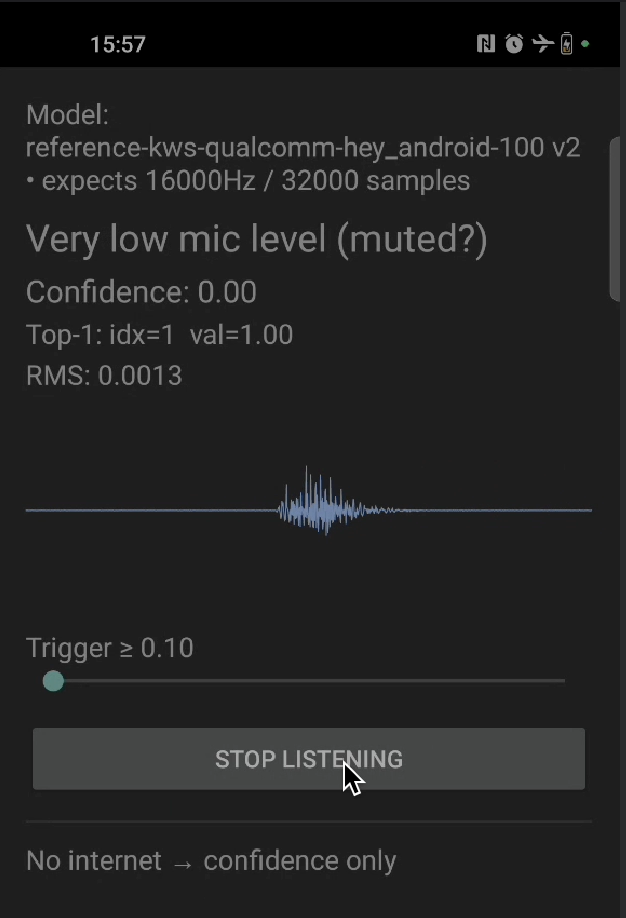 An Android app that:
* Captures real-time audio from microphone
* Recognizes spoken keywords continuously
* Displays classification results with confidence scores
* Runs entirely on-device with low latency
## Prerequisites
* Trained **audio keyword spotting** model
* Android Studio with NDK and CMake
* Android device with microphone (usb camera with a mic also works)
* Basic familiarity with Android development
## 1. Clone the repository
```bash theme={"system"}
git clone https://github.com/edgeimpulse/example-android-inferencing.git
cd example-android-inferencing/example_kws
```
## 2. Download TensorFlow Lite libraries
```bash theme={"system"}
cd app/src/main/cpp/tflite
sh download_tflite_libs.sh # or .bat for Windows
```
## 3. Export your audio model
1. In Edge Impulse Studio, go to **Deployment**
2. Select **Android (C++ library)**
3. Enable **EON Compiler** (recommended for audio)
4. Click **Build** and download the `.zip`
## 4. Integrate the model
1. Extract the downloaded `.zip` file
2. Copy all files **except** `CMakeLists.txt` to:
```
example_kws/app/src/main/cpp/
```
Your structure should be:
```
app/src/main/cpp/
├── edge-impulse-sdk/
├── model-parameters/
├── tflite-model/
├── native-lib.cpp
└── CMakeLists.txt (existing)
```
## 5. Configure audio permissions
Permissions are already set in `AndroidManifest.xml`:
```xml theme={"system"}
```
## 6. Build and run
1. Open in Android Studio
2. **Build → Make Project**
3. Connect your Android device
4. Run the app
5. Grant microphone permission when prompted
Run the app and speak your keywords.
## How it works
### Audio capture
```kotlin theme={"system"}
// MainActivity.kt
private fun startAudioRecording() {
val bufferSize = AudioRecord.getMinBufferSize(
SAMPLE_RATE,
AudioFormat.CHANNEL_IN_MONO,
AudioFormat.ENCODING_PCM_16BIT
)
audioRecord = AudioRecord(
MediaRecorder.AudioSource.MIC,
SAMPLE_RATE,
AudioFormat.CHANNEL_IN_MONO,
AudioFormat.ENCODING_PCM_16BIT,
bufferSize
)
audioRecord.startRecording()
// Read audio in background thread
Thread {
val buffer = ShortArray(bufferSize)
while (isRecording) {
val read = audioRecord.read(buffer, 0, buffer.size)
if (read > 0) {
processAudioBuffer(buffer, read)
}
}
}.start()
}
```
### Ring buffer for continuous inference
```kotlin theme={"system"}
private val audioRingBuffer = RingBuffer(16000) // 1 second at 16kHz
private fun processAudioBuffer(buffer: ShortArray, size: Int) {
// Add to ring buffer
audioRingBuffer.write(buffer, size)
// Run inference when buffer is full
if (audioRingBuffer.isFull()) {
val features = audioRingBuffer.read()
val result = runInference(features)
runOnUiThread {
updateUI(result)
}
}
}
```
### Native inference
```cpp theme={"system"}
// native-lib.cpp
extern "C" JNIEXPORT jobject JNICALL
Java_com_example_kws_EIClassifierAudio_run(
JNIEnv* env, jobject, jshortArray audioData) {
// Convert audio to float features
jshort* audio = env->GetShortArrayElements(audioData, nullptr);
int length = env->GetArrayLength(audioData);
std::vector features(length);
for (int i = 0; i < length; i++) {
features[i] = (float)audio[i] / 32768.0f;
}
// Create signal
signal_t signal;
signal.total_length = features.size();
signal.get_data = &get_feature_data;
// Run classifier
ei_impulse_result_t result = {0};
run_classifier(&signal, &result, false);
// Return result object
return createResultObject(env, result);
}
```
### Result display
```kotlin theme={"system"}
private fun updateUI(result: ClassificationResult) {
// Find highest confidence prediction
val topResult = result.classification.maxByOrNull { it.score } ?: return
if (topResult.score > CONFIDENCE_THRESHOLD) {
// Show detected keyword
keywordTextView.text = topResult.label
confidenceTextView.text = "${(topResult.score * 100).toInt()}%"
// Highlight detection
detectionIndicator.setBackgroundColor(Color.GREEN)
// Trigger action (optional)
onKeywordDetected(topResult.label)
} else {
keywordTextView.text = "Listening..."
detectionIndicator.setBackgroundColor(Color.GRAY)
}
}
```
## Troubleshooting
Confirm `` is in `AndroidManifest.xml` and that you call `ActivityCompat.requestPermissions` on first launch. Grant the permission manually under **Settings → Apps → … → Permissions** if the system dialog never appears.
* Verify the sample rate in `MainActivity.kt` matches the value reported by `ei_classifier_frequency()` (16 kHz for most KWS models).
* Confirm `EI_CLASSIFIER_SLICE_SIZE` matches the slice size you read from the microphone before each `run_classifier_continuous` call.
* Make sure your model was exported with **EON Compiler** enabled and that the labels in `ei_classifier_inferencing_categories` match what you trained on.
The bundled full TensorFlow Lite runtime uses `aligned_alloc`, which is only available from Android API 28 onwards. Bump `minSdk` to at least 28 in `app/build.gradle.kts`.
The native library failed to load. Confirm `ndk { abiFilters += "arm64-v8a" }` is set in `app/build.gradle.kts` and that `download_tflite_libs.sh` placed `.a` files in `app/src/main/cpp/tflite/android64/`.
## Next steps
* [Camera inference on Android](./camera-inference)
* [QNN hardware acceleration](./qnn-acceleration)
* [Android series overview](./android-series)
## Resources
* [GitHub: example\_kws](https://github.com/edgeimpulse/example-android-inferencing/tree/main/example_kws)
* [Keyword spotting tutorial](/tutorials/end-to-end/keyword-spotting)
An Android app that:
* Captures real-time audio from microphone
* Recognizes spoken keywords continuously
* Displays classification results with confidence scores
* Runs entirely on-device with low latency
## Prerequisites
* Trained **audio keyword spotting** model
* Android Studio with NDK and CMake
* Android device with microphone (usb camera with a mic also works)
* Basic familiarity with Android development
## 1. Clone the repository
```bash theme={"system"}
git clone https://github.com/edgeimpulse/example-android-inferencing.git
cd example-android-inferencing/example_kws
```
## 2. Download TensorFlow Lite libraries
```bash theme={"system"}
cd app/src/main/cpp/tflite
sh download_tflite_libs.sh # or .bat for Windows
```
## 3. Export your audio model
1. In Edge Impulse Studio, go to **Deployment**
2. Select **Android (C++ library)**
3. Enable **EON Compiler** (recommended for audio)
4. Click **Build** and download the `.zip`
## 4. Integrate the model
1. Extract the downloaded `.zip` file
2. Copy all files **except** `CMakeLists.txt` to:
```
example_kws/app/src/main/cpp/
```
Your structure should be:
```
app/src/main/cpp/
├── edge-impulse-sdk/
├── model-parameters/
├── tflite-model/
├── native-lib.cpp
└── CMakeLists.txt (existing)
```
## 5. Configure audio permissions
Permissions are already set in `AndroidManifest.xml`:
```xml theme={"system"}
```
## 6. Build and run
1. Open in Android Studio
2. **Build → Make Project**
3. Connect your Android device
4. Run the app
5. Grant microphone permission when prompted
Run the app and speak your keywords.
## How it works
### Audio capture
```kotlin theme={"system"}
// MainActivity.kt
private fun startAudioRecording() {
val bufferSize = AudioRecord.getMinBufferSize(
SAMPLE_RATE,
AudioFormat.CHANNEL_IN_MONO,
AudioFormat.ENCODING_PCM_16BIT
)
audioRecord = AudioRecord(
MediaRecorder.AudioSource.MIC,
SAMPLE_RATE,
AudioFormat.CHANNEL_IN_MONO,
AudioFormat.ENCODING_PCM_16BIT,
bufferSize
)
audioRecord.startRecording()
// Read audio in background thread
Thread {
val buffer = ShortArray(bufferSize)
while (isRecording) {
val read = audioRecord.read(buffer, 0, buffer.size)
if (read > 0) {
processAudioBuffer(buffer, read)
}
}
}.start()
}
```
### Ring buffer for continuous inference
```kotlin theme={"system"}
private val audioRingBuffer = RingBuffer(16000) // 1 second at 16kHz
private fun processAudioBuffer(buffer: ShortArray, size: Int) {
// Add to ring buffer
audioRingBuffer.write(buffer, size)
// Run inference when buffer is full
if (audioRingBuffer.isFull()) {
val features = audioRingBuffer.read()
val result = runInference(features)
runOnUiThread {
updateUI(result)
}
}
}
```
### Native inference
```cpp theme={"system"}
// native-lib.cpp
extern "C" JNIEXPORT jobject JNICALL
Java_com_example_kws_EIClassifierAudio_run(
JNIEnv* env, jobject, jshortArray audioData) {
// Convert audio to float features
jshort* audio = env->GetShortArrayElements(audioData, nullptr);
int length = env->GetArrayLength(audioData);
std::vector features(length);
for (int i = 0; i < length; i++) {
features[i] = (float)audio[i] / 32768.0f;
}
// Create signal
signal_t signal;
signal.total_length = features.size();
signal.get_data = &get_feature_data;
// Run classifier
ei_impulse_result_t result = {0};
run_classifier(&signal, &result, false);
// Return result object
return createResultObject(env, result);
}
```
### Result display
```kotlin theme={"system"}
private fun updateUI(result: ClassificationResult) {
// Find highest confidence prediction
val topResult = result.classification.maxByOrNull { it.score } ?: return
if (topResult.score > CONFIDENCE_THRESHOLD) {
// Show detected keyword
keywordTextView.text = topResult.label
confidenceTextView.text = "${(topResult.score * 100).toInt()}%"
// Highlight detection
detectionIndicator.setBackgroundColor(Color.GREEN)
// Trigger action (optional)
onKeywordDetected(topResult.label)
} else {
keywordTextView.text = "Listening..."
detectionIndicator.setBackgroundColor(Color.GRAY)
}
}
```
## Troubleshooting
Confirm `` is in `AndroidManifest.xml` and that you call `ActivityCompat.requestPermissions` on first launch. Grant the permission manually under **Settings → Apps → … → Permissions** if the system dialog never appears.
* Verify the sample rate in `MainActivity.kt` matches the value reported by `ei_classifier_frequency()` (16 kHz for most KWS models).
* Confirm `EI_CLASSIFIER_SLICE_SIZE` matches the slice size you read from the microphone before each `run_classifier_continuous` call.
* Make sure your model was exported with **EON Compiler** enabled and that the labels in `ei_classifier_inferencing_categories` match what you trained on.
The bundled full TensorFlow Lite runtime uses `aligned_alloc`, which is only available from Android API 28 onwards. Bump `minSdk` to at least 28 in `app/build.gradle.kts`.
The native library failed to load. Confirm `ndk { abiFilters += "arm64-v8a" }` is set in `app/build.gradle.kts` and that `download_tflite_libs.sh` placed `.a` files in `app/src/main/cpp/tflite/android64/`.
## Next steps
* [Camera inference on Android](./camera-inference)
* [QNN hardware acceleration](./qnn-acceleration)
* [Android series overview](./android-series)
## Resources
* [GitHub: example\_kws](https://github.com/edgeimpulse/example-android-inferencing/tree/main/example_kws)
* [Keyword spotting tutorial](/tutorials/end-to-end/keyword-spotting)