> ## Documentation Index
> Fetch the complete documentation index at: https://docs.edgeimpulse.com/llms.txt
> Use this file to discover all available pages before exploring further.

# Use the Edge Impulse Python SDK to upload and download data

<Columns cols={4}>
  <a href="https://colab.research.google.com/github/edgeimpulse/notebooks/blob/main/notebooks/python-sdk-upload-download.ipynb" target="_blank">
    <img src="https://colab.research.google.com/assets/colab-badge.svg" alt="Open in Google Colab" noZoom />
  </a>

  <a href="https://github.com/edgeimpulse/notebooks/blob/main/notebooks/python-sdk-upload-download.ipynb" target="_blank">
    <img src="https://raw.githubusercontent.com/edgeimpulse/notebooks/main/.assets/images/badge-view-on-github.svg" alt="View on GitHub" noZoom />
  </a>

  <a href="https://raw.githubusercontent.com/edgeimpulse/notebooks/main/notebooks/python-sdk-upload-download.ipynb" target="_blank">
    <img src="https://raw.githubusercontent.com/edgeimpulse/notebooks/main/.assets/images/badge-download-notebook.svg" alt="Download notebook" noZoom />
  </a>
</Columns>

If you want to upload files directly to an Edge Impulse project, we recommend using the [CLI uploader tool](/tools/clis/edge-impulse-cli/uploader). However, sometimes you cannot upload your samples directly, as you might need to convert the files to one of the accepted formats or modify the data prior to model training. Edge Impulse offers [data augmentation](/studio/projects/learning-blocks#data-augmentation-settings) for some types of projects, but you might want to create your own custom augmentation scheme. Or perhaps you want to [generate synthetic data](/tutorials/topics/data/generate-image-data-dall-e) and script the upload process.

The Python SDK offers a set of functions to help you move data into and out of your project. This can be extremely helpful when generating or augmenting your dataset. The following cells demonstrate some of these upload and download functions.

You can find the API documentation for the functions found in this tutorial [here](/tools/libraries/sdks/studio/python/edgeimpulse/experimental/data/index).

> **WARNING:** This notebook will add and delete data in your Edge Impulse project, so be careful! We recommend creating a throwaway project when testing this notebook.

Note that you might need to refresh the page with your Edge Impulse project to see the samples appear.

```python theme={"system"}
# If you have not done so already, install the following dependencies
!python -m pip install edgeimpulse
```

```python theme={"system"}
import edgeimpulse as ei
```

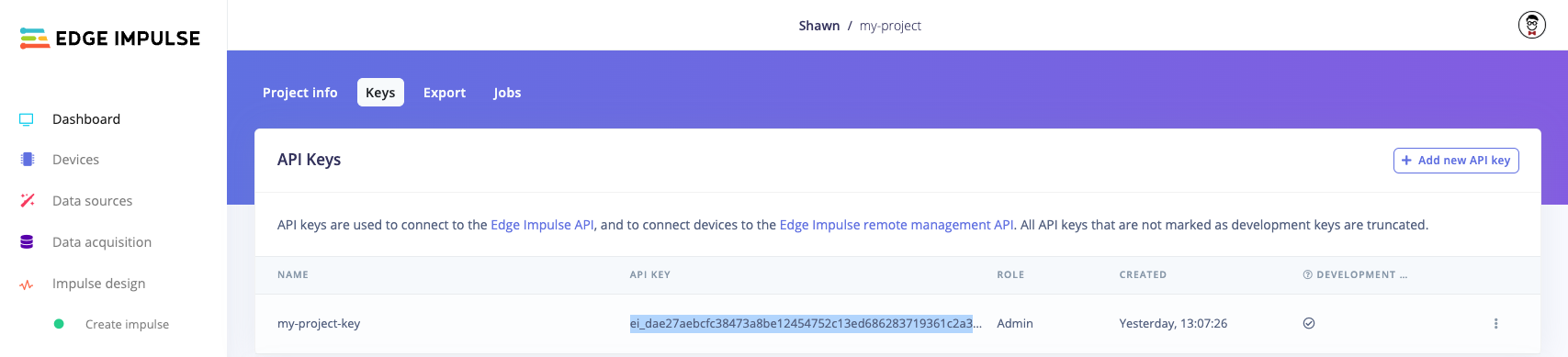
You will need to obtain an API key from an Edge Impulse project. Log into [edgeimpulse.com](https://edgeimpulse.com/) and create a new project. Open the project, navigate to **Dashboard** and click on the **Keys** tab to view your API keys. Double-click on the API key to highlight it, right-click, and select **Copy**.

<Frame caption="Copy API key from Edge Impulse project">
  <img src="https://raw.githubusercontent.com/edgeimpulse/notebooks/main/.assets/images/python-sdk-copy-ei-api-key.png" />
</Frame>

Note that you do not actually need to use the project in the Edge Impulse Studio. We just need the API Key.

Paste that API key string in the `ei.API_KEY` value in the following cell:

```python theme={"system"}
# Settings
ei.API_KEY = "ei_dae2..." # Change this to your Edge Impulse API key
```

## Upload directory

You can upload all files in a directory using the Python SDK. Note that you can set the *category*, *label*, and *metadata* for all files with a single call. If you want to use a different label for each file set `label=None` in the function call and name your files with *\<label>.\<name>.\<ext>*. For example, *wave.01.csv* will have the label *wave* when uploaded. See [here](/tools/clis/edge-impulse-cli/uploader#custom-labeling-and-metadata) for more information.

The following file formats are allowed: *.cbor*, *.json*, *.csv*, *.wav*, *.jpg*, *.png*, *.mp4*, *.avi*.

```python theme={"system"}
from datetime import datetime
```

```python theme={"system"}
# Download image files to use as an example dataset
!mkdir -p dataset
!wget -P dataset -q \
  https://raw.githubusercontent.com/edgeimpulse/notebooks/main/.assets/images/capacitor.01.png \
  https://raw.githubusercontent.com/edgeimpulse/notebooks/main/.assets/images/capacitor.02.png
```

```python theme={"system"}
# Upload the entire directory
response = ei.experimental.data.upload_directory(
    directory="dataset",
    category="training",
    label=None, # Will use the prefix before the '.' on each filename for the label
    metadata={
        "date": datetime.now().strftime('%Y-%m-%d %H:%M:%S'),
        "source": "camera",
    }
)

# Check to make sure there were no failures
assert len(response.fails) == 0, "Could not upload some files"

# Save the sample IDs, as we will need these to retrieve file information and delete samples
ids = []
for sample in response.successes:
    ids.append(sample.sample_id)

# Review the sample IDs and get the associated server-side filename
# Note the lack of extension! Multiple samples on the server can have the same filename.
for id in ids:
    filename = ei.experimental.data.get_filename_by_id(id)
    print(f"Sample ID: {id}, filename: {filename}")
```

If you head to the *Data acquisition* page on your project, you should see images in your dataset.


<Frame caption="Images uploaded to Edge Impulse project">
  <img src="https://raw.githubusercontent.com/edgeimpulse/notebooks/main/.assets/images/python-sdk-upload-download-images.png" />
</Frame>

## Download files

You can download samples from your Edge Impulse project if you know the sample IDs. You can get sample IDs by calling the `ei.data.get_sample_ids()` function, which allows you to filter IDs based on filename, category, and label.

```python theme={"system"}
# Get sample IDs for everything in the "training" category
infos = ei.experimental.data.get_sample_ids(category="training")

# The SampleInfo should match what we uploaded earlier
ids = []
for info in infos:
    print(info)
    ids.append(info.sample_id)
```

```python theme={"system"}
# Download samples
samples = ei.experimental.data.download_samples_by_ids(ids)

# Save the downloaded files
for sample in samples:
    with open(sample.filename, "wb") as file:
        file.write(sample.data.read())

# View sample information
for sample in samples:
    print(
        f"filename: {sample.filename}\r\n"
        f"  sample ID: {sample.sample_id}\r\n"
        f"  category: {sample.category}\r\n"
        f"  label: {sample.label}\r\n"
        f"  bounding boxes: {sample.bounding_boxes}\r\n"
        f"  metadata: {sample.metadata}"
    )
```

Take a look at the files in this directory. You should see the downloaded images. They should match the images in the *dataset/* directory, which were the original images that we uploaded.

## Delete files

If you know the ID of the sample you would like to delete, you can call the `delete_sample_by_id()` function. You can also delete all the samples in your project by calling `delete_all_samples()`.

```python theme={"system"}
# Delete the samples from the Edge Impulse project that we uploaded earlier
for id in ids:
    ei.experimental.data.delete_sample_by_id(id)
```

Take a look at the data in your project. The samples that we uploaded should be gone.

## Upload folder for object detection

For object detection, you can put bounding box information (following the [Edge Impulse JSON bounding box format](/tools/specifications/data-annotation/object-detection#edge-impulse-object-detection-format)) in a file named *info.labels* in that same directory.

> **Important!** The annotations file must be named exactly *info.labels*

```python theme={"system"}
# Download images and bounding box annotations to use as an example dataset
!mkdir -p dataset
!rm dataset/capacitor.01.png dataset/capacitor.02.png
!wget -P dataset -q \
  https://raw.githubusercontent.com/edgeimpulse/notebooks/main/.assets/images/dog-ball-toy.01.png \
  https://raw.githubusercontent.com/edgeimpulse/notebooks/main/.assets/images/dog-ball-toy.02.png \
  https://raw.githubusercontent.com/edgeimpulse/notebooks/main/.assets/annotations/info.labels
```

```python theme={"system"}
# Upload the entire directory (including the info.labels file)
response = ei.experimental.data.upload_exported_dataset(
    directory="dataset",
)

# Check to make sure there were no failures
assert len(response.fails) == 0, "Could not upload some files"

# Save the sample IDs, as we will need these to retrieve file information and delete samples
ids = []
for sample in response.successes:
    ids.append(sample.sample_id)
```

If you head to the *Data acquisition* page on your project, you should see images in your dataset along with the bounding box information.

<Frame caption="Images uploaded to Edge Impulse project">
  <img src="https://raw.githubusercontent.com/edgeimpulse/notebooks/main/.assets/images/python-sdk-upload-download-object-detection.png" />
</Frame>

```python theme={"system"}
# Delete the samples from the Edge Impulse project that we uploaded
for id in ids:
    ei.experimental.data.delete_sample_by_id(id)
```

## Upload individual CSV files

The Edge Impulse ingestion service accepts CSV files, which we can use to upload raw data. Note that if you configure a CSV template using the [CSV Wizard](/studio/projects/data-acquisition/csv-wizard), then the expected format of the CSV file might change. If you do not configure a CSV template, then the ingestion service expects CSV data to be in a particular format. See [here for details about the default CSV format](/tools/specifications/data-acquisition/csv).

```python theme={"system"}
import csv
import io
import os
```

```python theme={"system"}
# Create example CSV data
sample_data = [
    [
        ["timestamp", "accX", "accY", "accZ"],
        [0, -9.81, 0.03, 0.21],
        [10, -9.83, 0.04, 0.27],
        [20, -9.12, 0.03, 0.23],
        [30, -9.14, 0.01, 0.25],
    ],
    [
        ["timestamp", "accX", "accY", "accZ"],
        [0, -9.56, 5.34, 1.21],
        [10, -9.43, 1.37, 1.27],
        [20, -9.22, -4.03, 1.23],
        [30, -9.50, -0.98, 1.25],
    ],
]

# Write to CSV files
filenames = [
    "001.csv",
    "002.csv"
]
for i, filename in enumerate(filenames):
    file_path = os.path.join("dataset", filename)
    with open(file_path, "w", newline="") as file:
        writer = csv.writer(file)
        writer.writerows(sample_data[i])
```

```python theme={"system"}
# Add metadata to the CSV data
my_samples = [
    {
        "filename": filenames[0],
        "data": open(os.path.join("dataset", filenames[0]), "rb"),
        "category": "training",
        "label": "idle",
        "metadata": {
            "source": "accelerometer",
            "collection site": "desk",
        },
    },
    {
        "filename": filenames[1],
        "data": open(os.path.join("dataset", filenames[1]), "rb"),
        "category": "training",
        "label": "wave",
        "metadata": {
            "source": "accelerometer",
            "collection site": "desk",
        },
    },
]
```

```python theme={"system"}
# Wrap the samples in instances of the Sample class
samples = [ei.experimental.data.Sample(**i) for i in my_samples]

# Upload samples to your project
response = ei.experimental.data.upload_samples(samples)

# Check to make sure there were no failures
assert len(response.fails) == 0, "Could not upload some files"

# Save the sample IDs, as we will need these to retrieve file information and delete samples
ids = []
for sample in response.successes:
    ids.append(sample.sample_id)
```

If you head to the *Data acquisition* page on your project, you should see your time series data.

<Frame caption="Copy API key from Edge Impulse project">
  <img src="https://raw.githubusercontent.com/edgeimpulse/notebooks/main/.assets/images/python-sdk-upload-download-json-data.png" />
</Frame>

```python theme={"system"}
# Delete the samples from the Edge Impulse project
for id in ids:
    ei.experimental.data.delete_sample_by_id(id)
```

## Upload JSON data directly

Another way to upload data is to encode it in JSON format. See the [data acquisition format specification](/tools/specifications/data-acquisition/json-cbor) for more information on acceptable key/value pairs. Note that the `signature` value can be set to `0`.

The raw data must be encoded in an IO object. We convert the dictionary objects to a `BytesIO` object, but you can also read in data from *.json* files.

```python theme={"system"}
import io
import json
```

```python theme={"system"}
# Create two different example data samples
sample_data_1 = {
    "protected": {
        "ver": "v1",
        "alg": "none",
    },
    "signature": 0,
    "payload": {
        "device_name": "ac:87:a3:0a:2d:1b",
        "device_type": "DISCO-L475VG-IOT01A",
        "interval_ms": 10,
        "sensors": [
            { "name": "accX", "units": "m/s2" },
            { "name": "accY", "units": "m/s2" },
            { "name": "accZ", "units": "m/s2" }
        ],
        "values": [
            [ -9.81, 0.03, 0.21 ],
            [ -9.83, 0.04, 0.27 ],
            [ -9.12, 0.03, 0.23 ],
            [ -9.14, 0.01, 0.25 ]
        ]
    }
}
sample_data_2 = {
    "protected": {
        "ver": "v1",
        "alg": "none",
    },
    "signature": 0,
    "payload": {
        "device_name": "ac:87:a3:0a:2d:1b",
        "device_type": "DISCO-L475VG-IOT01A",
        "interval_ms": 10,
        "sensors": [
            { "name": "accX", "units": "m/s2" },
            { "name": "accY", "units": "m/s2" },
            { "name": "accZ", "units": "m/s2" }
        ],
        "values": [
            [ -9.56, 5.34, 1.21 ],
            [ -9.43, 1.37, 1.27 ],
            [ -9.22, -4.03, 1.23 ],
            [ -9.50, -0.98, 1.25 ]
        ]
    }
}
```

```python theme={"system"}
# Provide a filename, category, label, and optional metadata for each sample
my_samples = [
    {
        "filename": "001.json",
        "data": io.BytesIO(json.dumps(sample_data_1).encode('utf-8')),
        "category": "training",
        "label": "idle",
        "metadata": {
            "source": "accelerometer",
            "collection site": "desk",
        },
    },
    {
        "filename": "002.json",
        "data": io.BytesIO(json.dumps(sample_data_2).encode('utf-8')),
        "category": "training",
        "label": "wave",
        "metadata": {
            "source": "accelerometer",
            "collection site": "desk",
        },
    },
]
```

```python theme={"system"}
# Wrap the samples in instances of the Sample class
samples = [ei.data.sample_type.Sample(**i) for i in my_samples]

# Upload samples to your project
response = ei.experimental.data.upload_samples(samples)

# Check to make sure there were no failures
assert len(response.fails) == 0, "Could not upload some files"

# Save the sample IDs, as we will need these to retrieve file information and delete samples
ids = []
for sample in response.successes:
    ids.append(sample.sample_id)
```

If you head to the *Data acquisition* page on your project, you should see your time series data.

<Frame caption="Copy API key from Edge Impulse project">
  <img src="https://raw.githubusercontent.com/edgeimpulse/notebooks/main/.assets/images/python-sdk-upload-download-json-data.png" />
</Frame>

```python theme={"system"}
# Delete the samples from the Edge Impulse project
for id in ids:
    ei.experimental.data.delete_sample_by_id(id)
```

## Upload NumPy arrays

[NumPy](https://numpy.org/) is powerful Python library for working with large arrays and matrices. You can upload NumPy arrays directly into your Edge Impulse project. Note that the arrays are required to be in a particular format, and must be uploaded with required metadata (such as a list of labels and the sample rate).

> **Important!** NumPy arrays must be in the shape `(Number of samples, number of data points, number of sensors)`

If you are working with image data in NumPy, we recommend saving those images as .png or .jpg files and using `upload_directory()`.

```python theme={"system"}
import numpy as np
```

```python theme={"system"}
# Create example NumPy array with 2 time series samples
sample_data = np.array(
    [
        [ # Sample 1 ("idle")
            [-9.81, 0.03, 0.21],
            [-9.83, 0.04, 0.27],
            [-9.12, 0.03, 0.23],
            [-9.14, 0.01, 0.25],
        ],
        [ # Sample 2 ("wave")
            [-9.56, 5.34, 1.21],
            [-9.43, 1.37, 1.27],
            [-9.22, -4.03, 1.23],
            [-9.50, -0.98, 1.25],
        ],
    ]
)
```

```python theme={"system"}
# Labels for each sample
labels = ["idle", "wave"]

# Names of the sensors and units for the 3 axes
sensors = [
    { "name": "accX", "units": "m/s2" },
    { "name": "accY", "units": "m/s2" },
    { "name": "accZ", "units": "m/s2" },
]

# Optional metadata for all samples being uploaded
metadata = {
    "source": "accelerometer",
    "collection site": "desk",
}
```

```python theme={"system"}
# Upload samples to your project
response = ei.experimental.data.upload_numpy(
    data=sample_data,
    labels=labels,
    sensors=sensors,
    sample_rate_ms=10,
    metadata=metadata,
    category="training",
)

# Check to make sure there were no failures
assert len(response.fails) == 0, "Could not upload some files"

# Save the sample IDs, as we will need these to retrieve file information and delete samples
ids = []
for sample in response.successes:
    ids.append(sample.sample_id)
```

If you head to the *Data acquisition* page on your project, you should see your time series data. Note that the sample names are randomly assigned, so we recommend recording the sample IDs when you upload.

<Frame caption="Copy API key from Edge Impulse project">
  <img src="https://raw.githubusercontent.com/edgeimpulse/notebooks/main/.assets/images/python-sdk-upload-download-numpy-data.png" />
</Frame>

```python theme={"system"}
# Delete the samples from the Edge Impulse project
for id in ids:
    ei.experimental.data.delete_sample_by_id(id)
```

## Upload pandas (and pandas-like) dataframes

[pandas](https://pandas.pydata.org/) is popular Python library for performing data manipulation and analysis. The Edge Impulse library supports a number of ways to upload dataframes. We will go over each format.

Note that several other packages exist that work as drop-in replacements for pandas. You can use these replacements so long as you import that with the name `pd`. For example, one of:

```
import pandas as pd
import modin.pandas as pd
import dask.dataframe as pd
import polars as pd
```

```python theme={"system"}
import pandas as pd
```

The first option is to upload one dataframe for each sample (non-time series)

```python theme={"system"}
# Construct one dataframe for each sample (multidimensional, non-time series)
df_1 = pd.DataFrame([[-9.81, 0.03, 0.21]], columns=["accX", "accY", "accZ"])
df_2 = pd.DataFrame([[-9.56, 5.34, 1.21]], columns=["accX", "accY", "accZ"])

# Optional metadata for all samples being uploaded
metadata = {
    "source": "accelerometer",
    "collection site": "desk",
}
```

```python theme={"system"}
# Upload the first sample
ids = []
response = ei.experimental.data.upload_pandas_sample(
    df_1,
    label="One",
    filename="001",
    metadata=metadata,
    category="training",
)
assert len(response.fails) == 0, "Could not upload some files"
for sample in response.successes:
    ids.append(sample.sample_id)

# Upload the second sample
response = ei.experimental.data.upload_pandas_sample(
    df_2,
    label="Two",
    filename="002",
    metadata=metadata,
    category="training",
)
assert len(response.fails) == 0, "Could not upload some files"
for sample in response.successes:
    ids.append(sample.sample_id)
```

```python theme={"system"}
# Delete the samples from the Edge Impulse project
for id in ids:
    ei.experimental.data.delete_sample_by_id(id)
```

You can also upload one dataframe for each sample (time series). As with previous examples, we'll assume that the sample rate is 10 ms.

```python theme={"system"}
# Create samples (multidimensional, time series)
sample_data_1 = [ # Sample 1 ("idle")
    [-9.81, 0.03, 0.21],
    [-9.83, 0.04, 0.27],
    [-9.12, 0.03, 0.23],
    [-9.14, 0.01, 0.25],
]
sample_data_2 = [ # Sample 1 ("wave")
    [-9.56, 5.34, 1.21],
    [-9.43, 1.37, 1.27],
    [-9.22, -4.03, 1.23],
    [-9.50, -0.98, 1.25],
]
```

```python theme={"system"}
# Construct one dataframe for each sample
df_1 = pd.DataFrame(sample_data_1, columns=["accX", "accY", "accZ"])
df_2 = pd.DataFrame(sample_data_2, columns=["accX", "accY", "accZ"])

# Optional metadata for all samples being uploaded
metadata = {
    "source": "accelerometer",
    "collection site": "desk",
}
```

```python theme={"system"}
# Upload the first sample
ids = []
response = ei.experimental.data.upload_pandas_sample(
    df_1,
    label="Idle",
    filename="001",
    sample_rate_ms=10,
    metadata=metadata,
    category="training",
)
assert len(response.fails) == 0, "Could not upload some files"
for sample in response.successes:
    ids.append(sample.sample_id)

# Upload the second sample
response = ei.experimental.data.upload_pandas_sample(
    df_2,
    label="Wave",
    filename="002",
    sample_rate_ms=10,
    metadata=metadata,
    category="training",
)
assert len(response.fails) == 0, "Could not upload some files"
for sample in response.successes:
    ids.append(sample.sample_id)
```

```python theme={"system"}
# Delete the samples from the Edge Impulse project
for id in ids:
    ei.experimental.data.delete_sample_by_id(id)
```

You can upload non-time series data where each sample is a row in the dataframe. Note that you need to provide labels in the rows.

```python theme={"system"}
# Construct non-time series data, where each row is a different sample
data = [
    ["desk", "training", "One", -9.81, 0.03, 0.21],
    ["field", "training", "Two", -9.56, 5.34, 1.21],
]
columns = ["loc", "category", "label", "accX", "accY", "accZ"]

# Wrap the data in a DataFrame
df = pd.DataFrame(data, columns=columns)
```

```python theme={"system"}
# Upload non-time series DataFrame (with multiple samples) to the project
ids = []
response = ei.experimental.data.upload_pandas_dataframe(
    df,
    feature_cols=["accX", "accY", "accZ"],
    label_col="label",
    category_col="category",
    metadata_cols=["loc"],
)
assert len(response.fails) == 0, "Could not upload some files"
for sample in response.successes:
    ids.append(sample.sample_id)
```

```python theme={"system"}
# Delete the samples from the Edge Impulse project
for id in ids:
    ei.experimental.data.delete_sample_by_id(id)
```

A "wide" dataframe is one where each column represents a value in the time series data, and the rows become individual samples. Note that you need to provide labels in the rows.

```python theme={"system"}
# Construct time series data, where each row is a different sample
data = [
    ["desk", "training", "idle", 0.8, 0.7, 0.8, 0.9, 0.8, 0.8, 0.7, 0.8],
    ["field", "training", "motion", 0.3, 0.9, 0.4, 0.6, 0.8, 0.9, 0.5, 0.4],
]
columns = ["loc", "category", "label", "0", "1", "2", "3", "4", "5", "6", "7"]

# Wrap the data in a DataFrame
df = pd.DataFrame(data, columns=columns)
```

```python theme={"system"}
# Upload time series DataFrame (with multiple samples) to the project
ids = []
response = ei.experimental.data.upload_pandas_dataframe_wide(
    df,
    label_col="label",
    category_col="category",
    metadata_cols=["loc"],
    data_col_start=3,
    sample_rate_ms=100,
)
assert len(response.fails) == 0, "Could not upload some files"
for sample in response.successes:
    ids.append(sample.sample_id)
```

```python theme={"system"}
# Delete the samples from the Edge Impulse project
for id in ids:
    ei.experimental.data.delete_sample_by_id(id)
```

A DataFrame can also be divided into "groups" so you can upload multidimensional time series data.

```python theme={"system"}
# Create samples
sample_data = [
    ["desk", "sample 1", "training", "idle", 0, -9.81, 0.03, 0.21],
    ["desk", "sample 1", "training", "idle", 0.01, -9.83, 0.04, 0.27],
    ["desk", "sample 1", "training", "idle", 0.02, -9.12, 0.03, 0.23],
    ["desk", "sample 1", "training", "idle", 0.03, -9.14, 0.01, 0.25],
    ["field", "sample 2", "training", "wave", 0, -9.56, 5.34, 1.21],
    ["field", "sample 2", "training", "wave", 0.01, -9.43, 1.37, 1.27],
    ["field", "sample 2", "training", "wave", 0.02, -9.22, -4.03, 1.23],
    ["field", "sample 2", "training", "wave", 0.03, -9.50, -0.98, 1.25],
]
columns = ["loc", "sample_name", "category", "label", "timestamp", "accX", "accY", "accZ"]

# Wrap the data in a DataFrame
df = pd.DataFrame(sample_data, columns=columns)
```

```python theme={"system"}
# Upload time series DataFrame (with multiple samples and multiple dimensions) to the project
ids = []
response = ei.experimental.data.upload_pandas_dataframe_with_group(
    df,
    group_by="sample_name",
    timestamp_col="timestamp",
    feature_cols=["accX", "accY", "accZ"],
    label_col="label",
    category_col="category",
    metadata_cols=["loc"]
)
assert len(response.fails) == 0, "Could not upload some files"
for sample in response.successes:
    ids.append(sample.sample_id)
```

```python theme={"system"}
# Delete the samples from the Edge Impulse project
for id in ids:
    ei.experimental.data.delete_sample_by_id(id)
```