> ## Documentation Index
> Fetch the complete documentation index at: https://docs.edgeimpulse.com/llms.txt
> Use this file to discover all available pages before exploring further.
# Use the Edge Impulse Python SDK to run the EON Tuner


 The [EON Tuner](/studio/projects/eon-tuner) is Edge Impulse's automated machine learning (AutoML) tool to help you find the best combination of blocks and hyperparameters for your model and within your hardware constraints. This example will walk you through uploading data, running the EON Tuner, and interpreting the results.
> **WARNING:** This notebook will add and delete data in your Edge Impulse project, so be careful! We recommend creating a throwaway project when testing this notebook.
To start, create a new project in Edge Impulse. Do not add any data to it.
```python theme={"system"}
# If you have not done so already, install the following dependencies
# !python -m pip install matplotlib pandas edgeimpulse
```
```python theme={"system"}
import edgeimpulse as ei
from edgeimpulse.experimental.data import (
upload_directory
)
from edgeimpulse.experimental.tuner import (
check_tuner,
set_impulse_from_trial,
start_tuner,
start_custom_tuner,
tuner_report_as_df,
)
from edgeimpulse.experimental.impulse import (
build,
)
```
You will need to obtain an API key from an Edge Impulse project. Log into [edgeimpulse.com](https://edgeimpulse.com/) and create a new project. Open the project, navigate to **Dashboard** and click on the **Keys** tab to view your API keys. Double-click on the API key to highlight it, right-click, and select **Copy**.
The [EON Tuner](/studio/projects/eon-tuner) is Edge Impulse's automated machine learning (AutoML) tool to help you find the best combination of blocks and hyperparameters for your model and within your hardware constraints. This example will walk you through uploading data, running the EON Tuner, and interpreting the results.
> **WARNING:** This notebook will add and delete data in your Edge Impulse project, so be careful! We recommend creating a throwaway project when testing this notebook.
To start, create a new project in Edge Impulse. Do not add any data to it.
```python theme={"system"}
# If you have not done so already, install the following dependencies
# !python -m pip install matplotlib pandas edgeimpulse
```
```python theme={"system"}
import edgeimpulse as ei
from edgeimpulse.experimental.data import (
upload_directory
)
from edgeimpulse.experimental.tuner import (
check_tuner,
set_impulse_from_trial,
start_tuner,
start_custom_tuner,
tuner_report_as_df,
)
from edgeimpulse.experimental.impulse import (
build,
)
```
You will need to obtain an API key from an Edge Impulse project. Log into [edgeimpulse.com](https://edgeimpulse.com/) and create a new project. Open the project, navigate to **Dashboard** and click on the **Keys** tab to view your API keys. Double-click on the API key to highlight it, right-click, and select **Copy**.
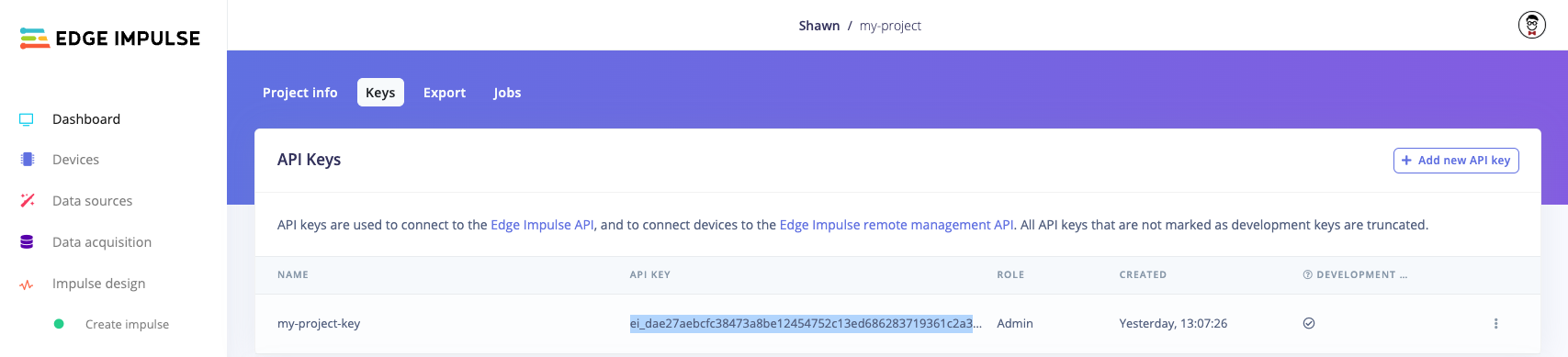 Note that you do not actually need to use the project in the Edge Impulse Studio. We just need the API Key.
Paste that API key string in the `ei.API_KEY` value in the following cell:
```python theme={"system"}
# Settings
ei.API_KEY = "ei_dae2..." # Change this to your Edge Impulse API key
deploy_filename = "my_model_cpp.zip"
```
```python theme={"system"}
# Get the project ID
api = ei.experimental.api.EdgeImpulseApi()
project_id = api.default_project_id()
```
## Upload dataset
We start by downloading the [continuous motion dataset](/datasets/time-series/continuous-motion-recognition) and uploading it to our project.
```python theme={"system"}
# Download and unzip gesture dataset
!mkdir -p dataset/
!wget -P dataset -q https://cdn.edgeimpulse.com/datasets/gestures.zip
!unzip -q dataset/gestures.zip -d dataset/gestures/
```
```python theme={"system"}
# Upload training dataset
resp = upload_directory(
directory="dataset/gestures/training",
category="training",
)
print(f"Uploaded {len(resp.successes)} training samples")
# Upload test dataset
resp = upload_directory(
directory="dataset/gestures/testing",
category="testing",
)
print(f"Uploaded {len(resp.successes)} testing samples")
```
```python theme={"system"}
# Uncomment the following if you want to delete the temporary dataset folder
#!rm -rf dataset/
```
## Run the Tuner
To start, we need to list the possible target devices we can use for profiling. We need to pick from this list.
```python theme={"system"}
# List the available profile targets
ei.model.list_profile_devices()
```
You should see a list printed such as:
```
['alif-he',
'alif-hp',
'arduino-nano-33-ble',
'arduino-nicla-vision',
'portenta-h7',
'brainchip-akd1000',
'cortex-m4f-80mhz',
'cortex-m7-216mhz',
...
'ti-tda4vm']
```
From there, we start the tuner with `start_tuner()` and wait for completion via `check_tuner()`. In this example, we configure the tuner to target for the *cortex-m4f-80mhz* device. Since we want to classify the motion, we choose `classification` for our `classifcation_type` and our dataset as motion continuous. We constrain our model to a latency of 100ms for running the impulse.
> **NOTE:** We set the max trials to 3 here. In a real life situation, you will omit this so the tuner decides the best number of trials.
Once the tuner is done, you can print out the results to determine the best combination of blocks and hyperparameters.
```python theme={"system"}
# Choose a device from the list
target_device = "cortex-m4f-80mhz"
# Start tuner. This will take 15+ minutes.
start_tuner(
target_device=target_device,
classification_type="classification",
dataset_category="motion_continuous",
target_latency=100,
tuning_max_trials=3,
)
# Wait while checking the tuner's progress.
state = check_tuner(
wait_for_completion=True
)
```
## Print EON Tuner results
To visualize the results of the tuner trials, you can head to the project page on Edge Impulse Studio.
Alternatively, you can access the results programmatically: the configuration settings and output of the EON Tuner is stored in the variable `state`. You can access the results of the various trials with `state.trials`. Note that some trials can fail, so it's a good idea to test the status of each trial.
From there, you will want to sort the results based on some metric. In this example, we will sort based on *int8* test set accuracy from highest to lowest.
> Note: Edge Impulse supports only one learning block per project (excluding anomaly detection blocks). As a result, we will use the first learning block (e.g. `learning_blocks[0]`) in the list to extract metrics.
```python theme={"system"}
import json
```
```python theme={"system"}
# The easiest way to view the results is to look at the EON Tuner page on your project
print(f"Navigate to https://studio.edgeimpulse.com/studio/{project_id}/tuner to see the results")
```
```python theme={"system"}
# Set quantization ("float32" or "int8")
qtzn = "int8"
# Filter out all failed trials
results = [r for r in state.trials if r.status == "completed"]
# Extract int8 accuracies from the trial results
accuracies = []
for result in results:
accuracy = result.impulse.learn_blocks[0]["metrics"]["test"][qtzn]["accuracy"]
accuracies.append(accuracy)
# Sort the results based on int8 accuracies
acc_results = zip(accuracies, results)
sorted_results = sorted(acc_results, reverse=True, key=lambda x: list(x)[0])
sorted_results = [result for _, result in sorted_results]
```
Now that we have the sorted results, we can extract the values we care about. We will print out the following metrics along with the impulse configuration (processing/learning block configuration and hyperparameters) of the top-performing trial.
This will help you determine if the impulse can fit on your target hardware and run fast enough for your needs. The impulse configuration can be used to recreate the processing and learning blocks on Edge Impulse. Later, we will set the project impulse based on the trial ID to simply deploy (rather than re-train).
> **Note:** we assume the first learning block has the metrics we care about.
```python theme={"system"}
def get_metrics(results, qtzn, idx):
"""Calculate metrics for a given trial index"""
metrics = {}
# Get model accuracy results
result_metrics = results[idx].impulse.learn_blocks[0]["metrics"]
metrics["val-acc"] = result_metrics['validation'][qtzn]['accuracy']
metrics["test-acc"] = result_metrics['test'][qtzn]['accuracy']
# Calculate processing block RAM
metrics["processing-block-ram"] = 0
for i, dsp_block in enumerate(results[idx].impulse.dsp_blocks):
metrics["processing-block-ram"] += dsp_block["performance"]["ram"]
# Get latency, RAM, and ROM usage
device_performance = results[idx].device_performance[qtzn]
metrics["learning-block-latency-ms"] = device_performance['latency']
metrics["learning-block-tflite-ram"] = device_performance['tflite']['ramRequired']
metrics["learning-block-tflite-rom"] = device_performance['tflite']['romRequired']
metrics["learning-block-eon-ram"] = device_performance['eon']['ramRequired']
metrics["learning-block-eon-rom"] = device_performance['eon']['romRequired']
return metrics
```
```python theme={"system"}
# The top performing impulse is the first element (sorted by highest int8 accuracy on test set)
trial_idx = 0
# Print info about the processing (DSP) blocks and store RAM usage
print("Processing blocks")
print("===")
for i, dsp_block in enumerate(sorted_results[trial_idx].impulse.dsp_blocks):
print(f"Processing block {i}")
print("---")
print("Block:")
print(json.dumps(dsp_block["block"], indent=2))
print("Config:")
print(json.dumps(dsp_block["config"], indent=2))
print()
# Print info about the learning blocks
print("Learning blocks")
print("===")
for i, learn_block in enumerate(sorted_results[trial_idx].impulse.learn_blocks):
print(f"Learn block {i}")
print("---")
print("Block:")
print(json.dumps(learn_block["block"], indent=2))
print("Config:")
print(json.dumps(learn_block["config"], indent=2))
metadata = learn_block["metadata"]
qtzn_metadata = [m for m in metadata["modelValidationMetrics"] if m.get("type") == qtzn]
print()
# Print metrics
metrics = get_metrics(sorted_results, qtzn, trial_idx)
print(f"Metrics ({qtzn}) for best trial")
print("===")
print(f"Validation accuracy: {metrics['val-acc']}")
print(f"Test accuracy: {metrics['test-acc']}")
print(f"Estimated processing blocks RAM (bytes): {metrics['processing-block-ram']}")
print(f"Estimated learning blocks latency (ms): {metrics['learning-block-latency-ms']}")
print(f"Estimated learning blocks RAM (bytes): {metrics['learning-block-tflite-ram']}")
print(f"Estimated learning blocks ROM (bytes): {metrics['learning-block-tflite-rom']}")
print(f"Estimated learning blocks RAM with EON Compiler (bytes): {metrics['learning-block-eon-ram']}")
print(f"Estimated learning blocks ROM with EON Compiler (bytes): {metrics['learning-block-eon-rom']}")
```
## Graph results
You can optionally use a plotting package like matplotlib to graph the results from the top results to compare the metrics.
```python theme={"system"}
import matplotlib.pyplot as plt
```
```python theme={"system"}
# Get metrics for the top 3 trials (sorted by int8 test set accuracy)
num_trials = 3
top_metrics = [get_metrics(sorted_results, qtzn, idx) for idx in range(num_trials)]
# Construct metrics for plotting
test_accs = [top_metrics[x]['test-acc'] for x in range(num_trials)]
proc_rams = [top_metrics[x]['processing-block-ram'] for x in range(num_trials)]
learn_latencies = [top_metrics[x]['learning-block-latency-ms'] for x in range(num_trials)]
learn_tflite_rams = [top_metrics[x]['learning-block-tflite-ram'] for x in range(num_trials)]
learn_tflite_roms = [top_metrics[x]['learning-block-tflite-rom'] for x in range(num_trials)]
learn_eon_rams = [top_metrics[x]['learning-block-eon-ram'] for x in range(num_trials)]
learn_eon_roms = [top_metrics[x]['learning-block-eon-rom'] for x in range(num_trials)]
```
```python theme={"system"}
# Create plots
fig, axs = plt.subplots(7, 1, figsize=(8, 15))
indices = range(num_trials)
# Plot test accuracies
axs[0].barh(indices, test_accs)
axs[0].set_title("Test set accuracy")
axs[0].set_xlabel("Accuracy")
axs[0].set_ylabel("Trial")
# Plot processing block RAM
axs[1].barh(indices, proc_rams)
axs[1].set_title("Processing block RAM")
axs[1].set_xlabel("RAM (bytes)")
axs[1].set_ylabel("Trial")
# Plot learning block latency
axs[2].barh(indices, learn_latencies)
axs[2].set_title("Learning block latency")
axs[2].set_xlabel("Latency (ms)")
axs[2].set_ylabel("Trial")
# Plot learning block RAM (TFLite)
axs[3].barh(indices, learn_tflite_rams)
axs[3].set_title("Learning block RAM (TFLite)")
axs[3].set_xlabel("RAM (bytes)")
axs[3].set_ylabel("Trial")
# Plot learning block ROM (TFLite)
axs[4].barh(indices, learn_tflite_roms)
axs[4].set_title("Learning block ROM (TFLite)")
axs[4].set_xlabel("ROM (bytes)")
axs[4].set_ylabel("Trial")
# Plot learning block RAM (EON)
axs[5].barh(indices, learn_eon_rams)
axs[5].set_title("Learning block RAM (EON)")
axs[5].set_xlabel("RAM (bytes)")
axs[5].set_ylabel("Trial")
# Plot learning block ROM (EON)
axs[6].barh(indices, learn_eon_roms)
axs[6].set_title("Learning block ROM (EON)")
axs[6].set_xlabel("ROM (bytes)")
axs[6].set_ylabel("Trial")
# Prevent overlap
plt.tight_layout()
```
## Results as a DataFrame
If you have [pandas](https://pandas.pydata.org/) installed, you can make the previous section much easier by reporting metrics as a DataFrame.
```python theme={"system"}
import pandas as pd
```
```python theme={"system"}
# Convert the state metrics into a DataFrame
df = tuner_report_as_df(state)
df.head()
```
```python theme={"system"}
# Print column names
for col in df.columns:
print(col)
```
```python theme={"system"}
# Sort the DataFrame by validation (int8) accuracy
df = df.sort_values(by="test_int8_accuracy", ascending=False)
# Print out best trial metrics
print(f"Trial ID: {df.iloc[0]['id']}")
print(f"Test accuracy (int8): {df.iloc[0]['test_int8_accuracy']}")
print(f"Estimated learning blocks latency (ms): {df.iloc[0]['device_performance_int8_latency']}")
print(f"Estimated learning blocks RAM (bytes): {df.iloc[0]['device_performance_int8_tflite_ram_required']}")
print(f"Estimated learning blocks ROM (bytes): {df.iloc[0]['device_performance_int8_tflite_rom_required']}")
print(f"Estimated learning blocks RAM with EON Compiler (bytes): {df.iloc[0]['device_performance_int8_eon_ram_required']}")
print(f"Estimated learning blocks ROM with EON Compiler (bytes): {df.iloc[0]['device_performance_int8_eon_rom_required']}")
```
## Set trial as impulse and deploy
We can replace the current impulse with the top performing trial from the EON Tuner. From there, we can deploy it, just like we would any impulse.
```python theme={"system"}
# Get the ID for the top-performing trial and set that to our impulse. This will take about a minute.
trial_id = df.iloc[0].trial_id
response = set_impulse_from_trial(trial_id)
job_id = response.id
# Make sure the impulse update was successful
if not hasattr(response, "success") or getattr(response, "success") == False:
raise RuntimeError("Could not set project impulse to trial impulse")
```
```python theme={"system"}
# List the available profile target devices
ei.model.list_deployment_targets()
```
You should see a list printed such as:
```
['zip',
'arduino',
'cubemx',
'wasm',
...
'runner-linux-aarch64-jetson-orin-6-0']
```
The most generic target is to download a .zip file that holds a C++ library containing the inference runtime and your trained model, so we choose `'zip'` from the above list. To do that, we first need to create a Classification object which contains our label strings (and other optional information about the model). These strings will be added to the C++ library metadata so you can access them in your edge application.
Note that instead of writing the raw bytes to a file, you can also specify an `output_directory` argument in the `.deploy()` function. Your deployment file(s) will be downloaded to that directory.
**Important!** The deployment targets list will change depending on the values provided for `model`, `model_output_type`, and `model_input_type` in the next part. For example, you will not see `openmv` listed once you upload a model (e.g. using `.profile()` or `.deploy()`) if `model_input_type` is not set to `ei.model.input_type.ImageInput()`. If you attempt to deploy to an unavailable target, you will receive the error `Could not deploy: deploy_target: ...`. If `model_input_type` is not provided, it will default to [OtherInput](/tools/libraries/sdks/studio/python/edgeimpulse/model/input_type#otherinput). See [this page](/tools/libraries/sdks/studio/python/edgeimpulse/model/input_type) for more information about input types.
```python theme={"system"}
# Build and download C++ library with the trained model
deploy_bytes = None
try:
deploy_bytes = build(
deploy_model_type=qtzn,
engine="tflite",
deploy_target="zip"
)
except Exception as e:
print(f"Could not deploy: {e}")
# Write the downloaded raw bytes to a file
if deploy_bytes:
with open(deploy_filename, 'wb') as f:
f.write(deploy_bytes.getvalue())
```
Your model C++ library should be downloaded as the file *my\_model\_cpp.zip* in the same directory as this notebook. You are now ready to use your C++ model in your embedded and edge device application! To use the C++ model for local inference, see our documentation [here](/hardware/deployments/run-cpp-overview).
## Configure custom search space
By default, the EON Tuner will make a guess at a search space based on the type of data you uploaded (e.g. using spectral-analysis blocks for feature extraction). As a result, you can run the tuner without needing to construct a search space. However, you may want to define your own search space.
The best way to define a search space is to open your project (after uploading data), head to the **EON Tuner** page, click **Run EON Tuner**, and select the **Space** tab.
Note that you do not actually need to use the project in the Edge Impulse Studio. We just need the API Key.
Paste that API key string in the `ei.API_KEY` value in the following cell:
```python theme={"system"}
# Settings
ei.API_KEY = "ei_dae2..." # Change this to your Edge Impulse API key
deploy_filename = "my_model_cpp.zip"
```
```python theme={"system"}
# Get the project ID
api = ei.experimental.api.EdgeImpulseApi()
project_id = api.default_project_id()
```
## Upload dataset
We start by downloading the [continuous motion dataset](/datasets/time-series/continuous-motion-recognition) and uploading it to our project.
```python theme={"system"}
# Download and unzip gesture dataset
!mkdir -p dataset/
!wget -P dataset -q https://cdn.edgeimpulse.com/datasets/gestures.zip
!unzip -q dataset/gestures.zip -d dataset/gestures/
```
```python theme={"system"}
# Upload training dataset
resp = upload_directory(
directory="dataset/gestures/training",
category="training",
)
print(f"Uploaded {len(resp.successes)} training samples")
# Upload test dataset
resp = upload_directory(
directory="dataset/gestures/testing",
category="testing",
)
print(f"Uploaded {len(resp.successes)} testing samples")
```
```python theme={"system"}
# Uncomment the following if you want to delete the temporary dataset folder
#!rm -rf dataset/
```
## Run the Tuner
To start, we need to list the possible target devices we can use for profiling. We need to pick from this list.
```python theme={"system"}
# List the available profile targets
ei.model.list_profile_devices()
```
You should see a list printed such as:
```
['alif-he',
'alif-hp',
'arduino-nano-33-ble',
'arduino-nicla-vision',
'portenta-h7',
'brainchip-akd1000',
'cortex-m4f-80mhz',
'cortex-m7-216mhz',
...
'ti-tda4vm']
```
From there, we start the tuner with `start_tuner()` and wait for completion via `check_tuner()`. In this example, we configure the tuner to target for the *cortex-m4f-80mhz* device. Since we want to classify the motion, we choose `classification` for our `classifcation_type` and our dataset as motion continuous. We constrain our model to a latency of 100ms for running the impulse.
> **NOTE:** We set the max trials to 3 here. In a real life situation, you will omit this so the tuner decides the best number of trials.
Once the tuner is done, you can print out the results to determine the best combination of blocks and hyperparameters.
```python theme={"system"}
# Choose a device from the list
target_device = "cortex-m4f-80mhz"
# Start tuner. This will take 15+ minutes.
start_tuner(
target_device=target_device,
classification_type="classification",
dataset_category="motion_continuous",
target_latency=100,
tuning_max_trials=3,
)
# Wait while checking the tuner's progress.
state = check_tuner(
wait_for_completion=True
)
```
## Print EON Tuner results
To visualize the results of the tuner trials, you can head to the project page on Edge Impulse Studio.
Alternatively, you can access the results programmatically: the configuration settings and output of the EON Tuner is stored in the variable `state`. You can access the results of the various trials with `state.trials`. Note that some trials can fail, so it's a good idea to test the status of each trial.
From there, you will want to sort the results based on some metric. In this example, we will sort based on *int8* test set accuracy from highest to lowest.
> Note: Edge Impulse supports only one learning block per project (excluding anomaly detection blocks). As a result, we will use the first learning block (e.g. `learning_blocks[0]`) in the list to extract metrics.
```python theme={"system"}
import json
```
```python theme={"system"}
# The easiest way to view the results is to look at the EON Tuner page on your project
print(f"Navigate to https://studio.edgeimpulse.com/studio/{project_id}/tuner to see the results")
```
```python theme={"system"}
# Set quantization ("float32" or "int8")
qtzn = "int8"
# Filter out all failed trials
results = [r for r in state.trials if r.status == "completed"]
# Extract int8 accuracies from the trial results
accuracies = []
for result in results:
accuracy = result.impulse.learn_blocks[0]["metrics"]["test"][qtzn]["accuracy"]
accuracies.append(accuracy)
# Sort the results based on int8 accuracies
acc_results = zip(accuracies, results)
sorted_results = sorted(acc_results, reverse=True, key=lambda x: list(x)[0])
sorted_results = [result for _, result in sorted_results]
```
Now that we have the sorted results, we can extract the values we care about. We will print out the following metrics along with the impulse configuration (processing/learning block configuration and hyperparameters) of the top-performing trial.
This will help you determine if the impulse can fit on your target hardware and run fast enough for your needs. The impulse configuration can be used to recreate the processing and learning blocks on Edge Impulse. Later, we will set the project impulse based on the trial ID to simply deploy (rather than re-train).
> **Note:** we assume the first learning block has the metrics we care about.
```python theme={"system"}
def get_metrics(results, qtzn, idx):
"""Calculate metrics for a given trial index"""
metrics = {}
# Get model accuracy results
result_metrics = results[idx].impulse.learn_blocks[0]["metrics"]
metrics["val-acc"] = result_metrics['validation'][qtzn]['accuracy']
metrics["test-acc"] = result_metrics['test'][qtzn]['accuracy']
# Calculate processing block RAM
metrics["processing-block-ram"] = 0
for i, dsp_block in enumerate(results[idx].impulse.dsp_blocks):
metrics["processing-block-ram"] += dsp_block["performance"]["ram"]
# Get latency, RAM, and ROM usage
device_performance = results[idx].device_performance[qtzn]
metrics["learning-block-latency-ms"] = device_performance['latency']
metrics["learning-block-tflite-ram"] = device_performance['tflite']['ramRequired']
metrics["learning-block-tflite-rom"] = device_performance['tflite']['romRequired']
metrics["learning-block-eon-ram"] = device_performance['eon']['ramRequired']
metrics["learning-block-eon-rom"] = device_performance['eon']['romRequired']
return metrics
```
```python theme={"system"}
# The top performing impulse is the first element (sorted by highest int8 accuracy on test set)
trial_idx = 0
# Print info about the processing (DSP) blocks and store RAM usage
print("Processing blocks")
print("===")
for i, dsp_block in enumerate(sorted_results[trial_idx].impulse.dsp_blocks):
print(f"Processing block {i}")
print("---")
print("Block:")
print(json.dumps(dsp_block["block"], indent=2))
print("Config:")
print(json.dumps(dsp_block["config"], indent=2))
print()
# Print info about the learning blocks
print("Learning blocks")
print("===")
for i, learn_block in enumerate(sorted_results[trial_idx].impulse.learn_blocks):
print(f"Learn block {i}")
print("---")
print("Block:")
print(json.dumps(learn_block["block"], indent=2))
print("Config:")
print(json.dumps(learn_block["config"], indent=2))
metadata = learn_block["metadata"]
qtzn_metadata = [m for m in metadata["modelValidationMetrics"] if m.get("type") == qtzn]
print()
# Print metrics
metrics = get_metrics(sorted_results, qtzn, trial_idx)
print(f"Metrics ({qtzn}) for best trial")
print("===")
print(f"Validation accuracy: {metrics['val-acc']}")
print(f"Test accuracy: {metrics['test-acc']}")
print(f"Estimated processing blocks RAM (bytes): {metrics['processing-block-ram']}")
print(f"Estimated learning blocks latency (ms): {metrics['learning-block-latency-ms']}")
print(f"Estimated learning blocks RAM (bytes): {metrics['learning-block-tflite-ram']}")
print(f"Estimated learning blocks ROM (bytes): {metrics['learning-block-tflite-rom']}")
print(f"Estimated learning blocks RAM with EON Compiler (bytes): {metrics['learning-block-eon-ram']}")
print(f"Estimated learning blocks ROM with EON Compiler (bytes): {metrics['learning-block-eon-rom']}")
```
## Graph results
You can optionally use a plotting package like matplotlib to graph the results from the top results to compare the metrics.
```python theme={"system"}
import matplotlib.pyplot as plt
```
```python theme={"system"}
# Get metrics for the top 3 trials (sorted by int8 test set accuracy)
num_trials = 3
top_metrics = [get_metrics(sorted_results, qtzn, idx) for idx in range(num_trials)]
# Construct metrics for plotting
test_accs = [top_metrics[x]['test-acc'] for x in range(num_trials)]
proc_rams = [top_metrics[x]['processing-block-ram'] for x in range(num_trials)]
learn_latencies = [top_metrics[x]['learning-block-latency-ms'] for x in range(num_trials)]
learn_tflite_rams = [top_metrics[x]['learning-block-tflite-ram'] for x in range(num_trials)]
learn_tflite_roms = [top_metrics[x]['learning-block-tflite-rom'] for x in range(num_trials)]
learn_eon_rams = [top_metrics[x]['learning-block-eon-ram'] for x in range(num_trials)]
learn_eon_roms = [top_metrics[x]['learning-block-eon-rom'] for x in range(num_trials)]
```
```python theme={"system"}
# Create plots
fig, axs = plt.subplots(7, 1, figsize=(8, 15))
indices = range(num_trials)
# Plot test accuracies
axs[0].barh(indices, test_accs)
axs[0].set_title("Test set accuracy")
axs[0].set_xlabel("Accuracy")
axs[0].set_ylabel("Trial")
# Plot processing block RAM
axs[1].barh(indices, proc_rams)
axs[1].set_title("Processing block RAM")
axs[1].set_xlabel("RAM (bytes)")
axs[1].set_ylabel("Trial")
# Plot learning block latency
axs[2].barh(indices, learn_latencies)
axs[2].set_title("Learning block latency")
axs[2].set_xlabel("Latency (ms)")
axs[2].set_ylabel("Trial")
# Plot learning block RAM (TFLite)
axs[3].barh(indices, learn_tflite_rams)
axs[3].set_title("Learning block RAM (TFLite)")
axs[3].set_xlabel("RAM (bytes)")
axs[3].set_ylabel("Trial")
# Plot learning block ROM (TFLite)
axs[4].barh(indices, learn_tflite_roms)
axs[4].set_title("Learning block ROM (TFLite)")
axs[4].set_xlabel("ROM (bytes)")
axs[4].set_ylabel("Trial")
# Plot learning block RAM (EON)
axs[5].barh(indices, learn_eon_rams)
axs[5].set_title("Learning block RAM (EON)")
axs[5].set_xlabel("RAM (bytes)")
axs[5].set_ylabel("Trial")
# Plot learning block ROM (EON)
axs[6].barh(indices, learn_eon_roms)
axs[6].set_title("Learning block ROM (EON)")
axs[6].set_xlabel("ROM (bytes)")
axs[6].set_ylabel("Trial")
# Prevent overlap
plt.tight_layout()
```
## Results as a DataFrame
If you have [pandas](https://pandas.pydata.org/) installed, you can make the previous section much easier by reporting metrics as a DataFrame.
```python theme={"system"}
import pandas as pd
```
```python theme={"system"}
# Convert the state metrics into a DataFrame
df = tuner_report_as_df(state)
df.head()
```
```python theme={"system"}
# Print column names
for col in df.columns:
print(col)
```
```python theme={"system"}
# Sort the DataFrame by validation (int8) accuracy
df = df.sort_values(by="test_int8_accuracy", ascending=False)
# Print out best trial metrics
print(f"Trial ID: {df.iloc[0]['id']}")
print(f"Test accuracy (int8): {df.iloc[0]['test_int8_accuracy']}")
print(f"Estimated learning blocks latency (ms): {df.iloc[0]['device_performance_int8_latency']}")
print(f"Estimated learning blocks RAM (bytes): {df.iloc[0]['device_performance_int8_tflite_ram_required']}")
print(f"Estimated learning blocks ROM (bytes): {df.iloc[0]['device_performance_int8_tflite_rom_required']}")
print(f"Estimated learning blocks RAM with EON Compiler (bytes): {df.iloc[0]['device_performance_int8_eon_ram_required']}")
print(f"Estimated learning blocks ROM with EON Compiler (bytes): {df.iloc[0]['device_performance_int8_eon_rom_required']}")
```
## Set trial as impulse and deploy
We can replace the current impulse with the top performing trial from the EON Tuner. From there, we can deploy it, just like we would any impulse.
```python theme={"system"}
# Get the ID for the top-performing trial and set that to our impulse. This will take about a minute.
trial_id = df.iloc[0].trial_id
response = set_impulse_from_trial(trial_id)
job_id = response.id
# Make sure the impulse update was successful
if not hasattr(response, "success") or getattr(response, "success") == False:
raise RuntimeError("Could not set project impulse to trial impulse")
```
```python theme={"system"}
# List the available profile target devices
ei.model.list_deployment_targets()
```
You should see a list printed such as:
```
['zip',
'arduino',
'cubemx',
'wasm',
...
'runner-linux-aarch64-jetson-orin-6-0']
```
The most generic target is to download a .zip file that holds a C++ library containing the inference runtime and your trained model, so we choose `'zip'` from the above list. To do that, we first need to create a Classification object which contains our label strings (and other optional information about the model). These strings will be added to the C++ library metadata so you can access them in your edge application.
Note that instead of writing the raw bytes to a file, you can also specify an `output_directory` argument in the `.deploy()` function. Your deployment file(s) will be downloaded to that directory.
**Important!** The deployment targets list will change depending on the values provided for `model`, `model_output_type`, and `model_input_type` in the next part. For example, you will not see `openmv` listed once you upload a model (e.g. using `.profile()` or `.deploy()`) if `model_input_type` is not set to `ei.model.input_type.ImageInput()`. If you attempt to deploy to an unavailable target, you will receive the error `Could not deploy: deploy_target: ...`. If `model_input_type` is not provided, it will default to [OtherInput](/tools/libraries/sdks/studio/python/edgeimpulse/model/input_type#otherinput). See [this page](/tools/libraries/sdks/studio/python/edgeimpulse/model/input_type) for more information about input types.
```python theme={"system"}
# Build and download C++ library with the trained model
deploy_bytes = None
try:
deploy_bytes = build(
deploy_model_type=qtzn,
engine="tflite",
deploy_target="zip"
)
except Exception as e:
print(f"Could not deploy: {e}")
# Write the downloaded raw bytes to a file
if deploy_bytes:
with open(deploy_filename, 'wb') as f:
f.write(deploy_bytes.getvalue())
```
Your model C++ library should be downloaded as the file *my\_model\_cpp.zip* in the same directory as this notebook. You are now ready to use your C++ model in your embedded and edge device application! To use the C++ model for local inference, see our documentation [here](/hardware/deployments/run-cpp-overview).
## Configure custom search space
By default, the EON Tuner will make a guess at a search space based on the type of data you uploaded (e.g. using spectral-analysis blocks for feature extraction). As a result, you can run the tuner without needing to construct a search space. However, you may want to define your own search space.
The best way to define a search space is to open your project (after uploading data), head to the **EON Tuner** page, click **Run EON Tuner**, and select the **Space** tab.
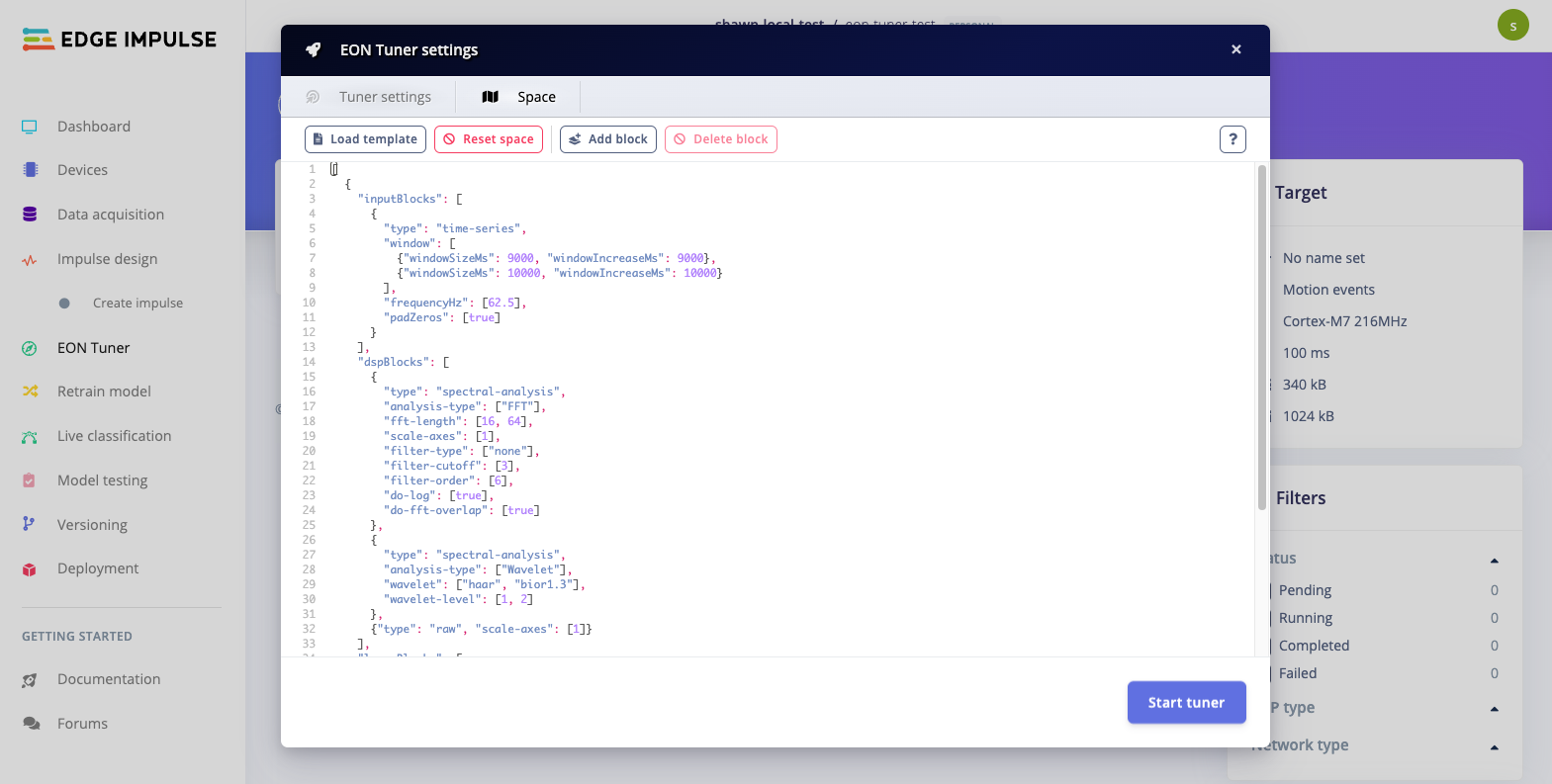 The search space is defined in JSON format, so we can just copy that to create a dictionary. This is a good place to start for tuning blocks and hyperparameters.
> **Note:** Functions to get available blocks and search space parameters coming soon
```python theme={"system"}
from edgeimpulse_api import (
OptimizeConfig,
TunerSpaceImpulse,
)
```
```python theme={"system"}
# Configure the search space
space = {
"inputBlocks": [
{
"type": "time-series",
"window": [
{"windowSizeMs": 9000, "windowIncreaseMs": 9000},
{"windowSizeMs": 10000, "windowIncreaseMs": 10000}
],
"frequencyHz": [62.5],
"padZeros": [True]
}
],
"dspBlocks": [
{
"type": "spectral-analysis",
"analysis-type": ["FFT"],
"fft-length": [16, 64],
"scale-axes": [1],
"filter-type": ["none"],
"filter-cutoff": [3],
"filter-order": [6],
"do-log": [True],
"do-fft-overlap": [True]
},
{
"type": "spectral-analysis",
"analysis-type": ["Wavelet"],
"wavelet": ["haar", "bior1.3"],
"wavelet-level": [1, 2]
},
{"type": "raw", "scale-axes": [1]}
],
"learnBlocks": [
{
"id": 4,
"type": "keras",
"dimension": ["dense"],
"denseBaseNeurons": [40, 20],
"denseLayers": [2, 3],
"dropout": [0.25, 0.5],
"learningRate": [0.0005],
"trainingCycles": [30]
}
]
}
```
```python theme={"system"}
# Wrap the search space
ts = TunerSpaceImpulse.from_dict(space)
# Create a custom configuration
config = OptimizeConfig(
name=None,
target_device={"name": "cortex-m4f-80mhz"},
classification_type="classification",
dataset_category="motion_continuous",
target_latency=100,
tuning_max_trials=2,
space=[ts]
)
```
```python theme={"system"}
# Start tuner and wait for it to complete
start_custom_tuner(
config=config
)
state = check_tuner(
wait_for_completion=True
)
```
```python theme={"system"}
# The easiest way to view the results is to look at the EON Tuner page on your project
print(f"Navigate to https://studio.edgeimpulse.com/studio/{project_id}/tuner to see the results")
```
```python theme={"system"}
# Set quantization ("float32" or "int8")
qtzn = "int8"
# Filter out all failed trials
results = [r for r in state.trials if r.status == "completed"]
# Extract float32 accuracies from the trial results
accuracies = []
for result in results:
accuracy = result.impulse.learn_blocks[0]["metrics"]["test"][qtzn]["accuracy"]
accuracies.append(accuracy)
# Sort the results based on int8 accuracies
acc_results = zip(accuracies, results)
sorted_results = sorted(acc_results, reverse=True, key=lambda x: list(x)[0])
sorted_results = [result for _, result in sorted_results]
```
```python theme={"system"}
# The top performing impulse is the first element (sorted by highest int8 accuracy on test set)
trial_idx = 0
# Print info about the processing (DSP) blocks and store RAM usage
print("Processing blocks")
print("===")
for i, dsp_block in enumerate(sorted_results[trial_idx].impulse.dsp_blocks):
print(f"Processing block {i}")
print("---")
print("Block:")
print(json.dumps(dsp_block["block"], indent=2))
print("Config:")
print(json.dumps(dsp_block["config"], indent=2))
print()
# Print info about the learning blocks
print("Learning blocks")
print("===")
for i, learn_block in enumerate(sorted_results[trial_idx].impulse.learn_blocks):
print(f"Learn block {i}")
print("---")
print("Block:")
print(json.dumps(learn_block["block"], indent=2))
print("Config:")
print(json.dumps(learn_block["config"], indent=2))
metadata = learn_block["metadata"]
qtzn_metadata = [m for m in metadata["modelValidationMetrics"] if m.get("type") == qtzn]
print()
# Print metrics
metrics = get_metrics(sorted_results, qtzn, trial_idx)
print(f"Metrics ({qtzn}) for best trial")
print("===")
print(f"Validation accuracy: {metrics['val-acc']}")
print(f"Test accuracy: {metrics['test-acc']}")
print(f"Estimated processing blocks RAM (bytes): {metrics['processing-block-ram']}")
print(f"Estimated learning blocks latency (ms): {metrics['learning-block-latency-ms']}")
print(f"Estimated learning blocks RAM (bytes): {metrics['learning-block-tflite-ram']}")
print(f"Estimated learning blocks ROM (bytes): {metrics['learning-block-tflite-rom']}")
print(f"Estimated learning blocks RAM with EON Compiler (bytes): {metrics['learning-block-eon-ram']}")
print(f"Estimated learning blocks ROM with EON Compiler (bytes): {metrics['learning-block-eon-rom']}")
```
The search space is defined in JSON format, so we can just copy that to create a dictionary. This is a good place to start for tuning blocks and hyperparameters.
> **Note:** Functions to get available blocks and search space parameters coming soon
```python theme={"system"}
from edgeimpulse_api import (
OptimizeConfig,
TunerSpaceImpulse,
)
```
```python theme={"system"}
# Configure the search space
space = {
"inputBlocks": [
{
"type": "time-series",
"window": [
{"windowSizeMs": 9000, "windowIncreaseMs": 9000},
{"windowSizeMs": 10000, "windowIncreaseMs": 10000}
],
"frequencyHz": [62.5],
"padZeros": [True]
}
],
"dspBlocks": [
{
"type": "spectral-analysis",
"analysis-type": ["FFT"],
"fft-length": [16, 64],
"scale-axes": [1],
"filter-type": ["none"],
"filter-cutoff": [3],
"filter-order": [6],
"do-log": [True],
"do-fft-overlap": [True]
},
{
"type": "spectral-analysis",
"analysis-type": ["Wavelet"],
"wavelet": ["haar", "bior1.3"],
"wavelet-level": [1, 2]
},
{"type": "raw", "scale-axes": [1]}
],
"learnBlocks": [
{
"id": 4,
"type": "keras",
"dimension": ["dense"],
"denseBaseNeurons": [40, 20],
"denseLayers": [2, 3],
"dropout": [0.25, 0.5],
"learningRate": [0.0005],
"trainingCycles": [30]
}
]
}
```
```python theme={"system"}
# Wrap the search space
ts = TunerSpaceImpulse.from_dict(space)
# Create a custom configuration
config = OptimizeConfig(
name=None,
target_device={"name": "cortex-m4f-80mhz"},
classification_type="classification",
dataset_category="motion_continuous",
target_latency=100,
tuning_max_trials=2,
space=[ts]
)
```
```python theme={"system"}
# Start tuner and wait for it to complete
start_custom_tuner(
config=config
)
state = check_tuner(
wait_for_completion=True
)
```
```python theme={"system"}
# The easiest way to view the results is to look at the EON Tuner page on your project
print(f"Navigate to https://studio.edgeimpulse.com/studio/{project_id}/tuner to see the results")
```
```python theme={"system"}
# Set quantization ("float32" or "int8")
qtzn = "int8"
# Filter out all failed trials
results = [r for r in state.trials if r.status == "completed"]
# Extract float32 accuracies from the trial results
accuracies = []
for result in results:
accuracy = result.impulse.learn_blocks[0]["metrics"]["test"][qtzn]["accuracy"]
accuracies.append(accuracy)
# Sort the results based on int8 accuracies
acc_results = zip(accuracies, results)
sorted_results = sorted(acc_results, reverse=True, key=lambda x: list(x)[0])
sorted_results = [result for _, result in sorted_results]
```
```python theme={"system"}
# The top performing impulse is the first element (sorted by highest int8 accuracy on test set)
trial_idx = 0
# Print info about the processing (DSP) blocks and store RAM usage
print("Processing blocks")
print("===")
for i, dsp_block in enumerate(sorted_results[trial_idx].impulse.dsp_blocks):
print(f"Processing block {i}")
print("---")
print("Block:")
print(json.dumps(dsp_block["block"], indent=2))
print("Config:")
print(json.dumps(dsp_block["config"], indent=2))
print()
# Print info about the learning blocks
print("Learning blocks")
print("===")
for i, learn_block in enumerate(sorted_results[trial_idx].impulse.learn_blocks):
print(f"Learn block {i}")
print("---")
print("Block:")
print(json.dumps(learn_block["block"], indent=2))
print("Config:")
print(json.dumps(learn_block["config"], indent=2))
metadata = learn_block["metadata"]
qtzn_metadata = [m for m in metadata["modelValidationMetrics"] if m.get("type") == qtzn]
print()
# Print metrics
metrics = get_metrics(sorted_results, qtzn, trial_idx)
print(f"Metrics ({qtzn}) for best trial")
print("===")
print(f"Validation accuracy: {metrics['val-acc']}")
print(f"Test accuracy: {metrics['test-acc']}")
print(f"Estimated processing blocks RAM (bytes): {metrics['processing-block-ram']}")
print(f"Estimated learning blocks latency (ms): {metrics['learning-block-latency-ms']}")
print(f"Estimated learning blocks RAM (bytes): {metrics['learning-block-tflite-ram']}")
print(f"Estimated learning blocks ROM (bytes): {metrics['learning-block-tflite-rom']}")
print(f"Estimated learning blocks RAM with EON Compiler (bytes): {metrics['learning-block-eon-ram']}")
print(f"Estimated learning blocks ROM with EON Compiler (bytes): {metrics['learning-block-eon-rom']}")
```