> ## Documentation Index
> Fetch the complete documentation index at: https://docs.edgeimpulse.com/llms.txt
> Use this file to discover all available pages before exploring further.
# SiLabs xG24 Dev Kit - object detection
> Count people in real time using FOMO object detection on the SiLabs xG24 Dev Kit with AI/ML hardware accelerator.
export const CardOpenStudioTutorial = ({href}) =>
Skip the setup: clone a ready-to-use Edge Impulse project with the dataset, impulse, and trained model.
;
This tutorial will guide you through a people counting reference design built using the [Silabs xG24 dev kit](https://www.silabs.com/development-tools/wireless/efr32xg24-dev-kit) and the [Arducam Mini 2MP Plus](https://www.arducam.com/product/arducam-2mp-spi-camera-b0067-arduino/). The design showcases:
* The Silabs xG24 Dev Kit featuring the EFR32 chipset with AI/ML accelerator providing:
* Up to 3x speed increases in image-based ML processing (when compared to running a non-accelerated model),
* An extremely low AI/ML and BT stack footprint allowing for concurrent inference and BT communication, and
* Edge Impulse’s own [FOMO algorithm](/studio/projects/learning-blocks/blocks/object-detection/fomo) providing:
* image-based object detection at the lower end (ARM Cortex®-M33, 256kB RAM) of TinyML compute,
* the ability to train object detection models using only \~100, instead of thousands of images,
* the ability to detect objects at extremely low resolutions (64x64 pixels)
## System Architecture
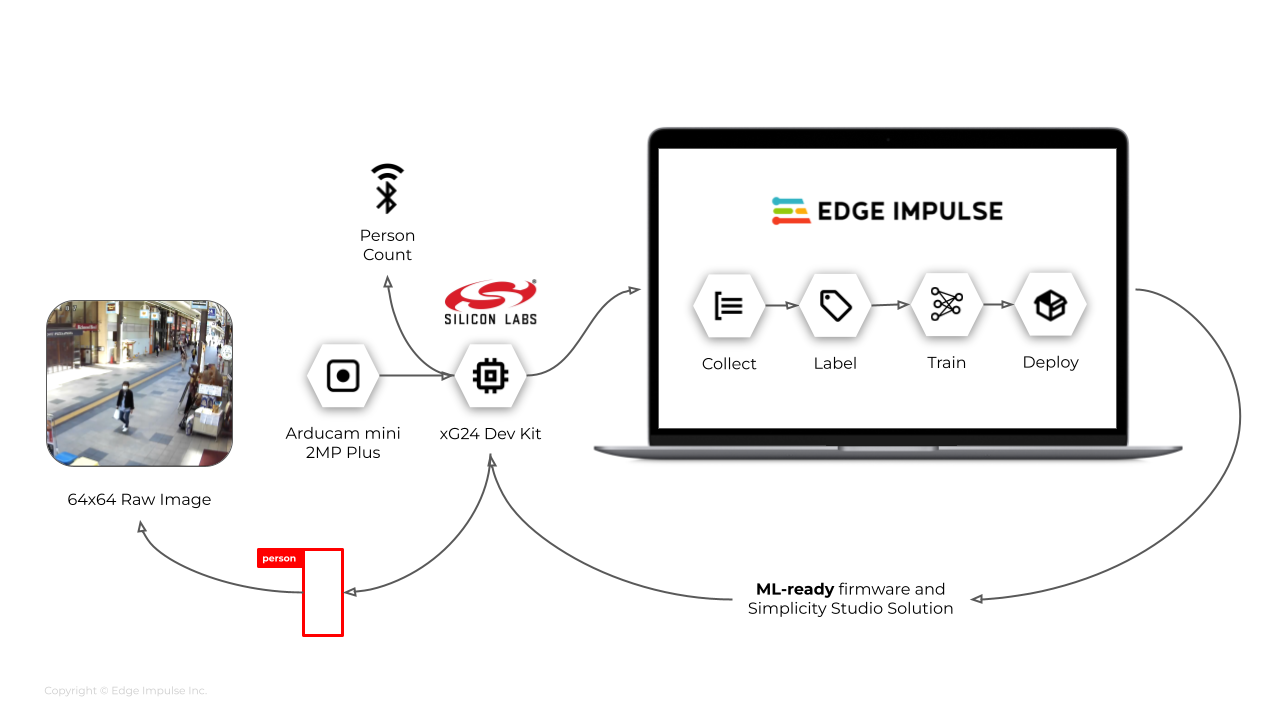
The diagram below depicts the ML lifecycle architecture defined for our people counting reference design. We used a single xG24 Dev Kit to implement either a collection or an inference flow, recursively as required, during the development process.
 ## Prerequisites
This guide assumes that you have already completed the [getting started guide for the Silabs xG24 Dev Kit](/hardware/boards/silabs-xg24-devkit) and have trained a model.
In order to replicate this reference design, you will also need:
* An xG24 Dev Kit from Silabs
* An Arducam Mini 2MP Plus
* An Edge Impulse Studio account with a clone of [the people counting project](https://studio.edgeimpulse.com/public/90689/live).
* A development computer with the [Edge Impulse CLI](/tools/clis/edge-impulse-cli) installed
## Camera Assembly
For this project, we attached an Arducam mini 2MP plus to the xG24 Dev Kit in order to capture low-res images of people flow from a real environment. This can be achieved by connecting the two devices as specified in the table below:
| xG24 Dev Kit pin | Arducam Mini 2MP Plus |
| ---------------- | --------------------- |
| **1** | **GND** |
| 2 | |
| **3** | **SDA** |
| **4** | **MOSI** |
| 5 | |
| **6** | **MISO** |
| 7 | |
| **8** | **SCK** |
| 9 | |
| 10 | |
| **11** | **SCL** |
| 12 | |
| **13** | **CS** |
| 14 | |
| 15 | |
| 16 | |
| 17 | |
| **18** | **VSS** |
| 19 | |
| 20 | |
## Deploying your Impulse
Head over to your cloned Edge Impulse project, and go to **Deployment**. From here you can create the full firmware package built with all required libraries and dependencies. This includes the Silabs' Bluetooth stack which can broadcast inference results to nearby devices. Select **Silabs xG24 Dev Kit** and click **Build** to build the firmware. Then download and extract the `.zip` file.
## Next Steps
You can use your cloned project and xG24 Dev Kit camera assembly as a starting point to develop your own object detection project by following our [FOMO guide](/tutorials/end-to-end/object-detection-centroids#configuring-the-object-detection-model-with-fomo).
You can find the firmware source code at: [firmware-silabs-xg24](https://github.com/edgeimpulse/firmware-silabs-xg24)
## Prerequisites
This guide assumes that you have already completed the [getting started guide for the Silabs xG24 Dev Kit](/hardware/boards/silabs-xg24-devkit) and have trained a model.
In order to replicate this reference design, you will also need:
* An xG24 Dev Kit from Silabs
* An Arducam Mini 2MP Plus
* An Edge Impulse Studio account with a clone of [the people counting project](https://studio.edgeimpulse.com/public/90689/live).
* A development computer with the [Edge Impulse CLI](/tools/clis/edge-impulse-cli) installed
## Camera Assembly
For this project, we attached an Arducam mini 2MP plus to the xG24 Dev Kit in order to capture low-res images of people flow from a real environment. This can be achieved by connecting the two devices as specified in the table below:
| xG24 Dev Kit pin | Arducam Mini 2MP Plus |
| ---------------- | --------------------- |
| **1** | **GND** |
| 2 | |
| **3** | **SDA** |
| **4** | **MOSI** |
| 5 | |
| **6** | **MISO** |
| 7 | |
| **8** | **SCK** |
| 9 | |
| 10 | |
| **11** | **SCL** |
| 12 | |
| **13** | **CS** |
| 14 | |
| 15 | |
| 16 | |
| 17 | |
| **18** | **VSS** |
| 19 | |
| 20 | |
## Deploying your Impulse
Head over to your cloned Edge Impulse project, and go to **Deployment**. From here you can create the full firmware package built with all required libraries and dependencies. This includes the Silabs' Bluetooth stack which can broadcast inference results to nearby devices. Select **Silabs xG24 Dev Kit** and click **Build** to build the firmware. Then download and extract the `.zip` file.
## Next Steps
You can use your cloned project and xG24 Dev Kit camera assembly as a starting point to develop your own object detection project by following our [FOMO guide](/tutorials/end-to-end/object-detection-centroids#configuring-the-object-detection-model-with-fomo).
You can find the firmware source code at: [firmware-silabs-xg24](https://github.com/edgeimpulse/firmware-silabs-xg24)