> ## Documentation Index
> Fetch the complete documentation index at: https://docs.edgeimpulse.com/llms.txt
> Use this file to discover all available pages before exploring further.
# Motion recognition using an agent
> Use an AI coding agent to take an Edge Impulse project from raw data collection through model training and deployment to a device.
This tutorial walks you through a complete Edge Impulse workflow using an [`edge-impulse` Agent Skill](/tutorials/topics/ai-agents/create-edge-impulse-skill), including uploading training data, triggering training, evaluating the model, exporting a deployment firmware, and flashing it to a device. Every step is driven by natural language commands; the AI coding agent writes and runs the API calls.
This example builds a **gesture classifier** that recognises three motions, `idle`, `wave`, and `punch`, from an accelerometer. The same sequence of prompts applies to other time-based sensor types or similar tasks.
## Prerequisites
* An Edge Impulse project with accelerometer data (or clone the [Continuous motion recognition tutorial project](https://studio.edgeimpulse.com/public/14299/latest) to your account)
* An [AI coding agent](/tutorials/topics/ai-agents/create-edge-impulse-skill) with the `edge-impulse` skill installed
Want to skip the step-by-step? This [end-to-end prompt](#end-to-end-prompt) is a single copy-paste prompt that covers the full Edge Impulse workflow and pauses to ask you questions along the way using the installed `edge-impulse` skill.
## Initialize your project
Find your [API key](/studio/projects/dashboard/api-keys) under **Dashboard → Keys** and your [project ID](/studio/projects/dashboard#6-project-info) under **Project Info** in Edge Impulse Studio and pass it to the agent:
```md theme={"system"}
EI_API_KEY="ei_..."
EI_PROJECT_ID="12345"
```
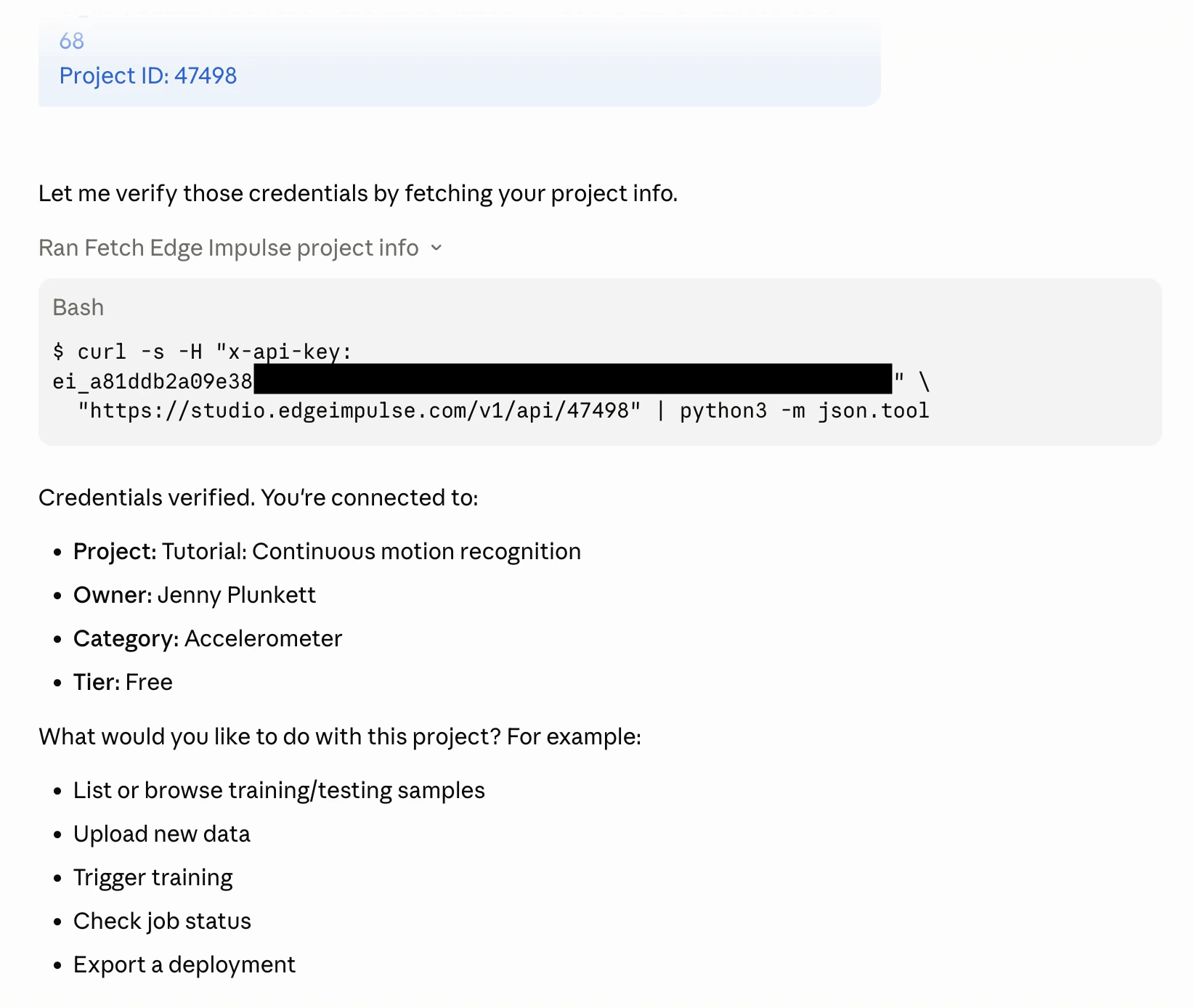 Then, confirm the agent can reach your project:
Get my Edge Impulse project info and list how many training samples exist per label
The agent calls `GET /api/{projectId}` and `GET /api/{projectId}/raw-data` to return a summary, for example:
```bash theme={"system"}
Project: Gesture Classifier (ID: 12345)
Training samples: 47
idle 18
wave 16
punch 13
Testing samples: 0
```
If the project is empty, move on to the next step to upload data. If you already have samples, skip to [Review and clean data](#review-and-clean-data).
## Upload training data
### Upload from local files
Point the agent at a folder of CSV or WAV files. Each file becomes one training sample:
Upload every CSV file in ./data/idle to my Edge Impulse project as training samples with label "idle", then do the same for ./data/wave and ./data/punch
The agent iterates the files and posts each one to the Ingestion API with the correct `x-label` and `x-file-name` headers. Watch the count climb as uploads complete:
```bash theme={"system"}
Uploading idle samples... 18/18 done
Uploading wave samples... 16/16 done
Uploading punch samples... 13/13 done
Total uploaded: 47 training samples
```
### Generate synthetic data for testing
If you don't have hardware yet, ask the agent to generate placeholder data:
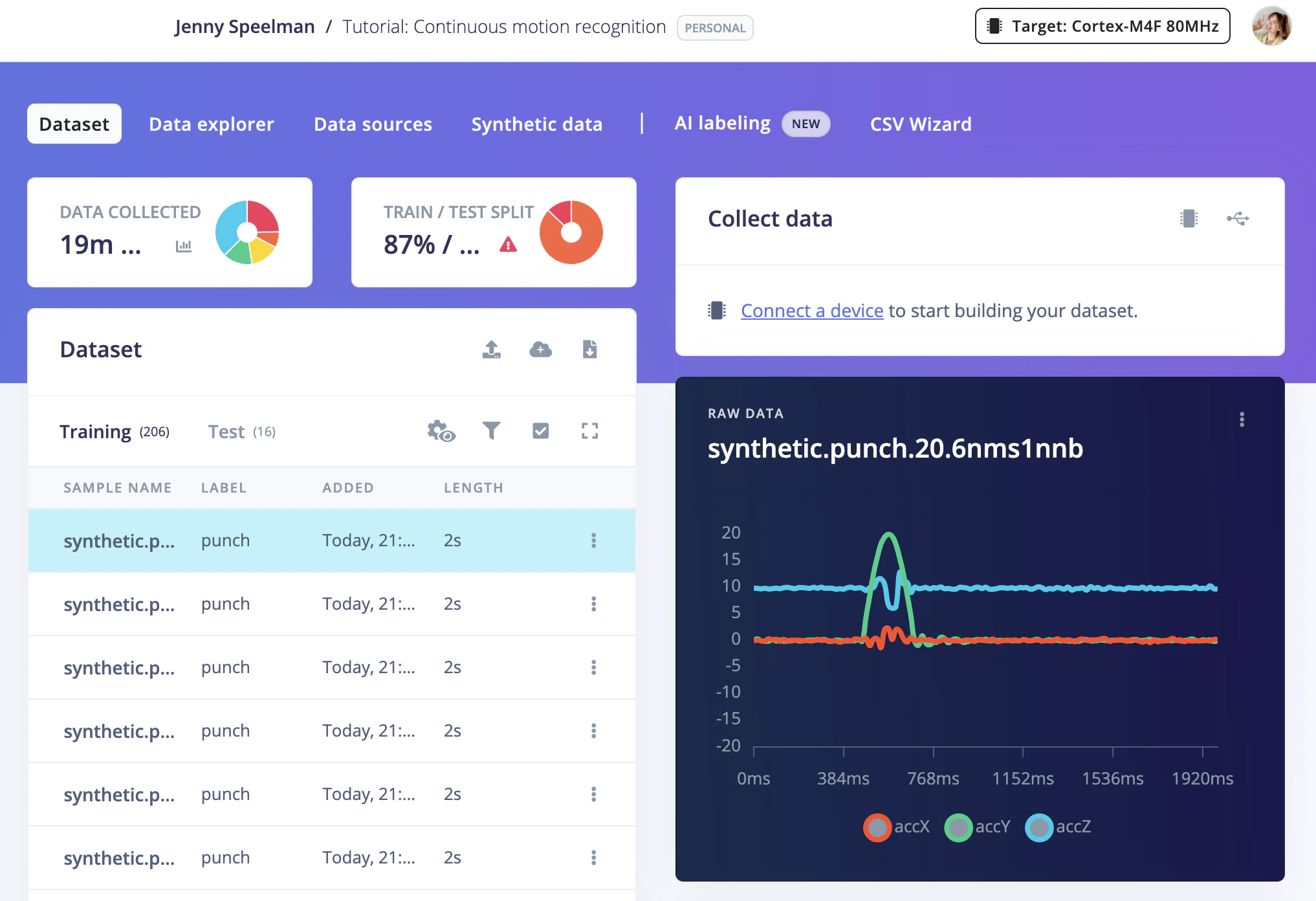
Generate 20 synthetic accelerometer samples for each of the labels "idle", "wave", and "punch" and upload them as training data to my Edge Impulse project. Use 3-axis (accX, accY, accZ) at 62.5 Hz for 10 seconds per sample.
The agent writes a script that produces Edge Impulse JSON payloads with randomised values intended to approximate sensor noise, and uploads them via the Ingestion API.
Then, confirm the agent can reach your project:
Get my Edge Impulse project info and list how many training samples exist per label
The agent calls `GET /api/{projectId}` and `GET /api/{projectId}/raw-data` to return a summary, for example:
```bash theme={"system"}
Project: Gesture Classifier (ID: 12345)
Training samples: 47
idle 18
wave 16
punch 13
Testing samples: 0
```
If the project is empty, move on to the next step to upload data. If you already have samples, skip to [Review and clean data](#review-and-clean-data).
## Upload training data
### Upload from local files
Point the agent at a folder of CSV or WAV files. Each file becomes one training sample:
Upload every CSV file in ./data/idle to my Edge Impulse project as training samples with label "idle", then do the same for ./data/wave and ./data/punch
The agent iterates the files and posts each one to the Ingestion API with the correct `x-label` and `x-file-name` headers. Watch the count climb as uploads complete:
```bash theme={"system"}
Uploading idle samples... 18/18 done
Uploading wave samples... 16/16 done
Uploading punch samples... 13/13 done
Total uploaded: 47 training samples
```
### Generate synthetic data for testing
If you don't have hardware yet, ask the agent to generate placeholder data:
Generate 20 synthetic accelerometer samples for each of the labels "idle", "wave", and "punch" and upload them as training data to my Edge Impulse project. Use 3-axis (accX, accY, accZ) at 62.5 Hz for 10 seconds per sample.
The agent writes a script that produces Edge Impulse JSON payloads with randomised values intended to approximate sensor noise, and uploads them via the Ingestion API.
 ## Review and clean data
Before training, verify that all samples are correctly labelled:
List all training samples and flag any that look mislabelled in my Edge Impulse project — show me sample IDs where the label doesn't match the file name
To bulk-relabel a set of samples:
Relabel all training samples whose filename contains "gesture\_idle" to "idle" in my Edge Impulse project
To remove low-quality samples:
Delete all training samples with label "unknown" in my Edge Impulse project
Aim for a roughly even split across classes. A 20 % imbalance is fine; more than 3× difference between the smallest and largest class can hurt accuracy.
## Set the training / testing split
Edge Impulse expects an 80/20 train-test split. Move 20 % of each class to the testing set:
Move 20% of training samples for each label to the testing set in my Edge Impulse project, picking them randomly
The agent fetches all sample IDs per label, selects a random 20 %, and moves them with `POST /api/{projectId}/raw-data/{sampleId}/move`.
## Training the model
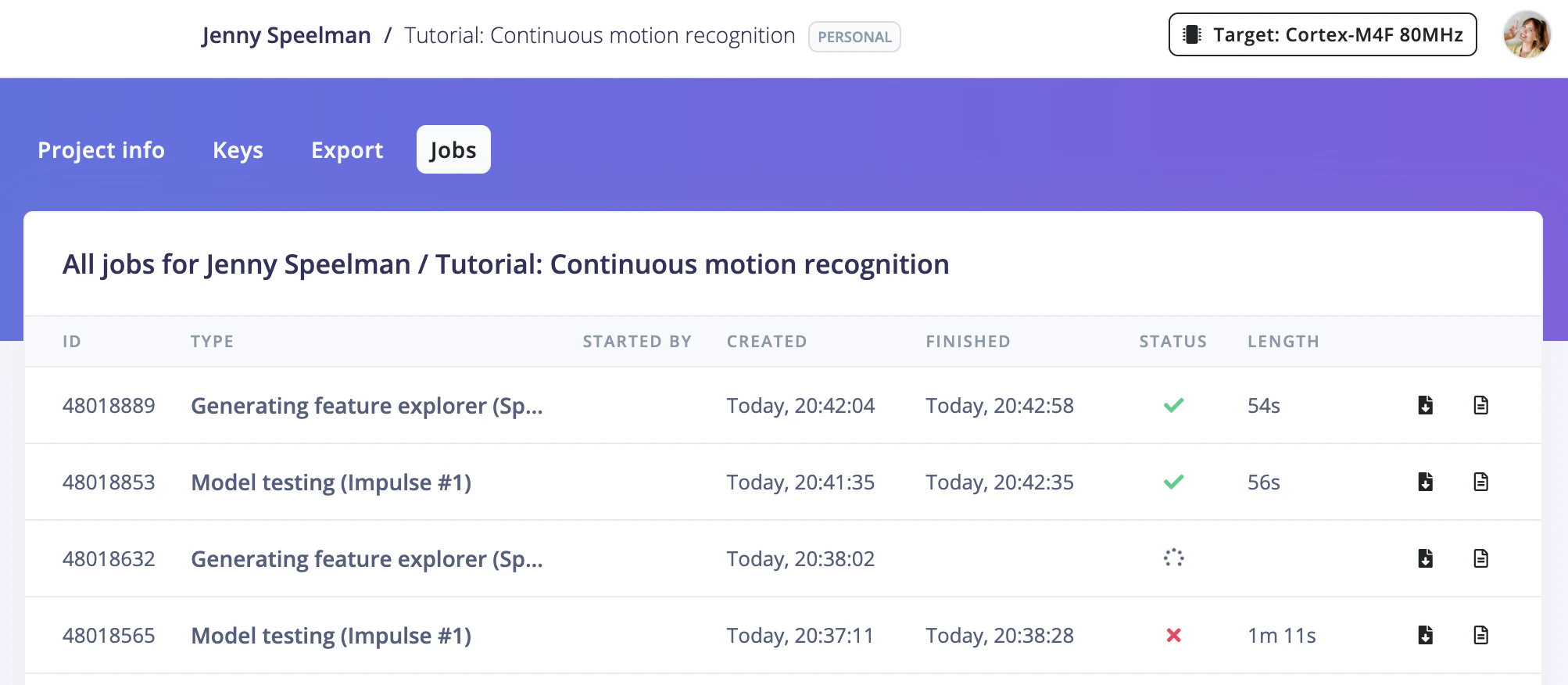
Start a training job in my Edge Impulse project and wait for it to finish, then print the accuracy
The agent posts to `POST /api/{projectId}/jobs/train/{versionId}`, then polls `GET /api/{projectId}/jobs/{jobId}/status` until the job completes:
```
Training job 8821 started.
Polling status... [2 min elapsed]
Job finished successfully.
Accuracy: 96.2 %
Loss: 0.11
```
You can also monitor training in real time at `https://studio.edgeimpulse.com/studio//jobs`.
## Review and clean data
Before training, verify that all samples are correctly labelled:
List all training samples and flag any that look mislabelled in my Edge Impulse project — show me sample IDs where the label doesn't match the file name
To bulk-relabel a set of samples:
Relabel all training samples whose filename contains "gesture\_idle" to "idle" in my Edge Impulse project
To remove low-quality samples:
Delete all training samples with label "unknown" in my Edge Impulse project
Aim for a roughly even split across classes. A 20 % imbalance is fine; more than 3× difference between the smallest and largest class can hurt accuracy.
## Set the training / testing split
Edge Impulse expects an 80/20 train-test split. Move 20 % of each class to the testing set:
Move 20% of training samples for each label to the testing set in my Edge Impulse project, picking them randomly
The agent fetches all sample IDs per label, selects a random 20 %, and moves them with `POST /api/{projectId}/raw-data/{sampleId}/move`.
## Training the model
Start a training job in my Edge Impulse project and wait for it to finish, then print the accuracy
The agent posts to `POST /api/{projectId}/jobs/train/{versionId}`, then polls `GET /api/{projectId}/jobs/{jobId}/status` until the job completes:
```
Training job 8821 started.
Polling status... [2 min elapsed]
Job finished successfully.
Accuracy: 96.2 %
Loss: 0.11
```
You can also monitor training in real time at `https://studio.edgeimpulse.com/studio//jobs`.
 ## Evaluate the model
After training, check how well the model performs on the held-out test set:
Run Edge Impulse model testing and show the confusion matrix and per-class F1 scores
```
Test results:
precision recall f1
idle 1.00 0.90 0.95
wave 0.91 1.00 0.95
punch 0.90 0.90 0.90
Overall accuracy: 93.3 %
```
If a class is under-performing, add more samples for it and retrain, or ask for specific samples that were misclassified:
Show me the samples that were misclassified in the test set of my Edge Impulse project
## Export the deployment
Once you are happy with accuracy, export the model for your target device, for example:
### C++ library (for bare-metal or RTOS targets)
Export a C++ library deployment from my Edge Impulse project and save it to ./build
### Arduino library
Export an Arduino library from my Edge Impulse project and save it to ./build/arduino-library.zip
The agent starts the build with `POST /api/{projectId}/deploy`, polls until the artifact is ready, then downloads it to the path you specified.
```
Build started (type: arduino).
Polling... done (34 s).
Downloaded to ./build/arduino-library.zip (1.2 MB)
```
## Deploy and run on device
### C++ on a Linux device (Raspberry Pi, NVIDIA Jetson, etc.)
Ask the agent to build and run the SDK example for you:
Unzip the Edge Impulse C++ library, build the Linux runner for ARM64, and give me the command to run it
The agent extracts the archive, generates the `cmake` build commands, and prints the run command:
```bash theme={"system"}
cd ./build/edge-impulse-sdk
mkdir -p build && cd build
cmake .. -DCMAKE_BUILD_TYPE=Release
make -j4
# Run inference on a sample CSV:
./edge-impulse-linux-runner --run-impulse --sample ./data/idle/sample_001.csv
```
### Arduino IDE
1. Open the Arduino IDE and install the library from **Sketch → Include Library → Add .ZIP Library**, then select `./build/arduino-library.zip`.
2. Open **File → Examples → your-project-name → nano\_ble33\_sense\_accelerometer** (or the sketch matching your board).
3. Upload the sketch and open the Serial Monitor at 115200 baud to see live inference results.
### Check live inference
With the model running on device, point the agent at the Devices API to confirm the device is connected and sampling:
List connected devices to my Edge Impulse project and show their last-seen time
## End-to-end prompt
Rather than running steps one at a time, you can hand your AI agent the full workflow in a single prompt. Your AI agent will work through each phase and pause to ask you questions at each decision point — what to name things, whether results look good, and whether to continue.
Run an end-to-end Edge Impulse workflow for me, pausing to ask me questions at each step:
1. Fetch my project info and show me a summary (name, ID, sample counts per label). Ask me: does this look right, or should we use a different project?
2. Check whether I have enough training data. If not, ask me: do I want to upload files from a local folder, or generate synthetic data? Wait for my answer before proceeding.
3. Review the training/testing split. If fewer than 20% of samples are in the test set, ask me: should we move some samples over?
4. Start a training job. While it runs, show me the job URL so I can monitor it. When it finishes, show me the accuracy and loss. Ask me: are these results good enough, or should we adjust and retrain?
5. Run model testing and show the confusion matrix and per-class F1 scores. Ask me: is there a class I want to improve before exporting?
6. Ask me: what deployment format do I want? (Arduino, C++ library, TFLite, ONNX, or other) Then build and download the artifact to ./build.
7. Summarise what was done and suggest next steps based on the results.
Stop and wait for my input at each question. Do not skip ahead.
```mardown End-to-end prompt expandable theme={"system"}
Run an end-to-end Edge Impulse workflow for me, pausing to ask me questions at each step:
1. Fetch my project info and show me a summary (name, ID, sample counts per label). Ask me: does this look right, or should we use a different project?
2. Check whether I have enough training data. If not, ask me: do I want to upload files from a local folder, or generate synthetic data? Wait for my answer before proceeding.
3. Review the training/testing split. If fewer than 20% of samples are in the test set, ask me: should we move some samples over?
4. Start a training job. While it runs, show me the job URL so I can monitor it. When it finishes, show me the accuracy and loss. Ask me: are these results good enough, or should we adjust and retrain?
5. Run model testing and show the confusion matrix and per-class F1 scores. Ask me: is there a class I want to improve before exporting?
6. Ask me: what deployment format do I want? (Arduino, C++ library, TFLite, ONNX, or other) Then build and download the artifact to ./build.
7. Summarise what was done and suggest next steps based on the results.
Stop and wait for my input at each question. Do not skip ahead.
```
## Next steps
* **More prompts:** Browse the [prompt library](/tutorials/topics/ai-agents/prompt-library) for ready-to-use prompts covering data management, training, evaluation, deployment, automation, and more
* **Iterate:** If accuracy is below target, collect more data for weak classes and retrain the model.
* **EON Tuner:** Let the agent run AutoML to find a more accurate or smaller model: `Run the EON Tuner in my Edge Impulse project and show the top 3 results ranked by accuracy`
* **Automate:** Schedule the full pipeline as a script that runs weekly: `Write a script that uploads new samples from ./inbox, retrains my Edge Impulse project, and emails me the accuracy weekly`
* **Continuous deployment:** Use the AI agent in CI/CD to rebuild and export the model whenever new data lands in your repository: `Create a GitHub workflow CI/CD action to rebuild and export the model from my Edge Impulse project whenever new data lands in my repository`
**More end-to-end tutorials to follow along with an AI agent:**
* [Image classification](/tutorials/end-to-end/image-classification)
* [Object detection with bounding boxes](/tutorials/end-to-end/object-detection-bounding-boxes)
* [Object detection with centroids (FOMO)](/tutorials/end-to-end/object-detection-centroids)
* [Sound recognition](/tutorials/end-to-end/sound-recognition)
* [Keyword spotting](/tutorials/end-to-end/keyword-spotting)
* [Visual anomaly detection](/tutorials/end-to-end/visual-anomaly-detection)
* [Motion recognition with anomaly detection](/tutorials/end-to-end/motion-recognition)
* [Environmental sensor fusion](/tutorials/end-to-end/environmental-sensor-fusion)
## Evaluate the model
After training, check how well the model performs on the held-out test set:
Run Edge Impulse model testing and show the confusion matrix and per-class F1 scores
```
Test results:
precision recall f1
idle 1.00 0.90 0.95
wave 0.91 1.00 0.95
punch 0.90 0.90 0.90
Overall accuracy: 93.3 %
```
If a class is under-performing, add more samples for it and retrain, or ask for specific samples that were misclassified:
Show me the samples that were misclassified in the test set of my Edge Impulse project
## Export the deployment
Once you are happy with accuracy, export the model for your target device, for example:
### C++ library (for bare-metal or RTOS targets)
Export a C++ library deployment from my Edge Impulse project and save it to ./build
### Arduino library
Export an Arduino library from my Edge Impulse project and save it to ./build/arduino-library.zip
The agent starts the build with `POST /api/{projectId}/deploy`, polls until the artifact is ready, then downloads it to the path you specified.
```
Build started (type: arduino).
Polling... done (34 s).
Downloaded to ./build/arduino-library.zip (1.2 MB)
```
## Deploy and run on device
### C++ on a Linux device (Raspberry Pi, NVIDIA Jetson, etc.)
Ask the agent to build and run the SDK example for you:
Unzip the Edge Impulse C++ library, build the Linux runner for ARM64, and give me the command to run it
The agent extracts the archive, generates the `cmake` build commands, and prints the run command:
```bash theme={"system"}
cd ./build/edge-impulse-sdk
mkdir -p build && cd build
cmake .. -DCMAKE_BUILD_TYPE=Release
make -j4
# Run inference on a sample CSV:
./edge-impulse-linux-runner --run-impulse --sample ./data/idle/sample_001.csv
```
### Arduino IDE
1. Open the Arduino IDE and install the library from **Sketch → Include Library → Add .ZIP Library**, then select `./build/arduino-library.zip`.
2. Open **File → Examples → your-project-name → nano\_ble33\_sense\_accelerometer** (or the sketch matching your board).
3. Upload the sketch and open the Serial Monitor at 115200 baud to see live inference results.
### Check live inference
With the model running on device, point the agent at the Devices API to confirm the device is connected and sampling:
List connected devices to my Edge Impulse project and show their last-seen time
## End-to-end prompt
Rather than running steps one at a time, you can hand your AI agent the full workflow in a single prompt. Your AI agent will work through each phase and pause to ask you questions at each decision point — what to name things, whether results look good, and whether to continue.
Run an end-to-end Edge Impulse workflow for me, pausing to ask me questions at each step:
1. Fetch my project info and show me a summary (name, ID, sample counts per label). Ask me: does this look right, or should we use a different project?
2. Check whether I have enough training data. If not, ask me: do I want to upload files from a local folder, or generate synthetic data? Wait for my answer before proceeding.
3. Review the training/testing split. If fewer than 20% of samples are in the test set, ask me: should we move some samples over?
4. Start a training job. While it runs, show me the job URL so I can monitor it. When it finishes, show me the accuracy and loss. Ask me: are these results good enough, or should we adjust and retrain?
5. Run model testing and show the confusion matrix and per-class F1 scores. Ask me: is there a class I want to improve before exporting?
6. Ask me: what deployment format do I want? (Arduino, C++ library, TFLite, ONNX, or other) Then build and download the artifact to ./build.
7. Summarise what was done and suggest next steps based on the results.
Stop and wait for my input at each question. Do not skip ahead.
```mardown End-to-end prompt expandable theme={"system"}
Run an end-to-end Edge Impulse workflow for me, pausing to ask me questions at each step:
1. Fetch my project info and show me a summary (name, ID, sample counts per label). Ask me: does this look right, or should we use a different project?
2. Check whether I have enough training data. If not, ask me: do I want to upload files from a local folder, or generate synthetic data? Wait for my answer before proceeding.
3. Review the training/testing split. If fewer than 20% of samples are in the test set, ask me: should we move some samples over?
4. Start a training job. While it runs, show me the job URL so I can monitor it. When it finishes, show me the accuracy and loss. Ask me: are these results good enough, or should we adjust and retrain?
5. Run model testing and show the confusion matrix and per-class F1 scores. Ask me: is there a class I want to improve before exporting?
6. Ask me: what deployment format do I want? (Arduino, C++ library, TFLite, ONNX, or other) Then build and download the artifact to ./build.
7. Summarise what was done and suggest next steps based on the results.
Stop and wait for my input at each question. Do not skip ahead.
```
## Next steps
* **More prompts:** Browse the [prompt library](/tutorials/topics/ai-agents/prompt-library) for ready-to-use prompts covering data management, training, evaluation, deployment, automation, and more
* **Iterate:** If accuracy is below target, collect more data for weak classes and retrain the model.
* **EON Tuner:** Let the agent run AutoML to find a more accurate or smaller model: `Run the EON Tuner in my Edge Impulse project and show the top 3 results ranked by accuracy`
* **Automate:** Schedule the full pipeline as a script that runs weekly: `Write a script that uploads new samples from ./inbox, retrains my Edge Impulse project, and emails me the accuracy weekly`
* **Continuous deployment:** Use the AI agent in CI/CD to rebuild and export the model whenever new data lands in your repository: `Create a GitHub workflow CI/CD action to rebuild and export the model from my Edge Impulse project whenever new data lands in my repository`
**More end-to-end tutorials to follow along with an AI agent:**
* [Image classification](/tutorials/end-to-end/image-classification)
* [Object detection with bounding boxes](/tutorials/end-to-end/object-detection-bounding-boxes)
* [Object detection with centroids (FOMO)](/tutorials/end-to-end/object-detection-centroids)
* [Sound recognition](/tutorials/end-to-end/sound-recognition)
* [Keyword spotting](/tutorials/end-to-end/keyword-spotting)
* [Visual anomaly detection](/tutorials/end-to-end/visual-anomaly-detection)
* [Motion recognition with anomaly detection](/tutorials/end-to-end/motion-recognition)
* [Environmental sensor fusion](/tutorials/end-to-end/environmental-sensor-fusion)