> ## Documentation Index
> Fetch the complete documentation index at: https://docs.edgeimpulse.com/llms.txt
> Use this file to discover all available pages before exploring further.
# parameters.json
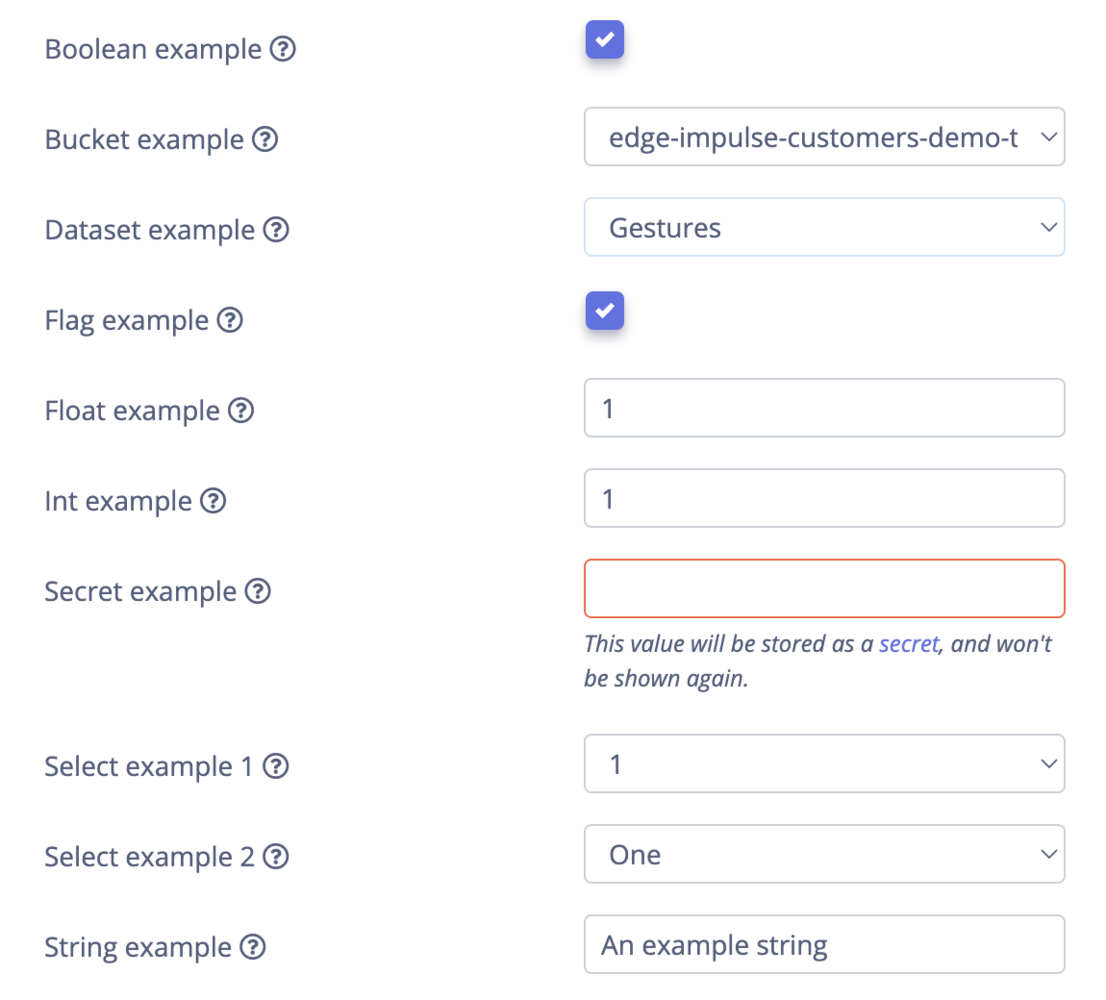
The `parameters.json` file is included at the root of the directory of a [custom block](/studio/organizations/custom-blocks). It is used to describe the block itself and identify the parameters available for its configuration. The parameters defined in this file are the input options rendered for the block in Studio and passed into the block as arguments when the it is run.
## File structure
The file can be considered in two sections: a header section and a parameters section. The header section identifies the block type and its associated metadata. The metadata required varies by block type. This information is followed by an array of parameters items.
```typescript AI labeling theme={"system"}
type AIActionBlockParametersJson = {
version: 1,
type: 'ai-action',
info: {
name: string,
description: string,
requiredEnvVariables: string[] | undefined;
operatesOn: ['images_object_detection' | 'images_single_label' | 'audio' | 'other'] | undefined;
},
parameters: DSPParameterItem[];
};
```
```typescript Deployment theme={"system"}
type DeployBlockParametersJson = {
version: 1,
type: 'deploy',
info: {
name: string,
description: string,
category?: 'library' | 'firmware';
integrateUrl?: string,
cliArguments: string,
supportsEonCompiler: boolean,
mountLearnBlock: boolean,
showOptimizations: boolean,
privileged?: boolean,
},
parameters?: DSPParameterItem[];
};
```
```typescript Learning theme={"system"}
type MachineLearningBlockParametersJson = {
version: 1,
type: 'machine-learning',
info: {
name: string,
description: string,
operatesOn?: 'object_detection' | 'audio' | 'image' | 'regression' | 'other';
objectDetectionLastLayer?: 'mobilenet-ssd' | 'fomo' | 'yolov2-akida' | 'yolov5' | 'yolov5v5-drpai' | 'yolox' | 'yolov7' | 'tao-retinanet' | 'tao-ssd' | 'tao-yolov3' | 'tao-yolov4';
imageInputScaling?: '0..1' | '-1..1' | '-128..127' | '0..255' | 'torch' | 'bgr-subtract-imagenet-mean';
indRequiresGpu?: boolean,
repositoryUrl?: string,
customModelVariants?: {
'key': string,
'name': string,
'inferencingEntrypoint': string,
'profilingEntrypoint'?: string,
'modelFiles'?: {
'id': string,
'name': string,
'type': 'binary' | 'json' | 'text';
'description': string,
}[],
}[],
displayCategory?: 'classical' | 'tao';
},
parameters: DSPParameterItem[];
};
```
```typescript Processing theme={"system"}
type DSPBlockParametersJson = {
version: 1,
type: 'dsp',
info: {
type: string,
title: string,
author: string,
description: string,
name: string,
preferConvolution: boolean,
convolutionColumns?: 'axes' | string;
convolutionKernelSize?: number,
cppType: string,
visualization: 'dimensionalityReduction' | undefined;
experimental: boolean,
hasTfliteImplementation: boolean,
latestImplementationVersion: number,
hasImplementationVersion: boolean,
hasFeatureImportance: boolean,
hasAutoTune?: boolean,
minimumVersionForAutotune?: number,
usesState?: boolean,
axes: {
name: string,
description: string,
optional?: boolean,
}[] | undefined;
port?: number,
}
parameters: {
group: string,
items: DSPParameterItem[];
}[],
};
```
```typescript Synthetic data theme={"system"}
type SyntheticDataBlockParametersJson = {
version: 1,
type: 'synthetic-data',
info: {
name: string,
description: string,
requiredEnvVariables: string[] | undefined;
},
parameters: DSPParameterItem[];
};
```
```typescript Transformation theme={"system"}
type TransformBlockParametersJson = {
version: 1,
type: 'transform',
info: {
name: string,
description: string,
operatesOn: 'file' | 'directory' | 'standalone' | undefined;
transformMountpoints: {
bucketId: number,
mountPoint: string,
}[] | undefined;
indMetadata: boolean | undefined;
cliArguments: string | undefined;
allowExtraCliArguments: boolean | undefined;
showInDataSources: boolean | undefined;
showInCreateTransformationJob: boolean | undefined;
requiredEnvVariables: string[] | undefined;
},
parameters: DSPParameterItem[];
};
```
```typescript Parameter item theme={"system"}
type DSPParameterItem = {
// Rendered as the label
name: string,
// Default value
value: string | number | boolean;
// Type of UI element to render
type: 'string' | 'int' | 'float' | 'select' | 'boolean' | 'bucket' | 'dataset' | 'flag' | 'secret';
// Optional help text (rendered as a help icon, text is shown on hover)
help?: string,
// Parameter that maps back to your block (no spaces allowed)
param: string,
// When type is "select" lists all options for the dropdown menu
// you can either pass in an array of strings, or a list of objects
// (if you want to customize the label)
valid?: (string | { label: string, value: string })[];
// If this is set, the field is rendered as readonly with the text "Click to set"
// when clicked the UI changes to a normal text box.
optional?: boolean,
// Whether the field should be rendered as readonly.
// These fields are shown, but cannot be changed.
readonly?: boolean,
// If set, this item is only shown if the implementation version of the block matches
// (only for processing blocks)
showForImplementationVersion: number[] | undefined;
// Show/hide the item depending on another parameter
showIf: ({
parameter: string,
operator: 'eq' | 'neq',
value: string,
}) | undefined;
// Processing blocks only. If set, a macro is created like:
// #define EI_DSP_PARAMS_BLOCKCPPTYPE_PARAM VALUE
createMacro?: boolean,
// When type is "select" the value passed into your block will be a string,
// you can use configType to override the type (used during deployment only)
configType?: string,
// (Optional) UX section to show parameter in.
section?: 'advanced' | 'modelProfiling';
// Only valid for type "string". If set to true, renders a multi-line text area.
multiline?: boolean,
// If set, shows a hint about the input format below the input. Use this
// sparingly, as it clutters the UI.
hint?: string,
// Sets the placeholder text on the input element (for types "string", "int", "float" and "secret")
placeholder?: string,
};
```
## File examples
Below you will find full examples of parameter files for the various types of blocks.
```json AI labeling theme={"system"}
{
"version": 1,
"type": "ai-action",
"info": {
"name": "Bounding box labeling with OWL-ViT",
"description": "Zero-shot object detector to automatically label objects using bounding boxes with OWL-ViT. To detect more complex objects you can combine this block with 'Bounding box re-labeling with GPT-4o'. First, roughly find objects using this block, then re-label (or remove) bounding boxes using the GPT4o block.",
"requiredEnvVariables": [
"BEAM_ENDPOINT",
"BEAM_ACCESS_KEY"
],
"operatesOn": [
"images_object_detection"
]
},
"parameters": [
{
"name": "Prompt",
"value": "A person (person, 0.2)",
"type": "string",
"help": "A prompt specifying the images to label. Separate multiple objects with a newline. You can specify the label and the min. confidence rating in the parenthesis.",
"param": "prompt",
"multiline": true,
"placeholder": "A prompt specifying the images to label. Separate multiple objects with a newline. You can specify the label and the min. confidence rating in the parenthesis.",
"hint": "Separate multiple objects with a newline. You can specify the label and the min. confidence rating in the parenthesis (e.g. 'A person (person, 0.2)')."
},
{
"name": "Delete existing bounding boxes",
"value": "no",
"type": "select",
"valid": [
{ "label": "No", "value": "no" },
{ "label": "Only if they match any labels in the prompt", "value": "matching-prompt" },
{ "label": "Yes", "value": "yes" }
],
"param": "delete_existing_bounding_boxes"
},
{
"name": "Ignore objects smaller than (%)",
"optional": true,
"value": 0,
"type": "float",
"param": "ignore-objects-smaller-than",
"help": "Any objects where the area is smaller than X% of the whole image will be ignored"
},
{
"name": "Ignore objects larger than (%)",
"optional": true,
"value": 100,
"type": "float",
"param": "ignore-objects-larger-than",
"help": "Any objects where the area is larger than X% of the whole image will be ignored"
},
{
"name": "Non-max suppression",
"help": "Deduplicate boxes via non-max suppression (NMS)",
"value": true,
"type": "flag",
"param": "nms"
},
{
"name": "NMS IoU threshold",
"help": "Threshold for non-max suppression",
"value": 0.2,
"type": "float",
"param": "nms-iou-threshold",
"showIf": {
"parameter": "nms",
"operator": "eq",
"value": "true"
}
}
]
}
```
```json Deployment theme={"system"}
{
"version": 1,
"type": "deploy",
"info": {
"name": "Build Linux app",
"description": "An example custom deployment block to build a standalone Linux application",
"category": "firmware",
"mountLearnBlock": false,
"supportsEonCompiler": true,
"showOptimizations": true,
"cliArguments": "",
"privileged": false,
"integrateUrl": "https://docs.edgeimpulse.com"
},
"parameters": [
{
"name": "Build optimization",
"value": "speed",
"type": "select",
"param": "optimization",
"help": "Choose whether to optimize for speed or size",
"valid": [
"speed",
"size"
]
},
{
"name": "Target architecture",
"value": "x86_64",
"type": "select",
"param": "architecture",
"valid": [
"x86_64",
"arm64",
"armv7"
]
}
]
}
```
```json Learning theme={"system"}
{
"version": 1,
"type": "machine-learning",
"info": {
"name": "Keras multi-layer perceptron",
"description": "Demonstration of a simple Keras custom learn block with CUDA drivers that can run on both CPU and GPU.",
"indRequiresGpu": false,
"operatesOn": "other",
"repositoryUrl": "https://github.com/edgeimpulse/example-custom-ml-block-keras"
},
"parameters": [
{
"name": "Number of training cycles",
"value": 30,
"type": "int",
"help": "Number of epochs to train the neural network on.",
"param": "epochs"
},
{
"name": "Learning rate",
"value": 0.001,
"type": "float",
"help": "How fast the neural network learns, if the network overfits quickly, then lower the learning rate.",
"param": "learning-rate"
}
]
}
```
```json Processing theme={"system"}
{
"version": 1,
"info": {
"title": "Custom processing block example",
"author": "Test User",
"description": "An example of a custom processing block.",
"name": "Custom block",
"cppType": "custom_block",
"preferConvolution": false,
"visualization": "dimensionalityReduction",
"experimental": false,
"latestImplementationVersion": 1
},
"parameters": [
{
"group": "Scaling",
"items": [
{
"name": "Scale axes",
"value": 1,
"type": "float",
"help": "Multiplies axes by this number",
"param": "scale-axes"
}
]
}
]
}
```
```json Synthetic data theme={"system"}
{
"version": 1,
"type": "synthetic-data",
"info": {
"name": "Whisper voice synthesis",
"description": "An example synthetic data block that uses Whisper to generate audio keyword data."
},
"parameters": [
{
"name": "OpenAI API Key",
"value": "",
"type": "secret",
"help": "An API Key that gives access to OpenAI",
"param": "OPENAI_API_KEY"
},
{
"name": "Phrase",
"value": "Edge Impulse",
"type": "string",
"help": "Phrase for which to generate voice samples",
"param": "phrase"
},
{
"name": "Label",
"value": "edge_impulse",
"type": "string",
"help": "Samples will be added to Edge Impulse with this label",
"param": "label"
},
{
"name": "Number of samples",
"value": 3,
"type": "int",
"help": "Number of unique samples to generate",
"param": "samples"
},
{
"name": "Voice",
"value": "random",
"type": "select",
"valid": [ "random", "alloy", "echo", "fable", "onyx", "nova", "shimmer" ],
"help": "Voice to use for speech generation",
"param": "voice",
"optional": true
},
{
"name": "Model",
"value": "tts-1",
"type": "select",
"valid": [ "tts-1", "tts-1-hd" ],
"help": "Model to use for speech generation",
"param": "model",
"optional": true
},
{
"name": "Speed",
"value": "0.6, 0.7, 0.8, 0.9, 1, 1.1, 1.2",
"type": "string",
"help": "A list of possible speed of the generated audio. Select values between '0.25' and '4.0'. A random one will be picked for each sample.",
"param": "speed"
},
{
"name": "Minimum length (seconds)",
"value": 1,
"type": "float",
"help": "Minimum length of generated audio samples. Audio samples will be padded with silence to minimum length",
"param": "min-length"
},
{
"name": "Upload to category",
"value": "split",
"type": "select",
"valid": [
{ "label": "Split 80/20 between training and testing", "value": "split" },
{ "label": "Training", "value": "training" },
{ "label": "Testing", "value": "testing" }
],
"help": "Data will be uploaded to this category in your project",
"param": "upload-category"
}
]
}
```
```json Transformation theme={"system"}
{
"version": 1,
"type": "transform",
"info": {
"name": "Mix background noise",
"description": "An example transformation block that mixes background noise into audio samples.",
"operatesOn": "file",
"transformMountpoints": [
{
"bucketId": 5532,
"mountPoint": "/mnt/s3fs/edge-impulse-demo-bucket"
}
]
},
"parameters": [
{
"name": "Number of files to create",
"type": "int",
"value": 10,
"help": "How many new files to create per input file. Noise is randomly mixed in per file.",
"param": "out-count"
},
{
"name": "Frequency",
"value": 16000,
"type": "int",
"param": "frequency",
"help": "Output frequency of the WAV files"
}
]
}
```
## Parameter types
Parameter items are defined as JSON objects that contain a `type` property. For example:
```json theme={"system"}
{
"name": "Scale axes",
"value": 1.0,
"type": "float",
"help": "Multiplies axes by this number.",
"param": "scale-axes"
}
```
The parameter type options available are shown in the table below, along with how the parameter is rendered in Studio and how it will be passed to your custom block. In general, parameter items are passed as command line arguments to your custom block script.
| Type | Renders | Passes |
| ------------------- | -------- | ------------------------------------------------------- |
| [Boolean](#boolean) | Checkbox | `-- 1` (true) \| `-- 0` (false) |
| [Bucket](#bucket) | Dropdown | `-- ""` |
| [Dataset](#dataset) | Dropdown | `-- ""` |
| [Flag](#flag) | Checkbox | `--` (true) \| ` ` (false) |
| [Float](#float) | Text box | `-- ` |
| [Int](#int) | Text box | `-- ` |
| [Secret](#secret) | Text box | `` (environment variable) |
| [Select](#select) | Dropdown | `-- ` |
| [String](#string) | Text box | `-- ""` |
**Processing blocks do not receive command line arguments**
Instead of command line arguments being passed to the block as shown above, processing blocks receive an HTTP request with the parameters in the request body, which are subsequently passed to the function generating the features in your processing block. In this case, dashes in parameter names are replaced with underscores before being passed to your function as arguments:
A processing block parameter named `custom-processing-param` is passed to your feature generation function as `custom_processing_param`.
**Secrets are passed as environment variables instead of command line arguments**
 ### Boolean
```json theme={"system"}
{
"name": "Boolean example",
"value": true,
"type": "boolean",
"help": "An example boolean parameter type to show how it is rendered.",
"param": "do-boolean-action"
}
```
```bash theme={"system"}
--do-boolean-action 1
```
### Boolean
```json theme={"system"}
{
"name": "Boolean example",
"value": true,
"type": "boolean",
"help": "An example boolean parameter type to show how it is rendered.",
"param": "do-boolean-action"
}
```
```bash theme={"system"}
--do-boolean-action 1
```
 ### Bucket
**Only available for AI labeling, synthetic data, and transformation blocks**
```json theme={"system"}
{
"name": "Bucket example",
"value": "",
"type": "bucket",
"help": "An example bucket parameter type to show how it is rendered.",
"param": "bucket-example-param"
}
```
```bash theme={"system"}
--bucket-example-param "edge-impulse-customers-demo-team"
```
### Bucket
**Only available for AI labeling, synthetic data, and transformation blocks**
```json theme={"system"}
{
"name": "Bucket example",
"value": "",
"type": "bucket",
"help": "An example bucket parameter type to show how it is rendered.",
"param": "bucket-example-param"
}
```
```bash theme={"system"}
--bucket-example-param "edge-impulse-customers-demo-team"
```
 ### Dataset
**Only available for AI labeling, synthetic data, and transformation blocks**
```json theme={"system"}
{
"name": "Dataset example",
"value": "",
"type": "dataset",
"help": "An example flag parameter type to show how it is rendered.",
"param": "dataset-example-param"
}
```
```bash theme={"system"}
--dataset-example-param "Gestures"
```
### Dataset
**Only available for AI labeling, synthetic data, and transformation blocks**
```json theme={"system"}
{
"name": "Dataset example",
"value": "",
"type": "dataset",
"help": "An example flag parameter type to show how it is rendered.",
"param": "dataset-example-param"
}
```
```bash theme={"system"}
--dataset-example-param "Gestures"
```
 ### Flag
```json theme={"system"}
{
"name": "Flag example",
"value": true,
"type": "flag",
"help": "An example flag parameter type to show how it is rendered.",
"param": "do-flag-action"
}
```
```bash theme={"system"}
--do-flag-action
```
### Flag
```json theme={"system"}
{
"name": "Flag example",
"value": true,
"type": "flag",
"help": "An example flag parameter type to show how it is rendered.",
"param": "do-flag-action"
}
```
```bash theme={"system"}
--do-flag-action
```
 ### Float
```json theme={"system"}
{
"name": "Float example",
"value": 0.1,
"type": "float",
"help": "An example float parameter type to show how it is rendered.",
"param": "float-example-param"
}
```
```bash theme={"system"}
--float-example-param 0.1
```
### Float
```json theme={"system"}
{
"name": "Float example",
"value": 0.1,
"type": "float",
"help": "An example float parameter type to show how it is rendered.",
"param": "float-example-param"
}
```
```bash theme={"system"}
--float-example-param 0.1
```
 ### Int
```json theme={"system"}
{
"name": "Int example",
"value": 1,
"type": "int",
"help": "An example int parameter type to show how it is rendered.",
"param": "int-example-param"
}
```
```bash theme={"system"}
--int-example-param 1
```
### Int
```json theme={"system"}
{
"name": "Int example",
"value": 1,
"type": "int",
"help": "An example int parameter type to show how it is rendered.",
"param": "int-example-param"
}
```
```bash theme={"system"}
--int-example-param 1
```
 ### Secret
**Only available for AI labeling, synthetic data, and transformation blocks**
```json theme={"system"}
{
"name": "Secret example",
"value": "",
"type": "secret",
"help": "An example secret parameter type to show how it is rendered.",
"param": "SECRET_EXAMPLE_PARAM"
}
```
```bash theme={"system"}
SECRET_EXAMPLE_PARAM
```
### Secret
**Only available for AI labeling, synthetic data, and transformation blocks**
```json theme={"system"}
{
"name": "Secret example",
"value": "",
"type": "secret",
"help": "An example secret parameter type to show how it is rendered.",
"param": "SECRET_EXAMPLE_PARAM"
}
```
```bash theme={"system"}
SECRET_EXAMPLE_PARAM
```

 ### Select
```json theme={"system"}
{
"name": "Select example 1",
"value": "1",
"type": "select",
"help": "An example select parameter type to show how it is rendered.",
"param": "select-example-param-1",
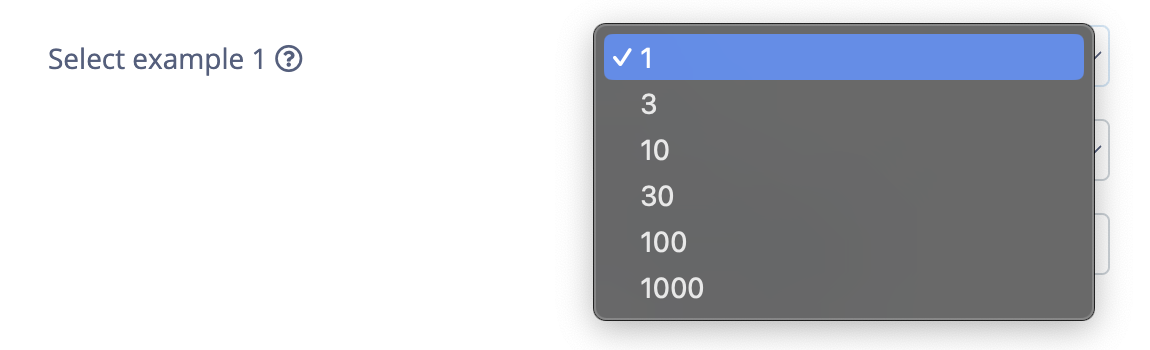
"valid": [ "1", "3", "10", "30", "100","1000" ]
}
```
```bash theme={"system"}
--select-example-param-1 "1"
```
### Select
```json theme={"system"}
{
"name": "Select example 1",
"value": "1",
"type": "select",
"help": "An example select parameter type to show how it is rendered.",
"param": "select-example-param-1",
"valid": [ "1", "3", "10", "30", "100","1000" ]
}
```
```bash theme={"system"}
--select-example-param-1 "1"
```

 ***
```json theme={"system"}
{
"name": "Select example 2",
"value": "1",
"type": "select",
"help": "An example select parameter type to show how it is rendered.",
"param": "select-example-param-2",
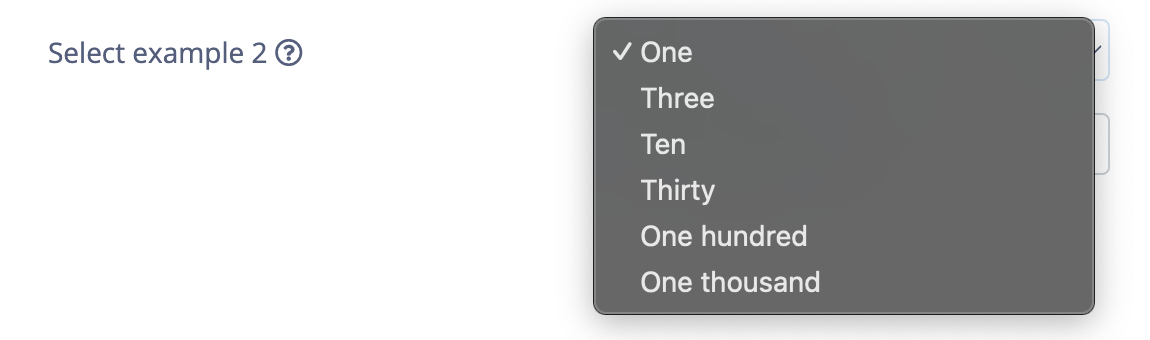
"valid": [
{ "label": "One", "value": "1" },
{ "label": "Three", "value": "3" },
{ "label": "Ten", "value": "10" },
{ "label": "Thirty", "value": "30" },
{ "label": "One hundred", "value": "100" },
{ "label": "One thousand", "value": "1000"}
]
}
```
```bash theme={"system"}
--select-example-param-2 "1"
```
***
```json theme={"system"}
{
"name": "Select example 2",
"value": "1",
"type": "select",
"help": "An example select parameter type to show how it is rendered.",
"param": "select-example-param-2",
"valid": [
{ "label": "One", "value": "1" },
{ "label": "Three", "value": "3" },
{ "label": "Ten", "value": "10" },
{ "label": "Thirty", "value": "30" },
{ "label": "One hundred", "value": "100" },
{ "label": "One thousand", "value": "1000"}
]
}
```
```bash theme={"system"}
--select-example-param-2 "1"
```

 ### String
```json theme={"system"}
{
"name": "String example",
"value": "An example string",
"type": "string",
"help": "An example string parameter type to show how it is rendered.",
"param": "string-example-param"
}
```
```bash theme={"system"}
--string-example-param "An example string"
```
### String
```json theme={"system"}
{
"name": "String example",
"value": "An example string",
"type": "string",
"help": "An example string parameter type to show how it is rendered.",
"param": "string-example-param"
}
```
```bash theme={"system"}
--string-example-param "An example string"
```
 ## Parameter groups
**Only available for processing blocks**
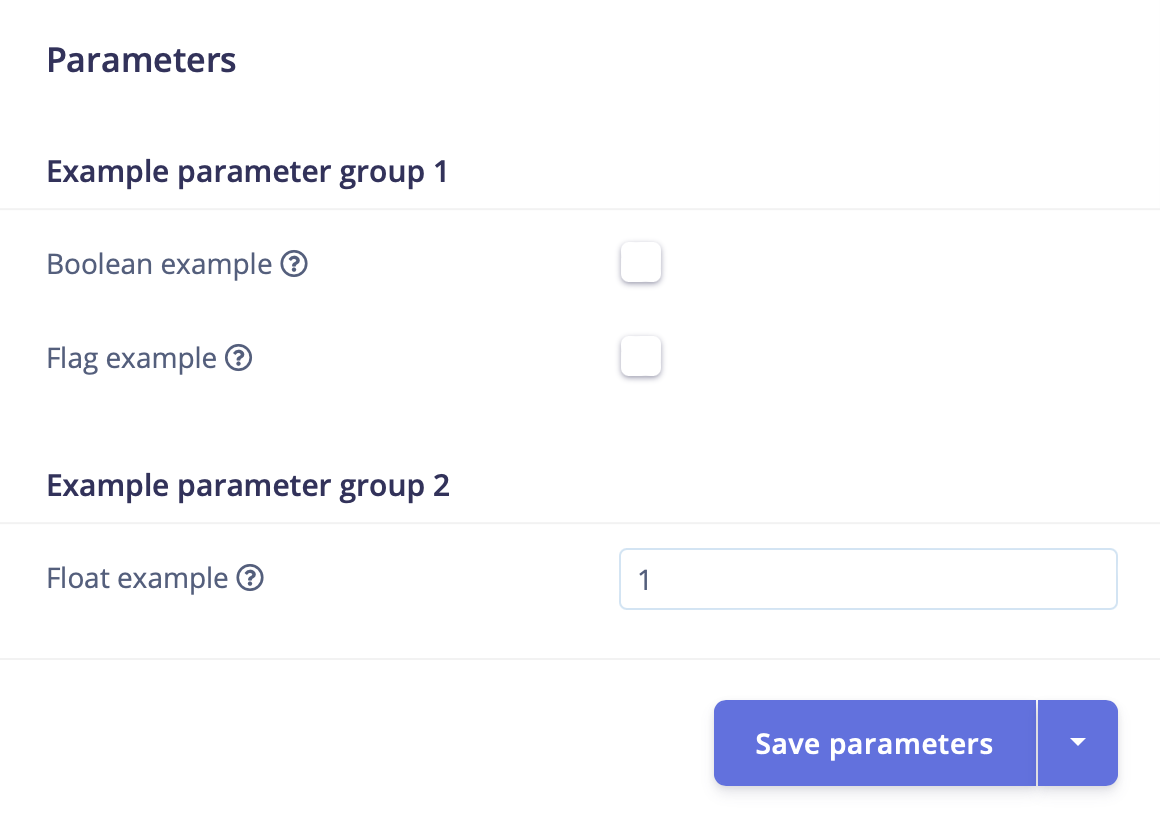
Processing block parameters can contain multiple groups to better organize the options when rendered in Studio. Each string entered as value for the `group` property is rendered as a header element.
```json theme={"system"}
"parameters": [
{
"group": "Example parameter group 1",
"items": [
{
"name": "Boolean example",
"value": false,
"type": "boolean",
"help": "An example boolean parameter type to show how it is rendered.",
"param": "do-boolean-action"
},
{
"name": "Flag example",
"value": false,
"type": "flag",
"help": "An example flag parameter type to show how it is rendered.",
"param": "do-flag-action"
}
]
},
{
"group": "Example parameter group 2",
"items": [
{
"name": "Float example",
"value": 1.0,
"type": "float",
"help": "An example float parameter type to show how it is rendered.",
"param": "float-example-param"
}
]
}
]
```
## Parameter groups
**Only available for processing blocks**
Processing block parameters can contain multiple groups to better organize the options when rendered in Studio. Each string entered as value for the `group` property is rendered as a header element.
```json theme={"system"}
"parameters": [
{
"group": "Example parameter group 1",
"items": [
{
"name": "Boolean example",
"value": false,
"type": "boolean",
"help": "An example boolean parameter type to show how it is rendered.",
"param": "do-boolean-action"
},
{
"name": "Flag example",
"value": false,
"type": "flag",
"help": "An example flag parameter type to show how it is rendered.",
"param": "do-flag-action"
}
]
},
{
"group": "Example parameter group 2",
"items": [
{
"name": "Float example",
"value": 1.0,
"type": "float",
"help": "An example float parameter type to show how it is rendered.",
"param": "float-example-param"
}
]
}
]
```
 ## Parameter logic
### showIf
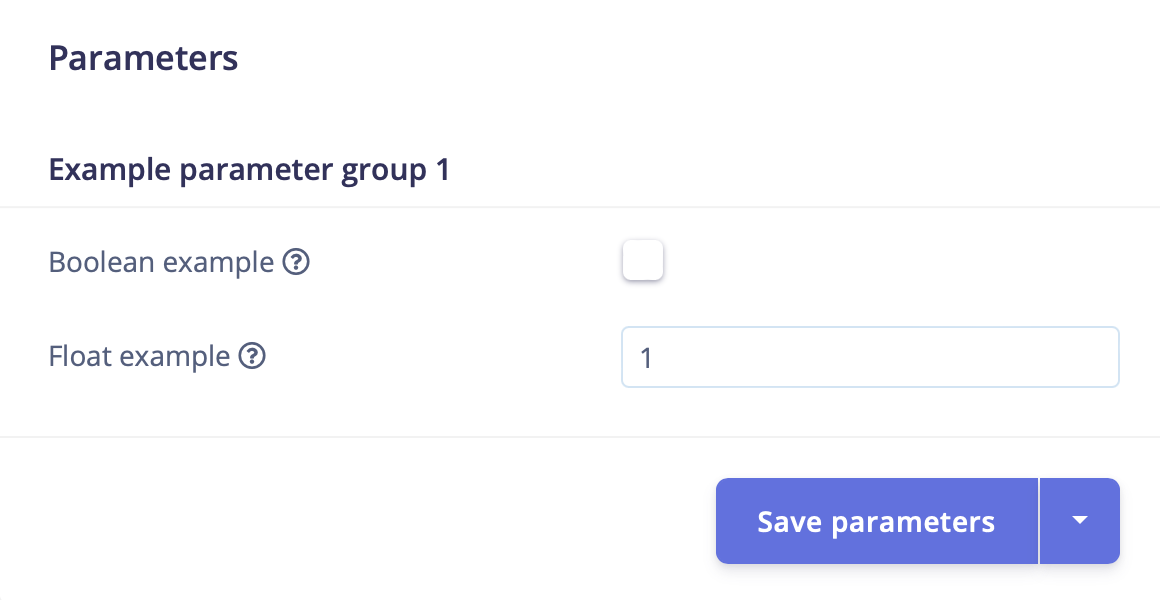
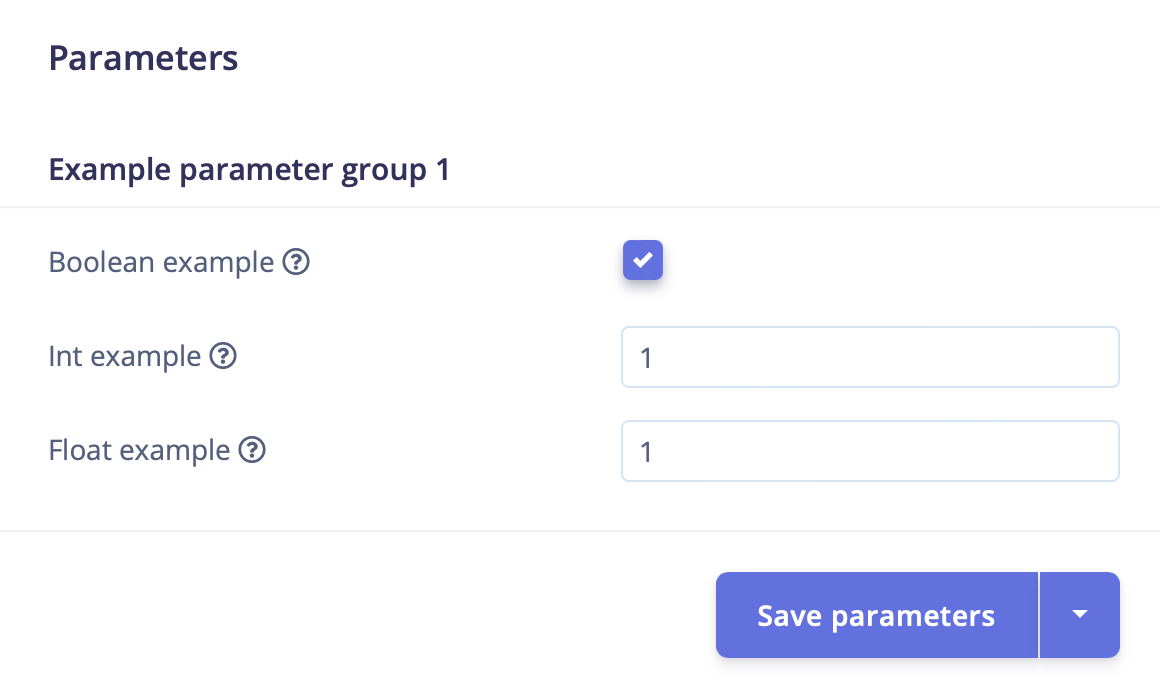
Parameters can be conditionally shown based on the value of another parameter using the `showIf` property.
```json theme={"system"}
{
"name": "Boolean example",
"value": false,
"type": "boolean",
"help": "An example boolean parameter type to show how it is rendered.",
"param": "do-boolean-action"
},
{
"name": "Int example",
"value": 1,
"type": "int",
"help": "An example int parameter type to show how it is rendered.",
"param": "int-example-param",
"showIf": {
"parameter": "do-boolean-action",
"operator": "eq",
"value": "true"
}
},
{
"name": "Float example",
"value": 1.0,
"type": "float",
"help": "An example float parameter type to show how it is rendered.",
"param": "float-example-param"
}
```
## Parameter logic
### showIf
Parameters can be conditionally shown based on the value of another parameter using the `showIf` property.
```json theme={"system"}
{
"name": "Boolean example",
"value": false,
"type": "boolean",
"help": "An example boolean parameter type to show how it is rendered.",
"param": "do-boolean-action"
},
{
"name": "Int example",
"value": 1,
"type": "int",
"help": "An example int parameter type to show how it is rendered.",
"param": "int-example-param",
"showIf": {
"parameter": "do-boolean-action",
"operator": "eq",
"value": "true"
}
},
{
"name": "Float example",
"value": 1.0,
"type": "float",
"help": "An example float parameter type to show how it is rendered.",
"param": "float-example-param"
}
```
 ### showForImplementationVersion
**Only available for processing blocks**
Processing blocks can have different versions, which allows you to add new functionality to existing blocks without breaking earlier implementations. You are able to shown/hide parameters based on the implementation version set in the `latestImplementationVersion` property of the processing block.
A processing block set to version 4:
```json theme={"system"}
"info": {
"title": "Spectral Analysis",
...
"latestImplementationVersion": 4
}
```
A parameter shown only for implementation versions 3 and 4:
```json theme={"system"}
{
"name": "Type",
"value": "FFT",
"help": "Type of spectral analysis to apply",
"type": "select",
"valid": [ "FFT", "Wavelet" ],
"param": "analysis-type",
"showForImplementationVersion": [ 3, 4 ]
}
```
### showForImplementationVersion
**Only available for processing blocks**
Processing blocks can have different versions, which allows you to add new functionality to existing blocks without breaking earlier implementations. You are able to shown/hide parameters based on the implementation version set in the `latestImplementationVersion` property of the processing block.
A processing block set to version 4:
```json theme={"system"}
"info": {
"title": "Spectral Analysis",
...
"latestImplementationVersion": 4
}
```
A parameter shown only for implementation versions 3 and 4:
```json theme={"system"}
{
"name": "Type",
"value": "FFT",
"help": "Type of spectral analysis to apply",
"type": "select",
"valid": [ "FFT", "Wavelet" ],
"param": "analysis-type",
"showForImplementationVersion": [ 3, 4 ]
}
```