> ## Documentation Index
> Fetch the complete documentation index at: https://docs.edgeimpulse.com/llms.txt
> Use this file to discover all available pages before exploring further.
# Linux Python SDK
This library lets you run machine learning models and collect sensor data on [Linux](/tools/libraries/sdks/inference/linux) machines using Python. The SDK is open source and hosted on GitHub: [edgeimpulse/linux-sdk-python](https://github.com/edgeimpulse/linux-sdk-python).
See our [Linux EIM executable guide](/hardware/deployments/run-linux-eim) to learn more about the .eim executable file format.
### Installation guide
1. Install a recent version of [Python 3](https://www.python.org/downloads/) (>=3.7).
2. Install the SDK
```bash theme={"system"}
pip3 install edge_impulse_linux
```
3. Clone this repository to get the examples:
```bash theme={"system"}
git clone https://github.com/edgeimpulse/linux-sdk-python
```
4. (Optional) If you want to use the camera or microphone examples, install the dependencies:
```bash theme={"system"}
cd linux-sdk-python
pip install -r requirements.txt
```
1. Install a recent version of [Python 3](https://www.python.org/downloads/) (>=3.7).
2. Install the SDK
```bash theme={"system"}
sudo apt install libatlas-base-dev libportaudio0 libportaudio2 libportaudiocpp0 portaudio19-dev
pip3 install edge_impulse_linux -i https://pypi.python.org/simple
```
3. Clone this repository to get the examples:
```bash theme={"system"}
git clone https://github.com/edgeimpulse/linux-sdk-python
```
4. (Optional) If you want to use the camera or microphone examples, install the dependencies:
```bash theme={"system"}
cd linux-sdk-python
pip install -r requirements.txt
```
1. Install a recent version of [Python 3](https://www.python.org/downloads/) (>=3.7).
2. Install the SDK
```bash theme={"system"}
sudo apt-get install libatlas-base-dev libportaudio2 libportaudiocpp0 portaudio19-dev python3-pip
```
It is possible you will need to install Cython for building numpy package:
```bash theme={"system"}
pip3 install Cython
```
After that proceed with installing Linux Python SDK:
```bash theme={"system"}
pip3 install pyaudio edge_impulse_linux
```
3. Clone this repository to get the examples:
```bash theme={"system"}
git clone https://github.com/edgeimpulse/linux-sdk-python
```
4. (Optional) If you want to use the camera or microphone examples, install the dependencies:
```bash theme={"system"}
cd linux-sdk-python
pip install -r requirements.txt
```
If you are using WSL, you will need to install the following npm packages, and may need to install audio / video dependencies for your machine:
e.g. audio dependencies for Ubuntu:
```bash theme={"system"}
sudo apt install libportaudio2 libportaudiocpp0 portaudio19-dev
```
Then install the SDK via pip:
```bash theme={"system"}
sudo apt install python3-pip
pip3 install edge_impulse_linux
```
### Classifying data
This SDK provides a simple interface to run Edge Impulse machine learning models on Linux machines using Python.
To classify data (whether this is from the camera, the microphone, or a custom sensor) you'll need a model file. This model file contains all signal processing code, classical ML algorithms and neural networks - and typically contains hardware optimizations to run as fast as possible. To grab a model file:
1. Train your model in Edge Impulse.
2. Install the [Edge Impulse for Linux CLI](/tools/clis/edge-impulse-linux-cli).
3. Download the model file via:
```bash theme={"system"}
edge-impulse-linux-runner --download modelfile.eim
```
This downloads the file into `modelfile.eim`. (Want to switch projects? Add `--clean`)
1. Train your model in Edge Impulse.
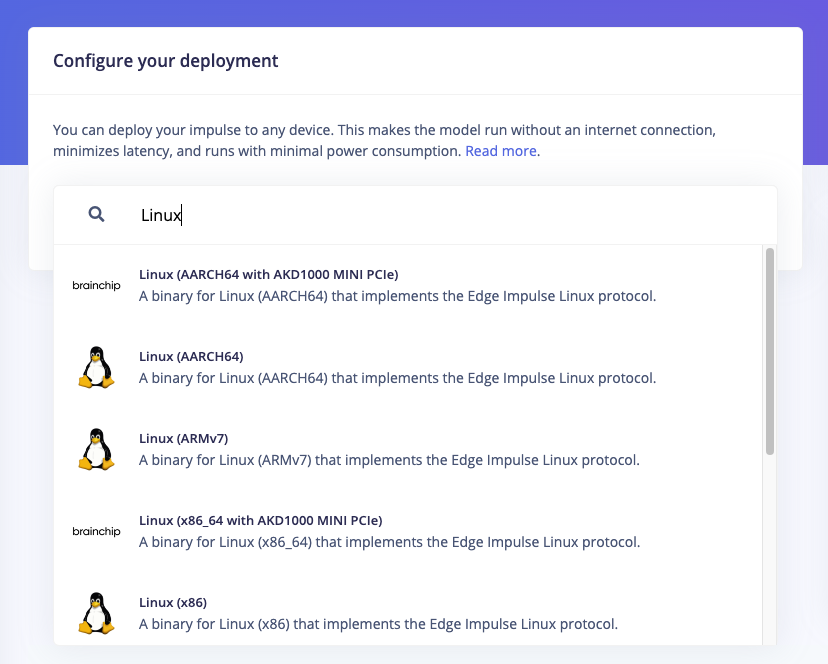
2. Navigate to the Deployment page in your project
3. Select the the relevant EIM Binary executable format for your target device. There are many options for different architectures and accelerators, for example:
* **Linux (AARCH64)**: for running on the CPU of ARM 64-bit devices (e.g. Raspberry Pi 4)
* **Linux (x86)**: for running on the CPU of Intel/AMD 64-bit devices
* **Linux (AARCH64 with Qualcomm QNN)**: for running on the Qualcomm Hexagon accelerator on ARM 64-bit devices like the RUBIK Pi or Dragonwing RB3 Gen2 dev kits
* **macOS (arm64)**: for running on Apple Silicon Macs
* **macOS (x86)**: for running on Intel Macs
4. Click "Build" to generate the binary, the .eim file will be downloaded once the build is complete
5. Follow the instructions on screen to give executable permissions to the file (e.g. `chmod +x model-file.eim`)
 Then you can start classifying realtime sensor data. We have examples for:
* [Audio](https://github.com/edgeimpulse/linux-sdk-python/blob/master/examples/audio/classify.py) - grabs data from the microphone and classifies it in realtime.
* [Camera](https://github.com/edgeimpulse/linux-sdk-python/blob/master/examples/image/classify.py) - grabs data from a webcam and classifies it in realtime.
* [Camera (full frame)](https://github.com/edgeimpulse/linux-sdk-python/blob/master/examples/image/classify-full-frame.py) - grabs data from a webcam and classifies it twice (once cut from the left, once cut from the right). This is useful if you have a wide-angle lens and don't want to miss any events.
* [Still image](https://github.com/edgeimpulse/linux-sdk-python/blob/master/examples/image/classify-image.py) - classifies a still image from your hard drive.
* [Video](https://github.com/edgeimpulse/linux-sdk-python/blob/master/examples/image/classify-video.py) - grabs frames from a video source from your hard drive and classifies it.
* [Custom data](https://github.com/edgeimpulse/linux-sdk-python/blob/master/examples/custom/classify.py) - classifies custom sensor data.
For most of these examples you can simply run the script with the model file as an argument, for example:
```bash theme={"system"}
python3 classify.py path/to/modelfile.eim
```
Some may have additional arguments for configuration like the camera port to use, run each with the `--help` argument for more information.
### Collecting data
#### Collecting data from other sensors
The Linux Python SDK includes an example for uploading raw sensor data to an Edge Impulse project via the Ingestion API [using a python script here.](https://github.com/edgeimpulse/linux-sdk-python/blob/master/examples/custom/collect.py).
### Troubleshooting
#### Collecting print out from the model
To display the logging messages (ie, you may be used to in other deployments), init the runner like so
```python theme={"system"}
model_info = runner.init(debug=True) # to get debug print out
```
This will pipe stdout and stderr into the same of your own process
#### Model timeouts / crashes
For some very large models you may find the default timeout value is too low. If your model is crashing or timing out, you can try increasing the timeout value when initializing the `ImpulseRunner`:
```python theme={"system"}
runner = ImpulseRunner("modelfile.eim", timeout=10) # timeout in seconds
```
#### \[Errno -9986] Internal PortAudio error (macOS)
If you see this error you can re-install portaudio via:
```bash theme={"system"}
brew uninstall --ignore-dependencies portaudio
brew install portaudio --HEAD
```
#### Abort trap (6) (macOS)
This error shows when you want to gain access to the camera or the microphone on macOS from a virtual shell (like the terminal in Visual Studio Code). Try to run the command from the normal Terminal.app.
#### Exception: No data or corrupted data received
This error is due to the length of the results output.
To fix this, you can overwrite [this line](https://github.com/edgeimpulse/linux-sdk-python/blob/master/edge_impulse_linux/runner.py#L92) in the `class ImpulseRunner` from the `runner.py`.
```python theme={"system"}
data = self._client.recv(1 * 1024 * 1024)
```
with:
```python theme={"system"}
data = b""
while True:
chunk = self._client.recv(1024)
# end chunk has \x00 in the end
if chunk[-1] == 0:
data = data + chunk[:-1]
break
data = data + chunk
```
Then you can start classifying realtime sensor data. We have examples for:
* [Audio](https://github.com/edgeimpulse/linux-sdk-python/blob/master/examples/audio/classify.py) - grabs data from the microphone and classifies it in realtime.
* [Camera](https://github.com/edgeimpulse/linux-sdk-python/blob/master/examples/image/classify.py) - grabs data from a webcam and classifies it in realtime.
* [Camera (full frame)](https://github.com/edgeimpulse/linux-sdk-python/blob/master/examples/image/classify-full-frame.py) - grabs data from a webcam and classifies it twice (once cut from the left, once cut from the right). This is useful if you have a wide-angle lens and don't want to miss any events.
* [Still image](https://github.com/edgeimpulse/linux-sdk-python/blob/master/examples/image/classify-image.py) - classifies a still image from your hard drive.
* [Video](https://github.com/edgeimpulse/linux-sdk-python/blob/master/examples/image/classify-video.py) - grabs frames from a video source from your hard drive and classifies it.
* [Custom data](https://github.com/edgeimpulse/linux-sdk-python/blob/master/examples/custom/classify.py) - classifies custom sensor data.
For most of these examples you can simply run the script with the model file as an argument, for example:
```bash theme={"system"}
python3 classify.py path/to/modelfile.eim
```
Some may have additional arguments for configuration like the camera port to use, run each with the `--help` argument for more information.
### Collecting data
#### Collecting data from other sensors
The Linux Python SDK includes an example for uploading raw sensor data to an Edge Impulse project via the Ingestion API [using a python script here.](https://github.com/edgeimpulse/linux-sdk-python/blob/master/examples/custom/collect.py).
### Troubleshooting
#### Collecting print out from the model
To display the logging messages (ie, you may be used to in other deployments), init the runner like so
```python theme={"system"}
model_info = runner.init(debug=True) # to get debug print out
```
This will pipe stdout and stderr into the same of your own process
#### Model timeouts / crashes
For some very large models you may find the default timeout value is too low. If your model is crashing or timing out, you can try increasing the timeout value when initializing the `ImpulseRunner`:
```python theme={"system"}
runner = ImpulseRunner("modelfile.eim", timeout=10) # timeout in seconds
```
#### \[Errno -9986] Internal PortAudio error (macOS)
If you see this error you can re-install portaudio via:
```bash theme={"system"}
brew uninstall --ignore-dependencies portaudio
brew install portaudio --HEAD
```
#### Abort trap (6) (macOS)
This error shows when you want to gain access to the camera or the microphone on macOS from a virtual shell (like the terminal in Visual Studio Code). Try to run the command from the normal Terminal.app.
#### Exception: No data or corrupted data received
This error is due to the length of the results output.
To fix this, you can overwrite [this line](https://github.com/edgeimpulse/linux-sdk-python/blob/master/edge_impulse_linux/runner.py#L92) in the `class ImpulseRunner` from the `runner.py`.
```python theme={"system"}
data = self._client.recv(1 * 1024 * 1024)
```
with:
```python theme={"system"}
data = b""
while True:
chunk = self._client.recv(1024)
# end chunk has \x00 in the end
if chunk[-1] == 0:
data = data + chunk[:-1]
break
data = data + chunk
```