> ## Documentation Index
> Fetch the complete documentation index at: https://docs.edgeimpulse.com/llms.txt
> Use this file to discover all available pages before exploring further.
# Search space
For many projects, you will need to constrain the EON Tuner to use steps that are defined by your hardware, your customers, or your expertise.
For example:
* Your project requires to use a grayscale camera because you already purchased the hardware.
* Your engineers have already spent hours working on a dedicated digital signal processing method that has been proven to work with your sensor data.
* You have the feeling that a particular neural network architecture will be more suited for your project.
This is why we developed an extension of the EON Tuner: the **EON Tuner Search Space**.
Please read first the [EON Tuner](/studio/projects/eon-tuner) documentation to configure your **Target**, **Task category** and desired **Time per inference**.
### Understanding Search Space Configuration
The EON Tuner Search Space allows you to define the structure and constraints of your machine learning projects through the use of templates.
#### Templates
The **Search Space** works with templates. The templates can be considered as a config file where you define your constraints. Although templates may seem hard to use in the first place, once you understand the core concept, this tool is highly capable.
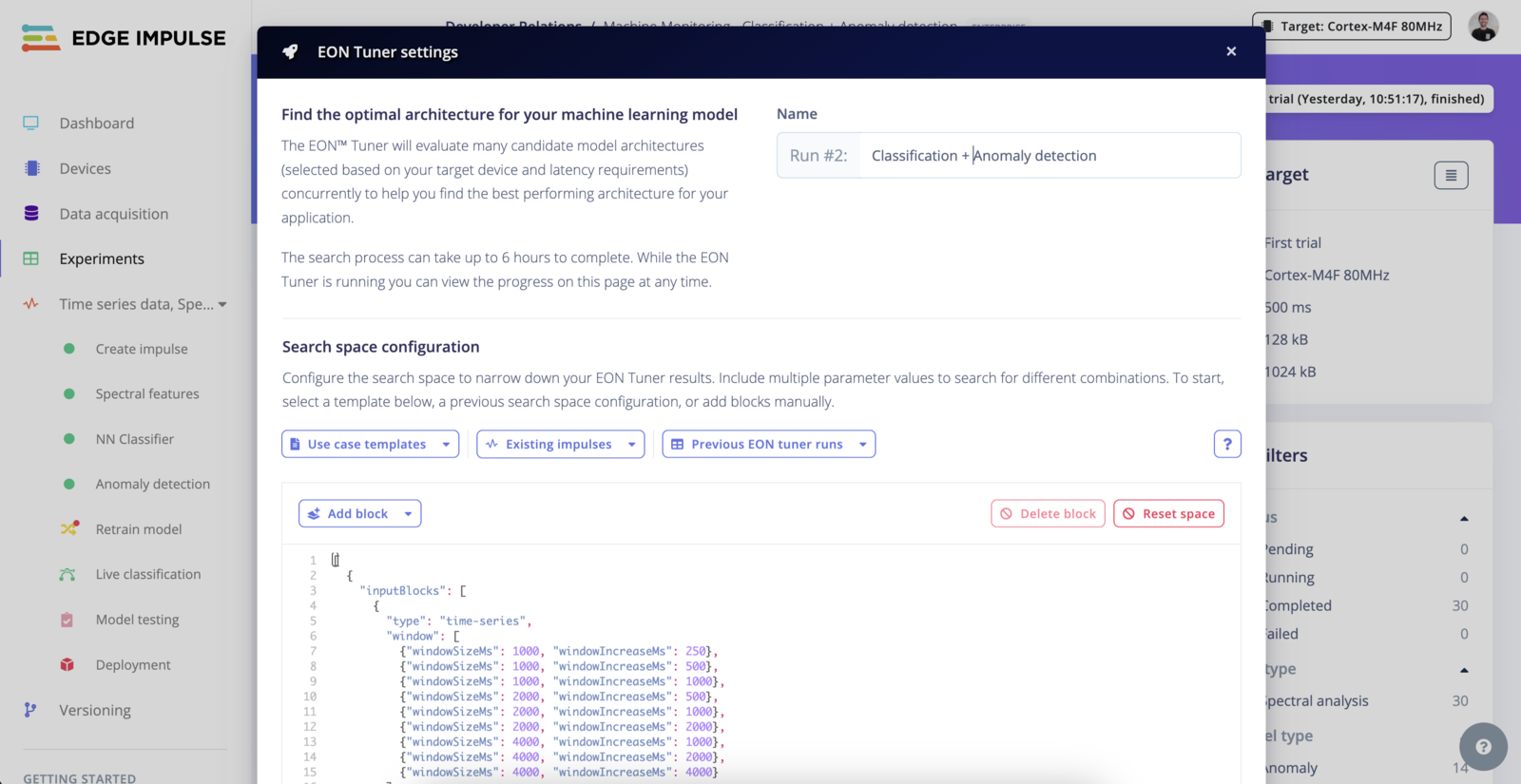 A blank template looks like the following:
```
[
{
"inputBlocks": [],
"dspBlocks": [],
"learnBlocks": []
}
]
```
#### Load a template
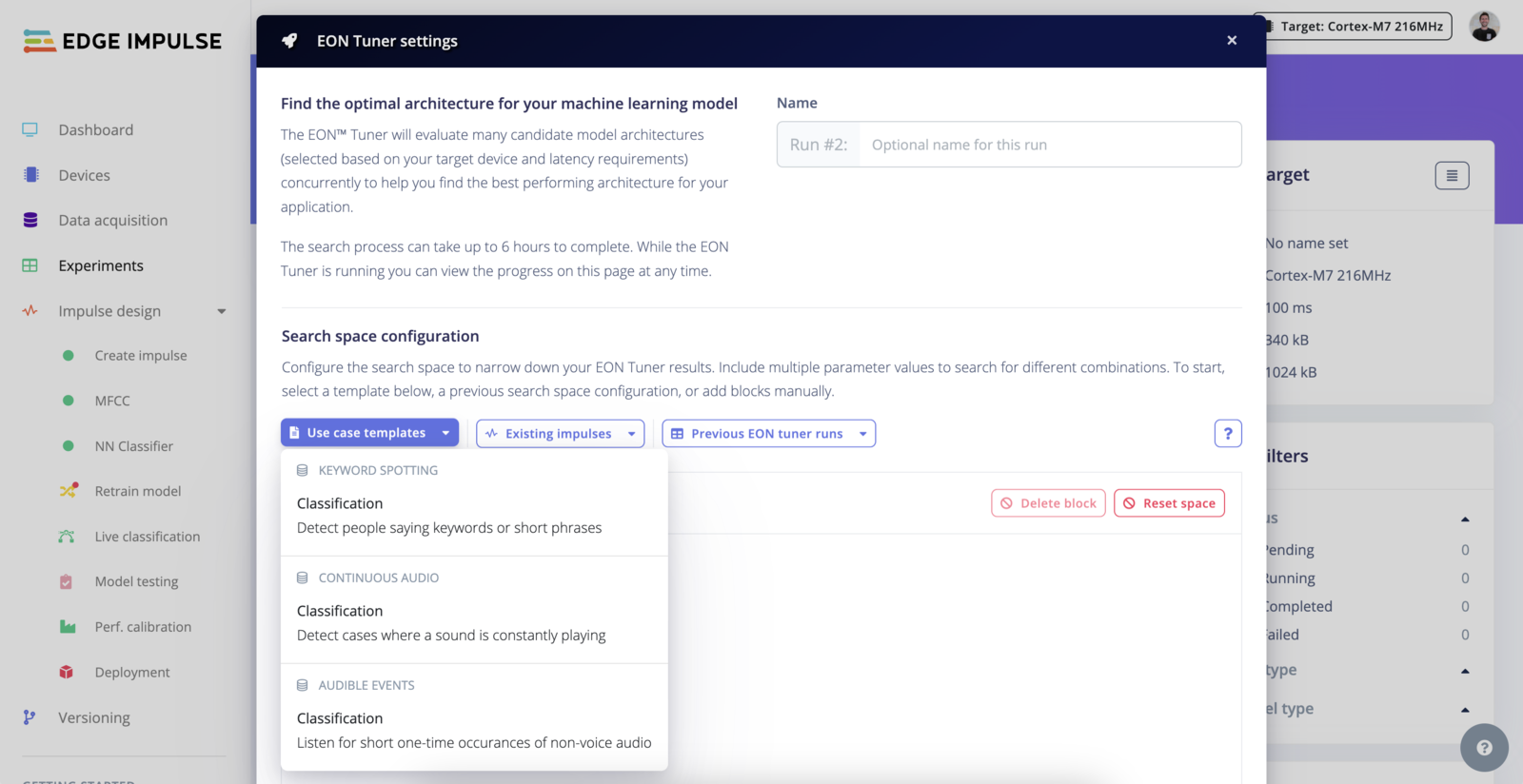
To understand the core concepts, we recommend having a look at the available templates. We provide templates for different task categories as well as one for your current impulse if it has already been trained.
A blank template looks like the following:
```
[
{
"inputBlocks": [],
"dspBlocks": [],
"learnBlocks": []
}
]
```
#### Load a template
To understand the core concepts, we recommend having a look at the available templates. We provide templates for different task categories as well as one for your current impulse if it has already been trained.
 #### Search parameters
Elements inside an array are considered as parameters. This means, you can stack several combinations of `inputBlocks|dspBlocks|learnBlocks` in your templates and each `block` can contain several elements:
```
[
{
"inputBlocks": [],
"dspBlocks": [],
"learnBlocks": []
},
{
"inputBlocks": [],
"dspBlocks": [],
"learnBlocks": []
},
...
]
```
or
```
...
"inputBlocks": [
{
"type": "time-series",
"window": [
{"windowSizeMs": 300, "windowIncreaseMs": 67},
{"windowSizeMs": 500, "windowIncreaseMs": 100}
]
],
...
```
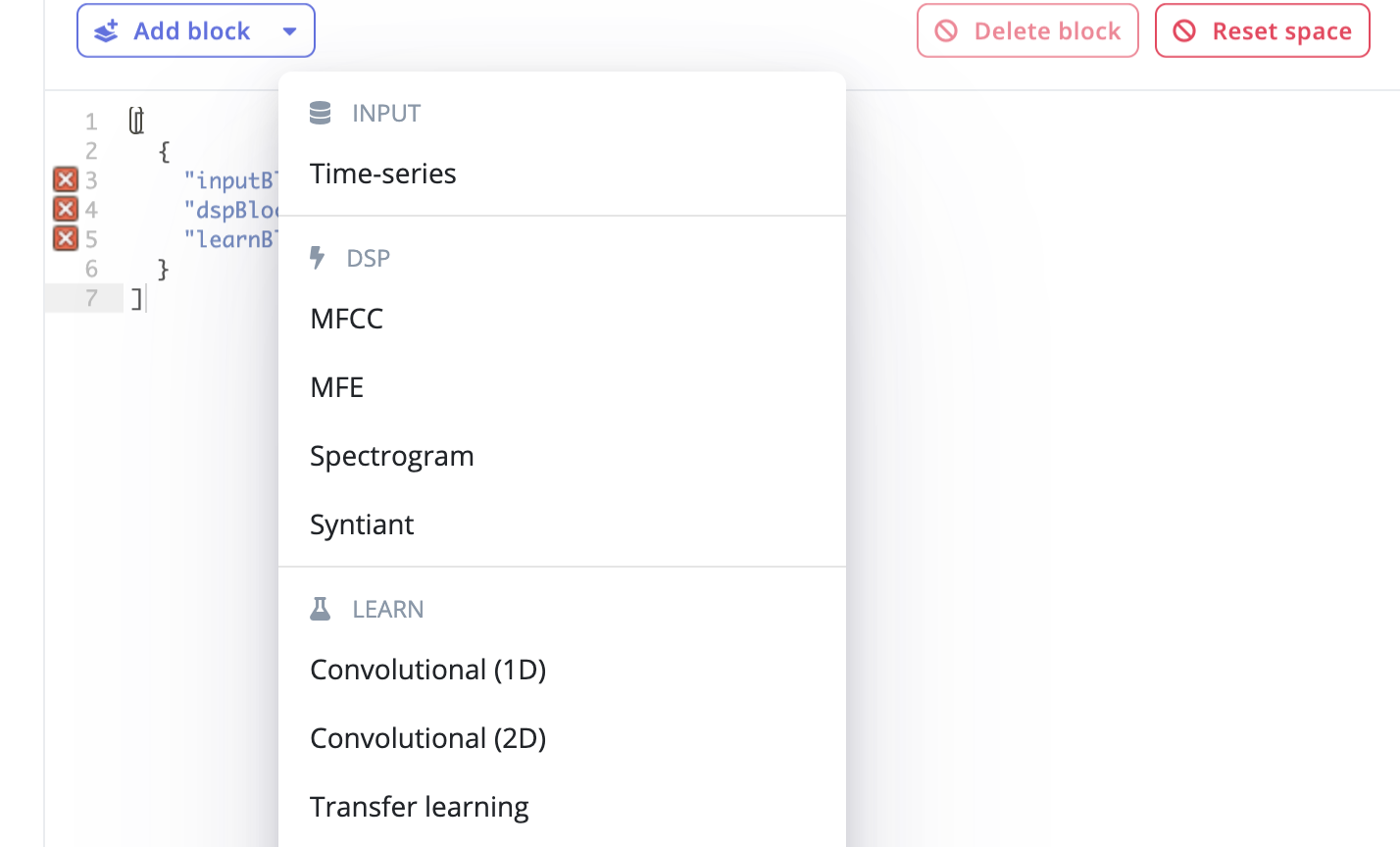
You can easily add pre-defined blocks using the **+ Add block** section.
#### Search parameters
Elements inside an array are considered as parameters. This means, you can stack several combinations of `inputBlocks|dspBlocks|learnBlocks` in your templates and each `block` can contain several elements:
```
[
{
"inputBlocks": [],
"dspBlocks": [],
"learnBlocks": []
},
{
"inputBlocks": [],
"dspBlocks": [],
"learnBlocks": []
},
...
]
```
or
```
...
"inputBlocks": [
{
"type": "time-series",
"window": [
{"windowSizeMs": 300, "windowIncreaseMs": 67},
{"windowSizeMs": 500, "windowIncreaseMs": 100}
]
],
...
```
You can easily add pre-defined blocks using the **+ Add block** section.
 #### Format
#### Input Blocks (`inputBlocks`)
#### Common Fields for All Input Blocks
* **`id`**: Unique identifier for the block.
* **Type**: `number`
* **`type`**: The nature of the input data.
* **Type**: `string`
* **Valid Options**: `time-series`, `image`
* **`title`**: Optional descriptive title for the block.
* **Type**: `string`
#### Specific Fields for Image Type Input Blocks
* **`dimension`**: Dimensions of the images.
* **Type**: `array` of `array` of `number`
* **Example Valid Values**: \[\[32, 32], \[64, 64], \[96, 96], \[128, 128], \[160, 160], \[224, 224], \[320, 320]]
* **Enterprise Option**: All dimensions available with full enterprise search space.
* **`resizeMode`**: How the image should be resized to fit the specified dimensions.
* **Type**: `array` of `string`
* **Valid Options**: `squash`, `fit-short`, `fit-long`
* **`resizeMethod`**: Method used for resizing the image.
* **Type**: `array` of `string`
* **Valid Options**: `nearest`, `lanczos3`
* **`cropAnchor`**: Position on the image where cropping is anchored.
* **Type**: `array` of `string`
* **Valid Options**: `top-left`, `top-center`, `top-right`, `middle-left`, `middle-center`, `middle-right`, `bottom-left`, `bottom-center`, `bottom-right`
#### Specific Fields for Time-Series Type Input Blocks
* **`window`**: Details about the windowing approach for time-series data.
* **Type**: `array` of `object` with fields:
* **`windowSizeMs`**: The size of the window in milliseconds.
* **Type**: `number`
* **`windowIncreaseMs`**: The step size to increase the window in milliseconds.
* **Type**: `number`
* **`windowSizeMs`**: Size of the window in milliseconds if not specified in the `window` field.
* **Type**: `array` of `number`
* **`windowIncreasePct`**: Percentage to increase the window size each step.
* **Type**: `array` of `number`
* **`frequencyHz`**: Sampling frequency in Hertz.
* **Type**: `array` of `number`
* **`padZeros`**: Whether to pad the time-series data with zeros.
* **Type**: `array` of `boolean`
#### DSP Blocks (`dspBlocks`)
#### Common Fields for All DSP Blocks
* **`id`**: Unique identifier for the DSP block.
* **Type**: `number`
* **`type`**: The type of Digital Signal Processing to apply.
* **Type**: `string`
* **Valid Options**: `raw`, `spectral-analysis`, `mfe`, `mfcc`, `spectrogram`, `image`, `flatten`, `organization` (the last one available only if full enterprise search space is enabled)
* **`axes`**: Name of the data axes in the project.
* **Type**: `array` of `string`
* **`implementationVersion`**: Version of the DSP method used.
* **Type**: `number`
* **`title`**: Optional title for the DSP block.
* **Type**: `string`
#### Conditional Fields Based on DSP Type
**For `image` Type**
* **`channels`**: Color channels used in the image.
* **Type**: `array` of `string`
* **Valid Options**: `RGB`, `Grayscale`
**For `spectral-analysis` Type**
* **`fft-length`**: Length of the Fast Fourier Transform applied.
* **Type**: `array` of `number`
* **Enterprise-specific Valid Options**: \[16, 64]
* **`scale-axes`**: Scale factor for the axes.
* **Type**: `array` of `number`
* **Enterprise-specific Valid Options**: \[1]
* **`filter-type`**: Type of filter applied.
* **Type**: `array` of `string`
* **Valid Options**: `low`, `high`, `none`
* **`filter-cutoff`**: Cutoff frequency for the filter.
* **Type**: `array` of `number`
* **`filter-order`**: Order of the filter.
* **Type**: `array` of `number`
* **`do-log`**: Whether to apply logarithmic scaling.
* **Type**: `array` of `boolean`
* **`do-fft-overlap`**: Whether to overlap FFT windows.
* **Type**: `array` of `boolean`
* **`spectral-peaks-count`**: Number of spectral peaks to identify.
* **Type**: `array` of `number`
* **`spectral-peaks-threshold`**: Threshold for identifying spectral peaks.
* **Type**: `array` of `number`
* **`spectral-power-edges`**: Defines the spectral edges for power calculation.
* **Type**: `array` of `string`
* **`autotune`**: Whether to enable automatic tuning of parameters.
* **Type**: `array` of `boolean`
* **`analysis-type`**: Type of spectral analysis.
* **Type**: `array` of `string`
* **Valid Options**: `FFT`, `Wavelet`
* **`wavelet-level`**: Level of wavelet transformation.
* **Type**: `array` of `number`
* **`wavelet`**: Type of wavelet used.
* **Type**: `array` of `string`
* **`extra-low-freq`**: Whether to include extra low frequencies in analysis.
* **Type**: `array` of `boolean`
* **`input-decimation-ratio`**: Ratio for input decimation.
* **Type**: `array`
**For `mfcc`, `mfe` Types**
* **`num_filters`**: Number of filters used in MFCC or MFE.
* **Type**: `array` of `number`
* **`num_cepstral`**: Number of cepstral coefficients in MFCC.
* **Type**: `array` of `number`
* **`win_size`**: Window size for the analysis.
* **Type**: `array` of `number`
* **`low_frequency`**: Lower bound of the frequency range.
* **Type**: `array` of `number`
* **`high_frequency`**: Upper bound of the frequency range.
* **Type**: `array` of `number`
* **`pre_cof`**: Pre-emphasis coefficient.
* **Type**: `array` of `number`
* **`pre_shift`**: Shift applied before analysis.
* **Type**: `array` of `number`
**For `raw` Type**
* **`scale-axes`**: Scale factor for the axes.
* **Type**: `array` of `number`
* **`average`**, **`minimum`**, **`maximum`**, **`rms`**, **`stddev`**, **`skewness`**, **`kurtosis`**: Statistical measures applied to raw data.
* **Type**: `array` of `boolean`
**For `custom` or `organization` Type**
* **`organizationId`**: Identifier for the organization.
* **Type**: `number`
* **`organizationDSPId`**: Specific DSP ID within the organization.
* **Type**: `number`
#### Learning Blocks (`learnBlocks`)
#### Common Fields for All Learning Blocks
* **`id`**: Unique identifier for the learning block.
* **Type**: `number`
* **`type`**: The type of machine learning model to use.
* **Type**: `string`
* **Valid Options**: `keras`, `keras-regression`, `keras-transfer-regression`, `keras-transfer-image`, `keras-transfer-kws`, `keras-object-detection`, `keras-transfer-other`, `keras-akida`, `keras-akida-transfer-image`, `keras-akida-object-detection`, `keras-visual-anomaly`
* **`dsp`**: Links to DSP blocks by their IDs indicating which DSP outputs are used as inputs for this learning model.
* **Type**: `array` of `array` of `number`
* **`title`**: Optional title for the learning block.
* **Type**: `string`
* **`implementationVersion`**: Version of the learning algorithm used.
* **Type**: `number`
#### Specific Fields Based on Learning Block Type
**Dimension and Architecture**
* **`dimension`**: Specifies the type of neural network architecture.
* **Type**: `array` of `string`
* **Valid Options**: `dense`, `conv1d`, `conv2d`
* **`dropout`**: Specifies the dropout rate to prevent overfitting.
* **Type**: `array` of `number`
* **`denseBaseNeurons`**, **`denseNeurons`**: Specifies the number of neurons in dense layers.
* **Type**: `array` of `number`
* **`denseLayers`**: Specifies the number of dense layers.
* **Type**: `array` of `number`
* **`convBaseFilters`**: Base number of filters in convolutional layers.
* **Type**: `array` of `number`
* **`convLayers`**: Number of convolutional layers.
* **Type**: `array` of `number`
**Training Configuration**
* **`trainingCycles`**: Number of training cycles.
* **Type**: `array` of `number`
* **`trainTestSplit`**: The ratio of training to test data.
* **Type**: `array` of `number`
* **`autoClassWeights`**: Whether to automatically adjust class weights.
* **Type**: `array` of `boolean`
* **`minimumConfidenceRating`**: The minimum confidence threshold for class predictions.
* **Type**: `array` of `number`
* **`learningRate`**: The learning rate for the optimizer.
* **Type**: `array` of `number`
* **`batchSize`**: Number of samples per batch during training.
* **Type**: `array` of `number`
**Augmentation and Model Policies**
* **`augmentationPolicySpectrogram`**: Defines the data augmentation strategies for spectrogram data.
* **Type**: `object`
* **Fields within the object**:
* **`enabled`**: Whether to apply augmentation.
* **Type**: `array` of `boolean`
* **`gaussianNoise`**: Level of Gaussian noise to add.
* **Type**: `array` of `string`
* **Valid Options**: `none`, `low`, `high`
* **`timeMasking`**: Extent of time masking to apply.
* **Type**: `array` of `string`
* **Valid Options**: `none`, `low`, `high`
* **`freqMasking`**: Extent of frequency masking to apply.
* **Type**: `array` of `string`
* **Valid Options**: `none`, `low`, `high`
* **`warping`**: Whether to apply time warping.
* **Type**: `array` of `boolean`
* **`augmentationPolicyImage`**: Defines the data augmentation strategies for image data.
* **Type**: `array` of `string`
* **Valid Options**:
* `all`: Apply all available image augmentations.
* `none`: Do not apply any image augmentations.
**Advanced Configurations**
* **`layers`**: Specifies the configuration of each layer within the learning model.
* **Type**: `array` of `object`
* **Fields within each layer object**:
* **`type`**: The type of layer (e.g., `conv2d`, `dense`).
* **Type**: `string`
* **`neurons`**: Specifies the number of neurons for dense layers or number of filters for convolutional layers.
* **Type**: `array` of `number`
* **Valid Options**: \[8, 16, 32, 64, 10, 20, 40], can vary depending on the full Eon Tuner search space availability.
* **`kernelSize`**: Size of the kernel in convolutional layers.
* **Type**: `array` of `number`
* **Valid Options**: \[1, 3, 5], specific to the project’s tuner space.
* **`dropoutRate`**: Dropout rate for the layer to prevent overfitting.
* **Type**: `array` of `number`
* **Valid Options**: \[0.1, 0.25, 0.5], determined by the project settings.
* **`columns`**: Optional field typically used in tabular data or custom setups.
* **Type**: `array` of `number`
* **`stack`**: Defines how many times the layer configuration should be repeated.
* **Type**: `array` of `number`
* **`enabled`**: Flag to enable or disable the layer.
* **Type**: `array` of `boolean`
* **`organizationModelId`**: If using a custom model from an organization, this is the identifier.
* **Type**: `number`
* **`model`**: Specifies the base model for transfer learning scenarios.
* **Type**: `array` of `string`
* **Valid Options**:
* `transfer_mobilenetv2_a35`
* `transfer_mobilenetv2_a1`
* `transfer_mobilenetv2_a05`
* `transfer_mobilenetv1_a2_d100`
* `transfer_mobilenetv1_a1_d100`
* `transfer_mobilenetv1_a25_d100`
* `transfer_mobilenetv2_160_a1`
* `transfer_mobilenetv2_160_a75`
* `transfer_mobilenetv2_160_a5`
* `transfer_mobilenetv2_160_a35`
* `fomo_mobilenet_v2_a01`
* `fomo_mobilenet_v2_a35`
* `object_ssd_mobilenet_v2_fpnlite_320x320`
* `transfer_kws_mobilenetv1_a1_d100`
* `transfer_kws_mobilenetv2_a35_d100`
* `transfer_akidanet_imagenet_160_a50`
* `transfer_akidanet_imagenet_224_a50`
* `fomo_akidanet_a50`
* **`customValidationMetadataKey`**: Key for custom metadata used in validation.
* **Type**: `array` of `string`
* **`profileInt8`**: Specifies whether to use INT8 quantization.
* **Type**: `array` of `boolean`
* **`skipEmbeddingsAndMemory`**: Whether to skip certain processing steps to optimize memory usage.
* **Type**: `array` of `boolean`
* **`useLearnedOptimizer`**: Whether to use a learned optimizer during training.
* **Type**: `array` of `boolean`
* **`anomalyCapacity`**: Specifies the model's capacity to handle anomalies.
* **Type**: `array` of `string`
* **Valid Options**: `low`, `medium`, `high`
* **`customParameters`**: Allows for additional custom parameters if full Eon Tuner search space is enabled.
* **Type**: `array` of `object`
#### Specifying ranges
Fields of type number can have a search space specified as a range rather than an array. In this case, pass a dictionary. Here are some examples:
```
"dropout": {
"value_type": "float",
"bounds": [0.1, 0.5],
"log_scale": true
},
"learningRate": {
"value_type": "float",
"bounds": [0.01, 0.1],
"digits": 2
}
```
#### Additional Notes
* The actual availability of certain dimensions or options can depend on whether your project has full enterprise capabilities (`projectHasFullEonTunerSearchSpace`). This might unlock additional valid values or remove restrictions on certain fields.
* Fields within `array` of `array` structures (like `dimension` or `window`) allow for multi-dimensional setups where each sub-array represents a different configuration that the EON Tuner can evaluate.
### Examples
#### Image classification
Example of a template where we constrained the search space to use 96x96 grayscale images to compare a neural network architecture with a transfer learning architecture using MobileNetv1 and v2:
[Public project: Cars binary classifier - EON Tuner Search Space](https://studio.edgeimpulse.com/public/140917/latest/tuner)
```
[
{
"inputBlocks": [
{
"type": "image",
"dimension": [[96, 96]],
"resizeMode": ["squash", "fit-short"]
}
],
"dspBlocks": [
{
"type": "image",
"id": 1,
"implementationVersion": 1,
"channels": ["Grayscale"]
}
],
"learnBlocks": [
[
{
"type": "keras",
"dsp": [[1]],
"trainingCycles": [20],
"learningRate": [0.0005],
"minimumConfidenceRating": [0.6],
"trainTestSplit": [0.2],
"layers": [
[
{
"type": "conv2d",
"neurons": [4, 6, 8],
"kernelSize": [3],
"stack": [1]
},
{
"type": "conv2d",
"neurons": [3, 4, 5],
"kernelSize": [3],
"stack": [1]
},
{"type": "flatten"},
{"type": "dropout", "dropoutRate": [0.25]},
{"type": "dense", "neurons": [4, 6, 8, 16]}
]
]
}
],
[
{
"type": "keras-transfer-image",
"dsp": [[1]],
"model": [
"transfer_mobilenetv2_a35",
"transfer_mobilenetv2_a1",
"transfer_mobilenetv2_a05",
"transfer_mobilenetv1_a2_d100",
"transfer_mobilenetv1_a1_d100",
"transfer_mobilenetv1_a25_d100"
],
"denseNeurons": [16, 32, 64],
"dropout": [0.1, 0.25, 0.5],
"augmentationPolicyImage": ["all", "none"],
"learningRate": [0.0005],
"trainingCycles": [20]
}
]
]
}
]
```
#### Object detection
Object detection models can use either bounding boxes (object location and size) or centroids (object location only).
Example of a template where we search for object detection models using bounding boxes (e.g. MobileNet V2 SSD FPN-Lite):
```
[
{
"inputBlocks": [
{
"type": "image",
"dimension": [[320, 320]],
"resizeMode": ["fit-short"]
}
],
"dspBlocks": [{"type": "image", "channels": ["RGB"]}],
"learnBlocks": [
[
{
"type": "keras-object-detection",
"model": [
"object_ssd_mobilenet_v2_fpnlite_320x320"
],
"augmentationPolicyImage": ["none"],
"learningRate": [0.01, 0.001],
"trainingCycles": [30, 60]
}
]
]
}
]
```
Example of a template where we search for object detection models using centroids (e.g. FOMO):
```
[
{
"inputBlocks": [
{
"type": "image",
"dimension": [[96, 96], [128, 128], [160, 160]],
"resizeMode": ["fit-short"]
}
],
"dspBlocks": [
{"type": "image", "channels": ["Grayscale", "RGB"]}
],
"learnBlocks": [
[
{
"type": "keras-object-detection",
"model": [
"fomo_mobilenet_v2_a01",
"fomo_mobilenet_v2_a35"
],
"augmentationPolicyImage": ["all", "none"],
"learningRate": [0.1, 0.01],
"trainingCycles": [30, 60]
}
]
]
}
]
```
Should you wish to compare models using bounding boxes with models using centroids, you can customize the search space to include impulses for both model types.
#### Audio
Example of a template where we want to compare, on the one side, MFCC vs MFE pre-processing with a custom NN architecture and on the other side, keyword spotting transfer learning architecture:
[Public Project: Keywords Detection - EON Tuner Search Space](https://studio.edgeimpulse.com/public/141212/latest/tuner)
```
[
{
"inputBlocks": [
{
"type": "time-series",
"window": [
{"windowSizeMs": 1000, "windowIncreaseMs": 250},
{"windowSizeMs": 1000, "windowIncreaseMs": 500},
{"windowSizeMs": 1000, "windowIncreaseMs": 1000}
],
"frequencyHz": [16000],
"padZeros": [true]
}
],
"dspBlocks": [
{
"id": 1,
"type": "mfcc",
"frame_length": [0.02, 0.032, 0.05],
"frame_stride_pct": [0.5, 1],
"num_filters": [32, 40],
"num_cepstral": [13],
"fft_length": [256],
"win_size": [101],
"low_frequency": [300],
"high_frequency": [0],
"pre_cof": [0.98]
},
{
"id": 2,
"type": "mfe",
"frame_length": [0.02, 0.032, 0.05],
"frame_stride_pct": [0.5, 1],
"noise_floor_db": [-72, -52, -32],
"num_filters": [32],
"fft_length": [256],
"low_frequency": [300],
"high_frequency": [0]
}
],
"learnBlocks": [
[
{
"type": "keras",
"dsp": [[1], [2]],
"dimension": ["conv1d", "conv2d"],
"convBaseFilters": [8, 16, 32],
"convLayers": [2, 3, 4],
"dropout": [0.25, 0.5],
"augmentationPolicySpectrogram": {
"enabled": [true, false],
"gaussianNoise": ["low"],
"timeMasking": ["low"],
"warping": [false]
},
"learningRate": [0.005],
"trainingCycles": [100]
}
]
]
},
{
"inputBlocks": [
{
"type": "time-series",
"windowSizeMs": [1000],
"windowIncreasePct": [0.5],
"frequencyHz": [16000],
"padZeros": [true]
}
],
"dspBlocks": [{"type": "mfe"}],
"learnBlocks": [
[
{
"type": "keras-transfer-kws",
"model": [
"transfer_kws_mobilenetv1_a1_d100",
"transfer_kws_mobilenetv2_a35_d100"
],
"learningRate": [0.01],
"trainingCycles": [30]
}
]
]
}
]
```
#### Motion classification + anomaly detection
Example of a template where we want to search for the best window size, compare the FFT and the wavelets pre-processing methods, search for a good classifier and compare the K-Means vs the GMM anomaly detection methods:
```
[
{
"inputBlocks": [
{
"type": "time-series",
"window": [
{"windowSizeMs": 500, "windowIncreaseMs": 250},
{"windowSizeMs": 1000, "windowIncreaseMs": 500},
{"windowSizeMs": 1000, "windowIncreaseMs": 1000},
{"windowSizeMs": 2000, "windowIncreaseMs": 500}
],
"frequencyHz": [62.5],
"padZeros": [true]
}
],
"dspBlocks": [
{
"type": "spectral-analysis",
"analysis-type": ["FFT"],
"fft-length": [16, 64],
"scale-axes": [1],
"filter-type": ["none"],
"filter-cutoff": [3],
"filter-order": [6],
"do-log": [true],
"do-fft-overlap": [true]
},
{
"type": "spectral-analysis",
"analysis-type": ["Wavelet"],
"wavelet": ["haar", "bior1.3"],
"wavelet-level": [1, 2]
}
],
"learnBlocks": [
[
{
"learningRate": [0.0005],
"trainingCycles": [30],
"type": "keras",
"dimension": ["dense"],
"denseBaseNeurons": [40, 20],
"denseLayers": [2, 3],
"dropout": [0.25, 0.5]
},
{"type": "anomaly", "clusterCount": [6, 12, 32]}
],
[
{
"learningRate": [0.0005],
"trainingCycles": [30],
"type": "keras",
"dimension": ["dense"],
"denseBaseNeurons": [40, 20],
"denseLayers": [2, 3],
"dropout": [0.25, 0.5]
},
{"type": "anomaly-gmm", "clusterCount": [3, 6, 8]}
]
]
}
]
```
#### Visual anomaly detection
```
[
{
"inputBlocks": [
{
"type": "image",
"dimension": [
[64, 64],
[96, 96],
[128, 128],
[160, 160],
[224, 224]
],
"resizeMode": ["fit-short"]
}
],
"dspBlocks": [
{"type": "image", "channels": ["RGB"]}
],
"learnBlocks": [
[
{
"anomalyCapacity": ["low", "medium", "high"],
"type": "keras-visual-anomaly",
"model": [
"transfer_mobilenetv2_a1",
"transfer_mobilenetv2_a35"
]
}
]
]
}
]
```
#### Akida Image Classification
Example of a template where we utilize the Akida Learning Blocks for Brainchip's Akida architecture.
[Public project: Akida Image Classification](https://studio.edgeimpulse.com/public/115634/v7/tuner)
```
[
{
"inputBlocks": [
{
"type": "image",
"dimension": [[160, 160], [224, 224]],
"resizeMode": ["fit-short"]
}
],
"dspBlocks": [
{"id": 3, "type": "image", "channels": ["Grayscale"]},
{"id": 4, "type": "image", "channels": ["RGB"]}
],
"learnBlocks": [
[
{
"id": 5,
"type": "keras-akida",
"dsp": [[3], [4]],
"dimension": ["conv2d"],
"convBaseFilters": [8, 16, 32],
"convLayers": [2, 3, 4],
"dropout": [0.25, 0.5],
"learningRate": [0.0005],
"trainingCycles": [10, 20, 30, 40]
}
]
]
},
{
"inputBlocks": [
{
"type": "image",
"dimension": [[160, 160], [224]],
"resizeMode": ["fit-short"]
}
],
"dspBlocks": [
{"id": 3, "type": "image", "channels": ["Grayscale"]},
{"id": 4, "type": "image", "channels": ["RGB"]}
],
"learnBlocks": [
[
{
"id": 5,
"type": "keras-akida-transfer-image",
"model": [
"transfer_akidanet_imagenet_160_a50",
"transfer_akidanet_imagenet_224_a50"
],
"denseNeurons": [0, 16, 64],
"dropout": [0.1, 0.5],
"augmentationPolicyImage": ["all", "none"],
"learningRate": [0.0005],
"trainingCycles": [20]
}
]
]
}
]
```
### Custom DSP and ML Blocks
#### Custom DSP block
**Only available on the Enterprise plan**
This feature is only available on the Enterprise plan. Review our [plans and pricing](https://edgeimpulse.com/pricing) or sign up for our free [expert-led trial](https://edgeimpulse.com/expert-led-trial) today.
The parameters set in the custom DSP block are automatically retrieved.
Example using a custom ToF (Time of Flight) pre-processing block:
```
[
{
"inputBlocks": [
{
"type": "time-series",
"window": [
{"windowSizeMs": 300, "windowIncreaseMs": 67}
]
}
],
"dspBlocks": [
{
"type": "organization",
"organizationId": 1,
"organizationDSPId": 613,
"max_distance": [1800, 900, 450],
"min_distance": [100, 200, 300],
"std": [2]
}
],
"learnBlocks": [
[
{
"type": "keras",
"trainingCycles": [50],
"dimension": ["conv2d"],
"convBaseFilters": [8, 16, 32],
"convLayers": [2, 3, 4],
"dropout": [0.25, 0.5]
}
]
]
}
]
```
#### Custom learning block
Example using EfficientNet (available through a custom ML block) on a dataset containing images of 4 cats:
```
[
{
"inputBlocks": [
{
"type": "image",
"dimension": [
[32, 32],
[64, 64],
[96, 96],
[128, 128],
[160, 160],
[224, 224],
[320, 320]
]
}
],
"dspBlocks": [{"type": "image", "channels": ["RGB"]}],
"learnBlocks": [
[
{
"type": "keras-transfer-image",
"layers": [
[
{
"type": "transfer_organization",
"organizationModelId": 6575
}
]
],
"title": "EfficientNet",
"learningRate": [0.005],
"trainingCycles": [60],
"customParameters": [
{"model-size": ["b0", "b1", "b2"]}
]
}
]
]
}
]
```
#### Format
#### Input Blocks (`inputBlocks`)
#### Common Fields for All Input Blocks
* **`id`**: Unique identifier for the block.
* **Type**: `number`
* **`type`**: The nature of the input data.
* **Type**: `string`
* **Valid Options**: `time-series`, `image`
* **`title`**: Optional descriptive title for the block.
* **Type**: `string`
#### Specific Fields for Image Type Input Blocks
* **`dimension`**: Dimensions of the images.
* **Type**: `array` of `array` of `number`
* **Example Valid Values**: \[\[32, 32], \[64, 64], \[96, 96], \[128, 128], \[160, 160], \[224, 224], \[320, 320]]
* **Enterprise Option**: All dimensions available with full enterprise search space.
* **`resizeMode`**: How the image should be resized to fit the specified dimensions.
* **Type**: `array` of `string`
* **Valid Options**: `squash`, `fit-short`, `fit-long`
* **`resizeMethod`**: Method used for resizing the image.
* **Type**: `array` of `string`
* **Valid Options**: `nearest`, `lanczos3`
* **`cropAnchor`**: Position on the image where cropping is anchored.
* **Type**: `array` of `string`
* **Valid Options**: `top-left`, `top-center`, `top-right`, `middle-left`, `middle-center`, `middle-right`, `bottom-left`, `bottom-center`, `bottom-right`
#### Specific Fields for Time-Series Type Input Blocks
* **`window`**: Details about the windowing approach for time-series data.
* **Type**: `array` of `object` with fields:
* **`windowSizeMs`**: The size of the window in milliseconds.
* **Type**: `number`
* **`windowIncreaseMs`**: The step size to increase the window in milliseconds.
* **Type**: `number`
* **`windowSizeMs`**: Size of the window in milliseconds if not specified in the `window` field.
* **Type**: `array` of `number`
* **`windowIncreasePct`**: Percentage to increase the window size each step.
* **Type**: `array` of `number`
* **`frequencyHz`**: Sampling frequency in Hertz.
* **Type**: `array` of `number`
* **`padZeros`**: Whether to pad the time-series data with zeros.
* **Type**: `array` of `boolean`
#### DSP Blocks (`dspBlocks`)
#### Common Fields for All DSP Blocks
* **`id`**: Unique identifier for the DSP block.
* **Type**: `number`
* **`type`**: The type of Digital Signal Processing to apply.
* **Type**: `string`
* **Valid Options**: `raw`, `spectral-analysis`, `mfe`, `mfcc`, `spectrogram`, `image`, `flatten`, `organization` (the last one available only if full enterprise search space is enabled)
* **`axes`**: Name of the data axes in the project.
* **Type**: `array` of `string`
* **`implementationVersion`**: Version of the DSP method used.
* **Type**: `number`
* **`title`**: Optional title for the DSP block.
* **Type**: `string`
#### Conditional Fields Based on DSP Type
**For `image` Type**
* **`channels`**: Color channels used in the image.
* **Type**: `array` of `string`
* **Valid Options**: `RGB`, `Grayscale`
**For `spectral-analysis` Type**
* **`fft-length`**: Length of the Fast Fourier Transform applied.
* **Type**: `array` of `number`
* **Enterprise-specific Valid Options**: \[16, 64]
* **`scale-axes`**: Scale factor for the axes.
* **Type**: `array` of `number`
* **Enterprise-specific Valid Options**: \[1]
* **`filter-type`**: Type of filter applied.
* **Type**: `array` of `string`
* **Valid Options**: `low`, `high`, `none`
* **`filter-cutoff`**: Cutoff frequency for the filter.
* **Type**: `array` of `number`
* **`filter-order`**: Order of the filter.
* **Type**: `array` of `number`
* **`do-log`**: Whether to apply logarithmic scaling.
* **Type**: `array` of `boolean`
* **`do-fft-overlap`**: Whether to overlap FFT windows.
* **Type**: `array` of `boolean`
* **`spectral-peaks-count`**: Number of spectral peaks to identify.
* **Type**: `array` of `number`
* **`spectral-peaks-threshold`**: Threshold for identifying spectral peaks.
* **Type**: `array` of `number`
* **`spectral-power-edges`**: Defines the spectral edges for power calculation.
* **Type**: `array` of `string`
* **`autotune`**: Whether to enable automatic tuning of parameters.
* **Type**: `array` of `boolean`
* **`analysis-type`**: Type of spectral analysis.
* **Type**: `array` of `string`
* **Valid Options**: `FFT`, `Wavelet`
* **`wavelet-level`**: Level of wavelet transformation.
* **Type**: `array` of `number`
* **`wavelet`**: Type of wavelet used.
* **Type**: `array` of `string`
* **`extra-low-freq`**: Whether to include extra low frequencies in analysis.
* **Type**: `array` of `boolean`
* **`input-decimation-ratio`**: Ratio for input decimation.
* **Type**: `array`
**For `mfcc`, `mfe` Types**
* **`num_filters`**: Number of filters used in MFCC or MFE.
* **Type**: `array` of `number`
* **`num_cepstral`**: Number of cepstral coefficients in MFCC.
* **Type**: `array` of `number`
* **`win_size`**: Window size for the analysis.
* **Type**: `array` of `number`
* **`low_frequency`**: Lower bound of the frequency range.
* **Type**: `array` of `number`
* **`high_frequency`**: Upper bound of the frequency range.
* **Type**: `array` of `number`
* **`pre_cof`**: Pre-emphasis coefficient.
* **Type**: `array` of `number`
* **`pre_shift`**: Shift applied before analysis.
* **Type**: `array` of `number`
**For `raw` Type**
* **`scale-axes`**: Scale factor for the axes.
* **Type**: `array` of `number`
* **`average`**, **`minimum`**, **`maximum`**, **`rms`**, **`stddev`**, **`skewness`**, **`kurtosis`**: Statistical measures applied to raw data.
* **Type**: `array` of `boolean`
**For `custom` or `organization` Type**
* **`organizationId`**: Identifier for the organization.
* **Type**: `number`
* **`organizationDSPId`**: Specific DSP ID within the organization.
* **Type**: `number`
#### Learning Blocks (`learnBlocks`)
#### Common Fields for All Learning Blocks
* **`id`**: Unique identifier for the learning block.
* **Type**: `number`
* **`type`**: The type of machine learning model to use.
* **Type**: `string`
* **Valid Options**: `keras`, `keras-regression`, `keras-transfer-regression`, `keras-transfer-image`, `keras-transfer-kws`, `keras-object-detection`, `keras-transfer-other`, `keras-akida`, `keras-akida-transfer-image`, `keras-akida-object-detection`, `keras-visual-anomaly`
* **`dsp`**: Links to DSP blocks by their IDs indicating which DSP outputs are used as inputs for this learning model.
* **Type**: `array` of `array` of `number`
* **`title`**: Optional title for the learning block.
* **Type**: `string`
* **`implementationVersion`**: Version of the learning algorithm used.
* **Type**: `number`
#### Specific Fields Based on Learning Block Type
**Dimension and Architecture**
* **`dimension`**: Specifies the type of neural network architecture.
* **Type**: `array` of `string`
* **Valid Options**: `dense`, `conv1d`, `conv2d`
* **`dropout`**: Specifies the dropout rate to prevent overfitting.
* **Type**: `array` of `number`
* **`denseBaseNeurons`**, **`denseNeurons`**: Specifies the number of neurons in dense layers.
* **Type**: `array` of `number`
* **`denseLayers`**: Specifies the number of dense layers.
* **Type**: `array` of `number`
* **`convBaseFilters`**: Base number of filters in convolutional layers.
* **Type**: `array` of `number`
* **`convLayers`**: Number of convolutional layers.
* **Type**: `array` of `number`
**Training Configuration**
* **`trainingCycles`**: Number of training cycles.
* **Type**: `array` of `number`
* **`trainTestSplit`**: The ratio of training to test data.
* **Type**: `array` of `number`
* **`autoClassWeights`**: Whether to automatically adjust class weights.
* **Type**: `array` of `boolean`
* **`minimumConfidenceRating`**: The minimum confidence threshold for class predictions.
* **Type**: `array` of `number`
* **`learningRate`**: The learning rate for the optimizer.
* **Type**: `array` of `number`
* **`batchSize`**: Number of samples per batch during training.
* **Type**: `array` of `number`
**Augmentation and Model Policies**
* **`augmentationPolicySpectrogram`**: Defines the data augmentation strategies for spectrogram data.
* **Type**: `object`
* **Fields within the object**:
* **`enabled`**: Whether to apply augmentation.
* **Type**: `array` of `boolean`
* **`gaussianNoise`**: Level of Gaussian noise to add.
* **Type**: `array` of `string`
* **Valid Options**: `none`, `low`, `high`
* **`timeMasking`**: Extent of time masking to apply.
* **Type**: `array` of `string`
* **Valid Options**: `none`, `low`, `high`
* **`freqMasking`**: Extent of frequency masking to apply.
* **Type**: `array` of `string`
* **Valid Options**: `none`, `low`, `high`
* **`warping`**: Whether to apply time warping.
* **Type**: `array` of `boolean`
* **`augmentationPolicyImage`**: Defines the data augmentation strategies for image data.
* **Type**: `array` of `string`
* **Valid Options**:
* `all`: Apply all available image augmentations.
* `none`: Do not apply any image augmentations.
**Advanced Configurations**
* **`layers`**: Specifies the configuration of each layer within the learning model.
* **Type**: `array` of `object`
* **Fields within each layer object**:
* **`type`**: The type of layer (e.g., `conv2d`, `dense`).
* **Type**: `string`
* **`neurons`**: Specifies the number of neurons for dense layers or number of filters for convolutional layers.
* **Type**: `array` of `number`
* **Valid Options**: \[8, 16, 32, 64, 10, 20, 40], can vary depending on the full Eon Tuner search space availability.
* **`kernelSize`**: Size of the kernel in convolutional layers.
* **Type**: `array` of `number`
* **Valid Options**: \[1, 3, 5], specific to the project’s tuner space.
* **`dropoutRate`**: Dropout rate for the layer to prevent overfitting.
* **Type**: `array` of `number`
* **Valid Options**: \[0.1, 0.25, 0.5], determined by the project settings.
* **`columns`**: Optional field typically used in tabular data or custom setups.
* **Type**: `array` of `number`
* **`stack`**: Defines how many times the layer configuration should be repeated.
* **Type**: `array` of `number`
* **`enabled`**: Flag to enable or disable the layer.
* **Type**: `array` of `boolean`
* **`organizationModelId`**: If using a custom model from an organization, this is the identifier.
* **Type**: `number`
* **`model`**: Specifies the base model for transfer learning scenarios.
* **Type**: `array` of `string`
* **Valid Options**:
* `transfer_mobilenetv2_a35`
* `transfer_mobilenetv2_a1`
* `transfer_mobilenetv2_a05`
* `transfer_mobilenetv1_a2_d100`
* `transfer_mobilenetv1_a1_d100`
* `transfer_mobilenetv1_a25_d100`
* `transfer_mobilenetv2_160_a1`
* `transfer_mobilenetv2_160_a75`
* `transfer_mobilenetv2_160_a5`
* `transfer_mobilenetv2_160_a35`
* `fomo_mobilenet_v2_a01`
* `fomo_mobilenet_v2_a35`
* `object_ssd_mobilenet_v2_fpnlite_320x320`
* `transfer_kws_mobilenetv1_a1_d100`
* `transfer_kws_mobilenetv2_a35_d100`
* `transfer_akidanet_imagenet_160_a50`
* `transfer_akidanet_imagenet_224_a50`
* `fomo_akidanet_a50`
* **`customValidationMetadataKey`**: Key for custom metadata used in validation.
* **Type**: `array` of `string`
* **`profileInt8`**: Specifies whether to use INT8 quantization.
* **Type**: `array` of `boolean`
* **`skipEmbeddingsAndMemory`**: Whether to skip certain processing steps to optimize memory usage.
* **Type**: `array` of `boolean`
* **`useLearnedOptimizer`**: Whether to use a learned optimizer during training.
* **Type**: `array` of `boolean`
* **`anomalyCapacity`**: Specifies the model's capacity to handle anomalies.
* **Type**: `array` of `string`
* **Valid Options**: `low`, `medium`, `high`
* **`customParameters`**: Allows for additional custom parameters if full Eon Tuner search space is enabled.
* **Type**: `array` of `object`
#### Specifying ranges
Fields of type number can have a search space specified as a range rather than an array. In this case, pass a dictionary. Here are some examples:
```
"dropout": {
"value_type": "float",
"bounds": [0.1, 0.5],
"log_scale": true
},
"learningRate": {
"value_type": "float",
"bounds": [0.01, 0.1],
"digits": 2
}
```
#### Additional Notes
* The actual availability of certain dimensions or options can depend on whether your project has full enterprise capabilities (`projectHasFullEonTunerSearchSpace`). This might unlock additional valid values or remove restrictions on certain fields.
* Fields within `array` of `array` structures (like `dimension` or `window`) allow for multi-dimensional setups where each sub-array represents a different configuration that the EON Tuner can evaluate.
### Examples
#### Image classification
Example of a template where we constrained the search space to use 96x96 grayscale images to compare a neural network architecture with a transfer learning architecture using MobileNetv1 and v2:
[Public project: Cars binary classifier - EON Tuner Search Space](https://studio.edgeimpulse.com/public/140917/latest/tuner)
```
[
{
"inputBlocks": [
{
"type": "image",
"dimension": [[96, 96]],
"resizeMode": ["squash", "fit-short"]
}
],
"dspBlocks": [
{
"type": "image",
"id": 1,
"implementationVersion": 1,
"channels": ["Grayscale"]
}
],
"learnBlocks": [
[
{
"type": "keras",
"dsp": [[1]],
"trainingCycles": [20],
"learningRate": [0.0005],
"minimumConfidenceRating": [0.6],
"trainTestSplit": [0.2],
"layers": [
[
{
"type": "conv2d",
"neurons": [4, 6, 8],
"kernelSize": [3],
"stack": [1]
},
{
"type": "conv2d",
"neurons": [3, 4, 5],
"kernelSize": [3],
"stack": [1]
},
{"type": "flatten"},
{"type": "dropout", "dropoutRate": [0.25]},
{"type": "dense", "neurons": [4, 6, 8, 16]}
]
]
}
],
[
{
"type": "keras-transfer-image",
"dsp": [[1]],
"model": [
"transfer_mobilenetv2_a35",
"transfer_mobilenetv2_a1",
"transfer_mobilenetv2_a05",
"transfer_mobilenetv1_a2_d100",
"transfer_mobilenetv1_a1_d100",
"transfer_mobilenetv1_a25_d100"
],
"denseNeurons": [16, 32, 64],
"dropout": [0.1, 0.25, 0.5],
"augmentationPolicyImage": ["all", "none"],
"learningRate": [0.0005],
"trainingCycles": [20]
}
]
]
}
]
```
#### Object detection
Object detection models can use either bounding boxes (object location and size) or centroids (object location only).
Example of a template where we search for object detection models using bounding boxes (e.g. MobileNet V2 SSD FPN-Lite):
```
[
{
"inputBlocks": [
{
"type": "image",
"dimension": [[320, 320]],
"resizeMode": ["fit-short"]
}
],
"dspBlocks": [{"type": "image", "channels": ["RGB"]}],
"learnBlocks": [
[
{
"type": "keras-object-detection",
"model": [
"object_ssd_mobilenet_v2_fpnlite_320x320"
],
"augmentationPolicyImage": ["none"],
"learningRate": [0.01, 0.001],
"trainingCycles": [30, 60]
}
]
]
}
]
```
Example of a template where we search for object detection models using centroids (e.g. FOMO):
```
[
{
"inputBlocks": [
{
"type": "image",
"dimension": [[96, 96], [128, 128], [160, 160]],
"resizeMode": ["fit-short"]
}
],
"dspBlocks": [
{"type": "image", "channels": ["Grayscale", "RGB"]}
],
"learnBlocks": [
[
{
"type": "keras-object-detection",
"model": [
"fomo_mobilenet_v2_a01",
"fomo_mobilenet_v2_a35"
],
"augmentationPolicyImage": ["all", "none"],
"learningRate": [0.1, 0.01],
"trainingCycles": [30, 60]
}
]
]
}
]
```
Should you wish to compare models using bounding boxes with models using centroids, you can customize the search space to include impulses for both model types.
#### Audio
Example of a template where we want to compare, on the one side, MFCC vs MFE pre-processing with a custom NN architecture and on the other side, keyword spotting transfer learning architecture:
[Public Project: Keywords Detection - EON Tuner Search Space](https://studio.edgeimpulse.com/public/141212/latest/tuner)
```
[
{
"inputBlocks": [
{
"type": "time-series",
"window": [
{"windowSizeMs": 1000, "windowIncreaseMs": 250},
{"windowSizeMs": 1000, "windowIncreaseMs": 500},
{"windowSizeMs": 1000, "windowIncreaseMs": 1000}
],
"frequencyHz": [16000],
"padZeros": [true]
}
],
"dspBlocks": [
{
"id": 1,
"type": "mfcc",
"frame_length": [0.02, 0.032, 0.05],
"frame_stride_pct": [0.5, 1],
"num_filters": [32, 40],
"num_cepstral": [13],
"fft_length": [256],
"win_size": [101],
"low_frequency": [300],
"high_frequency": [0],
"pre_cof": [0.98]
},
{
"id": 2,
"type": "mfe",
"frame_length": [0.02, 0.032, 0.05],
"frame_stride_pct": [0.5, 1],
"noise_floor_db": [-72, -52, -32],
"num_filters": [32],
"fft_length": [256],
"low_frequency": [300],
"high_frequency": [0]
}
],
"learnBlocks": [
[
{
"type": "keras",
"dsp": [[1], [2]],
"dimension": ["conv1d", "conv2d"],
"convBaseFilters": [8, 16, 32],
"convLayers": [2, 3, 4],
"dropout": [0.25, 0.5],
"augmentationPolicySpectrogram": {
"enabled": [true, false],
"gaussianNoise": ["low"],
"timeMasking": ["low"],
"warping": [false]
},
"learningRate": [0.005],
"trainingCycles": [100]
}
]
]
},
{
"inputBlocks": [
{
"type": "time-series",
"windowSizeMs": [1000],
"windowIncreasePct": [0.5],
"frequencyHz": [16000],
"padZeros": [true]
}
],
"dspBlocks": [{"type": "mfe"}],
"learnBlocks": [
[
{
"type": "keras-transfer-kws",
"model": [
"transfer_kws_mobilenetv1_a1_d100",
"transfer_kws_mobilenetv2_a35_d100"
],
"learningRate": [0.01],
"trainingCycles": [30]
}
]
]
}
]
```
#### Motion classification + anomaly detection
Example of a template where we want to search for the best window size, compare the FFT and the wavelets pre-processing methods, search for a good classifier and compare the K-Means vs the GMM anomaly detection methods:
```
[
{
"inputBlocks": [
{
"type": "time-series",
"window": [
{"windowSizeMs": 500, "windowIncreaseMs": 250},
{"windowSizeMs": 1000, "windowIncreaseMs": 500},
{"windowSizeMs": 1000, "windowIncreaseMs": 1000},
{"windowSizeMs": 2000, "windowIncreaseMs": 500}
],
"frequencyHz": [62.5],
"padZeros": [true]
}
],
"dspBlocks": [
{
"type": "spectral-analysis",
"analysis-type": ["FFT"],
"fft-length": [16, 64],
"scale-axes": [1],
"filter-type": ["none"],
"filter-cutoff": [3],
"filter-order": [6],
"do-log": [true],
"do-fft-overlap": [true]
},
{
"type": "spectral-analysis",
"analysis-type": ["Wavelet"],
"wavelet": ["haar", "bior1.3"],
"wavelet-level": [1, 2]
}
],
"learnBlocks": [
[
{
"learningRate": [0.0005],
"trainingCycles": [30],
"type": "keras",
"dimension": ["dense"],
"denseBaseNeurons": [40, 20],
"denseLayers": [2, 3],
"dropout": [0.25, 0.5]
},
{"type": "anomaly", "clusterCount": [6, 12, 32]}
],
[
{
"learningRate": [0.0005],
"trainingCycles": [30],
"type": "keras",
"dimension": ["dense"],
"denseBaseNeurons": [40, 20],
"denseLayers": [2, 3],
"dropout": [0.25, 0.5]
},
{"type": "anomaly-gmm", "clusterCount": [3, 6, 8]}
]
]
}
]
```
#### Visual anomaly detection
```
[
{
"inputBlocks": [
{
"type": "image",
"dimension": [
[64, 64],
[96, 96],
[128, 128],
[160, 160],
[224, 224]
],
"resizeMode": ["fit-short"]
}
],
"dspBlocks": [
{"type": "image", "channels": ["RGB"]}
],
"learnBlocks": [
[
{
"anomalyCapacity": ["low", "medium", "high"],
"type": "keras-visual-anomaly",
"model": [
"transfer_mobilenetv2_a1",
"transfer_mobilenetv2_a35"
]
}
]
]
}
]
```
#### Akida Image Classification
Example of a template where we utilize the Akida Learning Blocks for Brainchip's Akida architecture.
[Public project: Akida Image Classification](https://studio.edgeimpulse.com/public/115634/v7/tuner)
```
[
{
"inputBlocks": [
{
"type": "image",
"dimension": [[160, 160], [224, 224]],
"resizeMode": ["fit-short"]
}
],
"dspBlocks": [
{"id": 3, "type": "image", "channels": ["Grayscale"]},
{"id": 4, "type": "image", "channels": ["RGB"]}
],
"learnBlocks": [
[
{
"id": 5,
"type": "keras-akida",
"dsp": [[3], [4]],
"dimension": ["conv2d"],
"convBaseFilters": [8, 16, 32],
"convLayers": [2, 3, 4],
"dropout": [0.25, 0.5],
"learningRate": [0.0005],
"trainingCycles": [10, 20, 30, 40]
}
]
]
},
{
"inputBlocks": [
{
"type": "image",
"dimension": [[160, 160], [224]],
"resizeMode": ["fit-short"]
}
],
"dspBlocks": [
{"id": 3, "type": "image", "channels": ["Grayscale"]},
{"id": 4, "type": "image", "channels": ["RGB"]}
],
"learnBlocks": [
[
{
"id": 5,
"type": "keras-akida-transfer-image",
"model": [
"transfer_akidanet_imagenet_160_a50",
"transfer_akidanet_imagenet_224_a50"
],
"denseNeurons": [0, 16, 64],
"dropout": [0.1, 0.5],
"augmentationPolicyImage": ["all", "none"],
"learningRate": [0.0005],
"trainingCycles": [20]
}
]
]
}
]
```
### Custom DSP and ML Blocks
#### Custom DSP block
**Only available on the Enterprise plan**
This feature is only available on the Enterprise plan. Review our [plans and pricing](https://edgeimpulse.com/pricing) or sign up for our free [expert-led trial](https://edgeimpulse.com/expert-led-trial) today.
The parameters set in the custom DSP block are automatically retrieved.
Example using a custom ToF (Time of Flight) pre-processing block:
```
[
{
"inputBlocks": [
{
"type": "time-series",
"window": [
{"windowSizeMs": 300, "windowIncreaseMs": 67}
]
}
],
"dspBlocks": [
{
"type": "organization",
"organizationId": 1,
"organizationDSPId": 613,
"max_distance": [1800, 900, 450],
"min_distance": [100, 200, 300],
"std": [2]
}
],
"learnBlocks": [
[
{
"type": "keras",
"trainingCycles": [50],
"dimension": ["conv2d"],
"convBaseFilters": [8, 16, 32],
"convLayers": [2, 3, 4],
"dropout": [0.25, 0.5]
}
]
]
}
]
```
#### Custom learning block
Example using EfficientNet (available through a custom ML block) on a dataset containing images of 4 cats:
```
[
{
"inputBlocks": [
{
"type": "image",
"dimension": [
[32, 32],
[64, 64],
[96, 96],
[128, 128],
[160, 160],
[224, 224],
[320, 320]
]
}
],
"dspBlocks": [{"type": "image", "channels": ["RGB"]}],
"learnBlocks": [
[
{
"type": "keras-transfer-image",
"layers": [
[
{
"type": "transfer_organization",
"organizationModelId": 6575
}
]
],
"title": "EfficientNet",
"learningRate": [0.005],
"trainingCycles": [60],
"customParameters": [
{"model-size": ["b0", "b1", "b2"]}
]
}
]
]
}
]
```