> ## Documentation Index
> Fetch the complete documentation index at: https://docs.edgeimpulse.com/llms.txt
> Use this file to discover all available pages before exploring further.
# Offline SLMs for Edge AI Development — Part 2: Retrieval-Augmented Generation with FAISS
> Pair a FAISS retrieval index built from the Edge Impulse documentation with a fine-tuned Qwen2.5-Coder LoRA adapter to answer grounded, offline questions about the Studio API, DSP blocks, SDK methods, and deployment targets.
Created By: Eoin Jordan
GitHub Repo: [https://github.com/eoinjordan/rag-docs-demo](https://github.com/eoinjordan/rag-docs-demo)
Hugging Face model: [eoinedge/edgeai-docs-embedding-qwen1.5-0.5b-instruct](https://huggingface.co/eoinedge/edgeai-docs-embedding-qwen1.5-0.5b-instruct)
## Introduction
The [Part 1 guide](/projects/expert-network/integrating-slms-on-linux) showed how to load a fine-tuned Qwen2.5-Coder LoRA adapter and query it directly on a Raspberry Pi or Rubik Pi 3. That gives you a self-contained offline assistant whose domain knowledge — Edge Impulse Studio workflows, SDK methods, deployment targets — is baked into its weights at training time.
This guide pairs that same adapter with a FAISS retrieval index built from the live documentation source files. The result is a system that combines a fine-tuned adapter with document retrieval so your assistant can use current docs content while running fully offline on the same hardware.
## How it works
This guide walks through the [rag-docs-demo](https://github.com/eoinjordan/rag-docs-demo) companion repository, which pairs:
* A **FAISS inner-product index** built from the Edge Impulse `.mdx` documentation source files
* The **`eoinedge/edgeai-docs-embedding-qwen1.5-0.5b-instruct`** LoRA adapter on top of `Qwen/Qwen2.5-Coder-0.5B-Instruct`
* A minimal **Flask HTTP server** so other tools and scripts on the same device can query the assistant over HTTP
The same workflow runs on any Linux device where you can run Python 3.10 and install CPU-only PyTorch — including a Raspberry Pi 4, Pi 5, [Thundercomm Rubik Pi 3](/hardware/boards/thundercomm-rubikpi3), [Qualcomm Dragonwing RB3 Gen 2](/hardware/boards/qualcomm-rb3-gen-2-dev-kit), or NVIDIA Jetson Orin.
The demo has three scripts that build on each other:
| Script | Purpose |
| ---------------- | ------------------------------------------------------------------------------------------------------------------------------------------------------------------- |
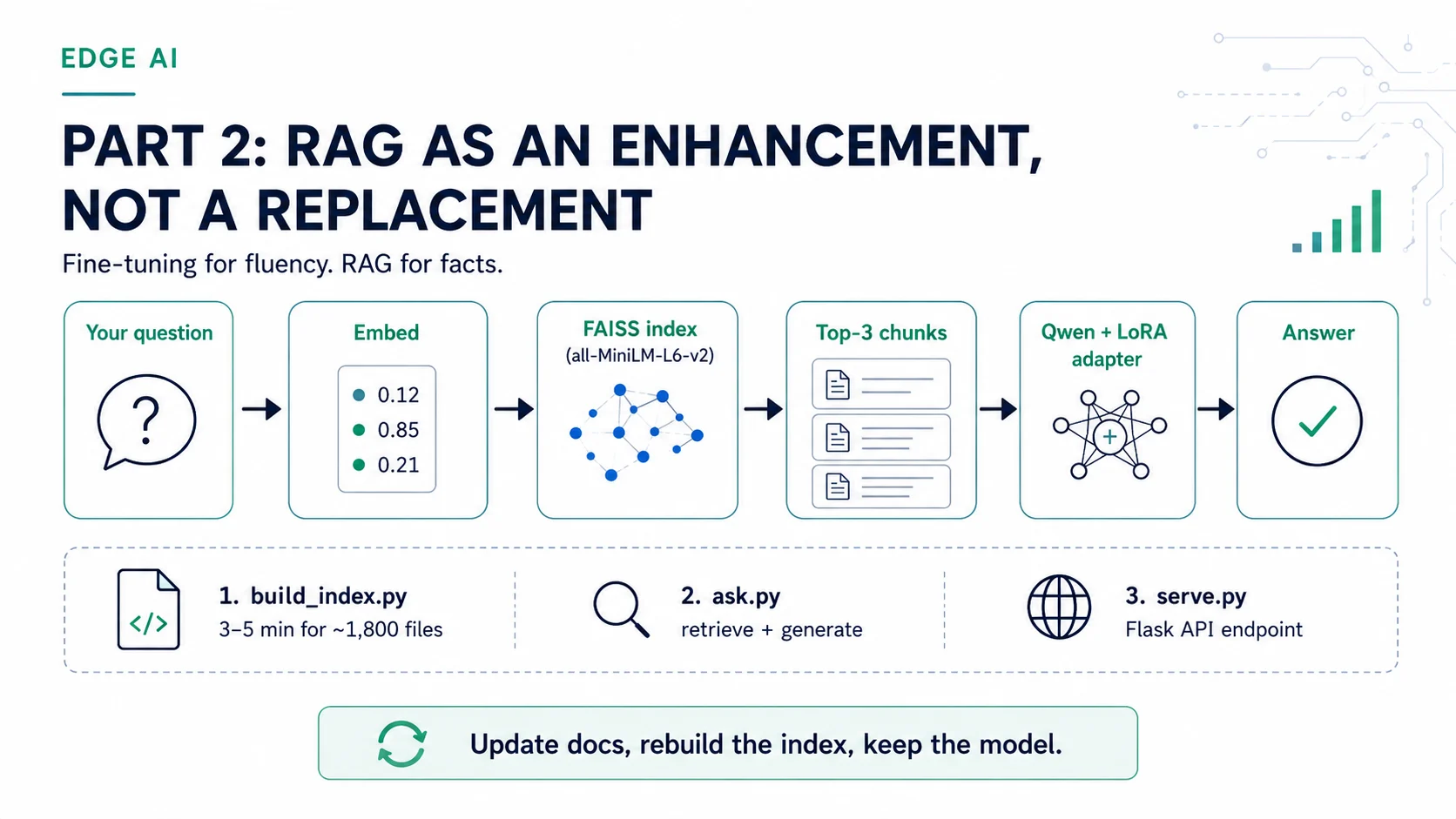
| `build_index.py` | Encodes every `.mdx` / `.md` file in a local docs clone using `all-MiniLM-L6-v2` and saves a FAISS inner-product index plus a pickle of the raw text chunks |
| `ask.py` | Loads the Qwen2.5-Coder adapter and the FAISS index, retrieves the top-k most relevant chunks for a question, injects them into the prompt, and generates an answer |
| `serve.py` | Wraps `ask()` in a Flask `POST /ask` endpoint so other tools and scripts on the same device can query the assistant over HTTP |
At query time, `ask.py` encodes the question with the same `all-MiniLM-L6-v2` model used at index time, runs a nearest-neighbour search over the FAISS index, and concatenates the top three matching chunks into a context block that prefixes the generation prompt. This keeps the language model's output grounded in actual documentation text rather than in general world knowledge.
 ## Prerequisites
* A Raspberry Pi 4 / Pi 5, a Thundercomm Rubik Pi 3, or an NVIDIA Jetson Orin running a 64-bit Linux distribution
* A local clone of the Edge Impulse documentation repository at `~/documentation` (or any folder of `.md` / `.mdx` files)
* Python 3.10 or later with `pip` and `venv` available
* \~1.5 GB free disk space for the base model cache (`~/.cache/huggingface`) and the FAISS index
If you have not set up Python and the virtual environment yet, follow the setup steps in the [Part 1 guide](/projects/expert-network/integrating-slms-on-linux) first.
The base model is `Qwen/Qwen2.5-Coder-0.5B-Instruct`. It is a \~1 GB download on first run and is cached in `~/.cache/huggingface` for all subsequent runs.
## Clone the repo and install dependencies
```bash theme={"system"}
cd ~
git clone https://github.com/eoinjordan/rag-docs-demo.git
cd rag-docs-demo
```
Activate your virtual environment (create one if you have not already):
```bash theme={"system"}
python3 -m venv ~/edgeai-llm
source ~/edgeai-llm/bin/activate
```
Install the dependencies:
```bash theme={"system"}
pip install -r requirements.txt
```
The `requirements.txt` includes: `torch`, `transformers`, `peft`, `sentence-transformers`, `faiss-cpu`, and `flask`.
On a Raspberry Pi or other ARM Linux device, install the CPU-only PyTorch wheel first to avoid a failed CUDA build attempt:
```bash theme={"system"}
pip install torch --index-url https://download.pytorch.org/whl/cpu
pip install -r requirements.txt
```
## Step 1 — Build the FAISS index
`build_index.py` scans your local documentation folder, encodes every file with `all-MiniLM-L6-v2`, and saves the resulting index alongside a pickle of the raw text chunks.
```bash theme={"system"}
python build_index.py
```
By default this scans `~/documentation/**/*.mdx`. Override the path with `--docs` if your docs clone is somewhere else or if you want to index a different set of files:
```bash theme={"system"}
python build_index.py --docs /path/to/your/docs/**/*.mdx
```
When complete, two files are written to the current directory:
| File | Contents |
| ----------------------- | ------------------------------------------------- |
| `edgeai_docs.index` | FAISS inner-product index (normalized embeddings) |
| `edgeai_docs_texts.pkl` | Raw text chunks and source paths |
By default each file is encoded using its first 2048 characters. This keeps memory use predictable on devices with limited RAM. You can raise the limit with `--chunk-size 4096`, but on a Pi 4 with 4 GB RAM the default is a safe starting point.
Indexing \~1,800 `.mdx` files takes around 3–5 minutes on a Raspberry Pi 5 and around the same on the Rubik Pi 3 thanks to its eight Kryo 670 cores.
## Step 2 — Ask a question (CLI)
With the index built, you can ask questions directly from the terminal:
```bash theme={"system"}
python ask.py "How do I deploy a model to an Arduino Nano 33 BLE Sense?"
```
```bash theme={"system"}
python ask.py "How do I call the REST API to start a training job?"
```
Each invocation:
1. Loads the Qwen2.5-Coder base model and the LoRA adapter from cache (or downloads them on first run)
2. Loads the FAISS index and the text chunk store
3. Encodes the question with `all-MiniLM-L6-v2` and retrieves the top 3 most relevant documentation chunks
4. Builds a grounded prompt from those chunks and generates an answer with up to 300 new tokens
You can also import `ask` as a function in your own Python scripts:
```python theme={"system"}
from ask import ask
print(ask("What is a DSP block in Edge Impulse?"))
print(ask("How do I use the Python SDK to upload a dataset?"))
```
The first call in a session takes longer because the model loads from disk. Subsequent calls in the same Python process reuse the loaded model and index.
## How the retrieval and generation works
`ask.py` uses three constants that you can adjust at the top of the file:
```python theme={"system"}
BASE_MODEL = "Qwen/Qwen2.5-Coder-0.5B-Instruct"
ADAPTER = "eoinedge/edgeai-docs-embedding-qwen1.5-0.5b-instruct"
INDEX_PATH = "edgeai_docs.index"
TEXTS_PATH = "edgeai_docs_texts.pkl"
```
The `ask()` function:
```python theme={"system"}
def ask(question: str, k: int = 3) -> str:
q_emb = emb_model.encode([question], convert_to_numpy=True)
faiss.normalize_L2(q_emb)
_, idx = index.search(q_emb, k)
context = "\n\n".join(texts[i] for i in idx[0])
prompt = (
"You are an Edge Impulse documentation assistant. "
"Use only the context below to answer the question.\n\n"
f"Context:\n{context}\n\n"
f"Question: {question}\nAnswer:"
)
out = pipe(prompt, max_new_tokens=300, do_sample=False)
return out[0]["generated_text"].split("Answer:")[-1].strip()
```
The prompt instructs the model to use only the retrieved context, which reduces hallucination and keeps responses grounded in the actual documentation. Increasing `k` retrieves more chunks (more context) at the cost of a longer prompt and slightly slower generation.
## Step 3 — Run the HTTP server
`serve.py` wraps `ask()` in a minimal Flask endpoint so other services, scripts, or tools running on the same device can query the assistant without importing the Python module directly.
Start the server bound to localhost:
```bash theme={"system"}
python serve.py
```
Or expose it on your local network (for example, to query it from another device on the same LAN):
```bash theme={"system"}
python serve.py --host 0.0.0.0
```
A custom port is also supported:
```bash theme={"system"}
python serve.py --host 0.0.0.0 --port 9000
```
Query it with `curl`:
```bash theme={"system"}
curl -s -X POST http://localhost:8080/ask \
-H "Content-Type: application/json" \
-d '{"question": "How do I call the REST API to start a training job?"}'
```
The server returns a JSON object:
```json theme={"system"}
{
"answer": "To start a training job using the Edge Impulse REST API, send a POST request to /api/v1/projects/{projectId}/jobs/train ..."
}
```
If the `question` field is missing or empty, the server responds with HTTP 400 and `{"error": "question is required"}`.
`serve.py` has no authentication. Do not expose it on a public network without adding an auth layer — for example a reverse proxy with HTTP basic auth, or a bearer-token check added to `ask_route`.
## Adding new docs to the index on the fly
One of the core advantages of RAG over fine-tuning is that you can add entirely new content to the assistant without any retraining — just drop the files into a folder, rerun `build_index.py`, and the new knowledge is immediately available at query time. The adapter's weights never change; only the retrieval index does.
This is useful whenever new documentation lands that the adapter has not seen, or when you want to extend the assistant with project-specific guides, internal notes, or content from another source entirely.
### Example — adding new robotics docs
As a concrete example, suppose a new set of robotics tutorials has just been published as a `.zip` of `.mdx` files. The adapter was trained before these existed, so it has no knowledge of their content. With a fine-tuned model that would mean waiting for a new training run. With RAG you can have the assistant answering questions from those docs in minutes.
Unzip the new content alongside the existing docs:
```bash theme={"system"}
cd ~/rag-docs-demo
unzip robotics.zip -d ~/robotics-docs
```
## Prerequisites
* A Raspberry Pi 4 / Pi 5, a Thundercomm Rubik Pi 3, or an NVIDIA Jetson Orin running a 64-bit Linux distribution
* A local clone of the Edge Impulse documentation repository at `~/documentation` (or any folder of `.md` / `.mdx` files)
* Python 3.10 or later with `pip` and `venv` available
* \~1.5 GB free disk space for the base model cache (`~/.cache/huggingface`) and the FAISS index
If you have not set up Python and the virtual environment yet, follow the setup steps in the [Part 1 guide](/projects/expert-network/integrating-slms-on-linux) first.
The base model is `Qwen/Qwen2.5-Coder-0.5B-Instruct`. It is a \~1 GB download on first run and is cached in `~/.cache/huggingface` for all subsequent runs.
## Clone the repo and install dependencies
```bash theme={"system"}
cd ~
git clone https://github.com/eoinjordan/rag-docs-demo.git
cd rag-docs-demo
```
Activate your virtual environment (create one if you have not already):
```bash theme={"system"}
python3 -m venv ~/edgeai-llm
source ~/edgeai-llm/bin/activate
```
Install the dependencies:
```bash theme={"system"}
pip install -r requirements.txt
```
The `requirements.txt` includes: `torch`, `transformers`, `peft`, `sentence-transformers`, `faiss-cpu`, and `flask`.
On a Raspberry Pi or other ARM Linux device, install the CPU-only PyTorch wheel first to avoid a failed CUDA build attempt:
```bash theme={"system"}
pip install torch --index-url https://download.pytorch.org/whl/cpu
pip install -r requirements.txt
```
## Step 1 — Build the FAISS index
`build_index.py` scans your local documentation folder, encodes every file with `all-MiniLM-L6-v2`, and saves the resulting index alongside a pickle of the raw text chunks.
```bash theme={"system"}
python build_index.py
```
By default this scans `~/documentation/**/*.mdx`. Override the path with `--docs` if your docs clone is somewhere else or if you want to index a different set of files:
```bash theme={"system"}
python build_index.py --docs /path/to/your/docs/**/*.mdx
```
When complete, two files are written to the current directory:
| File | Contents |
| ----------------------- | ------------------------------------------------- |
| `edgeai_docs.index` | FAISS inner-product index (normalized embeddings) |
| `edgeai_docs_texts.pkl` | Raw text chunks and source paths |
By default each file is encoded using its first 2048 characters. This keeps memory use predictable on devices with limited RAM. You can raise the limit with `--chunk-size 4096`, but on a Pi 4 with 4 GB RAM the default is a safe starting point.
Indexing \~1,800 `.mdx` files takes around 3–5 minutes on a Raspberry Pi 5 and around the same on the Rubik Pi 3 thanks to its eight Kryo 670 cores.
## Step 2 — Ask a question (CLI)
With the index built, you can ask questions directly from the terminal:
```bash theme={"system"}
python ask.py "How do I deploy a model to an Arduino Nano 33 BLE Sense?"
```
```bash theme={"system"}
python ask.py "How do I call the REST API to start a training job?"
```
Each invocation:
1. Loads the Qwen2.5-Coder base model and the LoRA adapter from cache (or downloads them on first run)
2. Loads the FAISS index and the text chunk store
3. Encodes the question with `all-MiniLM-L6-v2` and retrieves the top 3 most relevant documentation chunks
4. Builds a grounded prompt from those chunks and generates an answer with up to 300 new tokens
You can also import `ask` as a function in your own Python scripts:
```python theme={"system"}
from ask import ask
print(ask("What is a DSP block in Edge Impulse?"))
print(ask("How do I use the Python SDK to upload a dataset?"))
```
The first call in a session takes longer because the model loads from disk. Subsequent calls in the same Python process reuse the loaded model and index.
## How the retrieval and generation works
`ask.py` uses three constants that you can adjust at the top of the file:
```python theme={"system"}
BASE_MODEL = "Qwen/Qwen2.5-Coder-0.5B-Instruct"
ADAPTER = "eoinedge/edgeai-docs-embedding-qwen1.5-0.5b-instruct"
INDEX_PATH = "edgeai_docs.index"
TEXTS_PATH = "edgeai_docs_texts.pkl"
```
The `ask()` function:
```python theme={"system"}
def ask(question: str, k: int = 3) -> str:
q_emb = emb_model.encode([question], convert_to_numpy=True)
faiss.normalize_L2(q_emb)
_, idx = index.search(q_emb, k)
context = "\n\n".join(texts[i] for i in idx[0])
prompt = (
"You are an Edge Impulse documentation assistant. "
"Use only the context below to answer the question.\n\n"
f"Context:\n{context}\n\n"
f"Question: {question}\nAnswer:"
)
out = pipe(prompt, max_new_tokens=300, do_sample=False)
return out[0]["generated_text"].split("Answer:")[-1].strip()
```
The prompt instructs the model to use only the retrieved context, which reduces hallucination and keeps responses grounded in the actual documentation. Increasing `k` retrieves more chunks (more context) at the cost of a longer prompt and slightly slower generation.
## Step 3 — Run the HTTP server
`serve.py` wraps `ask()` in a minimal Flask endpoint so other services, scripts, or tools running on the same device can query the assistant without importing the Python module directly.
Start the server bound to localhost:
```bash theme={"system"}
python serve.py
```
Or expose it on your local network (for example, to query it from another device on the same LAN):
```bash theme={"system"}
python serve.py --host 0.0.0.0
```
A custom port is also supported:
```bash theme={"system"}
python serve.py --host 0.0.0.0 --port 9000
```
Query it with `curl`:
```bash theme={"system"}
curl -s -X POST http://localhost:8080/ask \
-H "Content-Type: application/json" \
-d '{"question": "How do I call the REST API to start a training job?"}'
```
The server returns a JSON object:
```json theme={"system"}
{
"answer": "To start a training job using the Edge Impulse REST API, send a POST request to /api/v1/projects/{projectId}/jobs/train ..."
}
```
If the `question` field is missing or empty, the server responds with HTTP 400 and `{"error": "question is required"}`.
`serve.py` has no authentication. Do not expose it on a public network without adding an auth layer — for example a reverse proxy with HTTP basic auth, or a bearer-token check added to `ask_route`.
## Adding new docs to the index on the fly
One of the core advantages of RAG over fine-tuning is that you can add entirely new content to the assistant without any retraining — just drop the files into a folder, rerun `build_index.py`, and the new knowledge is immediately available at query time. The adapter's weights never change; only the retrieval index does.
This is useful whenever new documentation lands that the adapter has not seen, or when you want to extend the assistant with project-specific guides, internal notes, or content from another source entirely.
### Example — adding new robotics docs
As a concrete example, suppose a new set of robotics tutorials has just been published as a `.zip` of `.mdx` files. The adapter was trained before these existed, so it has no knowledge of their content. With a fine-tuned model that would mean waiting for a new training run. With RAG you can have the assistant answering questions from those docs in minutes.
Unzip the new content alongside the existing docs:
```bash theme={"system"}
cd ~/rag-docs-demo
unzip robotics.zip -d ~/robotics-docs
```
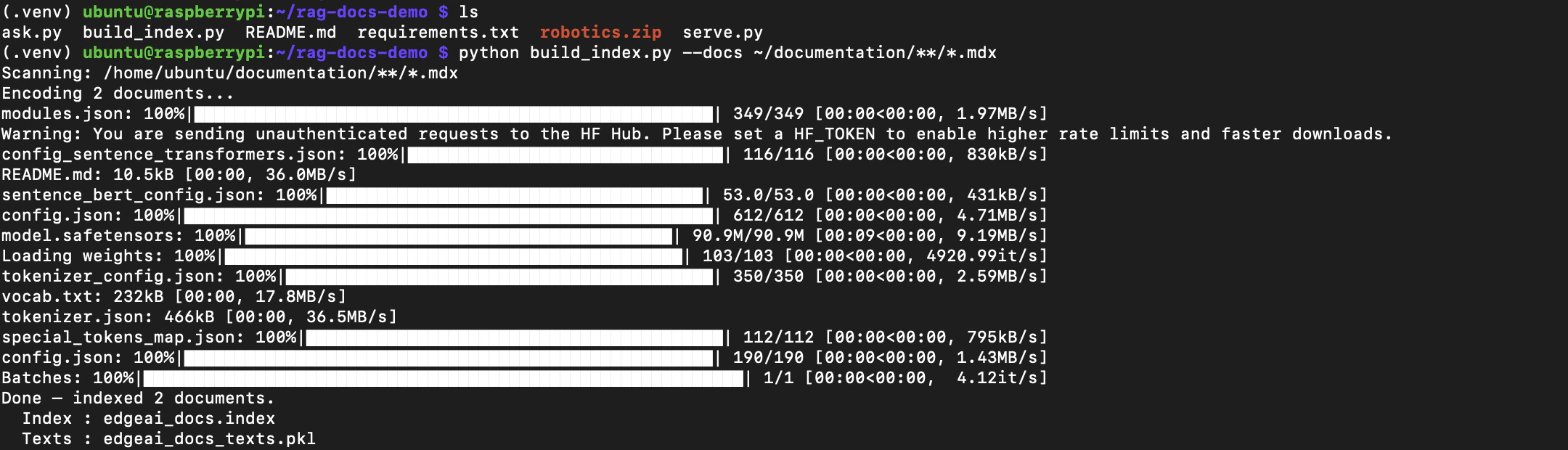 Rebuild the index pointing at both sources:
```bash theme={"system"}
python build_index.py --docs ~/robotics-docs/**/*.mdx
```
Or include both the main docs and the new content in one index:
```bash theme={"system"}
python build_index.py --docs ~/documentation/**/*.mdx
# then add the robotics files to the same index by running again with --index and --texts
# pointing at the same output files, or simply combine both globs into one folder
```
The simplest approach is to copy or symlink the new folder into your existing docs tree and re-run with the default glob:
```bash theme={"system"}
cp -r ~/robotics-docs ~/documentation/tutorials/topics/robotics
python build_index.py
```
The rebuild encodes all files, overwrites `edgeai_docs.index` and `edgeai_docs_texts.pkl`, and is immediately live on the next `ask.py` call or after restarting `serve.py`.
Rebuild the index pointing at both sources:
```bash theme={"system"}
python build_index.py --docs ~/robotics-docs/**/*.mdx
```
Or include both the main docs and the new content in one index:
```bash theme={"system"}
python build_index.py --docs ~/documentation/**/*.mdx
# then add the robotics files to the same index by running again with --index and --texts
# pointing at the same output files, or simply combine both globs into one folder
```
The simplest approach is to copy or symlink the new folder into your existing docs tree and re-run with the default glob:
```bash theme={"system"}
cp -r ~/robotics-docs ~/documentation/tutorials/topics/robotics
python build_index.py
```
The rebuild encodes all files, overwrites `edgeai_docs.index` and `edgeai_docs_texts.pkl`, and is immediately live on the next `ask.py` call or after restarting `serve.py`.
 `build_index.py` accepts any folder of `.md` or `.mdx` files via `--docs`. The glob pattern is passed directly to Python's `glob.glob(..., recursive=True)`, so you can point it at a zip extract, an internal wiki export, a cloned external docs repo, or any mix of directories.
The same pattern applies to any new content — a new board's getting-started guide, a release notes file, a set of application notes. No retraining required.
## Updating the index after a documentation pull
After pulling documentation updates, rebuild the index to reflect the new content:
```bash theme={"system"}
cd ~/documentation && git pull
cd ~/rag-docs-demo && python build_index.py
```
The rebuild overwrites `edgeai_docs.index` and `edgeai_docs_texts.pkl` in place. Any running `serve.py` instance will need to be restarted to pick up the new index.
## Best practices
* On a Raspberry Pi 4 with 4 GB RAM, close unused services before running `ask.py` or `serve.py`. The combined memory footprint of the FAISS index, the sentence-transformer model, and the Qwen2.5-Coder adapter is around 2.5–3 GB.
* Increase `k` in `ask()` from 3 to 5 if answers feel incomplete, but expect a small increase in generation time.
* Validate generated code and API calls before using them against live Edge Impulse projects or hardware.
* The adapter's training cut-off is mid-2026. For documentation added after that date, retrieval still works correctly because the FAISS index reflects your local docs clone — the model just relies more heavily on the retrieved context rather than its own weights.
## Related
**This series**
* [Offline SLMs for Edge AI Development — Part 1: Direct Inference with a Qwen LoRA Adapter](/projects/expert-network/integrating-slms-on-linux) — prerequisite guide covering environment setup and direct adapter inference
* [Offline SLMs for Edge AI Development — Part 3: Agentic Coding with an Arduino Fine-Tuned Adapter via llama.cpp and OpenCode](/projects/expert-network/opencode-offline-coding-assistant) — run GGUF models with llama-server and use OpenCode as an offline agentic coding assistant
**Models**
* [`eoinedge/edgeai-docs-embedding-qwen1.5-0.5b-instruct`](https://huggingface.co/eoinedge/edgeai-docs-embedding-qwen1.5-0.5b-instruct) — the LoRA adapter used in this guide
* [`Qwen/Qwen2.5-Coder-0.5B-Instruct`](https://huggingface.co/Qwen/Qwen2.5-Coder-0.5B-Instruct) — base model on Hugging Face
* [`sentence-transformers/all-MiniLM-L6-v2`](https://huggingface.co/sentence-transformers/all-MiniLM-L6-v2) — embedding model used to build and query the FAISS index
* [`eoinedge/arduino-qwen0.5-lora`](https://huggingface.co/eoinedge/arduino-qwen0.5-lora) — companion adapter fine-tuned on Arduino documentation
**Source**
* Full MCP stack: [eoinjordan/pi-openclaw-mcp-stack](https://github.com/eoinjordan/pi-openclaw-mcp-stack)
## Reference
* GitHub: [`eoinjordan/rag-docs-demo`](https://github.com/eoinjordan/rag-docs-demo)
* Base model: `Qwen/Qwen2.5-Coder-0.5B-Instruct`
* Embedding model: `all-MiniLM-L6-v2` (sentence-transformers)
* Index type: `faiss.IndexFlatIP` (inner product, L2-normalized embeddings = cosine similarity)
* Hardware guides: [Thundercomm Rubik Pi 3](/hardware/boards/thundercomm-rubikpi3) · [Raspberry Pi 5](/hardware/boards/raspberry-pi-5) · [Qualcomm RB3 Gen 2](/hardware/boards/qualcomm-rb3-gen-2-dev-kit) · [NVIDIA Jetson Orin](/hardware/boards/nvidia-jetson)
* Python libraries: `transformers`, `peft`, `torch`, `sentence-transformers`, `faiss-cpu`, `flask`
`build_index.py` accepts any folder of `.md` or `.mdx` files via `--docs`. The glob pattern is passed directly to Python's `glob.glob(..., recursive=True)`, so you can point it at a zip extract, an internal wiki export, a cloned external docs repo, or any mix of directories.
The same pattern applies to any new content — a new board's getting-started guide, a release notes file, a set of application notes. No retraining required.
## Updating the index after a documentation pull
After pulling documentation updates, rebuild the index to reflect the new content:
```bash theme={"system"}
cd ~/documentation && git pull
cd ~/rag-docs-demo && python build_index.py
```
The rebuild overwrites `edgeai_docs.index` and `edgeai_docs_texts.pkl` in place. Any running `serve.py` instance will need to be restarted to pick up the new index.
## Best practices
* On a Raspberry Pi 4 with 4 GB RAM, close unused services before running `ask.py` or `serve.py`. The combined memory footprint of the FAISS index, the sentence-transformer model, and the Qwen2.5-Coder adapter is around 2.5–3 GB.
* Increase `k` in `ask()` from 3 to 5 if answers feel incomplete, but expect a small increase in generation time.
* Validate generated code and API calls before using them against live Edge Impulse projects or hardware.
* The adapter's training cut-off is mid-2026. For documentation added after that date, retrieval still works correctly because the FAISS index reflects your local docs clone — the model just relies more heavily on the retrieved context rather than its own weights.
## Related
**This series**
* [Offline SLMs for Edge AI Development — Part 1: Direct Inference with a Qwen LoRA Adapter](/projects/expert-network/integrating-slms-on-linux) — prerequisite guide covering environment setup and direct adapter inference
* [Offline SLMs for Edge AI Development — Part 3: Agentic Coding with an Arduino Fine-Tuned Adapter via llama.cpp and OpenCode](/projects/expert-network/opencode-offline-coding-assistant) — run GGUF models with llama-server and use OpenCode as an offline agentic coding assistant
**Models**
* [`eoinedge/edgeai-docs-embedding-qwen1.5-0.5b-instruct`](https://huggingface.co/eoinedge/edgeai-docs-embedding-qwen1.5-0.5b-instruct) — the LoRA adapter used in this guide
* [`Qwen/Qwen2.5-Coder-0.5B-Instruct`](https://huggingface.co/Qwen/Qwen2.5-Coder-0.5B-Instruct) — base model on Hugging Face
* [`sentence-transformers/all-MiniLM-L6-v2`](https://huggingface.co/sentence-transformers/all-MiniLM-L6-v2) — embedding model used to build and query the FAISS index
* [`eoinedge/arduino-qwen0.5-lora`](https://huggingface.co/eoinedge/arduino-qwen0.5-lora) — companion adapter fine-tuned on Arduino documentation
**Source**
* Full MCP stack: [eoinjordan/pi-openclaw-mcp-stack](https://github.com/eoinjordan/pi-openclaw-mcp-stack)
## Reference
* GitHub: [`eoinjordan/rag-docs-demo`](https://github.com/eoinjordan/rag-docs-demo)
* Base model: `Qwen/Qwen2.5-Coder-0.5B-Instruct`
* Embedding model: `all-MiniLM-L6-v2` (sentence-transformers)
* Index type: `faiss.IndexFlatIP` (inner product, L2-normalized embeddings = cosine similarity)
* Hardware guides: [Thundercomm Rubik Pi 3](/hardware/boards/thundercomm-rubikpi3) · [Raspberry Pi 5](/hardware/boards/raspberry-pi-5) · [Qualcomm RB3 Gen 2](/hardware/boards/qualcomm-rb3-gen-2-dev-kit) · [NVIDIA Jetson Orin](/hardware/boards/nvidia-jetson)
* Python libraries: `transformers`, `peft`, `torch`, `sentence-transformers`, `faiss-cpu`, `flask`