> ## Documentation Index
> Fetch the complete documentation index at: https://docs.edgeimpulse.com/llms.txt
> Use this file to discover all available pages before exploring further.
# Clawrophyll runs on-Device Wake Word Detection - Arduino UNO Q
Created By: Samuel Alexander
Public Project Link: [https://studio.edgeimpulse.com/public/1031403/latest](https://studio.edgeimpulse.com/public/1031403/latest)
## The Clawrophyll project
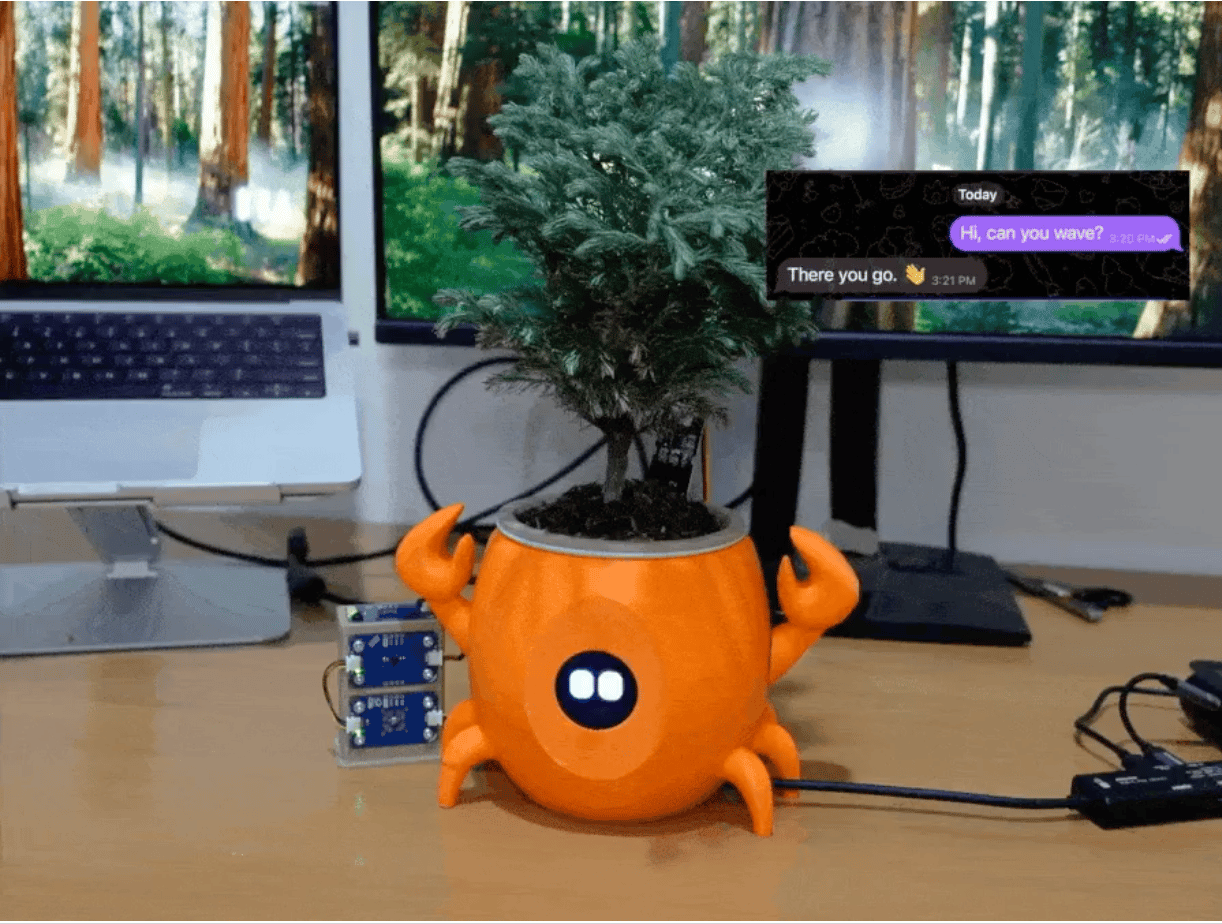
This tutorial distills the [Clawrophyll project](https://www.hackster.io/s4muela/clawrophyll-a-houseplant-that-runs-its-own-ai-agent-4c21ef) ("a houseplant that runs its own AI agent") down to the parts a developer needs to reproduce the keyword spotting (KWS) machine-learning part: the hardware, the software, and exactly why and how Edge Impulse is used.
The Edge Impulse sections below are reproduced in the author's own words.
### Hardware list
* **Arduino UNO Q**
* **USB webcam** (a Logitech C270 / C922, UVC) with microphone
* **USB speaker / USB DAC**
* **USB hub** (carries the webcam, speaker, and power)
* **GC9A01 1.28" round display** (driven over the MCU's hardware SPI: D13 = SCK, D11 = MOSI, D12 = MISO, D10 = SS)
* **SG90 servo** (the pincer/arm), on **D3**
* **100 µF capacitor** at the servo's 5 V connector (absorbs the SG90's inrush)
**Sensors (Modulino nodes on the Qwiic)**
* **Modulino Thermo** (I²C `0x44`)
* **Modulino Light** (I²C `0x53`)
* **Modulino Distance** (I²C `0x52`)
* **Capacitive soil moisture probe** (analog, on **A0**, AREF tied to 3V3)
**Enclosure & fabrication**
* 3D-printed parts: `shell` (the crab, with a face cutout and servo hole), `water_reservoir`, `pot`, and `modulino_stand`
* Heat-set threaded inserts
* A real Japanese cedar (*Cryptomeria japonica*)
***
### Software list
* **Edge Impulse Studio**
* **Autodesk Fusion (Fusion 360)**
* **3D Printer (generic)**
* **Arduino App Lab**
* An **Anthropic API key**
* A **Telegram account** and a bot from **@BotFather**.
***
In this tutorial from the Clawrophyll, we will only to focus on the Edge Impulse parts. If you would like to learn more about the complete project, feel free to visit the [Hackster project](https://www.hackster.io/s4muela/clawrophyll-a-houseplant-that-runs-its-own-ai-agent-4c21ef).
### Edge Impulse and why it is used
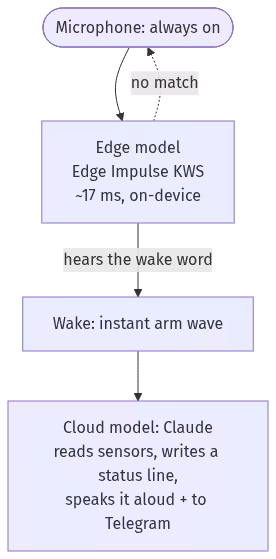
Edge Impulse provides the always-on wake word through a private, on-device model that lets the plant answer to its name and decides when the nanobot agent connected to the cloud model via Anthropic API key should wake up.
Collect a few minutes of audio and train a keyword-spotting neural network in Edge Impulse Studio, entirely in the browser. Then export the resulting model as a single self-contained model file built for the board's processor. It runs on the device in about 17 milliseconds per inference, with no cloud and no audio ever leaving the board.
That is the front half of a tiered-ML design: the cheap, private, always-on edge model is the trigger, and the expensive cloud model wakes up to reason and to see only when it fires. Each task runs where it belongs: the split-brain principle, applied to the models.
#### The right model on the right processor
Phil can sense, see, and react, but until now you reached him only by typing. The last piece lets him answer to his name out loud. Say "`Clawrophyll`" and the pincer waves and he pipes up, all triggered by a tiny neural network running on the board itself.
A keyword spotter has to listen continuously, which is the opposite of the MCU's job. The microcontroller is running a real-time loop (the face animation, the servo easing, the sensor polling), and stuffing continuous audio capture plus inference onto it would fight that timing. So the wake word lives on the Linux side, on the Qualcomm Dragonwing QRB2210, where there is RAM and CPU headroom to spare.
This is why the Arduino UNO Q is a fantastic board for these type of projects that can get the benefit of running on the MCU and the MPU in parallel.
### Edge Impulse and how it is used
#### The model
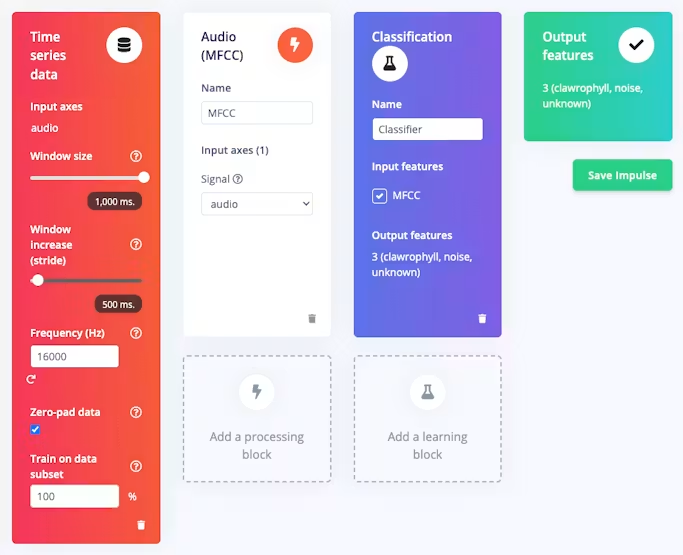
Trained in Edge Impulse Studio: 3 classes (`clawrophyll`, `noise`, `unknown`), an MFCC front end, and a small DS-CNN classifier (a few thousand parameters).
The wake word is the project's full name (`clawrophyll`) and not "Phil". This is on purpose: a three-syllable word gives a tiny model much more to hold onto, so it false-triggers far less than a short one. The audio path is 16 kHz mono, with a 1-second window (16000 samples) per inference. Edge Impulse bakes the MFCC DSP into the deployed model, so the runtime feeds it raw audio, not features.
It deploys as a single `.eim` file built for the board's architecture (`Linux aarch64`), which Edge Impulse's `ImpulseRunner` loads and runs as a subprocess. Inference is about 17 ms, so the board can classify continuously without breaking a sweat.
#### Training it in Edge Impulse Studio
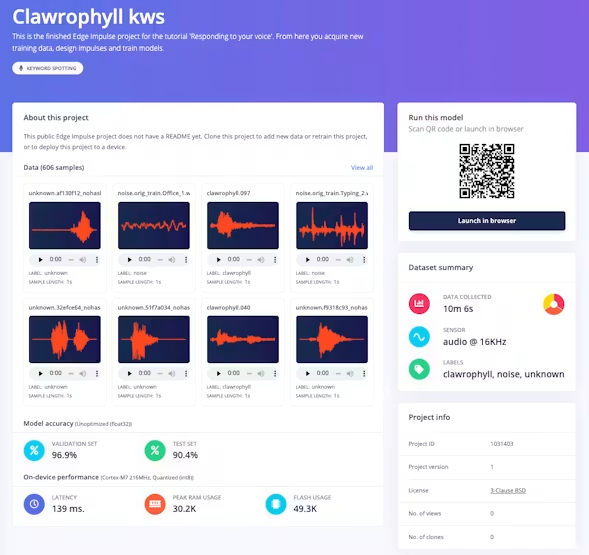
The fastest path is to skip training entirely: open the [public Clawrophyll project](https://studio.edgeimpulse.com/public/1031403/latest), clone it into your own Edge Impulse account, and go straight to the deployment step below.
To train your own wake word instead (you probably do not want your plant answering to "Clawrophyll"):
1. Create a project in Edge Impulse Studio and collect audio under **Data acquisition**. You want a few minutes per class: yourself saying the wake word many times (vary the distance, speed, and tone), room noise, and unknown speech that is not the wake word. More voices and more rooms make it noticeably more reliable.
2. Create the impulse under **Impulse design**: a 1000 ms window over 16 kHz audio, an Audio (MFCC) processing block, and a Classification learning block.
3. Generate features, then train. Studio shows accuracy on held-out data; treat it as optimistic if all the samples are your own voice in one room.
4. Sanity-check it with **Live classification**, speaking into your computer's mic.
5. Deploy: on the **Deployment** page pick `Linux (AARCH64)` and build. The download is the `.eim`; drop it into `python/models/` and the app loads it at start.
#### Listening continuously
This is the tiered-ML split in one feature: the small, always-on **Edge Impulse** model is the trigger, and **Claude** only does the heavy reasoning once it fires.
A daemon thread in `python/main.py` of the project captures the webcam's microphone through the App Lab Microphone peripheral (16 kHz mono; the C922 shows up as an ALSA capture device) and keeps a rolling one-second buffer, classifying an overlapping window every 250 ms so the word is caught no matter how it lands across the window boundary:
```python theme={"system"}
from edge_impulse_linux.runner import ImpulseRunner
from arduino.app_peripherals.microphone import Microphone
runner = ImpulseRunner(model_path); runner.init()
mic = Microphone(device=Microphone.USB_MIC_1, sample_rate=Microphone.RATE_16K,
channels=Microphone.CHANNELS_MONO, format=np.int16)
mic.start()
# ... rolling 16000-sample buffer, every 250 ms:
score = runner.classify(window)["result"]["classification"]["clawrophyll"]
if score >= THRESHOLD: # plus a short cooldown so one utterance is one wake
on_wake()
```
When `on_wake()` fires, `wave_arm("wave")` goes straight to the Bridge for an instant, sub-second acknowledgement. Then comes the utility: a quick on-demand status check. Phil reads his sensors, sets his face to his actual state, and asks Claude for a one-line status in his own dry voice, which he both posts to Telegram and says aloud. So the wake word does real work: calling his name gives you his current condition on the spot. (The threshold, confirm count, and cooldown are constants to tune on hardware; ours are 0.55, 1 window, and 3 seconds.)
#### Lessons Learnt from deploying the `.eim`
* **Build for the right architecture.** The board is `aarch64` but also you can deploy for `Arduino UNO Q` deployment target. Edge Impulse's Linux deployment lets you pick the target.
* **Keep the executable bit.** The `.eim` is an executable that the runner spawns. Our deploy uses rsync, which does not preserve the execute bit, so the app `chmod +x`'s the model at startup.
* **Feed raw audio, in order.** With the DSP baked in, you pass the 16000 raw samples and the model does the MFCC. The class order is alphabetical, which you should confirm from the runner's model metadata rather than assume.
* **Validation accuracy is not field accuracy.** Our model validated at about 97% but on a single speaker in two rooms, so that number is optimistic. The honest move is to tune the threshold live (we run it low for easy triggering) and treat real-world false-accepts as an open, observable question.
* **Privacy.** The microphone is always on, but the wake word is detected entirely on the board. No audio is streamed anywhere; only the decision ("he heard his name") leaves the detector, and only to move his own arm and message his owner.
### Read the complete story and build it
Full project, source, and write-up (MCU firmware, the phil-hardware MCP server, the agent persona and config, and deploy scripts):
[https://github.com/SamuelAlexander/clawrophyll](https://github.com/SamuelAlexander/clawrophyll)
 ## The Clawrophyll project
This tutorial distills the [Clawrophyll project](https://www.hackster.io/s4muela/clawrophyll-a-houseplant-that-runs-its-own-ai-agent-4c21ef) ("a houseplant that runs its own AI agent") down to the parts a developer needs to reproduce the keyword spotting (KWS) machine-learning part: the hardware, the software, and exactly why and how Edge Impulse is used.
The Edge Impulse sections below are reproduced in the author's own words.
### Hardware list
* **Arduino UNO Q**
* **USB webcam** (a Logitech C270 / C922, UVC) with microphone
* **USB speaker / USB DAC**
* **USB hub** (carries the webcam, speaker, and power)
* **GC9A01 1.28" round display** (driven over the MCU's hardware SPI: D13 = SCK, D11 = MOSI, D12 = MISO, D10 = SS)
* **SG90 servo** (the pincer/arm), on **D3**
* **100 µF capacitor** at the servo's 5 V connector (absorbs the SG90's inrush)
**Sensors (Modulino nodes on the Qwiic)**
* **Modulino Thermo** (I²C `0x44`)
* **Modulino Light** (I²C `0x53`)
* **Modulino Distance** (I²C `0x52`)
* **Capacitive soil moisture probe** (analog, on **A0**, AREF tied to 3V3)
**Enclosure & fabrication**
* 3D-printed parts: `shell` (the crab, with a face cutout and servo hole), `water_reservoir`, `pot`, and `modulino_stand`
* Heat-set threaded inserts
* A real Japanese cedar (*Cryptomeria japonica*)
***
### Software list
* **Edge Impulse Studio**
* **Autodesk Fusion (Fusion 360)**
* **3D Printer (generic)**
* **Arduino App Lab**
* An **Anthropic API key**
* A **Telegram account** and a bot from **@BotFather**.
***
In this tutorial from the Clawrophyll, we will only to focus on the Edge Impulse parts. If you would like to learn more about the complete project, feel free to visit the [Hackster project](https://www.hackster.io/s4muela/clawrophyll-a-houseplant-that-runs-its-own-ai-agent-4c21ef).
### Edge Impulse and why it is used
Edge Impulse provides the always-on wake word through a private, on-device model that lets the plant answer to its name and decides when the nanobot agent connected to the cloud model via Anthropic API key should wake up.
Collect a few minutes of audio and train a keyword-spotting neural network in Edge Impulse Studio, entirely in the browser. Then export the resulting model as a single self-contained model file built for the board's processor. It runs on the device in about 17 milliseconds per inference, with no cloud and no audio ever leaving the board.
That is the front half of a tiered-ML design: the cheap, private, always-on edge model is the trigger, and the expensive cloud model wakes up to reason and to see only when it fires. Each task runs where it belongs: the split-brain principle, applied to the models.
#### The right model on the right processor
Phil can sense, see, and react, but until now you reached him only by typing. The last piece lets him answer to his name out loud. Say "`Clawrophyll`" and the pincer waves and he pipes up, all triggered by a tiny neural network running on the board itself.
A keyword spotter has to listen continuously, which is the opposite of the MCU's job. The microcontroller is running a real-time loop (the face animation, the servo easing, the sensor polling), and stuffing continuous audio capture plus inference onto it would fight that timing. So the wake word lives on the Linux side, on the Qualcomm Dragonwing QRB2210, where there is RAM and CPU headroom to spare.
## The Clawrophyll project
This tutorial distills the [Clawrophyll project](https://www.hackster.io/s4muela/clawrophyll-a-houseplant-that-runs-its-own-ai-agent-4c21ef) ("a houseplant that runs its own AI agent") down to the parts a developer needs to reproduce the keyword spotting (KWS) machine-learning part: the hardware, the software, and exactly why and how Edge Impulse is used.
The Edge Impulse sections below are reproduced in the author's own words.
### Hardware list
* **Arduino UNO Q**
* **USB webcam** (a Logitech C270 / C922, UVC) with microphone
* **USB speaker / USB DAC**
* **USB hub** (carries the webcam, speaker, and power)
* **GC9A01 1.28" round display** (driven over the MCU's hardware SPI: D13 = SCK, D11 = MOSI, D12 = MISO, D10 = SS)
* **SG90 servo** (the pincer/arm), on **D3**
* **100 µF capacitor** at the servo's 5 V connector (absorbs the SG90's inrush)
**Sensors (Modulino nodes on the Qwiic)**
* **Modulino Thermo** (I²C `0x44`)
* **Modulino Light** (I²C `0x53`)
* **Modulino Distance** (I²C `0x52`)
* **Capacitive soil moisture probe** (analog, on **A0**, AREF tied to 3V3)
**Enclosure & fabrication**
* 3D-printed parts: `shell` (the crab, with a face cutout and servo hole), `water_reservoir`, `pot`, and `modulino_stand`
* Heat-set threaded inserts
* A real Japanese cedar (*Cryptomeria japonica*)
***
### Software list
* **Edge Impulse Studio**
* **Autodesk Fusion (Fusion 360)**
* **3D Printer (generic)**
* **Arduino App Lab**
* An **Anthropic API key**
* A **Telegram account** and a bot from **@BotFather**.
***
In this tutorial from the Clawrophyll, we will only to focus on the Edge Impulse parts. If you would like to learn more about the complete project, feel free to visit the [Hackster project](https://www.hackster.io/s4muela/clawrophyll-a-houseplant-that-runs-its-own-ai-agent-4c21ef).
### Edge Impulse and why it is used
Edge Impulse provides the always-on wake word through a private, on-device model that lets the plant answer to its name and decides when the nanobot agent connected to the cloud model via Anthropic API key should wake up.
Collect a few minutes of audio and train a keyword-spotting neural network in Edge Impulse Studio, entirely in the browser. Then export the resulting model as a single self-contained model file built for the board's processor. It runs on the device in about 17 milliseconds per inference, with no cloud and no audio ever leaving the board.
That is the front half of a tiered-ML design: the cheap, private, always-on edge model is the trigger, and the expensive cloud model wakes up to reason and to see only when it fires. Each task runs where it belongs: the split-brain principle, applied to the models.
#### The right model on the right processor
Phil can sense, see, and react, but until now you reached him only by typing. The last piece lets him answer to his name out loud. Say "`Clawrophyll`" and the pincer waves and he pipes up, all triggered by a tiny neural network running on the board itself.
A keyword spotter has to listen continuously, which is the opposite of the MCU's job. The microcontroller is running a real-time loop (the face animation, the servo easing, the sensor polling), and stuffing continuous audio capture plus inference onto it would fight that timing. So the wake word lives on the Linux side, on the Qualcomm Dragonwing QRB2210, where there is RAM and CPU headroom to spare.
 This is why the Arduino UNO Q is a fantastic board for these type of projects that can get the benefit of running on the MCU and the MPU in parallel.
### Edge Impulse and how it is used
#### The model
Trained in Edge Impulse Studio: 3 classes (`clawrophyll`, `noise`, `unknown`), an MFCC front end, and a small DS-CNN classifier (a few thousand parameters).
The wake word is the project's full name (`clawrophyll`) and not "Phil". This is on purpose: a three-syllable word gives a tiny model much more to hold onto, so it false-triggers far less than a short one. The audio path is 16 kHz mono, with a 1-second window (16000 samples) per inference. Edge Impulse bakes the MFCC DSP into the deployed model, so the runtime feeds it raw audio, not features.
It deploys as a single `.eim` file built for the board's architecture (`Linux aarch64`), which Edge Impulse's `ImpulseRunner` loads and runs as a subprocess. Inference is about 17 ms, so the board can classify continuously without breaking a sweat.
#### Training it in Edge Impulse Studio
The fastest path is to skip training entirely: open the [public Clawrophyll project](https://studio.edgeimpulse.com/public/1031403/latest), clone it into your own Edge Impulse account, and go straight to the deployment step below.
This is why the Arduino UNO Q is a fantastic board for these type of projects that can get the benefit of running on the MCU and the MPU in parallel.
### Edge Impulse and how it is used
#### The model
Trained in Edge Impulse Studio: 3 classes (`clawrophyll`, `noise`, `unknown`), an MFCC front end, and a small DS-CNN classifier (a few thousand parameters).
The wake word is the project's full name (`clawrophyll`) and not "Phil". This is on purpose: a three-syllable word gives a tiny model much more to hold onto, so it false-triggers far less than a short one. The audio path is 16 kHz mono, with a 1-second window (16000 samples) per inference. Edge Impulse bakes the MFCC DSP into the deployed model, so the runtime feeds it raw audio, not features.
It deploys as a single `.eim` file built for the board's architecture (`Linux aarch64`), which Edge Impulse's `ImpulseRunner` loads and runs as a subprocess. Inference is about 17 ms, so the board can classify continuously without breaking a sweat.
#### Training it in Edge Impulse Studio
The fastest path is to skip training entirely: open the [public Clawrophyll project](https://studio.edgeimpulse.com/public/1031403/latest), clone it into your own Edge Impulse account, and go straight to the deployment step below.
 To train your own wake word instead (you probably do not want your plant answering to "Clawrophyll"):
1. Create a project in Edge Impulse Studio and collect audio under **Data acquisition**. You want a few minutes per class: yourself saying the wake word many times (vary the distance, speed, and tone), room noise, and unknown speech that is not the wake word. More voices and more rooms make it noticeably more reliable.
2. Create the impulse under **Impulse design**: a 1000 ms window over 16 kHz audio, an Audio (MFCC) processing block, and a Classification learning block.
To train your own wake word instead (you probably do not want your plant answering to "Clawrophyll"):
1. Create a project in Edge Impulse Studio and collect audio under **Data acquisition**. You want a few minutes per class: yourself saying the wake word many times (vary the distance, speed, and tone), room noise, and unknown speech that is not the wake word. More voices and more rooms make it noticeably more reliable.
2. Create the impulse under **Impulse design**: a 1000 ms window over 16 kHz audio, an Audio (MFCC) processing block, and a Classification learning block.
 3. Generate features, then train. Studio shows accuracy on held-out data; treat it as optimistic if all the samples are your own voice in one room.
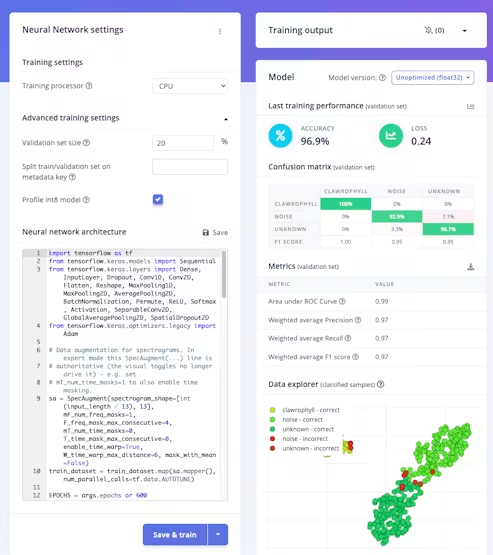 4. Sanity-check it with **Live classification**, speaking into your computer's mic.
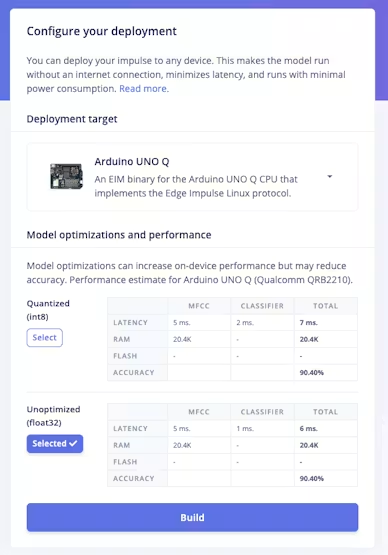
5. Deploy: on the **Deployment** page pick `Linux (AARCH64)` and build. The download is the `.eim`; drop it into `python/models/` and the app loads it at start.
4. Sanity-check it with **Live classification**, speaking into your computer's mic.
5. Deploy: on the **Deployment** page pick `Linux (AARCH64)` and build. The download is the `.eim`; drop it into `python/models/` and the app loads it at start.
 #### Listening continuously
This is the tiered-ML split in one feature: the small, always-on **Edge Impulse** model is the trigger, and **Claude** only does the heavy reasoning once it fires.
A daemon thread in `python/main.py` of the project captures the webcam's microphone through the App Lab Microphone peripheral (16 kHz mono; the C922 shows up as an ALSA capture device) and keeps a rolling one-second buffer, classifying an overlapping window every 250 ms so the word is caught no matter how it lands across the window boundary:
```python theme={"system"}
from edge_impulse_linux.runner import ImpulseRunner
from arduino.app_peripherals.microphone import Microphone
runner = ImpulseRunner(model_path); runner.init()
mic = Microphone(device=Microphone.USB_MIC_1, sample_rate=Microphone.RATE_16K,
channels=Microphone.CHANNELS_MONO, format=np.int16)
mic.start()
# ... rolling 16000-sample buffer, every 250 ms:
score = runner.classify(window)["result"]["classification"]["clawrophyll"]
if score >= THRESHOLD: # plus a short cooldown so one utterance is one wake
on_wake()
```
When `on_wake()` fires, `wave_arm("wave")` goes straight to the Bridge for an instant, sub-second acknowledgement. Then comes the utility: a quick on-demand status check. Phil reads his sensors, sets his face to his actual state, and asks Claude for a one-line status in his own dry voice, which he both posts to Telegram and says aloud. So the wake word does real work: calling his name gives you his current condition on the spot. (The threshold, confirm count, and cooldown are constants to tune on hardware; ours are 0.55, 1 window, and 3 seconds.)
#### Lessons Learnt from deploying the `.eim`
* **Build for the right architecture.** The board is `aarch64` but also you can deploy for `Arduino UNO Q` deployment target. Edge Impulse's Linux deployment lets you pick the target.
* **Keep the executable bit.** The `.eim` is an executable that the runner spawns. Our deploy uses rsync, which does not preserve the execute bit, so the app `chmod +x`'s the model at startup.
* **Feed raw audio, in order.** With the DSP baked in, you pass the 16000 raw samples and the model does the MFCC. The class order is alphabetical, which you should confirm from the runner's model metadata rather than assume.
* **Validation accuracy is not field accuracy.** Our model validated at about 97% but on a single speaker in two rooms, so that number is optimistic. The honest move is to tune the threshold live (we run it low for easy triggering) and treat real-world false-accepts as an open, observable question.
* **Privacy.** The microphone is always on, but the wake word is detected entirely on the board. No audio is streamed anywhere; only the decision ("he heard his name") leaves the detector, and only to move his own arm and message his owner.
### Read the complete story and build it
Full project, source, and write-up (MCU firmware, the phil-hardware MCP server, the agent persona and config, and deploy scripts):
[https://github.com/SamuelAlexander/clawrophyll](https://github.com/SamuelAlexander/clawrophyll)
#### Listening continuously
This is the tiered-ML split in one feature: the small, always-on **Edge Impulse** model is the trigger, and **Claude** only does the heavy reasoning once it fires.
A daemon thread in `python/main.py` of the project captures the webcam's microphone through the App Lab Microphone peripheral (16 kHz mono; the C922 shows up as an ALSA capture device) and keeps a rolling one-second buffer, classifying an overlapping window every 250 ms so the word is caught no matter how it lands across the window boundary:
```python theme={"system"}
from edge_impulse_linux.runner import ImpulseRunner
from arduino.app_peripherals.microphone import Microphone
runner = ImpulseRunner(model_path); runner.init()
mic = Microphone(device=Microphone.USB_MIC_1, sample_rate=Microphone.RATE_16K,
channels=Microphone.CHANNELS_MONO, format=np.int16)
mic.start()
# ... rolling 16000-sample buffer, every 250 ms:
score = runner.classify(window)["result"]["classification"]["clawrophyll"]
if score >= THRESHOLD: # plus a short cooldown so one utterance is one wake
on_wake()
```
When `on_wake()` fires, `wave_arm("wave")` goes straight to the Bridge for an instant, sub-second acknowledgement. Then comes the utility: a quick on-demand status check. Phil reads his sensors, sets his face to his actual state, and asks Claude for a one-line status in his own dry voice, which he both posts to Telegram and says aloud. So the wake word does real work: calling his name gives you his current condition on the spot. (The threshold, confirm count, and cooldown are constants to tune on hardware; ours are 0.55, 1 window, and 3 seconds.)
#### Lessons Learnt from deploying the `.eim`
* **Build for the right architecture.** The board is `aarch64` but also you can deploy for `Arduino UNO Q` deployment target. Edge Impulse's Linux deployment lets you pick the target.
* **Keep the executable bit.** The `.eim` is an executable that the runner spawns. Our deploy uses rsync, which does not preserve the execute bit, so the app `chmod +x`'s the model at startup.
* **Feed raw audio, in order.** With the DSP baked in, you pass the 16000 raw samples and the model does the MFCC. The class order is alphabetical, which you should confirm from the runner's model metadata rather than assume.
* **Validation accuracy is not field accuracy.** Our model validated at about 97% but on a single speaker in two rooms, so that number is optimistic. The honest move is to tune the threshold live (we run it low for easy triggering) and treat real-world false-accepts as an open, observable question.
* **Privacy.** The microphone is always on, but the wake word is detected entirely on the board. No audio is streamed anywhere; only the decision ("he heard his name") leaves the detector, and only to move his own arm and message his owner.
### Read the complete story and build it
Full project, source, and write-up (MCU firmware, the phil-hardware MCP server, the agent persona and config, and deploy scripts):
[https://github.com/SamuelAlexander/clawrophyll](https://github.com/SamuelAlexander/clawrophyll)