> ## Documentation Index
> Fetch the complete documentation index at: https://docs.edgeimpulse.com/llms.txt
> Use this file to discover all available pages before exploring further.
# Inferencing with Edge Impulse Linux Python SDK
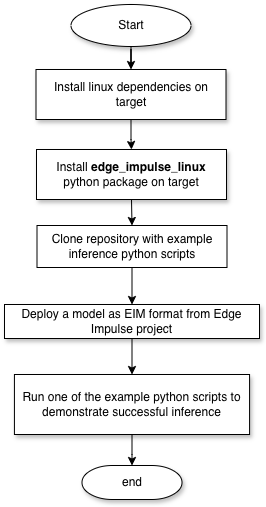
The Edge Impulse Linux Python SDK allows you to run Edge Impulse models on Linux devices using Python. You will need to have Python installed on your device and be able to use pip to install the edge\_impulse\_linux package. Once installed you can follow the normal workflow for creating and Linux EIM file that you can use with the example found with the Linux Python SDK.
 ## 0. Prerequisites
* The Linux Python SDK assumes that cameras and microphones are discoverable in the /dev/ directory
* The device should have internet connectivity to install the needed packages. Internet connection at inference time is not required.
* Access to the target from the host via SSH to copy a model file in case it's downloaded through a host computer.
* Python 3.6 or later installed on the target device.
## 1. Install dependencies and Edge Impulse Linux Python SDK on target
Assuming Python is install you will need to install edge\_impulse\_linux package via pip. Please work through any missing requirements on your system following the pip prompts.
### Debian Based Systems
```bash theme={"system"}
sudo apt-get install libatlas-base-dev libportaudio0 libportaudio2 libportaudiocpp0 portaudio19-dev
pip3 install edge_impulse_linux -i https://pypi.python.org/simple
```
## 2. Download an Edge Impulse Model as EIM file
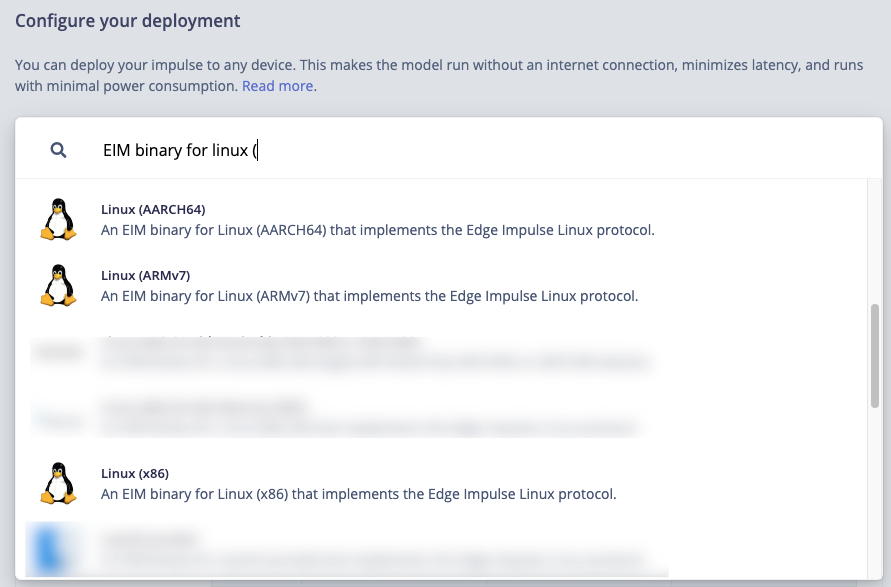
Navigate to the deployment page of the project in Edge Impulse platform and select Linux option appropriate for your architecture. Many deployment options are available, so choose an option that is appropriate for your target (e.g., its a Qualcomm SoC with Hexagon NPU, etc).
If you intend to running your model on a general purpose CPU without AI acceleration it is generally best to select AARCH64 or x86 as your deployment option.
## 0. Prerequisites
* The Linux Python SDK assumes that cameras and microphones are discoverable in the /dev/ directory
* The device should have internet connectivity to install the needed packages. Internet connection at inference time is not required.
* Access to the target from the host via SSH to copy a model file in case it's downloaded through a host computer.
* Python 3.6 or later installed on the target device.
## 1. Install dependencies and Edge Impulse Linux Python SDK on target
Assuming Python is install you will need to install edge\_impulse\_linux package via pip. Please work through any missing requirements on your system following the pip prompts.
### Debian Based Systems
```bash theme={"system"}
sudo apt-get install libatlas-base-dev libportaudio0 libportaudio2 libportaudiocpp0 portaudio19-dev
pip3 install edge_impulse_linux -i https://pypi.python.org/simple
```
## 2. Download an Edge Impulse Model as EIM file
Navigate to the deployment page of the project in Edge Impulse platform and select Linux option appropriate for your architecture. Many deployment options are available, so choose an option that is appropriate for your target (e.g., its a Qualcomm SoC with Hexagon NPU, etc).
If you intend to running your model on a general purpose CPU without AI acceleration it is generally best to select AARCH64 or x86 as your deployment option.
 Click “Deploy”. You will receive a .zip archive with a .eim executable file.
Copy this file over to your target linux device (e.g. to \~/models/my\_model.eim)
## 3. Test Inference Example
Clone the example repository found via git:
```bash theme={"system"}
git clone https://github.com/edgeimpulse/linux-sdk-python
```
Download this [test-image.jpg](/hardware/porting/test-image.jpg) to test an inference.
Choose the example image classification script:
```bash theme={"system"}
cd linux-sdk-python/examples/image-classification
```
Run the example:
```bash theme={"system"}
python3 classify-image.py
```
If everything is set up correctly, you should see inference results printed in the console like shown below:
```bash theme={"system"}
# change to the directory where classify-image.py is located and copy in the .eim file and test-image.jpg into the same directory
$ python3.11 classify-image.py cars-in-parking-garage-mac-x86_64-v31.eim test-image.jpg
MODEL: /Users/name/git/linux-sdk-python/examples/image/cars-in-parking-garage-mac-x86_64-v31.eim
Loaded runner for "ei-ready-device-testing / cars-in-parking-garage"
Found 3 bounding boxes (37 ms.)
vehicle (0.88): x=2 y=186 w=83 h=50
vehicle (0.84): x=123 y=151 w=111 h=71
vehicle (0.82): x=253 y=151 w=67 h=59
```
A debug image will be saved in the same directory as `debug.jpg`, showing the detected objects with bounding boxes.
Click “Deploy”. You will receive a .zip archive with a .eim executable file.
Copy this file over to your target linux device (e.g. to \~/models/my\_model.eim)
## 3. Test Inference Example
Clone the example repository found via git:
```bash theme={"system"}
git clone https://github.com/edgeimpulse/linux-sdk-python
```
Download this [test-image.jpg](/hardware/porting/test-image.jpg) to test an inference.
Choose the example image classification script:
```bash theme={"system"}
cd linux-sdk-python/examples/image-classification
```
Run the example:
```bash theme={"system"}
python3 classify-image.py
```
If everything is set up correctly, you should see inference results printed in the console like shown below:
```bash theme={"system"}
# change to the directory where classify-image.py is located and copy in the .eim file and test-image.jpg into the same directory
$ python3.11 classify-image.py cars-in-parking-garage-mac-x86_64-v31.eim test-image.jpg
MODEL: /Users/name/git/linux-sdk-python/examples/image/cars-in-parking-garage-mac-x86_64-v31.eim
Loaded runner for "ei-ready-device-testing / cars-in-parking-garage"
Found 3 bounding boxes (37 ms.)
vehicle (0.88): x=2 y=186 w=83 h=50
vehicle (0.84): x=123 y=151 w=111 h=71
vehicle (0.82): x=253 y=151 w=67 h=59
```
A debug image will be saved in the same directory as `debug.jpg`, showing the detected objects with bounding boxes.