> ## Documentation Index
> Fetch the complete documentation index at: https://docs.edgeimpulse.com/llms.txt
> Use this file to discover all available pages before exploring further.
# Inferencing with Edge Impulse Linux C++ SDK
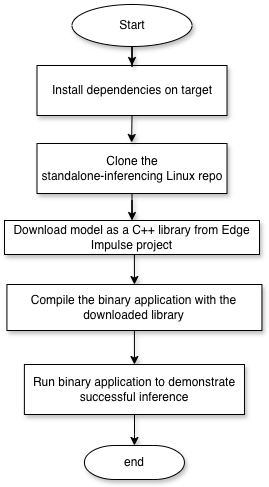
This process allows for building any custom application in C++ with the Edge Impulse Inferencing SDK for any Linux device. It does not require installation of CLI tools and minimal dependencies to compile code. The completion of this process is a standalone binary application that performs an inference of an Edge Impulse model. This application can either be built directly on target or cross-compiled on your host and copied over to the device. Each step of the flow in the diagram is described in details in subsections below.
 ## 0. Prerequisites
* The Linux Python SDK assumes that cameras and microphones are discoverable in the /dev/ directory
* The device should have internet connectivity at the moment of dependency installation for package manager access.
* For cross-compilation you will need a cross-compilation toolchain installed on your host (e.g. gcc-aarch64-linux-gnu)
* For on-device compilation you will need GNU Make and a recent C++ compiler
* Access to target from host via SSH to copy build artifacts.
## 1. Clone or download the Example Standalone Inferencing Linux Repository
Clone this repository via git:
```bash theme={"system"}
git clone https://github.com/edgeimpulse/example-standalone-inferencing-linux
```
## 2. Install Linux dependencies on target
The dependencies install support for audio and camera input examples
```bash theme={"system"}
$ sudo apt install libasound2-dev
$ sh build-opencv-linux.sh # In example-standalone-inferencing-linux; only needed if you want to run the camera example
```
If you can't find alsa/asoundlib.h during building you may need to reboot after installing libasound2 to see effects.
It is recommended to cross-compile openCV since compilation on lower compute devices could take a long time.
To cross-compile the OpenCV libraries for AARCH64:
```bash theme={"system"}
$ CC= \
CXX= \
sh build-opencv-linux-aarch64-cross-compile.sh --build-only # only needed if you want to run the camera example
```
The `--build-only` flag will build and install the libraries and binaries in `/opencv/build_opencv/install/`. Copy the contents of `install/` directory to the target (ideally somewhere discoverable by your PATH).
###
For Qualcomm targets that have the Hexagon NPU (e.g. Dragonwing QCS6490 SoC, RB3 Gen 2 Dev Kit, Thundercomm RUBIK Pi 3, etc.) you can build the application with TFLite QNN delegate support.
#### Install the AI Engine Direct SDK - Ubuntu
If you're on a Dragonwing development board running Ubuntu 24; open a terminal (on your development board) and run:
```bash theme={"system"}
# Install the SDK
wget -qO- https://cdn.edgeimpulse.com/qc-ai-docs/device-setup/install_ai_runtime_sdk.sh | bash
# Use the SDK in your current session
source ~/.bash_profile
```
#### Install the AI Engine Direct SDK - another OS:
* Download the AI Engine Direct SDK
* Extract it and export the path to the SDK root, for example:
* export QNN\_SDK\_ROOT=/home/user/qairt/2.36.0.250627/
## 3. Download model as a C++ library from Edge Impulse
Go to the *Deployment* page of the Edge Impulse project that you will be testing with and select *C++ Library (Linux)*.
## 0. Prerequisites
* The Linux Python SDK assumes that cameras and microphones are discoverable in the /dev/ directory
* The device should have internet connectivity at the moment of dependency installation for package manager access.
* For cross-compilation you will need a cross-compilation toolchain installed on your host (e.g. gcc-aarch64-linux-gnu)
* For on-device compilation you will need GNU Make and a recent C++ compiler
* Access to target from host via SSH to copy build artifacts.
## 1. Clone or download the Example Standalone Inferencing Linux Repository
Clone this repository via git:
```bash theme={"system"}
git clone https://github.com/edgeimpulse/example-standalone-inferencing-linux
```
## 2. Install Linux dependencies on target
The dependencies install support for audio and camera input examples
```bash theme={"system"}
$ sudo apt install libasound2-dev
$ sh build-opencv-linux.sh # In example-standalone-inferencing-linux; only needed if you want to run the camera example
```
If you can't find alsa/asoundlib.h during building you may need to reboot after installing libasound2 to see effects.
It is recommended to cross-compile openCV since compilation on lower compute devices could take a long time.
To cross-compile the OpenCV libraries for AARCH64:
```bash theme={"system"}
$ CC= \
CXX= \
sh build-opencv-linux-aarch64-cross-compile.sh --build-only # only needed if you want to run the camera example
```
The `--build-only` flag will build and install the libraries and binaries in `/opencv/build_opencv/install/`. Copy the contents of `install/` directory to the target (ideally somewhere discoverable by your PATH).
###
For Qualcomm targets that have the Hexagon NPU (e.g. Dragonwing QCS6490 SoC, RB3 Gen 2 Dev Kit, Thundercomm RUBIK Pi 3, etc.) you can build the application with TFLite QNN delegate support.
#### Install the AI Engine Direct SDK - Ubuntu
If you're on a Dragonwing development board running Ubuntu 24; open a terminal (on your development board) and run:
```bash theme={"system"}
# Install the SDK
wget -qO- https://cdn.edgeimpulse.com/qc-ai-docs/device-setup/install_ai_runtime_sdk.sh | bash
# Use the SDK in your current session
source ~/.bash_profile
```
#### Install the AI Engine Direct SDK - another OS:
* Download the AI Engine Direct SDK
* Extract it and export the path to the SDK root, for example:
* export QNN\_SDK\_ROOT=/home/user/qairt/2.36.0.250627/
## 3. Download model as a C++ library from Edge Impulse
Go to the *Deployment* page of the Edge Impulse project that you will be testing with and select *C++ Library (Linux)*.
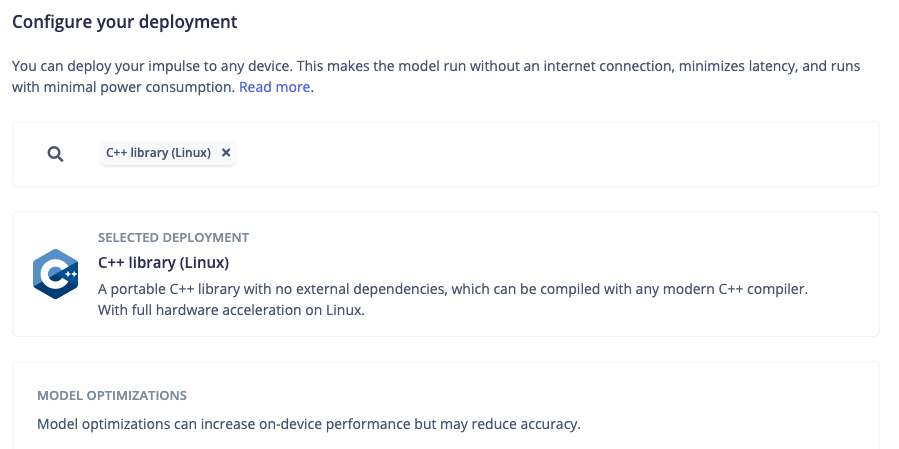 Select the model optimization and click *Build*. Once the build is completed a .zip archive will be downloaded. In the .zip are three folders:
* edge-impulse-sdk
* model-parameters
* tflite-model
Copy those three folders to the root of the `example-standalone-inferencing-linux` repository that you cloned above.
## 4. Compile the binary and run inference on target
This repository comes with three classification examples:
* [custom](https://github.com/edgeimpulse/example-standalone-inferencing-linux/blob/master/source/custom.cpp) - classify custom sensor data (APP\_CUSTOM=1).
* [audio](https://github.com/edgeimpulse/example-standalone-inferencing-linux/blob/master/source/audio.cpp) - realtime audio classification (APP\_AUDIO=1).
* [camera](https://github.com/edgeimpulse/example-standalone-inferencing-linux/blob/master/source/camera.cpp) - realtime image classification (APP\_CAMERA=1).
Replace `APP_CUSTOM` with an appropriate flag in the steps below based on the example you are building
### To build an application:
#### If your target architecture is either ARMV7, AARCH64 or X86, build application via:
```bash theme={"system"}
$ APP_CUSTOM=1 TARGET_LINUX_=1 USE_FULL_TFLITE=1 make -j `nproc`
```
Where `ARCHITECTURE` is one of either `ARMV7`, `AARCH64` or `X86`.
#### If you are building for a SoC with Qualcomm Hexagon NPU:
```bash theme={"system"}
$ APP_CUSTOM=1 TARGET_LINUX_AARCH64=1 USE_QUALCOMM_QNN=1 make -j`nproc`
```
#### In other cases:
```bash theme={"system"}
$ APP_CUSTOM=1 make -j `nproc`
```
Replace `APP_CUSTOM=1` with the application you want to build. See 'Hardware acceleration' below for the hardware specific flags.
The compiled application will be placed in the `build` directory:
```bash theme={"system"}
$ ./build/
```
If you build is success you can run inference by providing input data. For example, a single frame of vision data has the following command structure and output. You may get your raw features from the *Processing Block* of your Edge Impulse project. For convenience, you can also download a sample [features.csv](/hardware/porting/features.csv) file.
```bash theme={"system"}
$ ~/git/example-standalone-inferencing-linux$ ./build/custom features.csv
INFO: Created TensorFlow Lite XNNPACK delegate for CPU.
Predictions (DSP: 0 ms., Classification: 32 ms., Anomaly: 0 ms.):
#Object detection results:
vehicle (0.872717) [ x: 2, y: 184, width: 83, height: 52 ]
vehicle (0.850529) [ x: 118, y: 146, width: 121, height: 76 ]
vehicle (0.843133) [ x: 250, y: 151, width: 69, height: 62 ]
```
A debug image will be saved in the same directory as `debug.bmp`, showing the detected objects with bounding boxes.
Select the model optimization and click *Build*. Once the build is completed a .zip archive will be downloaded. In the .zip are three folders:
* edge-impulse-sdk
* model-parameters
* tflite-model
Copy those three folders to the root of the `example-standalone-inferencing-linux` repository that you cloned above.
## 4. Compile the binary and run inference on target
This repository comes with three classification examples:
* [custom](https://github.com/edgeimpulse/example-standalone-inferencing-linux/blob/master/source/custom.cpp) - classify custom sensor data (APP\_CUSTOM=1).
* [audio](https://github.com/edgeimpulse/example-standalone-inferencing-linux/blob/master/source/audio.cpp) - realtime audio classification (APP\_AUDIO=1).
* [camera](https://github.com/edgeimpulse/example-standalone-inferencing-linux/blob/master/source/camera.cpp) - realtime image classification (APP\_CAMERA=1).
Replace `APP_CUSTOM` with an appropriate flag in the steps below based on the example you are building
### To build an application:
#### If your target architecture is either ARMV7, AARCH64 or X86, build application via:
```bash theme={"system"}
$ APP_CUSTOM=1 TARGET_LINUX_=1 USE_FULL_TFLITE=1 make -j `nproc`
```
Where `ARCHITECTURE` is one of either `ARMV7`, `AARCH64` or `X86`.
#### If you are building for a SoC with Qualcomm Hexagon NPU:
```bash theme={"system"}
$ APP_CUSTOM=1 TARGET_LINUX_AARCH64=1 USE_QUALCOMM_QNN=1 make -j`nproc`
```
#### In other cases:
```bash theme={"system"}
$ APP_CUSTOM=1 make -j `nproc`
```
Replace `APP_CUSTOM=1` with the application you want to build. See 'Hardware acceleration' below for the hardware specific flags.
The compiled application will be placed in the `build` directory:
```bash theme={"system"}
$ ./build/
```
If you build is success you can run inference by providing input data. For example, a single frame of vision data has the following command structure and output. You may get your raw features from the *Processing Block* of your Edge Impulse project. For convenience, you can also download a sample [features.csv](/hardware/porting/features.csv) file.
```bash theme={"system"}
$ ~/git/example-standalone-inferencing-linux$ ./build/custom features.csv
INFO: Created TensorFlow Lite XNNPACK delegate for CPU.
Predictions (DSP: 0 ms., Classification: 32 ms., Anomaly: 0 ms.):
#Object detection results:
vehicle (0.872717) [ x: 2, y: 184, width: 83, height: 52 ]
vehicle (0.850529) [ x: 118, y: 146, width: 121, height: 76 ]
vehicle (0.843133) [ x: 250, y: 151, width: 69, height: 62 ]
```
A debug image will be saved in the same directory as `debug.bmp`, showing the detected objects with bounding boxes.