> ## Documentation Index
> Fetch the complete documentation index at: https://docs.edgeimpulse.com/llms.txt
> Use this file to discover all available pages before exploring further.
# Edge Impulse Zephyr Module Deployment
> Run your Edge Impulse model on any Zephyr-supported board using the new Zephyr Module Deployment, no manual SDK integration required.
The **Edge Impulse Zephyr Module Deployment** introduces a new way to integrate your Edge Impulse project and SDK directly into [Zephyr Applications](https://docs.zephyrproject.org/latest/develop/application/index.html), removing manual setup steps and enabling deployment across more than **[850 supported hardware targets](https://docs.zephyrproject.org/latest/boards/index.html#)**.
 For more on the Zephyr module system and how it differs from west projects, see the official [Zephyr modules documentation](https://docs.zephyrproject.org/latest/develop/modules.html)
By the end of this guide, you will be able to:
* Set up a Zephyr project with the Edge Impulse SDK as a Zephyr module.
* Deploy your trained Edge Impulse model as a Zephyr library.
* Use custom West commands for streamlined Edge Impulse workflows.
To get started quickly, you can clone and initialize the example standalone inferencing project with the Edge Impulse SDK Zephyr module included, and it will pull in all required dependencies with [west (the Zephyr meta-tool)](https://docs.zephyrproject.org/latest/develop/west/index.html):
```bash theme={"system"}
west init -m https://github.com/edgeimpulse/example-standalone-inferencing-zephyr-module
```
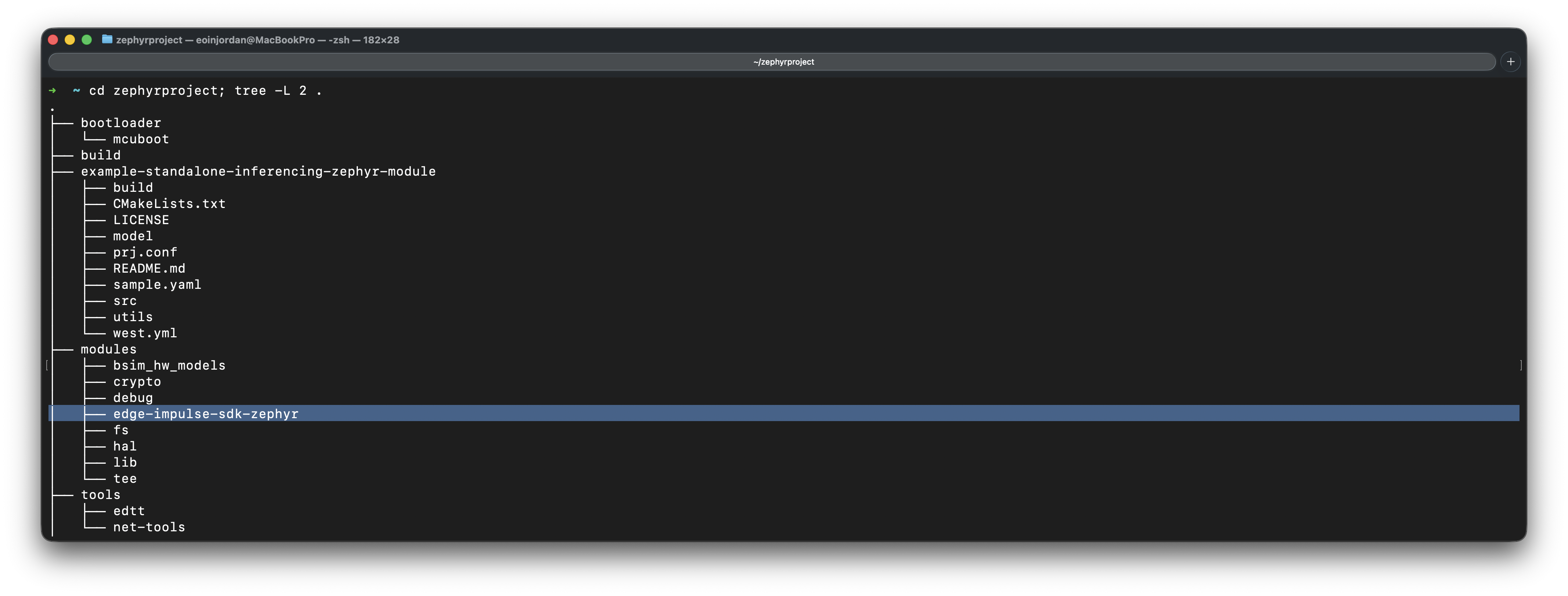
Your development environment should look similar to this by the end of the guide:
For more on the Zephyr module system and how it differs from west projects, see the official [Zephyr modules documentation](https://docs.zephyrproject.org/latest/develop/modules.html)
By the end of this guide, you will be able to:
* Set up a Zephyr project with the Edge Impulse SDK as a Zephyr module.
* Deploy your trained Edge Impulse model as a Zephyr library.
* Use custom West commands for streamlined Edge Impulse workflows.
To get started quickly, you can clone and initialize the example standalone inferencing project with the Edge Impulse SDK Zephyr module included, and it will pull in all required dependencies with [west (the Zephyr meta-tool)](https://docs.zephyrproject.org/latest/develop/west/index.html):
```bash theme={"system"}
west init -m https://github.com/edgeimpulse/example-standalone-inferencing-zephyr-module
```
Your development environment should look similar to this by the end of the guide:
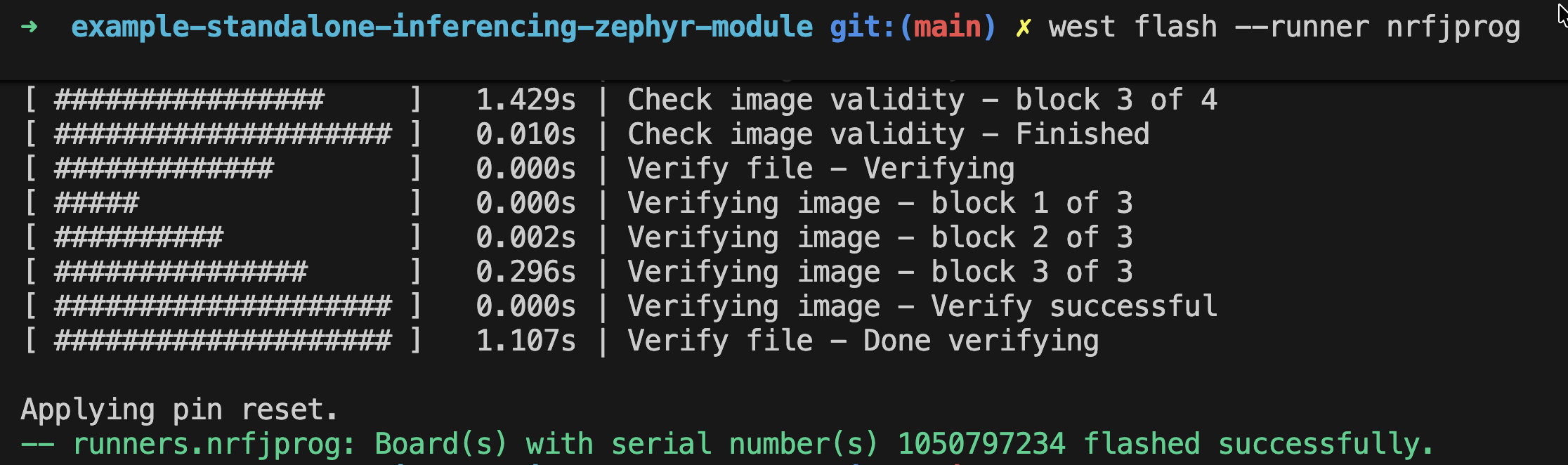
 Deploying to a device will look like this:
```bash theme={"system"}
west flash
```
Deploying to a device will look like this:
```bash theme={"system"}
west flash
```
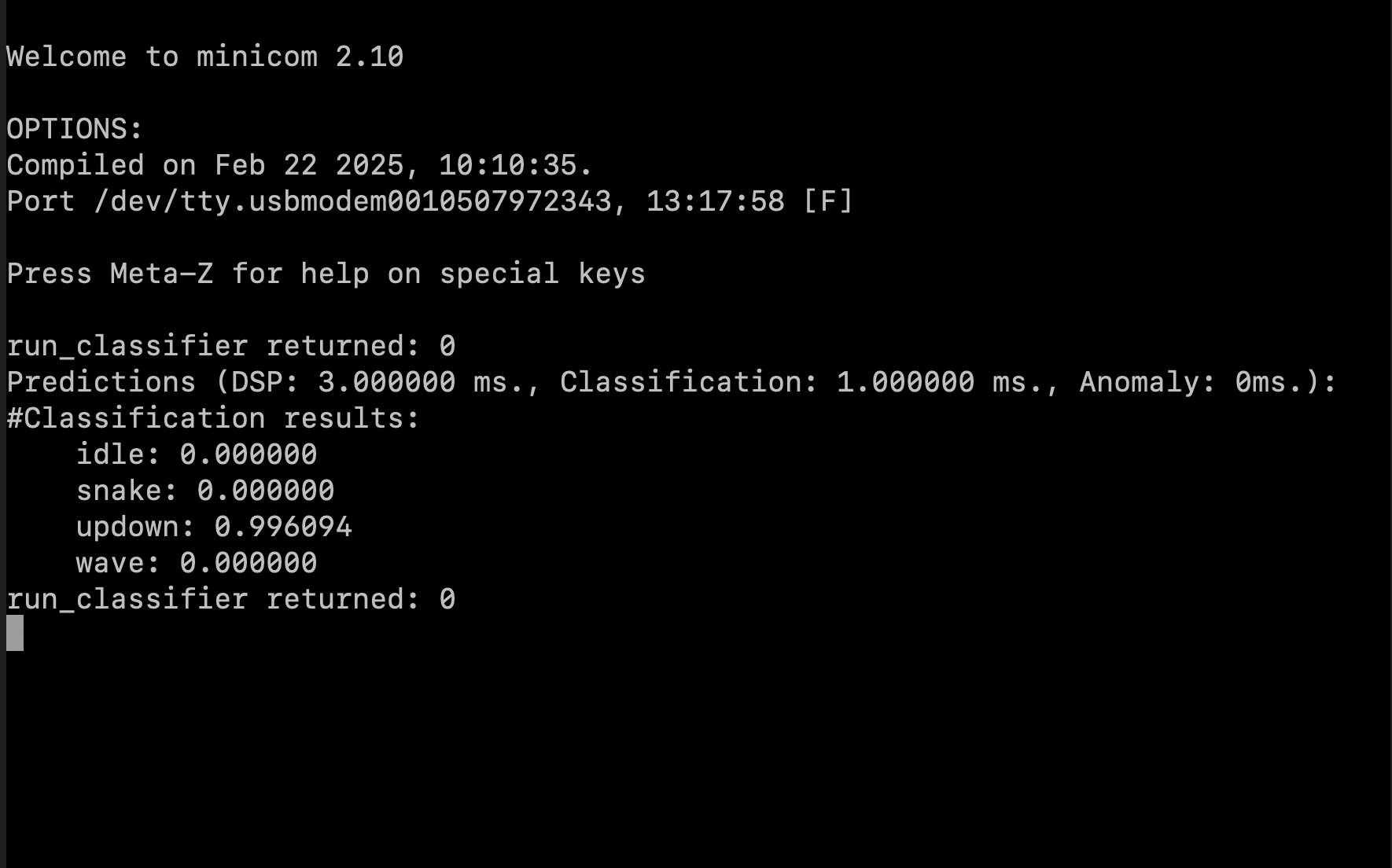
 View inference results:
 Let's get started.
## Prerequisites
Make sure you've followed one of the tutorials and have a trained impulse. For the purpose of this tutorial, we'll assume you trained a [Continuous motion recognition](/tutorials/end-to-end/motion-recognition) model. Also install the following software:
* [Edge Impulse CLI](/tools/clis/edge-impulse-cli/installation).
* Choose and set up your Zephyr-compatible hardware. You can find a list of supported boards in the [Zephyr documentation](https://docs.zephyrproject.org/latest/boards/index.html#).
* Install Zephyr or Nordic (for nRF based devices) NCS and its dependencies:
* [Zephyr SDK](https://docs.zephyrproject.org/latest/develop/getting_started/index.html): Follow the Zephyr getting started guide to install the Zephyr SDK and set up your environment. We also recommend following their Blinky tutorial to verify your setup.
* [Nordic NCS](https://docs.zephyrproject.org/latest/develop/getting_started/index.html) : Depending on your target hardware, you may need to install additional toolchains. For Nordic Semiconductor boards, follow the [Nordic NCS installation guide](https://developer.nordicsemi.com/nRF_Connect_SDK/doc/latest/nrf/getting_started/installation.html).
* [West](https://docs.zephyrproject.org/latest/develop/getting_started/index.html) : West is the meta-tool used to manage Zephyr projects and their dependencies. Install it using pip: `pip install -U west`
## Quick Start (5-10 minutes)
This guide is quite long, so here is a quick summary of the steps to get started with the Edge Impulse Zephyr module and command extensions.
## Command Extension Architecture
```mermaid theme={"system"}
graph LR
A[Studio] -->|west ei-build| B[Build API]
B -->|west ei-deploy| C[Download Model]
C -->|west build| D[Compile Firmware]
D -->|west flash| E[Deploy to Device]
style A fill:#9b59b6
style B fill:#3498db
style C fill:#e67e22
style D fill:#2ecc71
style E fill:#f39c12
```
```bash theme={"system"}
# 1. Initialize project
west init -m https://github.com/edgeimpulse/example-standalone-inferencing-zephyr-module
cd example-standalone-inferencing-zephyr-module
west update
# 2. Build model in Studio and download
west ei-build -k ei_abc123... -p 12345
west ei-deploy -k ei_abc123... -p 12345
unzip ei_model.zip -d ./model
# 3. Build firmware and flash
west build -b nrf52840dk_nrf52840 --pristine
west flash
```
For detailed explanations, continue reading below.
### Recommended versions
Used versions for the development of the example project are as follows:
* **ZEPHYR\_SDK\_VERSION** =0.17.4
* **west version** = "1.5.0"
* **zephyr main repo**: v3.7.1
## Zephyr Modules
Zephyr applications can import additional functionality through *[modules](https://docs.zephyrproject.org/latest/develop/modules.html)*, which are managed by the `west` tool.\
The Edge Impulse SDK is distributed as a Zephyr module so it can be seamlessly pulled into your project.
Using the Zephyr module has several benefits over manually copying the C++ library:
* **Automatic updates**: Easily update to the latest SDK version with `west update`.
* **Cleaner integration**: No need to manage third-party source code directly.
* **Native Zephyr build support**: The SDK is recognized as a standard module within the Zephyr ecosystem.
## Edge Impulse Zephyr Module
Whether starting from scratch or adding Edge Impulse to an existing Zephyr app, you can get up and running in minutes.
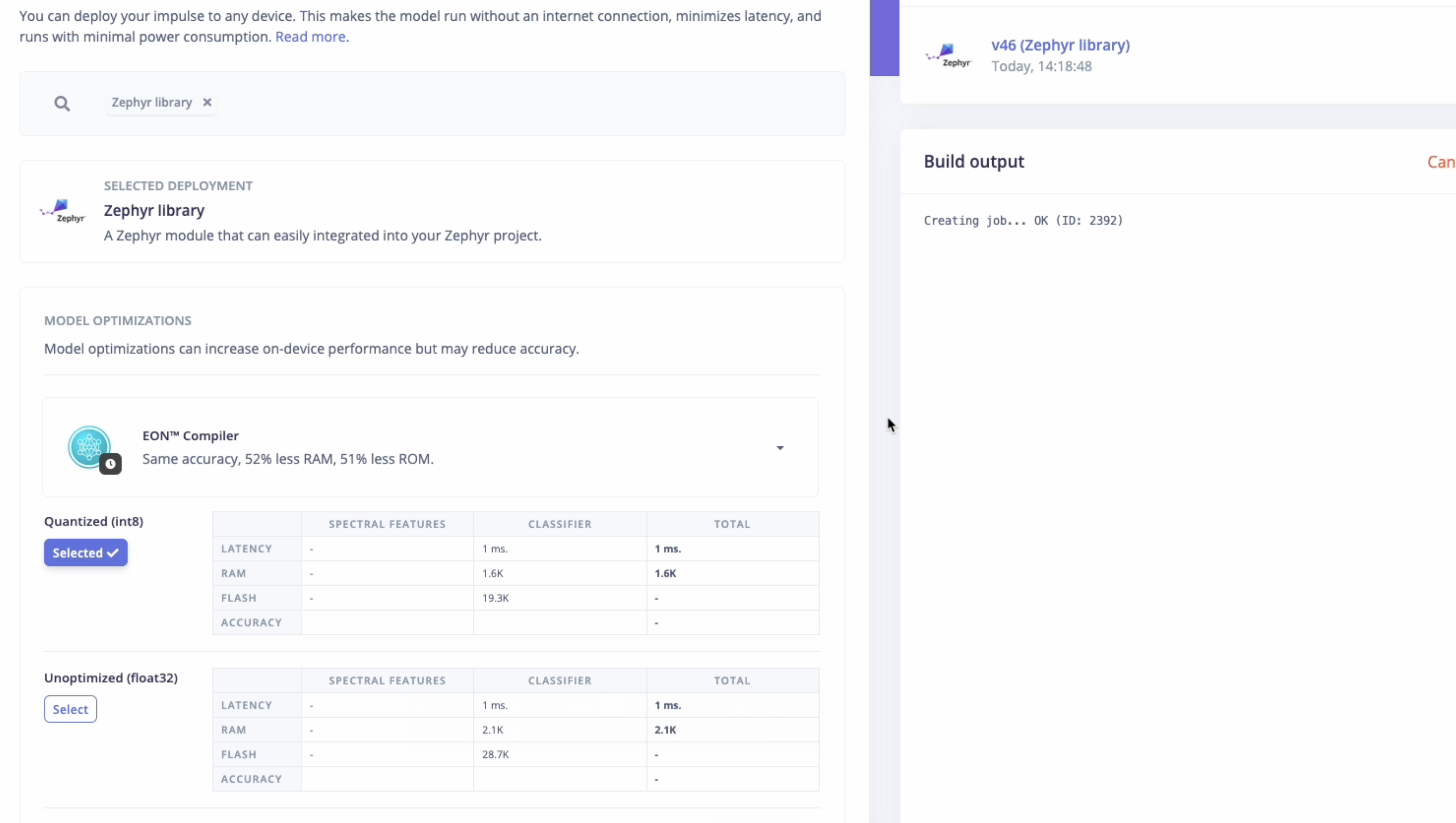
## Deploy your impulse as a Zephyr library
### Manual Deployment via Studio
Head over to your Edge Impulse project:
1. Go to the Deployment tab.
2. Select **Zephyr Module** as the target.
3. Click **Build** to generate the library.
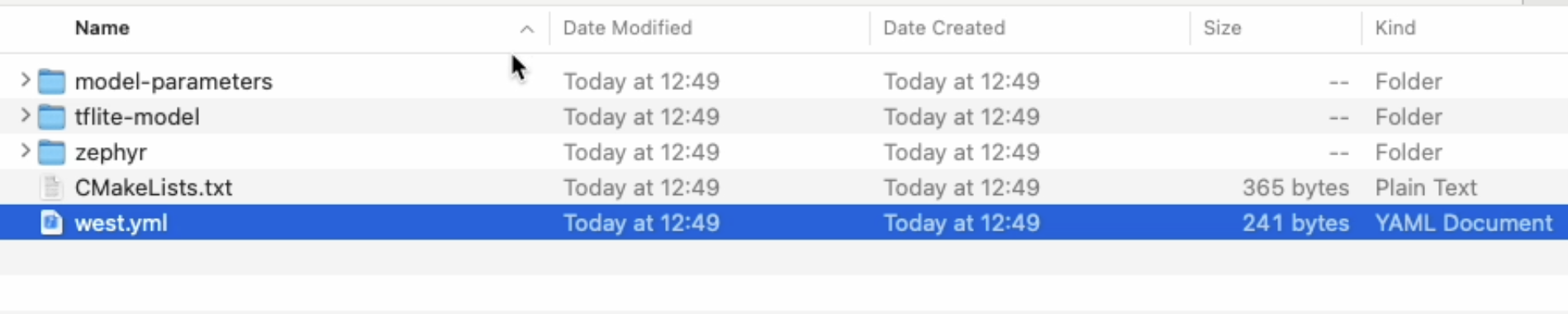
This creates a .zip archive containing your impulse and all required libraries.
Let's get started.
## Prerequisites
Make sure you've followed one of the tutorials and have a trained impulse. For the purpose of this tutorial, we'll assume you trained a [Continuous motion recognition](/tutorials/end-to-end/motion-recognition) model. Also install the following software:
* [Edge Impulse CLI](/tools/clis/edge-impulse-cli/installation).
* Choose and set up your Zephyr-compatible hardware. You can find a list of supported boards in the [Zephyr documentation](https://docs.zephyrproject.org/latest/boards/index.html#).
* Install Zephyr or Nordic (for nRF based devices) NCS and its dependencies:
* [Zephyr SDK](https://docs.zephyrproject.org/latest/develop/getting_started/index.html): Follow the Zephyr getting started guide to install the Zephyr SDK and set up your environment. We also recommend following their Blinky tutorial to verify your setup.
* [Nordic NCS](https://docs.zephyrproject.org/latest/develop/getting_started/index.html) : Depending on your target hardware, you may need to install additional toolchains. For Nordic Semiconductor boards, follow the [Nordic NCS installation guide](https://developer.nordicsemi.com/nRF_Connect_SDK/doc/latest/nrf/getting_started/installation.html).
* [West](https://docs.zephyrproject.org/latest/develop/getting_started/index.html) : West is the meta-tool used to manage Zephyr projects and their dependencies. Install it using pip: `pip install -U west`
## Quick Start (5-10 minutes)
This guide is quite long, so here is a quick summary of the steps to get started with the Edge Impulse Zephyr module and command extensions.
## Command Extension Architecture
```mermaid theme={"system"}
graph LR
A[Studio] -->|west ei-build| B[Build API]
B -->|west ei-deploy| C[Download Model]
C -->|west build| D[Compile Firmware]
D -->|west flash| E[Deploy to Device]
style A fill:#9b59b6
style B fill:#3498db
style C fill:#e67e22
style D fill:#2ecc71
style E fill:#f39c12
```
```bash theme={"system"}
# 1. Initialize project
west init -m https://github.com/edgeimpulse/example-standalone-inferencing-zephyr-module
cd example-standalone-inferencing-zephyr-module
west update
# 2. Build model in Studio and download
west ei-build -k ei_abc123... -p 12345
west ei-deploy -k ei_abc123... -p 12345
unzip ei_model.zip -d ./model
# 3. Build firmware and flash
west build -b nrf52840dk_nrf52840 --pristine
west flash
```
For detailed explanations, continue reading below.
### Recommended versions
Used versions for the development of the example project are as follows:
* **ZEPHYR\_SDK\_VERSION** =0.17.4
* **west version** = "1.5.0"
* **zephyr main repo**: v3.7.1
## Zephyr Modules
Zephyr applications can import additional functionality through *[modules](https://docs.zephyrproject.org/latest/develop/modules.html)*, which are managed by the `west` tool.\
The Edge Impulse SDK is distributed as a Zephyr module so it can be seamlessly pulled into your project.
Using the Zephyr module has several benefits over manually copying the C++ library:
* **Automatic updates**: Easily update to the latest SDK version with `west update`.
* **Cleaner integration**: No need to manage third-party source code directly.
* **Native Zephyr build support**: The SDK is recognized as a standard module within the Zephyr ecosystem.
## Edge Impulse Zephyr Module
Whether starting from scratch or adding Edge Impulse to an existing Zephyr app, you can get up and running in minutes.
## Deploy your impulse as a Zephyr library
### Manual Deployment via Studio
Head over to your Edge Impulse project:
1. Go to the Deployment tab.
2. Select **Zephyr Module** as the target.
3. Click **Build** to generate the library.
This creates a .zip archive containing your impulse and all required libraries.
 ### Automated Deployment with West Commands (Early Access Preview)
The Edge Impulse Zephyr module includes custom [West extension commands](https://docs.zephyrproject.org/latest/develop/west/extensions.html) that integrate directly with Edge Impulse Studio APIs for streamlined model deployment workflows.
#### `west ei-build` - Build your model in Studio
Use `west ei-build` to trigger a new build of your Edge Impulse model deployment in Studio:
```bash theme={"system"}
# Build the latest model configuration from your Edge Impulse project
west ei-build -k ei_abc123... -p 12345
# With optional parameters
west ei-build -k ei_abc123... -p 12345 -e tflite-eon -t int8 -i 1
```
**Required arguments:**
* `-k, --api-key` - Your Edge Impulse API key
* `-p, --project` - Your Edge Impulse project ID (integer)
**Optional arguments:**
* `-i, --impulseid` - Specific impulse ID to build (default: 1)
* `-e, --engine` - Build engine: `tflite` or `tflite-eon` (default: `tflite-eon`)
* `-t, --modeltype` - Model type: `int8` or `float32` (default: `int8`)
This command:
* Calls the Edge Impulse [Build On-Device Model API](https://docs.edgeimpulse.com/apis/studio/jobs/build-on-device-model)
* Triggers a fresh build of your Zephyr library deployment in Studio
* Waits for the build to complete
* Useful when you've made changes to your impulse configuration
This command builds your model **in Edge Impulse Studio**, not locally. It's equivalent to clicking "Build" in the Deployment tab.
#### `west ei-deploy` - Download deployment artifacts
Use `west ei-deploy` to download your pre-built Edge Impulse model deployment:
```bash theme={"system"}
# Download the latest built model from your Edge Impulse project
west ei-deploy -k ei_abc123... -p 12345
# With optional parameters
west ei-deploy -k ei_abc123... -p 12345 -e tflite-eon -t int8 -i 1
# The zip file is downloaded as ei_model.zip
# Extract it to the model/ directory
unzip ei_model.zip -d ./model
```
**Required arguments:**
* `-k, --api-key` - Your Edge Impulse API key
* `-p, --project` - Your Edge Impulse project ID (integer)
**Optional arguments:**
* `-i, --impulseid` - Specific impulse ID to download (default: 1)
* `-e, --engine` - Build engine: `tflite` or `tflite-eon` (default: `tflite-eon`)
* `-t, --modeltype` - Model type: `int8` or `float32` (default: `int8`)
This command:
* Calls the Edge Impulse [Download Deployment API](https://docs.edgeimpulse.com/apis/studio/deployment/download)
* Downloads the latest Zephyr library deployment as `ei_model.zip`
* You must manually extract it to the `model/` directory
You can find your API key in **Edge Impulse Studio** → **Dashboard** → **Keys**.\
Your project ID is visible in the URL: `studio.edgeimpulse.com/studio/12345`
#### Complete workflow example
Here's a typical development workflow using the extension commands:
```bash theme={"system"}
# 1. Initialize your project
west init -m https://github.com/edgeimpulse/example-standalone-inferencing-zephyr-module
cd example-standalone-inferencing-zephyr-module
west update
# 2. Build your model in Studio (if you made impulse changes)
west ei-build -k ei_abc123... -p 12345
# 3. Download the built model
west ei-deploy -k ei_abc123... -p 12345
# 4. Extract the model to the model/ directory
unzip ei_model.zip -d ./model
# 5. Build firmware locally
west build -b nrf52840dk_nrf52840 --pristine
# 6. Flash to device
west flash
```
#### Updating your model
**Option A: Use existing Studio build**
If you already built your model in Studio (via Deployment tab):
```bash theme={"system"}
# Download the latest deployment
west ei-deploy -k ei_abc123... -p 12345
# Extract to model directory
unzip ei_model.zip -d ./model
# Build and flash firmware
west build --pristine
west flash
```
**Option B: Build in Studio first**
If you made changes to your impulse configuration:
```bash theme={"system"}
# Trigger a new build in Studio
west ei-build -k ei_abc123... -p 12345
# Download the new build
west ei-deploy -k ei_abc123... -p 12345
# Extract to model directory
unzip ei_model.zip -d ./model
# Build and flash firmware
west build --pristine
west flash
```
Always use `--pristine` when building firmware after deploying a new model to ensure a clean build with the updated artifacts.
#### Build vs Deploy - When to use which?
| Command | Purpose | When to use | API Called |
| ---------------- | ------------------------ | ------------------------------------ | ----------------------------- |
| `west ei-build` | Build model in Studio | After changing impulse configuration | `/jobs/build-on-device-model` |
| `west ei-deploy` | Download pre-built model | After Studio build completes | `/deployment/download` |
**Typical workflow**: Make changes in Studio → `west ei-build -k KEY -p ID` → `west ei-deploy -k KEY -p ID` → `unzip ei_model.zip -d ./model` → `west build --pristine` → `west flash`
**Quick workflow**: If model is already built in Studio → `west ei-deploy -k KEY -p ID` → `unzip ei_model.zip -d ./model` → `west build --pristine` → `west flash`
#### Advanced: Using environment variables
West extension commands don't support environment variables directly, but you can create shell aliases:
```bash theme={"system"}
# Add to your ~/.bashrc or ~/.zshrc
export EI_API_KEY=ei_abc123...
export EI_PROJECT_ID=12345
# Create aliases
alias ei-build='west ei-build -k $EI_API_KEY -p $EI_PROJECT_ID'
alias ei-deploy='west ei-deploy -k $EI_API_KEY -p $EI_PROJECT_ID'
# Now use simplified commands
ei-build
ei-deploy
unzip ei_model.zip -d ./model
```
**Security Note**: Never commit API keys to version control. Store them in environment variables or a `.env` file:
```bash theme={"system"}
# .env (add to .gitignore)
export EI_API_KEY=ei_abc123...
export EI_PROJECT_ID=12345
# Load in your shell
source .env
```
This project differs from our [`example-standalone-inferencing-zephyr`](https://github.com/edgeimpulse/example-standalone-inferencing-zephyr) because it uses the **Edge Impulse SDK Zephyr module** and **Zephyr library deployment** for the model, instead of copying the C++ library export.
However, if you'd like to see complete reference Zephyr examples with full sensor integrations, check out our official Nordic Semiconductor firmware repositories:
* [nRF52840DK / nRF5340DK](https://github.com/edgeimpulse/firmware-nordic-nrf52840dk-nrf5340dk)
* [nRF9160DK](https://github.com/edgeimpulse/firmware-nordic-nrf9160dk)
* [Thingy:91](https://github.com/edgeimpulse/firmware-nordic-thingy91)
* [Thingy:53](https://github.com/edgeimpulse/firmware-nordic-thingy53)
## Using the Edge Impulse Zephyr module
As we have already deployed our model as a Zephyr library (either manually or using `west ei-deploy`), we can now use it in our example project or integrate it into our own Zephyr project.
To use the Edge Impulse SDK in your own Zephyr project, you need to add it as a module dependency. There are two ways to do this - see "Integrate into Existing Project" below:
We are going to explain how you can integrate your model with the Edge Impulse SDK Zephyr module in a standalone example project.
Navigate to your Zephyr workspace and clone the example project:
```bash theme={"system"}
# Create a new directory for your Zephyr project Workspace
mkdir zephyrproject
cd zephyrproject
```
To set up the project and fetch all required modules, run:
```bash theme={"system"}
# Initialize west with the example project manifest
west init -m https://github.com/edgeimpulse/example-standalone-inferencing-zephyr-module
cd example-standalone-inferencing-zephyr-module
west update
```
### Add the model to your project
Deploy your model directly from the command line:
```bash theme={"system"}
# Set your credentials
export EI_API_KEY=ei_abc123...
export EI_PROJECT_ID=12345
# Build model in Studio
west ei-build -k $EI_API_KEY -p $EI_PROJECT_ID
# Download the model
west ei-deploy -k $EI_API_KEY -p $EI_PROJECT_ID
# Extract to model directory
unzip ei_model.zip -d ./model
```
The model will be extracted to the `model/` directory.
Download the model from Edge Impulse Studio:
```bash theme={"system"}
# Go to the Deployment page of your Edge Impulse project.
# Choose the Zephyr library option.
# Extract the .zip in the project folder.
mkdir -p model
unzip -o ~/Downloads/your_model.zip -d model
```
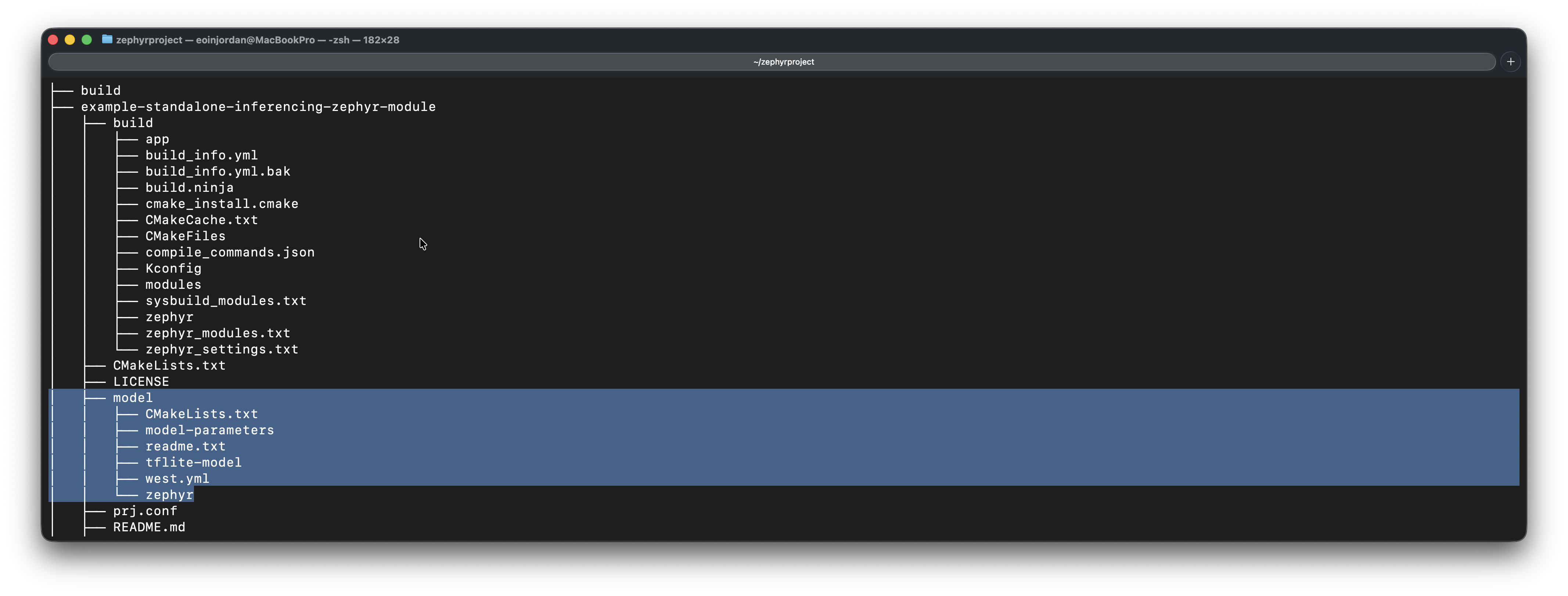
Your project structure should now look like this:
### Automated Deployment with West Commands (Early Access Preview)
The Edge Impulse Zephyr module includes custom [West extension commands](https://docs.zephyrproject.org/latest/develop/west/extensions.html) that integrate directly with Edge Impulse Studio APIs for streamlined model deployment workflows.
#### `west ei-build` - Build your model in Studio
Use `west ei-build` to trigger a new build of your Edge Impulse model deployment in Studio:
```bash theme={"system"}
# Build the latest model configuration from your Edge Impulse project
west ei-build -k ei_abc123... -p 12345
# With optional parameters
west ei-build -k ei_abc123... -p 12345 -e tflite-eon -t int8 -i 1
```
**Required arguments:**
* `-k, --api-key` - Your Edge Impulse API key
* `-p, --project` - Your Edge Impulse project ID (integer)
**Optional arguments:**
* `-i, --impulseid` - Specific impulse ID to build (default: 1)
* `-e, --engine` - Build engine: `tflite` or `tflite-eon` (default: `tflite-eon`)
* `-t, --modeltype` - Model type: `int8` or `float32` (default: `int8`)
This command:
* Calls the Edge Impulse [Build On-Device Model API](https://docs.edgeimpulse.com/apis/studio/jobs/build-on-device-model)
* Triggers a fresh build of your Zephyr library deployment in Studio
* Waits for the build to complete
* Useful when you've made changes to your impulse configuration
This command builds your model **in Edge Impulse Studio**, not locally. It's equivalent to clicking "Build" in the Deployment tab.
#### `west ei-deploy` - Download deployment artifacts
Use `west ei-deploy` to download your pre-built Edge Impulse model deployment:
```bash theme={"system"}
# Download the latest built model from your Edge Impulse project
west ei-deploy -k ei_abc123... -p 12345
# With optional parameters
west ei-deploy -k ei_abc123... -p 12345 -e tflite-eon -t int8 -i 1
# The zip file is downloaded as ei_model.zip
# Extract it to the model/ directory
unzip ei_model.zip -d ./model
```
**Required arguments:**
* `-k, --api-key` - Your Edge Impulse API key
* `-p, --project` - Your Edge Impulse project ID (integer)
**Optional arguments:**
* `-i, --impulseid` - Specific impulse ID to download (default: 1)
* `-e, --engine` - Build engine: `tflite` or `tflite-eon` (default: `tflite-eon`)
* `-t, --modeltype` - Model type: `int8` or `float32` (default: `int8`)
This command:
* Calls the Edge Impulse [Download Deployment API](https://docs.edgeimpulse.com/apis/studio/deployment/download)
* Downloads the latest Zephyr library deployment as `ei_model.zip`
* You must manually extract it to the `model/` directory
You can find your API key in **Edge Impulse Studio** → **Dashboard** → **Keys**.\
Your project ID is visible in the URL: `studio.edgeimpulse.com/studio/12345`
#### Complete workflow example
Here's a typical development workflow using the extension commands:
```bash theme={"system"}
# 1. Initialize your project
west init -m https://github.com/edgeimpulse/example-standalone-inferencing-zephyr-module
cd example-standalone-inferencing-zephyr-module
west update
# 2. Build your model in Studio (if you made impulse changes)
west ei-build -k ei_abc123... -p 12345
# 3. Download the built model
west ei-deploy -k ei_abc123... -p 12345
# 4. Extract the model to the model/ directory
unzip ei_model.zip -d ./model
# 5. Build firmware locally
west build -b nrf52840dk_nrf52840 --pristine
# 6. Flash to device
west flash
```
#### Updating your model
**Option A: Use existing Studio build**
If you already built your model in Studio (via Deployment tab):
```bash theme={"system"}
# Download the latest deployment
west ei-deploy -k ei_abc123... -p 12345
# Extract to model directory
unzip ei_model.zip -d ./model
# Build and flash firmware
west build --pristine
west flash
```
**Option B: Build in Studio first**
If you made changes to your impulse configuration:
```bash theme={"system"}
# Trigger a new build in Studio
west ei-build -k ei_abc123... -p 12345
# Download the new build
west ei-deploy -k ei_abc123... -p 12345
# Extract to model directory
unzip ei_model.zip -d ./model
# Build and flash firmware
west build --pristine
west flash
```
Always use `--pristine` when building firmware after deploying a new model to ensure a clean build with the updated artifacts.
#### Build vs Deploy - When to use which?
| Command | Purpose | When to use | API Called |
| ---------------- | ------------------------ | ------------------------------------ | ----------------------------- |
| `west ei-build` | Build model in Studio | After changing impulse configuration | `/jobs/build-on-device-model` |
| `west ei-deploy` | Download pre-built model | After Studio build completes | `/deployment/download` |
**Typical workflow**: Make changes in Studio → `west ei-build -k KEY -p ID` → `west ei-deploy -k KEY -p ID` → `unzip ei_model.zip -d ./model` → `west build --pristine` → `west flash`
**Quick workflow**: If model is already built in Studio → `west ei-deploy -k KEY -p ID` → `unzip ei_model.zip -d ./model` → `west build --pristine` → `west flash`
#### Advanced: Using environment variables
West extension commands don't support environment variables directly, but you can create shell aliases:
```bash theme={"system"}
# Add to your ~/.bashrc or ~/.zshrc
export EI_API_KEY=ei_abc123...
export EI_PROJECT_ID=12345
# Create aliases
alias ei-build='west ei-build -k $EI_API_KEY -p $EI_PROJECT_ID'
alias ei-deploy='west ei-deploy -k $EI_API_KEY -p $EI_PROJECT_ID'
# Now use simplified commands
ei-build
ei-deploy
unzip ei_model.zip -d ./model
```
**Security Note**: Never commit API keys to version control. Store them in environment variables or a `.env` file:
```bash theme={"system"}
# .env (add to .gitignore)
export EI_API_KEY=ei_abc123...
export EI_PROJECT_ID=12345
# Load in your shell
source .env
```
This project differs from our [`example-standalone-inferencing-zephyr`](https://github.com/edgeimpulse/example-standalone-inferencing-zephyr) because it uses the **Edge Impulse SDK Zephyr module** and **Zephyr library deployment** for the model, instead of copying the C++ library export.
However, if you'd like to see complete reference Zephyr examples with full sensor integrations, check out our official Nordic Semiconductor firmware repositories:
* [nRF52840DK / nRF5340DK](https://github.com/edgeimpulse/firmware-nordic-nrf52840dk-nrf5340dk)
* [nRF9160DK](https://github.com/edgeimpulse/firmware-nordic-nrf9160dk)
* [Thingy:91](https://github.com/edgeimpulse/firmware-nordic-thingy91)
* [Thingy:53](https://github.com/edgeimpulse/firmware-nordic-thingy53)
## Using the Edge Impulse Zephyr module
As we have already deployed our model as a Zephyr library (either manually or using `west ei-deploy`), we can now use it in our example project or integrate it into our own Zephyr project.
To use the Edge Impulse SDK in your own Zephyr project, you need to add it as a module dependency. There are two ways to do this - see "Integrate into Existing Project" below:
We are going to explain how you can integrate your model with the Edge Impulse SDK Zephyr module in a standalone example project.
Navigate to your Zephyr workspace and clone the example project:
```bash theme={"system"}
# Create a new directory for your Zephyr project Workspace
mkdir zephyrproject
cd zephyrproject
```
To set up the project and fetch all required modules, run:
```bash theme={"system"}
# Initialize west with the example project manifest
west init -m https://github.com/edgeimpulse/example-standalone-inferencing-zephyr-module
cd example-standalone-inferencing-zephyr-module
west update
```
### Add the model to your project
Deploy your model directly from the command line:
```bash theme={"system"}
# Set your credentials
export EI_API_KEY=ei_abc123...
export EI_PROJECT_ID=12345
# Build model in Studio
west ei-build -k $EI_API_KEY -p $EI_PROJECT_ID
# Download the model
west ei-deploy -k $EI_API_KEY -p $EI_PROJECT_ID
# Extract to model directory
unzip ei_model.zip -d ./model
```
The model will be extracted to the `model/` directory.
Download the model from Edge Impulse Studio:
```bash theme={"system"}
# Go to the Deployment page of your Edge Impulse project.
# Choose the Zephyr library option.
# Extract the .zip in the project folder.
mkdir -p model
unzip -o ~/Downloads/your_model.zip -d model
```
Your project structure should now look like this:
 ### Test with sample features from the Live classification page
To do this, first head back to the studio and click on the **Live classification** tab. Then load a validation sample, and click on a row under 'Detailed result'.
### Test with sample features from the Live classification page
To do this, first head back to the studio and click on the **Live classification** tab. Then load a validation sample, and click on a row under 'Detailed result'.
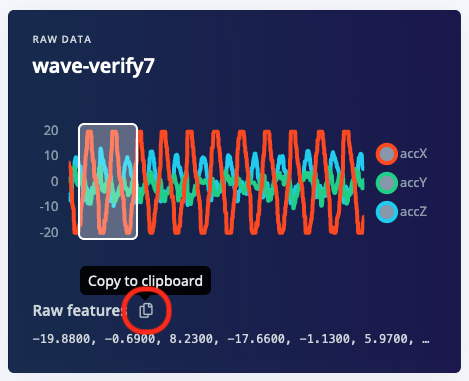
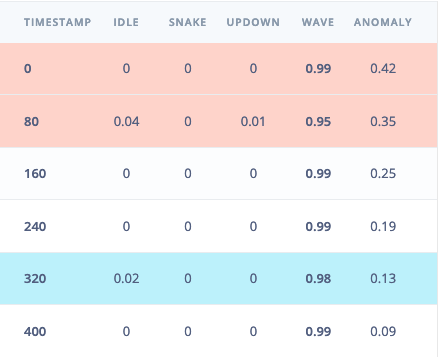 To verify that the local application classifies the same result, we need the raw features for this timestamp. To do so click on the 'Copy to clipboard' button next to 'Raw features'. This will copy the raw input values from this validation file, before any signal processing or inferencing happened.
 Next, update the sample you want to test in main.cpp:
```bash theme={"system"}
nano src/main.cpp
```
Paste the copied features into the features array:
```cpp theme={"system"}
static const float features[] = {
// copy raw features here (for example from the 'Live classification' page)
// see https://docs.edgeimpulse.com/docs/running-your-impulse-locally-zephyr
};
```
Next, update the sample you want to test in main.cpp:
```bash theme={"system"}
nano src/main.cpp
```
Paste the copied features into the features array:
```cpp theme={"system"}
static const float features[] = {
// copy raw features here (for example from the 'Live classification' page)
// see https://docs.edgeimpulse.com/docs/running-your-impulse-locally-zephyr
};
```
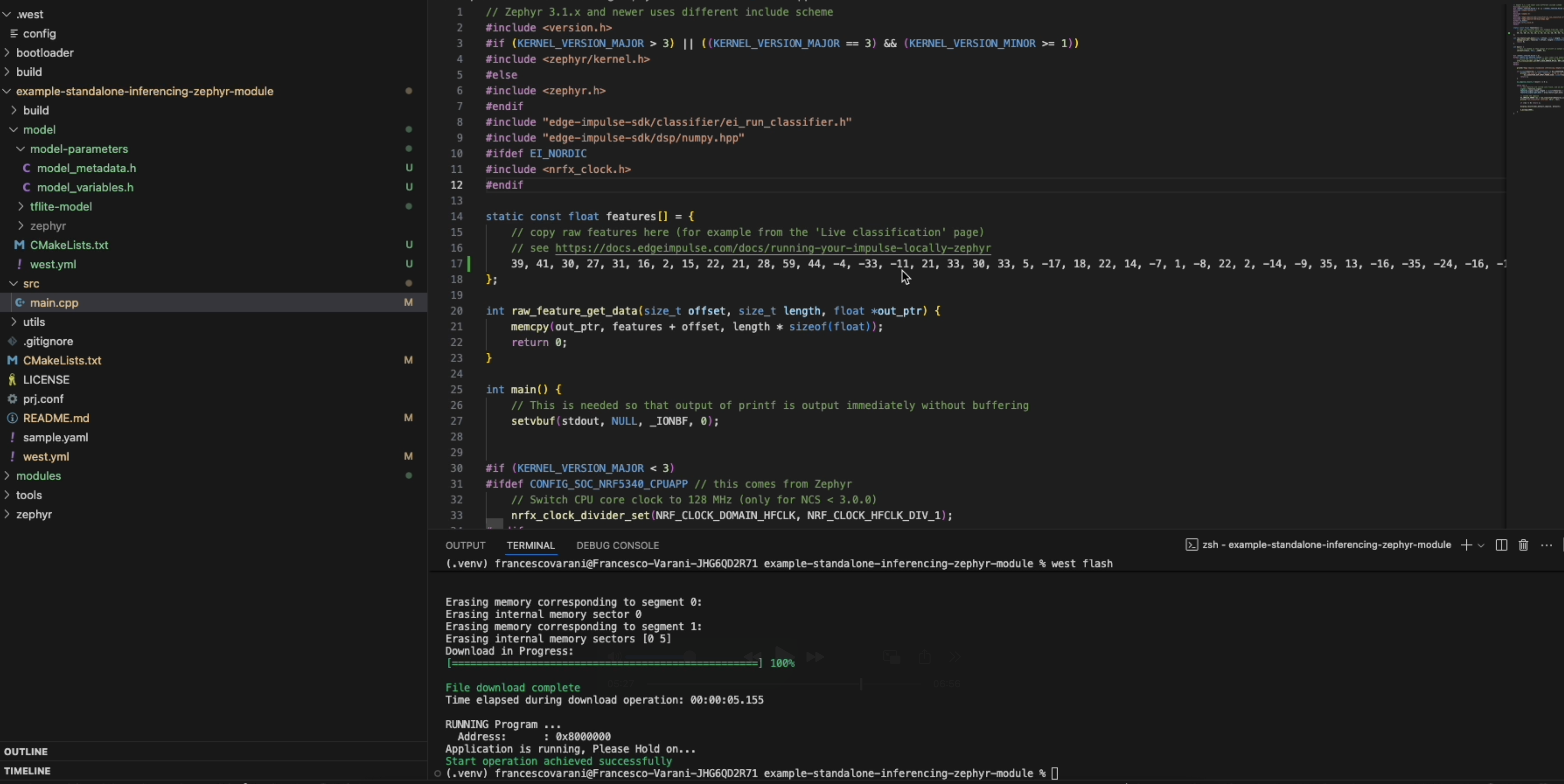 We are going to present two ways how you can integrate the module into your own Zephyr project. Update the west.yml file of your Zephyr main repository, or use this project as a manifest repository.
### Option 1: Update west.yml
We are going to present two ways how you can integrate the module into your own Zephyr project. Update the west.yml file of your Zephyr main repository, or use this project as a manifest repository.
### Option 1: Update west.yml
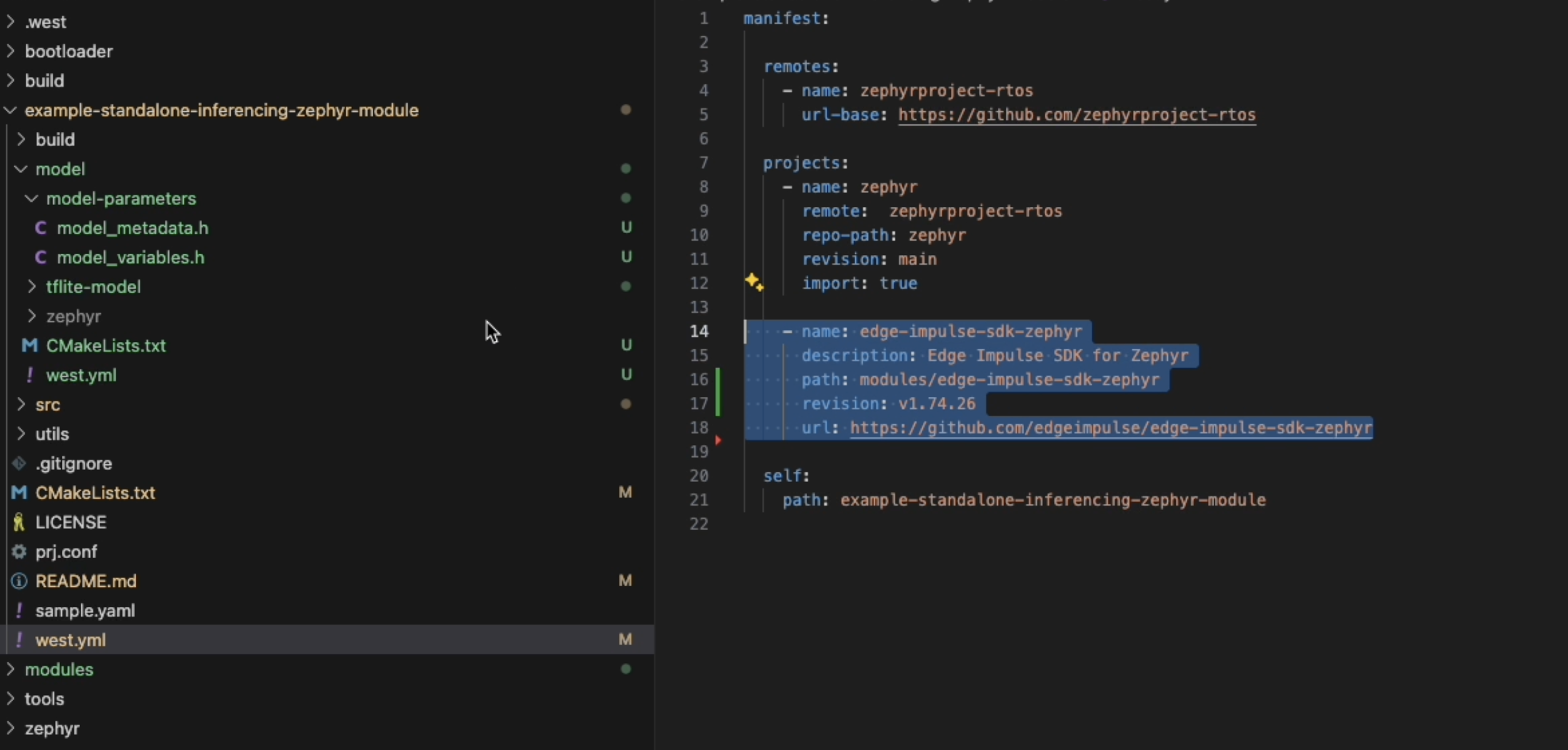 Add the following lines to your Zephyr repository's `west.yml`, then call `west update` to download the SDK:
Set SDK\_VERSION to latest e.g. v1.75.4 see [tags](https://github.com/edgeimpulse/example-standalone-inferencing-zephyr-module/tags)
```yaml theme={"system"}
- name: edge-impulse-sdk-zephyr
path: modules/edge-impulse-sdk-zephyr
revision: ${SDK_VERSION} # e.g., v1.75.4 see [tags](https://github.com/edgeimpulse/example-standalone-inferencing-zephyr-module/tags)
url: https://github.com/edgeimpulse/edge-impulse-sdk-zephyr
west-commands: scripts/west-commands.yml # Required for ei-build and ei-deploy commands
```
### Option 2: Use this project as a manifest repository
From the root of your project folder:
```bash theme={"system"}
west init --local .
cd ..
west update
```
This will pull or update all required modules.
Check the [Zephyr module documentation](https://docs.zephyrproject.org/latest/develop/modules.html) for best practices.
### Update the model
```bash theme={"system"}
# From your project directory (manifest repo)
cd example-standalone-inferencing-zephyr-module
# Build model in Studio
west ei-build -k ei_abc123... -p 12345
# Download the deployment
west ei-deploy -k ei_abc123... -p 12345
# Extract to model directory
unzip ei_model.zip -d ./model
```
Go to the Deployment page of your Edge Impulse project.
Choose the Zephyr library option.
Extract the .zip in your project folder:
```bash theme={"system"}
mkdir -p model
unzip -o ~/Downloads/your_model.zip -d model
```
### Add the model to your project
Add the extracted model path in your CMakeLists.txt:
```cmake theme={"system"}
list(APPEND ZEPHYR_EXTRA_MODULES ${CMAKE_CURRENT_SOURCE_DIR}/model)
```
## Compile and flash
**Quick workflow**: Use the West extension commands for the most efficient development cycle. See the [West Extension Commands](#automated-deployment-with-west-commands) section above.
Run the following commands to compile and flash your application:
Add the following lines to your Zephyr repository's `west.yml`, then call `west update` to download the SDK:
Set SDK\_VERSION to latest e.g. v1.75.4 see [tags](https://github.com/edgeimpulse/example-standalone-inferencing-zephyr-module/tags)
```yaml theme={"system"}
- name: edge-impulse-sdk-zephyr
path: modules/edge-impulse-sdk-zephyr
revision: ${SDK_VERSION} # e.g., v1.75.4 see [tags](https://github.com/edgeimpulse/example-standalone-inferencing-zephyr-module/tags)
url: https://github.com/edgeimpulse/edge-impulse-sdk-zephyr
west-commands: scripts/west-commands.yml # Required for ei-build and ei-deploy commands
```
### Option 2: Use this project as a manifest repository
From the root of your project folder:
```bash theme={"system"}
west init --local .
cd ..
west update
```
This will pull or update all required modules.
Check the [Zephyr module documentation](https://docs.zephyrproject.org/latest/develop/modules.html) for best practices.
### Update the model
```bash theme={"system"}
# From your project directory (manifest repo)
cd example-standalone-inferencing-zephyr-module
# Build model in Studio
west ei-build -k ei_abc123... -p 12345
# Download the deployment
west ei-deploy -k ei_abc123... -p 12345
# Extract to model directory
unzip ei_model.zip -d ./model
```
Go to the Deployment page of your Edge Impulse project.
Choose the Zephyr library option.
Extract the .zip in your project folder:
```bash theme={"system"}
mkdir -p model
unzip -o ~/Downloads/your_model.zip -d model
```
### Add the model to your project
Add the extracted model path in your CMakeLists.txt:
```cmake theme={"system"}
list(APPEND ZEPHYR_EXTRA_MODULES ${CMAKE_CURRENT_SOURCE_DIR}/model)
```
## Compile and flash
**Quick workflow**: Use the West extension commands for the most efficient development cycle. See the [West Extension Commands](#automated-deployment-with-west-commands) section above.
Run the following commands to compile and flash your application:
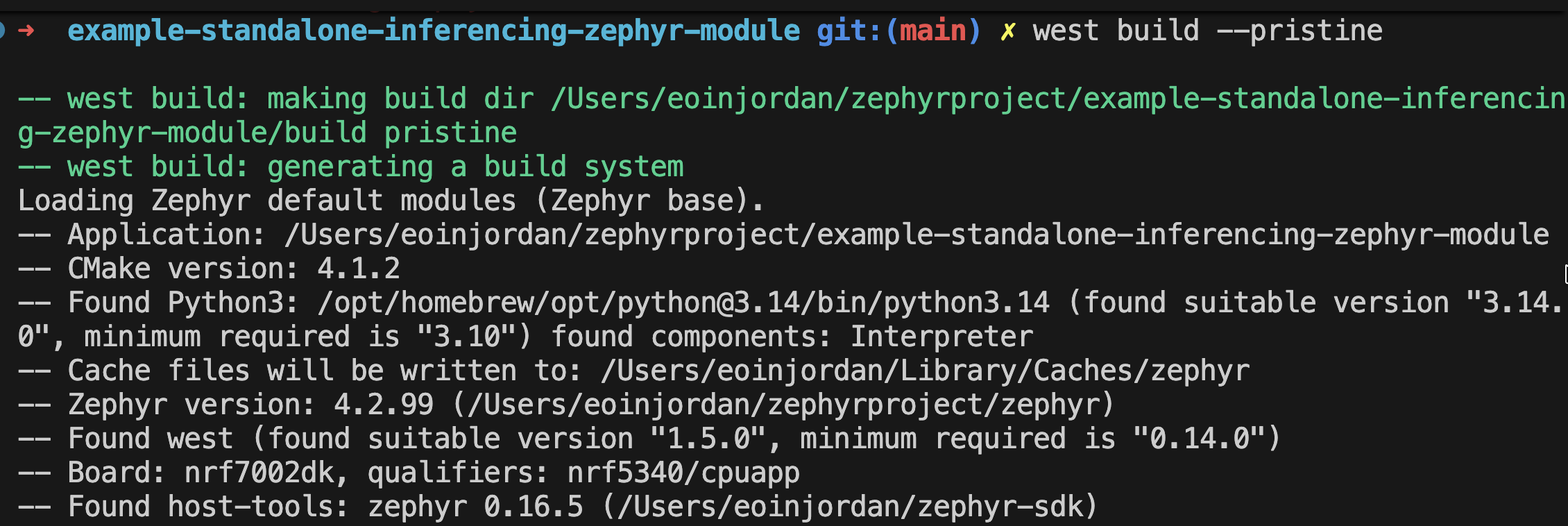 ### Build the project
Here you can specify the board you want to test by modifying `.west/config` or by building with west:
#### Specify the board
```bash theme={"system"}
cd your_zephyr_project
nano .west/config
```
Specify the board you want to test by modifying `.west/config`.
Add your board name under the `[build]` section:
```ini theme={"system"}
[build]
board =
### example boards:
### Arduino
#board = arduino_nano_33_ble
###STM32 Nucleo U585ZI Q
#board = nucleo_u585zi_q
# Renesas RA6M5 Evaluation Kit
#board = ek_ra6m5
## Nordic Thingy:91
#board = thingy91_nrf9160ns
## Nordic nRF9160-DK
#board = nrf9160dk_nrf9160ns
## Nordic Thingy:53
#board = thingy53_nrf5340_cpuapp
## Nordic nRF7002-DK
#board = nrf7002dk_nrf5340_cpuapp
## Arduino Opta
#board = arduino_opta
## Arduino Portenta H7
#board = arduino_portenta_h7_m7
## Arduino Nicla Vision
#board = arduino_nicla_vision
## M5Stack Core2
#board = m5stack_core2
## Silicon Labs EFR32MG24
#board = efr32mg24_brd4186c
```
Then build the project with:
```bash theme={"system"}
west build --pristine
```
Then flash with:
```bash theme={"system"}
west flash
```
Optionally, you can also flash using a programmer specific to your board. For example, with Nordic nRF-based boards, you can use `nrfjprog`:
```bash theme={"system"}
west flash --runner nrfjprog
```
For Silicon Labs boards, use J-Link:
```bash theme={"system"}
west flash --runner jlink
```
### View inference results
You now have standalone inferencing with Edge Impulse on Zephyr!
## Troubleshooting
If you encounter issues with west or Zephyr, ensure you have the required dependencies installed. You can install them using pip:
```bash theme={"system"}
pip install -U west
pip install -U -r https://raw.githubusercontent.com/zephyrproject-rtos/zephyr/main/scripts/requirements.txt
```
### Common Issues
**Symptoms:**
```
west: unknown command "ei-build"; workspace does not define this extension command
```
**Solutions:**
1. **Run from the manifest repository directory:**
```bash theme={"system"}
# Wrong - from workspace root
cd /path/to/zephyrproject
west ei-build # ❌ Fails
# Correct - from manifest repository
cd /path/to/zephyrproject/your-project-name
west ei-build # ✅ Works
```
2. **Enable extension commands:**
```bash theme={"system"}
west config --local commands.allow_extensions true
```
3. **Verify your `west.yml` includes west-commands registration:**
```yaml theme={"system"}
- name: edge-impulse-sdk-zephyr
path: modules/edge-impulse-sdk-zephyr
revision: v1.80.0
url: https://github.com/edgeimpulse/edge-impulse-sdk-zephyr
west-commands: scripts/west-commands.yml # Required!
```
4. **Update workspace:**
```bash theme={"system"}
west update
west help # Verify ei-build and ei-deploy appear
```
**Cause**: Invalid API key or project ID
**Solution:**
* Verify your API key in Edge Impulse Studio → Dashboard → Keys
* Ensure your project ID matches the URL: `studio.edgeimpulse.com/studio/YOUR_ID`
* Check API key has deployment permissions
* Use correct flags: `-k` for API key, `-p` for project ID
**Cause**: Studio build is taking longer than expected
**Solution:**
* Large models may take several minutes to build
* Check build status in Edge Impulse Studio → Deployment tab
* The command will wait for build completion
**Cause**: Studio has a cached build
**Solution:**
```bash theme={"system"}
# Force a fresh build first
west ei-build -k ei_abc123... -p 12345
# Then download
west ei-deploy -k ei_abc123... -p 12345
# Extract
unzip ei_model.zip -d ./model
```
**Cause**: Forgot to extract ei\_model.zip
**Solution:**
```bash theme={"system"}
# After downloading
west ei-deploy -k ei_abc123... -p 12345
# Extract to model directory
unzip ei_model.zip -d ./model
# Verify model/ contains:
ls model/
# Should see:
# - CMakeLists.txt
# - model-parameters/
# - tflite-model/
# - zephyr/
```
## Next Steps
Explore the Zephyr module series for Edge Impulse integration
Official Zephyr Project documentation
Get help from the community
## Summary
By packaging the **Edge Impulse SDK** and your **model** as a Zephyr module, you gain native integration within Zephyr's build system. The custom West extension commands (`west ei-build` and `west ei-deploy`) further streamline your development workflow, making it easier to iterate on your machine learning models directly from the command line.
This modular approach makes your firmware easier to maintain, update, and scale across 850+ supported boards.
By packaging the **Edge Impulse SDK** and your **model** as a Zephyr module, you gain native integration within Zephyr’s build system.\
This modular approach makes your firmware easier to maintain, update, and scale across supported boards.
### Build the project
Here you can specify the board you want to test by modifying `.west/config` or by building with west:
#### Specify the board
```bash theme={"system"}
cd your_zephyr_project
nano .west/config
```
Specify the board you want to test by modifying `.west/config`.
Add your board name under the `[build]` section:
```ini theme={"system"}
[build]
board =
### example boards:
### Arduino
#board = arduino_nano_33_ble
###STM32 Nucleo U585ZI Q
#board = nucleo_u585zi_q
# Renesas RA6M5 Evaluation Kit
#board = ek_ra6m5
## Nordic Thingy:91
#board = thingy91_nrf9160ns
## Nordic nRF9160-DK
#board = nrf9160dk_nrf9160ns
## Nordic Thingy:53
#board = thingy53_nrf5340_cpuapp
## Nordic nRF7002-DK
#board = nrf7002dk_nrf5340_cpuapp
## Arduino Opta
#board = arduino_opta
## Arduino Portenta H7
#board = arduino_portenta_h7_m7
## Arduino Nicla Vision
#board = arduino_nicla_vision
## M5Stack Core2
#board = m5stack_core2
## Silicon Labs EFR32MG24
#board = efr32mg24_brd4186c
```
Then build the project with:
```bash theme={"system"}
west build --pristine
```
Then flash with:
```bash theme={"system"}
west flash
```
Optionally, you can also flash using a programmer specific to your board. For example, with Nordic nRF-based boards, you can use `nrfjprog`:
```bash theme={"system"}
west flash --runner nrfjprog
```
For Silicon Labs boards, use J-Link:
```bash theme={"system"}
west flash --runner jlink
```
### View inference results
You now have standalone inferencing with Edge Impulse on Zephyr!
## Troubleshooting
If you encounter issues with west or Zephyr, ensure you have the required dependencies installed. You can install them using pip:
```bash theme={"system"}
pip install -U west
pip install -U -r https://raw.githubusercontent.com/zephyrproject-rtos/zephyr/main/scripts/requirements.txt
```
### Common Issues
**Symptoms:**
```
west: unknown command "ei-build"; workspace does not define this extension command
```
**Solutions:**
1. **Run from the manifest repository directory:**
```bash theme={"system"}
# Wrong - from workspace root
cd /path/to/zephyrproject
west ei-build # ❌ Fails
# Correct - from manifest repository
cd /path/to/zephyrproject/your-project-name
west ei-build # ✅ Works
```
2. **Enable extension commands:**
```bash theme={"system"}
west config --local commands.allow_extensions true
```
3. **Verify your `west.yml` includes west-commands registration:**
```yaml theme={"system"}
- name: edge-impulse-sdk-zephyr
path: modules/edge-impulse-sdk-zephyr
revision: v1.80.0
url: https://github.com/edgeimpulse/edge-impulse-sdk-zephyr
west-commands: scripts/west-commands.yml # Required!
```
4. **Update workspace:**
```bash theme={"system"}
west update
west help # Verify ei-build and ei-deploy appear
```
**Cause**: Invalid API key or project ID
**Solution:**
* Verify your API key in Edge Impulse Studio → Dashboard → Keys
* Ensure your project ID matches the URL: `studio.edgeimpulse.com/studio/YOUR_ID`
* Check API key has deployment permissions
* Use correct flags: `-k` for API key, `-p` for project ID
**Cause**: Studio build is taking longer than expected
**Solution:**
* Large models may take several minutes to build
* Check build status in Edge Impulse Studio → Deployment tab
* The command will wait for build completion
**Cause**: Studio has a cached build
**Solution:**
```bash theme={"system"}
# Force a fresh build first
west ei-build -k ei_abc123... -p 12345
# Then download
west ei-deploy -k ei_abc123... -p 12345
# Extract
unzip ei_model.zip -d ./model
```
**Cause**: Forgot to extract ei\_model.zip
**Solution:**
```bash theme={"system"}
# After downloading
west ei-deploy -k ei_abc123... -p 12345
# Extract to model directory
unzip ei_model.zip -d ./model
# Verify model/ contains:
ls model/
# Should see:
# - CMakeLists.txt
# - model-parameters/
# - tflite-model/
# - zephyr/
```
## Next Steps
Explore the Zephyr module series for Edge Impulse integration
Official Zephyr Project documentation
Get help from the community
## Summary
By packaging the **Edge Impulse SDK** and your **model** as a Zephyr module, you gain native integration within Zephyr's build system. The custom West extension commands (`west ei-build` and `west ei-deploy`) further streamline your development workflow, making it easier to iterate on your machine learning models directly from the command line.
This modular approach makes your firmware easier to maintain, update, and scale across 850+ supported boards.
By packaging the **Edge Impulse SDK** and your **model** as a Zephyr module, you gain native integration within Zephyr’s build system.\
This modular approach makes your firmware easier to maintain, update, and scale across supported boards.