> ## Documentation Index
> Fetch the complete documentation index at: https://docs.edgeimpulse.com/llms.txt
> Use this file to discover all available pages before exploring further.
# Run C++ library on Himax WE-I Plus
Impulses can be deployed as a C++ library. This packages all your signal processing blocks, configuration and learning blocks up into a single package. You can include this package in your own application to run the impulse locally. In this tutorial you'll export an impulse, and build an application for the [Himax WE-I Plus](/hardware/boards/himax-we-i-plus) development board to classify sensor data.
**Knowledge required**
This tutorial assumes that you're familiar with building applications for the Himax WE-I Plus. If you're unfamiliar with either of these you build binaries directly for your development board from the **Deployment** page in the studio.
Note: Are you looking for an example that has all sensors included? The Edge Impulse firmware for the Himax WE-I Plus has that. See [edgeimpulse/firmware-himax-we-i-plus](https://github.com/edgeimpulse/firmware-himax-we-i-plus).
### Prerequisites
Make sure you've followed one of the tutorials and have a trained impulse. Also install the following software:
* [Edge Impulse CLI](/tools/clis/edge-impulse-cli/installation) - to flash the firmware.
* A build toolchain, either:
* [Docker desktop](https://www.docker.com/products/docker-desktop).
* Or, the [GNU Toolchain for DesignWare ARC processors](https://github.com/foss-for-synopsys-dwc-arc-processors/toolchain), and make sure you have `arc-elf32-gcc` in your PATH (Linux only).
* Or, the [DesignWare ARC MetaWare Toolkit](https://www.synopsys.com/dw/ipdir.php?ds=sw_metaware) - including a valid license, and make sure you have `ccac` in your PATH.
If you're building with the GNU or DesignWare toolchains, also install:
* [CMake](https://cmake.org).
* [GNU Make](https://www.gnu.org/software/make/).
### Cloning the base repository
We created an example repository which contains a small application for the Himax WE-I Plus, which takes the raw features as an argument, and prints out the final classification. Download the application [here](https://github.com/edgeimpulse/example-standalone-inferencing-himax/archive/main.zip), or import this repository using Git:
```
$ git clone https://github.com/edgeimpulse/example-standalone-inferencing-himax
```
### Deploying your impulse
Head over to your Edge Impulse project, and go to **Deployment**. From here you can create the full library which contains the impulse and all external required libraries. Select **C++ library** and click **Build** to create the library.
Download the `.zip` file and extract the directories in the 'example-standalone-inferencing-himax' folder. **Make sure to not replace `CMakeLists.txt` in this folder.** Your final folder structure should look like this:
```
example-standalone-inferencing-himax
|_ arc_mli_package
|_ edge-impulse-sdk
|_ image_gen_linux_v3
|_ model-parameters
|_ tflite-model
|_ main.cc
```
### Running the impulse
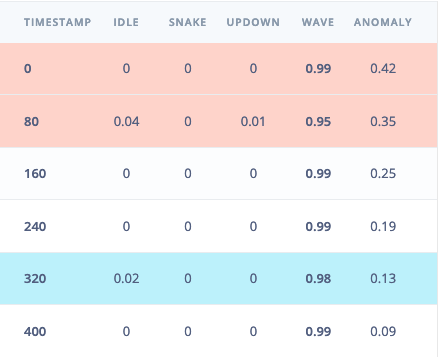
With the project ready it's time to verify that the application works. Head back to the studio and click on **Live classification**. Then load a validation sample, and click on a row under 'Detailed result'.
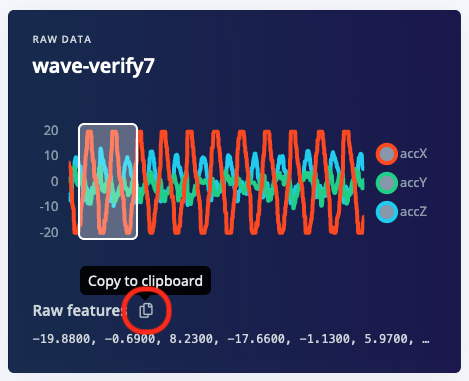
 To verify that the local application classifies the same, we need the raw features for this timestamp. To do so click on the 'Copy to clipboard' button next to 'Raw features'. This will copy the raw values from this validation file, before any signal processing or inferencing happened.
 Open `main.cc` and paste the raw features inside the `static const float features[]` definition, for example:
```cpp theme={"system"}
static const float features[] = {
-19.8800, -0.6900, 8.2300, -17.6600, -1.1300, 5.9700, ...
};
```
Then build and flash the application to your development board:
#### Building the application (Docker)
1. Build the container:
```
$ docker build -t himax-build-gnu -f Dockerfile.gnu .
```
2. Then set up your build environment:
```
$ mkdir -p build-gnu
$ docker run --rm -it -v $PWD:/app himax-build-gnu /bin/bash -c "cd build-gnu && cmake -DCMAKE_TOOLCHAIN_FILE=toolchain.gnu.cmake .."
```
3. And build and link the application:
```
$ docker run --rm -it -v $PWD:/app:delegated himax-build-gnu /bin/bash -c "cd build-gnu && make -j && sh ../make-image.sh GNU"
```
There are instructions in the README.md file on how to build with the Metaware toolkit under Docker.
#### Building the application (Metaware Toolkit)
1. Create a build directory and initialize CMake:
```
$ mkdir build-mw
$ cd build-mw
$ cmake -DCMAKE_TOOLCHAIN_FILE=toolchain.metaware.cmake ..
```
2. Build and link the application:
```
$ make -j
$ sh ../make-image.sh MW
```
#### Building the application (GNU)
1. Create a build directory and initialize CMake:
```
$ mkdir build-gnu
$ cd build-gnu
$ cmake -DCMAKE_TOOLCHAIN_FILE=toolchain.gnu.cmake ..
```
2. Build and link the application:
```
$ make -j
$ sh ../make-image.sh GNU
```
#### Flashing
You'll need the Edge Impulse CLI v1.10 or higher. Then flash the binary with:
```
$ himax-flash-tool --firmware-path image_gen_linux/out.img
```
### Seeing the output
To see the output of the impulse, connect to the development board over a serial port on baud rate 115,200 and reset the board. You can do this with your favourite serial monitor or with the Edge Impulse CLI:
```
$ edge-impulse-run-impulse --raw
```
This will run the signal processing pipeline, and then classify the output:
```
Edge Impulse standalone inferencing (Himax)
Running neural network...
Predictions (time: 0 ms.):
idle: 0.015319
snake: 0.000444
updown: 0.006182
wave: 0.978056
Anomaly score (time: 0 ms.): 0.133557
run_classifier_returned: 0
[0.01532, 0.00044, 0.00618, 0.97806, 0.134]
```
Which matches the values we just saw in the studio. You now have your impulse running on your Himax WE-I Plus development board!
Open `main.cc` and paste the raw features inside the `static const float features[]` definition, for example:
```cpp theme={"system"}
static const float features[] = {
-19.8800, -0.6900, 8.2300, -17.6600, -1.1300, 5.9700, ...
};
```
Then build and flash the application to your development board:
#### Building the application (Docker)
1. Build the container:
```
$ docker build -t himax-build-gnu -f Dockerfile.gnu .
```
2. Then set up your build environment:
```
$ mkdir -p build-gnu
$ docker run --rm -it -v $PWD:/app himax-build-gnu /bin/bash -c "cd build-gnu && cmake -DCMAKE_TOOLCHAIN_FILE=toolchain.gnu.cmake .."
```
3. And build and link the application:
```
$ docker run --rm -it -v $PWD:/app:delegated himax-build-gnu /bin/bash -c "cd build-gnu && make -j && sh ../make-image.sh GNU"
```
There are instructions in the README.md file on how to build with the Metaware toolkit under Docker.
#### Building the application (Metaware Toolkit)
1. Create a build directory and initialize CMake:
```
$ mkdir build-mw
$ cd build-mw
$ cmake -DCMAKE_TOOLCHAIN_FILE=toolchain.metaware.cmake ..
```
2. Build and link the application:
```
$ make -j
$ sh ../make-image.sh MW
```
#### Building the application (GNU)
1. Create a build directory and initialize CMake:
```
$ mkdir build-gnu
$ cd build-gnu
$ cmake -DCMAKE_TOOLCHAIN_FILE=toolchain.gnu.cmake ..
```
2. Build and link the application:
```
$ make -j
$ sh ../make-image.sh GNU
```
#### Flashing
You'll need the Edge Impulse CLI v1.10 or higher. Then flash the binary with:
```
$ himax-flash-tool --firmware-path image_gen_linux/out.img
```
### Seeing the output
To see the output of the impulse, connect to the development board over a serial port on baud rate 115,200 and reset the board. You can do this with your favourite serial monitor or with the Edge Impulse CLI:
```
$ edge-impulse-run-impulse --raw
```
This will run the signal processing pipeline, and then classify the output:
```
Edge Impulse standalone inferencing (Himax)
Running neural network...
Predictions (time: 0 ms.):
idle: 0.015319
snake: 0.000444
updown: 0.006182
wave: 0.978056
Anomaly score (time: 0 ms.): 0.133557
run_classifier_returned: 0
[0.01532, 0.00044, 0.00618, 0.97806, 0.134]
```
Which matches the values we just saw in the studio. You now have your impulse running on your Himax WE-I Plus development board!