> ## Documentation Index
> Fetch the complete documentation index at: https://docs.edgeimpulse.com/llms.txt
> Use this file to discover all available pages before exploring further.
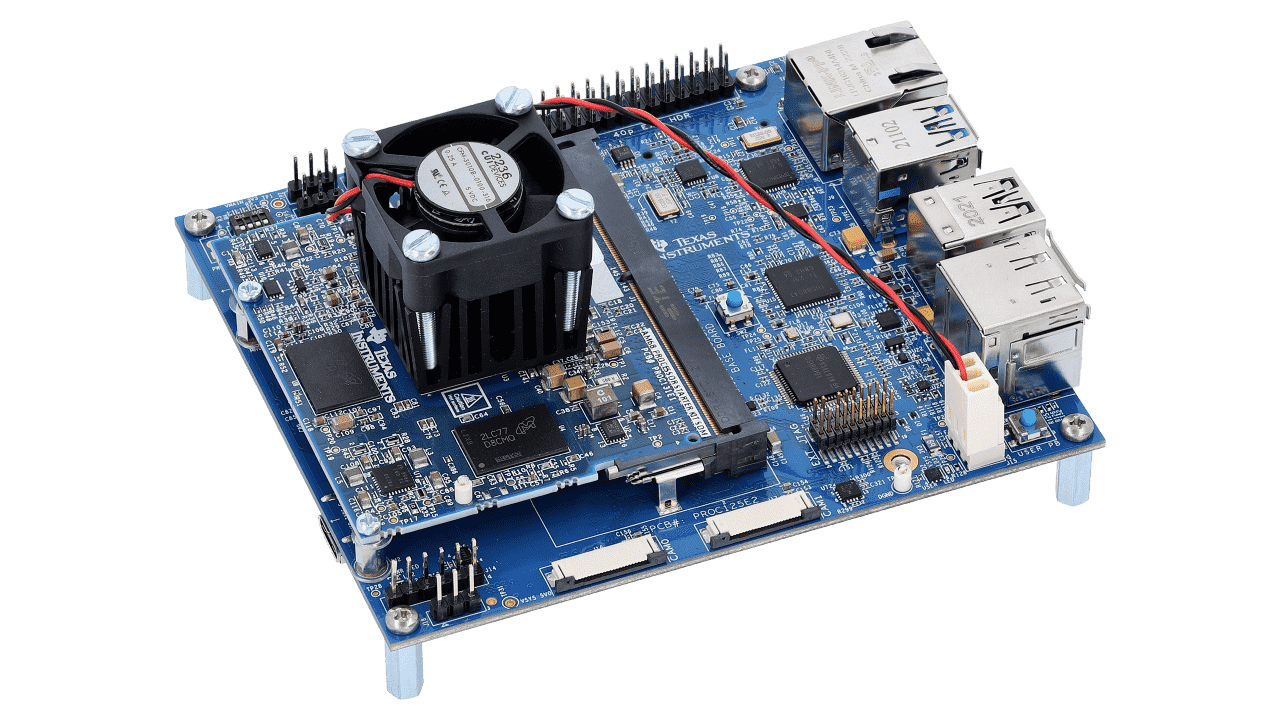
# Texas Instruments SK-AM68A
The [The SK-AM68 Starter Kit/Evaluation Module (EVM)](https://www.ti.com/tool/SK-AM68) is based on the AM68x vision SoC which includes an image signal processor (ISP) supporting up to 480MP/s, an 8 tera-operations-per-second (TOPS) AI accelerator, two 64-bit Arm® Cortex®-A72 CPUs, and support for H.264/H.265 video encode/decode. The SK-AM68x is an ideal choice for machine vision, traffic monitoring, retail automation, and factory automation.
In order to take full advantage of the AM68A's AI hardware acceleration Edge Impulse has integrated [TI Deep Learning Library](https://software-dl.ti.com/jacinto7/esd/processor-sdk-rtos-jacinto7/06_02_00_21/exports/docs/tidl_j7_01_01_00_10/ti_dl/docs/user_guide_html/index.html) and AM68A optimized [Texas Instruments Edge AI Model Zoo](https://github.com/TexasInstruments/edgeai) for low-to-no-code training and deployments from Edge Impulse Studio.
 ### Installing dependencies
First, one needs to follow the [AM68A Quick Start Guide](https://dev.ti.com/tirex/explore/node?node=A__AQniYj7pI2aoPAFMxWtKDQ__AM68Ax-devtools__FUz-xrs__LATEST) to install the Linux distribution to the SD card of the device.
Edge Impulse supports PSDK 8.06.
To set this device up in Edge Impulse, run the following commands on the SK-AM68A:
```
sudo npm install edge-impulse-linux -g --unsafe-perm
```
### Connecting to Edge Impulse
With all software set up, connect your camera or microphone to your operating system (see 'Next steps' further on this page if you want to connect a different sensor), and run:
```
edge-impulse-linux
```
This will start a wizard which will ask you to log in, and choose an Edge Impulse project. If you want to switch projects run the command with `--clean`.
#### Verifying that your device is connected
That's all! Your machine is now connected to Edge Impulse. To verify this, go to [your Edge Impulse project](https://studio.edgeimpulse.com/studio/profile/projects), and click **Devices**. The device will be listed here.
### Installing dependencies
First, one needs to follow the [AM68A Quick Start Guide](https://dev.ti.com/tirex/explore/node?node=A__AQniYj7pI2aoPAFMxWtKDQ__AM68Ax-devtools__FUz-xrs__LATEST) to install the Linux distribution to the SD card of the device.
Edge Impulse supports PSDK 8.06.
To set this device up in Edge Impulse, run the following commands on the SK-AM68A:
```
sudo npm install edge-impulse-linux -g --unsafe-perm
```
### Connecting to Edge Impulse
With all software set up, connect your camera or microphone to your operating system (see 'Next steps' further on this page if you want to connect a different sensor), and run:
```
edge-impulse-linux
```
This will start a wizard which will ask you to log in, and choose an Edge Impulse project. If you want to switch projects run the command with `--clean`.
#### Verifying that your device is connected
That's all! Your machine is now connected to Edge Impulse. To verify this, go to [your Edge Impulse project](https://studio.edgeimpulse.com/studio/profile/projects), and click **Devices**. The device will be listed here.
 ### Next steps: building a machine learning model
With everything set up you can now build your first machine learning model with these tutorials:
* [Keyword spotting](/tutorials/end-to-end/keyword-spotting)
* [Sound recognition](/tutorials/end-to-end/sound-recognition)
* [Image classification](/tutorials/end-to-end/image-classification)
* [object detection](/tutorials/end-to-end/object-detection-bounding-boxes).
* [Object detection with centroids (FOMO)](/tutorials/topics/post-processing/count-objects-fomo)
Looking to connect different sensors? Our [Linux SDK](/tools/libraries/sdks/inference/linux) lets you easily send data from any sensor and any programming language (with examples in Node.js, Python, Go and C++) into Edge Impulse.
### Deploying back to device
To run your impulse locally run on your Linux platform:
```
edge-impulse-linux-runner
```
This will automatically compile your model with full hardware acceleration, download the model to your local machine, and then start classifying. Our [Linux SDK](/tools/libraries/sdks/inference/linux) has examples on how to integrate the model with your favourite programming language.
#### Image model?
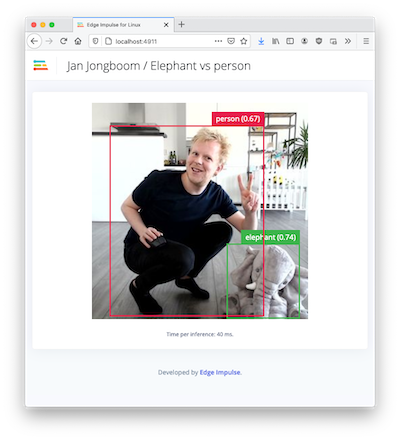
If you have an image model then you can get a peek of what your device sees by being on the same network as your device, and finding the 'Want to see a feed of the camera and live classification in your browser' message in the console. Open the URL in a browser and both the camera feed and the classification are shown:
### Next steps: building a machine learning model
With everything set up you can now build your first machine learning model with these tutorials:
* [Keyword spotting](/tutorials/end-to-end/keyword-spotting)
* [Sound recognition](/tutorials/end-to-end/sound-recognition)
* [Image classification](/tutorials/end-to-end/image-classification)
* [object detection](/tutorials/end-to-end/object-detection-bounding-boxes).
* [Object detection with centroids (FOMO)](/tutorials/topics/post-processing/count-objects-fomo)
Looking to connect different sensors? Our [Linux SDK](/tools/libraries/sdks/inference/linux) lets you easily send data from any sensor and any programming language (with examples in Node.js, Python, Go and C++) into Edge Impulse.
### Deploying back to device
To run your impulse locally run on your Linux platform:
```
edge-impulse-linux-runner
```
This will automatically compile your model with full hardware acceleration, download the model to your local machine, and then start classifying. Our [Linux SDK](/tools/libraries/sdks/inference/linux) has examples on how to integrate the model with your favourite programming language.
#### Image model?
If you have an image model then you can get a peek of what your device sees by being on the same network as your device, and finding the 'Want to see a feed of the camera and live classification in your browser' message in the console. Open the URL in a browser and both the camera feed and the classification are shown:
 ### Example projects
* [Concrete Crackdown: AI is Making Sure Nothing Slips Through the Cracks](https://edgeimpulse.com/blog/concrete-crackdown-ai-is-making-sure-nothing-slips-through-the-cracks)
* [Get Smart or Get Left Behind](https://edgeimpulse.com/blog/get-smart-or-get-left-behind)
* [AI Joins the Loss Prevention Team](https://edgeimpulse.com/blog/ai-joins-the-loss-prevention-team)
* [Smart Factory with TI TDA4VM](https://www.hackster.io/justinelutz/smart-factory-with-ti-tda4vm-672d2e)
* [Edge Impulse Public Projects with tag "TDA4VM"](https://edgeimpulse.com/projects/all?search=tda4vm\&sort=pageViewCount)
### Optimized models for the AM68A
Texas Instruments provides models that are optimized to run on the AM68A. Those that have Edge Impulse support are found in the links below. Each Github repository has instructions on installation to your Edge Impulse project. The original source of these optimized models are found at [Texas Instruments Edge AI Model Zoo](https://github.com/TexasInstruments/edgeai).
### Further resources
* [Getting Started with the TI SK-TDA4VM Development Kit](https://www.hackster.io/gatoninja236/getting-started-with-the-ti-sk-tda4vm-development-kit-711822)
* [SK-TDA4VM: How to create Object Detection Reference Design using Edge Impulse platform on TDA4VM-SK](https://e2e.ti.com/support/processors-group/processors/f/processors-forum/1226588/faq-sk-tda4vm-how-to-create-object-detection-reference-design-using-edge-impulse-platform-on-tda4vm-sk)
* [SK-TDA4VM: How to create Object Classification Reference Design using Edge Impulse platform on TDA4VM-SK](https://e2e.ti.com/support/processors-group/processors/f/processors-forum/1226533/faq-sk-tda4vm-how-to-create-object-classification-reference-design-using-edge-impulse-platform-on-tda4vm-sk)
### Example projects
* [Concrete Crackdown: AI is Making Sure Nothing Slips Through the Cracks](https://edgeimpulse.com/blog/concrete-crackdown-ai-is-making-sure-nothing-slips-through-the-cracks)
* [Get Smart or Get Left Behind](https://edgeimpulse.com/blog/get-smart-or-get-left-behind)
* [AI Joins the Loss Prevention Team](https://edgeimpulse.com/blog/ai-joins-the-loss-prevention-team)
* [Smart Factory with TI TDA4VM](https://www.hackster.io/justinelutz/smart-factory-with-ti-tda4vm-672d2e)
* [Edge Impulse Public Projects with tag "TDA4VM"](https://edgeimpulse.com/projects/all?search=tda4vm\&sort=pageViewCount)
### Optimized models for the AM68A
Texas Instruments provides models that are optimized to run on the AM68A. Those that have Edge Impulse support are found in the links below. Each Github repository has instructions on installation to your Edge Impulse project. The original source of these optimized models are found at [Texas Instruments Edge AI Model Zoo](https://github.com/TexasInstruments/edgeai).
### Further resources
* [Getting Started with the TI SK-TDA4VM Development Kit](https://www.hackster.io/gatoninja236/getting-started-with-the-ti-sk-tda4vm-development-kit-711822)
* [SK-TDA4VM: How to create Object Detection Reference Design using Edge Impulse platform on TDA4VM-SK](https://e2e.ti.com/support/processors-group/processors/f/processors-forum/1226588/faq-sk-tda4vm-how-to-create-object-detection-reference-design-using-edge-impulse-platform-on-tda4vm-sk)
* [SK-TDA4VM: How to create Object Classification Reference Design using Edge Impulse platform on TDA4VM-SK](https://e2e.ti.com/support/processors-group/processors/f/processors-forum/1226533/faq-sk-tda4vm-how-to-create-object-classification-reference-design-using-edge-impulse-platform-on-tda4vm-sk)