> ## Documentation Index
> Fetch the complete documentation index at: https://docs.edgeimpulse.com/llms.txt
> Use this file to discover all available pages before exploring further.
# Particle Boron
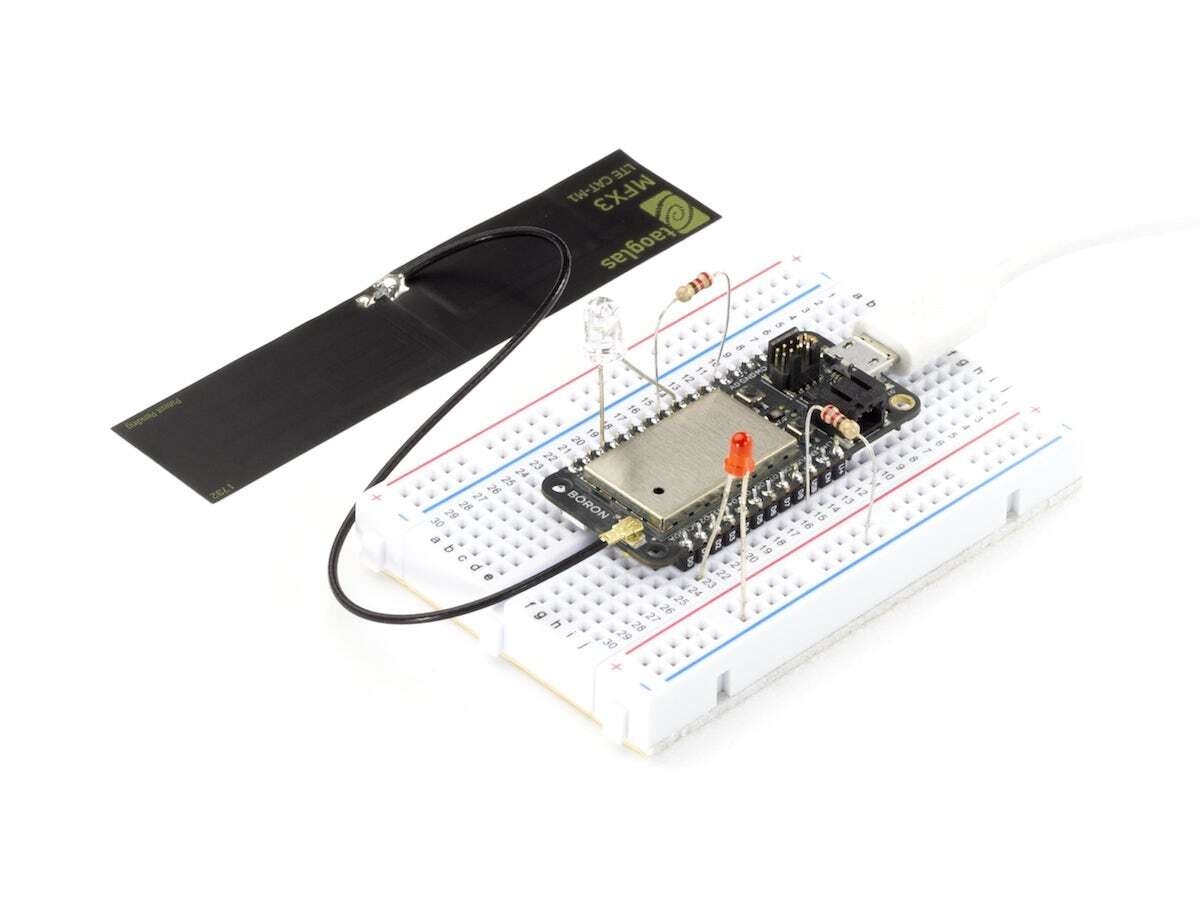
The Boron is a powerful cellular enabled development kit.
Equipped with the Nordic nRF52840 and u-blox SARA U201 (2G/3G) or R410M/R510S LTE Cat M1 module, the Boron has built-in battery charging circuitry which makes it easier to connect a Li-Po battery and 20 mixed signal GPIOs to interface with sensors, actuators, and other electronics.
The Boron is great for connecting existing projects to the Particle Device Cloud or as a gateway to connect an entire group of local endpoints where Wi-Fi is missing or unreliable.
 ### Installing dependencies
To set this device up in Edge Impulse, you will need to install the following software:
1. [Edge Impulse CLI](/tools/clis/edge-impulse-cli/installation)
2. [Particle CLI](https://docs.particle.io/getting-started/developer-tools/cli/)
3. [Particle Workbench](https://docs.particle.io/workbench/) (Optional, only required if deploying to Particle Library)
**Problems installing the CLI?**
See the [Installation and troubleshooting](/tools/clis/edge-impulse-cli/installation) guide.
### Connecting to Edge Impulse
#### Setup the Particle Boron with the accelerometer and PDM microphone
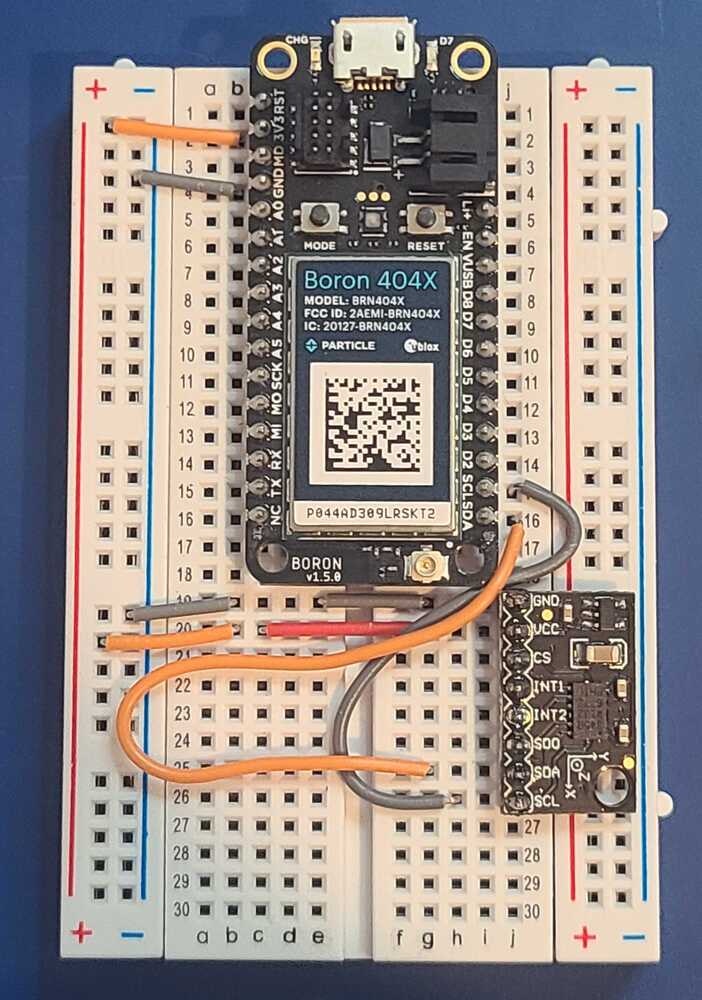
1. Connect the ADXL345 to the Boron as follows:
| ADXL345 | Boron |
| ------- | ----- |
| VCC | 3V3 |
| GND | GND |
| SCL | SCL |
| SDA | SDA |
| CS | VCC |
### Installing dependencies
To set this device up in Edge Impulse, you will need to install the following software:
1. [Edge Impulse CLI](/tools/clis/edge-impulse-cli/installation)
2. [Particle CLI](https://docs.particle.io/getting-started/developer-tools/cli/)
3. [Particle Workbench](https://docs.particle.io/workbench/) (Optional, only required if deploying to Particle Library)
**Problems installing the CLI?**
See the [Installation and troubleshooting](/tools/clis/edge-impulse-cli/installation) guide.
### Connecting to Edge Impulse
#### Setup the Particle Boron with the accelerometer and PDM microphone
1. Connect the ADXL345 to the Boron as follows:
| ADXL345 | Boron |
| ------- | ----- |
| VCC | 3V3 |
| GND | GND |
| SCL | SCL |
| SDA | SDA |
| CS | VCC |
 ### Next steps: building a machine learning model
Build your first machine learning model with this tutorial:
* [Particle Motion Detection](/tutorials/hardware/particle-photon2-motion-recognition)
### Deploying back to device
#### Particle library deployment
If you choose to deploy your project to a Particle Library and not a binary follow these steps to flash the your firmware from Particle Workbench:
1. Open a new VS Code window, ensure that Particle Workbench has been installed (see above)
2. Use [VS Code Command Palette](https://code.visualstudio.com/docs/getstarted/userinterface#_command-palette) and type in **Particle: Import Project**
1. Select the `project.properties` file in the directory that you just downloaded and extracted from the section above.
3. Use [VS Code Command Palette](https://code.visualstudio.com/docs/getstarted/userinterface#_command-palette) and type in **Particle: Configure Project for Device**
1. Select **`deviceOS@5.5.0`**
2. Choose a target. (e.g. **P2** , this option is also used for the Boron).
4. It is sometimes needed to manually put your Device into DFU Mode. You may proceed to the next step, but if you get an error indicating that "No DFU capable USB device available" then please follow these step.
1. Hold down both the **RESET** and **MODE** buttons.
2. Release only the **RESET** button, while holding the **MODE** button.
3. Wait for the LED to start flashing yellow.
4. Release the **MODE** button.
5. Compile and Flash in one command with: **Particle: Flash application & DeviceOS (local)**
**Local Compile Only!** You cannot use the **Particle: Cloud Compile** or **Particle: Cloud Flash** options; local compilation is required.
The following video demonstrates how to collect raw data from an accelerometer and develop an application around the Edge Impulse inferencing library with the Boron.
#### Particle Boron binary
Flashing your Particle device requires the Particle command line tool. Follow these [instructions](https://docs.particle.io/getting-started/developer-tools/cli/) to install the tools.
Navigate to the directory where your Boron firmware downloaded and decompress the zip file. Open a terminal and use the following command to flash your device:
```
particle flash --local firmware-particle.bin
```
### Next steps: building a machine learning model
Build your first machine learning model with this tutorial:
* [Particle Motion Detection](/tutorials/hardware/particle-photon2-motion-recognition)
### Deploying back to device
#### Particle library deployment
If you choose to deploy your project to a Particle Library and not a binary follow these steps to flash the your firmware from Particle Workbench:
1. Open a new VS Code window, ensure that Particle Workbench has been installed (see above)
2. Use [VS Code Command Palette](https://code.visualstudio.com/docs/getstarted/userinterface#_command-palette) and type in **Particle: Import Project**
1. Select the `project.properties` file in the directory that you just downloaded and extracted from the section above.
3. Use [VS Code Command Palette](https://code.visualstudio.com/docs/getstarted/userinterface#_command-palette) and type in **Particle: Configure Project for Device**
1. Select **`deviceOS@5.5.0`**
2. Choose a target. (e.g. **P2** , this option is also used for the Boron).
4. It is sometimes needed to manually put your Device into DFU Mode. You may proceed to the next step, but if you get an error indicating that "No DFU capable USB device available" then please follow these step.
1. Hold down both the **RESET** and **MODE** buttons.
2. Release only the **RESET** button, while holding the **MODE** button.
3. Wait for the LED to start flashing yellow.
4. Release the **MODE** button.
5. Compile and Flash in one command with: **Particle: Flash application & DeviceOS (local)**
**Local Compile Only!** You cannot use the **Particle: Cloud Compile** or **Particle: Cloud Flash** options; local compilation is required.
The following video demonstrates how to collect raw data from an accelerometer and develop an application around the Edge Impulse inferencing library with the Boron.
#### Particle Boron binary
Flashing your Particle device requires the Particle command line tool. Follow these [instructions](https://docs.particle.io/getting-started/developer-tools/cli/) to install the tools.
Navigate to the directory where your Boron firmware downloaded and decompress the zip file. Open a terminal and use the following command to flash your device:
```
particle flash --local firmware-particle.bin
```