> ## Documentation Index
> Fetch the complete documentation index at: https://docs.edgeimpulse.com/llms.txt
> Use this file to discover all available pages before exploring further.
# Digi ConnectCore 93 Development Kit
The Digi ConnectCore® 93 Development Kit (DVK) and System-on-Module (SOM) platform is a highly integrated, cost-effective, connected, secure embedded solution, built on the i.MX 93 MPU family. It integrates memory, power management, pre-certified wireless connectivity, and advanced Digi TrustFence device security with a complete, open-source Linux software platform based on the Yocto Project.
The i.MX 93 applications processors are the first in the i.MX portfolio to integrate the scalable Arm Cortex-A55 core, bringing performance and energy efficiency to Linux®-based edge applications and the Arm Ethos™-U65 microNPU, enabling developers to create more capable, cost-effective and energy-efficient ML applications.
Optimizing performance and power efficiency for Industrial, IoT and automotive devices, i.MX 93 processors are built with NXPs innovative Energy Flex architecture. The SoCs offer a rich set of peripherals targeting automotive, industrial and consumer IoT market segments.
Part of the EdgeVerse™ portfolio of intelligent edge solutions, the i.MX 93 family will be offered in commercial, industrial, extended industrial and automotive level qualification and backed by NXPs product longevity program.
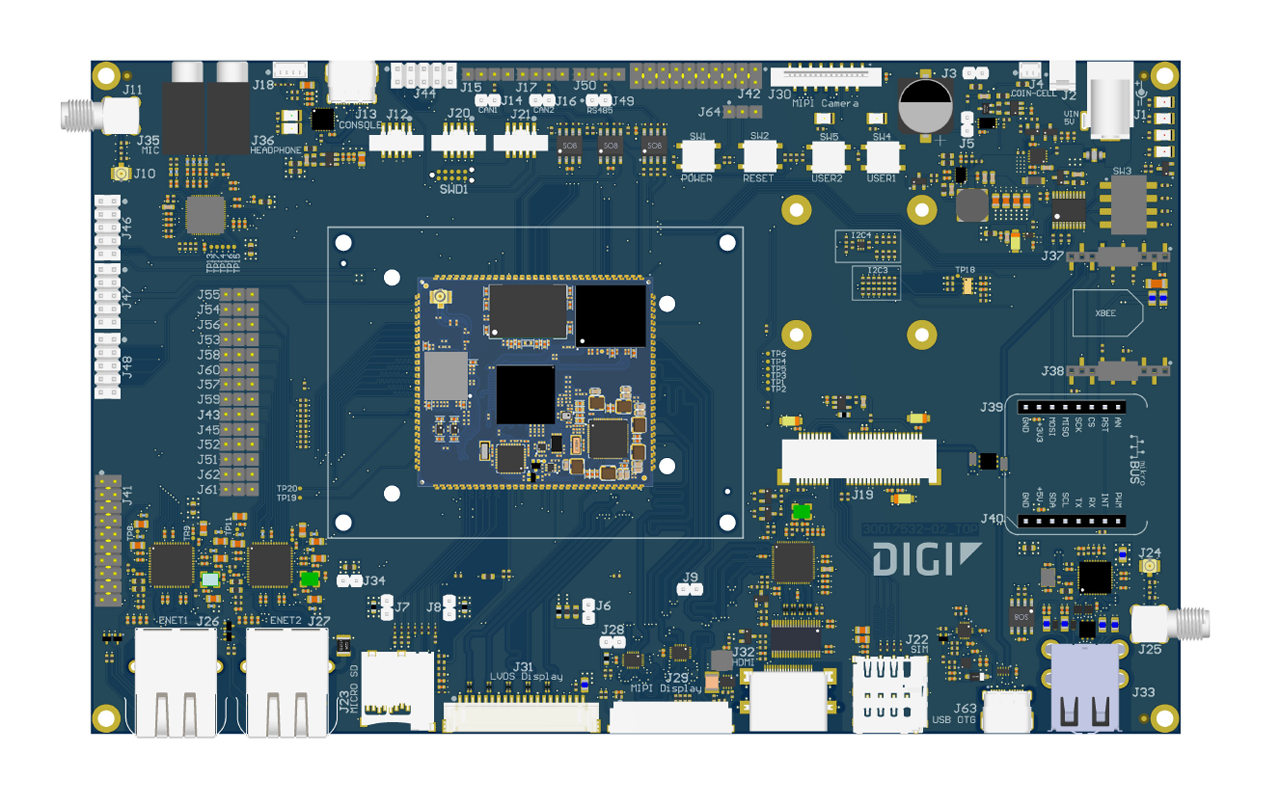 **Key Features:**
* i.MX 93 applications processor
* 1-2x Arm® Cortex®-A55 @ 1.7 GHz
* Arm Cortex-M33 @ 250Mhz
* Arm® Ethos™ U-65 microNPU
* EdgeLock® secure enclave
* Up to 1 GB, 16-bit LPDDR4 memory
* Up to 8 GB, 8-bit eMMC memory
* IEEE 802.11 a/b/g/n/ac/ax WLAN and Bluetooth 5.3
**Accessories included in the Development Kit:**
* ConnectCore 93 Development Kit PCBA
* 5V/3A power supply with EU, UK, AUST adapters
* USB type-C cable
* Whip antenna, Wi-Fi 2.4/5GHz
In addition to the DVK we recommend that you also add a camera. Most popular USB webcams work fine on the development board out of the box.
A few steps need to be performed to get your board ready for use.
### Prerequisites
You will also need the following equipment to complete your first boot:
* Ethernet cable
#### Operating System Installation
Digi provides a ready-made operating system based on Yocto Linux, which can be downloaded from [their Getting Started guide here](https://www.digi.com/resources/documentation/digidocs/embedded/dey/4.0/cc93/yocto-gs_index.html).
[Step 3 includes instructions](https://www.digi.com/resources/documentation/digidocs/embedded/dey/4.0/cc93/yocto-gs-program-fw_t.html) for flashing the device, use the UUU method as the SD card path is untested with Edge Impulse.
If you encounter problems obtaining the images, [this link](https://ftp1.digi.com/support/digiembeddedyocto/4.0/r5/images/ccimx93-dvk/) has been tested and works as of July 2024.
**In step 5 of the UUU instructions:**
*Connect a USB type-C cable to your development PC and the other end to the target USB type-C connector.*
Is referring to J63 type-C connector near the type-A USB ports.
### Installing dependencies
Once booted up, connect a terminal to the device over USB or preferably SSH, and run the following commands:
```
wget https://nodejs.org/dist/v20.15.1/node-v20.15.1-linux-arm64.tar.xz
tar xf node-v20.15.1-linux-arm64.tar.xz
cd node-v20.15.1-linux-arm64
cp -r bin /usr/
cp -r include/ /usr/
cp -r lib/ /usr/
cp -r share/ /usr/
npm install -g edge-impulse-linux
edge-impulse-linux --version
```
### Connecting to Edge Impulse
You may need to reboot the board once the dependencies have finished installing. Once rebooted, run:
```
edge-impulse-linux
```
This will start a wizard which will ask you to log in, and choose an Edge Impulse project. If you want to switch projects run the command with `--clean`.
#### Verifying that your device is connected
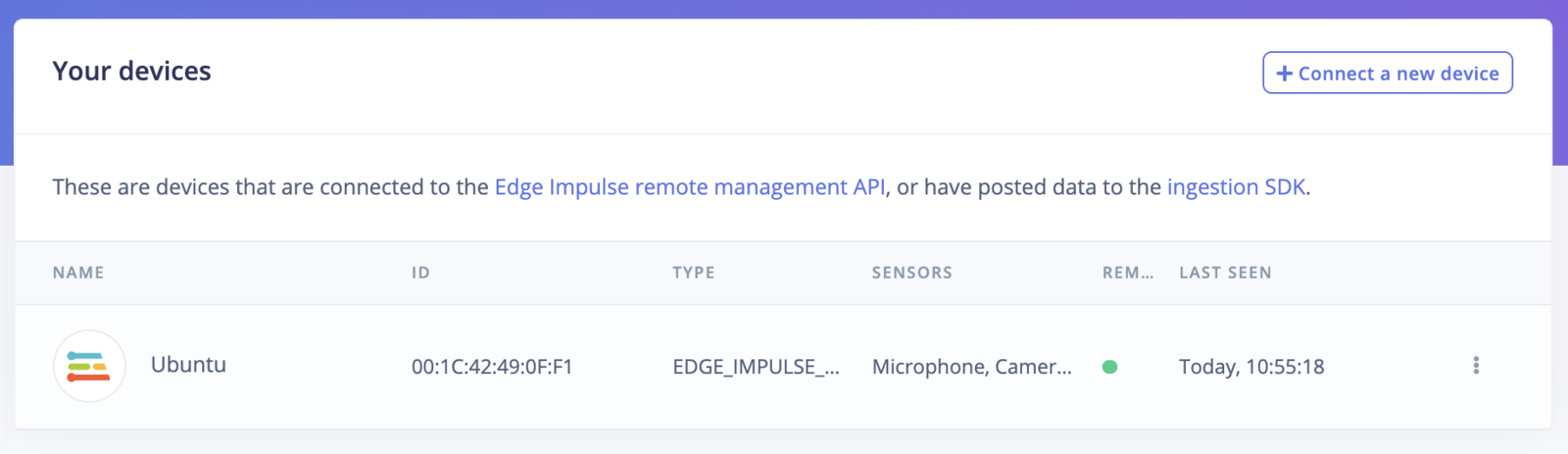
That's all! Your Digi i.MX 93 DVK is now connected to Edge Impulse. To verify this, go to [your Edge Impulse project](https://studio.edgeimpulse.com/studio/profile/projects), and click **Devices**. The device will be listed here.
**Key Features:**
* i.MX 93 applications processor
* 1-2x Arm® Cortex®-A55 @ 1.7 GHz
* Arm Cortex-M33 @ 250Mhz
* Arm® Ethos™ U-65 microNPU
* EdgeLock® secure enclave
* Up to 1 GB, 16-bit LPDDR4 memory
* Up to 8 GB, 8-bit eMMC memory
* IEEE 802.11 a/b/g/n/ac/ax WLAN and Bluetooth 5.3
**Accessories included in the Development Kit:**
* ConnectCore 93 Development Kit PCBA
* 5V/3A power supply with EU, UK, AUST adapters
* USB type-C cable
* Whip antenna, Wi-Fi 2.4/5GHz
In addition to the DVK we recommend that you also add a camera. Most popular USB webcams work fine on the development board out of the box.
A few steps need to be performed to get your board ready for use.
### Prerequisites
You will also need the following equipment to complete your first boot:
* Ethernet cable
#### Operating System Installation
Digi provides a ready-made operating system based on Yocto Linux, which can be downloaded from [their Getting Started guide here](https://www.digi.com/resources/documentation/digidocs/embedded/dey/4.0/cc93/yocto-gs_index.html).
[Step 3 includes instructions](https://www.digi.com/resources/documentation/digidocs/embedded/dey/4.0/cc93/yocto-gs-program-fw_t.html) for flashing the device, use the UUU method as the SD card path is untested with Edge Impulse.
If you encounter problems obtaining the images, [this link](https://ftp1.digi.com/support/digiembeddedyocto/4.0/r5/images/ccimx93-dvk/) has been tested and works as of July 2024.
**In step 5 of the UUU instructions:**
*Connect a USB type-C cable to your development PC and the other end to the target USB type-C connector.*
Is referring to J63 type-C connector near the type-A USB ports.
### Installing dependencies
Once booted up, connect a terminal to the device over USB or preferably SSH, and run the following commands:
```
wget https://nodejs.org/dist/v20.15.1/node-v20.15.1-linux-arm64.tar.xz
tar xf node-v20.15.1-linux-arm64.tar.xz
cd node-v20.15.1-linux-arm64
cp -r bin /usr/
cp -r include/ /usr/
cp -r lib/ /usr/
cp -r share/ /usr/
npm install -g edge-impulse-linux
edge-impulse-linux --version
```
### Connecting to Edge Impulse
You may need to reboot the board once the dependencies have finished installing. Once rebooted, run:
```
edge-impulse-linux
```
This will start a wizard which will ask you to log in, and choose an Edge Impulse project. If you want to switch projects run the command with `--clean`.
#### Verifying that your device is connected
That's all! Your Digi i.MX 93 DVK is now connected to Edge Impulse. To verify this, go to [your Edge Impulse project](https://studio.edgeimpulse.com/studio/profile/projects), and click **Devices**. The device will be listed here.
 ### Next steps: building a machine learning model
With everything set up you can now build your first machine learning model with this tutorial:
* [Object detection with centroids (FOMO)](/tutorials/end-to-end/object-detection-centroids)
### Deploying back to device
To run your impulse locally on the i.MX 93 DVK, open up a terminal and run:
```
edge-impulse-linux-runner
```
This will automatically compile your model, download the model to your i.MX 93 DVK, and then start classifying. Our [Linux SDK](/tools/libraries/sdks/inference/linux) has examples on how to integrate the model with your favourite programming language.
#### Image model?
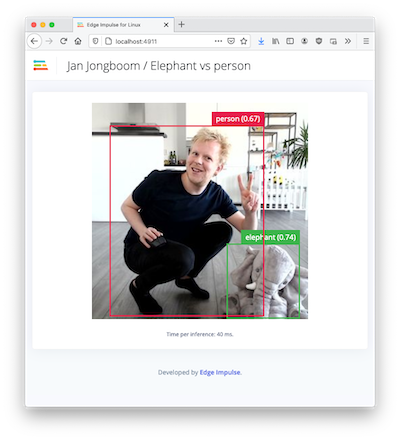
If you have an image model then you can get a peek of what your i.MX 93 DVK sees by being on the same network as your device, and finding the 'Want to see a feed of the camera and live classification in your browser' message in the console. Open the URL in a browser and both the camera feed and the classification are shown:
### Next steps: building a machine learning model
With everything set up you can now build your first machine learning model with this tutorial:
* [Object detection with centroids (FOMO)](/tutorials/end-to-end/object-detection-centroids)
### Deploying back to device
To run your impulse locally on the i.MX 93 DVK, open up a terminal and run:
```
edge-impulse-linux-runner
```
This will automatically compile your model, download the model to your i.MX 93 DVK, and then start classifying. Our [Linux SDK](/tools/libraries/sdks/inference/linux) has examples on how to integrate the model with your favourite programming language.
#### Image model?
If you have an image model then you can get a peek of what your i.MX 93 DVK sees by being on the same network as your device, and finding the 'Want to see a feed of the camera and live classification in your browser' message in the console. Open the URL in a browser and both the camera feed and the classification are shown: