> ## Documentation Index
> Fetch the complete documentation index at: https://docs.edgeimpulse.com/llms.txt
> Use this file to discover all available pages before exploring further.
# DHT11
> A labeled image dataset of DHT11 sensors for training visual anomaly detection models to identify damaged or mis-wired components.
export const CardOpenStudioDataset = ({href}) =>
Clone this ready-to-use dataset into your Edge Impulse account and start experimenting immediately.
;
**Task:** Visual Anomaly Detection
**License:** [BSD 3-Clause Clear](https://spdx.org/licenses/BSD-3-Clause-Clear.html)
 ## Description
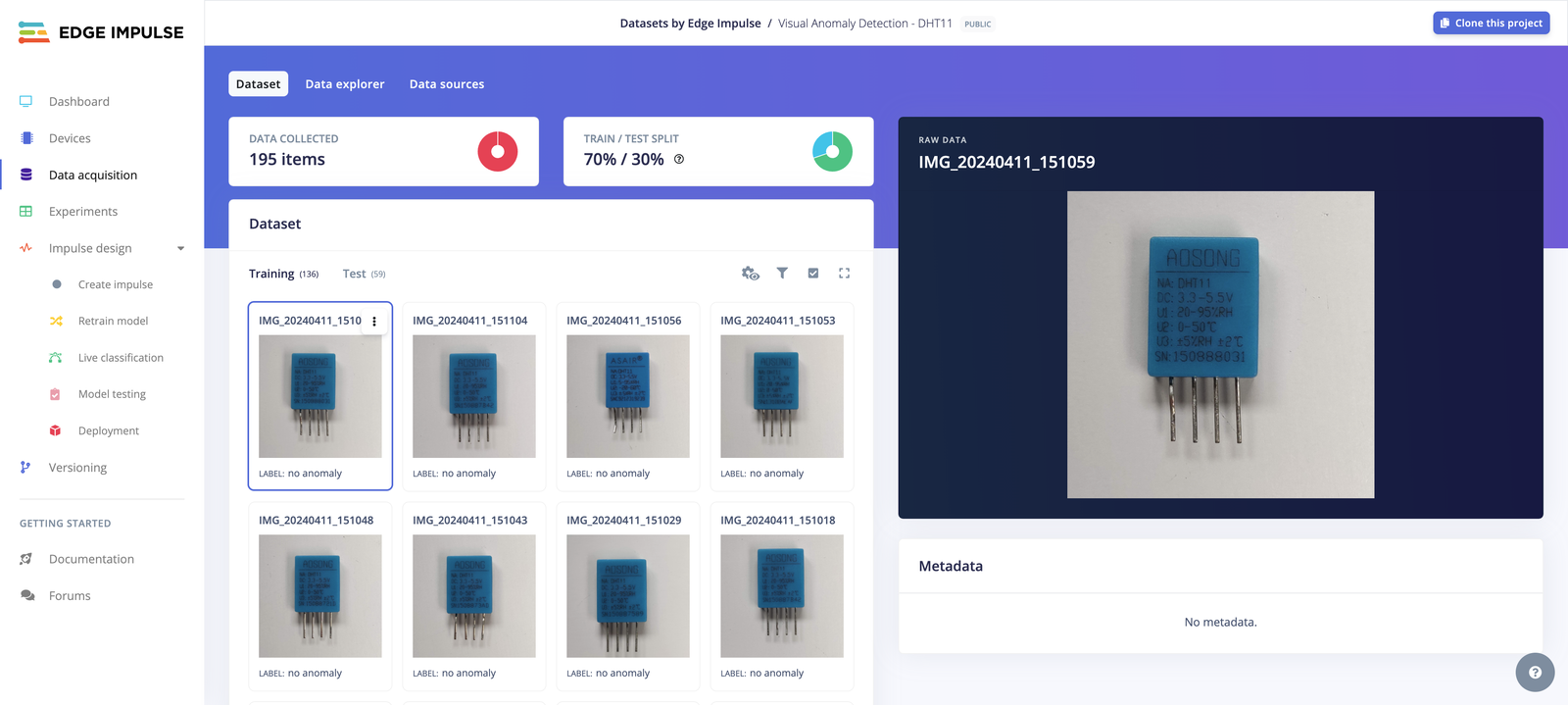
This dataset has been collected by Edge Impulse teams and contains a single DHT11 sensor, centered in the frame, with a similar size and a uniform background.
The training dataset only contains "nominal" (no anomaly) images whereas the testing dataset contains both nominal and anomalous images.
The DHT11 have been used to teach IoT classes in the past and have been manipulated by students extensively. When not wiring the pins properly, it can cause an overheat which often lead to the plastic melting. Some other anomalous images are missing wiring pins.
### Compatible Blocks
* **Feature extraction**: [Image](/studio/projects/processing-blocks/blocks/image)
* **Learning block**: [Visual Anomaly Detection (FOMO-AD)](/studio/projects/learning-blocks/blocks/visual-anomaly-detection-fomo-ad)
*Not sure what to choose? Try out this dataset with the [EON Tuner](/studio/projects/eon-tuner).*
### Dataset Details
* **Total Data Items:** 195
* **Labeling Method:** single label
* **Train/Test Split:** 69.74% / 30.26%
| | **Training Set** | **Testing Set** |
| -------------------- | ---------------- | ------------------- |
| **Total Data Items** | 136 | 59 |
| **Labels** | no anomaly | anomaly, no anomaly |
## Usage
The dataset can be added to a project in two ways: cloning the dataset public project or downloading the dataset and importing it into another project.
* **Clone the [public project](https://studio.edgeimpulse.com/public/497422/latest)**
To clone and use this project, visit the [Edge Impulse Studio link](https://studio.edgeimpulse.com/public/497422/latest), click on the **Clone** button on the top-right corner and follow the cloning instructions.
* **Download and import**
* [Download link](https://cdn.edgeimpulse.com/datasets/Visual+Anomaly+Detection+-+DHT11.zip)
This dataset uses the Edge Impulse Exporter Format (`info.labels`). See [Edge Impulse labels](/tools/specifications/data-annotation/ei-labels) for more info.
Edge Impulse also supports different [data acquisition formats](/tools/specifications/data-acquisition/json-cbor) and [dataset annotation formats](/tools/specifications/data-annotation/ei-labels) that you can import into your project to build your edge AI models:
* [Studio uploader](/studio/projects/data-acquisition/dataset/uploader)
* [CLI uploader](/tools/clis/edge-impulse-cli/uploader)
* [CSV Wizard](/studio/projects/data-acquisition/csv-wizard)
* [Python SDK](/tutorials/tools/sdks/studio/python/upload-download-data)
* [Ingestion API](/apis/ingestion)
* [Import from S3 buckets](/studio/projects/data-acquisition/data-sources)
* [Upload portals](/studio/organizations/upload-portals)
## Citation
If you use this dataset in your research paper, please cite it using the following BibTeX:
```
@misc{edgeimpulse_dataset_497422,
title = {Visual Anomaly Detection - DHT11},
author = {Edge Impulse},
year = {2024},
url = {https://studio.edgeimpulse.com/public/497422/latest},
note = {BSD 3-Clause Clear}
}
```
## Description
This dataset has been collected by Edge Impulse teams and contains a single DHT11 sensor, centered in the frame, with a similar size and a uniform background.
The training dataset only contains "nominal" (no anomaly) images whereas the testing dataset contains both nominal and anomalous images.
The DHT11 have been used to teach IoT classes in the past and have been manipulated by students extensively. When not wiring the pins properly, it can cause an overheat which often lead to the plastic melting. Some other anomalous images are missing wiring pins.
### Compatible Blocks
* **Feature extraction**: [Image](/studio/projects/processing-blocks/blocks/image)
* **Learning block**: [Visual Anomaly Detection (FOMO-AD)](/studio/projects/learning-blocks/blocks/visual-anomaly-detection-fomo-ad)
*Not sure what to choose? Try out this dataset with the [EON Tuner](/studio/projects/eon-tuner).*
### Dataset Details
* **Total Data Items:** 195
* **Labeling Method:** single label
* **Train/Test Split:** 69.74% / 30.26%
| | **Training Set** | **Testing Set** |
| -------------------- | ---------------- | ------------------- |
| **Total Data Items** | 136 | 59 |
| **Labels** | no anomaly | anomaly, no anomaly |
## Usage
The dataset can be added to a project in two ways: cloning the dataset public project or downloading the dataset and importing it into another project.
* **Clone the [public project](https://studio.edgeimpulse.com/public/497422/latest)**
To clone and use this project, visit the [Edge Impulse Studio link](https://studio.edgeimpulse.com/public/497422/latest), click on the **Clone** button on the top-right corner and follow the cloning instructions.
* **Download and import**
* [Download link](https://cdn.edgeimpulse.com/datasets/Visual+Anomaly+Detection+-+DHT11.zip)
This dataset uses the Edge Impulse Exporter Format (`info.labels`). See [Edge Impulse labels](/tools/specifications/data-annotation/ei-labels) for more info.
Edge Impulse also supports different [data acquisition formats](/tools/specifications/data-acquisition/json-cbor) and [dataset annotation formats](/tools/specifications/data-annotation/ei-labels) that you can import into your project to build your edge AI models:
* [Studio uploader](/studio/projects/data-acquisition/dataset/uploader)
* [CLI uploader](/tools/clis/edge-impulse-cli/uploader)
* [CSV Wizard](/studio/projects/data-acquisition/csv-wizard)
* [Python SDK](/tutorials/tools/sdks/studio/python/upload-download-data)
* [Ingestion API](/apis/ingestion)
* [Import from S3 buckets](/studio/projects/data-acquisition/data-sources)
* [Upload portals](/studio/organizations/upload-portals)
## Citation
If you use this dataset in your research paper, please cite it using the following BibTeX:
```
@misc{edgeimpulse_dataset_497422,
title = {Visual Anomaly Detection - DHT11},
author = {Edge Impulse},
year = {2024},
url = {https://studio.edgeimpulse.com/public/497422/latest},
note = {BSD 3-Clause Clear}
}
```