> ## Documentation Index
> Fetch the complete documentation index at: https://docs.edgeimpulse.com/llms.txt
> Use this file to discover all available pages before exploring further.
# Cans on conveyor belt
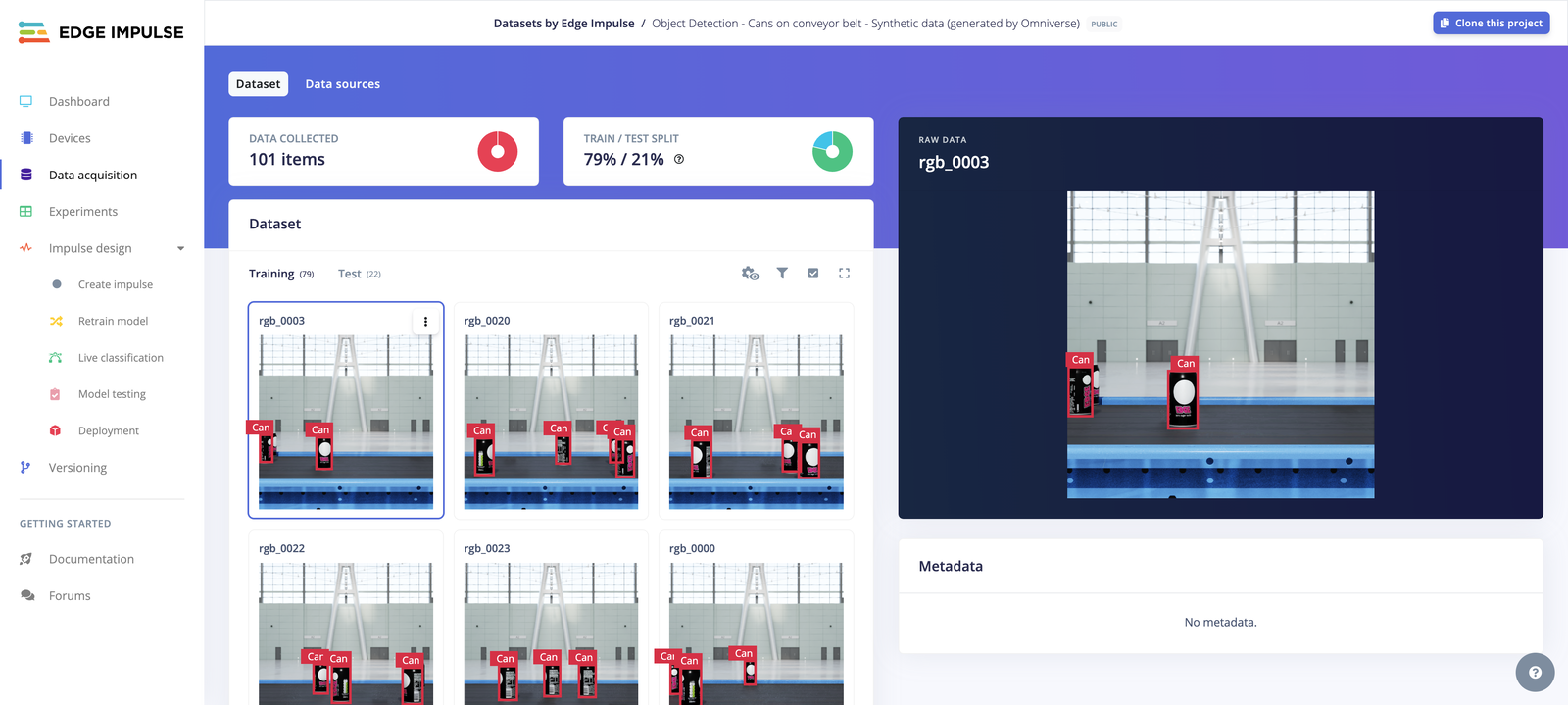
> A synthetically generated image dataset of cans on a conveyor belt for training object detection models using NVIDIA Omniverse.
export const CardOpenStudioDataset = ({href}) =>
Clone this ready-to-use dataset into your Edge Impulse account and start experimenting immediately.
;
**Task:** Object Detection
**License:** [BSD 3-Clause Clear](https://spdx.org/licenses/BSD-3-Clause-Clear.html)
 ## Description
This dataset has been synthetically generated by Edge Impulse teams using [NVIDIA Omniverse](/tutorials/integrations/nvidia-omniverse) and [Edge Impulse Omniverse Extension](https://github.com/edgeimpulse/edge-impulse-omniverse-ext).
You can also have a look at [this tutorial](/projects/expert-network/nvidia-omniverse-replicator) created by Edge Impulse expert George Igwegbe to create a synthetic dataset using NVIDIA Omniverse Replicator.
### Compatible Blocks
* **Feature extraction**: [Image](/studio/projects/processing-blocks/blocks/image)
* **Learning block**: [Object Detection](/studio/projects/learning-blocks/blocks/object-detection)
*Not sure what to choose? Try out this dataset with the [EON Tuner](/studio/projects/eon-tuner).*
### Dataset Details
* **Total Data Items:** 101
* **Labeling Method:** object detection
* **Train/Test Split:** 78.22% / 21.78%
| | **Training Set** | **Testing Set** |
| -------------------- | ---------------- | --------------- |
| **Total Data Items** | 79 | 22 |
| **Labels** | Can | Can |
## Usage
The dataset can be added to a project in two ways: cloning the dataset public project or downloading the dataset and importing it into another project.
* **Clone the [public project](https://studio.edgeimpulse.com/public/497676/latest)**
To clone and use this project, visit the [Edge Impulse Studio link](https://studio.edgeimpulse.com/public/497676/latest), click on the **Clone** button on the top-right corner and follow the cloning instructions.
* **Download and import**
* [Download link](https://cdn.edgeimpulse.com/datasets/Object+Detection+-+Cans+on+conveyor+belt.zip)
This dataset uses the Edge Impulse Exporter Format (`info.labels`). See [Edge Impulse labels](/tools/specifications/data-annotation/ei-labels) for more info.
Edge Impulse also supports different [data acquisition formats](/tools/specifications/data-acquisition/json-cbor) and [dataset annotation formats](/tools/specifications/data-annotation/ei-labels) that you can import into your project to build your edge AI models:
* [Studio uploader](/studio/projects/data-acquisition/dataset/uploader)
* [CLI uploader](/tools/clis/edge-impulse-cli/uploader)
* [CSV Wizard](/studio/projects/data-acquisition/csv-wizard)
* [Python SDK](/tutorials/tools/sdks/studio/python/upload-download-data)
* [Ingestion API](/apis/ingestion)
* [Import from S3 buckets](/studio/projects/data-acquisition/data-sources)
* [Upload portals](/studio/organizations/upload-portals)
## Citation
If you use this dataset in your research paper, please cite it using the following BibTeX:
```
@misc{edgeimpulse_dataset_497676,
title = {Object Detection - Cans on conveyor belt},
author = {Edge Impulse},
year = {2024},
url = {https://studio.edgeimpulse.com/public/497676/latest},
note = {BSD 3-Clause Clear}
}
```
## Description
This dataset has been synthetically generated by Edge Impulse teams using [NVIDIA Omniverse](/tutorials/integrations/nvidia-omniverse) and [Edge Impulse Omniverse Extension](https://github.com/edgeimpulse/edge-impulse-omniverse-ext).
You can also have a look at [this tutorial](/projects/expert-network/nvidia-omniverse-replicator) created by Edge Impulse expert George Igwegbe to create a synthetic dataset using NVIDIA Omniverse Replicator.
### Compatible Blocks
* **Feature extraction**: [Image](/studio/projects/processing-blocks/blocks/image)
* **Learning block**: [Object Detection](/studio/projects/learning-blocks/blocks/object-detection)
*Not sure what to choose? Try out this dataset with the [EON Tuner](/studio/projects/eon-tuner).*
### Dataset Details
* **Total Data Items:** 101
* **Labeling Method:** object detection
* **Train/Test Split:** 78.22% / 21.78%
| | **Training Set** | **Testing Set** |
| -------------------- | ---------------- | --------------- |
| **Total Data Items** | 79 | 22 |
| **Labels** | Can | Can |
## Usage
The dataset can be added to a project in two ways: cloning the dataset public project or downloading the dataset and importing it into another project.
* **Clone the [public project](https://studio.edgeimpulse.com/public/497676/latest)**
To clone and use this project, visit the [Edge Impulse Studio link](https://studio.edgeimpulse.com/public/497676/latest), click on the **Clone** button on the top-right corner and follow the cloning instructions.
* **Download and import**
* [Download link](https://cdn.edgeimpulse.com/datasets/Object+Detection+-+Cans+on+conveyor+belt.zip)
This dataset uses the Edge Impulse Exporter Format (`info.labels`). See [Edge Impulse labels](/tools/specifications/data-annotation/ei-labels) for more info.
Edge Impulse also supports different [data acquisition formats](/tools/specifications/data-acquisition/json-cbor) and [dataset annotation formats](/tools/specifications/data-annotation/ei-labels) that you can import into your project to build your edge AI models:
* [Studio uploader](/studio/projects/data-acquisition/dataset/uploader)
* [CLI uploader](/tools/clis/edge-impulse-cli/uploader)
* [CSV Wizard](/studio/projects/data-acquisition/csv-wizard)
* [Python SDK](/tutorials/tools/sdks/studio/python/upload-download-data)
* [Ingestion API](/apis/ingestion)
* [Import from S3 buckets](/studio/projects/data-acquisition/data-sources)
* [Upload portals](/studio/organizations/upload-portals)
## Citation
If you use this dataset in your research paper, please cite it using the following BibTeX:
```
@misc{edgeimpulse_dataset_497676,
title = {Object Detection - Cans on conveyor belt},
author = {Edge Impulse},
year = {2024},
url = {https://studio.edgeimpulse.com/public/497676/latest},
note = {BSD 3-Clause Clear}
}
```